jQuery Image Slider Plugin (Sliders)

This is a jQuery plugin that creates a scrollable image list out of an HTML unordered list of images. By default, each item will open a link, but it can be easily integrated with third party plugins (e.g. lightbox or similar plugins). It supports caption text for each item, on one or multiple lines. It can be easily resized and visually customized using the style sheets. PSD with slices included for customizing the scrollbar graphics.

Features

  • powered by jQuery
  • resizable, colors can be edited inside css
  • PSD with slices included for editing scrollbar graphics

Download jQuery Image Slider Plugin (Sliders)

Map Input (Forms)

Map Input is a plugin used for adding a map input into html forms. It’s useful for situations when you need to get geographical position from the user by alllowing selection of a position on the map (google maps). The map input field has 3 hidden inputs used for latitude, longitude, and map zoom level. Following is a sample call to the plugin (including all the options with their default values):

$(function(){
    $('.mapinput').mapinput({
        width:'600px', // map width
        height:'450px', // map height
        latInput:"map_lat", // latitude input name
        lngInput:"map_lng", // longitude input name
        zoomInput:"map_zoom", // zoom level input name
        initPos:[0,0], // initial position as [latitude,longitude]
        initZoom:1, // initial zoom level
        navigationControl:true, // navigation control showing option
        scaleControl:true, // scale control showing option
        pointerTitle:"Drag or click new position" // text used for position pointer (when mouse is over)
    });
});


Download Map Input (Forms)

Newsletter Signup – iOS XCode Project (iPhone)

Newsletter Signup is an XCode project which illustrates the versatility of utilizing NSMutableURLRequest object to perform GET /POST transactions against a URL in order to allow for the user to signup for your newsletter directly within your application. Utilizing this function we are then able to integrate web forms previous used only in a web context through an internet browser, into applications on our mobile devices without having the user leave the application to be redirected to a URL .

This particular application has been designed to be as compatible as possible with any of the major email marketing providers such as MailChimp or AWeber Communications. The specific example setup within the applications project files covers using the MailChimp system, AWeber Communications system, and your own custom self-hosted PHP script option. It currently contains active information for The Neezio Group’s own marketing list setup specifically for the testing of this application. This means that right out of the gate, this application is ready to be built and executed and will run as expected. However, while also having this live example provides a template for you to implement your own specific provider’s information into the code, the duration for which we keep these accounts live is subject to change as some of them are free while others are at a premium. The code has been expanded to detail the steps needed for custom setups utilizing a self-hosted intermediary script to handle the information being processed by the application, and is included in the “register.php” file.

The layout and arrangement of the source code in the PHP file, .h and .m files, as well as the .xib file makes it very easy to integrate the view based project directly into your own project, or even migrating the code and components over to your existing project. You even have a base layer of graphics available for modification, inspiration, or at least reference when specifying the various icons required for cross-device compatibility. The .plist file has been updated to include the icon array used to specify the available icons which the Apple devices will then choose from based on which icon is needed by the device be it the iPhone/iTouch, including Retina display, or the iPad.

What is Included

Contained within the ZIP file downloaded from the Envato Marketplace / CodeCanyon website, you will find four (4) different directories; Project, Documentation, Graphics, Screenshots.

1) The Project directory contains all of the source code files and XCode project file needed to load and build the Newsletter Signup application on your own machine, and integrate the necessary files with your own projects. It also includes the “register.php” script as a template to help assist you in setting up your own custom script to handle the form submission from the application.

2) The Documention directory contains the Help document.

3) The Graphics folder contains the PNG versions of each Apple device icon such as the standard icon for iPhone 3/3GS, higher resolution Retina version, and icon for iPad size. It also includes the AppStore icon as well as the Source PNG file designed within Adobe Fireworks.

4) The Screenshots folder contains various reference screenshots of the application on the home screen, after initial load, and while being used.

PNG Icon Files Included

I’ve included five (5) PNG Icon files with this project:

1) Application Icon for Apple AppStore

2) Application Icon for iPad devices

3) Application Icon for Retina devices

4) Application Icon for Standard iPhone/iTouch devices

5) Source PNG file used to generate the aforementioned Icon files

Each respective Icon file was formatted according to Apple’s Icon and Image standards and specified in their developer guides and documentation.

Application Versions

This XCode project was built using the following application and framework versions:

1) XCode Version 3.2.5

2) Interface Builder Version 3.2.5

3) iOS Simulator Version 4.25 (235)

4) Active SDK iOS Version 4.2

The self-hosted PHP intermediary script included with this project requires a hosting environment capable of hosting PHP files with access to the “mail()” function.

Release Versions

Version 1.2 (current)
* Custom Script Integration Instructions Included
* Custom PHP Script Included as Demo Template

Version 1.1
* AWeber Communications Integration Instructions Included

Version 1.0
* Core Application
* MailChimp Integration Instructions Included

Download Newsletter Signup – iOS XCode Project (iPhone)

WordPress Smart Backup (Utilities)

Smart Backup is a complete WordPress solution for database backup and restore operations. You can create backups of your complete WordPress installation, files only, or database only. Backups can be restored with one click.

Options for the scheduler include timeouts (for tight PHP servers), backup types (files, .sql, complete) and notification emails for backup success or failure.

The backup manager allows for easy restoring by type, date or ZIP archive.

New in version 1.5.1:

  • Added on-demand Amazon S3 backup and upload
  • Added new Help section
  • No more full root backups, as infinite loops may occur on some large WordPress installations
  • Backup only wp-content directory for obvious reasons
  • Fixed several invalid paths and bugs on some server configurations
  • Increased maximum execution time to 10 minutes
  • Switched off debugging by default

Complete list of features:

  • No bloated features and unnecessary code.
  • Fast, AJAX -driven options (no page reload).
  • PHP4 compatibility for older servers.
  • WordPress 2.8+ compatibility for older versions (though not recommended).
  • Enhanced .htaccess protection for backups directory.
  • No external PEAR libraries for ZIP archive generation.
  • No unnecessary server/MySQL load when backing up or restoring.
  • Uses simple JSON .
  • Works on Windows servers (though not recommended).
  • Overrides PHP script timeout, helpful for large WordPress installations.
  • Advanced memory usage messages and server response errors for easy bug reporting and debugging (for advanced users only).
  • Cleans up all options upon deactivation. No garbage left.
  • Multilanguage.
  • No ads.

Download WordPress Smart Backup (Utilities)

Raver (Abstract)

RAVER is a 0:15 sec High End animation.


NOTE : This file has prerendered Optical Flares so you do not need any plugins to open this file. However Cycore FX must be installed.

Main features:

  • AE CS3 project
  • Native resolution – 1280×720px
  • First version, no plugins required
  • Second version for ones who own Optical Flares plugins to play with the settings
  • Easily replace the contact and modify
  • Change the color
  • Font Download
  • Video tutorial on how to edit the file.

Audio is not included in the download, but feel free to drop me a line about additional information.

If you are experiencing any troubles while using this project, or have any additional questions, please contact me trough my profile and I’ll be glad to help you out.

Hope you like the file ;)

Thanks

Download Raver (Abstract)

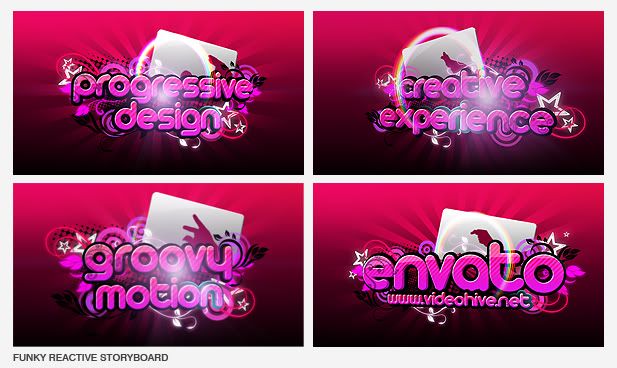
Funky Reactive – AE HD project (Retro)

After Effects Cs4 Cs5 Project File

Full Hd 1920×1080

No third-party plug-in needed

Easy to customize the texts and the media

7 video placeholders, 14 text placeholders

This motion graphic project is great for any media opener, website intro, promotion, entertainment business.

The music and the media in the video preview is NOT included.

You can download and use the song “Lazy Bones” from the link:

http://freeplaymusic.com/search/category_search.php?t=v&i=994

free counters

Download Funky Reactive – AE HD project (Retro)

Light Intro Logo Animation (Light)

Details:

– Easy to change the color (description in the help file)

– No third party plugins required

– CC plugins that comes with AE has to be installed

– Audio is not included but if you are interest, the link is in the help file

– 1920×1080 (16:9)

– 30 Fps

– Long: 20 Seconds

Enjoy!!

My Other Projects:

Woody
3D Modern Logo Reveal
Book Presentation
3D Dark Slide Show
3D Logo Animation

Download Light Intro Logo Animation (Light)

Red FX v.2 (Abstract)

  • After effects CS4 -CS5 Project
  • Full HD Res.(1920×1080) also 720p, ntsc and pal res. included
  • No Plugin Required + Plugin version(Trapcode Particular) included
  • Easy Customization
  • Logo intro Scene included
  • Fonts not included , you can find link below (both are free) http://www.fontemple.com/free-download/13349-Square-721-Bold-Extended-BT.html
  • Music is not included but if you like music send me an e-mail
  • Video tutorial included
  • For any question and customization send me an e-mail
  • Watch Red NasCar Customization sampling
  • Pls don’t forget 2 rate
     
    inaction
     
    Red_01
     
    Red_04
     
    Red_02
     

OTHER PROJECTS

 
SS_Pre_03
 
P001
 
followhive

Download Red FX v.2 (Abstract)

Logo Opener, Metamorfozis (Nature)

Metamorfozis is an After Effects project, resolution: 1280×720. Perfect for showing your logo in fresh, spring, modern, 3D style!

-Video Tutorial!

-Easy to customize and change color!

-No plugins required!

-Any logo can be used, very easy to adjust butterfly landing place!

Music is from Audiojungle here is the link: http://audiojungle.net/item/aqua-includes-3-loops/98322

-Sound effects are included (whooshes, Impacts…)

Please rate this project if you like it.

WT

Download Logo Opener, Metamorfozis (Nature)

Grungy Video Wall (Grunge)

Grungy Video Wall is great project for web, video or any kind of presentation. It`s built and designed as dark and grunge impact theme.

MAIN FEATURES

  • Project runs for 1:05 minutes
  • Everything is created with AE default plugins and you will need Cycore FX installed (comes with After Effects)
  • Video guide is included
  • Links to music and font are included in Help file
  • Images and video in preview are not included

I would like to thank`s urbandirty.com for they great textures.

Thank you for buying and don`t forget to rate.

Download Grungy Video Wall (Grunge)