Create Spherical Effect in CSS

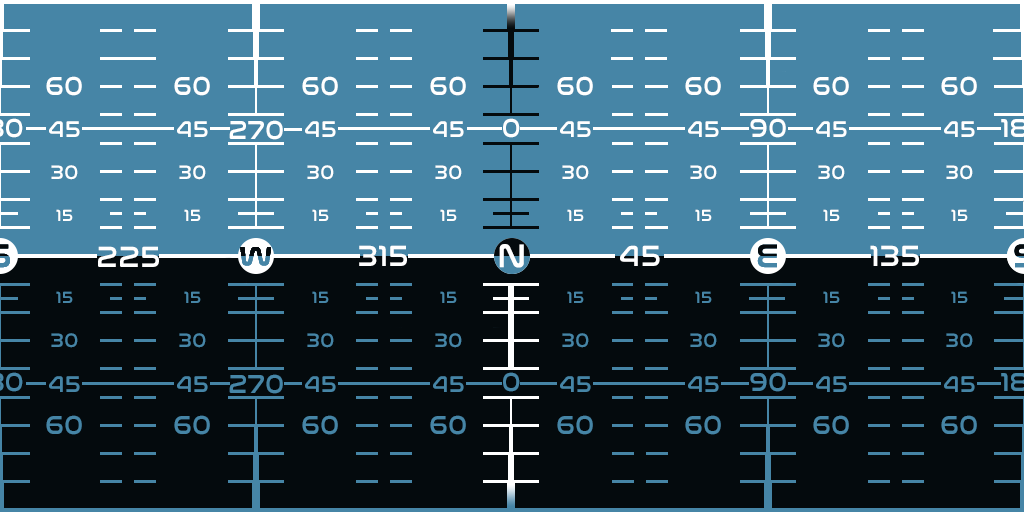
I would like to know if it’s possible and how can I achieve inverted spherical effect of custom texture in pure CSS, without using any 3rd party like three min js. I have created basic render for my idea here:

enter image description here

I have tried using canvas, classic transform or SVG Displacement map as someone else falsely recommended, but it can’t be made via this.

        let pitch = 0, yaw = 0;
        document.addEventListener('keydown', (event) => {
            if (event.key === 'ArrowUp') pitch -= 5;
            if (event.key === 'ArrowDown') pitch += 5;
            if (event.key === 'ArrowLeft') yaw -= 5;
            if (event.key === 'ArrowRight') yaw += 5;
            document.getElementById('navball').style.transform = `rotateX(${pitch}deg) rotateY(${yaw}deg)`;
        });
        body {
            margin: 0;
            overflow: hidden;
            display: flex;
            justify-content: center;
            align-items: center;
            height: 100vh;
            background-color: black;
        }

        .navball-container {
            width: 300px;
            height: 300px;
            position: relative;
            display: flex;
            justify-content: center;
            align-items: center;
            perspective: 800px;
        }

        .navball {
            width: 100%;
            height: 100%;
            background: url('https://spacedock.info/content/SqueakyB_141746/KSP2_Pre-Alpha_Style_NavBall/KSP2_Pre-Alpha_Style_NavBall-1729683637.png');
            background-size: 150%;
            background-position: center;
            border-radius: 50%;
            transform-style: preserve-3d;
            mask-image: radial-gradient(circle, rgba(0,0,0,0) 30%, rgba(0,0,0,1) 100%);
            -webkit-mask-image: radial-gradient(circle, rgba(0,0,0,0) 30%, rgba(0,0,0,1) 100%);
        }
    <div class="navball-container">
        <div class="navball" id="navball"></div>
    </div>

Source of example texture can be found here: https://spacedock.info/content/SqueakyB_141746/KSP2_Pre-Alpha_Style_NavBall/KSP2_Pre-Alpha_Style_NavBall-1729683637.png

How to have group column headers of different size in ag-grid?

I have a complex ag-grid table with several layers of group column headers. The ag-grid documentation shows how to set the height of group column headers with the groupHeaderHeight property. However, that sets the height of all group headers, not just a single row of group headers. When I set the groupHeaderHeight property to height of the tallest content, I get a table like this one:

Tall column group headers result in all group headers being tall.

We use a function to find the tallest header height and set the groupHeaderHeight to that value. As you can see, there is barely any room for the actual data because all group column header heights are driven by the tallest one.

How can I set up group headers of different heights so we can show more of the data in the table?

Date Convert Military Hours

I have a date string formatted as:

20250330230300-0400

I am trying to get that string into the format of:

3/30/2025 11:03

What I was originally doing was something like this:

var formattedDateTime = dateString.substring(4,6) + '/' + dateString.substring(6,8) + '/' + dateString.substring(0,4) + ' ' + dateString.substring(8,10) + ':' +  dateString.substring(10,12)

//Remove leading 0s from day and month
formattedDateTime = formattedDateTime .replace(/0(d)/0?(d)/g, '$1/$2')

What my code does not account for is the 23 military time being 11:03 instead of 23:02. Can someone point me to either how to do this or a more efficient way of doing this?

How do you uncache a module in Node.js when using createRequire?

Given an ESM Node.js project (package.json contains "type":"module"), I want to require a file, then delete its cache, and require it again so that its source runs again.

I tried this:

mod.js

console.log('in mod.ts')

testcase.js

import { createRequire } from 'module'
const require = createRequire(import.meta.url)

require('./mod.js')

const key = Object.keys(require.cache)[0]
delete require.cache[key]

require('./mod.js')

There are ways to do this in a CJS project such as this answer, but I can’t figure out how to do it in an ESM project.

I expected to see the console log printed twice, but it only prints once.

Is there a way to successfully uncache a module and reload its body in this test case?

Next js 15.2.4 canary version not support for storybook

I’m creating a Next.js component library with Storybook for use in my Next.js project and enabling partial pre-rendering. However, when I install Storybook version 15.2.4, it shows an error stating that it is not supported. Additionally, partial pre-rendering is only supported in the canary version of Next.js. How can I resolve this issue?

enter image description here

FFMPEG demuxer seek error in Chrome range slider with AWS audio file

I’m encountering an issue where if you click or slide enough on a range slider in Chrome, it will eventually stop working and give this error, an error 2 (network error):

PIPELINE_ERROR_READ: FFmpegDemuxer: demuxer seek failed

If I google this error, I only find the Chrome source code:

Line 1749 of Chrome source code

First, this issue only happens in Chrome, not Firefox. Second, I can only get it to happen with an encrypted file from AWS, which I can’t get into a sandbox, so the sandbox I made will never encounter that error with the random audio file I used.

Here’s the sandbox.

The only difference I can find between this code and the failing code is the source of the audio file (AWS).

Chrome Extension – can’t change text, colors, etc on live site

I’m trying to write a Chrome Extension that simply replaces some text on a website I don’t control. (There is actually a remote lookup, etc – but let’s leave that out for simplicity.)

It works fine on my local test site. When I try to use it on the remote site; the HTML does not get changed.

I’ve searched and see everything from timing issues, to using TreeWalker, etc. I don’t think these apply as I can find the element with document.elevate(xpath…) and alert(element.textContent) works just fine.

What am I missing?

Thanks!

How do I include a loop to allow the user to continue using JavaScript calculator until they choose to exit?

I have created a JavaScript simple calculator using the ‘readline-sync’ library for Node.js to handle terminal input/output. The calculator asks the user which operation they would like to perform (+, -, *, /). After they have selected an operation, it asks for two numbers. It performs the calculation and displays the result e.g. 45+9 = 54. After it displays the result, it should ask if the user wants to perform another calculation. How do I add a loop to allow the user to continue using the calculator until they choose to exit?

Here’s my code so far:

const calculator = require('readline-sync');

let operations = ['+', '-', '*', '/'];
let index = null;
let operator = null;
let firstNumber = 0;
let secondNumber = 0;

// Gets the operation question and the options
function operationQuestion(){
    operator = calculator.question("What operation would you like to perform?" 
        +'nOptions:'
        +'nAddition ('+ operations[0]+')'
         +'nSubtraction ('+ operations[1]+')'
          +'nMultiplication ('+ operations[2]+')'
           +'nDivision ('+ operations[3]+')n'
    );

    if (!operations.includes(operator)) {
        console.log("That is not a valid operation");
        operationQuestion();
    }

    // Gets the first and second number
    firstNumber = calculator.questionInt("Type the first number: ");
    secondNumber = calculator.questionInt("Type the second number: ");

    // 4 of the operations
    switch(operator) {
        case '+':
            console.log("The result of "+firstNumber + operator +secondNumber+" = "+ (firstNumber + secondNumber));
            break;
            case '-':
                console.log("The result of "+firstNumber + operator +secondNumber+" = "+ (firstNumber - secondNumber));
                break; 
                case '*':
                    console.log("The result of "+firstNumber + operator +secondNumber+" = "+ (firstNumber * secondNumber));
                    break;   
                    case '/':
                        console.log("The result of "+firstNumber + operator +secondNumber+" = "+ (firstNumber / secondNumber));
                        break;
                        default:
                            console.log("Something went wrong :(");
    }
}

// Logic
operationQuestion();

input = calculator.question("Do you want to perform another calculation?")

Why does this not work in JS? It always returns Good morning to the console [duplicate]

I am trying to make make it so that it logs ‘Good morning!’ in the console if the variable hour is between 6 and 12 and ‘Good afternoon!’ if it is between 13 and 17 and then ‘Good night!’ if it doesn’t match any of those cases. Please help I just started JS a few hours ago.

let hour = 1;

if (6 < hour < 12) {
    console.log('Good morning!');
} else if (12 < hour < 18) {
    console.log('Good afternoon!');
} else {
    console.log('Good night!');
}

How to integrate Firebase into my project?

I have a sign-up/sign-in page for my website, and I want to integrate Firebase authentication to manage user accounts securely. However, I’m having trouble integrating Firebase into my project. The main issue is that when I try to implement Firebase authentication (for both login and registration), the functionality doesn’t work, and no error message is shown.

What I’ve tried:

  • I have added the Firebase authentication SDK to my project.
  • I implemented the sign-up and sign-in forms with JavaScript, attempting to integrate Firebase’s createUserWithEmailAndPassword() and signInWithEmailAndPassword() methods.
  • I expected that the user registration and login would happen securely via Firebase, and after signing in, the user would be redirected to the homepage.

Issue faced:

  • When I press the “Sign Up” or “Sign In” button, the page does not behave as expected. No error message is shown.
  • I believe the Firebase connection is not properly integrated.
  • I also don’t get any red error messages that might help me debug.

Relevant code:

<!-- Sign Up Form -->
<form id="registerForm">
<input type="email" id="email" required>
<input type="password" id="newPassword" required>
<button type="submit">Register</button>
</form>
<script type="module">
import { getAuth, createUserWithEmailAndPassword, signInWithEmailAndPassword } from "https://www.gstatic.com/firebasejs/9.1.2/firebase-auth.js";
const auth = getAuth();

document.getElementById("registerForm").addEventListener("submit", async (event) => {
  event.preventDefault();

  const email = document.getElementById("email").value;
  const password = document.getElementById("newPassword").value;

  try {
    const userCredential = await createUserWithEmailAndPassword(auth, email, password);
    console.log('Registration successful:', userCredential.user);
  } catch (error) {
    console.error('Registration error:', error.message);
  }
});
</script>

What I expect:

  • After entering a username, email, and password, I want the user to be registered securely using Firebase.
  • If there’s an issue, I want to see a proper error message for debugging.

What actually happened:

  • When the user tries to sign up, the form submits but nothing happens (no error or success).
  • The Firebase authentication doesn’t seem to trigger correctly.

Things I’ve checked:

  • I’ve confirmed that the Firebase SDK is imported correctly.
  • No errors are shown in the browser’s console or UI.

Three.js model color difference from expected rendering

I am trying to display a model I downloaded on Sketchfab which is not showing up as expected when I render it.

This is the expected rendering
Above is the expected rendering

Rendering I get
Above is the rendering I get in three.js.

How do I achieve results like the first picture? Does the issue lie with the model or the way I display it using three.js?

Here is my code:

import * as THREE from 'three'; 
            import { GLTFLoader } from 'https://unpkg.com/[email protected]/examples/jsm/loaders/GLTFLoader.js';
            import { FBXLoader } from 'https://unpkg.com/[email protected]/examples/jsm/loaders/FBXLoader.js';
            import { OrbitControls } from 'https://unpkg.com/[email protected]/examples/jsm/controls/OrbitControls.js';
            
            const scene = new THREE.Scene();
            const camera = new THREE.PerspectiveCamera( 50, window.innerWidth / window.innerHeight, 0.1, 10000 );
            camera.position.set( -50, 50, 1000 );
            camera.lookAt(0, 0, 0)
            //camera.position.set( , 0, 0 );
            //camera.lookAt(scene.position)
            const renderer = new THREE.WebGLRenderer({antialias: true, logarithmicDepthBuffer: true});
            renderer.setSize( window.innerWidth, window.innerHeight);
            const color = 0xFFFFFF;
            const intensity = 10;
            const light = new THREE.DirectionalLight(color, intensity);
            light.position.set(-60, 60, 1060);
            //const light = new THREE.HemisphereLight( 0xffffbb, 0x080820, 0.5 );
            //scene.add( light );
          
                // Add a simple test cube to confirm the setup works
            const geometry = new THREE.BoxGeometry(1, 1, 1);
            const material = new THREE.MeshBasicMaterial({ color: 0x00ff00 });
            const cube = new THREE.Mesh(geometry, material);
            scene.add(cube);
                    document.getElementById("threejsbackdrop").appendChild( renderer.domElement );
                    const controls = new OrbitControls( camera, renderer.domElement );
                    controls.update();
            //import GLTFLoader from "../js/GLTFLoader.js"
            // Instantiate a loader
            const loader = new GLTFLoader();
            const fbxLoader = new FBXLoader()
            // Load a glTF resource
            loader.load('./black_hole.glb', function ( gltf ) {

                    
                    gltf.animations; // Array<THREE.AnimationClip>
                    gltf.scene; // THREE.Group
                    gltf.scenes; // Array<THREE.Group>
                    gltf.cameras; // Array<THREE.Camera>
                    gltf.asset; // Object
                    gltf.scene.receiveShadow = true;
                    
                    //console.log(gltf.scene)
                    
                    /*var box = new THREE.Box3()
                            .setFromObject( gltf.scene );
                            var center = new THREE.Vector3();
                            box.getCenter( center );
                            gltf.scene.position.sub( center )
                            //gltf.scene.position.x +=3
                            //gltf.scene.position.z += 3*/

                    scene.add( gltf.scene );


                },
                // called while loading is progressing
                function ( xhr ) {
                    //console.log(xhr)
                    //console.log( ( xhr.loaded / xhr.total * 100 ) + '% loaded' );
                    if(( xhr.loaded / xhr.total * 100 ) == 100){
                        console.log("Finished Loading!")
                    }
                    
                },
                // called when loading has errors
                function ( error ) {
                    console.log(error)
                    console.log( 'An error happened' );

                }
            );
            function animate() {
                        requestAnimationFrame( animate );
                        var bg3dobj = scene.children.find(e => e.name == "Sketchfab_Scene")
                        
                        controls.update();
                        //updateLayers()

                        renderer.render( scene, camera );
                    };

                    animate();
                    

Many thanks in advance!

Video.js big play button not working when a custom touchstart event is added to the video element

Why is the Video.js big play button not working on touchstart after I apply a custom handler (Of course, the big play button works on click.) Does my custom handler overwrite the default Video.js behavior? If yes, how can I prevent it from overriding Video.js’s default touchstart behavior? I need both to work fine—default and my custom handler.

I am using Vue.js with TypeScript.

current:

 if(player.value){
    const playerEl = player.value.el() as HTMLElement
    playerEl.addEventListener('touchstart', handleTouch, {passive:true})
  }

let tappedOnce: ReturnType<typeof setTimeout> | null = null

const handleTouch=(e: TouchEvent)=>{
 if(!player.value) return
 if(!tappedOnce){
   tappedOnce= setTimeout(()=>{
     tappedOnce=null
    },300)
 }else{
   clearTimeout(tappedOnce)
   tappedOnce = null
  //doing something
}

Authentication Issue: Invalid Credentials on Login & Error on Registration Despite Successful DB Entry

I have a problem when I launch a connection with the credentials the front sends me back that the credentials are invalid and when I create an account the front sends me back an error occurred during registration while the account is registered in my database

    e.preventDefault();
    setError(null);
    try {
      const response = await axios.post("http://localhost:8000/auth/login", {
        email,
        password,
      });
      const data = response.data;
      if (data && data.token) {
        localStorage.setItem("token", data.token);
        window.location.href = "/";
      } else {
        throw new Error("Identifiants invalides");
      }
    } catch (error: any) {
      const errorMessage =
        error.response?.data?.message ||
        error.message ||
        "Une erreur est survenue lors de la connexion";
      setError(errorMessage);
    }
  };

  const handleSignUp = async (e: React.FormEvent<HTMLFormElement>) => {
    e.preventDefault();
    setError(null);
    if (password !== confirmPassword) {
      setError("Les mots de passe ne correspondent pas");
      return;
    }
    try {
      const response = await axios.post("http://localhost:8000/auth/register", {
        email,
        firstName,
        lastName,
        password,
      });
      const data = response.data;
      if (data && data.token) {
        localStorage.setItem("token", data.token);
        window.location.href = "/";
      } else {
        throw new Error("Inscription impossible");
      }
    } catch (error: any) {
      const errorMessage =
        error.response?.data?.message ||
        error.message ||
        "Une erreur est survenue lors de l'inscription";
      setError(errorMessage);
    }
  };```

Why are params undefined in valueGetter but not in renderCell when using MUI datagrid?

I’m trying to set the value of a column based on the value of other columns in my datagrid. It works when setting what to render in rendercell but params is undefined when passed to valuegetter. What do I need to do to access the other values in a row from the valuegetter?

Simplified Example

      renderCell: (params: GridCellParams) => {
                const today = new Date();
                if (Date.parse(params.row.effectiveStartDateEst) > today){
                    return <Chip label='Inactive'/>
                }
                else{
                    return <Chip label='Active' color='success' />
                }
            },
      valueGetter: (params: GridCellParams) => {
              const today = new Date();
              if (Date.parse(params.row.effectiveStartDateEst) > today){
                return 'Inactive'
              }
              else{
                return 'Active'
              }
            }

The above code works in rendercell but errors due to undefined values in valuegetter.