When converting a .xlsx file to a temp google sheet file, update and back to .xlsx file keeps poping up an error, creating a pdf temp file, here is some code for reference, Error: Updating XLSX for xxxx : Converting from application/pdf to application/vnd.openxmlformats-officedocument.spreadsheetml.sheet is not supported. patial code ||. const sourceFile = DriveApp.getFileById(sourceSheetId);
const mimeType = sourceFile.getMimeType();
if (mimeType === ‘application/pdf’) return null;
if (mimeType === ‘application/vnd.openxmlformats-officedocument.spreadsheetml.sheet’) {
const resource = { name: ${clientName} Content Calendar (Converted), mimeType: ‘application/vnd.google-apps.spreadsheet’ };
const convertedFile = Drive.Files.copy(resource, sourceSheetId, { convert: true });
sheetId = convertedFile.id;
masterSheet.getRange(rowIndex, 6).setValue(sheetId);
} else if (mimeType !== ‘application/vnd.google-apps.spreadsheet’) {
return null;
VAST ads not working properly on Safari iOS and Samsung TV with VideoJS Nuevo plugin
I’m implementing VAST 3.0 preroll ads using the Nuevo plugin for VideoJS. While the implementation works perfectly on desktop browsers, I’m facing two specific platform issues:
- Safari 18.4 on iOS 18.4: No ads are played at all
- Samsung Smart TV: Only the first ad in the ad break plays (the break contains 3 consecutive ads)
Implementation Details
I’m loading the VAST/VPAID plugin dynamically after the player is ready:
player.on("ready", function () {
  window.videojs = videojs;
  const script = document.createElement("script");
  script.src = "/videojs/plugins/vast.vpaid.min.js";
  document.body.appendChild(script);

  script.onload = () => {
    player.vastAds({
      tagURL: vMapUrl, // VMAP URL from ad server
    });
  };
});
The VMAP URL is fetched from our ad server and contains a preroll ad break with three consecutive ads.
Questions
- Are there known compatibility issues with VAST/VPAID on Safari iOS that would prevent ads from playing entirely?
- What could cause only the first ad in a break to play on Samsung TVs?
- Is there a better way to implement this that would work across all platforms?
Here’s a simplified version of our player initialization:
const player = videojs(videoRef.current, {
  // ... player options
  sources: [{
    src: videoUrl,
    type: "application/x-mpegURL"
  }]
});

player.nuevo(); // Initialize Nuevo plugin
// Then the VAST implementation shown above
Any insights or suggestions for debugging these platform-specific issues would be greatly appreciated.
How to resolve this error: Could not resolve “virtual:keystatic-config”
I am using astro.js + keystatic.js (cms) to build a website with admin page, whenever i am running npm run dev command, i am seeing this error in terminal. it was working good earlier.
keystatic on github mode. The most interesting thing it doesn’t appear again when i close the terminal and start fresh. why does this happens?
note: i couldn’t use/create keystatic tag because of stackoverflow less reputation, please somebody make.
specs:
“@keystatic/astro”: “^5.0.6”,
“@keystatic/core”: “^0.5.47”,
“astro”: “^5.4.2”,
Display TVheadend stream in HTML5 video element without transcoding
I try to display raw stream from TVheadend in <video> element and cant get it to work in Firefox and Chrome. Also I get same error in https://github.com/4gray/iptvnator IPTV player when I try to use those stream urls inside .m3u list.
I have Traefik proxy that handles CORS headers, https and tunneling, all that works. But in <video> element it just downloads raw data without rendering image and audio.
I use OrangePi and Docker and transcoding to another format is not an option, it takes 100% CPU, I want to avoid such load. Without transcoding CPU load is 1%.
Here is index.html with <video> element:
<!DOCTYPE html>
<html>
<head>
  <title>TVHeadend Stream</title>
  <script src="https://cdn.jsdelivr.net/npm/hls.js@latest"></script>
</head>
<body>
  <video id="video" muted controls autoplay width="640" height="360" type="video/webm"></video>

  <script>
    var video = document.getElementById('video');
    var videoSrc = 'https://my-tv.my-website.com/stream/channelid/1974776170?profile=pass';
    // var videoSrc = 'https://my-tv.my-website.com/stream/channelid/1974776170?profile=webtv-h264-aac-matroska';

    if (Hls.isSupported()) {
      var hls = new Hls();
      hls.loadSource(videoSrc);
      hls.attachMedia(video);
      hls.on(Hls.Events.MANIFEST_PARSED, function() {
        video.play();
      });
    } else if (video.canPlayType('application/vnd.apple.mpegurl')) {
      // Native HLS support (Safari)
      video.src = videoSrc;
      video.addEventListener('loadedmetadata', function() {
        video.play();
      });
    } else {
      console.error('HLS not supported');
    }
  </script>
</body>
</html>
Here is sample .m3u list that works in VLC player but fails in browser in IPTV players:
#EXTM3U
#EXTINF:-1 tvg-logo="https://my-tv-my-website.com/imagecache/41" tvg-id="7eb1b4f54aec2b3f89d1ad8d10a6674c",PINK
https://my-tv.my-website.com/stream/channelid/1974776170?profile=pass
Here are available streaming formats in TVheadend:

TVheadend version:

Codec information in VLC player:
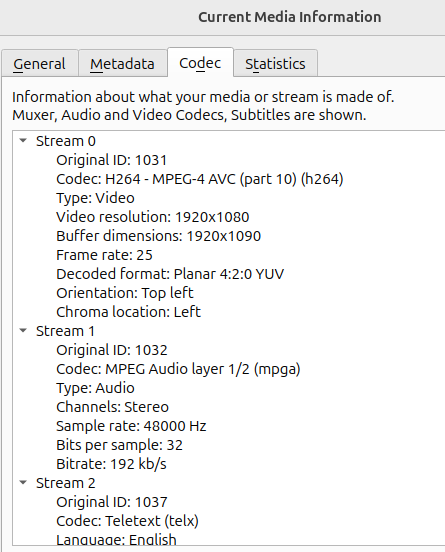
I am runing WinTV-dualHD dvb-t2 TV card:
https://www.hauppauge.com/pages/products/data_dualhd.html
How to render TVheadend raw stream in browsers HTML5 <video> element and web .m3u players without transcoding?
Canva preview shows error: No server is listening
I’m having trouble integrating the Canva SDK editor (DesignButton) into a simple HTML page.
I want to locally test a button that opens the Canva editor via their SDK.
I have an index.html file with the SDK integrated via the CDN. I’m using Live Server (VS Code) to launch it locally.
The preview URL in Canva is http://localhost:5500/, which is supported in the Canva Dashboard Developer.
I’m trying to integrate the Canva DesignButton SDK into a basic HTML page using Live Server (localhost:5500).
-
I followed Canva’s official SDK documentation: https://www.canva.com/developers/docs/design-button/overview
-
I created a simple
index.htmlpage and added the SDK script like this:<script src="https://sdk.canva.com/designbutton/v2/api.js"></script>
I also initialized the button with:
Canva.DesignButton.initialize({
  buttonSelector: "#canva-button",
  appId: "my_app_id", // my app ID
  designType: "Poster",
  onDesignPublish: (design) => {
    console.log("Design completed:", design.exportUrl);
  },
});
Here is my HTML file:
<!DOCTYPE html>
<html lang="fr">
  <head>
    <meta charset="UTF-8" />
    <title>Intégration Canva Editor</title>
    <script src="https://sdk.canva.com/designbutton/v2/api.js"></script>
  </head>
  <body>
    <h2>Test Canva Editor</h2>
    <div id="canva-button"></div>

    <script>
      try {
        Canva.DesignButton.initialize({
          buttonSelector: "#canva-button",
          appId: "my_app_id",
          designType: "Poster",
          onDesignOpen: () => {
            console.log("Éditor Canva open");
          },
          onDesignPublish: (design) => {
            console.log("Design ended:", design.exportUrl);

          },
        });
      } catch (error) {
        console.log("une erreur: ", error)
      }
    </script>
  </body>
</html>
Problem: In Canva, when previewing, it says: “No server is listening.”
In my browser, the page opens fine, but the Canva button doesn’t appear at all.
Browser console: No visible SDK-related errors.
If I try with 127.0.0.1 or 192.168.x.x, Canva rejects the dev URL.
I tried embedding the Canva DesignButton SDK into a local HTML file using Live Server (VS Code). I expected the Canva button to appear and allow me to open the Canva editor in a pop-up window when I clicked it. Instead, the button doesn’t appear at all, and in the Canva Developer Preview, I get the message “No server is listening.” The page loads fine in my browser (http://localhost:5500), but nothing appears in the Canva SDK.
Object.keys is giving incorrect values when used in for loop [duplicate]
I am having a little issue with trying to iterate through the keys of an object.
My code is simulating levers that lock unless other levers are in the correct positions
This means when I go to access the values later, they return undefined as shown here:

This same code is working with some other values from the object but just not with this one.
Any ideas where I’m going wrong?
// interlock is taken from {"leverbox": {"leverframe": {"lever": {"interlock": {}}}}
interlock = {
  "2": true,
  "3": true
}

console.log(Object.keys(interlock)) //outputs ["2", "3"] as expected

for (lock in Object.keys(interlock)) {
  console.log(lock) //outputs 0 and 1 (2 and 3 is expected)
}input forms or class properties with Required attribute not stopping ajax call
This has been a alow step-by-step process for me, but I’m getting there.
My modal popup has two input forms that need to be filled out before the ajax call is executed. I’ve tried a few options, Default values and validation in ASP RazorPage, How to check if the required attribute is set on a field among other, but no luck.
At one point, I tried checking to see if the string in these inputs are empty, and if so, return so that it doesn’t continue. It does work, but it defeats the purpose of the required attribute or binding of the inputs to the class properties (with the [Required(AllowEmptyStrings = false)] property as well).
I just to stop execution of the server-side code if the inputs are empty. Any help is appreciated.
This is my cshtml:
@page
@model Products.Pages.IndexModel
@{
    var product = Model.product;
}
@Html.AntiForgeryToken()
<div id="productsContainer">
        <div style="float: left;display: inline-block;">
            <div style="height: 280px">
                <button class="openProductModal" data-product-id="@product.ProductId" data-imageurl="@product.ImageUrl">
                    <img src="@product.ImageUrl" width="260" style="padding: 10px">
                </button>
            </div>
        </div>
</div>

<div id="modal_dialog" style="display: none">
    <span id="name"></span>
    <img id='imageurl' width="150">
    product-id: <span id="product-id"></span>
    <input type="text" name="fullname" id="fullname" bind-value="Customer.FullName" style="width: 90%;" required />
    <input type="text" name="email" id="email" style="width: 90%;" bind-value="Customer.EmailAddress" required />
</div>

@section Scripts {
    @{
        await Html.RenderPartialAsync("_ValidationScriptsPartial");
    }
    <script type="text/javascript">
        $(document).ready(function () {
            $("#productsContainer").on("click", ".openProductModal", function () {

                $(".ui-dialog-titlebar").hide();
                // Capture selected product data
                  var productId = $(this).data("product-id");
                  var imageurl = $(this).data("imageurl");
                  $('#imageurl').attr('src',imageurl);
                  $("#product-id").text(productId);
                  $("#modal_dialog").dialog({
                    buttons: {
                        Confirm: function () {
                        // var elem = document.getElementsByTagName("input")[0];
                        // if(elem.hasAttribute("required")){ /* This line breaks script */
                        //      alert("Name and email required.");
                        //      return;
                        // }

                        var form = $(this);
                        var validated = true;

                        $('input[type="text"]',this).each(function(){
                          if($(this).val().length < 1){
                            validated = false;
                            alert("Name and email required.");
                            return;
                            /* this works because it checks the length of the input, but that defeats the purpose of the REQUIRED attribute.
                            Plus, even when it hits "return", it still call server-side method */
                          }
                        });

                            $.ajax({
                                type: "POST",
                                url: "/Index?handler=Send",
                                dataType: "json",
                                beforeSend: function (xhr) {
                                    xhr.setRequestHeader("XSRF-TOKEN",
                                        $('input:hidden[name="__RequestVerificationToken"]').val());
                                },
                                success: function (response) {
                                    $("#modal_dialog").dialog('close');
                                }
                            });
                    },
                    Close: function () {
                        $(this).dialog('close');
                    }
                    },
                    modal: true,
                    width: 400
                });
            });
        });
    </script>
}
This is my cshtml.cs
namespace Products.Pages
{
    public class Customer
    {
        [Required(AllowEmptyStrings = false)]
        public string? FullName { get; set; }

        [Required(AllowEmptyStrings = false)]
        public string? EmailAddress { get; set; }

    }
    public class IndexModel : PageModel
    {

        public List<Product> availableProducts = new List<Product>();
        public Product product = new Product();

        public void OnGet()
        {
            Product products = new Product();
            availableProducts = products.GetProducts();
            product = availableProducts.First();
        }

        public ActionResult OnPostSend()
        {
            return new JsonResult("true");
        }
    }
}
Every time I scroll down on reddit and make the posts float to the left, the view keeps going back to the top
https://www.reddit.com/r/nextfuckinglevel/top/?t=month
// ==UserScript==
// @name         REDDIT: gallery view
// @match        https://www.reddit.com/*
// @require      https://raw.githubusercontent.com/KenKaneki73985/javascript-utils/refs/heads/main/minified_javascript
// @require      https://raw.githubusercontent.com/KenKaneki73985/javascript-utils/refs/heads/main/show_GUI
// @require      https://raw.githubusercontent.com/KenKaneki73985/javascript-utils/refs/heads/main/countdown_with_ms
// ==/UserScript==

(function() {
    'use strict'

    document.addEventListener('scroll', () => {
        show_GUI("you scrolled", "GUI_v1", "blue", 0, 80, 16, 1000)
        SET_GALLERY_VIEW()
    })

    function SET_GALLERY_VIEW() {
        show_GUI("gallery view set", "GUI_v2", "green", 0, 87, 16, 1000)

        let FEED_CONTAINER = document.querySelector("shreddit-feed")
        FEED_CONTAINER.style.display = "block"

        const POSTS_arr = FEED_CONTAINER.querySelectorAll("article")
        POSTS_arr.forEach(post => {
            post.style.float = "left"
            post.style.width = "33%"
        })
    }
})()
Someone on reddit says that: Reddit removes posts when they are not in view, and uses a placeholder to prevent posts from moving up. I think that using CSS is your best option.
So I asked Claude, and this is the response. I tried to use CSS styling (code below), but it does not work.
// ==UserScript==
// @name         REDDIT: gallery view
// @match        https://www.reddit.com/*
// @require      https://raw.githubusercontent.com/KenKaneki73985/javascript-utils/refs/heads/main/minified_javascript
// @require      https://raw.githubusercontent.com/KenKaneki73985/javascript-utils/refs/heads/main/show_GUI
// @require      https://raw.githubusercontent.com/KenKaneki73985/javascript-utils/refs/heads/main/countdown_with_ms
// ==/UserScript==

(function() {
    'use strict'

    window.addEventListener('load', () => {
        // alert("code injected BEFORE load event fires")
        INJECT_CSS()
    })

    document.addEventListener('keydown', function(event) {
        if (event.altKey && event.key === 'k') {
            INJECT_CSS()
        }
    })

    function INJECT_CSS() {
        show_GUI("gallery view", "GUI_v1", "green", 0, 80, 16, 3000)

        // Create CSS styles
        const style = document.createElement('style')

        // Apply CSS styles
        style.textContent = `
            shreddit-feed {
                display: block !important
            }

            shreddit-feed article {
                float: left
                width: 33%
                box-sizing: border-box
            }

            /* Clearfix for the container */
            shreddit-feed::after {
                content: ""
                display: table
                clear: both
            }
        `;

        document.head.appendChild(style)
    }
})()
How do I fix this?
Using value=”” as an attribute in ejs file to render data into a express server
I’m building a blog website using Node.js, Express, and EJS. I have a list of blog posts, each with an Edit button that is supposed to send the id of the post to the server using a GET request. However, when I hit the /editcontent route, the server logs show:
Server.js
import express from 'express';
import bodyParser from 'body-parser';

const app = express();
const port = 3000;

app.use(bodyParser.urlencoded({extended: true}));
app.use(express.static('public'));

let posts = [...];

app.get("/", (req, res) => {
    res.render('index.ejs', {
        data: posts
    });
});

app.get("/editcontent", (req, res) => {
    console.log(req.query);
    res.render('formpage.ejs', {
        id: parseInt(req.query.id)
    });
});

app.get("/blogpost", (req, res) =>{
    res.render('newpost.ejs');
});

app.listen(port, (req, res) => {
    console.log(`Server is running on port ${port}`);
});
Index.ejs
<!DOCTYPE html>
<html lang="en">
<head>
    <meta charset="UTF-8">
    <meta name="viewport" content="width=device-width, initial-scale=1.0">
    <title>My Blog</title>
</head>
<body>
    <div>
        <header>
            <h1>My Blog</h1>
            <form method="get" action="/blogpost">
                <button type="submit">New Post</button>
            </form>
        </header>

        <% if (locals.data && data.length > 0) { %>
            <% data.forEach(element => { %>
                <article>
                    <h2><%= element.title %></h2>
                    <p><%= element.dateofposting %></p>
                    <h5><%= element.content %></h5>
                    <p>By: <%= element.author %></p>
                    <div>
                        <form method="get" action="/editcontent">
                            <button type="submit" name="id" value="<%= element.id %>">Edit</button>
                        </form>
                        <form method="delete" action="/deletecontent">
                            <button type="submit" name="id" value="<%= element.id %>">Delete</button>
                        </form>
                    </div>
                </article>
                <hr>
            <% }); %>
        <% } else { %>
            <p>No blog posts available.</p>
        <% } %>
    </div>
</body>
</html>
Output
[Object: null prototype] { id: '' }
The issue is that does not reliably send its value in a GET form submission.
In HTML, elements with name and value do not behave like regular input fields when sending data in a GET request. The button’s name/value is only submitted if it’s clicked directly and there are no other conflicting inputs — and even then, behavior can vary by browser.
Adobe Lightroom Classic web gallery does not display all thumbnails on mobile
Hi I’m using the html/css/js tool from Adobe Lightroom Classic to generate code for web photo galleries. This is working on desktop, but on mobile I only have the first 5 images and I don’t know why. In DevTools all images are displayed…
Here is the Adobe Lightroom Classic main.js file :
// Minified Debounce taken from UnderscoreJS (MIT)
function debounce(a,b,c){var d;return function(){var e=this,f=arguments;clearTimeout(d),d=setTimeout(function(){d=null,c||a.apply(e,f)},b),c&&!d&&a.apply(e,f)}}
var WebGalleryTrack = WebGalleryTrack || {};
function init(){
// Let's cache some stuff!
var _$w = $(window),
_$body = $("body"),
_$thumbnailContainer = $("#thumbnailContainer"),
_$thumbnailsParent = $("#thumbnailContainer div.thumbnails"),
_$thumbnails = [],
_$loupeContainer = $("#loupeContainer"),
_$loupeBackground = $("#loupeContainer div.background"),
_$loupeImageContainer = $("#loupeContainer div.image-container"),
_$loupeInfoContainer = $("#loupeContainer div.info-container"),
_$loupeMeta = $("#loupeMeta"),
_$buttonPrev = $("#buttonPrev"),
_$hotspotPrevLoupe = $("#hotspotPrevLoupe"),
_$buttonPrevSideLoupe = $("#buttonPrevSideLoupe"),
_$buttonNext = $("#buttonNext"),
_$hotspotNextLoupe = $("#hotspotNextLoupe"),
_$buttonNextSideLoupe = $("#buttonNextSideLoupe"),
_$countCurrent = $("#countCurrent"),
_$countTotal = $("#countTotal"),
_$buttonClose = $("#loupeCloseButton");
var i,
_isOpen = false,
_$targetThumb,
_$loupeImage,
_loupeIsTransitioning = false,
_currentImageIndex,
_autoViewThumb,
_paginationStyle = "scroll",
_viewportHeight = 0,
_thumbsToLoad = 0,
_lastLoadedThumbIndex = -1,
_currentRowContents = [];
var onWindowResize = debounce(
function(e) {
_viewportHeight = _$w.height();
sizeAllThumbnails();
_$w.trigger("scroll");
},
250
);
// Set the current height
_viewportHeight = _$w.height();
_$w.on(
"resize",
onWindowResize
);
// create a global scroll handler so that we can make the header more compact as the user scrolls down the page
_$w.on(
"scroll",
onWindowScroll
);
// Check the pagination style
if(_$body.attr("data-pagination-style")){
_paginationStyle = _$body.attr("data-pagination-style");
}
// Loop through the global JSON object
for(i = 0; i < LR.images.length; i++) {
// Set some new properties
LR.images[i].index = i;
LR.images[i].thumbIsLoading = false;
LR.images[i].thumbHasLoaded = false;
LR.images[i].aspectRatio = LR.images[i].largeWidth / LR.images[i].largeHeight;
LR.images[i].currentThumbWidth = 0;
LR.images[i].currentThumbHeight = 0;
// Re-set the title if needed
if(LR.images[i].title == "nil"){
LR.images[i].title = "";
}
// Re-set the caption if needed
if(LR.images[i].caption == "nil"){
LR.images[i].caption = "";
}
// Create the individual thumbnail partial
LR.images[i].$thumbnail = $('<div class="thumbnail not-loaded" data-large-img="images/large/'+ LR.images[i].exportFilename +'.jpg" data-id="ID'+ LR.images[i].id +'" data-title="' + LR.images[i].title + '" data-caption="' + LR.images[i].caption + '" data-native-width="' + LR.images[i].largeWidth + '" data-native-height="' + LR.images[i].largeHeight + '"><img class="thumb-img" src="" /></div>');
LR.images[i].$thumbnail.data("index", i);
// Isolate the actual thumbnail image
LR.images[i].$thumbnailImg = $(LR.images[i].$thumbnail.find("img")[0]);
LR.images[i].$thumbnailImg.data("index", i);
_$thumbnails.push(LR.images[i].$thumbnail);
}
// Check for an existing hash
if(window.location.hash != ""){
var _parts = window.location.hash.split("/");
switch(_parts[1]){
case "view" :
for(var i = 0; i < LR.images.length; i++){
if(LR.images[i].$thumbnail.attr("data-id") == _parts[2]){
_autoViewThumb = LR.images[i].$thumbnail;
break;
}
}
break;
}
}
// Render the page based on the user-selected pagination style
switch(_paginationStyle){
case "none":
renderAllThumbnails();
break;
case "scroll":
initLoadOnScroll();
break;
}
function getTargetRowHeight() {
return _$body.attr("data-target-row-height");
}
function renderAllThumbnails() {
for(var i = 0; i < LR.images.length; i++){
_$thumbnailsParent.append(LR.images[i].$thumbnail);
LR.images[i].$thumbnail.on(
"click",
onThumbnailClick
);
LR.images[i].$thumbnailImg.attr(
"src",
"images/thumbnails/" + LR.images[i].exportFilename + ".jpg"
);
_lastLoadedThumbIndex = LR.images[i].index;
}
sizeAllThumbnails();
}
function sizeAllThumbnails() {
var _availableWidth = _$body.innerWidth();
_$thumbnailContainer.css("width", _availableWidth + "px");
_currentRowContents = [];
var _currentRowWidth = 0;
var _currentRowOffsetTop = 0;
var _thumbWidth, _thumbHeight;
for(var i = 0; i < LR.images.length; i++){
_currentRowContents.push(LR.images[i]);
_thumbHeight = getTargetRowHeight();
_thumbWidth = Math.round(_thumbHeight * LR.images[i].aspectRatio);
LR.images[i].$thumbnail.css({"width" : _thumbWidth + "px", "height" : _thumbHeight + "px"});
LR.images[i].currentThumbWidth = _thumbWidth;
LR.images[i].currentThumbHeight = _thumbHeight;
_currentRowWidth += _thumbWidth;
// if we're past our max width
if(_currentRowWidth > _availableWidth){
_currentRowOffsetTop += resizeRow(_currentRowContents, _availableWidth, _currentRowWidth);
for(var j = 0; j < _currentRowContents.length; j++){
_currentRowContents[j].$thumbnail.data("currentRowOffsetTop", _currentRowOffsetTop);
}
_currentRowContents = [];
_currentRowWidth = 0;
}
else {
LR.images[i].$thumbnail.data("currentRowOffsetTop", _currentRowOffsetTop);
}
}
}
function resizeRow(rowArray, availableWidth, currentWidth){
var _reductionRatio = availableWidth / currentWidth;
var _newCurrentWidth = 0;
for(var i = 0; i < rowArray.length; i++){
var _thumbHeight = Math.floor(rowArray[i].currentThumbHeight * _reductionRatio);
var _thumbWidth = Math.floor(rowArray[i].currentThumbWidth * _reductionRatio);
_newCurrentWidth += _thumbWidth;
if(i == rowArray.length - 1 && _newCurrentWidth < availableWidth){
_thumbWidth += (availableWidth - _newCurrentWidth);
}
rowArray[i].$thumbnail.css({"width" : _thumbWidth + "px", "height" : _thumbHeight + "px"});
rowArray[i].currentThumbWidth = _thumbWidth;
rowArray[i].currentThumbHeight = _thumbHeight;
}
return _thumbHeight + parseInt(rowArray[0].$thumbnail.css("margin-bottom"), 10);
}
// Pagination Style: "scroll"
function initLoadOnScroll() {
if(LR.images.length == 0){
return;
}
var _bodyHeight = _$body.height();
// First, we need to create a container for every image in the gallery
for(var i = 0; i < LR.images.length; i++){
_$thumbnailsParent.append(LR.images[i].$thumbnail);
LR.images[i].$thumbnail.on(
"click",
onThumbnailClick
);
}
// Size them all based on the current viewport dimensions
sizeAllThumbnails();
// Loop through them, and intiate loading on anything that's visible within the current viewport
for(var i = 0; i < LR.images.length; i++){
if(LR.images[i].$thumbnail.data("currentRowOffsetTop") < _$w.height() + 100){
LR.images[i].$thumbnailImg.on(
"load",
onThumbnailImgLoad
);
LR.images[i].$thumbnailImg.on(
"error",
onThumbnailImgError
);
LR.images[i].$thumbnailImg.attr(
"src",
"images/thumbnails/" + LR.images[i].exportFilename + ".jpg"
);
_lastLoadedThumbIndex = LR.images[i].index;
}
}
_$w.on(
"scroll",
onWindowLoadScroll
);
}
function onWindowLoadScroll(e) {
checkForSpace();
}
function onWindowScroll(e) {
if(_$w.scrollTop() > 0 && !_$body.hasClass("scrolled")){
_$body.addClass("scrolled");
}
else if(_$w.scrollTop() == 0 && _$body.hasClass("scrolled")) {
_$body.removeClass("scrolled");
}
}
function checkForSpace(){
if((_$w.scrollTop() + _viewportHeight) == _$body.height() && _thumbsToLoad == 0 && _lastLoadedThumbIndex < LR.images.length - 1){
loadMoreThumbnails(_lastLoadedThumbIndex + 1, 1);
}
else if(_$body.height() < _viewportHeight && _thumbsToLoad == 0){
loadMoreThumbnails(_lastLoadedThumbIndex + 1, 1);
}
}
function loadMoreThumbnails(startIndex, numRows) {
var _currentRowOffsetTop = LR.images[_lastLoadedThumbIndex].$thumbnail.data("currentRowOffsetTop");
var _rowsAdded = 0;
var _newRowOffsetTop = _currentRowOffsetTop;
for(var i = startIndex; i < LR.images.length; i++){
if(LR.images[i] == undefined){
break;
}
// Fill up the last row - there could be space in it after a viewport resize
if(LR.images[i].$thumbnail.data("currentRowOffsetTop") == _currentRowOffsetTop){
LR.images[i].$thumbnailImg.on(
"load",
onThumbnailImgLoad
);
LR.images[i].$thumbnailImg.on(
"error",
onThumbnailImgError
);
LR.images[i].$thumbnailImg.attr(
"src",
"images/thumbnails/" + LR.images[i].exportFilename + ".jpg"
);
_lastLoadedThumbIndex = LR.images[i].index;
}
else if(LR.images[i].$thumbnail.data("currentRowOffsetTop") > _currentRowOffsetTop){
_rowsAdded ++;
if(_rowsAdded > numRows){
break;
}
_currentRowOffsetTop = LR.images[i].$thumbnail.data("currentRowOffsetTop");
LR.images[i].$thumbnailImg.on(
"load",
onThumbnailImgLoad
);
LR.images[i].$thumbnailImg.on(
"error",
onThumbnailImgError
);
LR.images[i].$thumbnailImg.attr(
"src",
"images/thumbnails/" + LR.images[i].exportFilename + ".jpg"
);
_lastLoadedThumbIndex = LR.images[i].index;
}
}
}
function onThumbnailImgLoad(e) {
var $el = $(e.currentTarget);
$el.parent().css(
{
"background-image" : "url('" + $el.attr("src") + "')",
"background-size" : "cover",
"background-position" : "center center"
}
);
$el.css("display", "none");
$el.parent().removeClass("not-loaded");
if(_thumbsToLoad > 0){
_thumbsToLoad--;
}
else {
checkForSpace();
}
}
function onThumbnailImgError(e) {
// we should inject an SVG or something here so that the thumbnail grid doesn't become oddly sized
if(_thumbsToLoad > 0){
_thumbsToLoad--;
}
else {
checkForSpace();
}
}
function onThumbnailClick(e) {
showLoupeViewForThumbnail($(e.currentTarget));
}
// Loupe View Logic
_$loupeContainer.fadeOut(0);
_$loupeImageContainer.fadeOut(0);
_$loupeInfoContainer.fadeOut(0);
_$buttonClose.fadeOut(0);
_$loupeBackground.css("opacity", 0);
_$buttonClose.on(
"click",
closeLoupeView
);
_$buttonPrev.on(
"click",
showPrevImage
);
_$buttonNext.on(
"click",
showNextImage
);
_$hotspotPrevLoupe.on(
"mouseover",
onHotspotPrevLoupeOver
);
_$hotspotPrevLoupe.on(
"mouseout",
onHotspotPrevLoupeOut
);
_$hotspotPrevLoupe.on(
"click",
showPrevImage
);
_$hotspotNextLoupe.on(
"mouseover",
onHotspotNextLoupeOver
);
_$hotspotNextLoupe.on(
"mouseout",
onHotspotNextLoupeOut
);
_$hotspotNextLoupe.on(
"click",
showNextImage
);
if(_autoViewThumb){
showLoupeViewForThumbnail(_autoViewThumb, true);
}
function openLoupeView(snap) {
_loupeIsTransitioning = true;
setCounts();
_$loupeContainer.fadeIn(0);
_$loupeBackground.css(
{
"width": _$targetThumb.width() + "px",
"height": _$targetThumb.height() + "px",
"top": (_$targetThumb.offset().top - $(window).scrollTop()) + "px",
"left": _$targetThumb.offset().left + "px"
}
);
_$loupeContainer.css("display", "block");
var _targetTime = 250;
if(snap){
_targetTime = 0;
}
_$loupeBackground.animate(
{
"width": "100%",
"height": "100%",
"top": "0px",
"left": "0px",
"opacity": 1
},
_targetTime,
onLoupeBackgroundShown
);
$(document).on(
"keydown",
onLoupeKeyDown
);
}
function onLoupeBackgroundShown() {
_$body.addClass("loupe-active");
showLoupeElements();
}
function showLoupeElements() {
_$loupeInfoContainer.fadeIn(350);
_$buttonClose.fadeIn(350);
_isOpen = true;
showLoupeViewForThumbnail(_$targetThumb);
}
function showLoupeViewForThumbnail($thumbnail, snap) {
_loupeIsTransitioning = true;
_$targetThumb = $thumbnail;
_currentImageIndex = _$targetThumb.data("index");
if(!_isOpen){
openLoupeView(snap);
return;
}
setLateralNavVisibilities();
loadImageForThumbnail(_$targetThumb);
}
function setLateralNavVisibilities() {
if(_currentImageIndex == 0){
_$hotspotPrevLoupe.addClass("disabled");
_$buttonPrev.addClass("disabled");
}
else{
_$hotspotPrevLoupe.removeClass("disabled");
_$buttonPrev.removeClass("disabled");
}
if(_currentImageIndex == LR.images.length - 1){
_$hotspotNextLoupe.addClass("disabled");
_$buttonNext.addClass("disabled");
}
else{
_$hotspotNextLoupe.removeClass("disabled");
_$buttonNext.removeClass("disabled");
}
}
function loadImageForThumbnail($thumbnail) {
_currentImageIndex = $thumbnail.data("index");
$('<img/>').css("opacity", 0).attr('src', $thumbnail.attr("data-large-img")).load(
function() {
$(this).remove();
setImage();
}
);
var _metadata = "";
if($thumbnail.attr("data-title") != "nil" && $thumbnail.attr("data-title") != ""){
_metadata += '<p class="title">' + $thumbnail.attr("data-title") + '</p>';
}
if($thumbnail.attr("data-caption") != "nil" && $thumbnail.attr("data-caption") != ""){
_metadata += '<p class="caption">' + $thumbnail.attr("data-caption") + '</p>';
}
_$loupeMeta.html(_metadata);
if(_metadata == ""){
_$loupeContainer.addClass("meta-empty");
}
else {
_$loupeContainer.removeClass("meta-empty");
}
setLateralNavVisibilities();
}
function setImage() {
if(_$loupeImage){
_$loupeImage.remove();
}
_$loupeImage = $('<div class="image"></div>');
_$loupeCorners = $('<div class="corners"></div>');
_$loupeImg = $('<img src="' + _$targetThumb.attr("data-large-img") + '"/>');
_$loupeCorners.append(_$loupeImg);
_$loupeImage.append(_$loupeCorners);
_$loupeImageContainer.fadeOut(0);
_$loupeImageContainer.append(_$loupeImage);
_$loupeImageContainer.fadeIn(350, onSetImageFadeInComplete);
setLoupeHashForID(_$targetThumb.attr("data-id"));
_$loupeImg.css("max-height", _$loupeContainer.height() + "px");
$(window).on(
"resize",
onLoupeResize
);
}
function onSetImageFadeInComplete() {
_loupeIsTransitioning = false;
}
function setCounts() {
_$countTotal.html(_$thumbnails.length);
_$countCurrent.html(_$targetThumb.data("index") + 1);
}
function setLoupeHashForID(id) {
window.location.hash = "#/view/" + id;
}
function hideCurrentImage() {
_loupeIsTransitioning = true;
_$loupeImageContainer.fadeOut(100, onCurrentImageHidden);
$(window).off(
"resize",
onLoupeResize
);
}
function onCurrentImageHidden() {
loadImageForThumbnail(_$targetThumb);
}
function showNextImage() {
if(_loupeIsTransitioning){
return;
}
if(_currentImageIndex == _$thumbnails.length - 1){
_$targetThumb = LR.images[0].$thumbnail;
}
else{
_$targetThumb = LR.images[_currentImageIndex + 1].$thumbnail;
}
hideCurrentImage();
setCounts();
}
function showPrevImage() {
if(_loupeIsTransitioning){
return;
}
if(_currentImageIndex == 0){
_$targetThumb = LR.images[$_thumbnails.length - 1].$thumbnail;
}
else{
_$targetThumb = LR.images[_currentImageIndex - 1].$thumbnail;
}
hideCurrentImage();
setCounts();
}
function onHotspotPrevLoupeOver(e) {
if(_currentImageIndex > 0){
_$hotspotPrevLoupe.addClass("over");
}
}
function onHotspotPrevLoupeOut(e) {
_$hotspotPrevLoupe.removeClass("over");
}
function onHotspotNextLoupeOver(e) {
if(_currentImageIndex < _$thumbnails.length - 1){
_$hotspotNextLoupe.addClass("over");
}
}
function onHotspotNextLoupeOut(e) {
_$hotspotNextLoupe.removeClass("over");
}
function onLoupeKeyDown(e){
switch(e.keyCode){
case 39:
showNextImage();
break;
case 37:
showPrevImage();
break;
}
}
function onLoupeResize(e){
_$loupeImg.css("max-height", _$loupeContainer.height() + "px");
}
function closeLoupeView(e) {
e.preventDefault();
e.stopPropagation();
$(window).off(
"resize",
onLoupeResize
);
_$loupeImageContainer.fadeOut(0);
_$loupeInfoContainer.fadeOut(0);
_$buttonClose.fadeOut(0);
_$loupeContainer.fadeOut(0);
_$loupeImage.remove();
$(document).off(
"keydown",
onLoupeKeyDown
);
unlockBody();
var currentScrollTop = _$w.scrollTop();
window.location.hash = "";
_$w.scrollTop(currentScrollTop);
_isOpen = false;
_isOpen = false;
}
function unlockBody() {
_$body.removeClass("loupe-active");
}
// Wire up the fullscreen stuff if we can
if(Modernizr.fullscreen){
$("#buttonFullscreen").on(
"click",
toggleFullScreen
);
}
if(window.hostIsLightroom){
$("#buttonFullscreen").css("display", "none");
}
// This was taken from Mozilla's MDN reference: https://developer.mozilla.org/en-US/docs/Web/Guide/API/DOM/Using_full_screen_mode#Browser_compatibility
// At author-time, this API is still very much in flux and not consistent between browsers, as shown by the conditionals below:
function toggleFullScreen(e) {
if (!document.fullscreenElement && // alternative standard method
!document.mozFullScreenElement && !document.webkitFullscreenElement && !document.msFullscreenElement ) { // current working methods
if (document.documentElement.requestFullscreen) {
document.documentElement.requestFullscreen();
}
else if (document.documentElement.msRequestFullscreen) {
document.documentElement.msRequestFullscreen();
}
else if (document.documentElement.mozRequestFullScreen) {
document.documentElement.mozRequestFullScreen();
}
else if (document.documentElement.webkitRequestFullscreen) {
document.documentElement.webkitRequestFullscreen(Element.ALLOW_KEYBOARD_INPUT);
}
}
else {
if (document.exitFullscreen) {
document.exitFullscreen();
}
else if (document.msExitFullscreen) {
document.msExitFullscreen();
}
else if (document.mozCancelFullScreen) {
document.mozCancelFullScreen();
}
else if (document.webkitExitFullscreen) {
document.webkitExitFullscreen();
}
}
}
// Put some stuff in the global scope so that Live Update can trigger it
WebGalleryTrack.sizeAllThumbnails = sizeAllThumbnails;
}
$(document).ready(function(){
init();
});
Would you know how I can edit this so all thumbnails would be displayed on mobile ?
React routing Issue [closed]
Mene react me website bnai haii jisme navigation baar me jo sections hai like home, services, about us wo next page pr nhi forward ho rha same page pr return kr rha hai. Can anyone has solution?
Mene codes me modifications kiye routing ke paath chnag kr ke dekha different different but kuch bhi reflect nhi hua
How to create a cloud function in firebase in JavaScript
I am currently stuck on how to create a cloud function with firebase. I have tried to do the following:
In my terminal:
npm install -g firebase-tools
mkdir my-firebase-project
cd my-firebase-project
firebase init
After this step, it prompts me for this:
`? Which Firebase features do you want to set up for this directory? Press Space
to select features, then Enter to confirm your choices. (Press space to
select, a to toggle all, i to invert selection, and enter to proceed)
◯ Extensions: Set up an empty Extensions manifest
◯ Realtime Database: Configure a security rules file for Realtime Database and
(optionally) provision default instance
❯◯ Data Connect: Set up a Firebase Data Connect service
◯ Firestore: Configure security rules and indexes files for Firestore
◯ Genkit: Setup a new Genkit project with Firebase
◯ Functions: Configure a Cloud Functions directory and its files
I select Functions, and then it prompts me again for this:
? Would you like to initialize a new codebase, or overwrite an existing one?
(Use arrow keys)
❯ Initialize
Overwrite
I press Initialize, and it prompts me for this:
? What should be the name of this codebase?
I enter the name of the codebase to be firebase-function
It prompts me for this:
? In what sub-directory would you like to initialize your functions for codebase
firebase-function? (firebase-function)
I enter ‘firebase-function’
I select my language to write my cloud function to be Javascript
I select that I want to use ESLint to catch probable bugs and enforce style
I select that I want to install dependencies with npm now
And it says that my “Firebase initialization complete!”
But when I open ‘firebase-function’ in Visual Studio Code, I have expected the files
.firebaserc
firebase.json
index.js
package.json
package-lock.json
And a folder called ‘node_modules’
But I only have
index.js
package.json
package-lock.json
And a folder called ‘node_modules’
So now I am very confused on how to create a cloud function with firebase, so if anyone could tell me how to fix this error or just guide me step by step, that would be great!
How can an element inserted into a link inherit the attributes of the link?
I have written a CKEditor plugin that inserts an element from an HTML string.
The string is, for example:
<span class="link">Link</span>
This string is inserted as described in the official help as follows:
const viewFragment = this.editor.data.processor.toView(markup);
const modelFragment = this.editor.data.toModel(viewFragment);
this.editor.model.insertContent(modelFragment);
This works perfectly!
However, when I insert the element within a link, the link is broken and the element is inserted at the selected position. The result:
<a href="URL">This is a </a><span class="link">Link</span><a href="URL"> inside link</a>
What I would have expected is:
<a href="URL">This is a <span class="link">Link</span> inside link</a>
What I don’t understand:
The model for the inserted element has correct upcast/downcast and inherits all attributes from $text (via allowAttributesOf), so it should actually inherit all attributes of the link and be able to be inserted within it. If I insert the element elsewhere and move it into the link using drag & drop, it works!
It only fails when I insert the element directly into the link using the method described above.
Does anyone have any idea how the attributes can be correctly inherited by the inserted element in this case?
Minimal chatbox on a static website: is JS compulsory? [closed]
With barely some PHP showing a couple of pictures and some text, what is the most conservative* approach to an interactive chat frontend?
* – fewer technologies; at the expense of more code and libraries
Firebase Connection Loss on Mobile Browsers with Multiple Tabs or Backgrounded App
I’m running into a issue with Firebase on mobile browsers and was wondering if anyone else has encountered (or solved) this.
Issue:
On mobile devices only, if a user opens multiple tabs of the same web app — or backgrounds the app by locking the phone and then returns — Firebase appears to lose all active connections (Firestore, Auth, etc.) – this is regardless if they are a signed in user or not signed in and just viewing the app. From that point on:
All firebase calls fail as the client is disconnected
Auth sessions break
App stuck on spinner
Temporary Fix:
The only way to restore proper functionality is for the user to manually close all browser tabs of the app and reopen just one. Only then do Firebase connections reinitialize cleanly.
Setup Info:
Next.js (15+)
Firebase v11+
Using Auth, Firestore, and Storage
This only seems to affect mobile browsers — iOS Safari and Chrome are where it’s most reproducible.
What I’ve Tried:
Listening to visibilitychange to refresh state
Checking for known Firebase mobile persistence bugs
Still no consistent fix unless all tabs are closed.
Has anyone else seen this? Any workarounds or best practices for handling Firebase in multi-tab mobile environments?
Thanks in advance!
import { initializeApp, getApps, getApp } from 'firebase/app';
import { getAuth, connectAuthEmulator, setPersistence, browserLocalPersistence } from 'firebase/auth';
import {
    getFirestore,
    connectFirestoreEmulator,
    initializeFirestore,
    persistentLocalCache,
    persistentMultipleTabManager
} from 'firebase/firestore';
import { getStorage } from 'firebase/storage';

const firebaseConfig = {
    apiKey: process.env.NEXT_PUBLIC_FIREBASE_API_KEY,
    authDomain: process.env.NEXT_PUBLIC_FIREBASE_AUTH_DOMAIN,
    projectId: process.env.NEXT_PUBLIC_FIREBASE_PROJECT_ID,
    storageBucket: process.env.NEXT_PUBLIC_FIREBASE_STORAGE_BUCKET,
    messagingSenderId: process.env.NEXT_PUBLIC_FIREBASE_MESSAGING_SENDER_ID,
    appId: process.env.NEXT_PUBLIC_FIREBASE_APP_ID
};

// Initialize Firebase
const app = !getApps().length ? initializeApp(firebaseConfig) : getApp();

// Initialize Auth with persistence
const auth = getAuth(app);
setPersistence(auth, browserLocalPersistence).catch((error) => {
    console.error("Auth persistence error:", error);
});

// Initialize Firestore with persistent cache
const db = initializeFirestore(app, {
    localCache: persistentLocalCache({
        tabManager: persistentMultipleTabManager()
    })
});

// Initialize Storage
const storage = getStorage(app);

export { app, auth, db, storage };