


RoyalSlider for WordPress is a cross-device jQuery content slider with touch-based navigation and fluid layout. It has user-friendly admin area where you can manage slides, change slider settings, customize interface and add blocks-captions using custom WYSIWIG editor.
RoyalSlider for WordPress is created based on HTML version, selling here on CodeCanyon with over 750 happy buyers and five star rating.
Frontend Features:
- Touch navigation for mobile and desktop
- Hardware-accelerated CSS3 transitions for supported touch devices.
- Multiple sliders per page is allowed, even with different skins.
- Each slide can contain image and/or HTML content.
- Smart lazy-loading — preloads nearby images after current (optional).
- SEO — each block can contain any HTML tags (h2, p, img, ul).
- Thumbnails or bullets for navigation.
- Fluid(responsive) layout — size can be set in percents.
- Three unique skins that can easily be editable using CSS . Photoshop files included.
- Slider files are included only to WordPress pages where it is (if shortcode is used).
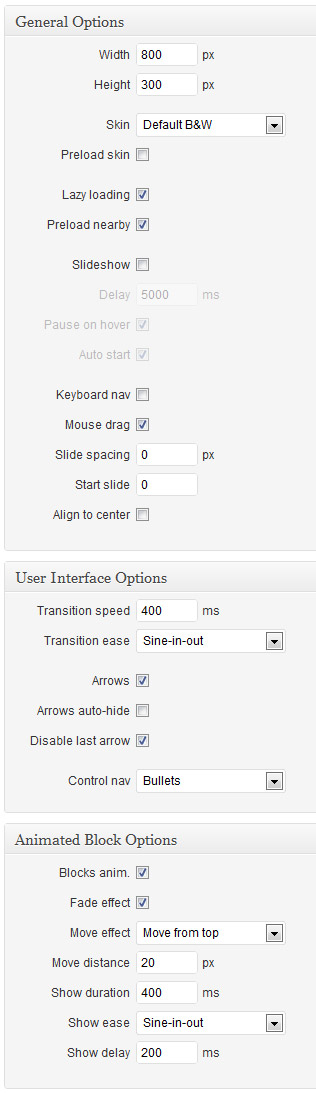
- Autoplay support, interval times can be set in the settings panel.
- Optional keyboard navigation and much more…
RoyalSlider is tested on Mac, PC, iPad 2, iPhone 4, HTC Desire, Blackberry PlayBook and even on Kindle Keyboard  . If you’ve found that something works incorrectly on your device, so please contact me through my profile page.
Backend Features:
- Easy to use admin area with default WordPress style and inline help.
- Simple embedding using shortcode or PHP function.
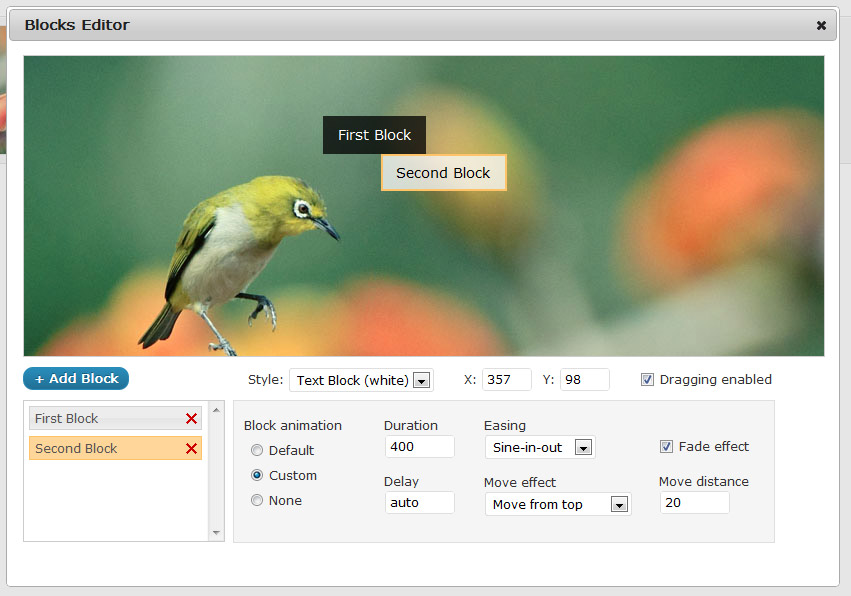
- WYSIWIG blocks editor — add unlimited blocks-captions to each slide and edit their content inline.
- Set custom move and fade effects, duration, easing and delay for each animated block.
- Live slider preview in admin.
- Add images via WordPress media uploader or paste a url.
- Manage sliders and slides — delete, duplicate, drag and drop to sort.
Admin Panel Screenshots (click for larger image):


View Demo On Your Mobile Device

For support please contact me through contact form on my profile page.
Images in preview by John&Fish.