iOS4 iPhone Update Now Available: How to Download & Install

Now that iOS4 is available, here’s a tutorial on how to download the latest iPhone update in a few simple steps:

First, download the latest iTunes update 9.2 via the Apple website.

iTunes 9.2

Connect your iPhone to your computer via USB and open iTunes. Navigate to the “iPhone” in the left-hand sidebar and click “Update.”

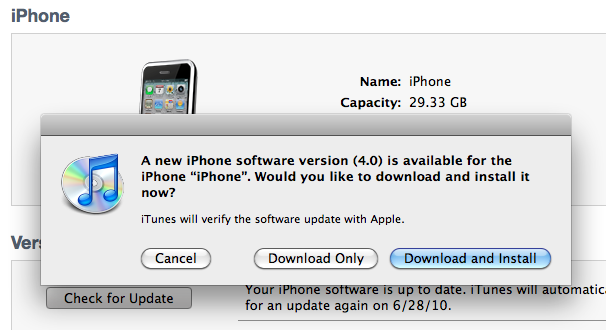
iOS4 Now Available

iTunes will prompt you with a notification that iOS4 is now available. Click Download & Install to install it automatically.

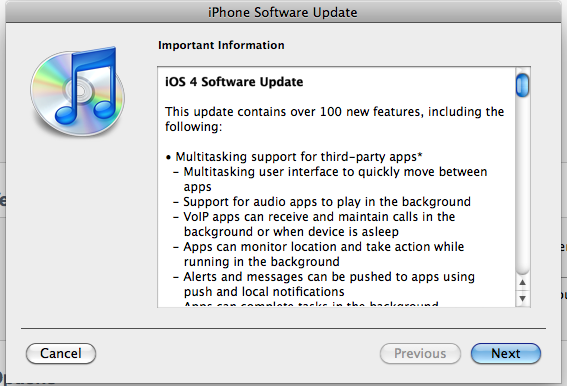
iOS4 Features

The installation wizard will show you a list of features in iOS4. Click next and agree to the Software License Agreement.

You will be asked whether to create a backup of your iPhone. I recommend that you create a Backup so that you do not lose any of your data.

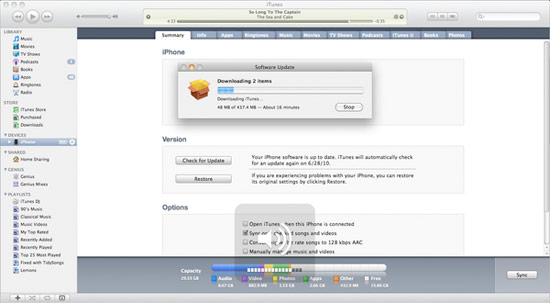
iOS4 download status

iTunes will begin downloading iOS4. Be patient, it is a 378 MB download.

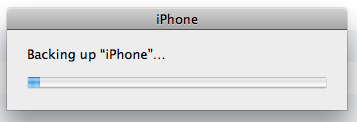
iPhone Backup

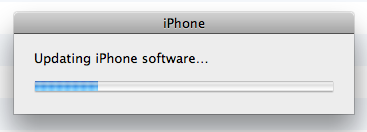
Updating iPhone Software

From there iTunes will backup your iPhone and install the latest iPhone software update.

Look forward to multitasking, folders, customizable backgrounds and much more. Let me know how you like iOS4.

iOS4 iPhone Update Now Available: How to Download & Install is a post from Apple iPhone Review.

You Might Also Like…

  1. Rumor: iOS4 to Hit Between 9 AM to 10 AM Cupertino Time
  2. When Can We Download the iPhone 3.0 Update?
  3. Seven iOS4 Mini-Features You May Not Be Aware of


Seven iOS4 Mini-Features You May Not Be Aware of

iOS4 Features

I assume you already know about the major features in the iOS4 iPhone update like multitasking and folders, but what small changes has Apple made to the iPhone in this update?

Here are the seven iOS4 features that have intrigued me the most — note: I own an iPhone 3GS:

  1. Whenever music is playing in the background, you can bring up rewind, fast-forward and play/pause controls by swiping right in the multitasking panel. (To go to the multitasking panel, double-tap your home button.)
  2. To lock your iPhone into portrait (vertical) orientation at any point, go to the multitasking panel by double-tapping your home button, swipe right, then tap the lock to fix your iPhone’s orientation in portrait mode.
  3. To add Bing as your default search engine, go to Settings >> Safari >> Bing. I am not a fan of Bing myself, but Apple has added Microsoft’s search engine to the iPhone for those of you who are.
  4. A section has been added to the Settings to add or remove certain types of searches from Spotlight Search. For example, you can now exclude notes and messages from Spotlight for privacy or convenience purposes.
  5. You can now turn off all cellular data in Settings >> General >> Network. Whenever I’m low on battery, I temporarily turn off 3G, but EDGE always used to remain on. Now, I can turn off all cellular data to preserve my battery for important uses only.
  6. If someone who is in your Contacts emails you, you will see their photo next to the subject heading.
  7. Perhaps the coolest “mini-feature” is the ability to zoom in the camera viewfinder. Simply tap the screen when in Camera and a zoom bar will appear at the bottom. Slide the zoom bar to zoom in and out.

What do you like most about the latest iOS4 iPhone update?

Seven iOS4 Mini-Features You May Not Be Aware of is a post from Apple iPhone Review.

You Might Also Like…

  1. Rumor: iOS4 to Hit Between 9 AM to 10 AM Cupertino Time
  2. iOS4 iPhone Update Now Available: How to Download & Install
  3. Will Apple “Borrow” Features from Developers’ iPhone Apps?


New iPhone SDK Question & Answer Site: ExcBadAccess.com

Do you have iPhone SDK programming questions?

Do you have a hard time finding answers to your tough iPhone development problems?

Are you tired of searching and searching for how to create iPhone applications?

Do you wish there was site dedicated to answering your iPhone SDK programming questions?

If you answered yes to any of these questions then you should check out http://www.excbadaccess.com/.

http://www.excbadaccess.com/

http://www.excbadaccess.com/

This week’s ExcBadAccess.com’s best questions.

[http://www.excbadaccess.com]

Question of the Day #1: What iPhone dev site do you find most useful?

Question of the Day #2: What are some good resources for iPhone development?

Question of the Day #3: Is there a way I can record my iPhone screen as a video?

Question of the Day #4: Any recommendations for a great iPhone programming book?

You can find the answers to these questions and many more on our Question and Answer site: http://www.excbadaccess.com

Even better that is where you can find the answers to your questions. See you there!

Download the source code from all of our 31 Days of iPhone SDK Apps

Thanks to feedback and suggestions from readers like you, we now have created a single zip file that you can download that contains all of the source code from our series 31 Days of iPhone SDK Apps.

31 Days of iPhone SDK Apps Master Zip File.

And here is the full list of 31 Days of iPhone SDK Apps.

How do I mask a square image to have round corners in the iPhone SDK?

Here’s a quick and easy way to create images with rounded corners.

UIImageView * headerImage = [[UIImageView alloc] initWithFrame:CGRectMake(10.0, 10.0, 64.0, 64.0)];
headerImage.image = contactPhoto;

CALayer * layer = [headerImage layer];
[layer setMasksToBounds:YES];
[layer setCornerRadius:10.0];

[layer setBorderWidth:1.0];
[layer setBorderColor:[[UIColor blackColor] CGColor]];

[contactHeader addSubview:headerImage];

Apps Amuck: The Road Ahead

Road Ahead

Road Ahead

On Wednesday, October 01, 2008 Apple remove the iPhone SDK NDA, and Apps Amuck was there. On the same day we started our 31 days of iPhone SDK applications. Since then we have released all 31 iPhone SDK applications, as promised.

We have heard from many of you, that you want more. And that is our goal, to give you more, and more. We want to help you be great. And it is a goal we are excited about, and looking forward to achieving. Every time we hear from one of our readers, how we helped them achieve and do more, we know we are making a big difference.

We were able to release all 31 of our iPhone SDK applications. This was quite the challenge for us, and we feel we could do even better. That’s why for the 30 days of November, we will be going back and “refactoring”, and improving our existing 31 iPhone SDK applications.

What does this mean for you? More detailed descriptions, and more in depth explanations for all the applications we have already published.

[PS: Don’t you worry. We still have a few more surprises for you up our sleeves. The sky is the limit for all of us.]

Coming Soon – “Step by Step: How to Write Your First iPhone SDK Application” eBook

Step by Step

Step by Step

[See told you we had some surprises in store for you.]

We’ve gotten a LOT of requests to do some really in depth step-by-step tutorials on how to write iPhone SDK applications from scratch. We have published a ton of source code already, and there will be more to come. And soon we will be expanding the descriptions, and explanations for the applications we have already written.

But we want to do more, so we have decided to really push ourselves, and try to get an ebook out this month, “Step by Step: How to Write Your First iPhone SDK Application”. If all goes well, this will be the first in a series of iPhone SDK ebooks.

While the book will target begginers, it will still include some of our best tips and tricks, that we have picked up along the way, that make writing iPhone SDK applications a lot easier. The ebook will be different from most ebooks, because we want it to be a living book, that is updated as we receive new feedback from readers over time.

We also believe in our readers, and the marketplace. So instead of charging $49, or $39, or $29 for our ebook. We will charge no more than $9. And we intend to charge even less, with an introductory offer of $0.99 USD for all of our loyal Apps Amuck readers.

Right now, we are trying to put the infrastructure in place to make all of this happen. But if you can not wait until then, and want to be one of the first to recieve the “Step by Step: How to Write Your First iPhone SDK Application” ebook, then send an email to [email protected] with the subject “StepByStep99″, and we will add your name to the list!

Handling Z-Ordering In Cocos2D Map Based Games

If you’ve used Cocos2D for awhile you may have had some difficult when trying to handle the display order of images.

Things get even more complicated if you are creating an isometric game.  The player character may need to be placed behind an obstacle such as a rock or a tree.  In v0.99.1 automatic z-ordering for tile maps was implemented, and the problem was somewhat solved, but some problems still exist and there is some tweaking to be done.

Another problem, especially with map-based games is creating a player HUD display as the images need to be placed at the right z-ordering and at a consistent location on the screen.

Nat Weiss has created a tutorial on how to overcome these problems by creating two different custom sprite classes which can be found here:
CCZSprite and HudLevelSprite

These two classes should be of help to anyone interested in creating a map-based game in Cocos2D.

Thanks for reading, if you like this please share it!

©2010 iPhone iOS 4 iPad SDK Development Tutorials, Programming Tips, News. All Rights Reserved.

.

Share and Enjoy:

RSS
Twitter
Facebook
DZone
HackerNews
del.icio.us
FriendFeed

How To Push Out Notifications Locally Based On Time

There are times when you want to notify the user that an important event has occurred or will occur.

Push notifications are a great way to notify the user that an event has occurred and became a staple feature immediately after they were added into the iOS sdk.

Now local notifications are available that allow you to push a notification to the device that your app is running on based on time, the notifications can even be recurring.

Brandon Treb has written a great step-by-step tutorial on exactly how to do just that, which you can find here:
iPhone Programming Tutorial Notifications

Thanks for reading, if you like this please share it!

©2010 iPhone iOS 4 iPad SDK Development Tutorials, Programming Tips, News. All Rights Reserved.

.

Share and Enjoy:

RSS
Twitter
Facebook
DZone
HackerNews
del.icio.us
FriendFeed

Blocks – An Interesting Objective-C Addition In iOS 4

Blocks are a feature of the C language that have been added to the iPhone and iPad sdk with iOS 4.

What they allow you to do are create usable “blocks” of code that you can pass along like any object. This probably sounds a lot like a function, and they are very similar, but there is a significant difference in that they “close” around variables that are in scope before a block is declared.

I know this sounds odd, and you might be wondering when you’ll need to use them, but they certainly have their uses as there are definitely times when you will want a small block of reusable code.

You can find a complete tutorial from Mike Clark here that explains things better here:
Using Blocks In iOS 4

If you liked this, please share it!

[Via Joost Schuur]

©2010 iPhone iOS 4 iPad SDK Development Tutorials, Programming Tips, News. All Rights Reserved.

.

Share and Enjoy:

RSS
Twitter
Facebook
DZone
HackerNews
del.icio.us
FriendFeed