Analyst: Apple’s Bumper case program a win-win for customers and shareholders

Analyst Shaw Wu with Kaufman Bros. says that while Apple is likely taking a hit by giving away free cases and bumpers to iPhone 4 buyers (and the company is even extending the offer after the deadline to anyone who calls AppleCare), the program will likely be a win in the long run. Obviously customers appreciate getting a free case (and a “fix” for the “antennagate” issue), but Wu says that even shareholders will benefit. Apple has set aside $175 million for the case program, which sounds like a lot, but it’s a drop in Apple’s $45.8 billion cash bucket, and a fix for the issue may eventually add as much as 45 cents to Apple’s share price this year. In other words, the free cases are money well spent, according to Wu.

So it looks like Apple got out of its reception issue cheap. Doesn’t hurt, says Wu, that it wasn’t a huge issue in the first place: supposedly, not many users actually had the reception issue that got such press. I’m not entirely sure that’s true — since I bought my iPhone 4, I have experienced the antenna problem multiple times. But because voice calls are such a small part of the experience for me (most of what I do on the iPhone 4 is with apps and messaging), it hasn’t really hurt my enjoyment of the device overall. And I’m guessing that’s where most customers lie — the antenna problem is an issue for them, but not necessarily a deal-breaker.

TUAWAnalyst: Apple’s Bumper case program a win-win for customers and shareholders originally appeared on The Unofficial Apple Weblog (TUAW) on Tue, 14 Sep 2010 14:00:00 EST. Please see our terms for use of feeds.

Read | Permalink | Email this | Comments

HMH Fuse: California tests a full year Algebra course on an iPad app

Houghton Mifflin Harcourt, a major textbook company, has launched a year long pilot project with the HMH Fuse: Holt McDougal Algebra 1 full year algebra course on an iPad. The course mirrors all the content of the Holt McDougal Larson Algebra 1 2011 textbook currently being used in many schools.

The pilot project includes 400 eighth grade students in the San Francisco, Long Beach, Riverside and Fresno, California school districts. One group is using the HMH Fuse app and a control group is using the standard text. As far as we know, this is the first time a full year subject matter course has been rolled out as an app. The study will be conducted by Empirical Educations Inc. an independent testing group, and will measure differences and similarities in areas of achievement and attitudes about learning. They also want to learn about how and if the students use the app the way it was intended.

Each teacher in the pilot project will teach one random class section using the app and another using the book, which may help account for differences in teaching style and his or her influence over the class. According to the testing agency, the study will eventually roll-out to 1200 students with test reports due in the Fall of 2011 and hopefully be available to all California school districts in January, 2011.

TUAWHMH Fuse: California tests a full year Algebra course on an iPad app originally appeared on The Unofficial Apple Weblog (TUAW) on Tue, 14 Sep 2010 13:00:00 EST. Please see our terms for use of feeds.

Read | Permalink | Email this | Comments

Apple profiles iPads used in big business

Apple has published profiles of 4 large businesses that use iPads in their daily functioning. The first, Hyatt Hotels and Resorts, explains how their staff has replaced older tools with the iPad. “I don’t carry a calculator. I used to subscribe to all the journals: the Wall Street Journal, the Financial Times. That’s all disappeared. It’s all on iPad.”

Additionally, guests who check into Hyatt’s Andaz brand hotels are greeted with iPad-wielding staff who let them swipe a credit card, check in and receive a card key that was encoded by the iPad itself. Since the iPad is so portable, there’s no need for guests to stand in line at the desk.

Also featured is RehabCare, a St. Louis-based medical rehab facility. They’ve eliminated a lot of paper from their process by introducing the iPad, using it to enter patient data, track records and more.

There are two other businesses featured, and each has an accompanying overview video. It’s good to see Apple pushing the iPad to the enterprise market.

TUAWApple profiles iPads used in big business originally appeared on The Unofficial Apple Weblog (TUAW) on Tue, 14 Sep 2010 12:00:00 EST. Please see our terms for use of feeds.

Read | Permalink | Email this | Comments

TUAW preview: NimbleBit’s Pocket Frogs

Since I got my new iPhone 4 a few weeks back, I’ve been playing more games than ever on Apple’s little handheld. I just recently got back into Ngmoco’s We Rule. It’s probably the pinnacle of the “freemium” genre on the iPhone so far. It’s free to play, very social, and very much based on timed “check-ins,” where you set crops to grow and then come back in a few hours to harvest them. It puts in little blips of gameplay that move you towards a larger progress goal.

The only problem is that We Rule isn’t all that fun; it’s a bunch of clicking and grinding. So, lately I’ve been wondering when someone would add a fun freemium game to the App Store. It would have to be something that was social and progressive and all that that entails, but it would also need to have a game component that was actually fun to play.

Enter NimbleBit! They’re following up on their great froggy platformer DizzyPad with Pocket Frogs, a freemium title that actually adds some fun to the equation and shows a lot of potential as well.

Gallery: Pocket Frogs

TUAWTUAW preview: NimbleBit’s Pocket Frogs originally appeared on The Unofficial Apple Weblog (TUAW) on Tue, 14 Sep 2010 11:00:00 EST. Please see our terms for use of feeds.

Read | Permalink | Email this | Comments

Is Game Center limited to 500 friends?

Rene Ritchie at TiPb recently noticed that Apple’s new Game Center seems to be capped at 500 friends, which another user was able to confirm.

After receiving 500 friend requests*, Rene noticed they stopped coming in. He figured that was the end until he saw a tweet from fellow Game Center user MuscleNerd:

“So much for my not-so-secret plan to break GameCenter! They’re capping my friend count at 500 (as soon as I delete 1, I get 1 new request).”

After some testing, Rene confirmed the same thing. As soon as one request was deleted, another popped up. So, if you’ve got a lot of requests waiting beyond 500, you won’t see them. As Rene correctly points out, most people won’t have this problem as 500 is a heck of a lot of friends. Still, it’s something to keep in mind lest would-be friend number 502 thinks he’s being ignored.

*I know 9 people. Including my children.

TUAWIs Game Center limited to 500 friends? originally appeared on The Unofficial Apple Weblog (TUAW) on Tue, 14 Sep 2010 10:00:00 EST. Please see our terms for use of feeds.

Read | Permalink | Email this | Comments

Apple warns App Store name squatters

TechCrunch reports that Apple is cracking down on “app name squatters,” developers who create an app and reserve a name on the App Store, but don’t actually upload files to release and sell the app. Apparently this is an issue — personally, I can’t immediately think of any names that I’d need to have on the App Store (maybe it’s something really generic, like iReader?), but there are supposedly a few developers who have a certain name in mind, but can’t use it because a squatter has locked it up in iTunes Connect. In fact, our own Victor Agreda foresaw this problem a while back, and now it’s popped up on Apple’s radar.

There’s good news, though. Apple will now send out a warning after 90 days of locking up a name with no actual files uploaded, and then 30 days later will delete the record on the App Store. And notices are going out; developers who’ve sat on a name for more than 90 days already are getting their 30 days’ notice now.

If that app you’re planning to put out there has taken a little longer than expected to go through the final coding process, you might want to get on it. But Apple doesn’t say that it will actually check. While the app will need to meet all of the other guidelines (including the rules for minimum functionality), you could probably still release a small app under the name you want, and then upgrade and release the full version later on. We’ll have to see what happens with devs who really want to reserve App Store names in the future.

[via AppleInsider]

TUAWApple warns App Store name squatters originally appeared on The Unofficial Apple Weblog (TUAW) on Tue, 14 Sep 2010 09:00:00 EST. Please see our terms for use of feeds.

Read | Permalink | Email this | Comments

TUAW’s Daily App: Monkey Island 2 Special Edition

This will be the shortest Daily App post I’ve ever had to write. LucasArts has inexplicably put the iPhone version of Monkey Island 2: LeChuck’s Revenge Special Edition on sale for just US 99 cents. Go buy it. You’re welcome.

Oh, you need more? This is one of the most beloved LucasArts adventure games of all time, and it’s actually two games in one. They redrew and recorded all new voices and audio just for this edition, and you can switch between the old and the new games at any time. It’s got a new control scheme, or you can point and click your way around the old control scheme. It’s hilarious, beautiful, still original, and just plain captivating.

Oh, and it’s usually $7.99 (in fact, the iPad version is still priced at $9.99, even during this sale). Just go buy this game right now! This is a crazy bargain for iPhone gamers, and you should consider yourself lucky to have it.

TUAWTUAW’s Daily App: Monkey Island 2 Special Edition originally appeared on The Unofficial Apple Weblog (TUAW) on Tue, 14 Sep 2010 08:00:00 EST. Please see our terms for use of feeds.

Read | Permalink | Email this | Comments

AppSync 4.1 – Install Cracked Apps on iOS 4.1 (Jailbroken)

AppSync 4.1 for iOS 4.1 jailbroken firmware is now available in the Cydia. AppSync 4.1 let you install cracked apps on iOS 4.1 firmware by patching MobileInstallation file on iOS 4.1. Once you’ve installed AppSync iOS 4.1 on your iDevice running jailbroken iOS 4.1, you’ll be able to install cracked apps (.ipa) on your iDevice.

appsync 4.1 for iOS 4.1

NOTE: Your iDevice running iOS 4.1 must be jailbroken. iOS 4.1 jailbreak is NOT out yet. There’s an unofficial PwnageTool released but we recommend official jailbreak tools only.

Follow the instructions below to install AppSync 4.1 on iOS 4.1 running iPhone or iPod Touch so that you may install cracked apps.

DISCLAIMER: This guide is for testing and educational purposes only. Use it at your own risk. We can NOT be held responsible if anything goes wrong. We encourage you to buy apps from iTunes Store.

Install AppSync 4.1 for iOS 4.1 Firmware

  1. Assuming that you’ve already jailbroken iOS 4.1, Simply go to Cydia.
  2. Add the following source: http://cydia.hackulo.us (How to)
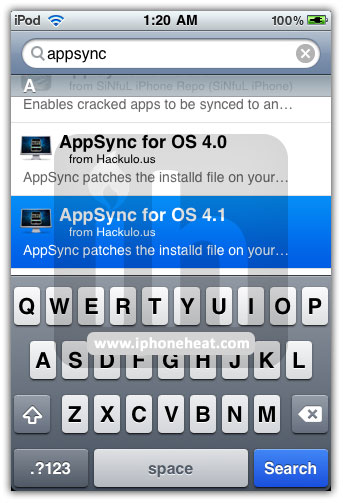
  3. Now search for AppSync for OS 4.1 in Cydia.
  4. Install AppSync for OS 4.1

Installing AppSync will patch MobileInstallation on iOS 4.1 and let you install cracked apps (.ipa) on your iPhone and iPod Touch.

appsync 4.1 for iOS 4.1appsync 4.1 for iOS 4.1appsync 4.1 for iOS 4.1

*** Don’t forget to install a free app from iTunes Store before trying Cracked apps.***

You can follow us on Twitter, Join us at Facebook, and also Subscribed to RSS Feed to receive latest updates.

Also Checkout:

Digg
Twitter
StumbleUpon
Facebook
Reddit
del.icio.us

Windows Live Messenger for iPhone Now Supports iOS 4 and Facebook Chat

Windows Live Messenger for iPhone and iPod Touch has been updated to version 1.1 with iOS 4 support and Facebook chat among other new features. Complete changelog in Windows Live Messenger 1.1 after the jump…

windows live messenger

New In Windows Live Messenger 1.1

  • iOS 4 fast-switching
  • Facebook chat
    Connect your account at http://profile.live.com/Services (Available in US, UK, France, Germany, Brazil, and Russia)
  • Friends list filters
  • Hide off-line contacts in Settings
  • Faster access to change status & sign-out
  • Support for 31 languages

You can download Windows Live Messenger from the App Store for free. [iTunes Link]

You can follow us on Twitter, Join us at Facebook, and also Subscribed to RSS Feed to receive latest updates.

Digg
Twitter
StumbleUpon
Facebook
Reddit
del.icio.us

Updated:Great Beginning iOS Developer Books For Learning Objective-C/Cocoa Touch

Just over a year ago I posted about some beginning iPhone developer books, and things have changed dramatically since.  Since I get e-mails about that old post and whether or not those books are still relevant for learning Objective-C/Cocoa Touch I felt I should update since with so many more choices my perspective has dramatically changed.  At that time there were just a few books on the market.  Now there seems to be dozens of books targeting beginning iOS developers.  Searching for iPhone development in books on Amazon.com currently yields 200 results.

As time has gone on publishers seem to be trying to one up each other, and the material just gets better and better.  I’ve also added a review section where users can submit ratings for various books, that area is fairly new and I haven’t had much time to work on it, but it will be extended in the future.  Here’s a breakdown including some of the more recent books for learning iPhone development using Objective-C/Cocoa Touch.

These are the 3 books that stand out:

1) Big Nerd Ranch: iPhone Programming Guide – This book overall is probably the beginner book that will appeal to the widest range of people.  It is extremely well written, deep and covers an extremely wide range of topics.  You certainly can’t go wrong with this one.  The Big Nerd Ranch is known for quality instruction.  (More in-depth review here)

2) iPhone For Programmers: An App-Driven Approach – This is a by example type book which I love.  If you like learning directly in code you will probably like this book.  Some people hate to learn this way and prefer a deeper more theoretical learning experience those people will like the Big Nerd Ranch book better.  This book is also a very quick read for a programming book which is something that I also like.  (More in-depth review here)

3) How To Make An iPhone App – This book is for absolute beginners looking to get their feet wet.   This book was created to be accessible for anyone even if they had not programmed before and covers learning Objective-C.  It does not cover anything with extreme depth, but rather gets you started teaching you need to know material in a very straightforward manner.  Only available as an eBook. (More in-depth review here)

Conclusion

I’d say that if you have some programming knowledge the Big Nerd Ranch book is the kind of book that most programmers love, and I think it’s a great book.  I like to learn more through code and so I personally would prefer the Deitel book.  If you’re starting at the absolute beginning How To Make An iPhone App covers learning Objective-C in addition to Cocoa touch and is very straightforward.

©2010 iPhone, iOS 4, iPad SDK Development Tutorial and Programming Tips. All Rights Reserved.

.

Share and Enjoy:

RSS
Twitter
Facebook
DZone
HackerNews
del.icio.us
FriendFeed

New Open Source OAuth Library For Easy Authentication On iOS Devices From Google

OAuth authentication is commonly used by web services around the internet, including Youtube, Twitter, and Facebook.  Unfortunately it can be somewhat of a pain to code and on the iPhone and iPad some of the solutions end up being somewhat awkward.

I’ve mentioned some useful goodies from Google for iOS developers in the past, and now Google has created a new library that allows easy Oauth authentication and can be used in all your iOS apps.

What I really like about this library is how easy it is to use, with just a few lines of code you can implement it into your app, and it does everything including popping up a webview so your users can sign in.

You can see a tutorial with sample usage code on the Google Mac Blog here:
Oauth Sign-In Controllers For iOS Apps

You can find the project on Google code here:
http://code.google.com/p/gtm-oauth/

Thanks for reading, please share this using the buttons below!

©2010 iPhone, iOS 4, iPad SDK Development Tutorial and Programming Tips. All Rights Reserved.

.

Share and Enjoy:

RSS
Twitter
Facebook
DZone
HackerNews
del.icio.us
FriendFeed

Four Writing Apps for the iPad

“One upon a time …” Well, ok, you wouldn’t start a story like that anymore. You’ll probably have a much more striking idea for the opening which will make the reader of your short story or novel or poem crave to read more. But if the muse strikes you, where do you write it down? What if you don’t happen to have pen and paper or a smartphone with you? Or: how do you write professionally while not at your desk?

With National Novel Writing Month coming up, a 30 day frenzy of writing an entire novel, I took a look at the options the iPad offers us. And even if you’re not ready to lose yourself in NaNoWriMo, some of these writing apps might just fit your needs anyway if you are a serious journal keeper or have other professional writing needs.

What To Look For In a Writing App

Since there are many different types of writers out there, no single app will fit all their needs. But these are the criteria I’ve been looking for in preparing for NaNoWriMo:

  • the ability to flesh out characters and scenes in separate documents, which should be easily accessible while writing
  • to have separate documents per chapter, but all chapters to a story should be assembled within one larger “container” so there will be no mix-ups if one’s writing more than one story at a time (or separate articles or journals)
  • the ability to sync what has been written as comfortably as possible to a desktop computer or at least to an online service from where it’s accessible

Of course there are other criteria, but these are the most important ones for me. Taking these into account, let’s look at the following four apps.

Chapters for iPad

Chapters for iPad is an excellent application when it comes to chronicles or to keeping a journal. If desired, different larger events – for example a journal of life in general and a journal of a trip – can be separated into different chapters (documents). Within a chapter, entries are done chronologically, but with the option to adjust dates so entries for past events are no difficulty.

I am unsure as how to practical the app is for actual novel writing; it certainly doesn’t fit my writing style. But for a journal, it comes close to perfect. The interface is well designed and the app allows for a number of adjustments, ranging from font-size and font-face over the adjustable color of the background to the ability to password protect whatever you have written. I especially like that I can attach photos to entries, which in my opinion is essential for keeping a journal of my life’s events.

Chapters for iPad

Chapters for iPad

The export options are also noteworthy: you can send your entries to Google Docs, you can email them or create PDF’s or complete web pages (the two latter can be accessed via the Apps tab in iTunes and they include your photos too!).

Verdict: Chapters is not really a novel writing app, but an excellent journal app. As long as you’re waiting for Momento to come out on the iPad, Chapters can be a worthy replacement (or if you neither want or need social media integration, it could be THE journaling app for you).

My Writing Nook

My Writing Nook allows for separate entries, which are all stored in one location. There are no different notebooks to separate content belonging to different stories or articles. Instead, you can give each entry a different color label, which can serve to distinguish quickly between character notes, chapters, or research done on a subject. More importantly, the colors serve an ordering purpose – all notes with the same color code are grouped together. Through this application of color coding even different stories can be easily separated from each other.

My Writing Nook

My Writing Nook

Aspects to also consider in My Writing Nook are the capabilities to switch between a dark and light screen mode (good for writing in the evening or at night), to set a password and to sync via Google Docs. Also worth mentioning is the app’s capability to look up words in an online dictionary or thesaurus – a feature which My Writing Nook shares with only Manuscript, a much more advanced (and pricier) app.

Verdict: if you are looking for color coding and the ability to adjust font-faces, sizes and colors, but don’t need extra sorting or filtering options, My Writing Nook might just fit your needs.

Manuscript for iPad

Manuscript for iPad comes with a beautiful interface that spells novel writing at every opportunity. It’s where beauty marries function and a wonderful writing app emerges. Content can be divided into separate books (and they look just like books too); you can add a pitch for every story and a synopsis. Above all, you have index cards. Doesn’t sound exciting, but if you have ever juggled different characters, chapter concepts, story lines etc you will appreciate the concept of having them neatly arranged on virtual cards (on the Mac, Scrivener uses the same formula). You can color code them to represent different content.

Manuscript Cards

Manuscript Cards

In the actual writing screen you have your chapters to the left with a short summary of what’s happening. The left pane can disappear and so you’ll have the entire screen for your writing, distraction free. A specialty of Manuscript are the build in research tools. You can quickly jump into Google, Wikipedia or the thesaurus with just two taps. While looking up stuff so easily rocks, it would be great if I could also import that content, say as an index card (thinking of Scrivener again here).

Manuscript for iPad

Manuscript for iPad

When it comes to settings, you can only chose between two different fonts and different paper backgrounds for the writing area. Nothing spectacular, but the again the question is – do you really need more? Manuscript syncs with a service that is quite popular, Dropbox, and offers export in HTML, RTF and TXT format.

Verdict: Manuscript does exactly as its name implies – it makes it very easy and comfortable to write a novel by providing a number of needed tools (synopsis, index cards), which make the use of the app fun and engaging.

Notebooks

This app came as a surprise – or to be specific: the wealth of functions Notebooks offers took me by surprise. I had almost decided on Manuscript as my go to app for the upcoming NaNoWriMo, but Notebooks brings on some serious competition.

Since I can’t dive into all the features it had to offer, let me focus on the most remarkable ones: first, the ability to structure content. On multiple levels! You can have separate notebooks for different stories and within a notebook, you can have notes (in my example called chapters) and books, which in turn can again contain notes and books. This way, you can generate a hierarchical structure to contain your content (did I mention you can color code books?).

Notebooks for iPad

Notebooks for iPad

Second, you can also generate to-do lists, that can hold items with due dates. If an item is due today, the checkbox turns orange and an extra “book” appears that shows your due items. In addition, the app icon sports a red badge with the number of due items. By tapping list items, you can either mark them as being processed, done or delete them.

The app is also available for the iPhone, with both the iPad and iPhone version supporting various synchronization methods. In the next version of Notebooks, Dropbox support is planned as well as support for tags and handwritten notes.

Verdict: Notebooks for iPad is a very mighty app with excellent content-structuring features. The task management integration allows for reminders about research and other tasks, which can be handy if you just want to remind yourself of something later but not significantly disturb your workflow by changing to another app.

Conclusion

It’s hard to recommend any of the reviewed apps – not because they are not useful, but because every writer will have different preferences. For eager journal keepers, Chapters will be the go-to app with its photo integration and date-based entry approach. For simple writing needs that exceed the included Notes app by Apple, My Writing Nook might suffice – it’s color coding capabilities and interface adjustment options lift it above free apps like Simplenote as well.

For really serious novel writers, Manuscript will definitely be worth trying out with its very structured approach to writing; and Notebooks for iPad might appeal to both novel writers and researchers (journalists, students, bloggers etc) with its wealth of included features.

15 Nifty Navigation Apps

The iPhone’s advanced GPS capabilities make it an awesome companion for getting from A to B. There are tons of apps that provide advanced interfaces and turn-by-turn directions exactly like you’d find on a dedicated GPS device.

Below we’ll take a look at fifteen of the best navigation apps we could find for the road, the trails and even the air! Note that several navigation apps require subscription but we did our homework and tried to provide subscription information where appropriate.


The apps below are mostly for the U.S. but several have identical versions for other countries.

AT&T Navigator

“AT&T Navigator transforms your iPhone 3G, iPhone 3GS, and iPhone 4 into a voice-guided navigation system with turn-by-turn driving directions. (AT&T Navigator is currently not supported on the iPad.) A subscription charge will appear on your AT&T wireless bill. You can choose between monthly or annual subscription options.”

Price: Free
Subscription: $9.99/month or $69.99/year

screenshot

AT&T Navigator

MotionX GPS Drive

“MotionX-GPS Drive turns your iPhone into the next-generation car and pedestrian navigation solution. MotionX introduces new features not yet seen on mobile devices, including “door-to-door” personal navigation tools, user interface innovations that greatly simplify the navigation experience, and integration of live search capabilities.”

Price: $0.99
Subscription: Includes 30 Days of Live Voice Guidance ($24.99/year)

screenshot

MotionX GPS Drive

Waze – Social GPS

“Waze – A social driving and navigation app that connects you to other drivers in order to get all the real-time road information you need…every time you get into the car! Foursquare, Facebook and Twitter integrations.”

Price: Free
Subscription: None

screenshot

Waze – Social GPS

TomTom U.S.A.

“Get the TomTom navigation app and have smart, easy-to-use, turn-by-turn navigation on your iPhone or iPod touch, whenever and wherever you need it. Seamless navigation while calling, new, updated maps, background navigation instructions, and route sharing.”

Price: $39.99
Subscription: None (pay for Map updates)

screenshot

TomTom U.S.A.

Where To?

“Where To? makes it incredibly easy to locate the closest steakhouse, bank branch, billiard club or anything else you may be looking for, at the drop of a hat! Think of it as a traditional GPS device built right into your iPhone. Includes more than 700 customizable categories and 2,200 brands, allowing you to find whatever you want without any typing.”

Price: $2.99
Subscription: None

screenshot

Where To?

iGO My way

“iGO My way 2009 for the iPhone offers a trendy and entertaining navigation solution at your hands. The software can be easily learned even by first-time users, who have never tried GPS navigation before.?On the other hand it offers a rich and valuable set of features and functions that most users demand. Numerous smart functions take individual needs into consideration, helping the driver to use the software more quickly and effectively.”

Price: $49.99
Subscription: None (free map updates until December 2010)

screenshot

iGO My way

skobbler US

“Skobbler is the first TRULY free voice-assisted turn-by-turn navigator to offer true street level navigation like those overpriced giant GPS company apps you have been eyeing but don’t want to shell out the hard cash for. Oh you have heard the *FREE* story before and then been caught by an in-app purchase that made you upgrade to keep using it or the need to subscribe after 30 days? Not Skobbler. Skobbler is free. No in-app purchase, no subscription. ”

Price: Free
Subscription: None

screenshot

skobbler US

MapQuest Navigator

“Based on the foundation from a brand you know and trust, MapQuest Navigator sets the standard for voice-guided personal navigation on the iPhone. We’ve taken the most useful features for navigation and packed them into a simple, intuitive application that makes getting to your destinations as easy as possible.”

Price: $0.99
Subscription: 30 days for $3.99, 90 days for $9.99, or 365 days for $29.99

screenshot

MapQuest Navigator

NAVIGON MobileNavigator

“With the NAVIGON MobileNavigator you can transform your iPhone into a fully functional mobile navigation system that is every bit as good as the multi-award-winning personal navigation devices from NAVIGON in terms of its user-friendliness and features.”

Price: $59.99
Subscription: None

screenshot

NAVIGON MobileNavigator

Gokivo GPS Navigator

“Find your way simply and easily behind the wheel with turn-by-turn visual and voice-guided GPS navigation. Enjoy the latest NAVTEQ maps and integrated real-time traffic conditions monitoring for the most convenient timesaving routes. Find nearby restaurants, gas stations, ATMs, hotels, hospitals, theaters, plus millions of updated points of interest (POI) – all powered by Yahoo! Local search.”

Price: Free
Subscription: $4.99 per month or $32.99 per year

screenshot

Gokivo GPS Navigator

CoPilot Live North America

“CoPilot Live is one of the most highly acclaimed mobile GPS navigation apps available, widely recognized by the experts as the best blend of features and performance for an amazing price. With complete, detailed street maps of the U.S. and Canada stored on-board your iPhone, not downloaded each trip, there’s no need to rely on your mobile service for navigation or risk running up expensive roaming and data charges. ”

Price: $19.99
Subscription: None for maps, required for traffic (free monthly map improvement downloads directly to your iPhone and free quarterly full map updates through December 2010 )

screenshot

CoPilot Live North America

Magellan RoadMate

“With Magellan’s Premium Car Kit with built-in GPS receiver (sold separately), transform your iPhone and even iPod touch into turn-by-turn GPS navigator with spoken street names. The Magellan RoadMate App for iPhone and iPod touch uses the same easy-to-use interface as our dedicated personal navigation devices. Best of all, the Magellan App is a one-time purchase with no subscription or monthly fees.”

Price: $49.99
Subscription: None

screenshot

Magellan RoadMate

Mobile Maps US

“Sygic Mobile Maps is the most complete turn-by-turn, voice guided navigation software for your iPhone. All maps of US from Tele Atlas are with you on your phone. Text-to-speech tells you the name of the next street so you can fully focus on the road. Speed camera crowd-sourcing protects your wallet.”

Price: $29.99
Subscription: None

screenshot

Mobile Maps US

Backpacker GPS Trails

“Backpacker’s GPS Trails iPhone app doubles as a portable trip database and personal navigation device for your outdoor lifestyle: hiking, backpacking, mountain biking, trail running, mountaineering, or for just basic trail navigation. Locate trips: Search by name or park, or select from trails near your current location—more than 3,500 Backpacker-endorsed adventures across North America.”

Price:$9.99
Subscription: None

screenshot

Backpacker GPS Trails

Air Navigation Pro

“Air Navigation is a real-time aircraft navigation application with integrated flight planning. Using the GPS receiver (integrated or external) and accelerometers of the iPhone it can emulate different types of real IFR or VFR aircraft navigation instruments. Using the navigation plan editor, you can prepare and store navigation plans and use them in the cockpit with the moving map. Using the flight recorder, you can store your flight path and altitude and display it in Google Earth.”

Price: $37.99
Subscription: None

screenshot

Air Navigation Pro

Conclusion

No matter how bad you are with directions, the fifteen apps should definitely be enough to get you to wherever you happen to be going.

Leave a comment below and let us know what your favorite GPS app is and why. Also be sure to give your opinion of any of the apps above that you’ve tried!

Join Me At The Voices That Matter iOS Dev Conference **Coupon Code**

Learn from Industry Leaders Who Literally “Wrote the Books” on iOS Development

Coming to you direct from Addison-Wesley Professional, which has published some of the leading books in the field, the Voices That Matter: iPhone Developers Conference is taking place October 16-17 in Philadelphia!

Take a look around at all the tech books you have on your physical and digital bookshelves. If you’ve been developing for the Mac, the iPhone and the iPad – chances are good that you rely on books by Steve Kochan, Erica Sadun, Aaron Hillegass and Jeff LaMarche. Even more, you probably follow the Tweets and blogs of folks like Graham Lee, Mike Lee, Matt Long and Chris Adamson. Wouldn’t it be great to meet and learn from these thought-leaders in person? Now you can at the Voices That Matter: iPhone Developers Conference!

You’ll acquire skills for mastering iOS development during a weekend of robust educational sessions. Our speakers are eager to share their knowledge, answer your questions and address your application needs. You’ll participate in interactive discussions that provide the perfect environment for an unbiased and effective learning experience.

SPECIAL SAVINGS! As someone that reads this blog, you can save $100 off the conference fee by providing priority code PHBLOGS when registering. Register Now!

Coupon Code: PHBLOGS


With firmware 4.1, the iPhone battery lasts half? Here’s how to solve!

There are many users (Including me) that since yesterday after updating to 4.1 ios complain sensational drop in battery, of course, the iPhone 3G and iPhone … 4 in this article we explain how to address the problem at the moment waiting for Apple launched an update for this bugs.

Practically, the problem it brings gamecenter platform developed by Apple to play with friends from anywhere in the world from our iPhone. Game center even if not used remains in the background that is open in our multitasking consuming so our battery in half the time … To resolve at the moment waiting for what will Apple just hit on account and to log out by clicking “EXIT”

Related Posts

  1. [apps iPhone] Scarface Last Stand .ipa Download