Survey: 23% of iPhone users would switch to Verizon

It’s something we’ve heard for years now. “If the Verizon offered the iPhone, there would be a mass exodus from AT&T.” According to one survey, the exodus might not be so massive.

BusinessInsider reports on a survey conducted by Credit Suisse that asked an unspecified number of iPhone users who they would select as a carrier if they could abandon AT&T. Just 23% — less than one quarter — said they’d jump ship to Verizon. Additionally, another 3% would move over to Sprint while a whopping 2% would choose T-Mobile.

Of course, this means that 63% of iPhone users surveyed would stay put with AT&T. Credit Suisse crunched the numbers and figured out that 23% of users represents about 1.4 million customers who are willing to switch to Verizon. Personally, I live in a moderate coverage area, so I’d have trouble no matter who I’m with.

How about you? Are you ready to switch?

[Via AppleInsider]

TUAWSurvey: 23% of iPhone users would switch to Verizon originally appeared on The Unofficial Apple Weblog (TUAW) on Tue, 21 Sep 2010 14:00:00 EST. Please see our terms for use of feeds.

Read | Permalink | Email this | Comments

Coming soon to a pocket near you: Jorno folding Bluetooth keyboard

Want a Bluetooth keyboard that you can use with your iDevice or Mac and slip into your pocket when it’s not in use? Cervantes Mobile LLC today introduced their Jorno folding Bluetooth keyboard, which folds down to a tiny 3.5″ x 3.5″ x .9″ box when not in use. When deployed, the keyboard is quite small — 8.5″ x 3.5″ by just 0.3″ — but apparently quite usable. It’s only 8.8 ounces in weight, too, so it won’t bog you down.

The Jorno keyboard uses a rechargeable lithium ion battery to provide about a month of use; it’s charged with a Mini USB charging cable. It works with a variety of devices, so even if you don’t have an Apple device, you can put one to good use. It also comes with a detachable cradle for holding a phone, iPad, or media player.

Jorno will cost US$99 when it begins to ship later this fall, but you can preorder the keyboard for a special price of $79 through October 31, 2010.

TUAWComing soon to a pocket near you: Jorno folding Bluetooth keyboard originally appeared on The Unofficial Apple Weblog (TUAW) on Tue, 21 Sep 2010 13:30:00 EST. Please see our terms for use of feeds.

Read | Permalink | Email this | Comments

iPhone-connected blood glucose meter now closer to reality

TUAW received a tip this morning about something that could be immensely useful to the over 17.9 million people in the U.S., as well as millions in other countries, who have diabetes.

Pharmaceutical company Sanofi Aventis has announced the iBGStar Blood Glucose Meter that connects directly to the iPhone or iPod touch. While the hardware and official app that will accompany the meter is not yet released, the app is based on the free Wavesense Diabetes Manager app now in the App Store.

Sanofi Aventis is currently preparing the meter for submission to the U.S. Food and Drug Administration (FDA), and it is unlike the Johnson & Johnson concept displayed at the iPhone 3GS event in March of 2009. That device required a cable; the Sanofi Aventis glucose meter just plugs into the Dock Connector port on the iPhone, takes readings from a blood sample, and stores the information on the iPhone for analysis. The patient can email the data to a physician if he or she needs feedback on management of their condition.

The patient uses a glucose test strip with a sample drop of blood, and the strip is read by inserting it into the slot (lower right of meter pictured at the right side). The results are displayed on both a small display on the meter as well as in the iPhone app.

Since diabetes is responsible for 1 out of every 10 health care dollars spent in the U.S., better management of the disease could have a huge impact on health care spending.

TUAWiPhone-connected blood glucose meter now closer to reality originally appeared on The Unofficial Apple Weblog (TUAW) on Tue, 21 Sep 2010 13:00:00 EST. Please see our terms for use of feeds.

Read | Permalink | Email this | Comments

Adobe’s Premiere Elements now available for Mac

Adobe has released Premiere Elements for the Mac. Premiere Elements is Adobe’s consumer-level image and video editing software, and this is the first time a Mac version has been released.

This release — version 9 — offers some pretty cool features, like optimized editing of HD video and those neat photo books (much like the ones you can create with iPhoto). They’re a big hit with Grandma.

Much more powerful technology is behind the Photomerge Style Match feature, which is smart enough to match the style of one photo with another. Let’s say you’ve got a beautiful landscape shot with ominous clouds, sparkling water and an impressive foreground, all perfectly exposed. Another picture is completely washed out and would be better if it looked like the former. Photomerge Style Match does its best to make that happen. You can watch a short demo video here.

There’s much more to this software, so go and read the details. Adobe Photoshop Elements 9, which is also available now, and Premier Elements 9 are priced at US$99 each. You can buy both for $149. Mac and Windows versions of the applications are included.

TUAWAdobe’s Premiere Elements now available for Mac originally appeared on The Unofficial Apple Weblog (TUAW) on Tue, 21 Sep 2010 10:30:00 EST. Please see our terms for use of feeds.

Read | Permalink | Email this | Comments

TUAW review and giveaway: Exolife battery case for iPhone 4

With earlier iPhone models, external battery packs and battery cases like the Mophie Juice Pack Air became very popular, due to the original iPhone’s shorter battery life. With the iPhone 4, we’re not seeing quite the battery life issues that we did with the earlier models, but for those who need to be away from a recharging power source for a while, battery cases are still an excellent solution.

Exogear has recently released the Exolife rechargeable battery case for iPhone 4 ($89.95), with a built-in 1500 mAh Lithium-Ion Polymer battery that’s sure to keep your iPhone 4 running for a long time. Read on for a complete review of the Exolife case, and a chance to win one from TUAW.

TUAWTUAW review and giveaway: Exolife battery case for iPhone 4 originally appeared on The Unofficial Apple Weblog (TUAW) on Tue, 21 Sep 2010 11:00:00 EST. Please see our terms for use of feeds.

Read | Permalink | Email this | Comments

Rumor: Apple/Rovi deal suggests Apple television

Earlier this week, it was reported that Apple and Rovi had signed a super-secret pact. The multi-year arrangement will reportedly let Apple make use of Rovi’s technology, which includes interactive television programming guides. Piper Jaffray’s Gene Munster suggested that the deal could mean live TV and DVR functionality for the new Apple TV. “[This is] further evidence that Apple is developing live TV and DVR features for its Apple TV product,” Munster told CNET.

Additionally, Munster goes on to predict an Apple-branded, all-in-one television. I’m not convinced that an actual Apple television is on the drawing board, but it seems that an interactive guide could be added to the Apple TV without too much trouble. As we’ve seen, it’s running the iOS. Apple’s developers could probably write an app to make use of Rovi’s data.

And what a mountain of data they have. According to the Rovi website, they’ve got about 111 million subscribers and a unique catalog of more than 1.2 million TV series episodes (going back to 1954) and over than 1.8 million music albums. Add to that nearly 500,000 movies, and it’s an impressive collection.

Here’s to an update we’d love to see on the Apple TV. Hopefully it won’t be too hard for mom.

[Via Macsimum News]

TUAWRumor: Apple/Rovi deal suggests Apple television originally appeared on The Unofficial Apple Weblog (TUAW) on Tue, 21 Sep 2010 12:00:00 EST. Please see our terms for use of feeds.

Read | Permalink | Email this | Comments

First look: Fuze Meeting extends remote presentation mojo to iPad

Modern meetings are a marvel. With strong competition in the remote presentation/conferencing product space, we now have plenty of capable and feature-rich platforms that offer affordable (sometimes free) remote meetings, most with a good Mac compatibility story to tell. The catch, of course, is that all these technologies depend on Java, Flash/AIR or a bespoke browser plugin to deliver the goods — meaning that the iPad and iPhone are largely left out of the fun.

Given the demand, it’s clear why the Adobe Connect iPhone client and WebEx player for iPad deliver meeting attendance options for iDevices; who wouldn’t want to attend a web meeting from the beach? Still, if you want to host a meeting from your iPad and show off the content stored there or in the cloud, there hasn’t been a solid option [Commenters noted Mighty Meeting, which includes straightforward PPT sharing from the iPad to remote or local displays]. Now, with the introduction of Fuze Meeting HD for the iPad, there is a new contender.

Callwave’s new & free iPad client for Fuze, released today, gives you access to your Fuze Meeting account on the go. Want to host a meeting? Three taps and you’re rolling, including any PPT or Keynote presentations on your device, photos, videos and more. You can include local content or tightly-synchronized media playback from files stored in your Fuze account, including HD media. Pinch to zoom in, point to show a ‘laser pointer’ indicator — just like being there.

Read on for the video demo & more features.

TUAWFirst look: Fuze Meeting extends remote presentation mojo to iPad originally appeared on The Unofficial Apple Weblog (TUAW) on Tue, 21 Sep 2010 09:40:00 EST. Please see our terms for use of feeds.

Read | Permalink | Email this | Comments

TUAW’s Daily App: Phases

Phases is one of those apps that has a lot of information you wouldn’t really think of or need — until you actually have an app available to give it to you. Basically, Phases tells you everything you need to know about the moon, from when it wanes and waxes, rises and sets, and when and where it appears in the sky. Sure, it might not be the most pressing information to have, but it’s kind of fun to check and see if it really is a full moon out, or find out just when the moon will be up in the evening.

And you don’t even need an Internet connection — the app has a database of over 20,000 cities, so even if you can’t hook up to the ‘net, you can still get information from the app. It’s just 99 cents in the store right now, so if the clean design and surprising amount of data available in this one appeals to you, definitely give it a download.

TUAWTUAW’s Daily App: Phases originally appeared on The Unofficial Apple Weblog (TUAW) on Tue, 21 Sep 2010 08:00:00 EST. Please see our terms for use of feeds.

Read | Permalink | Email this | Comments

Kindle ad goes on the offensive against the iPad


Amazon’s taken a leaf out of Apple’s advertising book (Mac vs PC, anyone?) by going head to head with the iPad maker in the most recent Kindle television ad. Most noticeably, the spot delivers a low blow to the iPad’s comparatively poor screen visibility in direct sunlight. As far as ads go it’s rather ingenious, taking some of the best tricks out of the old advertising, uh, book.

In short, a guy sunbathes in a gray t-shirt (geeky), but can’t quite read his “iPad” due to the sunlight. On the deck chair next to him lies a beautiful, bikini clad woman sunbathing while reading her Kindle with a pair of sunglasses on! The geeky guy asks the beautiful woman how she’s reading in the sunlight, she confidently responds by saying, “it’s a Kindle,” and points out that the Kindle cost less than her sunglasses did. The geeky guy is left the inadequate fool. Struggling to read further, he enviously looks over at the beautiful woman while she smirks and carries on reading her Kindle. As a guy, it’s pretty hard to watch that and not think, “I want that.” (I’m talking about the Kindle, aren’t you?)

Recently I had a conversation with a friend who has an iPhone and a MacBook Pro. He’s been in the market for an iPad for some time, but at the last minute he decided to go for the Kindle instead. A tad confused by his last minute change in direction, I asked him why. He noted to me that his iPhone does everything he needs it to do (web browsing, email, apps etc), so getting an iPad would only double up on what he’s already got. As for reading e-books, he continued, the Kindle is substantially cheaper and arguably easier to read.

I guess it’s horses for courses. I know I’d go for the iPad, but I have different needs / wants as to what my friend does.

Amazon’s new iteration of the Kindle was released earlier this month. Having seen the ad, and being that you’re likely a Mac fan since you’re reading this on TUAW, what would you go for? Let’s have our own little Kindle vs. iPad face-off poll.

View Poll

P.S. Check out the parody response to the ad in the continuation of this post. Worth a watch!

TUAWKindle ad goes on the offensive against the iPad originally appeared on The Unofficial Apple Weblog (TUAW) on Tue, 21 Sep 2010 07:00:00 EST. Please see our terms for use of feeds.

Read | Permalink | Email this | Comments

Covert: Enable Private Browsing in iPhone Safari

Covert is a new tweak available in Cydia that enables private browsing in iPhone and iPod Touch Safari. With Covert enabled, Mobile Safari won’t keep any history, cookies or any other private data. Covert is developed by Chpwn, the dev behind Proswitcher, Infiniboard and Infinidock.

covert

How to enable Private Browsing in iPhone with Covert

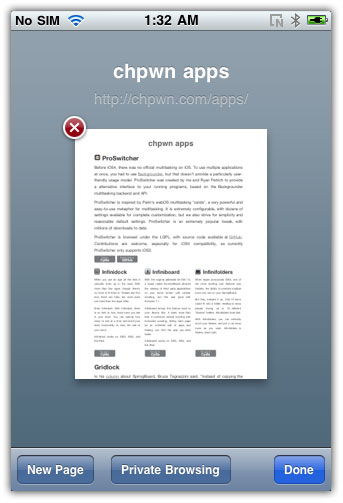
  • After installing the tweak, tap on the Tabs button at bottom-right in your Mobile Safari
  • Then Tap the Private Browsing button
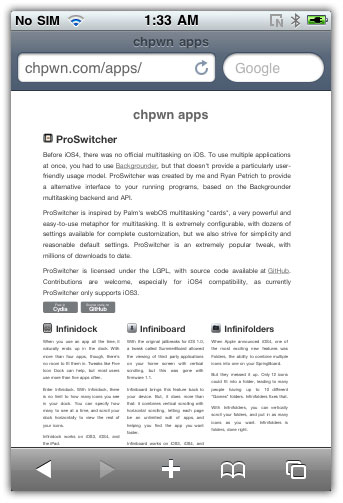
  • This should activate the Private Browsing mode. UI of Safari will change to show that Covert is enabled.

Download Covert

You can download Covert for iPhone and iPod Touch from Cydia under BigBoss Repo for Free. It requires iOS 4.0.

covert private browsing iphonecovert private browsing iphonecovert private browsing iphone

covert private browsing iphone

You can follow us on Twitter, Join us at Facebook, and also Subscribed to RSS Feed to receive latest updates.

Also checkout:

Digg
Twitter
StumbleUpon
Facebook
Reddit
del.icio.us

Download RedSn0w 0.96 b1: iOS 4.1 Jailbreak for iPhone 3G and iPod Touch 2G

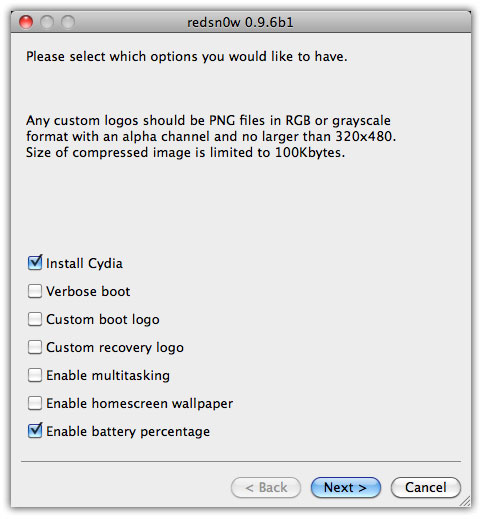
Dev-Team has released RedSn0w 0.96 b1, the iOS 4.1 jailbreak for iPhone 3G and iPod Touch 2G. Download RedSn0w 0.96 b1 from below and jailbreak iOS 4.1 on iPhone 3G and iPod Touch 2G. RedSn0w 0.96 beta1 uses pwnage2 DFU-mode exploit to jailbreak iPhone 3G and iPod Touch 2G running iOS 4.1. It does not include SHAtter exploit developed by pod2g which will be used in Greenpois0n.

download RedSn0w 0.96

RedSn0w 0.96 b1 Supports:

  • iPhone 3G
  • iPod touch 2G (Both MC and non-MC, for MC model it’s a tethered jailbreak)
  • iOS 4.1 or 4.0
  • Mac OS X x86 only (for now). Windows support will be added soon.

Warning

IF YOU USE THE ULTRASN0W UNLOCK, PLEASE WAIT FOR PWNAGETOOL TO SUPPORT 4.1.  DO NOT USE REDSN0W. That’s because to use redsn0w at 4.1, you need to already have updated to official 4.1 from Apple.  If you do that, you lose the ultrasn0w unlock (possibly forever).

Download RedSn0w 0.96b1

Download RedSn0w 0.96 b1

You can download RedSn0w 0.96 b1 from the link below:

Download RedSn0w 0.96b1 (MAC) [Mirror 1] [Mirror 2]

Also checkout:

Digg
Twitter
StumbleUpon
Facebook
Reddit
del.icio.us

Sn0wBreeze 2.0 to Jailbreak iOS 4.1 on iPhone 3GS, 3G and iPod Touch Releasing Tomorrow (Wednesday)

Sn0wbreeze 2.0 to jailbreak iOS 4.1 on iPhone 3GS, 3G, 2G and iPod Touch 3G, 2G and 1G will be out tomorrow (Wednesday). Sn0wBreeze 2.0 will jailbreak iOS 4.1, iOS 4.x and iOS 3.1.x.

Sn0wbreeze 2.0

Sn0wbreeze 2.0, just like PwnageTool, creates a custom firmware for your iPhone, iPod Touch and jailbreak them without updating iPhone baseband and allows you to unlock iPhone with UltraSn0w then. But unlike PwnageTool it works in Windows OS only.

Sn0wBreeze 2.0 will Support:

  • iPhone 3GS (New Bootrom): Must be running iOS 3.1.2 + Jailbroken
  • iPhone 3GS (Old Bootrom): Must already be Jailbroken (If jailbroken using Spirit or JailbreakMe, install Spirit2Pwn from http://repo.woowiz.net)
  • iPhone 3G
  • iPhone 2G
  • iPod Touch 3G: Must be running iOS 3.1.2 + Jailbroken
  • iPod Touch 2G (MC Model): Must be running OS 3.1.2 + Jailbroken
  • iPod Touch 2G (non-MC Model)
  • iPod Touch 1G

NOTE: iPhone 4, iPod Touch 4G and iPad support will be added once SHAtter exploit is out.

We’ll keep you posted as soon as Sn0wbreeze goes live along with step-by-step instruction on how to jailbreak iOS 4.1, 4.0.x and OS 3.2.1 on iPhone 3GS, 3G, 2G and iPod Touch 3G, 2G and 1G. via [iedicate]

You can follow us on Twitter, Join us at Facebook, and also Subscribed to RSS Feed to receive latest updates.

Also checkout:

Digg
Twitter
StumbleUpon
Facebook
Reddit
del.icio.us

Cash From In-App Mobile Advertising Networks

In app advertising can generate significant revenues for you. There are 2 scenarios of usage for your free app that can determine the in app ad revenues. Either your app can be mainstream or have a small niche user base. If you app is mainstream small amounts of usage can add up, and if you app has a small niche user base but is very “sticky”, then the revenues can also add up.

Here is a bunch of Ad Networks that you can consider, if you want to earn revenues through ads inside your apps –

http://www.admob.com – The 1000 pound gorilla in the space that was recently acquired by Google.

http://www.adwhirl.com – A multi-network advertising platform with a feature that allows you to switch between Admob, Mobclix, JumpTap, videoEgg, Millenial Media, Quattro Wireless and more.

http://www.google.com/ads/mobileapps – Google Adsense for mobile applications.

http://www.greystripe.com – Has a propritery method of displaying flash ads inside the iphone and recently uses highly immersive and interactive in-app ads.

http://www.medialets.com – Specializes in rich media advertising for mobile devices. They offer an analytics platform and has a framework for tracking user activity.

http://www.mobclix.com – Represents the largest mobile ad networks available for developers and publishers and supports over 20 different networks, and has analytics integration for developers.

http://www.quattrowireless.com – operates as a mobile adnetwork exchange as well as offering its own ads. Allows location based ad serving / targeting.

http://www.tapjoy.com – Operates as an ad network exchange and also has an iPhone SDK for selling virtual goods via Offerpal Media. Has a pay-per-install feature also.

http://www.ivdopia.com – Claims to be the first iPhone Video Ads platform.

http://www.videoegg.com – Another ad network exchange service. Has an interesting Ad Frame format which when tapped shows a full page ad.

Blind user explains why he loves the iPhone

Here’s a wild little story that made its way around the blogonets this past weekend — it was originally posted in June, but it got recirculated on Twitter, and we first heard it from Steve Troughton-Smith. Austin Seraphin is a blind person, and he says that getting an iPhone changed his life forever — he considers Apple’s iDevice to be “the greatest thing to happen to the blind for a very long time, possibly ever.” Really high praise, especially considering that we’ve heard both good and bad about the iPhone in terms of accessibility.

Seraphin’s story is a great read, so I just suggest you head over to his blog and check it out. But why does he appreciate the phone so much? Apple’s VoiceOver feature is a big plus — it allows people without sight to browse and control the iPhone’s touch screen using audio feedback, reading off messages and even checking things like stocks and weather all by translating it through the speaker.

Seraphin even describes using a color picking app to use the iPhone’s camera to “see” colors around him, with VoiceOver reading off descriptive names of the colors coming through the lens. That’s pretty incredible, and something only the iPhone, with its extremely mobile combination of technology and UI design, can easily make possible.

Seraphin still has an issue using iTunes, and not all apps are, of course, quite as accessible as Apple’s guidelines ask them to be. But it’s awesome to hear how Apple’s approach to technology, combined with all of the various apps out there, can make a significant change in this man’s life. In fact, last week he got himself an iMac.

TUAWBlind user explains why he loves the iPhone originally appeared on The Unofficial Apple Weblog (TUAW) on Mon, 20 Sep 2010 21:30:00 EST. Please see our terms for use of feeds.

Read | Permalink | Email this | Comments

Foursquare app gets a version bump

Being the geek that I am, I always have time to annoy my wife by checking into venues with Foursquare whenever we go somewhere. The free location-based social networking iPhone app gained even more awesomeness (their description, not mine) today with the release of version 2.0.

What’s new? A to-do list for organizing your explorations. You can search for a location, and then add it to your to-do list. This would be handy for reminding yourself about restaurants that friends have tipped you off to. To-dos can also be added via websites, if they embed the button on their page (think Instapaper for location-based to-dos).

Another new feature is that friends, tips, and to-do items can now be displayed on a map, nice for figuring out where you were planning on going, where your friends have gone off to, and what you were going to do when you got there. This feature ought to be popular with aging Americans like myself.

The venue pages have also been updated, with large, easily-found links for the current mayor’s profile, any tips that have been left, and a one-tap button for calling a venue.

The mini-gallery below features some screenshots from version 2 of Foursquare. Enjoy!

TUAWFoursquare app gets a version bump originally appeared on The Unofficial Apple Weblog (TUAW) on Mon, 20 Sep 2010 19:30:00 EST. Please see our terms for use of feeds.

Read | Permalink | Email this | Comments