MacTech Conference to offer Apple Certification Exams

Here’s good news for aspiring Mac techs attending the MacTech Conference in November. Attendees will be able to visit a study session and take their Apple Certification Exams right there at the conference. It’s a great idea, as you’ll already be in a “tech-y” mood. Here’s how it works.

Immediately following the last session of MacTech Conference, Apple Authorized Training Center v.2 Consulting is offering a study hour and exam session: November 5th, 12:30-4:00PM, on site at the conference. Conference attendees can take any Apple Certification Exam that is currently available at the time of testing. The cost of the study session and the exam is included in the US$899 registration fee (a $200 value). You’ll find which exams are available here and register here.

You say you don’t need to take an exam after the conference? Then you can get a $100 discount on the conference and register for this bundle for just $799. Sweet!

TUAW is happy to be a media sponsor of the conference, and we’re looking forward to meeting some of you there.

TUAWMacTech Conference to offer Apple Certification Exams originally appeared on The Unofficial Apple Weblog (TUAW) on Fri, 24 Sep 2010 15:45:00 EST. Please see our terms for use of feeds.

Read | Permalink | Email this | Comments

Exclusive photos from iPhone 4 launch in China, new Beijing Apple Store

Our favorite blogger in China, Maik Lutze of SuddenlyBeijing.com, has provided TUAW with exclusive photos from the official Chinese iPhone 4 launch this morning (9/25). Not only were there lines for the iPhone 4, but there was a new Apple Store being opened in Beijing at Xidan’s Joy City today, so he provided photos of the crowds on had for the opening:

This is the second Apple Store in Beijing, the first being the Sanitun store. Maik provided a batch of photos for TUAW of the iPhone 4 lines at this store as well:

The second Apple retail location in Shanghai also opened today. The new Huaihai Lu Apple Store is a two-story structure with the only curved window front of any Apple Store. Apple is really booming in the Chinese market, with a third Beijing store planned for Qianmen Street that will open this fall.

[Shanghai store information via Shanghaiist.com, Beijing store info via Asia Blog]

TUAWExclusive photos from iPhone 4 launch in China, new Beijing Apple Store originally appeared on The Unofficial Apple Weblog (TUAW) on Fri, 24 Sep 2010 14:30:00 EST. Please see our terms for use of feeds.

Read | Permalink | Email this | Comments

Confirmed: No FaceTime in parts of the Middle East

We just got confirmation on our story earlier this week that FaceTime had gone missing in parts of the world, mostly around the Middle East. @dutweets is the official Twitter account for du, the telecom operator for the iPhone in the United Arab Emirates, and in a tweet just a little while ago, the account confirmed that FaceTime is currently unavailable in that country. The iPhone hasn’t even officially launched there yet, but the account also says that FaceTime “won’t be working as of the launch” (which takes place tomorrow), so even official customers there won’t have access to the video chat feature.

Unfortunately, there’s no detail yet on why — we’ve heard that there may be local restrictions on VoIP technology that would block these kinds of communications. And this is only confirmation for the UAE, though it’s probably a pretty good guess that other outages are legit as well. Stay tuned — we’ll keep an eye out for official confirmation in other areas, as well as a reason why this decision was made.

Thanks, Joe!

Update: The Next Web Middle East has a confusing write up that suggests Apple pulled FaceTime because they assumed it would run afoul of the region’s regulations around VoIP.

TUAWConfirmed: No FaceTime in parts of the Middle East originally appeared on The Unofficial Apple Weblog (TUAW) on Fri, 24 Sep 2010 14:45:00 EST. Please see our terms for use of feeds.

Read | Permalink | Email this | Comments

Multitouch casing could remove buttons from iPhone, iPad

apple touch pattent

Back before the iPhone was formally announced, there was talk that Steve Jobs was simply not happy with the product because Apple’s engineers couldn’t figure out how to eliminate all of the physical buttons. There was just no practical way to put the functions of a power switch or home button into a touch-only interface. But all of that hasn’t stopped Apple from trying.

A recently-filed patent by Apple clearly shows that the company means business when it comes to sleek, clutter-free interfaces. This particular patent aims to take advantage of multiple sides of a device (in this case, it appears to be the iPad, as pictured), including parts of the casing, in order to perform functions that physical buttons currently handle.

Talk of an interactive case has come up before, but with this new patent, it’s clear the minds at Apple are still churning about in search for that holy grail of button-free, ultra-portable devices. I’m just not so sure there will be a way to get rid of them entirely — who wants to have to resort to a paperclip to reset their device?

TUAWMultitouch casing could remove buttons from iPhone, iPad originally appeared on The Unofficial Apple Weblog (TUAW) on Fri, 24 Sep 2010 14:00:00 EST. Please see our terms for use of feeds.

Read | Permalink | Email this | Comments

7-inch iPad coming? Loose lips in Shenzen say yes

Since the iPad was first announced in January of this year, there’s been speculation that a smaller form factor — say, something between an iPad and an iPod touch — would be added to the line.

Shanzai.com, a site that follows China’s technology industry, has posted a rumor to the effect that Apple’s next tablet will resemble “an oversized iPhone 4” rather than a smaller iPad. Shanzai says that they have “ears to the ground in Shenzen,” the home of Apple contract manufacturer Foxconn, and that loose lips have stated that the 7″ tablet is a “finished product.”

Sam Levin of AppMinute.com and I discussed the possibility of a smaller tablet on a podcast we recorded right after our abortive attempt at doing TUAW TV Live this week. Apple abhors a lot of different products that are not heavily differentiated. I brought up the example of Archos, which has a line of six Android-based tablets that range in screen size from 2.8″ to 10.1.” That just seems to be a bit odd, as there’s not a tremendous amount that really makes the devices different other than screen size. Apple, however, has managed to turn the iPod line into four completely different products — the minimalist shuffle, the tiny touch screen nano, the Classic, and the iPod touch.

Would Apple risk cannibalizing sales of the iPod touch on the small device side and the existing iPad on the larger tablet side to bring in a new form factor? Does a smaller iPad that would be difficult to type on make sense? What do you think? Leave your comments below.

[via 9to5Mac]

TUAW7-inch iPad coming? Loose lips in Shenzen say yes originally appeared on The Unofficial Apple Weblog (TUAW) on Fri, 24 Sep 2010 13:30:00 EST. Please see our terms for use of feeds.

Read | Permalink | Email this | Comments

Accordance 9 is another big step forward in Bible study software

Accordance, long regarded as the premier Bible study software for the Mac, has a new version 9 that’s now available for download.

At first glance, it may look at a lot like version 8, but that’s because most of the changes have gone on under the hood. Don’t let that fool you into thinking this isn’t a big update, though, because it is, and there’s more coming.

Four primary new features will appeal to almost all users:

“Workspace Zones” are a new way of grouping tools. Put Bibles in one zone, dictionaries in another, or put related tools for a project together so that you can access them all at once. These also seem to work better side-by-side than what I was able to do previously. Maybe there was a way before, but if so, it’s much, much easier now.

Learning a language is more than just translating words; you also have to understand syntax, grammar, idioms, and so forth. This won’t make you a Greek or Hebrew scholar by itself, but it’s a good reminder for those who have been out of seminary for a while and need a refresher, or a good aid to those just trying to learn.

“Easy Install” is OakTree’s way of saying “you won’t have to wait around for discs to arrive in the mail anymore.” Most of their resources are now available for immediate download. Good riddance to media through the mail. Keeping track of installation disks and unlock codes is a hassle that no one will miss. If you haven’t already created a user account on Accordance’s website, now is the time to do it. You may need to contact support to get your past order history added to your account, but once all the pieces are in place, this is going to be a huge boon for everyone involved.

I’ve definitely saved the best for last: Search All. My biggest gripe about Accordance 8 (which was the first version that I used) was that, when I searched for something, I didn’t get the feeling that I was getting results from all of the different books that are part of my Accordance library. That was one of the biggest advantages that Logos had over Accordance. Search All eliminates that. Not only that, but it’s fast, and I mean really fast. It’s fast enough that you’ll wonder how it was that fast. OK, I’ll admit that wasn’t particularly eloquent, but you get the point.

So, those are some of the details, but how does Accordance 9 feel? Read on.

TUAWAccordance 9 is another big step forward in Bible study software originally appeared on The Unofficial Apple Weblog (TUAW) on Fri, 24 Sep 2010 13:00:00 EST. Please see our terms for use of feeds.

Read | Permalink | Email this | Comments

Confirmed: iPads in Target this October

The rumor is true: Target will begin selling the iPad in October. Reuters is reporting today that the official release date will be October 2nd, and Target will have all six models.

The launch will make Target the fourth vendor to sell iPads in the US, along with Best Buy, Micro Center, and Apple. Target is a discount chain here in the US with locations from coast to coast. There are many areas that have a Target but not an Apple Store, so this move will get the device physically in front of more users than Apple could.

Good luck to Apple and Target on their partnership.

[Via Mashable]

TUAWConfirmed: iPads in Target this October originally appeared on The Unofficial Apple Weblog (TUAW) on Fri, 24 Sep 2010 12:30:00 EST. Please see our terms for use of feeds.

Read | Permalink | Email this | Comments

What 10 years of Apple did to its main product

How time flies! In the year 2000, I was just finishing high school, listening to Bush, and becoming acquainted with Windows 2000. Back then, I knew very little about Apple, and I’d certainly not heard of the Bondi Bubble iMac (the first iMac was released in 1998). In 2010, well…how things have changed for me!

And, as illustrated by Brett Jordan in the graphic above, things have also changed at Apple.

It’s incredible to think that the iPhone has taken center stage at Apple over the last three years. As noted by some of our commentators, there has been a real lack of Mac-centric news recently. Sure, there was the update to the iMac a few months ago, but it’s glaringly obvious that the Mac has taken a back seat to the iPhone — certainly in the limelight department. In fact, I’m reveling in the fact that I’m writing about the iPhone and the iMac at the same time!

Today, the Mac is the center of our digital hub, but it’s no longer the center of our digital world. When we leave the house / office / room where the Mac lives, it’s the iPhone ( iPad / iPod touch) that is constantly in our hands, and Apple knows it!

Of course, we have to come back to our Macs eventually (in my case, repeatedly, everyday) because the iPhone can’t do everything that we want it to, or even some of the things that we want done well, yet. But just looking at this picture shows how far things have come, and how the direction taken by personal computing is becoming even more personal.

The only feature of the iPhone 4 that doesn’t beat the iMac of yesteryear is screen real estate. The processor and RAM are double the capacity of the iMac, the iPhone’s storage is 2 gigabytes larger, and it’s flash-based memory. And of course, it’s tiny in comparison. As noted by Obama Pacman, it’s Moore’s law in effect.

But when will it end? In 10 years time, will we have an iPhone that’s five times smaller than the current one, but more powerful than the personal computers of today? Who knows? That might be a weird phone, but anything could happen. For now, I’m still stuck with my iPhone 3G, and I think it might still have some Bush on it. In the meantime, I’m just looking forward to getting the iPhone 4!

TUAWWhat 10 years of Apple did to its main product originally appeared on The Unofficial Apple Weblog (TUAW) on Fri, 24 Sep 2010 12:00:00 EST. Please see our terms for use of feeds.

Read | Permalink | Email this | Comments

Apple sues startup over "pod" name

As we’ve seen before, Apple is laying claim to the word “pod.” This time, the target is Sector Labs (SL), who are nearly 10 years into development of their Video Pod.

More accurately, Apple believes that customers will confuse SL’s Video Pod for an Apple product because of the name. The company first gained the attention of Apple legal back in 2009.

Still, SL’s Daniel Kokin doesn’t see the problem. “My team started working on the Video Pod in 2000, and it took us years to go from prototype to funded,” he said. “At that time, Apple didn’t even enter our minds as a competitor.” He goes on to note that his company’s product focuses on projection, something that Apple is not doing.

This is hardly the first time Apple has asked a company or product to change their name. Remember when iLounge was iPodLounge? Or PodShow?

Good luck to all parties involved.

TUAWApple sues startup over “pod” name originally appeared on The Unofficial Apple Weblog (TUAW) on Fri, 24 Sep 2010 11:30:00 EST. Please see our terms for use of feeds.

Read | Permalink | Email this | Comments

NBC says no to iTunes rentals at 99 cents

With reports of credit cards being charged for Apple TV pre-orders, it’s only a short time before Apple’s hobby takes a rather serious step forward. But with only ABC and Fox having signed up to Apple’s new $0.99 price point to rent television shows, it seems there’s a lot hanging in the balance. Most notably, for Apple – and for those that purchase the Apple TV – whether other large television studios will follow suit and get on board with Apple’s new strategy.

Recently, we reported that Warner Bros. was not best pleased with Apple’s new TV episode price point. And now NBC has chimed in, too. Speaking at the Goldman Sachs Investor conference, Chief Executive of NBC Universal Jeff Zucker said, “We do not think 99 cents is the right price point for our content,” and continued by saying, “We thought it would devalue our content.” As reported by AppleInsider.

But Apple’s been at loggerheads with NBC before. Back in 2007, NBC decided not to renew its contract with Apple, resulting in NBC content being removed from the iTunes store, rather abruptly. NBC wanted the price point to be raised to $4.99 per TV episode, and that was three years ago. Eventually NBC came good with Apple, with NBC content being restored to the iTunes Store.

Could history be repeating itself again? We’re inclined to think so. Though Apple’s new TV platform doesn’t have everything going for it, it’s certainly got a lot in its favor. And, as always, time will tell if Apple’s going in the right direction, again.

Be sure to let us know when your new Apple TV arrives at your door.

TUAWNBC says no to iTunes rentals at 99 cents originally appeared on The Unofficial Apple Weblog (TUAW) on Fri, 24 Sep 2010 11:00:00 EST. Please see our terms for use of feeds.

Read | Permalink | Email this | Comments

Dear Aunt TUAW: Help me find iPhone simulation games

Dear Aunt TUAW,

Finding games (or any app) for iPhone, or iOS in general, is a series of hit and misses. Let me be frank. It’s mostly misses. I was wondering if you knew of any good Empire Building or (preferably) Company building games out there.

Any help would be most appreciative.

Thanks,

Your nephew Mike E.

TUAWDear Aunt TUAW: Help me find iPhone simulation games originally appeared on The Unofficial Apple Weblog (TUAW) on Fri, 24 Sep 2010 10:00:00 EST. Please see our terms for use of feeds.

Read | Permalink | Email this | Comments

Mac 101: Preparing your old Mac for sale or recycling

It happens to all of us eventually (except for the Mac collectors). At some point, we decide that it’s time to take that old Mac that we’ve just replaced and try to get a few bucks out of it. Some of us donate our machines to schools or other worthwhile organizations, and if we have really old equipment, we may just recycle it. In any case, there are some things you’ll want to do to prepare the Mac for sale or recycling.

Step One: Make sure everything is backed up
There’s nothing worse than nuking the hard drive on a computer and then realizing that you’ve just destroyed irreplaceable photos, documents, or recordings. Even if you’re using Time Machine to back up your Mac onto an external hard disk drive, I recommend going through your important directories — Applications, Documents, Downloads, Photos, Music, and Movies — to make sure that everything has either been migrated to your new Mac or is available from a backup. I’m so paranoid that I usually keep the Time Machine backup and a secondary backup (usually made with Carbon Copy Cloner or SuperDuper!) for a while, even after I’ve switched machines.

Click the Read More link to learn more about how to get that old Mac ready for sale.

Photo by Flickr user sfllaw, licensed under Creative Commons

TUAWMac 101: Preparing your old Mac for sale or recycling originally appeared on The Unofficial Apple Weblog (TUAW) on Fri, 24 Sep 2010 09:00:00 EST. Please see our terms for use of feeds.

Read | Permalink | Email this | Comments

TUAW’s Daily App: Awesome Solitaire

Awesome Solitaire is (surprise!) an awesome solitaire game. The usual card game is so simple by now that presentation is everything, and Awesome Solitaire has presentation in spades. If you play in Awesome mode, the graphics are flashy, you get rewarded with points for combos, and the animation looks smooth and professional. Heck, the background is even animated with the accelerometer. My one argument is that there’s no sound on the app at all — as flashy and smooth as the graphics are, you’d think there would be some sparkling sounds to accompany them. But then again, I often turn the sounds on my phone down (especially in public), so the lack of sound on a pick up and play game like this doesn’t hurt too much.

This is the absolute coolest version of solitaire you will ever play on your iPhone. There aren’t a lot of actual game options (there are lots of other versions if you want a little variety), but if you just want to sit back and move solitaire cards around, this is the way to do it.

Oh, and one more thing: the app is free through the weekend. You really have no excuses at all — go on over to the App Store and download this one.

TUAWTUAW’s Daily App: Awesome Solitaire originally appeared on The Unofficial Apple Weblog (TUAW) on Fri, 24 Sep 2010 08:00:00 EST. Please see our terms for use of feeds.

Read | Permalink | Email this | Comments

How To: Add contact information to your Mac’s login screen

If you believe in the kindness of strangers, this tip might be for you. Most laptop users fear that their computer will be lost or stolen. Assuming that the right sort of person finds your laptop, however, they might be willing to return it to its rightful owner, if they knew how to contact you.

It is possible to add a short message to the login screen of your Mac. The easiest way to do that is by using Onyx; click on the Parameters tab, and then type your message into the area shown above. I suggest including your name, phone number, and whatever else you think increases your chances of getting it back.

This won’t help if a thief has ripped off your MacBook while you weren’t looking, but it just might help if you accidentally leave it in a cab and someone trustworthy gets in next. Hey, it could happen!

Note that “certain special characters” includes ( ), so if you want to include a phone number, I suggest using a format such as xxx-xxx-xxxx.

TUAWHow To: Add contact information to your Mac’s login screen originally appeared on The Unofficial Apple Weblog (TUAW) on Thu, 23 Sep 2010 22:00:00 EST. Please see our terms for use of feeds.

Read | Permalink | Email this | Comments

Jailbreak iPod Touch 3G, 2G iOS 4.1 with Sn0wbreeze 2.0.1

Sn0wBreeze 2.0 can jailbreak iPod Touch 3G and iPod Touch 2G (MC, non-MC) on iOS 4.1 firmware. Sn0wBreeze 2.0 jailbreaks iPod Touch 3G / 2G by creating a custom firmware. Please read the important note after the jump before proceeding.

jailbreak ios 4.1

IMPORTANT

Sn0wBreeze 2.0.1 Supports

  • iPod Touch 3G: Must be running iOS 3.1.2 (does NOT need to be pre-jailbroken but there is a special check box in expert mode when building the custom firmware)
  • iPod Touch 2G (MC Model): Must be running OS 3.1.2 (does NOT need to be pre-jailbroken)
  • iPod Touch 2G (non-MC Model) – use iReb if NOT pre-jailbroken

How to: Downgrade to iOS 3.1.2

If you meet the above mentioned conditions, then lets create custom iOS 4.1 and  jailbreak iPod Touch 3G / 2G (MC, non-MC) on iOS 4.1.

Disclaimer: This guide for educational purposes only. So, try it at your own risk. We can NOT be held responsible if anything goes wrong.

Jailbreak iPod Touch 3G, 2G on iOS 4.1 with Sn0wBreeze 2.0

Step 1

Step 2

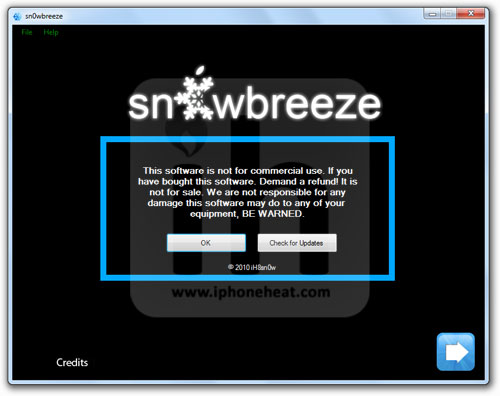
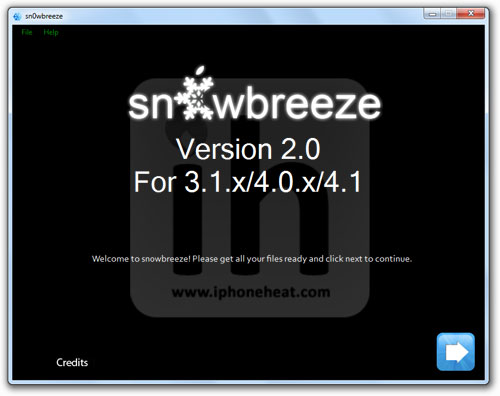
Run the downloaded Sn0wbreeze 2.0 and hit the Ok button and then Next.

jailbreak ipod touch 3g 2g ios 4.1jailbreak ipod touch 3g 2g ios 4.1

Step 3

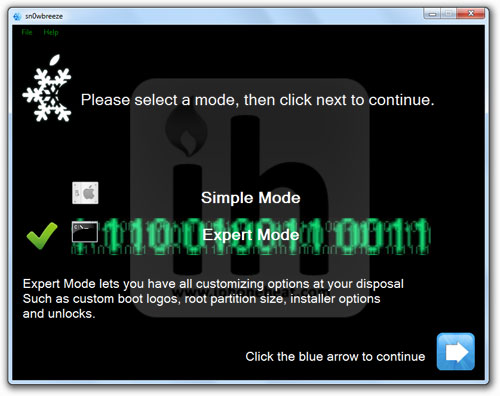
Select the Expert Mode and hit next button.

jailbreak ipod touch 3g 2g ios 4.1

Step 4

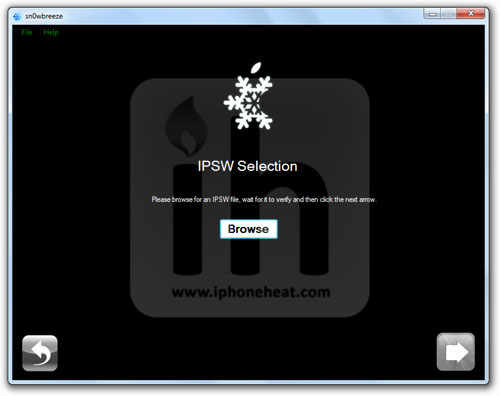
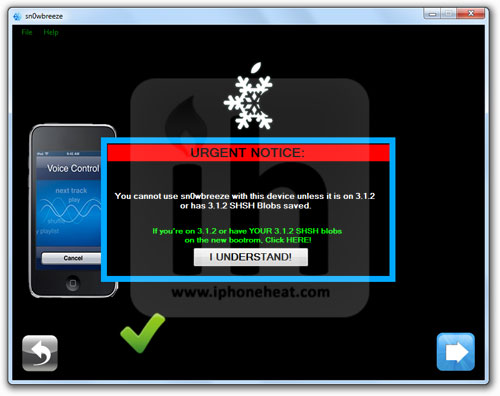
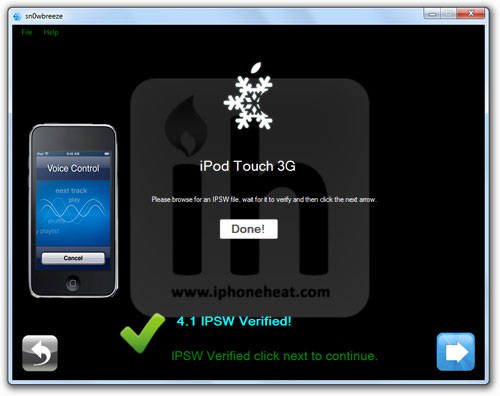
Now Hit the Browse button and select the download IPSW firmware file for your iPod Touch 3G or 2G. Sn0wbreeze will process the IPSW file.

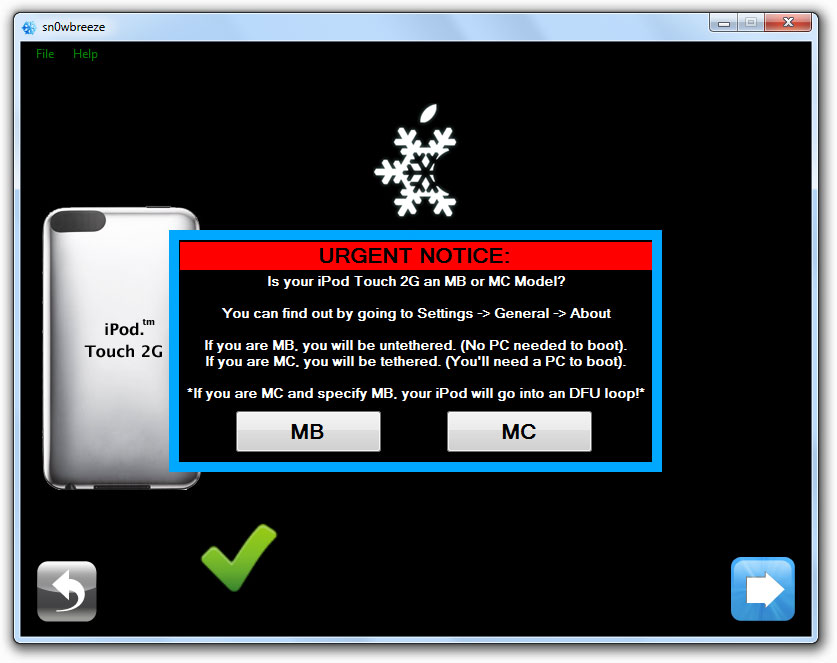
Once done, hit the I Understand and then Next button. iPod Touch 2G users will be prompted to select MB or MC model (read on screen instructions)

jailbreak ipod touch 3g 2g ios 4.1

Sn0wbreeze 2.0Sn0wbreeze

Step 5

Now select General and proceed.

Sn0wbreeze

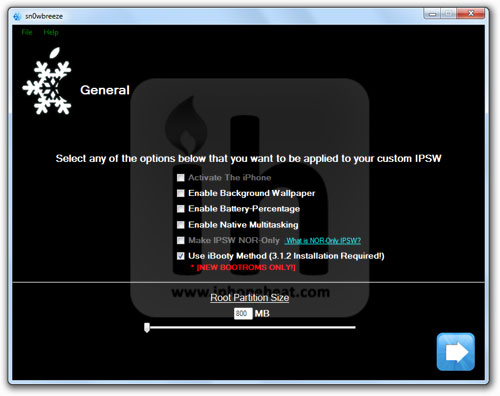
Step 6

Select you desired options.

NOTE: iPod Touch 3G and iPod Touch 2G (MC) users MUST also check mark the last option (Use iBooty Method).

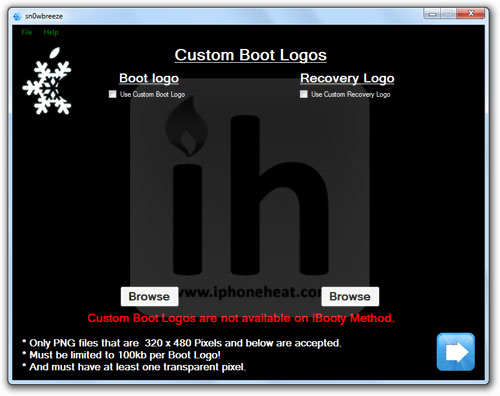
Hit the next button until to get to the custom logos.

Sn0wbreeze

Step 7

If you do NOT want to use custom boot logos, simply uncheck them and hit next.

sn0wbreeze

Step 8

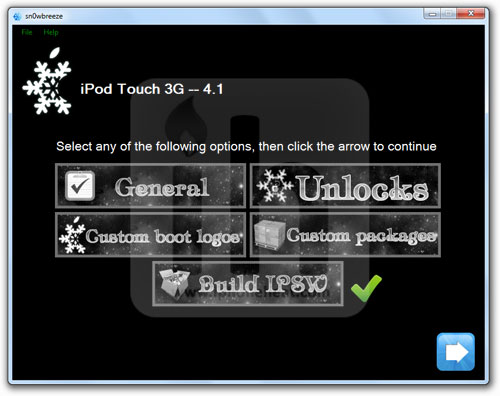
Now select Build IPSW option and hit next.

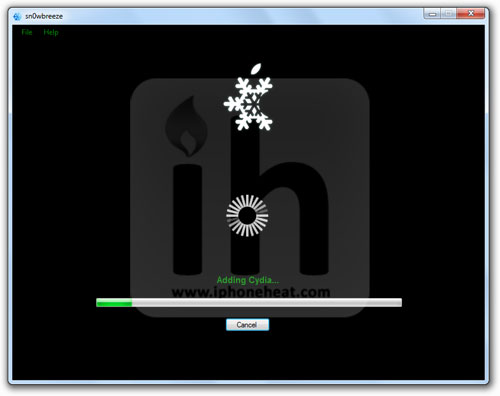
Sn0wbreeze will start building the custom firmware (IPSW) for your device. When done, there will be a custom firmware on your desktop created by Sn0wbreeze.

sn0wbreezesn0wbreeze

sn0wbreeze

Step 9

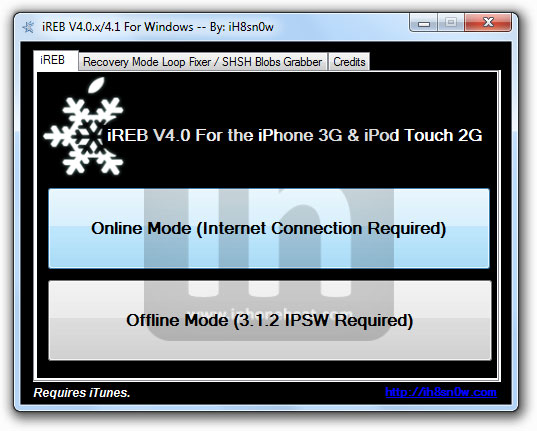
This step for iPod Touch 2G (non-MC) only. Download iReb 4.0

Launch iReb and select Online Mode. Then select your device. Now put your iPod Touch 2G into DFU mode (How to)

sn0wbreeze

Step 10

  • Open the iTunes 10. Backup your personal stuff.
  • Put your iPod Touch into recovery or DFU mode.
  • Select your iPod Touch from the left navigation pane in iTunes.
  • Hold down the Shift key and hit restore button on iTunes (Right pane).
  • Now browse and select you just created custom IPSW file and let the iTunes complete the restore process.

Voila! your iPod Touch 3G / iPod Touch 2G is now jailbroken on iOS 4.1. Have Fun and don’t forget to share your experience via comments section below.

Also checkout:

Digg
Twitter
StumbleUpon
Facebook
Reddit
del.icio.us