New iPhone 4 Ad: “Every”

Apple has posted a new iPhone 4 commercial named “Every”. The ad is primarily focused on the iPhone 4‘s crisp, and sharp Retina display.

Watch “Every”, the iPhone 4 commercial, after the jump…

The iPhone 4′s Retina display is the highest resolution (960 x 640) phone screen, ever. Which means all your photos, movies, emails, and even apps look more amazing than ever before.

Checkout: iPhone 4 Specs

You can follow us on Twitter, Join us at Facebook, and also Subscribed to RSS Feed to receive latest updates.

Also checkout:

Digg
Twitter
StumbleUpon
Facebook
Reddit
del.icio.us

IM+ Pro 4.4: Adds VoiceOver and UI Improvements

IM+ Pro for iPhone, iPod Touch and iPad has been updated to version 4.4 with VoiceOver, UI Improvements and more. Checkout the complete changelog after the jump…

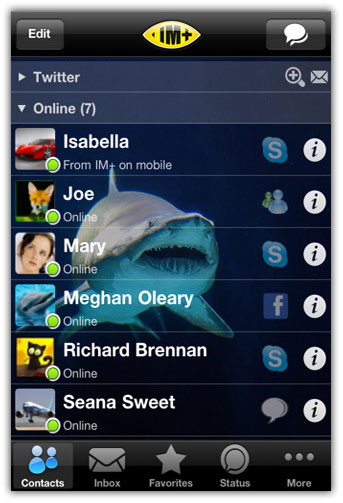
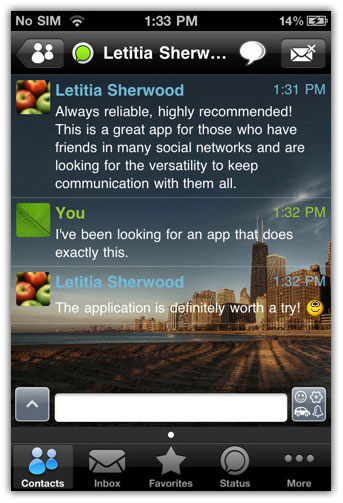
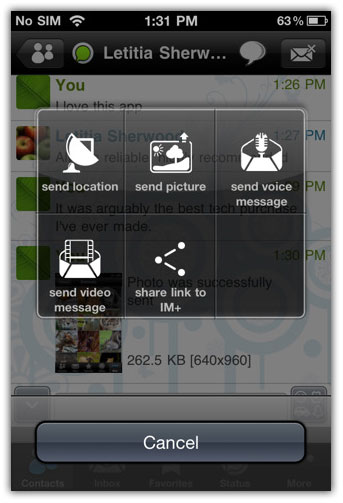
IM+ Pro is an all-in-one app for GTalk, Yahoo, MSN/Live Messenger, AIM/iChat, ICQ, MySpace, Twitter, Facebook, Jabber and Skype chat. It’s a universal iPad / iPhone / iPod Touch app with full iOS 4 multitasking support!

New in IM+ Pro 4.4

  • VoiceOver: incoming messages instant playback without tapping
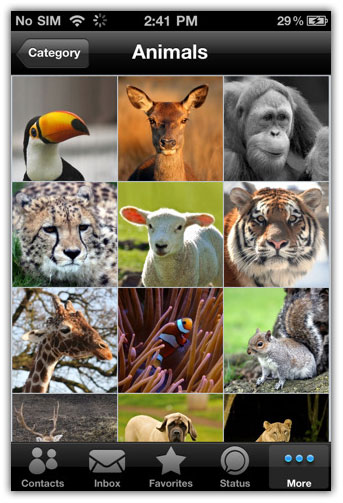
  • Extra wallpapers available for downloading
  • UI improvements
  • Large contact list management improvements
  • History saving in IM+ Web at https://plus.im
  • Lock Orientation repaired for iPhone
  • Bugfix

You can purchase and download IM+ Pro from the App Store for $9.99. [iTunes Link]

im+ pro 4.4

im+ pro 4.4im+ pro 4.4

You can follow us on Twitter, Join us at Facebook, and also Subscribed to RSS Feed to receive latest updates.

Digg
Twitter
StumbleUpon
Facebook
Reddit
del.icio.us

Review of Almost DSLR – We give you the low down on this iPhone camera app.

Almost DSLR is a camera app that is used in place of the iPhone’s built in camera application. Unlike the default camera app, Almost DSLR provides you with many settings and options you can change before taking pictures and videos, but costs $1.99 in the app store. There is also a free version, but the only difference is that it has ads and asks to buy the full version upon opening the app.

Features

This app is loaded with features, many of which are beneficial, but all of which must be applied before taking the picture. These include being able to manually set focus and exposure, choose a resolution, and have control over white balance. You can also take the picture as a mirror image, and the app features gridlines, which can be turned on and off, that can help you align your pictures to they are straight. It also allows you to use the built in flash, front camera, and torch feature if your device supports it. Lastly, you can take videos and control the frames per second and resolution of the videos.

Overview

Gridlines are turned on by default, and that’s the first difference from the default camera app that you’ll notice upon opening the app. Personally, I’ve never had a problem keeping my pictures aligned but I still find this to be a helpful measure to avoid crooked photos. Next up there are three buttons along the bottom of the screen: the left most button takes a picture, the middle takes a video, and the last one take you to your photos so you can view the pictures you just took without exiting the app.

Next up we’ll move to the row of buttons along the right side of the screen. The top button simply switches between the front and back cameras on the iPhone 4 or the new iTouch. The button directly below that changes the size ratio of the screen, and the preview of the picture that you see through is smaller than the full screen, but it does not change the size of the actual picture. Third from the top is the picture of the wrench, and tapping this shows a menu on the left edge of the screen that displays the options for the majority of the features of the app.  The menu that shows up on the left gives you options for using the flash and using the torch (which just keeps like LED light on continuously). Because these both rely on the LED light, not all devices will be able to utilize these features. Below that is focus, which can be set to “lock,” which locks the focus at its current position, or “continuous,” which continuously monitors and adjusts the focus when necessary. To set the exposure, tap once on the area on which you would like to focus. The following item in this list is mirror, which can be set to “on”, which flips the image over a vertical axis, “off”, or “auto”, which only does so when using the front camera. Exposure is next, and helpful feature that sets this apart from the default camera app, is that you can control the focus and exposure separately. Taping to focus on the default camera app not only focuses on that point, but also sets the exposure based of that point. With Almost DSLR you double tap to set exposure, which allows you to set the exposure and focus in two different spots, which can allow for some improved and cool pictures. Just like with focus, exposure can be set to “lock” or “continuous.” White balance is next, and that also has “lock” and “continuous,” which act the same way as the other “lock” and “continuous” options. The first locks the white balance setting, while the second continuously monitors and adjusts it. Lastly is just the option to turn on and off grid lines. Back to the right side of the screen now, and we are at the last button, which brings up settings when tapped. These include the option to change the resolution of pictures and videos, which is great because this should be an option that comes with the default app, but it doesn’t.

One big drawback this app lacks is a digital zoom. The default camera app allows you to zoom in, but Almost DSLR has no zoom feature at all, and I’m not sure why this is the case. All the test pictures shown were taken from the same exact location. The first was taken with the built-in camera app with no zoom, and the second with Almost DSLR, and you can see that the second picture is more zoomed in. Even though Almost DSLR has no zoom, for whatever reason its pictures were zoomed in to some degree.

Another thing I noticed, and again I am not sure why, is that the representation of colors in the pictures taken by this app does not seem to be as accurate as those taken by the default camera app. If this is a mistake on my part please let me know, but the pictures on the left, taken by the default app, are closer to what the real colors are, and to me this is a major problem for obvious reasons. In the pictures below, both pictures were taken with the default resolution settings, which accounts for the differences in size, but I played with the options in Almost DSLR in order to try to get the best picture. You can see that the pictures taken by Almost DSLR have a reddish tint, and I cannot figure out why this is.


Here is another example:

Conclusion

Although the lack of zoom is not ideal, it is the inaccurate color representation that turns me off from this app. If there is a mistake on my part and there is some way to fix that, although I have tried numerous times, then I may continue using the app because of all the options it provides you with. Among these are the ability to set focus and exposure separately, the ability to change the picture resolution, and the gridlines. These options are something that should be included, but they are not and therefore you can get all of them in Almost DSLR for only $1.99

*Pictures were taken on an iPhone 4 running version 4.0.1, therefore the built in camera app does not have HDR.


Appcelerator Titanium Mobile vs. Phonegap

A topic that seems to come up every now and again in iOS development conversations is that of Titanium vs. Phonegap.  Since I’ve also seen the Appcelerator vs. Phonegap debate come up on this site I thought that I would write a post about it since there seems to be a lot of outdated information on this.

While they are compared quite often these really are two entirely different frameworks meant for two different purposes.

Phonegap

Phonegap was created so that web developers could add utilize all their existing skills and code from creating mobile web apps and add in functionality utilizing native features on the device.  What this basically means is you take a web app, run it in a UIWebView an through javascript you can access iPhone features such as the camera an accelerometer.

Advantages Over Appcelerator

– More liberal license (MIT vs Apache open source license)
– Easier testing in browser or simulator created in Adobe Air
– Support for more mobile platforms

Phonegap is great if you’ve created a mobile web page and want to embed it in an app with a few more extra features and monetize it in the app store.  With browsers and devices are becoming so much more efficient at running javascript this method of creating apps is likely to grow in popularity.

Appcelerator Titanium Mobile

While Appcelerator Titanium Mobile utilizes javascript it is not done through a UIWebView like Phonegap.

Appcelerator apps go through a complex compilation and optimization process which I don’t have much desire to fully understand :) I can say though that this creates apps that look, feel, and perform just like native apps coded in pure Objective-C because you are using native UI components.

Advantages Over Phonegap

– Easier to get a native looking app (since you are using native UI components!)
– Better performance
– Can be extended to add in any native feature

Appcelerator is great if your an app developer who wants the similar performance to what you’d get if you were programming the app in Objective-C without having to learn Objective-C.

Conclusion

From the looks  of things it might seem like I’m pro-Phonegap.  Ultimately they are two completely different frameworks.  Phonegap is limited in the way that  your javascript runs in the browser so you likely wouldn’t be using it to create a true native interface or any sort of high performance app.  Appcelerator can be used for these things, and can do anything just like you were coding with Objective-C.

I hope this clears up much of the Appcelerator vs. Phonegap debate.  If you have any comments, questions or corrections please post them.

In case you don’t already know — the Phonegap framework can be found here, and the Titanium Mobile framework can be found here.

Thanks for reading, please share this using the buttons below!

©2010 iPhone, iOS 4, iPad SDK Development Tutorial and Programming Tips. All Rights Reserved.

.

Share and Enjoy:

RSS
Twitter
Facebook
DZone
HackerNews
del.icio.us
FriendFeed

How To Implement Core Location And The Google XML Weather API on the iPhone

Location Based Services are all the rage currently. In fact 2010 is seeing the largest surge in LBS Apps being released on several mobile platforms and VCs are scrambling to invest in start up shops that have LBS products. Apps like Loopt, Foursquare and Gowala amongst countless others have quickly amassed millions of loyal users and have started to integrate unique money generating modules within them (virtual goods, points, branding etc). These apps thrive on location of the user. There is also a very high percentage of Apps on the Appstore that also have a location based component to them… and in fact a very large majority of Apps have some user location based module or feature.

As a developer you need to know how this is done. A user’s current location is derived by using the Core Location API that is built into the iPhone SDK. This API communicated with an online service that provides the data – that is then sent to the device to process or the app – and for the user to see.

Below is a link to a step-by-step tutorial on how to use core location. It is built with Objective-C and starts from the ground up and will take you through right from the beginning – and will show you how to communicate with the Google XML Weather API, to finally presnet the data on the device for the user.

Tutorial Part 1Adding Local Weather Conditions, Part 1
Tutorial Part 2Adding Local Weather Conditions, Part 2

This tutorial will cover all aspects, and is an excellent starting point if you want a step-by-step tutorial on adding localized information into an iPhone or iPad App .

Apple Store news: Openings in Chicago and Edinburgh

As autumn approaches, an Apple Store in Chicago nears completion while another in Edinburgh is still in the planning stages. In Chicago, a future Lincoln Park store got dressed up a bit with festive barricades. Specifically, autumn-colored “leaves” have been added, spelling out the words “Lincoln Park Apple Store.” Text below the famous Apple logo reads “A vibrant opening. Fall 2010.” Many believe that this store will open some time this month.

This isn’t the first time Apple has decorated a store that’s under construction. In Boston the barricades resembled Fenway Park’s Green Monster, and in Paris barricades depicted a luxurious theatrical curtain. That’s nice, as typically those things are an eyesore.

Meanwhile, plans are progressing in Edinburgh, Scotland, where Apple is reportedly in discussions with the city’s planning officials to finalize plans for a new store’s design, construction, etc. In fact, Herald Scotland suggests that it could all be finalized within a few weeks. Apple already has two stores up and running in Scotland.

TUAWApple Store news: Openings in Chicago and Edinburgh originally appeared on The Unofficial Apple Weblog (TUAW) on Wed, 06 Oct 2010 13:00:00 EST. Please see our terms for use of feeds.

Read | Permalink | Email this | Comments

Found Footage: Using an iPhone and a movie theatre to propose marriage


Wow! These days, it seems, if you’re going to propose, popping the question needs to be done in a super creative, ultra romantic fashion. Gone are the days of proposing to your love after a few drinks at the local pub or after a few too many at a New Years Eve party (Both proposals I know of, both ladies said yes)!

Apparently, If you’re going to do it right in this day and age, you need to do it akin to the stratosphere that B.B Bling did it in. This guy took his girlfriend to the cinema where they watched their first movie together (OK, nothing too special there), but after a few commercials, what appeared to be an iPhone commercial came on the screen. However, it turned out to be a full blown music video proposal, written and performed by the groom to be. Using apps from his iPhone, the song declared Bling’s undying love for his stunned girlfriend, culminating in an on screen proposal. Thankfully, she said yes, and the rest of the cinema goers burst into applause.

To to top it all off, the track is now available for purchase on the iTunes store to finance the wedding.

From all of us here at TUAW, we say well done to you, sir! And congratulations to the happy couple.

Now, why didn’t I think of that?

For all the juicy details, click here.

TUAWFound Footage: Using an iPhone and a movie theatre to propose marriage originally appeared on The Unofficial Apple Weblog (TUAW) on Wed, 06 Oct 2010 12:00:00 EST. Please see our terms for use of feeds.

Read | Permalink | Email this | Comments

GDC Online 2010: Booyah’s InCrowd, or how to develop an app in four weeks

Booyah first made a big splash on the App Store with the check-in game MyTown, then they stepped over to Facebook to release a game called Nightclub City before returning to Apple’s platform a little while back with a title called InCrowd. Most App Store releases are known for their short development times (usually around six months or less), but InCrowd might set a record. As Booyah’s Jon Parise explained in his panel at this year’s GDC Online conference, Booyah created the app in just four weeks.

There were a few reasons for doing this. First and foremost, the app is designed to work in conjunction with Facebook’s new Places service, and because of Booyah’s success with Nightclub City, Facebook granted them early access to work on and release an app for launch day (just four weeks after development began). While Parise didn’t say it directly, his speech gave the impression that Booyah just wanted to try it — could they really take an idea and turn it into a viable App Store product and brand in just four weeks’ time? That, as Parise pointed out, is just about the length of Adobe Photoshop’s trial period. In fact, one of their developers downloaded and used the expensive photo editor’s trial all within the time of development.

TUAWGDC Online 2010: Booyah’s InCrowd, or how to develop an app in four weeks originally appeared on The Unofficial Apple Weblog (TUAW) on Wed, 06 Oct 2010 11:00:00 EST. Please see our terms for use of feeds.

Read | Permalink | Email this | Comments

iPhone 4 shipping times improved

Good news for those wanting to purchase an iPhone 4…in the US anyway. Shipping estimates have improved from three weeks to between five and seven business days, according to Apple’s US online retail store. Improved shipping estimates usually indicate that Apple is catching up with consumer demand.

The iPhone 4 has been in high demand since its release in June, selling well over 1.5 million devices in its first three days of availability. But supply is still short, especially with expansion into the overseas market. According to AppleInsider, mobile carrier China Unicom was only able to meet about half of the pre-orders placed by customers, with the rest having to wait until the end of October for their orders to be fulfilled.

Similarly, the iPad suffered high shipping times upon its release in April, with things only improving in August when Apple’s standard shipping time of 24hrs was reached.

In the UK, the iPhone 4 shipping time is set at three weeks, while the iPhone 3GS can be shipped in one to two weeks, according to Apple’s UK online retail store.

Personally, I’ve currently got an iPhone 3G with the mobile carrier O2. The contract has expired, and I’m now running on their Simplicity tariff. I could upgrade to the iPhone 4 with O2 (they seem to get priority stock), however, Tesco is offering the most cost effective contract (for me anyway). Unfortunately, though, they never seem to have any stock.

Tesco is offering a 16GB iPhone 4 on a 12 month contract at £35 a month. The upfront cost is £229, but the overall cost of ownership is £649. With this contract, you get 750 monthly minutes, a 1GB monthly data allowance, and unlimited texts. Alternatively, O2’s £35 a month contract is for 18 months. The upfront cost is cheaper, at £179, but the overall cost of ownership comes in at a much steeper £809. Worse still, with this contract you only get 300 monthly minutes and a 500MB monthly data allowance. If I was to purchase a contract nearer the 600 minute a month point with O2 (which is more like what I need), I’d have to pay £40 a month on an 18 month contract with the overall cost of ownership being £839.

For me, it’s obvious to go with Tesco’s iPhone 4 contract. Unfortunately, until stock supplies improve, I’m forced to hold onto my iPhone 3G.

Engadget has done a fantastic comparison of all the price plans for the iPhone 4 in the UK. If you haven’t got an iPhone 4 yet, and you live in the UK, it’s well worth the read.

TUAWiPhone 4 shipping times improved originally appeared on The Unofficial Apple Weblog (TUAW) on Wed, 06 Oct 2010 10:00:00 EST. Please see our terms for use of feeds.

Read | Permalink | Email this | Comments

GDC Online 2010: Newtoy and Words with Friends’ 10 million downloads

Newtoy is the company behind the popular Games With Friends brand on the App Store, featuring Chess With Friends and the extremely popular Words With Friends. If you’re on Twitter, you probably already knew that Words With Friends was popular (it’s all over the service), but you might not have realized just how popular. Newtoy’s own David Bettner took the stage here at GDC Online 2010 in Austin, Texas for a panel and said that the game has had 10 million downloads so far. That’s allowed him, his brother Paul, and their cousin to take Newtoy from a company of three people working on laptops in a library (though they admittedly had a lot of good experience as developers at Age of Empires dev Ensemble Studios) to a 30-person game studio with a bright future in what Bettner calls “turn-based asynchronous mobile gaming.”

And that stat isn’t the only interesting one that Bettner shared. Of those 10 million downloads, half have played the game in the last month. The Words With Friends app has two million daily active users and five million monthly active users. And of those users, 60% were brought in to the game by their friends (which makes for a very viral cocktail), and a whopping 40% play the app ten times or more per day.

TUAWGDC Online 2010: Newtoy and Words with Friends’ 10 million downloads originally appeared on The Unofficial Apple Weblog (TUAW) on Wed, 06 Oct 2010 09:00:00 EST. Please see our terms for use of feeds.

Read | Permalink | Email this | Comments

TUAW’s Daily App: Blue Defense: Second Wave!

One of the best reasons to come to a conference like GDC Online (which I’m at this week in Austin, Texas) is touching base with others in the iPhone and iPad community and sharing your favorite apps with each other. I’ve been hooking as many people as I can on Pocket Frogs (I just passed 50% of awards completed, and the app just added Game Center integration in a new update), and my colleague Jeff Scott of 148Apps recommended Blue Defense: Second Wave! to me. Blue Defense is a top-down shooter with an iPhone twist — instead of moving your ship around as it shoots down enemy ships in 2D, you tilt your iPhone (or just touch the screen) to aim a planetary cannon, taking out ships as they come to you.

The tilt interface is very intuitive, and there are even some fun multitouch functions. You can split your fire by double-tapping anywhere to create fixed aiming sights, or even grab and drag away from the planet to shoot a gigantic screen-clearing gun. This is actually the second version of the game, so there are multiple modes to get through, including two infinite modes that you can use to try and raise your score up on the game’s leaderboards. There are also lots of levels to play and medals to earn while doing so. The graphics are 2D, with a simple but smooth and well-designed look, and the Retina Display makes the game look great.

Blue Defense: Second Wave! is an excellent title for just US$1.99. It’s also a universal build, so I bet it’ll look even better on the iPad. I’ve heard some other good app recommendations from the panels and attendees here at the show, so stay tuned all week for more.

TUAWTUAW’s Daily App: Blue Defense: Second Wave! originally appeared on The Unofficial Apple Weblog (TUAW) on Wed, 06 Oct 2010 08:00:00 EST. Please see our terms for use of feeds.

Read | Permalink | Email this | Comments

Steve and the Governator mark transplant bill signing

In a ceremony commemorating California’s SB 1395, the world’s most well-known liver transplant recipient and the world’s only former killer future robot turned politician posed for photos. Jobs and Schwarzenegger were at the Lucile Packard Children’s Hospital in Stanford, CA to mark the signing of the transplant bill into law.

Both men have been active sponsors of the measure, which establishes a live donor registry for kidney transplants and sets up a binary opt-in/opt-out system for organ donation via the DMV. While Californians were able to register as organ donors before when getting or renewing a driver’s license, the new system requires that they explicitly choose to be a donor or not to be a donor.

Jobs received a liver transplant in 2009; he chose to register as a transplant candidate in Memphis, TN rather than in California in order to improve his odds of getting a donor organ in time to salvage his health. In his remarks at the March announcement of the bill, Steve noted that 400 Californians died waiting for donor organs in 2009.

TUAWSteve and the Governator mark transplant bill signing originally appeared on The Unofficial Apple Weblog (TUAW) on Wed, 06 Oct 2010 07:00:00 EST. Please see our terms for use of feeds.

Read | Permalink | Email this | Comments

Apple Store is down… and back up, with no changes

The store’s down!* We’re not sure why (if I had to guess, I’d say they’re updating the listings for bumper cases, since those recently returned to the retail shelves), but we’ll keep an eye on things and let you know what’s new when it comes back.

Meanwhile, don’t panic. We want a new iPod nano, too, but you can surely wait a few more minutes until the store returns to normal.

*In the United States, anyway.

Update: The store is back up, but there are no obvious changes staring us in the face. If you see something we’ve missed, let us know in the comments.

TUAWApple Store is down… and back up, with no changes originally appeared on The Unofficial Apple Weblog (TUAW) on Wed, 06 Oct 2010 00:18:00 EST. Please see our terms for use of feeds.

Permalink | Email this | Comments

iPad adoption rate faster than DVD, says analyst

I first heard about DVDs in late March 1997, sitting in the back seat of a friend’s car as her now-husband explained this new video format that had just gone on sale weeks earlier. Having just gotten my VCR, it was pretty hard to fathom picking up another piece of hardware anytime soon.

Within the next year, I saw DVDs appear at the local Suncoast and people gradually began taking to them. The clincher? Eventually, the price of DVDs dropped to where you were paying a cheaper price and getting better quality. Consumers gravitated to the new format, and the rest is history — the DVD took off and never looked back.

The iPad? It took off a lot faster. CNBC has the story from
Colin McGranahan, a retail analyst at Bernstein Research, who dug into the adoption rates.

McGranahan points out that Apple sold 3 million iPads within the first 80 days of launch. By contrast, there were a million iPhones sold in the first quarter of release… and only 350,000 DVD players sold in all of 1997. Keep in mind, when it comes to non-phone electronics products, McGranahan says that DVD players had the fastest adoption rate ever before the iPad (presumably meaning new categories of gadgets). The sales rate of the iPad after one quarter matches up with the DVD sales rate after five years. The iPod’s first year? A similarly modest 375,000 devices sold.

Of course, the DVD player was fighting an established product in VHS, and the iPad had the iPhone and iPod touch (not to mention the App Store) to soften the ground for it — but still, that’s not bad for a product that some vocal critics gave lousy first reviews. The original predictions of a million units sold in the first year seem remarkably conservative in the face of a likely run rate of 18 million iPads.

Granted, Apple does have a history of defying the odds.

[Via MacDailyNews]

TUAWiPad adoption rate faster than DVD, says analyst originally appeared on The Unofficial Apple Weblog (TUAW) on Wed, 06 Oct 2010 00:00:00 EST. Please see our terms for use of feeds.

Read | Permalink | Email this | Comments