Writers’ software month: iA Writer

I posted a few days ago that October is turning out to be a wonderful month for writers who enjoy trying out new word processing software. Today I want to tell you about an iPad app.There are a ton of word processing apps for the iPad and, in my opinion, Pages is still the best by far due to the rich feature set. This might change, however, if Apple ever decides to open up their styled-text and other iWork suite APIs to developers. Until then, it’s hard for one iPad word processor to really distinguish itself from the next in a significant way. One app that has, however, is called iA Writer.

iA Writer has two features that I haven’t seen in other iPad word processors. One of those features is called Focus Mode. While in Focus Mode, everything except for the three most recent lines of text are blurred out. The idea behind this is that it focuses the writer just on the words or thought flow that is immediately in his mind. Focus eliminates everything but the words; you don’t see any auto-correction text, tool bars, or spelling errors. The feature took me a while to get used to, but once I did it became something I wish that desktop word processors would adopt.

TUAWWriters’ software month: iA Writer originally appeared on TUAW on Mon, 11 Oct 2010 16:00:00 EST. Please see our terms for use of feeds.

Permalink | Email this | Comments

148Apps creates an App Hall of Fame

Jeff Scott of 148Apps has finally revealed his App Hall of Fame project — he started it up about a month ago, and asked a number of personalities around the iPhone/iPad app scene (including yours truly) to nominate and then vote on a few App Store apps, with the eventual goal of inducting them into a Hall of Fame. We made our nominations and voted a little while ago, and the first inductees into the store are now listed on the site: Angry Birds, Flight Control, Doodle Jump, Shazam, Evernote, Plants vs. Zombies, Pandora, Simplenote, the official Twitter app, Instapaper, Homerun Battle 3D, and Fieldrunners. You’ve probably heard of all of those already, but that’s the point: the Hall of Fame aims to honor “the very best mobile applications and games.”

There will be 12 inductees honored every month going forward, so the collection should grow bigger pretty fast. The nomination process is all done by the selection committee (not the public), but if you want to follow along, you can sign up on the mailing list (and have a chance to win some of the nominees for free every month). It’s a fun project — the App Store has been around long enough now that some super popular apps have risen to the top, and this is a good way to keep track of the absolute cream of the crop over the App Store’s whole life. At the same time, I’m sure we’ll see some interesting decisions in the months to come, so stay tuned for that.

TUAW148Apps creates an App Hall of Fame originally appeared on TUAW on Mon, 11 Oct 2010 15:00:00 EST. Please see our terms for use of feeds.

Read | Permalink | Email this | Comments

Apple considering MagSafe charger on iPad

Here’s something to get your mind wondering this Monday afternoon. Patently Apple is reporting that Apple may be considering integrating the MagSafe Power Port to its portable products, like the iPad.

The continuation patent, published on October 7th 2010 by the US Patent and Trademark Office, clearly depicts what looks like an iPhone / iPod touch / iPad with figure 62 revealing what appears to be a power connector. This power connector, expanded upon in greater detail in further diagrams, depicts what appears to be, according to Patently Apple, a MagSafe Power Port. And here at TUAW, we’ll concur. It does look remarkably like a MagSafe Power Port.

The MagSafe power adapter and port (first introduced in 2006 and then quietly updated in April of this year), are designed to connect the power cable to your MacBook / Pro / Air magnetically, allowing for a solid connection, but providing an immediate disconnection if the power cord is strongly pulled on. The idea is to stop your MacBook from flying off the table when you accidentally trip over the power cord.

I can’t imagine Apple introducing a lone power port for the iPad, but I can see the advantage in adding the MagSafe’s magnetic qualities to, say, the 30-pin connector currently used with all iPods, iPhones and iPads. What do you think, readers? I know I’ve yanked my iPhone off the desk by inadvertently pulling on the 30-pin connector cable. A release mechanism like the MagSafe would certainly come in handy.

Apple first filed this patent in June of this year. With this follow up continuation patent being filed in October, Patently Apple seems to suggest that Apple maybe trying to rush through the patent for an upcoming product release. But, with patents, it’s hard to know whether these ideas will actually see the light of day in released products. It could just be another case of Apple securing its intellectual property.

TUAWApple considering MagSafe charger on iPad originally appeared on TUAW on Mon, 11 Oct 2010 14:00:00 EST. Please see our terms for use of feeds.

Read | Permalink | Email this | Comments

Finally — multi-windowing under iOS

I’m sure that all of us have had this dilemma at one time or another. You want multiple windows open on your iDevices, so you get ’em all going at once, laid out on the couch around you. You’re watching a movie on your iPhone and surfing the web on your iPad at the same time, and if you have to get up to go make more popcorn, there’s a tendency to fumble all of the equipment. What’s a geek to do?

Julian Horsey from Geeky Gadgets came up with the perfect solution — the iPad iPhone Connector Clip, a do-it-yourself project for making a clip that holds your iPhone snugly on top of your iPad so you can use them both simultaneously. Using a 24 cm. long piece of plastic “U” extrusion, scissors, super glue, a Dremel tool, and fast-dry enamel paint, Horsey created a mount that will be particularly useful to those with jailbroken iPhones using MyWi for tethering of their iPads.

Horsey is quick to remind potential project wannabees that they can cut a few steps by finding plastic extrusion that’s already in an “H” shape, thus eliminating the step of gluing the two “U” extrusions back to back. He also points out that the same incredible technology can be used to connect two iPads or two iPhones together. Me? I’m looking forward to connecting four iPads together for a reading / surfing / watching / tweeting experience like I’ve never had before.

TUAWFinally — multi-windowing under iOS originally appeared on TUAW on Mon, 11 Oct 2010 13:00:00 EST. Please see our terms for use of feeds.

Read | Permalink | Email this | Comments

Another ‘smash and grab’ hits Portland Apple reseller

One sign of the continuing popularity of Apple’s product line is the fact that some people will go to extraordinary (and illegal) measures to procure the products. That image at right? It’s from a security camera video showing a full-size gray pickup truck with a diamond-plate toolbox in the back backing through the front wall of a store.

TUAW has published a number of stories throughout 2010 talking about various burglaries, robberies, and “smash and grabs” targeting Apple Stores and other resellers. The victim this weekend was Portland, Oregon-based MacPac, which has been hit by destructive drive-through theft five other times.

As reported by Portland TV station KGW, MacPac owner Randy Feldman and his staff had just finished renovating the displays in the store last Wednesday. The criminals got off with display MacBooks, iPads, and desktop machines, but Feldman says his main concern might be “losing an insurance company.”

[via MacObserver]

TUAWAnother ‘smash and grab’ hits Portland Apple reseller originally appeared on TUAW on Mon, 11 Oct 2010 12:00:00 EST. Please see our terms for use of feeds.

Read | Permalink | Email this | Comments

Apple trademarks "There’s an app for that"

Apple has been awarded a trademark for the phrase, “There’s an app for that.” The tagline has been used to promote the App Store and iOS devices almost since their inception, and has really caught on. From tech articles to jokes told around the water cooler, many people have adopted the phrase.

The trademark, which Apple filed for on December 4th, 2009, covers “Retail store services featuring computer software provided via the Internet and other computer and electronic communication networks; retail store services featuring computer software for use on handheld mobile digital electronic devices and other consumer electronics.”

Congratulations to both Apple for their new trademark, and to me for avoiding a lame “there’s an app for that” joke.

TUAWApple trademarks “There’s an app for that” originally appeared on TUAW on Mon, 11 Oct 2010 11:00:00 EST. Please see our terms for use of feeds.

Read | Permalink | Email this | Comments

GDC Online 2010: Interview with Newtoy’s David Bettner

Last week, during GDC Online in Austin, Texas, I saw a panel run by Newtoy’s David Bettner. Later in the week, Bettner himself met up with me to talk about the company and its popular Games With Friends titles for the iPhone. Though the company is doing great with its own App Store games (Words With Friends has over 10 million downloads and a surprisingly active user base), the first game that I asked about was actually We Rule. Newtoy designed that one for Ngmoco, and it’s become one of the pioneering “freemium” titles on the App Store, using in-app purchases to fund a free-to-play Farmville-style game.

Bettner told me that We Rule was the product of two companies, not just a work-for-hire. “It was a fun collaboration with Ngmoco,” he said. “It was not the typical publisher/developer kind of a relationship. It was more of a collaboration of ideas.” The idea for “mojo,” the in-app product that pushes We Rule’s gameplay forward, actually drove the whole project, both from a design and a monetization standpoint. “It was a fantastic sort of thing where as soon as you use mojo on a crop, you’re like oh, I get this now, ” Bettner said. “It’s this magic thing that I can do to speed things up.” Players have been split on the use of microtransactions in App Store titles like that, but Bettner said the model very much appeals to iPhone developers — “the total lack of friction” on in-app purchases makes it easy to sell items in-game.

TUAWGDC Online 2010: Interview with Newtoy’s David Bettner originally appeared on TUAW on Mon, 11 Oct 2010 10:00:00 EST. Please see our terms for use of feeds.

Read | Permalink | Email this | Comments

How to Jailbreak iPod Touch 4G / 3G iOS 4.1 with Greenpois0n

Greenpois0n to jailbreak iPod Touch 4G, 3G iOS 4.1 is out now. In this guide you’ll learn how to jailbreak iPhone 4 / 3GS running iOS 4.1 with Greenpois0n jailbreak. Greenpois0n is available for both Windows and Mac OS X.


Disclaimer: This guide is for educational and information purposes only. Follow the steps below at your own risk. We cannot be held responsible if anything goes wrong.

Lets jailbreak iPod Touch 4G iOS 4.1 and jailbreak iPod Touch 3G iOS 4.1 using Greenpois0n jailbreak.

How to Jailbreak iPod Touch 4G, 3G with Greenpois0n

Step 1

Download the required stuff:

Step 2

Connect your iPod Touch 4G / 3G to iTunes and restore iOS 4.1 firmware.

Now turn your iPod Touch Off.

Step 3

Execute the downloaded Greenpois0n jailbreak (from step 1).

Step 4

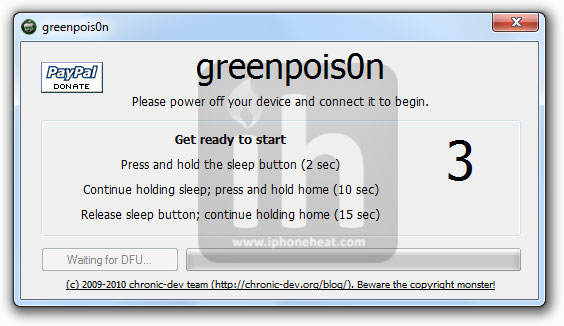
Now hit the “Prepare to Jailbreak (DFU)” button on the Greepois0n and follow the on screen instructions to put your iPod Touch 4G/ 3G into DFU mode.

* If you find on screen instructions difficult to follow, we have an easy guide to: put iPod Touch into DFU Mode.
* If you think your device is in DFU mode but Greenpois0n is not detecting it, hit the “Prepare to Jailbreak (DFU)” button again.

Step 6

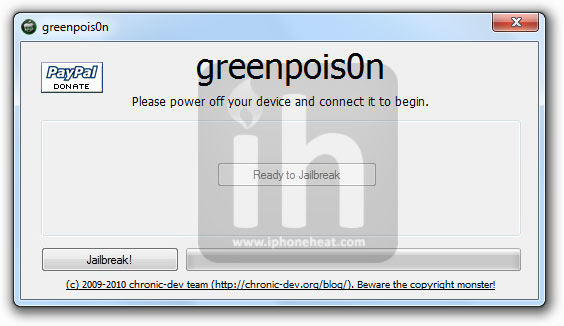
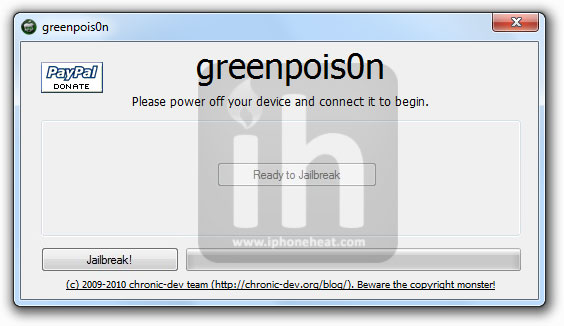
Once you’re into DFU mode, Greepois0n will tell you that your device is ready to jailbreak.

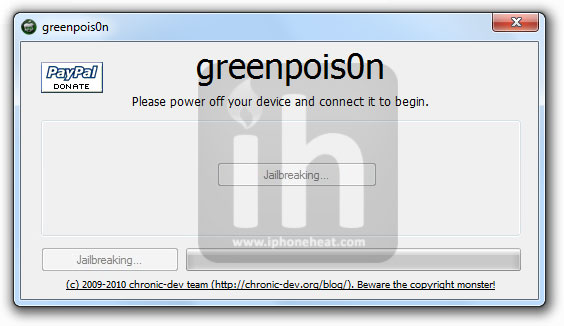
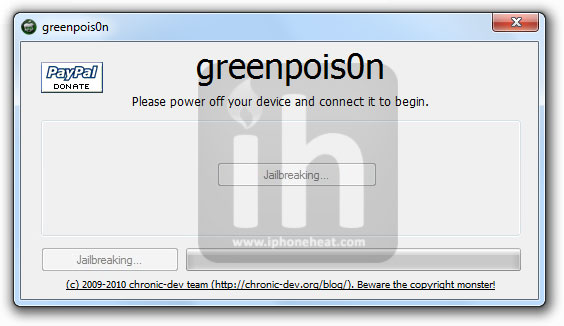
Hit the “Jailbreak!” button and Greenpois0n will start jailbreaking your iPod Touch 4G/ 3G.

Step 7

Once the process is successfully completed, Quit button will appear on Greenpois0n window.

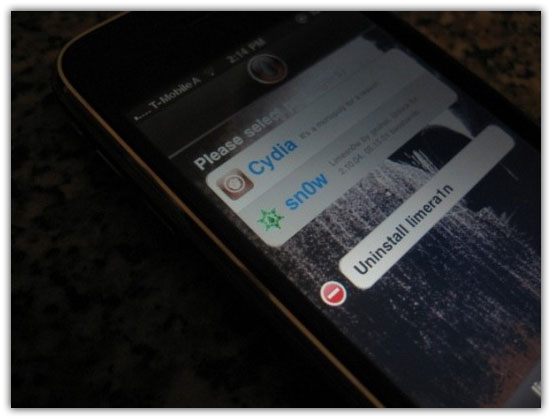
That’s it. Check for the Cydia icon on your iPod Touch home screen. Have fun with your jailbroken iPod Touch 4G / 3G on iOS 4.1. Don’t forget to share your experience in the comments section.

If Greenpois0n, due to any reason, doesn’t work for you, you can always use Limera1n guides linked below and don’t forget to save SHSH blobs for iOS 4.1.

You can follow us on Twitter, Join us at Facebook, and also Subscribed to RSS Feed to receive latest updates.

Digg
Twitter
StumbleUpon
Facebook
Reddit
del.icio.us

Download Greenpois0n to Jailbreak iOS 4.1 (iPhone 4, 3GS, iPod Touch 4G, 3G, iPad)

Greenpois0n jailbreak for iOS 4.1 on iPhone 4, 3GS, iPod Touch 4G, 3G, iPad is now available for Download. You can download Greenpois0n jailbreak from the link at the bottom. Greenpois0n is available for both the Windows and Mac OS X.

Device compatibility and Greenpois0n download links after the jump…

Chronic Dev-Team has successfully implemented GeoHot’s exploit into Greenpois0n in order to preserve SHAtter exploit. Greenpois0n loaded with GeoHot’s exploit and Comex’s userland jailbreak can now jailbreak iPhone 4, 3GS, iPod Touch 4G, 3G and iPad running iOS 4.1.

Greenpois0n Jailbreak Supports

  • iPhone 4
  • iPhone 3GS
  • iPod touch 4G
  • iPod touch 3G
  • iPad

greenpois0n jailbreak

Apple cannot patch the GeoHot’s exploit via any firmware update because it’s based on bootrom. Only a hardware revision can fix it. So, all the above mentioned devices can enjoy a life time jailbreak. Thanks to Greenpois0n and Limera1n.

Detailed guides on how to jailbreak iPhone 4, 3GS, iPod Touch 4G, 3G, and iPad will be posted shortly. Stay Tuned!

Download GreenPois0n

  • Download Greenpois0n for Windows [Mirror 1] [Mirror 2]
  • Download Greenpois0n for Mac [Mirror 1] [Mirror 2]

Digg
Twitter
StumbleUpon
Facebook
Reddit
del.icio.us

How to Jailbreak iPhone 4 / 3GS iOS 4.1 with Greenpois0n

Chronic Dev-Team has released Greenpois0n to jailbreak iPhone 4, iPhone 3GS iOS 4.1. In this guide you’ll learn how to jailbreak iPhone 4, 3GS running iOS 4.1 with Greenpois0n jailbreak. Greenpois0n is available for both Windows and Mac OS X.


IMPORTANT

iPhone users: Installing iOS 4.1 on your iPhone 4 or 3GS will updated its baseband which is not unlockable ATM. So, if you depend on unlock you’re strongly advised not to go for Greepois0n or Limera1n and also avoid iOS 4.1. Wait for the PwnageTool update which will be anytime now.

However, iPhone 4 users can still update to iOS 4.1 without updating baseband using Tinyumbrella. Here is how to: update iPhone 4 to iOS 4.1 without updating baseband.

Disclaimer: This guide is for educational and information purposes only. Follow the steps below at your own risk. We cannot be held responsible if anything goes wrong.

Lets jailbreak iPhone 4 iOS 4.1 and jailbreak iPhone 3GS iOS 4.1 using Greenpois0n jailbreak.

How to Jailbreak iPhone 4, 3GS with Greenpois0n

Step 1

Download the required stuff:

Step 2

iPhone 4: If you don’t need to unlock iPhone, simply update to iOS 4.1 via iTunes. But If you depend on unlock, follow the guide linked below to update your iPhone 4 to iOS 4.1 without upgrading its baseband:

How to Update iPhone 4 to iOS 4.1 without updating baseband

iPhone 3GS: If you don’t need to unlock iPhone 3GS, simply update to iOS 4.1 via iTunes. But If you depend on unlock, AVOID iOS 4.1, Greepois0n, Limera1n and wait for the PwnageTool to come out (hopefully within a week.)

Step 3

Connect your iPhone 4 / 3GS to your computer and turn it off.

Step 4

Now execute the downloaded Greenpois0n jailbreak (from step 1).

greenpois0n jailbreak iPhone 4 3gs 1

Step 5

Now hit the “Prepare to Jailbreak (DFU)” button on the Greepois0n and follow the on screen instructions to put your iPhone 4 / 3GS into DFU mode.

* If you find on screen instructions difficult to follow, we have an easy guide to: put iPhone into DFU Mode.
* If you think your device is in DFU mode but Greenpois0n is not detecting it, hit the “Prepare to Jailbreak (DFU)” button again.

greenpois0n jailbreak iPhone 4 3gs

Step 6

Once you’re into DFU mode, Greepois0n will tell you that your device is ready to jailbreak.

greenpois0n jailbreak iPhone 4 3gs

Hit the “Jailbreak!” button and Greenpois0n will start jailbreaking your iPhone 4 or iPhone 3GS.

greenpois0n jailbreak iPhone 4 3gs

Step 7

Once the process is successfully completed, Quit button will appear on Greenpois0n window.

That’s it. Check for the Cydia icon on your iPhone home screen. Have fun with your jailbroken iPhone 4/3GS on iOS 4.1. Don’t forget to share your experience in the comments section.

If Greenpois0n, due to any reason, doesn’t work for you, you can always use Limera1n:

Unlock iPhone

After the jailbreak on iOS 4.1 with a preserved baseband, you can install UltraSn0w to unlock your iPhone. Follow the guide linked below to unlock your iPhone:

Digg
Twitter
StumbleUpon
Facebook
Reddit
del.icio.us

LimeSn0w Unlock for iOS 4.1 by GeoHot on its Way?

After Limera1n, GeoHot is going to amaze us all over again with LimeSn0w, a potential unlock for iOS 4.1 on iPhone 4, 3GS and 3G. The screenshot and video below [Fake?] shows iPhone 3GS iOS 4.1 baseband 05.15.01 unlocking with LimeSn0w installed via Limera1n just like BlackSn0w was available via Blackra1n.

As a matter of fact, when you update iPhone 4 / 3GS to iOS 4.1 to jailbreak with Limera1n it also updates iPhone 4 baseband to 02.10.04 which is not unlockable ATM. So, it would make sense for GeoHot to comes up with his own unlock solution (LimeSn0w?).

The domain http://www.limesn0w.com is registered by GeoHot the same day he registered limera1n.com for Limera1n jailbreak. Domain info for LimeSn0w.com and LimeRa1n.com can be found here and here. The domain ownership enforce our belief that Limesn0w will become reality just like Limera1n.
NOTE: There’s no word from GeoHot himself.

PwnageTool update for iOS 4.1 is expected soon which will jailbreak iPhone and iPod Touch on iOS 4.1 while preserving baseband thus enables you to unlock your iPhone with UltraSn0w.

You can follow us on Twitter, Join us at Facebook, and also Subscribed to RSS Feed to receive latest updates.

Also checkout:

Digg
Twitter
StumbleUpon
Facebook
Reddit
del.icio.us

Must Read Interview with David Appleyard, Author of iPhone App Entrepreneur

Mobile Orchard recently had the privileged of interviewing David Appleyard, author of iPhone App Entrepreneur, which will be available today. You can check out the contents and read the forward.

Mobile Orchard: First, tell us a little about yourself and the book, iPhone App Entrepreneur.

David Appleyard: I’ve been an avid Apple enthusiast for several years – more or less since the announcement of the very first iPod. Not as long as many of the people reading this blog, I’m sure, but it feels like a long time! I started working for Envato a couple of years ago, with the launch of Mac.AppStorm.

We’ve since then expanded the network out to a couple more websites, including iPhone.AppStorm which launched on the 22nd December 2009. After almost a year of talking with iPhone developers, pulling apart apps, and always being on the look-out for the “next big thing”, I thought it was time to put some of my thoughts about development down in a longer format.

The book is designed to take someone through the decisions they need to make when developing a new iPhone app. It doesn’t delve into technical or programming discussion, but rather looks at choosing an idea, marketing, pricing, the App Store, and all the other issues you encounter as an iPhone developer.

MO: What level of iPhone app developer is it targeted at?

DA: In principle, the book is targeted at a beginner/intermediate level. That said, it contains contributions from lots of very, very talented developers. Their experience and insight is really valuable to experienced developers as well as those new to the game.

MO:What kind of research did you do for the book?

DA: Research came from a few different angles. First and foremost were the in-depth interviews conducted with iPhone developers. These include companies such as Avatron, Bjango, The Iconfactory, 37signals, Simplenote, and Sophiestication (Sophia Teutschler). The experience that these developers had to share was immense, and really helped to shape the direction of the book.

In addition, we ran two surveys – one with around 80 iPhone developers, and another with over 1,000 iPhone users. These helped to both understand what challenges developers face, as well as what users are looking for in an app. Some of the results were exactly what you’d expect, but others were particularly fascinating. I was amazed at how important people found interface design to be!

MO: How did you select the developers you interviewed?

DA: For the in-depth interviews, I approached a mix of developers known for being experts in different fields. For instance, The Iconfactory are known for their gorgeous interface design, whereas the Simplenote team have perfected the technical aspects of seamless syncing between different devices.

MO: How did you get involved with writing a book on iPhone development any way?

DA: I worked as the editor of iPhone.AppStorm for almost nine months (I have just passed this responsibility onto a new editor, Josh Johnson), which put me in touch with all manner of amazing developers. The book is published by Rockable Press, part of the Envato banner under which iPhone.AppStorm falls.

MO: What experience do you have with creating iPhone applications?

DA: In terms of actual experience in programming a native iPhone app from scratch, very little indeed. I’ve created websites and web apps for the iPhone, so have something of an understanding of many challenges from that perspective.

I think that the outside perspective I have – as someone who critiques and reviews iPhone apps – allows me to give a broad image of what works and what doesn’t in an app. It’s also important to be very impartial when writing a book such as this, and I don’t have the underlying aim of promoting an application that I’ve designed myself!

MO: Will this book help someone interested in iPad app development?

DA: Absolutely. Reference to the iPad is made throughout, and it’s designed to be very much a companion for iPad development as well. Although the larger screen certainly brings different challenges from an interface perspective, everything else is perfectly relevant. You’re still trying to promote your app, keep things simple, make good development decisions and work within the confines of the App Store.

MO: Besides buying your book, what advice would you give to someone who is interested in getting into iPhone app development?

DA: I think that one of the most important things emerging from the book research is to just get your hands dirty and try developing something. Many interviewees discussed how their first attempts at app development were simple, un-polished, and – in many cases – a complete flop! There’s no pressure to make your very first venture a smash-hit.

Also, do your best to seek out developers in your local community. It’s likely that a regular iPhone/Mac developer meet-up happens somewhere nearby, and there’s no substitute for sharing a few beers with fellow developers. You don’t need to make this a once-a-year occurrence at WWDC!

MO: Any great iPhone dev sites out there that developers must read?

DA: I’d be remiss not to mention own our development tutorial site at Envato, Mobiletuts+, which is turning into an absolutely wonderful resource for mobile developers on any platform.

MO: What is your favorite iPhone app?

DA: I’m torn between Instapaper and Reeder. By far the task I use my iPhone for most is reading, and it’s almost always done in one of these two applications. Both are wonderfully designed, understatedly simple, and do their job perfectly. Simplenote comes in at close second.

MO: Anything else you would like to say?

BA: Thanks for giving me the chance to write a little about the book experience, and for running such as wonderfully useful resource for developers! If you’re about to get started developing your first iPhone app, I wish you all the best. I hope you enjoy the whole process from start to finish!

MO: Thank you very much for taking the time to answer our questions, David.

We hope you enjoyed this interview and also wish David luck on his book launch. Be on the lookout for a giveaway involving iPhone App Entrepreneur.

Will We Ever See a Multi-Touch Mac?


In the past few years Apple’s core strategy and media coverage seem to have taken a shift from desktop computers and software suites like iLife towards the newer and more exciting field of touch-screen computing.

The iPod Nano, iPod Touch, iPhone, and iPad together are a perfect picture of how much time, money and effort Apple is sinking into their new favorite technology. Since the day Apple released the iPhone, we all started dreaming about multi-touch in a place Apple hasn’t yet delivered: on our Macs.

If you’ve ever sat down with an iPad for more than ten minutes you almost can’t help but admit that the basic experience is something well beyond that of our beloved Magic Mice and Magic Trackpads, which give only a hint of what a multi-touch Mac would be like.

screenshot

Fantasy or near-future?

Overcoming Problems and Priming the Market

Even if Apple releases a multi-touch iMac as soon as tomorrow, they wouldn’t be the first PC manufacturer to do so, just like they weren’t the first to create a touch-screen phone or e-reader. However, as with the iPhone and iPad, if and when Apple jumps into this game, it’s going to represent a major paradigm shift in personal computing that the rest of the industry will have to keep up with.

So why doesn’t Apple just do it already? Where’s my multi-touch iMac!? One thing that Apple is obviously not doing is rushing such a device to the market. Apple generally has two primary objectives in breaking new ground. First, they want to overcome the inherent problems with touch-screen PCs. Next, they want to prime the market and maximize demand before they release the product.

The Problems

First of all, there’s the issue of software. OS X simply wasn’t built for multi-touch. Sure, Apple could throw together a sloppy hack and overlay some touch interaction, but sloppy isn’t their forte. Instead, you can bet they’ll have a significantly overhauled operating system that will either be the most drastic change to OS X we’ve seen yet or a completely new operating system. Either way, they’ll have to completely redesign the way we interact with our Macs.

Likewise, hardware presents a significant problem. It’s probably safe to assume that Apple can either overcome the operating costs of larger multi-touch screens or simply pass the buck onto consumers while still selling a billion models. However, it’s not as simple as throwing a touch-screen on an iMac.

The logistics of working on a touch-screen PC haven’t quite been perfected. You either have users reaching awkwardly across their desktop to touch the screen or have a lower mount that leaves users straining their neck while looking down. Remember that many of us work on a Mac for 40+ hours per week and anything slightly uncomfortable could deal serious damage to spines all over the world.

Further, since we’re not likely to abandon traditional interfaces any time soon, there needs to be a solid transition between processes that require a mouse, keyboard and/or trackpad and those that require direct interaction via multi-touch (often, you have to make the same process work both ways).

Priming the Market

This idea of duality between interaction methods becomes even more of a priority when you consider that Apple won’t want to render all current models completely obsolete the moment a touch-screen Mac is announced. Perhaps the Magic Trackpad is a hint at Apple trying to present older machines with touch-friendly input options.

This leads into the idea that Apple will no doubt seek to maximize consumer demand for a multi-touch Mac before delivering. They’re getting the public used to the idea of touch-screen technology not as the future, but as the current state of computing, and of Apple being the king of this market.

As with the iPad, expect some well-placed leaks to start sometime within a few months of the release. They’ll build us all into a frenzy wondering if the rumors are true and then drop the product that the whole world will be going nuts for even before the official announcement. This strategy worked wonders for the “Apple Tablet” and led to sales that blew away even generous estimates and I definitely expect it to be put to use again.

Is Apple Really Working On This?

Whether or not Apple will release a multi-touch Mac anytime soon is anyone’s guess. However, you can be certain that in the deep, dark and oh-so-secret tunnels of Apple inc. there are people working on the fabled device. Jobs himself has probably critiqued countless working prototypes and is pushing the design team ever closer to his elusive definition of perfection.

Hints of Apple’s solutions to the problems outlined above have already arisen from various sources. Patently Apple has an awesome article outlining recent Apple patents pointing towards multi-touch Macs.

screenshot

An interesting and very real Apple patent

Here you can see a new stand that can easily switch between an upright mode for traditional computing and a closer tilted position for touch-screen computing. The patent hints that sensors in the computer’s stand could be used to track the position and present an appropriate UI accordingly. So imagine seeing the current iPhoto UI when your screen is upright but a new touch-optimized UI when you switch to the touch-friendly monitor position.

Though by no means a finished idea, this definitely indicates that Apple has thought a lot about how to apply multi-touch technology in one of the few products left without it. An Apple patent doesn’t necessarily mean you’ll ever see a finished product, but in this case I think it’s safe to bet that Apple will one day make the leap.

Conclusion

My prediction is nothing shocking: Apple is far too excited about multi-touch to leave it in iOS. For decades Apple has held a niche market (albeit a growing one) in the PC world while they strategically took over other industries: music players, phones and most recently, tablets.

You can bet that the same technology that currently drives Apple’s industry-leading devices is their hope for turning the PC world on its head and finally taking a crippling chunk of market share away from HP and its Windows-based brethren.

Leave a comment below and let us know what you think. Will Apple release a multi-touch Mac soon or are we still a few years out? What will this new wonder-Mac and its accompanying OS be like and will they be great enough to loosen the hold of Windows on consumers? We want to hear your thoughts!

IMDB for iPad: The Ultimate Way to Browse IMDB


I am a movie fanatic. There is not a week when I don’t watch at least one movie I haven’t seen before. Not to speak of all the TV shows I am following. While watching, I often have “geek moments” – those are times when I go “Oh, what’s that actor’s name?” or “What was the other recent movie this actress starred in?”

Before the time of iPhone and iPad, I had to move over to my Mac and fire up IMDB in Safari to check it out. With the IMDB app for iPad I can remain slouching on my couch and get all the information I desire. The comforts of the 21st century.

What is IMDB?

IMDB is the abbreviation for Internet Movie Database and it really lives up to its name. It is the source of information about pretty much everything related to movies (past, current and future) as well as TV shows and the people working on both.

screenshot

IMDB.com

For a while now this content has been available on the iPhone via a dedicated app. It’s handy but the small screen really is not suited for the wealth of information that this site has to offer. The transition to the iPad’s larger screen allows for a much better browsing experience.

screenshot

iPad vs. iPhone IMDB

Where do I find what?

At first, the interface of the IMDB iPad app can be a little overwhelming. All the images and the long list of navigation options can trigger information overload. Not to worry, it’s all pretty thought through and once you know your way around, you might not want to go back to the web interface.

screenshot

The Main IMDB Interface

To the left you can see all your navigation options and the content relating to your current choice is being displayed to the right. The start screen brings you the most viewed movies and actors, a statistic that updates constantly. From there, you can either browse the options given to you or search for a specific movie or person. Independently from whoever you are in the app, the little IMDB button on the bottom left will always take you back to the home screen.

Wide or tall?

A word about how you hold your iPad. As with most iPad apps, switching between landscape or portrait mode can have an influence on how the content is displayed. This holds true significantly for IMDB. Due to the fact that it relies very heavily on photos which are displayed prominently at the top of every page, written content gets pushed beneath the fold (the imaginary border beyond which content lies that you have to scroll to see).

With IMDB, changing the orientation of the device does not only change the way the content is displayed but also which content is displayed/accessible at all! For example, if you look up the information for a movie, all the actors in that movie are displayed to the left, with the movie information shown on the right. As the screenshot demonstrates, the top is taken up entirely by images. To read something about the movie, you have to scroll.

screenshot

Yes, you can also watch trailers right within the app!

If you turn your iPad into portrait mode, you can not only view pretty pictures but read content immediately (not much, but at least a synopsis!). The list of actors that was shown on the left is gone though (and so will be all information that is displayed in the left pane). You can still access that information by tapping the corresponding area on the screen (and it will appear as a pop over menu), but you don’t have it available all the time.

screenshot

Portrait Mode

In the end, it will be personal preferences that decide which way you’ll consume the content. I personally use the landscape mode if I just want to quickly look things up (since scrolling is fast, I don’t mind). If I actually want to read up on something, I turn my iPad into portrait mode since that doesn’t impede my reading flow as much.

TV Anyone?

Even though the name doesn’t suggest it, IMDB is a great source for TV show addicts as well. Simply browse the popular TV section or search for your favorite show and chances are you’ll find what you need (even though the information for current shows are often more detailed).

screenshot

IMDB is great for TV shows too!

As with movies, you can see the cover, the lead actors and some information about the show and via the links you can pull up even more stuff, like an episode guide for example. Aired episodes are clickable and will give you even more goodies.

Finding Theaters and Showtimes

Tell IMDB where you are and it will tell you what runs in movie theaters near you! No kidding, it even works outside the US! I live in Germany and it found all the movie theaters in my city (I had no idea we had that many!) and told me what was playing there. You can either let IMDB determine your location or set a specific zip code in the settings.

screenshot

Theaters and Showtimes

Verdict

My opinion about this app can be summarized like this: You can’t go wrong with it! Not just because it’s free, but because it will enrich your iPad experience. Just leave your computer off while you enjoy a movie or show and take advantage of the Apple device the way it was meant to. Granted, IMDB has a quirk here and there with its handling of different device orientations, but it’s very useful for movie enthusiasts and pretty on the eyes. Indulge yourself with some leisurely browsing and who knows, you might come to have a geek moment too when you learn something new about a favorite actor or show.

Conclusion

In summary, IMDB for iPad is an amazing free app that is sure to be your new favorite way to consume information related to your favorite movies and shows.

Leave a comment below and let us know what you think of the IMDB iPad app and how it stacks up to the experience of the iPhone app and the website.

Quick Look: Shuzzle


Quick Look posts are paid submissions offering only a brief overview of an app. Vote in the polls below if you think this app is worth an in-depth AppStorm review!

In this Quick Look, we’re highlighting Shuzzle. The developer describes “an engaging and deceptively simple puzzle game that’s fun, interactive, and addictive. The purpose of the game is to challenge players to match shapes to colors while under the stress of a timer. The timer speeds up the longer you play making it more difficult every second. The objective In Shuzzle, is to match the center shape with one of the six surrounding shapes.”

Read on for more information and screenshots!

Screenshots

screenshot

Shuzzle

About the App

Here are the top five features you can expect to see in the latest version:

  • Two Modes of Gameplay: touch or tilt.
  • Game Center: Climb the leader-board and post your achievements for everyone to see.
  • Play Your Own Tunes: Climb the leader-board and post your achievements for everyone to see.
  • 3 Power-Ups: Giving you the ability to earn more points.
  • Amazing User Interface and Graphics

Requirements: 4.1

Price: 0.99

Developer: Appuous Inc.

Vote for a Review

Would you like to see us write a full review of Shuzzle? Have your say in our poll:

Would you like to see Shuzzle reviewed in-depth on AppStorm?Market Research

Quick Look posts are paid submissions offering only a brief overview of an app. Vote in the poll if you think this app is worth an in-depth AppStorm review! If you’re a developer and would like to have your app profiled, you can submit it here.