Quick Look: 1TapAlarm


Quick Look posts are paid submissions offering only a brief overview of an app. Vote in the polls below if you think this app is worth an in-depth AppStorm review!

In this Quick Look, we’re highlighting 1TapAlarm. The developer describes 1TapAlarm as “the fastest and simplest way to setup a reminder notification for an upcoming event on your iPhone. With just 1 tap you’ll be able to schedule a notification, 1TapAlarm won’t let you forget anything and it will make GTD easy!”

Read on for more information and screenshots!

Screenshots

screenshot

1TapAlarm

screenshot

Landscape Mode

About the App

Here are the top five features you can expect to see in the latest version:

  • Setup alarms with just 1 tap.
  • Notifications even if the app is closed.
  • Choice of notification’s sounds (credits).
  • Elegant clock-like landscape mode

Requirements: iOS 4.1

Price: Free

Developer: Shiny Frog

Vote for a Review

Would you like to see us write a full review of 1TapAlarm? Have your say in our poll:

Would you like to see 1TapAlarm reviewed in-depth on AppStorm?online surveys

Quick Look posts are paid submissions offering only a brief overview of an app. Vote in the poll if you think this app is worth an in-depth AppStorm review! If you’re a developer and would like to have your app profiled, you can submit it here.

Raptr releases free iPhone app

Raptr is one of the gaming social networks that seems to have some staying power — the idea is that you can broadcast and track what and when you’re playing, and the network will share all of that information with your friends as it happens. Raptr has just introduced an iPhone app that allows you to check in on all your friends and their gaming habits from anywhere, and even send messages across to Xbox Live with just one inbox.

The app is free on the App Store, but if you’re brand new to Raptr, you’ll want to head over to their site and create an account first (and probably pick up the desktop client, too, although it’s Windows-only at the moment). If you’re already a Raptr user, then there’s no reason not to have this app.

That said, a few recent App Store reviews say the app has a problem with friends list loading. I didn’t see any issues, but be warned. I’m sure the Raptr team is hard at work on fixing any issues that come up.

Raptr releases free iPhone app originally appeared on TUAW on Sat, 16 Oct 2010 14:00:00 EST. Please see our terms for use of feeds.

Source | Permalink | Email this | Comments

Life Browser adds sideswiping, improved page queue

Building a better browser for iOS devices is a bit of a Sisyphean task. When you’re pitching your product against one of the most successful mobile browsers of all time — in fact, when you and everyone else trying to hike the trail are simply staging your product atop the underlying WebKit engine shared with Mobile Safari — it’s not easy. The best approach may be to identify the pain points Apple isn’t addressing in designing Safari for 80% of the users, and hit hard on the convenience and features demanded by the other 20% who might be shopping for a new deal.

Looking at Life Browser, the latest project from the team at It’s About Time, brings home the concept of power features for the rest of us. This snappy browser, available in a $2.99 universal build and an $0.99 iPhone-only version, is evolving pretty quickly as user feedback translates directly into new features and bug fixes. Life Browser first appeared on the iPad back in June of this year, at which time TUAW provided a first look at the app.

The three big features that recently joined the list for Life Browser are sideswiping to navigate from open page to page, an ‘Open Sites’ popup at the bottom of the screen to assist navigation, and the seemingly-omnipresent ‘pull to refresh’ pioneered by Tweetie/Twitter on the iPhone. Life Browser also tweaks and improves the Queue feature, which is handy for preloading links off of a page you’re browsing (think Reddit or Twitter, where you might want to see several outgoing links without jumping forward and back repeatedly).

All in all, Life Browser provides quite a bit of value for your app dollar, and the rapid iteration of features and fixes is good to see. It’s a shame that there isn’t a way to do a trial version of the app, because it’s hard to know if you’re really in the 20% of high-needs users who will really take advantage of the power it brings.

Life Browser adds sideswiping, improved page queue originally appeared on TUAW on Sat, 16 Oct 2010 17:00:00 EST. Please see our terms for use of feeds.

Source | Permalink | Email this | Comments

New MacBook Air has many batteries, few hard drives

An anonymous tipster has sent an image to our friends across the hall at the Engadget HQ and what a treat it is. The image appears to be of the upcoming MacBook Air that is likely to be announced at Wednesdays “Back to the Mac” event.

Features include a re-designed case, more internal room for battery packs, and a 0GB hard drive. Wait, what? In this particular example, there doesn’t appear to be a hard drive. This leaves us to speculate that there must be multiple models of the Air and this particular SKU is probably making use of some sort of flash-based storage device.

The MacBook Air hasn’t received a substantial hardware upgrade in quite some time and the newer Unibody MacBooks have many features not found in the MacBook Air. Whether this is the new MacBook Air or not, this Wednesday cannot arrive quickly enough.

New MacBook Air has many batteries, few hard drives originally appeared on TUAW on Sat, 16 Oct 2010 11:30:00 EST. Please see our terms for use of feeds.

Source | Permalink | Email this | Comments

Swearch brings style to the iPhone web app

I guess you could say that it finally happened: Someone built a web app for the iPhone so beautiful that it’s nearly indistinguishable from something natively run. That person is Steve Streza, and that app is Swearch.

Swearch does one thing, and it does it very well. It allows you to search Google, Twitter, Wikipedia, and Flickr quickly. Thanks to resource caching, Swearch is lightning fast once you add it to your homescreen (with a spiffy retina-ready icon, to boot!).

Navigation is done through a card-like interface that allows you to swipe through the selection of search engines much like one would swipe through pictures in the Photos app. Once you type in your search, the results are displayed inside the app and are cleared automatically to keep Swearch ready at all times.

I’ve been beta testing Swearch for quite a while now, and let me tell you this: If they’d let me pay for this web app, I would. It’s really that good. Try it out for yourself over at Swearch.me.

And one last thing: The clouds on the Twitter search page move! How freakin’ neat is that? I’m giddy over it. The polish on this app is incredible.

Swearch brings style to the iPhone web app originally appeared on TUAW on Sat, 16 Oct 2010 12:00:00 EST. Please see our terms for use of feeds.

Source | Permalink | Email this | Comments

iPad app helps you understand US health care reform

In the US, Election Day is just over two weeks away. While there are many issues people will be turning up to vote their conscience on, one of the biggest issues will be health care reform. While the Health Care and Education Reconciliation Act of 2010 was signed into law back in March of this year, come November 2nd some will be voting their approval or disapproval of the bill by casting ballots for Democrats, Republicans, or other parties.

Health care reform has remained contentious even after the legislation was passed, and there’s a lot of misinformation (formerly known as “lying”) and just plain lunacy out there about what it actually entails. To that end, the developers at Redf have put together an iPad app that shows you what’s really changing, when it’s happening, and how it benefits you.

The app is called Health Care Reform and when you launch it you are presented with a simple timeline of the bill’s new laws and regulations. It shows you in a very easy to follow manner what changes go into effect and when. All of the app’s facts and information are taken directly from healthcare.gov.

iPad app + civic education + progress = a good thing. Health Care Reform is available on the App Store as a free download.

Let’s keep the comments constructive, civil and non-partisan, please.

iPad app helps you understand US health care reform originally appeared on TUAW on Sat, 16 Oct 2010 11:00:00 EST. Please see our terms for use of feeds.

Source | Permalink | Email this | Comments

Toys R Us offering iPod trade-in

We here at TUAW aren’t quite sure how great a deal this is, but just in case you want to take advantage, Toys R Us is apparently offering trade-ins on old iPods. From October 17 to the 23rd, the toy chain will take old iPods (no model is specified, but I’d assume older won’t get you as much money) at the customer counter, paying out up to $100 in gift cards, just to buy a new version of the device.

Unfortunately, the deal’s not available online, and not all stores are participating in the promotion, so the old “Your mileage may vary” adage very much applies here. Definitely call before you go, and if you do bring an iPod in, you probably shouldn’t expect to get any extra money for that full catalog of Aerosmith CDs you’ve got saved on there.

Who knows, though — if your household happens to have a few old nanos sitting in a drawer somewhere and you want a quick and easy way to turn them into a new device, this might be worth trying out. If it works for you, be sure to let us know.

Toys R Us offering iPod trade-in originally appeared on TUAW on Sat, 16 Oct 2010 10:00:00 EST. Please see our terms for use of feeds.

Source | Permalink | Email this | Comments

Steve Jobs friends Mark Zuckerberg to talk about Ping

The Los Angeles Times is reporting that Steve Jobs invited Facebook founder Mark Zuckerberg to his house for dinner a few weeks ago. The dinner is presumed to have been a meeting about Ping and Facebook integration. Despite getting over one million users in 48 hours, Ping has yet to gain much traction in the social networking world.

Ping is designed to follow your friends and find what music they like. Right now, finding your friends is a bit of a pain, but if Ping users could find their friends via Facebook Connect it would do much to increase Ping membership and use.

When Ping first launched, Facebook Connect access was briefly implemented before being quickly blocked by Facebook. A few days later Steve Jobs told All Things Digital that Facebook had “onerous terms that we could not agree to” regarding Facebook friends connecting on Ping. But just two weeks ago Facebook CTO Bret Taylor told Silicon Alley Insider that he’s “very confident” that the two companies could find common ground to work together.

The Times article interestingly points out that years ago Apple was Facebook’s first big commercial sponsor through its Apple Students group. But, as we’ve learned from a certain movie, many of Facebook’s original friends have become enemies. Let’s hope the dinner has brought two of the biggest names in tech closer together (and come up with a Facebook iPad app in the process).

Steve Jobs friends Mark Zuckerberg to talk about Ping originally appeared on TUAW on Sat, 16 Oct 2010 09:00:00 EST. Please see our terms for use of feeds.

Source | Permalink | Email this | Comments

Mac 101: Making a fancy signature in Mail.app

I was leafing through some emails this afternoon and came upon one with an extremely attractive signature block. So attractive, in fact, that I promptly stopped doing the writing I was working on and decided to create my own new signature to replace the ugly one I had been using.

I wanted to have three major components to the signature: my name in color so that it stood out, links to the websites that describe my work (TUAW being one of those sites), and the ever-popular links to my Facebook, Twitter, and LinkedIn pages. The final product looks like this:

It’s nothing too fancy, but it provides links to the locations that are important to me and also to the social networking sites I use. So what’s the secret to doing this? Easy – use a blank new message as your canvas for creating the signature you want, and then copy and paste it into a new signature block in Mail preferences. Follow along as I create this signature block.

Continue reading Mac 101: Making a fancy signature in Mail.app

Mac 101: Making a fancy signature in Mail.app originally appeared on TUAW on Sat, 16 Oct 2010 08:00:00 EST. Please see our terms for use of feeds.

Source | Permalink | Email this | Comments

PwnageTool to Jailbreak iOS 4.2 + Future Firmwares on iPhone 4, iPod Touch 4G and iPad [Untethered]

MuscleNerd confirms via Twitter that they have figured out a way to extend PwnageTool support to iOS 4.2 and beyond, with the help of Limera1n and Comex’s hack, for all A4 based devices which include iPhone 4, iPod Touch 4G and iPad. It will be an untethered jailbreak.

This is what MuscleNerd Tweeted:

Pwnage

Think we’ve figured out a way to extend PwnageTool + limera1n + @comex hacks to untethered JBs for all future A4 firmwares :)

Limera1n and Greenpois0n jailbreaks (untethered) for iOS 4.1 are loaded with GeoHot’s bootrom exploit + Comex’s userland hack which “pwn for life” the iPhone 4, 3GS, iPod Touch 4G, 3G and iPad. The exploit itself can only tether jailbreak, it’s Comex’s userland hack which makes it untethered for all devices. It was being said that as soon as Apple pushes a new firmware update, the Comex’s userland hack will be patched thus Limera1n and Greepois0n will become tethered jailbreak for future firmwares.

But now, MuscleNerd confirms that after playing with PwnageTool + Limera1n + Comex’s hack, their team has figured out a way to extend untethered jailbreaks to iOS 4.2 and beyond for all A4 processor based devices (iPhone 4, iPod Touch 4G, and iPad).

This is indeed a great news because it would mean that all A4 processor based devices (iPhone 4, iPod Touch 4G, and iPad) will get untethered jailbreak treatment for life. PwnageTool for iOS 4.1 is expected this Sunday.

Thanks to the legendary Dev-Team for their hard work and quality jailbreak and unlock tools. We will keep you posted as soon as more information is available.

You can follow us on Twitter, Join us at Facebook, and also Subscribed to RSS Feed to receive latest updates.

Digg
Twitter
StumbleUpon
Facebook
Reddit
del.icio.us

Tinyumbrella 4.1.8: New UI + Numerous New Features

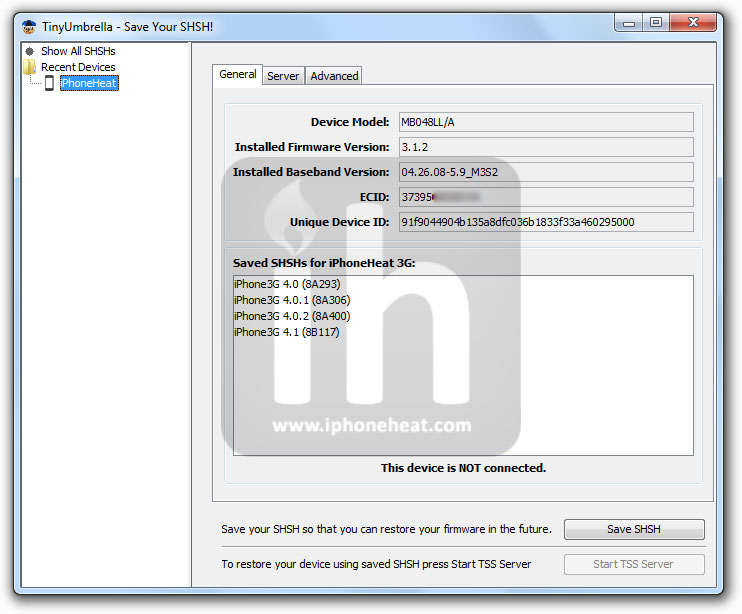
TinyUmbrella 4.1.8 is now available for download. TinyUmbrella 4.1.8 comes with a new UI and numerous new features. You can download Tinyumbrella 4.1.8 from the link below.

Complete list of new features in TinyUmbrella 4.1.8 after the jump…
tinyumbrella
For those who don’t know, TinyUmbrella lets you save SHSH blobs for iPhone, iPad, iPod Touch and Apple TV which are required to be able to downgrade device firmware to an older version.

New in TinyUmbrella 4.1.8

  • Totally redesigned UI for all platforms (inspired by chpwn refined by me)
    • Original artwork by iOPK of Chronic Dev Team
    • Spinny Icon code (thanks to technomage)
    • Quaqua look and feel (sorry mac only due to license restrictions)
    • Much cleaner look and feel all around
  • Known Devices!
    • Now all devices detected by TinyUmbrella are saved for future use!
    • You can remove them as well :) (Right click -> delete from history)
    • You can save SHSH with known devices as well (No more requirement for the device to be connected)
  • Recovery Devices
    • If you connect a device in recovery mode you can still kick it out of recovery (Right click -> Kick out of recovery)
  • Save SHSH now saves ALL SHSHs available at Cydia with one button press!
  • Preferences
    • Change SHSH save directory
  • Proxies (Web and Socks) for those that need them!
  • Better port 80 detection.

download tinyumbrella 4.1.8

Using TinyUmbrella, you can update iPhone 4 to iOS 4.1 without updating baseband.
NOTE: It preserves baseband of iPhone 4 ONLY. iPhone 3GS and 3G users can only preserve baseband with PwnageTool/Sn0wBreeze.

Download TinyUmbrella

Download TinyUmbrella 4.1.8 for Windows, Mac and Linux

You can follow us on Twitter, Join us at Facebook, and also Subscribed to RSS Feed to receive latest updates.

Also checkout:

Digg
Twitter
StumbleUpon
Facebook
Reddit
del.icio.us

VTM iPhone Conference

So I’ve arrived in Philadelphia for the VTM iPhone conference safely :o) I’ve not had a chance to catch up with anyone yet, but hoping to meet some of the attendees tonight. I’m really looking forward to meeting people and seeing the buzz these events generate. I’ve just been tweaking the prototype project I’m going […]

River of News’ real money returns

Developer Dylan Ginsburg has noticed that a lot of iPhone companies (including most of the folks I spoke with at GDC last week) don’t like to talk about exactly how much money they’ve made on the App Store. But he has no such compunctions, so he’s written up a nice post on his blog about how much his River of News RSS app for the iPad has made so far. The short answer? About $20,600 since the app was released on August 19th. The app, which peaked in the top 30 (good, but not outstanding), has sold about 9,500 copies so far, and has made about $5500 of that total in the past month, which Ginsburg says seems like a pretty standard period.

I can tell you from my own knowledge that Ginsburg could be making more — it sounds like he hasn’t even started exploring advertising or in-app purchases in his app, and I’ve heard from many developers that those can be very helpful in the right places. But more important, Ginsburg says the satisfaction he’s getting from working on the App Store is better than any monetary gain — he just recently stepped away from a corporate job, and plans to make a go at creating apps for a full-time living.

It’s cool to hear a straight story from one developer on the App Store about just how viable creating apps is. Of course, one thing Ginsburg doesn’t talk about is how much work and training went into making his app — that $20k in sales didn’t just appear out of thin air. And not all developers see even his level of modest success, since there are so many apps on the store that don’t even make it into the top lists. But Ginsburg is as good an example as any of the kinds of opportunities Apple has created with its App Store platform.

River of News’ real money returns originally appeared on TUAW on Fri, 15 Oct 2010 18:00:00 EST. Please see our terms for use of feeds.

Source | Permalink | Email this | Comments

Bloomberg Game Changers Steve Jobs documentary online and on TV tonight

Last night, Bloomberg TV presented an episode of the Bloomberg Game Changers documentary series highlighting the life and career of Steve Jobs. The show included interviews with Jobs’ friends, former colleagues, and business associates, and detailed his styles of leadership, management, and creative process.

The show is now available for viewing online, or you can watch it tonight (October 15) at 9 PM and 11 PM EDT on Bloomberg TV. Selected highlights from the show are also available on YouTube:

Bloomberg Game Changers Steve Jobs documentary online and on TV tonight originally appeared on TUAW on Fri, 15 Oct 2010 18:30:00 EST. Please see our terms for use of feeds.

Source | Permalink | Email this | Comments

Found Footage: iPhone concert on the B train

It’s time for another installment of our favorite viral program, “Bands You’ve Never Heard Of Play A Song On Their iPhones.” In this case, the band is Brooklyn’s Atomic Tom, the song is the decidedly catchy Take Me Out, and the performance is live on the 6th Avenue line of the New York City subways, crossing the Manhattan Bridge on the B train.

Add the degree of difficulty of shooting the video on iPhones, the noise and lighting challenges of the train, and the likelihood of an overeager “see something, say something” New Yorker getting the boys into trouble with the transit cops — all in all, an impressive effort.

Thanks Howdy!

[via NYT Bits, Daily What and The Loop]

Found Footage: iPhone concert on the B train originally appeared on TUAW on Fri, 15 Oct 2010 23:30:00 EST. Please see our terms for use of feeds.

Source | Permalink | Email this | Comments