Limited edition Joule and Vapor cases from ElementCase

elementcase joule vapor

We’ve drooled over the Joule, a classy metal iPad stand before, and the Vapor iPhone 4 case is one of my favorite iPhone cases. That said, they are not what you would call inexpensive. Nevertheless, the latest models to roll off their custom shop floor are even more exclusive, as limited-edition colors are now available under the “extreme metals” line.

These are extremely limited-edition collectible stands and cases. As you can see in the gallery, the Joule stands have a nice variety in colors (quite excellent for those of us enjoying the Fall colors), and the Vapor cases now include some shiny nickel and a “blood” red that is quite bright. The price range on the Vapor extreme metal line is $99 to $109, while the Joule extreme metal line is $159. As I said, these are not budget cases.

The Vapor cases are released in very limited quantities via pre-order list, expected to ship “within a few weeks,” whereas the Joule is available now. If you’re looking for high-end accessories for the holidays, these are a good bet.

Limited edition Joule and Vapor cases from ElementCase originally appeared on TUAW on Wed, 27 Oct 2010 22:30:00 EST. Please see our terms for use of feeds.

Source | Permalink | Email this | Comments

Valve releases the original Left 4 Dead just in time for Halloween

I just got done playing a level of Left 4 Dead 2 on my MacBook Pro when I saw this: Valve has released the original Left 4 Dead for Mac OS X. Valve originally released the sequel, Left 4 Dead 2, for the Mac on October 5th, promising the first one would come in time for Halloween. The reason for the delay? Valve was having a bit of a hard time making the original Mac-compatible. Late last night, Valve made good on their promise.

If you’re a fan of zombies, the original Left 4 Dead is a blast. It’s also a steal at just US$9.99 (a 50 percent discount in celebration of its release), but for an even better value, you can get both Left 4 Dead and Left 4 Dead 2 for just $14.99 for a limited time. If you already bought the game through Steam on a Windows PC, you should be able to play it on a Mac now without having to re-purchase it thanks to Steam Play.

Left 4 Dead requires Mac OS X 10.6.4 or higher (Snow Leopard Graphics Update required) with a 2 GHz dual core Intel processor or better. You’ll also need either an ATI Radeon 2400 video card or better or an NVIDIA 8600M or better.

Valve releases the original Left 4 Dead just in time for Halloween originally appeared on TUAW on Thu, 28 Oct 2010 01:00:00 EST. Please see our terms for use of feeds.

Source | Permalink | Email this | Comments

Jailbreak iPad iOS 4.2 beta with Sn0wBreeze Confirmed [Screenshot]

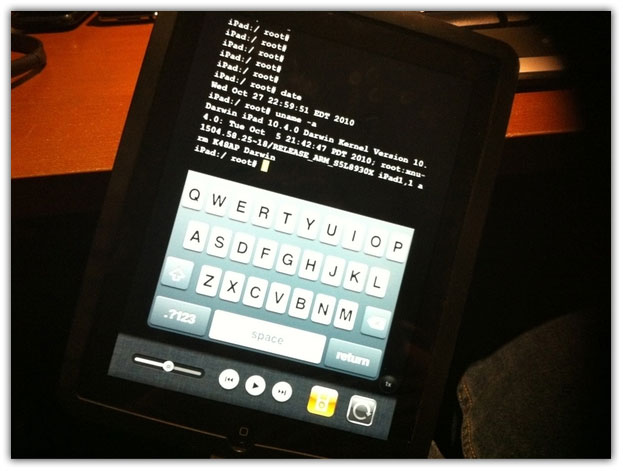
iH8sn0w has successfully jailbreak iPad iOS 4.2 beta 3 with Sn0wbreeze. Sn0wbreeze will jailbreak iPad iOS 4.2 using GeoHot’s exploit used in both Limera1n and Greenpois0n. Checkout the 2 screenshots below shared by iH8sn0w showing a jailbroken iPad iOS 4.2 beta 3 running MobileTerminal app.

Those who don’t know, Sn0wbreeze creates custom firmware to jailbreak iPhone, iPod Touch and iPad just like PwnageTool. But, unlike PwnageTool, Sn0wbreeze is available for Windows only. It also preserves iPhone baseband so that you may unlock iPhone with UltraSn0w then.

iOS 4.2 will be out in November as a universal firmware update for all iDevices (iPhone, iPod Touch and iPad). Get ready to jailbreak iPad iOS 4.2 as soon as it’s out as many hackers are already working on iOS 4.2 jailbreak because of the GeoHot’s bootrom exploit which “Pwns for life” all current devices.

We’ll keep you posted as soon as iOS 4.2 and jailbreak for iPad iOS 4.2 via Sn0wbreeze is out. Stay Tuned!

You can follow us on Twitter, Join us at Facebook, and also Subscribed to RSS Feed to receive latest updates.

Also checkout:

Digg
Twitter
StumbleUpon
Facebook
Reddit
del.icio.us

We go nuclear with the updated Atomic Web Browser

Safari is great for using the web every so often and reading a few things here and there, but unfortunately it is lacking tons of features. Luckily, RichTech was kind enough to create the Atomic Web Browser, which is a fantastic Safari replacement as it has the addition of dozens of features. This app often gets new features and updates, and in fact was just updated about two weeks ago to add AutoFill and some other small things.  Loaded with tons of other features, options, and customization preferences too, Atomic Web Browser, available on the iPhone, iPod Touch, and the iPad, is much superior to Safari and absolutely worth only $0.99

Features

Bear with me here this might be a long list, but let’s start with the ability to view web pages in full screen mode, have desktop or list style tabs, block ads, and identify as a desktop browser, which is actually pretty helpful. Various multi-touch gestures are supported and can be configured to your liking, pages can be saved, you can search for text, you can add, import, and export bookmarks, search through various search engines without having to go to their website, adjust font size, block ads and/or images, a private browsing mode, passcode lock, and rotation lock. And don’t forget what was included in the most recent update, which is AutoFill, improved multitasking functions, and a screen dimmer for the iPad version. Oh, and you can change the color scheme and show or hide the status bar too.

Review

With all these features, you must be thinking that they don’t all work properly or there is some sort of underlying problem. Fortunately, that’s not the case. I have not had a single problem while using Atomic Web Browser. Not one bug, glitch, or flaw at all. Full screen can be toggled with a tap, and you can configure many actions to be performed by a simple swipe. Searching for text on a page is quick and easy and every other feature works great. Now while it does all of these wonderful things, there certainly are a few problems and complaints that should be worked out.

Appearance is one of these issues. You will notice the icon is not very elegant and professional, and could be redesigned to look much nicer. The browser’s actual theme could use some changes too. No matter what color you choose, it just does not look very nice and looks somewhat cheap, and not very good looking. Choosing the Safari color scheme certainly resolves this somewhat, but making it look nicer would be a welcome change.

Conclusion

There really isn’t much else to say about this app. Any features you wish Safari had can probably be found in Atomic Web Browser, along with other great features you never even thought of.  The creators did a great job implementing all the features and they all work to perfections. A redesigned icon and interface would make this app complete, and hopefully we’ll see that in future updates

Are you invited to Apple’s secret summit?

As Apple gets ready to launch iOS 4.2 next month it is rumored that they will host a secret three-day summit in California for iOS developers next week. The goal of this event is to improve the quality of software being offered in the App Store.

Though there isn’t much information on the summit a Silicon Alley insider said it was a more intimate version of the iPhone Tech Talk World Tour held by Apple last year. Developers will get time with Apple engineers, and possibly even hands-on help with their applications.

It is unknown who is attending or how big the event will be. I am sure we will all be looking forward to reports from those who get to go, if this rumor turns out to be true. You can read more about this at Business Insider.

Barnes & Noble intros Nook Color: the worst of all worlds

nook color is no ipad

Barnes & Noble introduced a new color version of its Nook eBook reader on Tuesday and as expected, it features a color touch screen. Unfortunately for B&N, this new device is unlikely to pose a significant challenge to either Apple’s iPad or Amazon’s Kindle.

The big advantage that both the Kindle and the original Nook had was a monochrome e-ink display which uses very little energy and generally provides excellent readability. The iPad on the other hand needs to be charged daily but its color LCD provides plenty of capability for displaying photos and video that are utterly beyond what a slow moving e-ink screen can do. This allows iPad users to utilize any of hundreds of thousands of apps for all sorts of tasks.

The Nook Color has a color LCD with a touch screen and runs on Android. But unlike forthcoming Android tablets like the Samsung Galaxy Tab, this device is going to be locked down and will only be able to run a limited number of B&N-approved apps such as Pandora and Lonely Planet. Even with WiFi-only, the Nook Color only runs for eight hours, at least two hours less than an iPad. With limited capability, poor battery life and a higher price than the Kindle, the Nook Color doesn’t really seem like it would be very appealing to anyone. At $249 it seems like either a full featured iPad or Galaxy tab would be a much better choice even at a higher price.

[Via: Crunchgear]

Barnes & Noble intros Nook Color: the worst of all worlds originally appeared on TUAW on Wed, 27 Oct 2010 19:30:00 EST. Please see our terms for use of feeds.

Source | Permalink | Email this | Comments

Some Apple execs exercise stock options

Bob MansfieldSeveral Apple executives took advantage of the fact that Apple stock hit an all-time high recently to cash out some stock options for extra christmas spending money. Apple hit $319 on October 18 and Bertrand Serlet, software engineering senior VP exercised 5,000 options at $318.50 while controller Betsy Rafael, operations SVP Jeffrey Williams and hardware SVP Bob Mansfield all sold at over $300.

Mansfield in particular made a killing exercising 40,000 options that were priced at $36.54 for $308 each. That’s a tidy profit of $10.844 million. Sometimes it’s worth hanging on to those options for a while. If only all stock options were so valuable. Mansfield has overseen the development of a number of Apple computers in recent years including the slim new MacBook Air, the iMac and the regular MacBook.

[Source: Fortune via Macsimum News]

Some Apple execs exercise stock options originally appeared on TUAW on Wed, 27 Oct 2010 21:00:00 EST. Please see our terms for use of feeds.

Permalink | Email this | Comments

Another hardware keyboard solution for iPhone

iphone keyboardThere are many iPhone detractors who still won’t let go of the fact that the iPhone doesn’t have a physical keyboard. Whether it’s because the on-screen keyboard is too difficult to use, or the move away from “the norm” is too jarring, it’s what holds back many from making the switch or from liking the iPhone they already have.

There have been physical keyboard solutions for the iPhone for some time now, like the 4iThumbs and iTwinge overlays, but now there’s a new type of keyboard from ThinkGeek that connects to your iPhone via Bluetooth and doubles as a case. The $49.99 keyboard is powered by its own rechargeable batteries (recharges via USB) and, when not in use, can flip to the backside of the phone.

Unfortunately, once the keyboard is flipped to the back, it’s obstructing the camera, so taking photos is going to be cumbersome with this thing attached. It’s also going to add a bit of bulk to your phone, but what do you expect when you’re carrying around a separate keyboard for the thing?

[via iPhone Savior]

Another hardware keyboard solution for iPhone originally appeared on TUAW on Wed, 27 Oct 2010 19:00:00 EST. Please see our terms for use of feeds.

Source | Permalink | Email this | Comments

eBooks for kids take a step backward in 3-Little Pigs

The field of interactive children’s eBooks has become quite sophisticated over the last number of months. Products from Oceanhouse Media and My Black Dog Books are quite impressive and offer children four years and up a satisfying interactive experience as they traverse their way through well-designed stories with lots of animation and variations to keep things interesting. It’s become the norm that when a child taps on something in one of these books, he or she gets immediate feedback on the item of interest.

3-Little Pigs (US$3.99) for the iPad is a major step backward in a field that has been constantly improving. When I first downloaded it a few days ago, the price was $6.99 and quickly dropped. Even at $3.99 I consider it too expensive by half. What you get looks like a very rough first draft of what could be a good eBook. A good example of the rawness of the app is that when you launch it, you have no idea what to do next. I contacted the publishers and was told that you need to tap on the bottom right corner of the screen and that this problem will be fixed in the next revision. That’s fine, but I’m reviewing the current version and kids would be left frustrated and unhappy with not knowing what to do. How hard would it have been to add a graphic telling the kids where to tap?

The instructions are given on the second page, using the standard tap right to progress, tap left to go back and tap on objects to interact. Double tapping on the bottom brings up a ribbon allowing you to go to any particular page. Options are given to turn the music on or off, and to have the words appear in either English or Slovak. The English needed a decent proofread, since if you’re teaching a child to read, text like “I want to build a house my- self.” is not helpful. It’s also not very helpful that the app only runs in portrait mode.

Continue reading eBooks for kids take a step backward in 3-Little Pigs

eBooks for kids take a step backward in 3-Little Pigs originally appeared on TUAW on Wed, 27 Oct 2010 18:30:00 EST. Please see our terms for use of feeds.

Source | Permalink | Email this | Comments

TUAW TV Live: A brief history of notable Apple product announcements

Today on a special remote edition of TUAW TV Live, I’ll be screening some amazing video clips for you that show Apple product releases of the past. It’s hard to believe how far Apple and its product lines have come since the late 1990s. You’ll see the first incarnations of some of the current Apple cash cows and marvel at how bad the specifications were on top-of-the-line equipment just a little over a decade ago.

How can you join in on the fun? From your Mac or PC, go to the next page by clicking the read more link at the bottom of this post, and you’ll find a livestream viewer and a chat tool. The chat tool allows you to participate by asking questions or making comments.

If you’re driving somewhere and would like to watch TUAW TV Live while you’re stuck in traffic, please don’t — keep your eyes on the road! However, if someone else is doing the driving, you can watch the show on your iPhone by downloading the free Ustream Viewing Application.

We haven’t neglected our iPad users, since you can tune in to TUAW TV Live on your iPad! That link will send you to a non-Flash page, although you won’t have access to our chat tool. And one final note — if the show has started and you’re seeing a previously recorded show instead of the livestream, you can always pop on over to ustream.tv/tuaw to join the show in progress.

Continue reading TUAW TV Live: A brief history of notable Apple product announcements

TUAW TV Live: A brief history of notable Apple product announcements originally appeared on TUAW on Wed, 27 Oct 2010 16:55:00 EST. Please see our terms for use of feeds.

Source | Permalink | Email this | Comments

The MacBook Air’s unique display

The folks at TechRestore have taken it upon themselves to remove the gloss from Apple’s MacBook Airs. In the process, they’ve discovered that the laptop’s multi-layered display is truly a thing to behold.

Calling the screen “paper thin,” TechRestore CEO Shannon Jean tells ZDNet how the display differs from nearly every other one he’s seen. “It’s in layers, it’s insane,” he says. “I don’t think there’s ever been a screen like this used in a laptop. It’s very similar to a Sony PSP screen, where the LCD panel and backlight are separate pieces.”

He notes that the display doesn’t rest in a typical housing, but is held in place with “Iron Man adhesives.” Finally, Jean notes that replacing the screen will require a dust-free environment, and that removing it is like “peeling an onion.”

You’ll find annotated photos in TechRestore’s Flickr stream. This one is the money shot.

The MacBook Air’s unique display originally appeared on TUAW on Wed, 27 Oct 2010 18:00:00 EST. Please see our terms for use of feeds.

Source | Permalink | Email this | Comments

Count The Beats: Moog Filtatron – a closer look

Last week, Moog Music released Filtatron, an iPhone app modeled after Moog’s own analogue hardware. If you’re not familiar, and you’re wondering what the heck a Moog is anyway, you may be surprised to find you’ve probably heard one dozens of times before, performed on countless albums. Moog Music, founded by Dr. Robert Moog, is the maker of digital and analogue synthesizers like the Minimoog and the Moog Theremin (although the original Theremin was invented by Léon Theremin). A good example of a Moog synthesizer can be heard by the band Air, on their track Kelly Watch The Stars, off their album Moon Safari (Listen in at about 2:10 for what sounds like a Moog Theremin to me).

Typically, Moog Synthesizers are rather expensive, being that they are hand made for a rather substantial, albeit niche market. Therefore, I can’t say I’ve spent any time with a real Moog. As much as I’d like to say I have a couple kicking around in the spare room of my house, I don’t. So, unfortunately, I don’t know a great deal about the sounds of Moog hardware other than what I’ve heard off recordings. And, I suspect, that’s how most other users will approach Filtatron, too.

Thankfully, Filtatron goes a long way to helping users understand what it does and how it does it by including a built-in user guide and glossary. After you’ve had an initial play, I highly recommend you have a good read over these to get the most out of the app. It certainly helped me out. There’s also a whole bunch of presets to show you exactly what Filtatron can do, and how to get there.

At this point, you may be wondering what Filtatron actually does. In a nutshell, let me try to explain. Using its filter ladder — a four-pole resonant ladder filter modeled after the filter found on analogue Moog hardware — Filtatron shapes sound, giving it characteristics akin to a real Moog filter.

In Filtatron, there are two different ways of using this filter. You can either shape the sound using the knobs and dials found on the main tab of the app or by using the two “hands-on” pads provided — allowing you to swipe and move your fingers around the pads to adjust and control most of the parameters found in Filtatron. To provide further character to the sound, there’s a FX module, with fully featured delay, and an amp with distortion and controlled feedback, too.

Continue reading Count The Beats: Moog Filtatron – a closer look

Count The Beats: Moog Filtatron – a closer look originally appeared on TUAW on Wed, 27 Oct 2010 16:00:00 EST. Please see our terms for use of feeds.

Source | Permalink | Email this | Comments

Report: HTML5 web video usage doubled in 5 months

MeFeedia released a report today that isn’t going to make Adobe happy. HTML5 video on the web is on a substantial rise, going from just 10% of web videos in January of this year to 54% of total web videos this October. Just five months ago in May, HTML5 usage was at 26%. MeFeedia found that while Flash is still the dominant player of choice on desktop PCs, mobile devices like the iPad, iPhone, and Android phones are what are driving HTML5 adoption.

Steve Jobs penned his Thoughts on Flash letter back in April in which he wrote that Flash is a dying technology and the future of web video was in HTML5. From the latest adoption rates of HTML5 for web video, it looks like he was right.

Report: HTML5 web video usage doubled in 5 months originally appeared on TUAW on Wed, 27 Oct 2010 16:30:00 EST. Please see our terms for use of feeds.

Source | Permalink | Email this | Comments

Extra! Extra! app may be scraping news museum’s feed of front pages

TUAW came across the US$3.99 app Extra! Extra! when developer Finbarr Brady solicited a review. Extra! Extra! bills itself as an app that will supply you with the daily front pages of more than 800 newspapers from around the globe.

This sounded suspiciously similar to one of the features on the Newseum‘s website. The Newseum, located in Washington, D.C., is a museum that documents news media history. Each morning, more than 800 newspapers from around the world send their front pages as high-quality PDFs to the museum’s gallery, which features these pages for educational purposes.

In Extra! Extra!, you can select a newspaper either from a list or a map view, and the app downloads the PDF to your iPhone, iPod touch or iPad. You can then either mark it as a favorite, e-mail it to someone, or visit the paper’s site — though several of the links I checked were incorrect.

I scanned the list of papers provided by Extra! Extra! and found that it closely mirrored the Newseum’s list.
The FAQ section on the app site claims that it is up to the individual newspaper to decide whether or not it is included with the Extra! Extra! app.

Full disclosure: I’m a designer with The Patriot-News just outside of Harrisburg, PA. Part of my duties when I, or my co-workers, design the front page is to send a high-quality PDF to the Newseum. I checked with our executive editor this morning, who confirmed that we only send those PDFs to Newseum and not any other organization. The Patriot-News is one of the newspapers made available through Extra! Extra!

Read on for more…

Continue reading Extra! Extra! app may be scraping news museum’s feed of front pages

Extra! Extra! app may be scraping news museum’s feed of front pages originally appeared on TUAW on Wed, 27 Oct 2010 15:30:00 EST. Please see our terms for use of feeds.

Source | Permalink | Email this | Comments

Apple holding "secret summit" with select iOS devs next week

apple to hold secret ios summit rumorBusiness Insider is reporting that Apple is set to hold a secret iOS developer summit next week. The event apparently begins next Tuesday and will run for three days. While Business Insider doesn’t have any firm details yet, they speculate that the purpose of the summit is to improve the quality of apps on iOS devices in order to stave off competition from Google’s Android App Store.

The event coincides with the stated sometime-in-November release date of iOS 4.2, which will be available for the iPhone, iPod touch, and iPad. iOS 4.2 will be the first major update to the iPad since its launch in March. It’s unknown what developers will be in attendance, but Business Insider speculates that whatever app developers are in attendance, they’ll likely get “some extra face time with Apple engineers” and some hands on dev help.

This story is just breaking and we’ll get you all the details as they leak out.

Apple holding “secret summit” with select iOS devs next week originally appeared on TUAW on Wed, 27 Oct 2010 15:00:00 EST. Please see our terms for use of feeds.

Source | Permalink | Email this | Comments