Thieves drive truck through Apple retailer’s wall

We’ve heard of quite a few robberies at Apple Stores (and in its own twisted way, the idea makes sense — despite the adage that ‘crime doesn’t pay,’ laptops and iPhones are certainly easy to carry and very resellable), but this is probably the most brute force way we’ve seen it done. A set of thieves in Portland, Oregon just plain crashed a truck through the front window of the MacPac reseller there, and ripped off some iPads, MacBooks, and a few more devices from the store a few weeks ago.

Fortunately, it sounds like things are as under control as they can be — not only did the store’s cameras capture the suspects on tape, but the police showed up within minutes, and the store’s owner says that even though this has happened before, “the last person who did this we put away.” So it sounds like justice will be served up, Apple retailer style, soon enough.

Thanks, Patrick!

Thieves drive truck through Apple retailer’s wall originally appeared on TUAW on Tue, 02 Nov 2010 07:30:00 EST. Please see our terms for use of feeds.

Source | Permalink | Email this | Comments

TUAW’s Daily App: iSlash

iSlash is a nice puzzle-type title that reminds me of Fruit Ninja, but is probably the old arcade game Qix. You’re presented with a shape on screen with a few samurai stars bouncing around inside it, and your task is to slash, with your finger, parts of the shape off, while keeping all of the stars inside a certain area. You’ve got to slash off up to a certain percentage of the shape to move through the levels, and while the first few are easy, the shapes get tougher later on. It’s good fun.

You don’t have to trust us — since the app was released, it’s seen over 500,000 downloads from all over the world. Additionally, the developers are already updating it. They’ve added Game Center support for leaderboards and achievements already, and while there are over 70 levels now, they promise even more to come. The game’s available for US$0.99, or there’s a lite version to try out if you’re not willing to shell out the buck.

TUAW’s Daily App: iSlash originally appeared on TUAW on Tue, 02 Nov 2010 08:00:00 EST. Please see our terms for use of feeds.

Source | Permalink | Email this | Comments

iOS devices affecting Mac’s web share worldwide

There’s a new set of web share stats out in the US, and it appears that on a worldwide scale, the iPhone and other iOS devices are taking a bite out of normal computers’ web browsing, but specifically more for Macs than Windows PCs. That’s the conclusion in the new Net Applications report, which notes that iOS devices are now up to 1.25 percent of all web traffic, while the Mac has dropped below five percent for the first time in a while. Of course, these are only figures, not actual cause-and-effect, so any actual correlations are speculative. But it makes sense that people who previously used MacBooks to do their web browsing are slowly transferring some of that time over to iPads and iOS devices.

On a US scale, the Mac is actually gaining share right alongside iOS, as Apple’s gaining even more of a foothold on device time. Windows still has a huge lead at 83 percent, but Macs and iOS are bigger than ever; together, they make up the largest non-Windows share by far. In terms of actual browsers, Safari is still being beaten handily by Chrome, Firefox, and of course Internet Explorer, but that’s mostly business as usual.

Interesting stats — it’s wild to consider that Apple has basically created the iOS market from thin air in the past few years, and it’ll be interesting to see if the company can start taking a bigger bite out of Windows users rather than sharing browsing time with the Mac product line.

iOS devices affecting Mac’s web share worldwide originally appeared on TUAW on Tue, 02 Nov 2010 09:00:00 EST. Please see our terms for use of feeds.

Source | Permalink | Email this | Comments

Flickr Find: Grampa Mac Portable, meet the baby MacBook Air

It’s hard to look at Patrick McCarron’s snapshot of — how many generations? Hard to count — many generations of mobile computing development and 22 years of Macintoshes on the move without being a little bit awed. The Mac Portable, 1989’s answer to getting things done on the go, seems simultaneously quaint and grotesque next to the sleek and dramatically faster MacBook Air. A trackball! That keyboard, that screen! And the floppy drive — while the newest member of the family doesn’t even sport a built-in optical drive. I don’t even want to think about how many iPads would fit inside that case.

You’ve come a long way, baby. Here’s to another 21 years of portable computing, Apple style.

Photo by Patrick McCarron, all rights reserved. Used with permission. Hat tip to Michael Gartenberg.

Flickr Find: Grampa Mac Portable, meet the baby MacBook Air originally appeared on TUAW on Mon, 01 Nov 2010 22:00:00 EST. Please see our terms for use of feeds.

Source | Permalink | Email this | Comments

iOS 4.2 Gold Master release seeded to developers

The day all iPad users have been waiting for is just about upon us; iOS 4.2 has finally gone Gold Master. Apple is giving developers the go-ahead to download what will likely be the final release version of its latest mobile operating system and SDK. While all but the first generation iPhones and iPod touches will be eligible for the update, the big news is that the iPad will finally move up to the fourth generation of iOS, gaining multitasking and app folders.

All the iOS 4.2 devices will be adding two marquee features: Air Print for remote printing via a networked Mac or compatible HP hardware, and Air Play to hand off video playback to the iOS-based Apple TV.

The new OS should be available for general download sometime in the next couple of weeks.

Thanks to everyone who sent this in.

iOS 4.2 Gold Master release seeded to developers originally appeared on TUAW on Mon, 01 Nov 2010 21:20:00 EST. Please see our terms for use of feeds.

Source | Permalink | Email this | Comments

djay for Mac and iPad review, video hands-on and giveaway

We’ve covered djay and the djay Remote app’s release, but I think the video (on the next page) shows you how awesome the two are together. I’m not a professional DJ, however. I understand many of the basic concepts and tools, as I’ve seen some former roommates practicing their skills — and skills beyond merely loading up the Electric Slide, too. But djay is accessible to anyone who wants to make a mix for a party on up to real, pro DJs who are looking for an electronic alternative to lugging around a box of records and a couple of turntables. I’m not sure djay can completely replace a full rig for a pro, however, but it comes very close.

Be sure to read through to the end as two lucky readers will win a copy of djay the Mac application and the iPhone remote app.

Interface

The UI for djay is meant to simulate having two turntables and a simple EQ/mixer in front of you. Added to the right is an iTunes-like playlist manager and some buttons to enable audio input/output (more on this later) and samples. Overall it’s a simple, yet powerful interface that puts everything at your fingertips. Plus, there are ample keyboard shortcuts available for almost every necessary function in the application.

The iPhone interface (which I preferred to use on an iPad — the app scales up nicely but is not universal) is a subset of the Mac app, focusing on one turntable at a time and giving you a larger, more tactile surface to spin the record back and forth. My biggest complaint here is simply that if you are a professional DJ who is used to having minute control over the platter as it spins, you’ll find djay, when you release the surface, will only spin back up in the direction it was going — in other words, it is not 100% accurate as a turntable simulator. However, for most applications (simply providing a quick break or scratch) it does OK.

I’ve included a video on the next page of how you can interface a MIDI controller with djay for even more “real world” controls.

Continue reading djay for Mac and iPad review, video hands-on and giveaway

djay for Mac and iPad review, video hands-on and giveaway originally appeared on TUAW on Mon, 01 Nov 2010 20:30:00 EST. Please see our terms for use of feeds.

Source | Permalink | Email this | Comments

The 58-inch Multitouch iPhone Table [Video]

The guys behind Table Connect for iPhone, a 58-inch screen that mirrors iPhone screen and multitouch capabilities, has posted a video that shows Table Connect in action.

Check out the video after the jump…

Yesterday we had a short visit from a friend and he was lucky enough to be the first outsider to test our alpha firmware on the Table Connect for iPhone.

As you can see in the video, iPhone must be connected to the Table connect and then it requires you to run an app (jailbroken?) from the iPhone to mirror the iPhone screen to the 58″ table.

via [MacStories]

You can follow us on Twitter, Join us at Facebook, and also Subscribed to RSS Feed to receive latest updates.

Digg
Twitter
StumbleUpon
Facebook
Reddit
del.icio.us

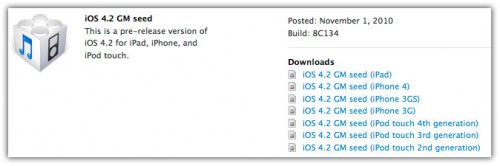
Download iOS 4.2 GM For iPad, iPhone and iPod Touch

iOS 4.2 GM For iPad, iPhone and iPod Touchis now available for Download. You can download iOS 4.2 GM for iPad, iPhone 4, 3GS, 3G, iPod Touch 4G, 3G, 2G from iOS Dev Center only if you’re a registered Apple developer. The iOS 4.2 GM build is 8C134.

We’ll update the post as soon as more details on what’s new in iOS 4.2 GM are available. Stay Tuned!

WARNING: Avoid the iOS 4.2 firmware if you depend on jailbreak and unlock until further notice.

iOS 4.2 GM is available to developers only. Developers can download iOS 4.2 from the iOS Dev Center. However, if you still want to give it a shot, Google the queries listed below. (Please don’t ask for the links)

download-ios-4.2-gm

Download iOS 4.2 GM 8C134

iOS 4.2 is available to developers only. Developers can download iOS 4.2 from the iOS Dev Center. However, if you still want to give it a shot, Google the queries listed below. (Please don’t ask for the links)

Download iOS 4.2 GM for iPad

  • iPad1,1_4.2_8C134_Restore.ipsw
  • ios_4.2_gm_seed__ipad__8C134.dmg

Download iOS 4.2 GM for iPhone 4

  • iPhone3,1_4.2_8C134_Restore.ipsw
  • ios_4.2_gm_seed__iphone_4__8C134.dmg

Download iOS 4.2 GM for iPhone 3GS

  • iPhone2,1_4.2_8C134_Restore.ipsw
  • ios_4.2_gm_seed__iphone_3gs__8C134.dmg

Download iOS 4.2 GM iPhone 3G

  • iPhone1,2_4.2_8C134_Restore.ipsw
  • ios_4.2_gm_seed__iphone_3g__8C134.dmg

Download iOS 4.2 GM for iPod Touch 4G

  • iPod4,1_4.2_8C134_Restore.ipsw
  • ios_4.2_gm_seed__ipod_touch__4th_generation__8C134.dmg

Download iOS 4.2 GM for iPod Touch 3G

  • iPod3,1_4.2_8C134_Restore.ipsw
  • ios_4.2_gm_seed__ipod_touch__3rd_generation__8C134.dmg

Download iOS 4.2 GM for iPod Touch 2G

  • iPod2,1_4.2_8C134_Restore.ipsw
  • ios_4.2_gm_seed__ipod_touch__2nd_generation__8C134.dmg

Report: OmniVision to supply iPad image sensors

Barron’s reports today that manufacturer OmniVision has been tapped to supply image sensors for the next-generation iPad. Citing a note from investment firm Detweiler Fenton & Co., Barron’s suggests that the new iPad, due in the first quarter of 2011, will feature two cameras: one 5 MP model and one a VGA. It’s also expected that FaceTime will be supported.

It seems quite likely that a future iPad will support FaceTime. Shortly after the current iteration was released, the folks at Mission:Repair confirmed that a slot in the iPad’s frame perfectly accommodated an iSight camera pulled from a MacBook Pro. It’s only a matter of times, folks. And once this thing hits…bam. Jetsons phone.

Report: OmniVision to supply iPad image sensors originally appeared on TUAW on Mon, 01 Nov 2010 16:00:00 EST. Please see our terms for use of feeds.

Source | Permalink | Email this | Comments

More Angry Birds costumes (and a cake)

As requested, TUAW reader Amy sent us pictures of these homemade costumes designed to look like the characters in Angry Birds. You can browse through all of them in the gallery below — again, I’m partial to the pig, but that bird looks pretty good as well. Reader Sheldon also dressed up as an Angry Bird, and included the legendary white iPhone with a screenshot on his costume — twice the geeky references!

And while it’s not a costume, reader JT says he spotted this Angry Birds cake in Singapore. Never have the birds and their enemies looked so darn … edible! Thanks to everybody who sent pictures in. I didn’t see many Mac-related costumes out and about this weekend during Halloween. There were lots of video game and comic book characters walking around Hollywood last night, but no Steve Jobs or Newtons to be seen. Did you see any fun Apple costumes?

Update: Here’s some more reader Hanson created with his son.

More Angry Birds costumes (and a cake) originally appeared on TUAW on Mon, 01 Nov 2010 17:00:00 EST. Please see our terms for use of feeds.

Source | Permalink | Email this | Comments

More giveaway goodness: Icon Power Pack, essential TPE Puff Sleeve from IPEVO

If you missed out on some of our “Trick or Treat with TUAW” giveaways over the last few days, you’re not out of luck. We have a number of other giveaways we’re going to continue over the next few days.

Today’s goodies are from IPEVO, the makers of the P2V USB video camera that I use to capture iPad and iPhone screens for TUAW TV Live. They’ve expanded their offerings, and now make a carrying case for the P2V (US$39.99), cool Bluetooth speakers called Tubular WIreless Speakers ($79.00) that I’ll review soon, the essential TPE Puff Sleeve for iPad ($39.95), and The Icon Power Pack for iPod and iPhone ($53.68).

We have samples of the latter two items to give away. First, there’s the essential TPE Puff Sleeve for iPad, which I like to call an “LL Bean down vest for an iPad.” It’s not down-filled, but it looks like it can keep an iPad toasty in chilly weather, or at least keep it protected from bumps and drops thanks to neoprene padding. We have one in maroon to give away, and it looks great. Hit the link below to find out how to win both that and an Icon Power Pack.

Continue reading More giveaway goodness: Icon Power Pack, essential TPE Puff Sleeve from IPEVO

More giveaway goodness: Icon Power Pack, essential TPE Puff Sleeve from IPEVO originally appeared on TUAW on Mon, 01 Nov 2010 18:00:00 EST. Please see our terms for use of feeds.

Source | Permalink | Email this | Comments

Mac Sale and MacBasket offer up Mac app bundles

The Mac App Store is set to change the way you download and use a lot of software on your Mac, but one thing I hope it doesn’t change is the tradition of the Mac software bundle sale. Bundling up indie software and selling it for a relatively huge discount is something that, in my experience, tends to be Mac-specific. Despite the obvious benefits of a nice discount (as long as the software’s developers are fairly compensated for their sales), it’s also an excellent way to find new software that you might not have purchased separately. I know of a few apps that I would have never bought on my own, but now use every day after picking them up in a bundle sale.

There are two bundles going on right now. First, the Mac Sale is up and running right now, offering 10 different Mac apps worth $400 separately for just 50 bucks. There are a few good creative tools in there like Mariner Write and iCollage, and the iPad video converter helps you prepare videos for viewing on your iPad. RuckSack is a useful Mac utility for dealing with archive files like .zips and .rars. The Mac Universe has a discount code for an extra 5% off your purchase, so that’s a great deal if you’re interested in even just a few of those apps.

The MacBasket sale is also underway right now with 10 titles on sale for $49. Great apps like Pear Note, SpeedDownload, and Dropzone are included in the offer. An app like Delta Walker, which compares and syncs files and folders for you, might not sound too useful by itself, but once you have the functionality you’ll find it very helpful indeed. I like these bundles a lot — there’s always the question of whether the software’s creators are making the money that they deserve, but as long as everyone’s in on the agreement, it’s a win-win for all.

Mac Sale and MacBasket offer up Mac app bundles originally appeared on TUAW on Mon, 01 Nov 2010 19:00:00 EST. Please see our terms for use of feeds.

Source | Permalink | Email this | Comments

While store customers get Halloween patches, Apple’s retail VP cleans up

File under “Awww”: Children visiting the Bellevue, WA Apple Store on Halloween were treated to collectible instant-stick logo patches, says iPhone Savior. The patches ran out pretty quickly, but they were popular while they lasted.

Patches are certainly nice keepsakes, but if you want to talk real holiday rewards, let’s consider Apple’s senior VP of retail Ron Johnson. Over the weekend, as noted by Apple 2.0, an SEC reporting form listed Johnson as selling a few stock options. To be precise, he sold 150,000 shares on Thursday, with an average selling price per share of $306.07 — which, along with the strike price (the ‘sticker price’ on the shares, which are granted by Apple) of $11.06, means he cleared a cool $44 million in pretax profits.

Johnson isn’t a first-time seller, either; over the past three years his total profits from option sales come to about $200 million. Can’t argue with the job he’s doing, as Apple’s retail stores continue going gangbusters quarter after quarter — but maybe he needs a new nickname. RJ Nabisco, because he’s making bread? Hmm. Needs work.

image courtesy Interior Design Room

While store customers get Halloween patches, Apple’s retail VP cleans up originally appeared on TUAW on Mon, 01 Nov 2010 14:00:00 EST. Please see our terms for use of feeds.

Source | Permalink | Email this | Comments

GarageBand ’11 is worth diving into

iLife ’11 has a lot of goodies, but none impressed me more than GarageBand’s new capabilities (although I am pretty enthralled with some of the new iMovie features). GarageBand has taken another step toward being a “prosumer” music-recording solution, while still maintaining its roots as a simple, dive-in-and-go application.

I’m a Logic Studio user, and working in GarageBand can be a little awkward if you’re used to more precision and flexibility. For a musical scratchpad with the ability to output a polished, professional track, though, GarageBand is aces. The latest updates make this even more true. Read on for my take on some of the highlights of GarageBand ’11.

Continue reading GarageBand ’11 is worth diving into

GarageBand ’11 is worth diving into originally appeared on TUAW on Mon, 01 Nov 2010 15:00:00 EST. Please see our terms for use of feeds.

Source | Permalink | Email this | Comments

Rumor: iPhone 5 will use NFC for remote computing

Imagine if you could fit all of your Mac‘s personality — settings, documents, and even applications — into your iPhone, and then be able to have any Mac turn into your Mac. According to a source who talked with Cult of Mac‘s Leander Kahney, the iPhone 5 is expected to allow you to easily perform this type of magic through a Near Field Communication (NFC) capability built into the device.

NFC’s initial use would be to turn the iPhone 5 into a passcode-protected electronic wallet or security passkey (like a SecureID fob) that would communicate via the short-range wireless technology to other compatible devices. Apple has recently hired a number of people who specialize in NFC and submitted patent applications for uses of the technology.

Kahney’s source said that Apple is working on a way of letting Mac users simply wave their NFC iPhone near an NFC-equipped Mac, and that other machine suddenly acquires the personality of their home or office Mac. If NFC Macs become commonplace in hotel rooms, offices, and other public locations, you wouldn’t need to carry even a lightweight MacBook Air with you. Just with a wave of your NFC iPhone 5, you’d have your computer anywhere that there was a Mac.

Once you walk away from the remote Mac, it reverts back to its initial personality, with all of your information disappearing from the Mac but securely stored on your iPhone. As with most rumors, there’s a good chance that this technology might not make it to the next iteration of iPhone, but it would sure be an impressive and effective way to carry your Mac anywhere you go.

[via MacDailyNews]

Rumor: iPhone 5 will use NFC for remote computing originally appeared on TUAW on Mon, 01 Nov 2010 13:00:00 EST. Please see our terms for use of feeds.

Source | Permalink | Email this | Comments