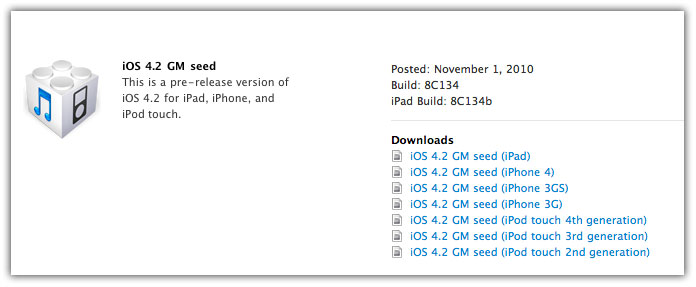
iOS 4.2 GM build 8C134b for iPad Now Available to Developers

Apple has just released a iOS 4.2 GM for iPad build 8C134b to fix the the WiFi issues in iPad. If you’re a registered iOS developer, you can download iOS 4.2 GM build 8C134b for iPad from the iOS dev Center.


iOS 4.2 GM build 8c134b

Stay Tuned for more on the story!

Download iOS 4.2 GM build 8C134b

iOS 4.2 is available to developers only. Developers can download iOS 4.2 from the iOS Dev Center. However, if you still want to give it a shot, Google the queries listed below. (Please don’t ask for the links)

Download iOS 4.2 GM for iPad

  • iPad1,1_4.2_8C134b_Restore.ipsw
  • ios_4.2_gm_seed__ipad__8C134b.dmg

You can follow us on Twitter, Join us at Facebook, and also Subscribed to RSS Feed to receive latest updates.

Digg
Twitter
StumbleUpon
Facebook
Reddit
del.icio.us

iPhone Game Friday: New Releases

Welcome back to the weekend — relax, you made it!

Life is good this Friday because we’ve got a collection of games for you that are not only fun, but free too! So settle in and have a look, and if you’ve got any hot tips for us then don’t forget to pass them along.

Toyshop Adventures

Toyshop Adventures

Toyshop Adventures

As soon as you hit the opening cinematic (by the way, I love that I can say that about an iPhone game now. Opening cinematic. Awesome), you will begin to notice that Toyshop Adventures is a remarkable title. First of all, let me get this out of the way and say that it’s basically LittleBigPlanet. You don’t really customize your character, there’s no charming voiceover, and you’re not a sack, but beyond that you’re still navigating faux-3D stages hunting for marbles. In a toyshop.

The toyshop owner, you see, has lost his marbles (literally) and the shop’s various denizens need your help collecting them. The premise is cute but pretty invisible because where this game really shines is in the gameplay department. While it may take you a level or two to get the hang of the physics, once you do it’s really very fun to make your way to the finishing box at the end of each level. While the designs are not as clever as their LittleBigPlanet counterparts, they’re still challenging and attractive to look at, and the lasso (once you unlock it) makes things even more exciting.

Overall, you’re looking at a solid collection of levels and some unlockable characters and other goodies, which for the price is pretty amazing. Future updates will hopefully address an issue of occasional crashing that we encountered, but beyond that if you’re after a bit of fun in the spirit of LittleBigPlanet while you’re on the go, then Toyshop Adventures is for you.

Price: Free
Developer: Glu Games
Download: App Store

Flamin Stack

Flamin Stack

Flamin Stack

Flamin Stack is a challenging little arcade game with a fast pace and an old-school vibe.

Your seemingly-simple task is to stack the glowing squares as high as you can get them. But this isn’t Tetris — they’re not falling from up above; rather, they slide in one row at a time from the side, starting in groups of three. If you manage to stop them so they rest perfectly in line with the ones below them, then another three will come in. Otherwise, the number of blocks diminishes to two or one and they become harder to align. So while it sounds like it’d be easy to just stack blocks nine layers high, the quick pace makes it a legitimate challenge.

If you’re a very casual gamer then you might be put off by the difficulty, but if you’re used to arcade-era games where the challenge was the whole point, then you’ll feel right at home here.

Price: Free
Developer: Nicholas Robert
Download: App Store

Wordlands

Wordlands

Wordlands

In the interest of bringing some variety into the mix, let’s take a look at a game that’s not just for play but is also educational. Wait, come back, it’s fun!

Wordlands is essentially the wordsearch of the 21st century. You’re presented with a grid of letters and must drag your finger across to form words. The longer the better. Unlike a standard wordsearch, you can drag around diagonally, overlap things, and do all sorts of crazy stuff if it gets you the word you’re after. Doing this earns you money, certificates, and access to new levels. The game is structured like a journey, with your overarching goal to reach the “promised land” by earning enough points in each of the stages across the world map.

If you’d like to exercise your brain and vocabulary a bit along with your fingers, then Wordlands is easy to recommend. In fact, it’s so well put together that it feels like a shame not to give it a try even if you’re not into this kind of thing. And it’s free, after all.

Price: Free
Developer: Thinknao Software
Download: App Store

Watercolor War: Bomb That Man!

Watercolor War: Bomb That Man!

Watercolor War: Bomb That Man!

Fans of Watercolor War will be thrilled about Bomb That Man! because now they finally have a free app they can recommend to their friends to coerce them into buying the full game. Watercolor War: Bomb That Man! is, in fact, an isolated minigame of sorts from the full title which offers a glimpse of the full game’s charm in a free teaser.

The design maintains the same gorgeous watercolor aesthetic while removing all unnecessary menus and distractions. It’s just you, a fleet of bomber plane, and a beach full of baddies. Tapping the screen above them will summon a plane to drop a bomb in that area, and your goal is to use the splash damage of the (rather slow) bombs to keep the soldiers from crossing the beach.

There really isn’t much more to it than that, but the mechanic is solid and it’s an easy way to pass some time hunting for a high score. Besides, if you like it then you can grab the full Watercolor War and enjoy a hugely successful title.

Price: Free
Developer: Joseph Neuman
Download: App Store

Connectus!

Connectus!

Connectus!

This week’s last entry is actually just free for a limited time, but it’s a fun little brain twister so we’ve included it. Remember in grade school when your friend used to ask you to draw that house without lifting your pen off the paper or going back over lines you’d already drawn? Well that’s basically Connectus!

Here’s an example of a simple concept turned into a very smooth and accessible game. Over the course of the game’s 30 levels, you explore the notion of completing figures that range from the simple to the notorious house and beyond. It’s a cinch to pick up and play and it’ll test your visual thinking skills, especially later on.

A promised update will include plenty more levels, and in the meantime if you get stuck there’s a convenient Hint and Undo function to help you solve the puzzles. We’d like to see some extra modes or layers of gameplay added in the future, but for now Connectus! is a wonderful and good looking free game that you should grab before the price goes up!

Price: Free (for a limited time)
Developer: Ishay Weinstock
Download: App Store

What Have You Been Playing?

So now that we’ve saved some cash with these freebies, let’s hear what sorts of games you’ve been playing this week. Any other amazing free titles that you recommend? Let us know in the comments!

Weekly Poll: What Is Your Favorite iPhone App Category?

Here at AppStorm we want to make sure we’re continually improving our content so that it’s relevant to our readers. One huge way you can help us do this is simply by telling us what types of apps you like best.

Take a second and vote for your favorite category from the App Store. I’m personally addicted to productivity apps but you might be more of gamer or maybe a music lover. If we didn’t mention your favorite category, simply write it in at the bottom.

If you’d like to help us even further, leave a comment below ranking your top three to five favorite categories. Feel free to also mention what types of apps you’re sick of reading about!

My iOS Feature Wishlist

iOS (formerly iPhone OS) has come a long way since its inception. What began as a simple system with only a few default apps and zero expansion opportunities is now a powerful application platform with desktop-like features such as copy and paste, global search and more.

Despite this notable progress, there’s always room for improvement. Today we’ll go over my personal wish list for the platform then ask for your input on features you’d like to see Apple implement in the future.

Home Screen: Jump to Specific Page

My first request is quite simple. We all have tons of apps filling our iPhones, iPads and iPod Touches and it can be time consuming to flip through each screen to get to the one you want.

To be fair, the global search feature has vastly improved app-finding for me and I use it on a regular basis. However, I’m quite familiar with how each of my pages is organized and frequently just want to shoot to the third or fourth page immediately.

screenshot

The iPhone page indicator should be more functional

The dots at the bottom of the page seem like a natural place to implement this feature. Perhaps holding your finger on a dot should have an OS X-like dock zoom effect so you can easily select the page you want. Honestly, it doesn’t matter much how they implement it, I just want it to be there!

Alphabetical App Listing

When you navigate to the search screen, the list is blank until you start searching, which of course brings up the results matching your inquiry. I think this is a waste of space and could be made extremely useful if the default state of this screen were an alphabetical listing of all the apps on your device.

screenshot

The iPhone search page could double as an app list

It might seem unnecessary with a search bar at the top but you don’t always know what app you’re looking for. Sometimes you forget the name but can recognize the icon, other times you merely want to quickly browse all of your apps to find one to kill some time with.

Zip Support In Mail

Zipped archives are an extremely common way to send files digitally and it’s beyond frustrating that iOS leaves you hanging on this aspect. If you receive a ZIP, tough, you’ll just have to wait until you get to a desktop to open it.

screenshot

After all this time, still no ZIP support?

As I pointed out in an earlier article, Readdle’s excellent app PDF Expert actually solves this problem and brings excellent ZIP support to the native Mail app, but this feature should be built into the system and not something that you have to pay extra to receive.

A Central Notifications List

Notifications were an awesome addition to the iPhone. It’s great that apps can inform us of important events that we want to know about, but the system isn’t perfect.

As inspiration for how it should work, let’s look at another notification system we’re all familiar with: Facebook. Just as with the iPhone, Facebook has a system that tells me about anything that I’ll likely be interested in knowing. The great thing about the notification system in Facebook though is that they’re all organized into a nice list that I can go back and reference at any time. If I ignore a notification or was simply bombarded with ten of them at once, I can just cruise over to the list and browse through everything that happened.

screenshot

The Facebook notification list

Where is this functionality on the iPhone? We get those little popups, but once they’re gone that’s all we get. I want a simple screen where I can browse through all my past notifications. This could easily be implemented in a new screen next to global search or even through the feature in the next wish.

A Better Lock Screen

The iPhone lock screen seemed neat when we all first saw it, but then Teehan and Lax created a mockup of a home screen (later hacked into a functioning lock screen) that blew away Apple’s silly little clock.

screenshot

Teehan and Lax’s brilliant mockup

This just makes too much sense for Apple to ignore for much longer. It’s a beautiful implementation of a dead-practical idea that would save us all tons of time.

As a further look into what we could be enjoying if Apple would just get on board, check out the new Palm Pre 2′s dock screen apps. This brilliant idea, outlined in a recent article, allows developers to create apps specifically designed to run when the phone is docked. How cool is that?

Tell Us About Your iOS Wishlist!

I could keep going for days but these suggestions are definitely at the top of my iOS wishlist. We never know what Apple is cooking up in their next release but it’s good to get these discussions going so they know what we want to see!

Be sure to leave a comment below and tell us about your brilliant feature ideas to make the best mobile operating system on the planet even better.

Cut the Rope: A Fantastically Outrageous Puzzle Game

Among people who like playing games, I think that there are a few types. There are those who play massive, epic three-dimensional games with dedicated consoles, and then there are the rest of us who become casually addicted to gems like Rolando, Topple 2, Doodle Jump, and my new favorite, Cut the Rope, by Chillingo in conjunction with ZeptoLab.

As you have probably guessed, this review is going to be about Cut the Rope. Keep reading after the fold to see what I think of this truly charming App Store phenomenon.

screenshot

Getting Started

When you open Cut the Rope for the first time, an adorable animation of a package (containing your new and adorable friend, Om Nom) arriving sets the tone for the entire game.

Getting Started

When you go to the App Store to download Cut the Rope, you’ll see that there are two versions: Cut the Rope for iPhone, and Cut the Rope HD for iPad. Note that this is not a universal app; you have to buy both if you want to play on iPhone and iPad.

screenshot

Cut the Rope HD

You can also buy Cut the Rope HD, the high-definition iPad-optimized version!

Once you have made your choice and opened it, the app will ask you whether you want to enable Crystal. Crystal is a social gaming experience similar to Apple’s Game Center, ngmoco’s Plus+, or Aurora Feint’s OpenFeint; in fact, since Cut the Rope comes with Game Center support built-in, I am a little baffled by the inclusion of Crystal (more on that later).

After you have made a decision on enabling Crystal, the begins with an breathtaking animation of a package arriving at your front door, labeled “Feed with Candy”, with a breathing-hole cut in it. Inside is your new little friend, the adorable green, frog-like monster Om Nom.

Game Play

Om Nom is hungry for candy, which hangs from a rope where he can’t reach it; it’s your job to cut the rope by passing your finger through it, and give your tiny green friend the treats he requires. In the process, you try to get the little wheel of candy to pass through as many out of three glowing stars as possible; this is how you earn points.

screenshot

Game Play

With the help of Cut the Rope’s quick instructions, you’ll be up and running in no time!

Cut the Rope also features fantastic background music (of the classical sort), which is very reminiscent of that used by Topple and Topple2 from ngmoco.

All this is realized using a fantastically smooth and realistic physics engine; it truly feels like the real world, but better for Om Nom’s company. When the candy nears the little monster, he opens his mouth wide, and if he catches it, you’ll hear a satisfying crunch-crunch as he gobbles it up. But if you miss, Om Nom will emit a small, disappointed whine, and frown at you. Time to try again!

Try to collect as many stars as possible in order to unlock the next world!

Cut the Rope currently features four worlds (Cardboard Box, Fabric Box, Foil Box, and Gift Box); within each, there are fifty levels which vary from incredibly difficult to pretty easy. As you advance through the worlds, you encounter new challenges and control structures (spikes, spiders, elastic ropes, etc.). More worlds are planned for future updates.

screenshot

Levels and Worlds

Flick to the right and to the left to choose on of currently four worlds; within each world, you get an ample number of levels. Once you have collected enough stars, new the next world is unlocked!

Artwork: A 2D Renaissance

My friends have all heard my spiel on games. I’m often disturbed and disappointed by the trend toward three-dimensional gaming, because it seems to put glitz and short-term impression in front of great art; for how many 3D games look truly smooth? The test on game artwork for me is whether I’d most expect to see it in a frame at an exhibition, or in the hands of a poorly-socialized fourteen-year-old boy; unfortunately, even the very best 3D games seem to fall into the latter category, whereas the best 2D games feel at home in the former.

When ngmoco pulled the plug on the Rolando franchise and began expanding their empire of cynical, kitschy social games, my greatest fears for mobile gaming were realized. For the greatest while, it seemed as though the future would comprise pretend farms, pretend cities, pretend kingdoms, and all-too-real money.

screenshot

Charm

Charm wins out in the end! I’m easily won over by nice touches like taping and untaping the box as you exit and enter worlds.

But the massively positive response to Cut the Rope has given me hope again that beautiful, charming graphics and no-nonsense, healthy fun can succeed on the App Store. There will always be a market for addicting users to growing fake crops with real money, but it seems that the charm of adorable games like Cut the Rope is not lost on consumers.

Performance

Cut the Rope performs perfectly on both my iPhone 4 and iPad. It seems to be the norm for most iOS games to crash frequently, but I’m elated to say that Cut the Rope has not even crashed once for me.

Cut the Rope is an impressive masterpiece of careful memory-management.

Room for Improvement

I touched earlier on the confusion caused by the inclusion of the Crystal gaming network; I’d like to fill out my thoughts on that a little.

In the days before Game Center and iOS 4.1, it made sense to have many competing gaming networks; each had its own culture and following, and pool of conforming games. But now what we really want is consistency. The differences between the various networks, be they superficial or philosophical, are largely irrelevant to normal users. That’s why when my mother downloaded Cut the Rope at my recommendation, she delayed playing it for several days, because she was afraid to make the wrong decision in choosing whether to enable Crystal; it doesn’t matter to people like her that any such decision can easily be undone. To them, the friction of uncertainty is enough to frighten them away from a great game.

It is imperative that developers rally around Game Center, if only to provide a unified experience for people like my mother. And if you must include a third-party network with your game, don’t confuse new users by making them opt in or out on first launch.

Another area for potential improvement I’d like to mention is crispness of graphics on the iPhone version of Cut the Rope. It truly looks great, but with the Retina Display, it is common to see some spots where things are a little blurry. In Cut the Rope HD on my iPad, however, the graphics are outstandingly crisp.

Pricing

Cut the Rope for iPhone costs only $0.99; for iPad, you can pick up Cut the Rope HD for $1.99, still a fantastic price. There are also free (lite) versions of each, which come with 18 full levels.

Conclusion

Cut the Rope gets a clean 10/10 from me! With its outstanding physics, charming graphics, and endearing theme, it’s impossible not to love. In fact, if you listen to App Store reviews (I rarely do, but that’s another story), you’ll be glad to know that Cut the Rope has received nearly 54,000 five-star ratings.

Let us know what you think of Cut the Rope in the comments below!

Format iPhone Emails with MarkdownMail

Have you ever wanted to format your iPhone email messages? Today we’re going to look at a popular new app, MarkdownMail, which makes it incredibly easy to create HTML formatted emails with the simplicity of Markdown markup.

The default iOS Mail app works great for most emailing purposes, but if you want to format your text or include lists, links, and more, you’ll need a more advanced app. MarkdownMail fills in this gap by letting you quickly create HTML formatted messages using simple Markdown formatting. No matter what email client your receiver is using, including the iOS Mail app, your message will be formatted just like you intended. Let’s take a look at this app and see if it will make emailing from your iOS device better for you.

Getting Started with MarkdownMail

MarkdownMail is a no frills app that gets out of the way to let you get your work done. When you first run the app, you’ll see an example message that explains the app’s features … in Markdown formatting, of course. Tap the compass icon, second to right, to preview the post as it will look in rendered HTML.

screenshot

MarkdownMail is simple and to the point

From the edit screen, tap the Drafts button in the top left corner to see all posts saved in MarkdownMail. There’s only the default example one at first, so press the plus button to add a new post. Start typing anything you’d like, and add Markdown markup to get your message formatted.

screenshot

Editing messages works in normal and landscape mode

It’s fairly quick to add the formatting you want with Markdown. If you’re already used to using it in 37signals webapps and other tools, you’ll be ready to format beautiful emails quickly. Otherwise, you can get an overview of Markdown on Daring Fireball.. For a quick refresher, just press the left menu button and select Syntax Review for a quick glance at the formatting options right from the app.

Or, here’s some quick formatting options you may want to use – just replace the text between the symbols with the text you want to format:

  • *italic*
  • **bold**
  • #Header 1# (same as <H1></H1> in HTML)
  • ##Header 2##
  • To make a list, just add numbered or * lists in individual lines
screenshot

Help is only a tap away

Once your message is ready to send, press Done to close the keyboard then tap the email icon in the toolbar to send the message. Enter your subject and recipients as normal, then send your message. All messages you’ve written will stay in the MarkdownMail Drafts folder, so you can quickly access them to get formatting for a future message.

screenshot

Sending richly formatted messages is quick and easy

One thing we found very useful was using MarkdownMail for HTML snippets we wanted to use commonly in email messages. We wrote out our standard email signature in Markdown, then preview it in HTML, copy it and then paste it into any app, including the default Mail app, in seconds. This is not what you’d think of as the default use for an app like this, but it works well, especially with the Drafts folder that makes it easy to save messages.

screenshot

Copy formatted text into many apps

Use MarkdownMail for Blogging

Another thing MarkdownMail works great for is for composing blog posts. Most of the major blogging systems offer their own mobile apps for creating new posts on the go, but most don’t let you format your posts with rich text and formatting.

There’s a couple ways you can use MarkdownMail to overcome these limitations. First, Tumblr and Posterous both let you email Markdown formatted posts to publish directly. Alternately, you can copy HTML formatted text to your clipboard to post to another blogging system such as WordPress using its native app.

To post to Tumblr or Posterous, just type up a new post in MarkdownMail with Markdown formatting. Once you’re finished, press the menu button on the left and select Email Markdown to email the post in Markdown formatting. Now just email it to your special posting email address you’ll find in your account info, and you’ll have a new formatted post on your blog in minutes. Alternately, if your blogging system doesn’t support markdown, just copy the HTML formatting and paste it into an email or the mobile app; this works well with the WordPress app.

If you’re emailing a post to Tumblr, remember to put !m in the subject line before your post title, or otherwise Tumblr will not recognize the markdown formatting.

screenshot

Blogging on the go … Markdown style

Pros and Cons

In general, it’s fairly easy to use Markdown to make nicer emails than you could with the Mail app. The only problem with entering Markdown formatting on the iPhone is that you have to navigate between 3 keyboards to get all of the characters. It’s still easer than entering raw HTML markup, but we did find it tiring in our tests. If you have the TextExpander app, though, you can cut some of your editing time by making shortcuts for the text you enter the most. We wish it offered formatting options via a tweaked keyboard or extra editor buttons. Additionally, it would be nice if there was an option to not save messages as Drafts if you want; sometimes you want to send a formatted message one time only, and don’t want it filling up the drafts folder.

Conclusion

If the default Mail app has been killing you with its lack of formatting options, MarkdownMail will be like a breath of fresh air. It makes it quick and easy to create formatted messages, and is terribly useful for a snippet manager for those little bits of formatted text you need daily.

Even if you’ve never used Markdown formatting, it’s easy enough to learn that you’ll be using it like a pro quickly. There’s tons of reasons having full HTML editing support can be useful on an iPhone, from creating a rich footer for your emails to sending your client a list of things left on their project to writing a well-formatted post for your blog on the go. If you’ve used MarkdownMail for something unique, be sure to let us know in the comments below!

iTunes 10.1 live now, introduces AirPlay and iOS 4.2

iTunes 10.1 is now available in a Software Update near you — the latest version of Apple’s all-in-one music library/iOS sync/movie rental/social network/educational material application (why’s it still just called iTunes again?) introduces AirPlay compatibility (as promised), lines up the iOS 4.2 release with all kinds of goodies for iPhone and iPad owners, and includes that special sauce that seems to come with all big Apple releases: “stability and performance improvements.”

But don’t take our word for it — hit up your Software Update right now and find the new version for yourself. If you spot something in there that we didn’t know about, be sure to let us know about it, too.

iTunes 10.1 live now, introduces AirPlay and iOS 4.2 originally appeared on TUAW on Fri, 12 Nov 2010 13:07:00 EST. Please see our terms for use of feeds.

Source | Permalink | Email this | Comments

Java isn’t dead on OS X as Apple contributes to OpenJDK

java duke logoWere you worried about Apple’s commitment to Java? Today’s press release from Cupertino may make you feel a little better. It seems Oracle (who bought Sun and thus Java back in 2009) and Apple are going to support the OpenJDK project going forward. You can read the full press release below, but the practical upshot is that Java on the Mac is far from being dead. It’s a good thing, too, because Java is still widely used for writing applications that need to be easily deployed across a multitude of platforms.

Show full PR text
REDWOOD SHORES and CUPERTINO, California-November 12, 2010-Oracle and Apple(R) today announced the OpenJDK project for Mac OS(R) X. Apple will contribute most of the key components, tools and technology required for a Java SE 7 implementation on Mac OS X, including a 32-bit and 64-bit HotSpot-based Java virtual machine, class libraries, a networking stack and the foundation for a new graphical client. OpenJDK will make Apple’s Java technology available to open source developers so they can access and contribute to the effort.

“We are excited to welcome Apple as a significant contributor in the growing OpenJDK community,” said Hasan Rizvi, Oracle’s senior vice president of Development. “The availability of Java on Mac OS X plays a key role in the cross-platform promise of the Java platform. The Java developer community can rest assured that the leading edge Java environment will continue to be available on Mac OS X in the future. Combined with last month’s announcement of IBM joining the OpenJDK, the project now has the backing of three of the biggest names in software.”

“We’re delighted to be working with Oracle to insure that there continues to be a great version of Java on the Mac,” said Bertrand Serlet, Apple’s senior vice president of Software Engineering. “The best way for our users to always have the most up to date and secure version of Java will be to get it directly from Oracle.”

Apple also confirmed that Java SE 6 will continue to be available from Apple for Mac OS X Snow Leopard(R) and the upcoming release of Mac OS X Lion. Java SE 7 and future versions of Java for Mac OS X will be available from Oracle.

Java is a general purpose software development platform that is specifically designed to be open and enable application developers to “write once, run anywhere.” The Java platform is most widely used in business software, web and mobile applications.

Java isn’t dead on OS X as Apple contributes to OpenJDK originally appeared on TUAW on Fri, 12 Nov 2010 13:00:00 EST. Please see our terms for use of feeds.

Source | Permalink | Email this | Comments

iAds helping all mobile advertising take off?

The Wall Street Journal is reporting on an interesting effect of Apple’s iAd platform — it seems to be helping the competition.

Just a few months after being announced, iAds began appearing in the U.S., and a global launch began earlier this month. Meanwhile, Apple and the Denstu Group signed a deal to bring iAds to Japan. All of this activity has garnered a lot of attention for the mobile advertising space in general, and several providers are seeing greater sales.

“…ad executives say Apple’s entry into the market is giving them a boost,” the Journal reports. “That’s because iAds has gotten big marketers to pay attention to mobile advertising in the first place.”

Of course, the only evidence of a correlation is anecdotal. It’s quite likely that Apple’s high-profile entry into the space has generated interest, but we haven’t seen empirical data to support that theory. Still, Apple does bring a bit of cachet and sexy to mobile marketing. The true test will be to see who’s still standing in 5 years.

[Via AppleInsider]

iAds helping all mobile advertising take off? originally appeared on TUAW on Fri, 12 Nov 2010 12:00:00 EST. Please see our terms for use of feeds.

Source | Permalink | Email this | Comments

iPad and iPod touch books show off TUAW pride

There’s a Yiddish word, naches, that doesn’t refer to tortilla chips with kosher sour cream; it translates literally as ‘joy’ but with a strong connotation of pride and pleasure in the achievements of family or friends. It is, therefore, with substantial naches that we point to the work of several TUAW contributors gracing bookstore shelves near you.

First up, from authors Michael Grothaus and Steve Sande with technical review by Erica Sadun, Apress’ Taking Your iPad to the Max delivers a thorough guide to the magical and revolutionary tablet for both new buyers and existing owners. Retail price is $29.99, and Amazon will be happy to deliver it to you in plenty of time for the holidays.

Second, Michael and Erica collaborated on the Taking Your iPod touch to the Max volume, also from Apress. The book guides iPod touch owners through all the information they’ll need to make the most of their new devices, and it looks very pretty sitting under the tree with a new iPod. The book is $24.99 at retail.

It’s possible that longtime TUAW readers may already know a good bit of the information in these books, but there’s always the chance to learn something new — and for those family members or friends who are new to the world of iDevices, one of these books would be a great way to get them rolling.

iPad and iPod touch books show off TUAW pride originally appeared on TUAW on Fri, 12 Nov 2010 11:00:00 EST. Please see our terms for use of feeds.

Source | Permalink | Email this | Comments

Sync your iTunes library with Dropbox

There are a lot of nice things about the iTunes (and Apple in general) ecosystem. As long as the way you want to work is the same as the way Apple built it, things are generally hunky-dory, easy to use, and reliable. Stray away from Apple orthodoxy, though, and things can get ugly really fast. A prime example of this is trying to keep one iPod/iPad/iPhone in sync with an iTunes library through multiple computers.

Between Apple and the recording industry’s piracy paranoia, they have contrived to make it very difficult to plug a device into multiple computers without having everything on the handheld device wiped out. However, thanks to the amazing cloud storage solution known as Dropbox, there is an answer. The beauty of Dropbox is that once you create an account, you can install a local application that automatically syncs selected folders to the cloud. Linking multiple computers to the same account will keep copies of all of the desired files and folders in sync on all of those machines automatically and seamlessly.

Syncing the media files is pretty straightforward, but iTunes keeps track of portable devices and sync status through its library database, an XML file that is easily corrupted. Plugging the iPod into a computer with a different library file will prompt iTunes to wipe all of the data from the device. Getting around this requires keeping the library file in sync through Dropbox as well, but this is not quite as simple as it sounds. Because iTunes expects the library to be in a very specific location, you have to delve into the OS X terminal to create a symbolic link that fools iTunes into thinking the library is still where it was originally created. This technique apparently works reliably for the most part, as long as you don’t open the library from multiple computers simultaneously, which will break everything. Head over to the source link to get the detailed instructions.

Sync your iTunes library with Dropbox originally appeared on TUAW on Fri, 12 Nov 2010 10:00:00 EST. Please see our terms for use of feeds.

Source | Permalink | Email this | Comments

Could AMD Fusion chips be coming to Macs?

Ever since Apple finally abandoned the PowerPC platform in favor of the x86 architecture, Macs have been exclusively powered by CPUs from Intel. Throughout that time, however, there has been speculation that Intel could dual source and use some of AMD’s chips as well; that may have just been posturing in order to get a better pricing deal from Intel, though. So far, AMD’s only inroad at Apple has been through its ATI graphics division, which has supplied Radeon GPUs for an array of Macs over the years.

The AMD speculation has flared up again in recent days following an analyst meeting to discuss the company’s new Fusion chips. Fusion is a platform that AMD has been working on ever since it bought ATI several years ago. The Fusion chips combine the CPU and a GPU onto a single die, and one of the slides in the AMD presentation featured a lineup of iMacs and a Mac Pro. The slide apparently went by without discussion, and neither Apple nor AMD has made any announcement about Fusion chips appearing in future Macs. AMD has begun providing Fusion samples to hardware partners for testing, with full production due to start in early 2011. It would be a shock if Apple doesn’t at least test AMD chips, but seeing them in production will likely require a very positive combination of performance, power consumption, and pricing. We’ll just have to wait and see.

Could AMD Fusion chips be coming to Macs? originally appeared on TUAW on Fri, 12 Nov 2010 09:00:00 EST. Please see our terms for use of feeds.

Source | Permalink | Email this | Comments

TUAW’s Daily App: Gun Bros

Freemium has earned kind of a bad name on the iPhone — a lot of people see it as a nickle-and-dime kind of thing, where if you don’t pay out a buck or two to the game every once in a while, you don’t get to have a full-featured experience. But there is a way to do it right: have a full game before the microtransactions, and then use those transactions to make the experience better, in an optional way. That’s exactly what Gun Bros does. The free game that you get on the App Store is a more than excellent dual-stick shooter with some really nice RPG and social elements added into the mix. And even without spending any money, you can have a fun and full experience playing the game.

Continue reading TUAW’s Daily App: Gun Bros

TUAW’s Daily App: Gun Bros originally appeared on TUAW on Fri, 12 Nov 2010 08:00:00 EST. Please see our terms for use of feeds.

Source | Permalink | Email this | Comments

Mac OS X Leopard security update available

On Wednesday, Apple released Security Update 2010-007, which patches a critical security flaw in Mac OS X Leopard. The update is approximately 241 MB and contains numerous security patches, including an updated version of Adobe’s Flash Player plug-in. Note that this security update is for Mac OS X 10.5 Leopard, an older version of OS X; if you’re running Mac OS X 10.6 Snow Leopard, this update does not apply to you.

If you’re still running Mac OS X Leopard, fire up Software Update and grab this security update, or you can follow these links for updates for the client version and server version.

Mac OS X Leopard security update available originally appeared on TUAW on Fri, 12 Nov 2010 08:30:00 EST. Please see our terms for use of feeds.

Source | Permalink | Email this | Comments

Bad apps mar the experience, according to survey

Here’s an interesting reason why so many (around 9 percent, according to the most recent data) iPad and iPhone owners don’t use apps as often as you might think: one bad experience usually ruins the whole setup for them. That’s according to a new survey done by Harris Interactive, which found that 38 percent of mobile app using adults polled were actually dissatisfied with “most” of the apps they’d used. And 69 percent said that using an app they didn’t like actually colored their perception of that brand entirely. Thirteen percent said that any bad app hindered them from even downloading other apps. You can probably imagine a user pulling up a fart app recommended by a friend, realizing how dumb it is, and then dismissing the App Store entirely.

Of course, this survey doesn’t seem to specifically cover the App Store (and it only surveyed 781 people, though we’ll hope Harris chose those people as a representative sample), so these people could have been using non-iPhone mobile apps — typically a far cry from what’s available in terms of selection and quality on the App Store right now.

It is interesting to hear some reasons why people aren’t downloading and using apps. It’s weird to think that people would use a terrible app and have it color their perception of some of the great apps we love, but as new as this platform still is, mass market users are still forming their opinions about the concept of applications on their phones.

Bad apps mar the experience, according to survey originally appeared on TUAW on Thu, 11 Nov 2010 23:00:00 EST. Please see our terms for use of feeds.

Permalink | Email this | Comments