Microsoft Office or iWork, that is the question

No doubt about it: Microsoft Office is the 800-pound gorilla of productivity suites, both on the Mac and on Windows. In the latest version, Office 2011, the product teams have added lots of zing both in performance and features.

Question is, can you go with alternatives? In particular, what about iWork? The answer is, it depends on the apps that you’ll be using, the level of functionality you want from them, how you work and who you collaborate with. As there are great deals to be had today on Office ($80 for Home/Student, which only lacks Outlook vs. the Business edition), it’s worth thinking about the match-up.

[There are other commercial options, like Mariner Write/Calc, open-source alternatives like KOffice, NeoOffice and Open Office.org, and of course, cloud apps like ThinkFree, SlideRocket and Google Docs. Today we’re talking iWork. -Ed.]

For basic word processing, Pages is up to the task against Microsoft Word. Sure, things are in different places and the lingo may not be as familiar, and that may take some time getting used to. However, if the end goal is to get your thoughts on paper and to have the flexibility to format these words the way you want to, Pages will do the job. And if you need page layout flexibility, Pages’ page layout tools makes for a more elegant and easy-to-use solution for documents that require you to position things around.

Continue reading Microsoft Office or iWork, that is the question

Microsoft Office or iWork, that is the question originally appeared on TUAW on Mon, 29 Nov 2010 19:30:00 EST. Please see our terms for use of feeds.

Source | Permalink | Email this | Comments

Mongoliad apps out now on iPhone and iPad

We’ve been following the Mongoliad project by author Neal Stephenson ever since it was announced last May, and the iOS apps for the project have finally been released on the iOS App Store. The apps are free, but you’ll remember that the project is actually a subscription-based universe of fiction, so while there are some free things to read in there, you’ll have to buy a membership or a subscription if you want access to everything. You can do so from directly within the app — it’s about seven bucks for more than a novel’s worth of material, so it’s not a bad price at all.

If you already have a subscription, the app will let you access the content you’ve got from anywhere, and/or download them so you can read offline. Even if you’re not a fan of Neal Stephenson (and you probably should be — read Snow Crash, and then read The Diamond Age, because they’re both terrific), the model itself is quite interesting. We’ve seen a few other publications decide to publish subscription content on iOS devices, but this is the first time we’ve seen a fiction author publish a novel as a subscription app. It’s the kind of model that should really appeal to authors with the right audience — we’ll have to see what the response to The Mongoliad turns out to be.

Mongoliad apps out now on iPhone and iPad originally appeared on TUAW on Mon, 29 Nov 2010 19:00:00 EST. Please see our terms for use of feeds.

Source | Permalink | Email this | Comments

27" iMac gets an SSD, process is not for the faint-hearted

There comes a time in a boy’s life when his latest toy no longer thrills him as it did when it was shiny and new. Engadget blogger Richard Lai found that his Core i7 27″ iMac was slowing down as it neared its first birthday, so he decided to liven things up by popping a 240GB OCZ Vertex 2 SSD into the box.

Watching Richard tear apart his baby was a bit unnerving to me. I recall opening an iMac G5 about five years ago to swap out a noisy power supply and fan assembly, and I still shudder to think about that.

Richard was armed with the proper tools: a set of Torx screwdrivers, tweezers, a pair of suction cups for removing the glass screen and the restore disc for Mac OS X. He also had a handy tool nearby in the form of an iFixit teardown guide for the iMac displayed on his iPad.

Richard noted that boot times are almost three times as fast for the iMac after the heart transplant, and the video (after the break) shows it launching in just over 20 seconds. That’s still not enough to make me take apart my iMac. Enjoy the video, if you can stand to watch that beautiful iMac being dissected.

Continue reading 27″ iMac gets an SSD, process is not for the faint-hearted

27″ iMac gets an SSD, process is not for the faint-hearted originally appeared on TUAW on Mon, 29 Nov 2010 18:45:00 EST. Please see our terms for use of feeds.

Source | Permalink | Email this | Comments

iMac turned ant farm for sale on eBay

We’ve seen lots of interesting ways to use old Macs, including the great Macquarium that pops up every now and again. But I think an ant farm is a new one — that’s what this 17″ G5 iMac has been turned into. An eBay seller in Hawaii says he emptied out the Mac’s insides and built a custom habitat to slide in and out of the unit, and then he filled it up with a special gel designed to grow and support a colony of ants. The only issue? He can’t get the ants he’d need for the farm in Hawaii, so he’s selling the whole kit and caboodle, ants not included.

The habitat is also watertight (though it’s a little small), but if you wanted to use this as a Macquarium, that would work, too. Perhaps for Sea Monkeys? I think an ant habitat would be a little more original, however. Just hope that they don’t get free. As of this writing, the price is set at only $1 with no reserve, so anyone who wants to try using an old repurposed iMac can jump at the chance.

iMac turned ant farm for sale on eBay originally appeared on TUAW on Mon, 29 Nov 2010 18:30:00 EST. Please see our terms for use of feeds.

Source | Permalink | Email this | Comments

Tesco begins selling iPad in the UK

Tesco, the massive global grocer and merchandising retailer, has begun selling all six models of the iPad on its Tesco Direct website and in select Tesco stores today. While the iPad has been available in the UK since May, the addition of Tesco as an iPad reseller is significant, because it is the largest retailer in the United Kingdom and provides yet another locale for UK customers, specifically those not close to an Apple Store, to buy an iPad.

Though typically known for its cutthroat prices, all six models of the iPad retail for the same price as they do on the Apple UK Store. Tesco is the second-largest retailer in the world with stores in over 14 countries, but it is unknown at this time if the iPad will be available in any of those stores located outside the United Kingdom.

Tesco begins selling iPad in the UK originally appeared on TUAW on Mon, 29 Nov 2010 18:15:00 EST. Please see our terms for use of feeds.

Source | Permalink | Email this | Comments

Laplog for iPad molds to your midsection

I get tons of people emailing me asking if they could send me samples of their product to review. Nowadays a lot of those requests come from people or companies that make some form of iPad stand or another. And lets be honest here, there’s not much difference between one iPad stand and the next. Some are lighter than others, some have a sexier design, but they all do basically the same thing: they let you prop your iPad up on a flat surface. One stand that does do something the others can’t is the Laplog. Think of it as a bean bag chair for your iPad.

I’ll be honest, when I first received the Laplog I took one look at it and thought it was designed in the 1970s. Its muted brown organic linen fabric and its salvaged wood iPad slot certainly scream anything but hi-tech. I actually thought I wouldn’t even review it and threw it in a corner of my bedroom. But one night while laying in bed, I was sick of using my fingers to keep my usual iPad stand from sliding off my chest, so I grabbed the Laplog. From then on, I fell in love with it. It’s now my favorite of the iPad stands that I’ve tested. Its bean bag design conforms to almost any surface, be it your desk, the curved arm of your couch or, indeed, your lap. The unique buckwheat hull filling of the Laplog also gives it a tremendous amount of malleability, which lets you easily mold the iPad to any viewing angle you want.

The Laplog isn’t thin, so if you’re constantly on the go, it’s not something you’ll easily be able to fit into your laptop or iPad bag. But the adaptability of the Laplog makes it an ideal iPad stand to have around the house, especially for those of you who read books or watch movies on your iPad in bed. The Laplog also works exceptionally well in the car, whether it’s the kids using it to support the iPad while watching a movie in the back seat on a road trip or for your driver’s side passenger, so they can easily prop your iPad Wi-Fi+3G on the dashboard for easy viewing of satnav iPad apps.

The Laplog is made in America. It’s eco-friendly and available for US$29.95.

Laplog for iPad molds to your midsection originally appeared on TUAW on Mon, 29 Nov 2010 17:45:00 EST. Please see our terms for use of feeds.

Source | Permalink | Email this | Comments

Project Magazine for iPad Hits the App Store

Project Magazine for iPad, an iPad specific digital mag, is now available in the App Store. Project is the very first international magazine created specifically for the iPad.

A revolutionary multimedia magazine built specially for your iPad – packed with international culture, entertainment, design, business and travel. And nuclear weapons. Oh, and Jeff Bridges.

You can download the reader App for free, then get Issue No.1 – a full month’s worth of updating content – for $2.99 or £1.79. including:

  • DUDE! Jeff Bridges reboots Tron – featuring exclusive “electrified cover”, videos and an audio interview on his best-known roles.
  • SPEED! Jaguar’s 205mph hypercar… has jet engines. Want to hear it in action?
  • GODZILLA! Take our in-depth 3D video tour of Tokyo
  • EARTH 2! How the search for a slightly nicer home planet is going
  • FORAGING! The superchef who serves soil
  • MUSIQUE! The world’s coolest record label is… French?

You can download Project magazine app for iPad from the App Store for free. [iTunes Link]

[via iClarified]

You can follow us on Twitter, Join us at Facebook, and also Subscribed to RSS Feed to receive latest updates.

Also checkout:

Digg
Twitter
StumbleUpon
Facebook
Reddit
del.icio.us

IM+ Pro Updated to v4.6 with iOS 4.2 Supports

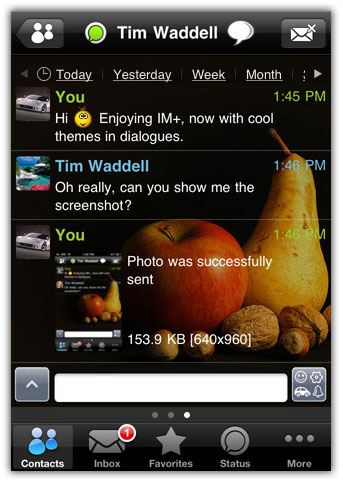
IM+ Pro, a decent client for instant messaging on iPhone, iPod Touch and iPad has recently been updated to version 4.6 with new features and iOS 4.2 support. Complete chengelog after the jump…

IM+: Now with iOS 4.2 fast app switching! IM+ will keep you connected to GTalk, Yahoo, MSN/Live Messenger, AIM/iChat, ICQ, MySpace, Twitter, Facebook, and Jabber. No pre-registration required. Just enter your account in the IM network and start the chat right away.

IM+ Pro: Now with iOS 4.2 fast app switching! All-in-One app for GTalk, Yahoo, MSN/Live Messenger, AIM/iChat, ICQ, MySpace, Twitter, Facebook, Jabber and Skype chat. No pre-registration required. Just enter your account in the IM network and start the chat right away.

What’s New in Version 4.6

  • Full support for multitasking on iOS 4.2;
  • Multichat for ICQ and AIM;
  • Ability to show only online contacts on Facebook;
  • Improved connection with Facebook;
  • Improved performance.

You can download IM+ from the AppStore for Free. [iTunes Link]
You can purchase and download IM+ Pro from the AppStore for $9.99. [iTunes Link]

You can follow us on Twitter, Join us at Facebook, and also Subscribed to RSS Feed to receive latest updates.

Also checkout:

Digg
Twitter
StumbleUpon
Facebook
Reddit
del.icio.us

iPad Launches in 11 More Countries

Apple has launched the iPad in 11 more countries today, namely Czech Republic, Denmark, Finland, Hungary, Malaysia, Norway, Poland, Portugal, South Korea, Sweden, and Taiwan.

apple ipad
This holiday season is expected to be the best quarter for Apple ever. Check with Apple and your favorite retailers regarding availability and pricing.

Did you get a new iPad today/ planning on getting one over the holidays? Let us know in the comments section below! [via MacRumors]

You can follow us on Twitter, Join us at Facebook, and also Subscribed to RSS Feed to receive latest updates.

Digg
Twitter
StumbleUpon
Facebook
Reddit
del.icio.us

UberTwitter comes to iPhone: A Review

Brett Widmann is currently wrapping up his undergrad degree in Computer Information Systems, Web and Digital Media Development, and Religious Studies at UWSP.  He currently works as a developer and SEO consultant for WebMovement, LLC and PointZeroDesigns and has a keen interest in mobile app development as well as blogging.  Feel free to drop him a tweet or check out his personal site.  This is his first article written for Mobile Orchard.

UberTwitter is a mobile Twitter client originally released for BlackBerry devices.  Recently, the app was released to iPhone and iPod Touch devices.  UberTwitter boasts the same features as many other Twitter clients, but is lightweight and simple.  This app is perfect for anyone who tweets and doesn’t need something gushing with all the bells and whistles.

Features

While UberTwitter isn’t as feature rich as TweetDeck, it does boast some of the basic necessities: URL shortening, image uploading (uses the Plixi service), and adding a location to a tweet.  One feature that does stand out, though, is the UberView feature (seen below), which allows a user to preview the content of a link in a tweet without having to leave the app.  UberTwitter keeps the user interface simple and easy to read by navigating to other areas of the app such as mentions and lists accessible at the bottom of the screen.

UberView for UberTwitter

Review

One of the first things I noticed with UberTwitter for iPhone is the inability of having more than one account tied to the app simultaneously, which can be problematic for people who manage multiple accounts.  With the BlackBerry version of the app (at least for the devices running version 4.5 of BlackBerry OS), I could manage multiple accounts, but would have to switch between the two in the Accounts setting.  I have failed to find a similar feature in the iPhone version without having to log out and then log in with the other account, which is tedious and time consuming.

I praise the team that released the app, especially with the UberView feature, but I found a number of bugs when tweeting, such as avatars attributed to the wrong users, or issues like this

Stacked Tweet Error in UberTweet

I was confused at the app’s behavior after sending out the tweet and was not sure what exactly happened.  After a quick refresh, the issue subsided and the view was normal once again.  Also, I periodically received an error while sending a tweet that stated The Operation Couldn’t Be Completed. This could have been a number of issues, and I make the assumption that it was something on Twitter’s end.   Aside from said issues, I found the app’s performance and resource management impressive.  The application was responsive and I was able to successfully interact like I would with most Twitter clients currently available.

Conclusion

For people on the go who tweet casually and that don’t need excessive features, UberTwitter is the perfect solution for those looking for something other than the official Twitter app.  Tweets are easy to read and updating is simple because of the nicely constructed user interface design.  I found the app easy to navigate, and not once did the app crash, even with the bugs and hiccups while testing.  I also found tweeting from the device simple, straightforward and not overwhelming.  While I wouldn’t suggest ditching your current Twitter client  for UberTwitter right away, I do suggest giving the app some time to grow and evolve with future updates, then making the eventual transition.  People currently using the app can suggest features and report bugs under the Contact Us portion of the More section within the app.  You can learn more by visiting UberTwitter’s website.

iOS 4.3 is on the way

Now that iOS 4.2 was finally released it time to move on and talk about…the release of iOS 4.3. Once again the rumors are flying and a mid-December release is being predicted. Here is what MacRumors had to say:

Here’s what we heard from a reliable source: when Apple didn’t know about the WiFi issues in the GM seed of iOS 4.2, the OS was scheduled to be released weeks before Nov. 22nd. Apple found out about the WiFi issues, released a second GM build and iOS 4.2 came out yesterday. It came out in November, but it should have been out in the first half of November. Anyway, before the WiFi issues were discovered, Apple was already planning to release a new build of iOS 4.x in mid-December. Most specifically, they were planning for an iOS 4.3 release on December 13th, which is a Monday.

I am pretty surprised that we would see another release this year let alone two weeks away, but who knows with Apple.

Google releases Google Earth 6 beta for Mac, introduces 3D trees

Google today released Google Earth 6 beta for Mac, PC, and Linux. Google Earth 6 includes several beefed up features including a better integration of Street View with Google Earth’s 3D environment that lets users seamlessly navigate streets across the world.

And speaking of 3D environments, perhaps the biggest (and most unexpected) featured of Google Earth 6 is the introduction of 3D trees. Yes, trees. The 3D trees (over 50 different species) are included in several parks, forests, and neighborhoods from around the globe. According to the Google Earth blog, Google Earth 6 includes 80 million trees worldwide. No word yet on how Google has accurately placed the trees inside Earth, but if they can make a car that drives on its own, I’m betting they’ve adapted the GPS-enabled cameras from Street View cars to fit on squirrels heads.

Google Earth 6 beta is available now as a free download and requires Mac OS X 10.5.0 or later.

Google releases Google Earth 6 beta for Mac, introduces 3D trees originally appeared on TUAW on Mon, 29 Nov 2010 17:30:00 EST. Please see our terms for use of feeds.

Source | Permalink | Email this | Comments

Grandma makes iPhone quilt for grandson

iPhone QuiltWe’ve seen an edible iPhone birthday cake, a giant iPhone wedding cake, and Apple icon cupcakes, but here is the ultimate gift to get your new baby interested in emptying your wallet as a teenager — the iPhone blanket. Six day old baby Gabriel Augusto Stein is the proud recipient of this cool iPhone quilt knitted by his even cooler Grandma Harriet, and judging by the size of it in comparison to his body he will be able to use it for years to come. “There’s a nap for that!” says Dad.

Congratulations to the new Mom and Dad — that’s one stylin’ kid you’ve got there!

[via The Daily What]

Grandma makes iPhone quilt for grandson originally appeared on TUAW on Mon, 29 Nov 2010 17:00:00 EST. Please see our terms for use of feeds.

Source | Permalink | Email this | Comments

Things that Mac OS X could learn from the iPad and iPhone

It’s kind of amazing how the iPad and iPhone have crept more and more into my digital life, slowly encroaching on my laptop use. Of course the iPad isn’t very good for Photoshop or some of the high end programs I need to use at times, but I’ve noticed that over the holidays with time at home the iPad is getting about 90% of my computing attention. Checking the web, email, weather, flight info, you name it, the iPad is doing it all quite nicely, backed up by the iPhone.

It’s also made me realize there are some things that iOS should bring to Mac OS X, and the sooner, the better. Lots of the innovations coming to Lion are going to improve matters, but here’s what I’m looking for.

When I’m back on my desktop or laptop I find myself constantly double clicking on web pages to get them to zoom up in size. Of course it’s a no-go. I’ve gotten so used to that feature I feel terribly deprived without it.

I love the iOS software update notifications. Yes, the App Store is coming to the Mac, but it will never have pervasive control like the iPad, because lots of applications won’t be sold that way; they’ll depend on other methods to let you know an update has arrived. iOS lets me update everything at once. A couple of clicks and I’m done.

Continue reading Things that Mac OS X could learn from the iPad and iPhone

Things that Mac OS X could learn from the iPad and iPhone originally appeared on TUAW on Mon, 29 Nov 2010 16:45:00 EST. Please see our terms for use of feeds.

Source | Permalink | Email this | Comments

iPhone owners uniquely loyal to Apple

iPhone 4A survey of over 2,600 mobile phone users in Brazil, Germany, Spain, Britain, the United States and China shows that only about 25 percent of smartphone owners are loyal to their current operating system. The survey by German firm Gfk found that 56 percent of smartphone owners were open to trying a new OS with their next phone, with only Apple bucking the trend with a 59 percent loyalty rate to iOS. Microsoft users were the least loyal to their OS with a 21 percent loyalty rate, while Blackberry came in at 35 percent, Android at 28 percent, and Nokia/Symbian at 24 percent.

Lead analyst on the survey Ryan Garner told Reuters that “Loyalty with a handset is a lot more complicated these days in that people buy into experiences at the high-end level. If a phone doesn’t do what it says it will do or what the owner hopes it will do, the maker will lose loyalty.”

I am not sure that the only factor in loyalty is the OS itself, because as an iPhone user I find myself incredibly frustrated with AT&T’s service. Three of my friends have defected from iOS over to Android in hopes that they can use their phone to make phone calls, even though they would have preferred to stay with an Apple product due to the symbiosis with their home computer setup. But with the iPhone’s market share still growing, Apple is definitely doing something right to keep those 59 percent of users loyal.

Is the brand of the OS your only determining factor as to what smartphone you go with? Or is it a combination of OS and level of service? Leave your comments below.

[via electronista]

iPhone owners uniquely loyal to Apple originally appeared on TUAW on Mon, 29 Nov 2010 16:00:00 EST. Please see our terms for use of feeds.

Source | Permalink | Email this | Comments