Analyst report: Why Verizon wants to sell the iPhone

Let’s say straight out, this is just the opinion of one analyst, and the opinion is based on sales data assumptions that might or might not be accurate. Still, it’s an interesting report, and it might help explain why Verizon, which originally rejected the iPhone, wants it back.

Horace Dedlu over at Asymco says basically that Verizon is having a rough time with smartphones. He cites three issues that are making life difficult for the big V.

  • The iPhone has stolen its growth
  • It’s facing the prospect of a single OS platform supplier
  • Android is not competitive vs. iOS

The report, citing sales estimates, says that while Verizon has been growing sales of smartphones, AT&T has been outpacing Verizon by significant numbers. While Verizon increased sales from 2.7 million units in Q1, the iPhone at AT&T went from 2.7 million to 5.7 units in the same time period.

Continue reading Analyst report: Why Verizon wants to sell the iPhone

Analyst report: Why Verizon wants to sell the iPhone originally appeared on TUAW on Mon, 13 Dec 2010 19:30:00 EST. Please see our terms for use of feeds.

Source | Permalink | Email this | Comments

ReTweetie adds legitimate retweeting to Tweetie Mac

One of the biggest frustrations with Tweetie for Mac is the lack of legitimate retweeting to your followers. While it’s understandable that the developers have been a tad busy in the past year, it doesn’t seem all that unreasonable to at least issue an update to include a very basic Twitter function.

Developer Nick Paulson solved this by writing a plug-in called ReTweetie. The ReTweetie plug-in requires a download of SIMBL, which is a free bundle loader, and the program itself. After relaunching Tweetie for Mac, hit “repost” and enjoy full retweet goodness.

As for Tweetie for Mac itself, development on version 2 was alive and well as of October.

Many thanks to @AndruEdwards!

ReTweetie adds legitimate retweeting to Tweetie Mac originally appeared on TUAW on Mon, 13 Dec 2010 17:00:00 EST. Please see our terms for use of feeds.

Source | Permalink | Email this | Comments

BlueSLR allows iPhone users to remotely control DSLR cameras

blueSLR

If you happen to own both a Nikon digital SLR camera and an iPhone and have been looking for a way that the two could work together, you may now be in luck. BlueSLR, which combines a Bluetooth accessory (dongle) that plugs into your SLR and an app you run on your iPhone (3G and up), iPod touch (2nd generation or later) or iPad, enables you to remotely control your camera’s shutter from up to 300 feet away. Photographers can also manually adjust focus and exposure length from that distance, along with the ability to tag photographs with GPS information.

Electronista reports that BlueSLR only supports 11 models of Nikon’s SLR cameras but that Canon support is in the works for the near future. The Bluetooth dongle that hangs off your SLR will run you US$149, but the app to control it is available from the App Store free of charge.

Most professional photographers have all sorts of gadgets and remotes to control their equipment, so for many of them, this could be one more piece of equipment to carry around. But for the rest of us amateur photographers, this looks like it could be a pretty nice accessory to have in our camera bag. With the iPhone having the ability to remotely control almost anything, including driving your car, monitoring your own robot and now your DSLR camera, anyone want to guess what could be next?

[via Engadget and electronista]

BlueSLR allows iPhone users to remotely control DSLR cameras originally appeared on TUAW on Mon, 13 Dec 2010 18:00:00 EST. Please see our terms for use of feeds.

Source | Permalink | Email this | Comments

Toshiba and Apple working together on a display manufacturing plant

Toshiba and Apple are reportedly working together on a brand new manufacturing plant in Japan’s Ishikawa Prefecture, specifically to build “low-temperature polysilicon LCD panels,” to be used in Apple’s iPhones. Toshiba will spend about $1.9 billion on the project, which is scheduled to start building in a month or so, and be done in time to start production by the end of next year. Toshiba already makes some 8.55 million units in its current manufacturing plant, but that production is supposed to double with this new facility.

We’ve posted before about the incredible scale of Apple’s production process, and even with all of these plants churning out parts and units, Apple is only barely able to keep up with demand. In some places it’s still not even able to keep up. The other benefit is that the more of its production process Apple moves under its own purview, the more of an advantage it can have against competitors, some of which use the same manufacturers and distributors that Apple uses right now. The more plants Apple invests in, the more unique production locations it will be able to take advantage of later on.

[via 9to5Mac]

Toshiba and Apple working together on a display manufacturing plant originally appeared on TUAW on Mon, 13 Dec 2010 19:00:00 EST. Please see our terms for use of feeds.

Source | Permalink | Email this | Comments

Find My iPhone no longer needs automatic mail delivery to be enabled

Apple has recently eliminated one of the configuration requirements and potential points of failure for Find My iPhone (FMI) on your iOS device.

About a year ago we reported that there were three settings that you had to have enabled in order for FMI to work:

1. Under Settings > Mail, Contacts, Calendars > (Your Mobile Me account), you must set “Find My iPhone” to ON. This is not enabled by default.
2. Settings > General > Location Services has to be on.
3. Under Settings > Mail, Contacts, Calendars > Fetch New Data, you must either enable Push OR have fetch set to Every 15 minutes, 30 minutes or Hourly. If you disable Push and set Fetch to “Manually,” Find My iPhone will not work.

The first two requirements were fairly obvious. If FMI wasn’t enabled, and if Location Services were disabled, you wouldn’t expect FMI to work. The third requirement was a little less obvious, and I only discovered it when I tried to set mail to “manual” and was warned that it would make FMI cease to function.

Continue reading Find My iPhone no longer needs automatic mail delivery to be enabled

Find My iPhone no longer needs automatic mail delivery to be enabled originally appeared on TUAW on Mon, 13 Dec 2010 16:30:00 EST. Please see our terms for use of feeds.

Source | Permalink | Email this | Comments

Goldman Sachs resumes Apple coverage, targets AAPL at $430

Investing firm Goldman Sachs has decided to start covering Apple’s stock profile, and that news sent the AAPL stock price up to $325.06 this morning, a nice boost from the day before. And that’s not all — not only did Goldman Sachs pull AAPL into its reporting fold, but it was about as bullish as you can get on a stock, saying through a spokesman that “we believe significant growth and profit opportunities for this platform still lie ahead.” The company had been covering Apple previously, but when that special analyst left the firm, it took them a while to find a replacement. But it looks like they’ve found someone else they feel is qualified to make a prediction.

The company predicts a $430 price target for AAPL, so if any of you happen to fall into some money over this coming holiday, you’ll now know just where to put it. (Note: this is not actual financial advice, obviously, and there’s no guarantee of success in the stock market.) Apple seems to be the success story that keeps on growing — AAPL has hit a few all-time highs in 2010, and the forecast is pretty sunny all the way around.

Goldman Sachs resumes Apple coverage, targets AAPL at $430 originally appeared on TUAW on Mon, 13 Dec 2010 16:00:00 EST. Please see our terms for use of feeds.

Source | Permalink | Email this | Comments

Download iOS 4.2.1 for Apple TV 2G (8C1540)

iOS 4.2.1 firmware for Apple TV 2G is now available for download. You can download iOS 4.2.1 Apple TV 2G build 8C1540 from the link below. The iOS 4.2.1 to Apple TV 2G should also be available under updates shortly.

It’s expected to be a minor update to fix bugs. We’ll update you as soon as we know about the new features in iOS 4.2.1 for Apple TV 2G.

Download Apple TV 2G iOS 4.2.1 Firmware

AppleTV2,1_4.2.1_8C154_Restore.ipsw

You can follow us on Twitter, Join us at Facebook, and also Subscribed to RSS Feed to receive latest updates.

Also checkout:

Digg
Twitter
StumbleUpon
Facebook
Reddit
del.icio.us

Google Docs Desktop Editor Now Available on iPad

Google has announced that their Google Docs desktop editor is now available on the iPad. If you want to make more style edits like changing a font, or center aligning a paragraph on iPad, you should be using desktop version of the Google Docs.

For basic document editing, it’s recommended to use the mobile friendly version.

The new mobile editor is fast and lightweight, but sometimes you want to make more style edits like changing a font, or center aligning a paragraph. If you’re on an iPad, you can do that by visiting the Desktop version of the document editor.

The desktop version working on the iPad is also especially helpful when you want to do some spreadsheet editing and creation, as shown after the break.

If you want to insert formulas in a Google spreadsheet from your iPad, you can use the same trick. Just click Go to spreadsheet view at the top of the mobile view to try out the full version of Google spreadsheets. You can now insert formulas in from the editable formula bar.

[via Google Blog]

You can follow us on Twitter, Join us at Facebook, and also Subscribed to RSS Feed to receive latest updates.

Digg
Twitter
StumbleUpon
Facebook
Reddit
del.icio.us

Google Voice for iPad and iPod touch is Now Available for Download!

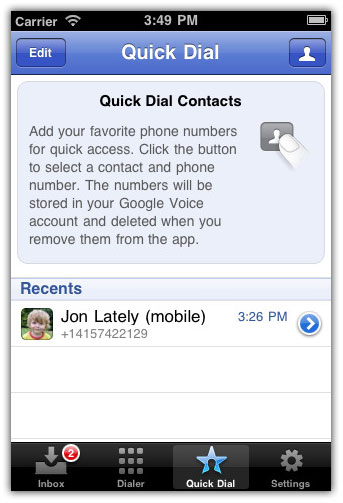
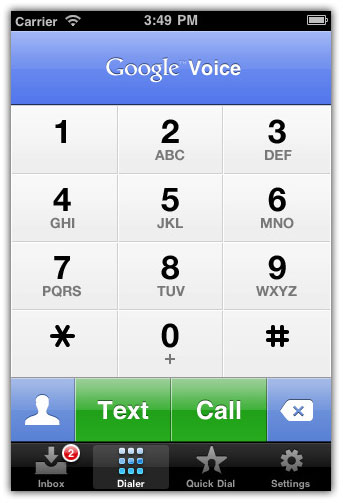
Google has updated its Google Voice app with iPad and iPod Touch support. In a blog post today, Google announced the Google Voice support for iPad and iPod touch. The ability to use the application on both the iPad and iPod touch to send and receive free text messages and Click2Call are the two most notable features.

What’s Click2Call?

While you can’t use your iPod or iPad as a phone, you can use it to initiate Google Voice calls with your phones. We call this feature Click2Call. Simply click any ‘Call’ button in the Google Voice app on your iPod or iPad and then select which of your phones you want to ring. Google Voice will call your phone and then connect your call.

What’s New In Google Voice App:

  • Support for iPod Touch
  • iPod Touch and iPhone can now make calls using Click2Call
  • Do Not Disturb setting
  • Text forwarding is automatically disabled when registering for Push notifications
  • Added Text forwarding setting to the app
  • Easier to make calls from the phone Address Book
  • Removed annoying OK dialog every time you send an SMS
  • Fixed crashes caused by text messages that begin with a space character
  • Fixed bug that caused the entire Inbox to load
  • Fixed bug that caused Contact pictures to get mixed up
  • Improved access to Contact groups
  • Improved speed of Contact search

Download Google Voice App

You can download Google Voice for iPhone, iPad and iPod Touch from the App Store (U.S. only) for free. [iTunes Link]

You can follow us on Twitter, Join us at Facebook, and also Subscribed to RSS Feed to receive latest updates.

Also checkout:

Digg
Twitter
StumbleUpon
Facebook
Reddit
del.icio.us

CNN App for iPad Hits the AppStore

CNN’s official app for iPad is now available in the iOS AppStore. CNN app for iPad lets you watch live and breaking news video, and take yourself deeper into the stories.

The CNN app for iPad is meant to let you enjoy the full CNN experience with stories, insights and breaking news videos directly on your iPad. The app also has built-in sharing feature and commenting system.

CNN App for iPad Features

  • Go beyond breaking news with top headlines, in-depth feature stories and video
  • Choose your view from different navigation options; quickly scan the headlines or immerse yourself in a slideshow
  • Take part in the conversation by commenting on stories and reading others’ responses
  • Share stories on Facebook and Twitter or via e-mail
  • Save stories for offline viewing
  • Watch live video streams of breaking news and other major news events

CNN App for iPad Features

You can download CNN App for iPad from the App Store for free. [iTunes Link]

You can follow us on Twitter, Join us at Facebook, and also Subscribed to RSS Feed to receive latest updates.


Also checkout our iPhone apps and iPad apps gallerias.

Digg
Twitter
StumbleUpon
Facebook
Reddit
del.icio.us

Interview with AppifyWP creator and UX expert Cory Shaw

We recently had an AppifyWP giveaway that proved to be very popular among Mobile Orchard readers. Due to the popularity of AppifyWP we decided to ask Cory Shaw, it’s creator and founder of User Kind, a few questions.

Mobile Orchard: Tell us a little about your company, User Kind, and background in UX design.

Cory Shaw: User Kind is a one-man company where I help clients design a great user experience and develop fun projects like AppifyWP and CrowdTubeTV (with dev Derrick Petzold) in my spare time.

My background as a UX designer spans from working for travel companies like Orbitz.com to building facial recognition photo tagging software at a startup, and everything in-between. I’ve always enjoyed making complex things easy to use, especially when I can touch every aspect of the product development life cycle. After 3 corporate jobs and 2 start-ups, I decided it was time to do my own thing, and User Kind was born.

MO: How has your business changed in regards to designing interfaces for mobile apps?

CS: It seems like people are starting to tackle big problems in mobile apps, things like music production (Korg iMS-20 for iPad) and booking travel (Kayak). These types of apps tend to have more complex interfaces and a lot of screens/states, so it becomes more important to have someone thinking about the UX to ensure that it’s easy to use. So far I’ve only worked on a couple of simple UIs for iPhone apps, but I fully expect within a few years it’ll be the brunt of my business.

MO: What is AppifyWP?

CS: AppifyWP is a WordPress theme for mobile app developers so they can build a stunning site to promote their apps without all the hassle of designing and coding a website.

MO: Why did you decide to create it?

CS: I wanted to combine my passions of design, WordPress, mobile apps, and jQuery into something people would find useful. After seeing what some friends had to go though to get a site up and running for their app, I knew I could make it easier.

Design and front-end web development aren’t a strength for a lot of app developers. The last thing you want to do after finishing your app is spend a few sleepless nights hacking together a website that probably doesn’t market your app as well as it could.

I designed AppifyWP with that in mind and cater every ounce of it towards the app developer.

MO: What are your future plans for AppifyWP?

CS: I’m currently working on a template for Mac App Store apps, and I’m planning to support android apps, different layout templates, and I’d like to create a version of the theme that supports multiple apps for those with several under their belt.

MO: How is your theme superior to others marketed to iPhone and iPad devs?

CS: I think it excels in the design and the options. I really wanted to push WordPress to see how it could accommodate a single page layout which is all an app developer really needs. I spent a lot of time on all the little details of the design and making sure that it was scalable to fit a wide variety of colors and customizations. I wanted it to be a design that developers could embrace and make their own without having to hack under the hood.

The options page lets you add things like your app store URL, your app screenshots, and a bunch of other options specifically catered to app developers, and spits out magic after you hit the save button. Maximum output from minimum input is where AppifyWP really shines.

MO: What other products or services do you offer to mobile app developers?

CS: Currently AppifyWP is the only product I offer, but it’s really just the beginning. I feel like I’ve struck a chord with it so I’m sure it wont be the last thing I offer to app developers. On the service side, I love working with people to design a great user experience, and I’m really anxious to get involved with app developers to deliver something amazing. If I can help, please let me know!

MO: Thanks for taking the time to answer our questions. Good luck with AppifyWP and your future projects.

Apple disabled jailbreak detection API in iOS 4.2

Last week NetworkWorld reported that Apple has quietly disabled the jailbreak detection API in iOS 4.2 less than six months after introducing it. Nobody really knows why they did it:

Device management vendors say the reasons for the decision are a mystery, but insist they can use alternatives to discover if an iPhone, iPod touch or iPad has been modified so they can load and modify applications outside of Apple’s iTunes-based App Store.

You can read the full article here.

Spider Podium for iPhone by Breffo [Review]

The Spider Podium by Breffo is not your average iPhone stand. It is advertised as a “flexible gadget grip and travel dock” that can adapt to many different mounting situations. So how does it fare in the real world?

Spider Podium for iPhone Reviewed

You’ve got to hand it to Breffo for coming up with such a creative mounting solution. The Spider Podium has, as you might expect, eight legs that are multi-jointed and extremely flexible. It will hoist up any generation iPhone, including those with cases. And the possibilities for mounting with the Spider Podium are nearly endless.

Spider Podium Kitchen

You can mount it to the dish rack so that you can refer to a recipe while you cook;

Spider Podium for iPhone

prop it on your desk while you crank through your to-do list;

Spider Podium Guitar

or even hang it from the soundhole of your acoustic guitar while you read the lyrics to a song you’re playing.

The Spider Podium is great for creative people because it’s like play-doh with a purpose. Once you use it for a few days, you’ll start to come up with unique mounting setups for a number of different situations.

So it’s great for creative people, but for the rest of us? As my friend who observed me using it said, “seems interesting, but not practical.” The one problem with the Spider Podium is that it takes some time and some fiddling around to get the podium mounted where you want it. When you’re rushing to get on the road, do you really have time to bend a bunch of little parts to get this thing to mount on the air vents of your dashboard? Better to just get a car mount.

Nevertheless, you do get a better hang of the Spider Podium the more you use it. And despite the time it takes, there is no other mount as versatile and as fun to use as the Spider Podium.

Pros

  • Highly versatile, with eight jointed and bendable legs
  • No annoying parts like screws, brackets, etc.
  • Fun to mount your iPhone on (almost) anything
  • More affordable than getting different mounts for different purposes. Sells for ~$20 USD

Cons

  • Takes time/patience to mold and attach
  • Cannot be mounted on large objects, only on objects that its legs can wrap around
  • Not the most stable mount. Although Breffo advertises it used on a bike, I wouldn’t take the chance.

Spider Podium for iPhone by Breffo [Review] is a post from Apple iPhone Review.

You Might Also Like…

  1. Arkon Car Mounts for iPhone 4 [Review]
  2. Xtand Go Windshield and Dashboard Car Mount for iPhone [Review]
  3. iPhone Car Mount Review: Pro-Fit miCradle & UltiMount V2


Microsoft Office 2011 update fixes bugs

An update for Microsoft Office for Mac 2011 (14.0.2) boasts improved reliability when accessing Office for Mac through third-party applications, problems with Microsoft’s AutoUpdate program and improved stability for Outlook 2011.

The update is available now through MacUpdate, where we were tipped off about it, or should eventually appear in the AutoUpdate.

[via MacUpdate]

Microsoft Office 2011 update fixes bugs originally appeared on TUAW on Mon, 13 Dec 2010 15:30:00 EST. Please see our terms for use of feeds.

Source | Permalink | Email this | Comments