Ultrasn0w Unlock for iPhone 4, 3GS to be Released After iOS 4.3 or 4.2.5 [Official]

MuscleNerd of iPhone Dev-Team has just confirmed that the no UltraSn0w unlock for iPhone 4, 3GS will be released until after 4.2.5 or official 4.3 (whichever is last) is out.

This is what MuscleNerd just tweeted:


Official iPhone unlock statement: no unlock will be released until after 4.2.5 or official 4.3 (whichever is last) is out.

iOS 4.3 is now in beta testing. Verizon iPhone 4 will come with iOS 4.2.5. We expect that iOS 4.3 will be a unified iOS firmware for both AT&T’s GSM and Verizon’s CDMA iPhone 4. So, if iOS 4.3 comes out after iOS 4.2.5 then UltraSn0w unlock for iPhone 4, 3GS will be released only after iOS 4.3. This delay makes sense. Sorry to all those eagerly waiting for an unlock, it’s for their own good.

We’ll keep you updated as soon as we know more. Stay Tuned!

You can follow us on Twitter, Join us at Facebook, and also Subscribed to RSS Feed to receive latest updates.

Digg
Twitter
StumbleUpon
Facebook
Reddit
del.icio.us

Enable Multi-Touch Gestures on iPad iOS 4.3 Beta

iOS 4.3 Beta features new multi-touch gestures for iPad, but to enable multi-touch gestures on iOS 4.3 iPad, there’s an extra step involved other than restoring iOS 4.3 beta.

These new multi-touch gestures are not enabled by default in iOS 4.3 beta, you need to enable these gestures via Xcode on Mac OS X. Follow the step-by-step instructions below to enable multi-touch gestures on iPad iOS 4.3 beta.

How to enable Muti-touch gestures on iPad 4.3 beta

Step 1

Download iOS 4.3 beta, connect your iPad to your computer and restore it to iOS 4.3 beta.

Step 2

Download Xcode and install it on your Mac.

Step 3

Open Xcode, and click on the iPad icon in the sidebar

Step 4

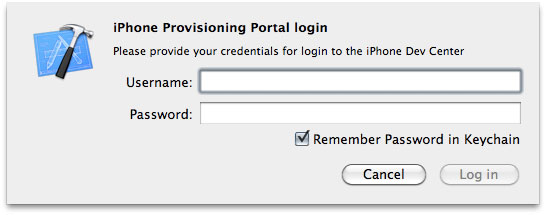
Now click on “Use for Development” and login with your Apple developer credentials and wait for Xcode to verify your iPad with Apple’s servers. Once done, the icon next to iPad will turn green.

enable multi-touch gestures ios 4.3 ipad

enable multi-touch gestures ios 4.3 ipad

Step 5

Now close the Xcode and also close the Settings.app on iPad from the multitasking tray (double click the iPad Home button, tap & hold Settings.app icon and then hit the red badge to close the app).

Step 6

Now go to Settings > General on your iPad, there you’ll find the “Multitasking Gestures” preference which, by default, is set to “ON”.

That’s it! Now you can use the following gestures (4 or 5 fingers) on iPad iOS 4.3:

  • 4-5 fingers Pinch to the Home Screen
  • 4-5 fingers Swipe up to reveal the multitasking bar
  • 4-5 fingers Swipe left or right to switch between apps.

via [Macstories]

You can follow us on Twitter, Join us at Facebook, and also Subscribed to RSS Feed to receive latest updates.

Also checkout:

Digg
Twitter
StumbleUpon
Facebook
Reddit
del.icio.us

Game Roundup: End Of December, Early January

1. Asphalt 6: Adrenaline – “Feel the thrill of racing like never before in the newest adrenaline-pumping edition of the Asphalt series.

BUILD YOUR DREAM COLLECTION
Discover 42 cars and bikes from Ferrari, Lamborghini, Aston Martin, Ducati and other world-class manufacturers. Collect them in your own 3D garage that you can explore using the gyroscope.

RACE YOUR FRIENDS
You can even take on friends in Online and Local Multiplayer mode for up to 6 racers. Climb the online leaderboard to be the best in the world!

LEAVE THE WORLD IN YOUR DUST
These street races will have you tearing up city streets in L.A., Tokyo, the Bahamas and more. Each location is rendered in beautiful HD graphics that take full advantage of the Retina display.

CHALLENGE THE BEST
Don’t take your eyes off the road for a second, because you’ll be driving against tough opponents in 11 different leagues and 55 events.

TUNED TO PERFECTION
Take advantage of numerous tuning options to help your vehicles reach peak performance on any track. You can even customize your vehicles with decals to give them your own style.”

2. Burn The Rope – “From the team that brought you Thumpies –‘game that reinvented the rhythm genre’; here comes one of the most original games this year. Burn the Rope is a unique game for the pyro in all of us. All you have to do is feed the fire!

Burn the Rope is a challenging game where you try to burn as much rope as you can in each level. There’s a catch! The fire only burns upwards, leaving you to tilt and turn your phone to keep your flame alive!

As you progress through the levels, you’ll encounter bugs crawling along the rope. Different bugs have different reactions to the flame. For example, the ant changes the color of the flame so you can burn different colored ropes, and the spider shoots out a web bridge so you can access parts of the level that you could not before.

Burn the Rope is incredibly fun and addictive. You will actually feel like you’re burning a rope, yet there’s no need for a fire extinguisher!”

3. Papa Sangre – “Our multiple award-winning team proudly present PAPA SANGRE — a terrifying, beautiful breakthrough game created using easily the most advanced, immersive 3D sound EVER on a mobile device.

The ultimate first-person game, you’re trapped in Papa Sangre’s palace — a ‘Day of the Dead’ style afterlife. Your task: save the soul of someone you love.

Do you dare enter the dark palace of Papa Sangre?”

4. Ramps – “Ramps is an addictive, pick-up-and-play physics game based on the 2007 original enjoyed by nearly a million players worldwide. Position and rotate the ramps to guide your ball into the goal, all while avoiding treacherous enemies and terrain!

Sounds easy, right? Try it and see. Anyone can play Ramps, but only the truest of champions will defeat all the levels and challenges!”

5. Secret of Mana – “Initially released in Japan in 1993, Secret of Mana took the world by storm with its innovative real-time battle system and gorgeously rendered world. It continues to stand out among other action RPGs for its seamless gameplay that anyone from beginner to veteran can enjoy.
One of the most memorable elements of the Mana series is the Ring Command menu system. With the single press of a button, a ring-shaped menu appears on the screen, where players can use items, change weapons, and do a variety of other actions without needing to switch screens. This Ring Command menu system for which the Mana series is so well known was first introduced in Secret of Mana and has since appeared in most games in the series.
Play as Randi and his two companions, Primm and Popoi, as they adventure all around the world. At the center of our epic story is the mystical power of Mana. Battle the empire in its quest for control of Mana. Befriend the eight elementals who wield the forces of nature itself. Numerous encounters await at every turn.”

Asphalt 6: Adrenaline

Manipulating UIImage Data Directly Within A C type Array

Manipulation of image data is done within many highly successful apps on the iPhone.  What is great about these apps is that the actual algorithms are relatively simple, and by mixing a few things together you can create some interesting effects.

There is one catch, and that is in order to directly manipulate the data from a UIImage you have to jump through a few Core Graphics hoops.   In creating a photo app it took me awhile to find the actual code to let me do that seemingly simple task.

Fortunately, Brandon Trebitowski has posted a nice code snippet on his site which copies that image data directly into an array which you can then modify easily, and he has placed a tutorial along with a project showing the code in action on his website here:
Image Manipulation: Retrieving And Updating Pixel Values For A UIImage

If you’d like to learn more about image processing in general you can head over and take a look at the Image Processing Lab over at CodeProject.  While that particular tutorial uses C# you can see the algorithms for some common image filters and do some interesting things.

©2011 iPhone, iOS 4, iPad SDK Development Tutorial and Programming Tips. All Rights Reserved.

.

DeliciousTwitterTechnoratiFacebookLinkedInEmail

Doodle Jump Drama Continues

In case you weren’t aware of it, in the recent past some developers using the word “Doodle” had been threatened with legal action due to a trademark claim by the makers of the Doodle Jump app.

While  the Doodle Jump makers have apparently backed off from their trademark claims it still makes for an interesting story, and a conversation that is fun to participate in, and really shows how ridiculous many technology lawsuits are.

Some developers had even threatened to make Doodle games just to spite.  I wish I could draw well enough to Doodle.  Anyways, if you’d like to catch up on the story the following article and thread make for interesting reads:

Lima Sky Flexes Legal Muscle Claims Trademark on The Word Doodle

Lima Sky Bringing Down The Hammer – Message Board Thread

It’s amazing what topics bring out the passion in the iOS dev community.

Read More: iPhone Dev News

©2011 iPhone, iOS 4, iPad SDK Development Tutorial and Programming Tips. All Rights Reserved.

.

DeliciousTwitterTechnoratiFacebookLinkedInEmail

Top 5 Discoveries In Apple’s iOS 4.3 Beta

Apple isn’t wasting any time getting to work this January after bringing the iPhone to Verizon earlier this week.The company released the first beta version of iOS 4.3 for iPad, iPhone, iPod Touch and Apple TV on Wednesday night. The new version of iOS promises all kinds of new features such as AirPlay support for third-party applications, four- and five-finger multitouch gestures and the return of the iPad’s screen orientation lock switch.

But that’s not all. Developers and bloggers have been hard at work overnight teasing out all kinds of new features and digging up fresh rumors about iOS 4.3. The new iOS hints at new iPads and iPhones, the end of the iPhone 3G, a mobile hotspot feature for all and the end of the home button. Here’s a look at the top five rumors, guesses and speculation surrounding iOS 4.3 Beta. New iToys Deep in iOS 4.3 beta’s code are purported references to two new iPhone models and three new iPads, according to Engadget. That’s five new iToys for 2011, although we’re most likely talking about two new devices. The gadget blog posits, and I’d have to concur, that these are most likely references to GSM and CDMA versions of a new iPhone, as well as CDMA, GSM and Wi-Fi only versions of a new iPad. Goodbye iPhone 3G? The next iOS release appears to dump software updates for the iPhone 3G and the second-generation iPod Touch, according to MacStories. Apple’s Developer site typically lists different beta versions of iOS that are specific to each iOS device. The lists currently in Apple’s developer center for iOS 4.3 leave both the iPhone 3G and the older iPod Touch out. This is not that surprising since AT&T dropped sales of the iPhone 3G once the iPhone 4 was released. Apple also dumped software support for the original iPhone with the iOS 4 release in June. If the iPhone 3G is getting cut now, how soon until iPhone 3GS owners are cut out of iOS updates?

Death To The Home Button?

Apple appears to have reignited its war on physical buttons in iOS 4.3. The company will reportedly do away with the home button on the iPad in favor of four- and five-finger multitouch gestures, according to Boy Genius Report. The new multi-finger gestures are included in iOS 4.3 as a preview so it’s unclear if they will make it into the final version of iOS 4.3.

The new gestures let you swipe up to see the multitasking bar, swipe left or right to switch between open apps and pinch to go back to the home screen.

There’s no word on whether the home button’s wake function will be replaced by a gesture or if you’ll have to rely exclusively on the iPad’s sleep/wake button at the top of the device. Personally, I’m hoping for a knock-to-wake gesture.

It’s not clear if the so-called iPad 2 expected in 2011 would lose its home button or if the rumored home button drop is planned for a later iteration of Apple’s tablet. Although BGR says both the iPad and maybe even the iPhone could lose their home buttons this year.

Hardware Rotation Lock

If you were sad to see the iPad’s screen orientation lock switch become a mute button in iOS 4.2, it looks like your prayers for the return of the screen lock have been answered. The Settings application in iOS 4.3 has an option to make your iPad’s side switch a mute button or a screen orientation lock, according to MacStories.

Hot Hotspot

The mobile hotspot option that debuted in Verizon’s CDMA-based iPhone is coming to all iPhone users with iOS 4.3, according to BGR. The feature allows up to five devices at once to use your iPhone’s 3G Internet access. But this new feature will probably be added at your carrier’s discretion, which means AT&T iPhone users may be left out in the cold.

One thing that hasn’t appeared in iOS 4.3 beta, or remains undiscovered, was any mention of an in-app subscription model for newspapers and magazines. We’ll have to see if that feature shows up in a later beta of iOS 4.3.

UPDATE: 9-to-5 Mac made another discovery in iOS 4.3 that appears to be references to the next iPad’s highly rumored front- and rear-facing cameras. The gadget blog found four files referencing the camera, and images of what the camera shutter effect will look like on the iPad screen. The images were 1024-by-768, which suggests the next iPad may have the same resolution display as the current model.

Related posts:

  1. Next-gen iPad and iPhone could lose the home button
  2. What iOS 4.3, And Specifically The New Multi-Touch Gestures, May Say About iPad 2
  3. iTunes 10.1 Beta Released for Windows and Mac

Next-gen iPad and iPhone could lose the home button

Apple’s obsession with removing physical buttons could continue. BGR is reporting that it’s received an exclusive tip from one of its trusted Apple insiders that the Cupertino-based company is testing next-gen iPads and iPhones that do not have home buttons.

Think of it like how the original Palm Pre lost its trackball when the Palm Pre 2 came out. Instead, multi-finger gestures could replace the home button entirely, as evidenced in last night’s iOS 4.3 beta software update. The iOS 4.3 beta release brought five-finger pinching to go back the home screen and four-finger swiping to the left and right to switch apps.

From what we noticed, iOS 4.3 beta’s new iPad update is much more intuitive, seeing as how double-clicking, and long holding the iPad’s home button to trigger actions becomes tedious after a while. The iPhone 4 hasn’t received any update for gestures, but that could just be a hardware limitation or Apple could be waiting to release gestures as a separate update after the next-gen iPhone comes out.

Regardless, Apple can streamline its hardware however it wants, as long as it doesn’t make things more complicated, customers will be happy. Besides, removing the home button is naturally the next step for Apple — when the hell are we getting touch-sensitive bezels on iOS devices hmm?

Related posts:

  1. Top 5 Discoveries In Apple’s iOS 4.3 Beta
  2. What iOS 4.3, And Specifically The New Multi-Touch Gestures, May Say About iPad 2
  3. How to Downgrade iOS 4.2 to iOS 4.1 / 4.0.1 / 4.0.2 on iPhone 4, 3GS, 3G, iPad and iPod Touch

Seas0nPass jailbreak app for Apple TV now available

The folks at fireCore have released Seas0nPass, a jailbreak application for the second generation Apple TV. Seas0nPass is a tethered jailbreak solution that requires you to connect your Apple TV to your computer briefly during boot. Similar to the Pwnage tool app, the jailbreak application lets you load custom IPSW files onto your Apple TV.

While Seas0nPass is new, fireCore is a name that should be familiar to Apple TV owners. This group also released aTV Flash, a software package that adds streaming services like Last.fm, an HTML 5 web browser and more to the Apple TV. The latest version aTV Flash (black) is in beta and is available as a pre-order for $19.95.

Unlike aTV Flash which is available for a nominal fee, Seas0nPass is open source and available for free. The tool was designed for the second generation Apple TV only, so please don’t try this with your iPhone, iPad or iPod touch. The current version of Seas0nPass is compatible with Mac OS X 10.6 or later. A Windows version is under development and will be available soon.

Interested Apple TV owners can grab the download and pertinent instructions at Seas0nPass.com. The source code is available on here on Github.

Seas0nPass jailbreak app for Apple TV now available originally appeared on TUAW on Thu, 13 Jan 2011 09:00:00 EST. Please see our terms for use of feeds.

Source | Permalink | Email this | Comments

TUAW’s Daily App: Corel Paint it! Now

Corel was a big deal back in the days before Photoshop — I remember CorelDRAW as being one of the most premiere art apps out there. It still is, of course, but Corel has fallen to the wayside now that Photoshop and Illustrator have become so popular. However, Corel has made an interesting step onto the App Store with the awkwardly-titled Corel Paint it! Now (free). Not a drawing app, Corel Paint It! Now lets you apply artistic filters to your photos, like oil or pen and ink.

It works well and does its job in an interesting way, as you can watch it “draw” the resulting image, suggesting some sort of drawing engine is at work. You can create some pretty funky pictures, and then you can send them off via email, Facebook or Flickr.

At even 99 cents, I’d question what this app is for, but at the current price of free, it’s probably worth a download just to see it in action. In fact, Corel tells TUAW that the app has seen over 175k downloads already, so you’d be in good company. I wouldn’t depend on it for anything important (the resolution is sadly low), but it’s a nice little trick to spice up some pictures that could use a cool effect on them.

TUAW’s Daily App: Corel Paint it! Now originally appeared on TUAW on Thu, 13 Jan 2011 08:00:00 EST. Please see our terms for use of feeds.

Source | Permalink | Email this | Comments

MacTech Boot Camp San Francisco 2011, five days left to save

We attended the MacTech Conference in 2010 and we can tell you: they put on a great conference. The MacTech Boot Camp is designed for a different audience. Instead of the hardcore IT pro, the Boot Camp experience is more for the folks who support small businesses and home users. The event is close to selling out, but you can still take advantage of pre-registration pricing ($100 off) until Monday, January 17. As a bonus, if you’re interested in becoming Apple Certified, there’s a study session and exam the day prior. You can check out more info on the exam and study session here.

MacTech Boot Camp is a one-day program, to be held on January 26 from 9 AM to 6 PM at the Parc55 Hotel in San Francisco. You can check out the registration page here and register now for $395 (it goes up to $495 after Monday). Check out the full schedule here, or the list of topics covered at Boot Camp here. It’ll be a jam-packed day, and we’ll be sure to have some coverage while we’re there. Educational pricing is also available.

See you in San Francisco!

MacTech Boot Camp San Francisco 2011, five days left to save originally appeared on TUAW on Wed, 12 Jan 2011 23:30:00 EST. Please see our terms for use of feeds.

Source | Permalink | Email this | Comments

Google nixes direct H.264 support in Chrome

In a move likened to converting the US from English to Esperanto, Google has announced that its web browser, Chrome, will be removing support for direct HTML5 playback of H.264 video in the coming months, in favor of Google’s WebM media container (which leverages the VP8 video codec, also supported by Flash Player and used in the new Skype beta’s multiparty video conferencing). This is a blow to the adoption of Apple’s preferred video standard, as well as a hint that the Web may see some continued churn within the video format arena.

The HTML5 spec for video doesn’t require any specific codec, and the tag allows you to include multiple versions of a video, which the browser can flip through to find one that it can play. This just means an extra encoding step for web content creators who had previously been happy just creating an Ogg Theora file (Firefox) and an H.264 mpeg file (most others), or working with JavaScript to detect what the browser can handle and falling back to Flash Player as needed (which can also play H.264 video). Update: As commenters point out, Firefox can already handle VP8-encoded video and Chrome can handle Ogg, so actually content creators could in theory stick with only two encoding standards and still be OK. Both Opera and Chromium (the open-source version of Chrome) also include VP8 codec support, while Safari and IE do not.

For many high-profile sites like Hulu, the question is moot; in order to deliver advertising and secure the videos it delivers for television networks and movie studios, it feels HTML5 isn’t ready for prime time.

While the majority of web video is already encoded as H.264, instead of proprietary formats like Flash, there is a fairly large elephant in the room when it comes to content. If Google’s subsidiary YouTube (and other sites that serve large amounts of video to mobile phones) makes a move to WebM, Apple is going to have to make some tough decisions about the codecs supported in iOS devices. Unfortunately for Apple and most other mobile device manufacturers, H.264 playback is already implemented in hardware (for speed and battery savings); WebM is not yet, even on Android devices.

The debate is, ostensibly, about free versus patent-limited approaches to video (despite Google’s effort to portray this as a move toward openness, there’s been no indication that Chrome will be dropping the included proprietary/closed Flash Player as well). One could also point out that despite Google’s move to open up VP8 and WebM, it’s not at all clear that the codec truly is unencumbered by patents; H.264 is also an ISO standard format, while WebM is not.

With Internet Explorer, Microsoft has chosen to support only H.264 in the latest version of the browser (although, in theory, a downloadable codec would allow it to play WebM as well). No question, the “format war” is still on, but the major players could decide the fate of video codecs pretty quickly. It will be interesting to see how this pans out for Apple’s customers.

[hat tip DF]

Google nixes direct H.264 support in Chrome originally appeared on TUAW on Wed, 12 Jan 2011 23:00:00 EST. Please see our terms for use of feeds.

Source | Permalink | Email this | Comments

Smule’s Dr. Ge Wang on what’s next for the company and the App Store

Smule is one of the oldest names on the App Store. Ocarina was one of the App Store’s first big successes, and they’ve continued to make music and social-based apps like their most recent app, Magic Fiddle for the iPad. Dr. Ge Wang is not only the co-founder and Chief Creative Officer of the company, but he’s also an assistant professor at Stanford. We caught him right after his CES keynote last week and asked him a few questions about what Smule’s been up to lately and what they’re working on next.

Magic Fiddle has done very well, Wang told us, after releasing last year. “The very next day, it was actually our fastest app to reach the number one paid iPad app. We saw off the charts engagement with the app. So it’s been really positive.” Lots of users they’ve heard from are not necessarily violinists or magicians, just people interested in using their iPads to make music.

Read on to hear more from Dr. Wang about why Smule’s apps have gotten more complicated over time, and what the next app from Smule will be like.

Continue reading Smule’s Dr. Ge Wang on what’s next for the company and the App Store

Smule’s Dr. Ge Wang on what’s next for the company and the App Store originally appeared on TUAW on Wed, 12 Jan 2011 21:30:00 EST. Please see our terms for use of feeds.

Source | Permalink | Email this | Comments

Twisted Pixel chooses not to sue Capcom over iOS ripoff

Capcom Mobile recently released a new game for the iOS App Store called MaXplosion, and soon after, a few fans noticed the game bears a striking similarity to a game by Twisted Pixel for Xbox Live Arcade called ‘Splosion Man. Aside from the names themselves, MaXplosion also allows the player to jump three times by exploding each time, has a similar-looking character also running around a lab space, and it even has a similar soundtrack.

We’ve noted before that intellectual property theft has run rampant on the App Store, and Gameloft has even earned a reputation for “borrowing” game styles from bigger console games. But this one’s pretty flagrant — not only is the ripoff pretty clear, but it’s from Capcom’s European development unit, a traditional gaming company that should know better. There’s one more wrinkle: Twisted Pixel says it even pitched the game to Capcom’s US offices before releasing it themselves on Xbox Live.

Despite the problem, Twisted Pixel has responded by saying it won’t sue. Not only is the battle probably not worth it for the relatively small developer, but as CEO Mike Wilford says wittily, “we owe them one for inventing Mega Man, so we’ll let them slide.” He promises Twisted Pixel will put the extra time saved into a quality mobile game of its own. Fair enough.

Twisted Pixel chooses not to sue Capcom over iOS ripoff originally appeared on TUAW on Wed, 12 Jan 2011 22:30:00 EST. Please see our terms for use of feeds.

Source | Permalink | Email this | Comments

Chinese Apple Stores plan special New Year events

While India’s Krishna Kalyan ate an iPhone 4 cake to celebrate the New Year, Apple’s four retail stores in China have something else in mind to celebrate the Chinese New Year. According to ifoAppleStore, Apple has emailed an invitation to their customers in China to visit the retail stores between January 26 and February 13 for select events such as workshops, One to One training and shopping specials on Apple and third-party products.
Apple currently has stores both in Beijing and Shanghai, but we here at TUAW are partial to the first one to land in Shanghai back in July of last year. With the four stores already under its belt and a growing online presence in China, it seems that Apple heard Lenovo loud and clear when it was declared that Apple hadn’t stepped up efforts in the Far East.

Chinese Apple Stores plan special New Year events originally appeared on TUAW on Wed, 12 Jan 2011 20:00:00 EST. Please see our terms for use of feeds.

Source | Permalink | Email this | Comments