TUAW’s Daily App: Inspector Gadget’s MAD Dash

I would say that this Canabalt-like game is good for kids (and it is), but I don’t suppose there are too many kids around nowadays who remember the early days of Inspector Gadget like I did in my generation. We 80s babies can fondly look back on Gadget, Penny, Brain and the mysterious Dr. Claw with nostalgia, so while this one is more or less a licensed tie-in game, it’s still good to see the old gang kicking around.

Actually, just calling it a tie-in game isn’t quite right — there are some new elements here, in the form of coins to collect as you run and a few interesting new sequences (including some hook-jumping and a train for Gadget to dodge). But it basically plays like a running game; Gadget constantly skates forward, and a touch on the screen let’s you jump up to safety. It’s just as fun, too — while it doesn’t have Canabalt’s cool flavor, it does have the Gadget theme, sounds from the series and everything else you’d expect from a licensed title.

It also has a nice curve of replayability — you’re not only scored as you play, you’re also granted Gadget Coins, which you can use to unlock extras both in-game and out (there’s a digital comic and a sound board, both of which are nice meaty add-ons). Plus, the game is half price right now at just US 99 cents ($2.99 for the iPad version). If you’ve got kids who like Canabalt, or if you just remember being a kid that liked Inspector Gadget, give it a shot.

TUAW’s Daily App: Inspector Gadget’s MAD Dash originally appeared on TUAW on Mon, 24 Jan 2011 07:45:00 EST. Please see our terms for use of feeds.

Source | Permalink | Email this | Comments

Talkcast tonight, 4 HST/7 PST/10 EST: Pre-Macworld Edition

Tonight’s show will mostly be filled with talk of Macworld, which takes place this week. There are quite a few TUAW bloggers going, and if you have any tips for us on how to survive the week or even just some cool San Francisco suggestions, I would love to hear them! We also have a bit of Apple news to talk about, from the earnings call to the new kid on the block. And remember: Kelly hosting equals aftershow!

Your calls and questions help us make the show the best it can be, otherwise I’m just talking to myself! To participate on TalkShoe, you can use the browser-only client, the embedded Facebook app, or download the classic TalkShoe Pro Java client; however, for maximum fun, you should call in. For the web UI, just click the Talkshoe Web button on our profile page at 4 HST/7 PST/10 PM EST Sunday. To call in on regular phone or VoIP lines (yay for free cell phone weekend minutes!): dial (724) 444-7444 and enter our talkcast ID, 45077 — during the call, you can request to talk by keying in *8.

If you’ve got a headset or microphone handy on your Mac, you can connect via the free Gizmo or X-Lite SIP clients; basic instructions are here. Talk to you tonight!

Talkcast tonight, 4 HST/7 PST/10 EST: Pre-Macworld Edition originally appeared on TUAW on Sun, 23 Jan 2011 17:30:00 EST. Please see our terms for use of feeds.

Source | Permalink | Email this | Comments

Splashtop Remote for Mac and iOS: An unbeatable combo

I’ve tried just about every remote control application under the sun. iTeleport, LogMeIn Ignition, Mocha VNC and TeamViewer have all been on my iOS devices at one time or another. When I recently heard about Splashtop Remote, my initial thought was to delete the email about it and move on. Fortunately, my curiosity got the best of me.

Like most remote control apps, Splashtop comes in two pieces — the free Splashtop Remote Server part that runs on the target computer (either Mac or Windows), and a client app for iOS. The Mac server is still in beta, while the Windows piece has been in place for a while. The iOS apps run US$1.99 each for the iPhone and iPad versions, and there is a free time-limited (5 minutes per connect session) version for iPad that is useful for just trying out the app. That’s probably my biggest complaint right now — many of the other remote control apps are available in Universal versions that run on any iOS device.

Why am I so smitten with Splashtop Remote? Perhaps my biggest criteria for apps of this type are ease of setup, speed and a way of controlling the Mac or PC that makes the best use of the iOS touch interface. Setup is dead simple on both the desktop and mobile devices, although the Mac installation does require an installation of Soundflower. Since I already use Soundflower, I was able to skip that step. Launching the mobile app displays the computers that are running the server on the local network. A tap on the computer name launches the connection.

Continue reading Splashtop Remote for Mac and iOS: An unbeatable combo

Splashtop Remote for Mac and iOS: An unbeatable combo originally appeared on TUAW on Sun, 23 Jan 2011 17:00:00 EST. Please see our terms for use of feeds.

Source | Permalink | Email this | Comments

New Apple iPhone ad brings AT&T and Verizon together

Love, peace and harmony. That’s what Apple seems to be pushing in the latest iPhone advertisement to hit the airwaves.

The ad, titled “Two is Better than One,” shows a pair of iPhones performing side-by-side synchronized app usage. The action is backed by that beautiful piece of waltz music used to good effect by ice skaters and Stanley Kubrick, Johann Strauss’s “On the Beautiful Blue Danube.

At the end of the 30-second piece, AT&T and Verizon logos are seen side-by-side. Considering the level of sniping being done by the two carriers, it’s nice to see Apple stepping in as a mediator. For US smartphone users, it’s great to finally have a choice.

Check out the ad, which was captured off of a TV screen by YouTube user DoctoriTouch, on the next page.

[via 9to5Mac]

Continue reading New Apple iPhone ad brings AT&T and Verizon together

New Apple iPhone ad brings AT&T and Verizon together originally appeared on TUAW on Sun, 23 Jan 2011 15:30:00 EST. Please see our terms for use of feeds.

Source | Permalink | Email this | Comments

Theme It App – Theme Store for iPhone, iPad and iPod Touch [Jailbreak]

Theme It is a new theme store for iPhone, iPad and iPod Touch which is now officially launched along with an iOS app; theme it app which is available in Cydia for download.


The core idea behind “Theme it” is to put together high-quality themes for iOS devices all at one place with all necessary details. You can either use a user-friendly website or an iPhone, iPad and iPod touch Cydia app to browse through all the exclusive high quality themes.

Download Theme It App

Theme It app requires your iPhone, iPad or iPod Touch to be jailbroken.

The simplest way to download and install themes from Theme it store to your iDevice is to install Theme it App from Cydia. Follow the steps below to download and install Theme It App.

  1. Launch Cydia
  2. Go to the Manage tab
  3. Tap on “Sources”
  4. Now hit the “Edit” and then “Add” buttons.
  5. Input the following repo url : http://www.themeitapp.com/repo (or follow: how to add repo to Cydia)
  6. Now go to your just added repository and download Theme it.app and start enjoying great themes.

Overall the Theme It App comes with a neat and user friendly interface.

You can follow us on Twitter, Join us at Facebook, and also Subscribed to RSS Feed to receive latest updates.

Digg
Twitter
StumbleUpon
Facebook
Reddit
del.icio.us

10 Billion downloads and counting for the App Store

This past weekend the Apple App Store reached a milestone that everyone has been anticipating for some time now, 10 billion downloads. Who would have thought when the App Store launched a little over two and a half years ago that many apps would have been downloaded so quickly.

In related news, the lady who won the $10,000 iTunes giftcard actually thought it was a prank and hung up on the Apple representative who called to let them know. Luckily for her they called back.

How long do you think it will take to hit 20 billion? My guess is by late April of next year. What do you think?

Open Source: NSAttributed String HTML Additions For iOS

The NSAttributed string additions available on the Mac allowing one to easily display properly formatted HTML text do not as of yet exist for iOS devices.

Because of this in order to display rich HTML text we need to use a UIWebview, and apart from being somewhat inconvenient this can bring about other problems. Fortunately Oliver Drobnik from Cocoanetics has created an open source library duplicating the html related NSAttributedString methods available on the Mac.

The library utilizes core text, and Oliver has done a brilliant job of mimicking Apple’s NSAttributedString functionality with tremendous precision. Not all tags are supported so not all HTML will display straight out, but many are available.

The library along with information on supported tags can be found on Github here:
NSAttributed String Additions For HTML

You can find Oliver’s original writeup on the library here:
UIWebView Must Die

Definitely a very useful library for displaying something such as a credits or instruction page within an iOS app.

©2011 iPhone, iOS 4, iPad SDK Development Tutorial and Programming Tips. All Rights Reserved.

.

DeliciousTwitterTechnoratiFacebookLinkedInEmail

Best Resources In iOS Development January 24th 2011

It has been awhile since I posted one of these lists – for those unfamiliar this article covers the more popular new resources that have been placed on this website.

Things have definitely picked up in the iPhone development blogging world, and although I try it is becoming tougher to keep up on things.  If you’ve created a resource or article that you believe is useful to other iOS developers feel free to post it in the iPhone development forum (no login required), and greatly increase the chances of it being written about on the main iPhone development blog.

iOS Developer Cheat Sheets – A list of cheat sheet sheets specifically for iPad and iPhone developers covering Xcode, Objective-C and more.

Create A Variable Slider With Adjustable Scrubber Speed Similar To The Music App – A good tutorial with source code covering how to create a slider that provides finer control the further a user’s finger moves.

Learn iPhone And iPad Cocos2D Game Development Review – A review of the recently released book from Steffen Itterheim on using the Cocos2D game engine.

Notable iOS Game Engine Updates – A list of some notable updates to iOS game engines that have occured in the past few months.

Open Source iOS Game Engine Sparrow Updates To 1.1 – A summary of what’s new in the latest update to the Sparrow framework iPhone and iPad game engine.

Open Source Galaxy iPhone And iPad Game Engine – A look at another open source game engine available, the Galaxy iPhone and iPad game engine.

Open Source: 3 Frameworks For Real-Time Multiplayer Games That Run Over The Internet – A look at some of the open source networking frameworks available that have been used in iOS games that allow for real-time multiplayer gameplay.

iOS Game With 225,000+ Copies Sold Goes Open Source – Article covering the release of the source code for the Canabalt iOS game.

Open Source: OpenGL ES Curve Library For iOS – An open source library containing functions allowing for the generation of many different types of curves particularly useful for those utilizing OpenGL.

Tutorial: How To Embed Lua In iOS Apps – A tutorial on how to embed the popular LUA scripting language within your iPad and iPhone apps.

Manipulating UIImage Data Directly Within A C type Array – A tutorial on how to manipulate the data directly within an image – very useful for those looking to create a photo app.

Animation Along A Path: Core Animation Tutorial – A tutorial on how to define a path in core animation, and how to send an object along a created path.

Open Source Library For Better Crash Handling And Reporting – A useful open source project that handles crashes, and allows information about the crash to be easily sent to the developer.

Corona SDK Tutorial: Bringing Flash Games To iOS – A tutorial covering how to convert Flash games to the popular Corona SDK from Ansca Mobile.

Tutorial: Cocos2D Example – Whack A Mole Game – An excellent Cocos2D tutorial on how to develop a whack-a-mole game.

Thanks for reading, please share this using the buttons below!

©2011 iPhone, iOS 4, iPad SDK Development Tutorial and Programming Tips. All Rights Reserved.

.

DeliciousTwitterTechnoratiFacebookLinkedInEmail

USA Today updates and improves iPad app

There are plenty of news apps for the iPad, but I’m happy to see USA Today aggressively improving what was already a useful and easy to use app.

Version 2.0 is still free, and has added more extensive tech coverage. Tech reviews feature iPad apps, and there is a video player, along with a spiffy This Week in Space section. The app also has increased travel coverage, along with a map that displays airport delays.

The app now multitasks in iOS 4.2 and the developers seem to have squashed a nasty crash on start up many people were seeing.

With more and more news apps like the the New York Times and the Washington Post getting ready to slip behind a pay wall, it’s nice to see USA Today maintain this app as a free service.

Gallery: USA Today 2.0

USA Today front pageUSA Today with floating navigationUSA Today video player

Continue reading USA Today updates and improves iPad app

USA Today updates and improves iPad app originally appeared on TUAW on Sun, 23 Jan 2011 09:00:00 EST. Please see our terms for use of feeds.

Source | Permalink | Email this | Comments

David Rice heading to Apple as global security lead

Apple has hired David Rice, executive director of the Monterey Group and faculty member with IANS, as its global director of security. It’s the latest in a series of high-profile security hires for the company. Former Mozilla security chief Window Snyder was hired as a senior security product manger in March.

Mr. Rice may be familiar to some readers as the author of “Geekonomics,” a book about “the astonishing lack of consumer protection in the software market and how this impacts economic and national security.” Rice suggests that software is infrastructure, and the risk of a poor security in consumer and business software is, in fact, a security risk to all of us.

Rice goes on to suggest that taxes may be required to spread the cost of reducing risk and that weak security in the tech sector is a matter of public policy, not just of private enterprise building unsafe systems. An analogy is made to the auto industry in the 50s and 60s, where style trumped safety. It will be interesting to see how Mr. Rice’s employment at Apple bolsters their security profile going forward with the rise of iOS devices in enterprise and government.

[Via All Things Digital]

David Rice heading to Apple as global security lead originally appeared on TUAW on Sun, 23 Jan 2011 06:00:00 EST. Please see our terms for use of feeds.

Source | Permalink | Email this | Comments

Zibri spots more Qualcomm evidence in iTunes

The evidence of a shift in Apple’s wireless chipset choices for upcoming iDevices is growing stronger. First there was Engadget’s strongly sourced report indicating that Qualcomm (the key innovator/inventor in the CDMA space) was going to take over the radio component sourcing for both the iPhone 5 and future iPads, instead of the Infineon hardware that’s been used up until now.

Add to the pile this new post from jailbreak impressario Zibri, who says that there are key items in the current iTunes build that clearly show support for a Qualcomm baseband. It’s great that they’re there, don’t get us wrong, but chances are they’re in place to cover the forthcoming/announced Verizon iPhone rather than future unannounced iPhone and iPad versions. In fact, as far back as August of 2010, TechCrunch put a stake in the ground and predicted a January 2011 launch of a CDMA Verizon iPhone based entirely on the chain of component orders that could be traced back to Qualcomm’s manufacturing partners.

Any time there’s a drastic shift in the architecture of an Apple product, the component story has to change along with it (see the 68040 to PowerPC transition, PPC to Intel only five short years ago, and hard-drive-based to flash memory for iPods as past examples). Chances are we will be hearing a lot more about Qualcomm in the weeks and months to come.

Thanks to Zibri for sending in the tip.

Zibri spots more Qualcomm evidence in iTunes originally appeared on TUAW on Sat, 22 Jan 2011 19:00:00 EST. Please see our terms for use of feeds.

Source | Permalink | Email this | Comments

Mac.com email addresses getting the boot? Signs point to ‘No.’

On Friday, we got a rather nervous tip from reader Julian (echoed in this MacStories post) pointing to his Apple Discussions thread about the future of @mac.com addresses. The thread cited a conversation with an Apple support chat representative that seemed to indicate an imminent end-of-life for the vintage mac.com emails, with all incoming and outgoing mail being forced over to the equivalent me.com address.

Since the mac.com domain predated the July 2008 relaunch of Apple’s web services as MobileMe by several years, many subscribers have never bothered to update all the various spots where their mac.com addresses are used, and the prospect of being pushed to do so is obviously a bit worrisome. It’s not at all clear, however, that this is actually happening, despite the rather sharp level of anxiety.

Why the agita right now? As with most Apple news nowadays, it begins with the iPhone. In a subtle tweak to iOS 4.2, Apple changed the MobileMe account setup to only allow the me.com address if you’re activating your mail account ‘fresh’ on the device.

While anyone who upgraded from 4.1 or earlier without deleting and reactivating accounts is completely unaffected, trying to set up a mac.com account under MobileMe on a 4.2 iPad or iPhone will always result in the me.com equivalent address being used for inbound and outbound mail. (Keep in mind that you will still get incoming mac.com mail regardless of the account setup, as the two addresses are linked to the same mailbox — [email protected] is the same as [email protected] as far as inbound traffic is concerned.)

Continue reading Mac.com email addresses getting the boot? Signs point to ‘No.’

Mac.com email addresses getting the boot? Signs point to ‘No.’ originally appeared on TUAW on Sat, 22 Jan 2011 17:00:00 EST. Please see our terms for use of feeds.

Source | Permalink | Email this | Comments

Apple Airs New AT&T and Verizon iPhone 4 Commercial ‘Two is Better than One’ [Video]

Apple has aired a new iPhone 4 commercial which features both the fierce rivals; AT&T and Verizon. The commercial doesn’t show much other than both Verizon and AT&T’s phones performing the same tasks.

Watch the commercial after the jump…


Two is Better than one:

Verizon and Apple will launch the new CDMA iPhone 4 on Feb. 10 for a starting price of $199. [AppleInsider]

You can follow us on Twitter, Join us at Facebook, and also Subscribed to RSS Feed to receive latest updates.

Digg
Twitter
StumbleUpon
Facebook
Reddit
del.icio.us

TinyUmbrella 4.21.05 – Save SHSH blobs for iOS 4.3

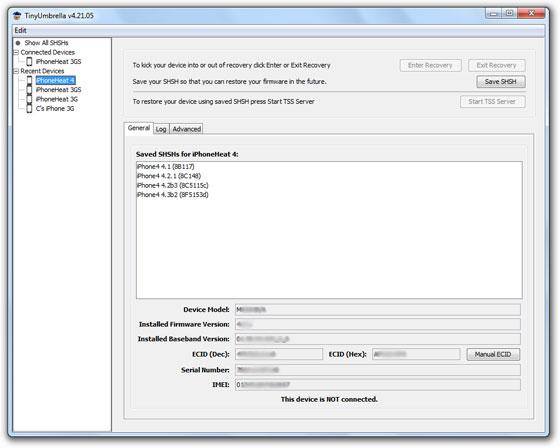
TinyUmbrella 4.21.05 is now available for download. Notcom releases TinyUmbrella 4.21.05 to save SHSH blobs for iOS 4.3 beta 2. You can download TinyUmbrella 4.21.05 from the link below.

For those who don’t know, TinyUmbrella lets you save SHSH blobs for iPhone, iPad, iPod Touch and Apple TV which are required to be able to downgrade device firmware to an older version. Some of the recent untethered jailbreak tools like Redsn0w 0.9.7 also uses SHSH blobs to provide untethered jailbreak.

Though I have been busy, I have not forgotten you. I’ve just added iOS 4.3b2 support. For those of you with Apple Developer accounts, this means you can save your SHSH’s for that version and restore to it permanently. Keep me posted of any issues. I’m still working on my next big contribution to the scene… :)
EDIT: Ok so I had a FEW bugs. 4.21.05 should work peachy :)

TinyUmbrella 4.21.05

Download TinyUmbrella

Download TinyUmbrella 4.21.05 for Windows, Mac and Linux

You can follow us on Twitter, Join us at Facebook, and also Subscribed to RSS Feed to receive latest updates.

Also checkout:

Digg
Twitter
StumbleUpon
Facebook
Reddit
del.icio.us

Untethered Jailbreak for iOS 4.3 beta with RedSn0w 0.9.7 in Works Now!

iPhone Dev-Team has successfully ported RedSn0w 0.9.7 Jailbreak Monte, the untethered iOS 4.2.1  jailbreak technique, to iOS 4.1 SHSH blobs. Now the Dev-Team is working on untethered iOS 4.3 Jailbreak by porting the same Jailbreak Monte-4.1 to iOS 4.3 beta.


For those unfamiliar, Jailbreak Monte is an untethered jailbreak technique developed by the Dev-team which uses iOS 4.2b3 SHSH blobs to jailbreak iOS 4.2.1. iOS 4.2b3 is not publicly available so, this technique encouraged iOS 4.3b3 piracy in an effort to get an untethered iOS 4.2.1 jailbreak. However, starting with next RedSn0w 0.9.7 beta update, Jailbreak Monte will use iOS 4.1 (which is publicly available) to jailbreak iOS 4.2.1.

Now the iPhone Dev-Team is working on untethered jailbreak for iOS 4.3 beta using the same Monte-4.1 technique in RedSn0w 0.9.7. Monte-4.1 untethered jailbreak technique won’t use any new exploit but the same iOS 4.1′s jailbreak exploit on iOS 4.3 (Wastes no exploits).

We hope that iPhone Dev-Team will succeed in porting Jailbreak Monte-4.1 to iOS 4.3. We’ll update you as we know more on iOS 4.3 jailbreak. Stay Tuned!

You can follow us on Twitter, Join us at Facebook, and also Subscribed to RSS Feed to receive latest updates.

Also checkout:

Digg
Twitter
StumbleUpon
Facebook
Reddit
del.icio.us