Jailbreak iOS 4.2.1 [All Guides]

You can jailbreak iOS 4.2.1 with Greenpois0n, RedSn0w and Seas0nPass. All iOS 4.2.1 jailbreak guides for iPhone 4, 3GS, 3G and iPod Touch 4G, 3G and 2G can be found below. We’ll update this post as soon as a new jailbreak for iOS 4.2.1 firmware is out. So, bookmark this page for future reference.
Jailbreak iOS 4.2.1 Firmware

Follow the Guides linked under your concerned device to jailbreak iOS 4.2.1 firmware.

Jailbreak iPhone 4

Jailbreak iPhone 3GS

Jailbreak iPhone 3G

Jailbreak iPod Touch 4G

Jailbreak iPod Touch 3G

Jailbreak iPod Touch 2G

Jailbreak iPad

Jailbreak Apple TV 2G

You can follow us on Twitter, Join us at Facebook, and also Subscribed to RSS Feed to receive latest updates.

Also checkout:

Digg
Twitter
StumbleUpon
Facebook
Reddit
del.icio.us

Greenpois0n RC5 for Windows is Now Available for Download!

GreenPois0n RC5 for Windows is now available for download. Chronic Dev-Team has released Greenpois0n RC5, the untethered iOS 4.2.1 jailbreak for Windows OS. Greenpois0n RC5 supports iPhone 4, 3GS, iPod touch 4G, 3G, 2G and iPad.

You can download Greenpois0n RC5 for Windows from the link below. Guides to jailbreak iOS 4.2.1 untethered with Greenpois0n RC5 for iPhone 4, 3G, iPod Touch 4G, 3G, 2G and iPad are also linked below.

Download Greenpois0n RC5

How to Jailbreak iOS 4.2.1

You can follow us on Twitter, Join us at Facebook, and also Subscribed to RSS Feed to receive latest updates.

Digg
Twitter
StumbleUpon
Facebook
Reddit
del.icio.us

Angry Birds 1.5.1 for iOS Brings 15 New Levels, and a New Golden Egg

Angry Birds for iPhone and iPad has been updated with 15 new levels and a new Golden Egg that is ‘as mad as a bag of hammers’ and a Super Bowl Tie-in.

New in Angry Birds 1.5.1

  • Am ‘em high continues – another searing update
  • Angry birds is back with a brand new update!
  • Adventures in the frontier badlands continue
  • 15 new levels – all crazier than popcorn on a hot stove
  • A new golden egg that is as mad as a bag of hammers

Angry Birds 1.5.1 also adds support for the secret code that will be given away during a Super Bowl commercial. This secret code will let users unlock an additional level which, on completion, will give you a chance to win a ticket to Fox’s premiere of the animated film “Rio” in Rio de Janeiro.

Angry Birds Rio, a special version, will be released in March 2011.

Angry Birds for iPhone and iPad is available in AppStore for $0.99 and $4.99 respectively. iTunes Link: [for iPhone] [for iPad]

You can follow us on Twitter, Join us at Facebook, and also Subscribed to RSS Feed to receive latest updates.

Also checkout other iPhone Apps and iPad Apps:

Digg
Twitter
StumbleUpon
Facebook
Reddit
del.icio.us

Jailbreak iPad iOS 4.2.1 Untethered with Greenpois0n RC5

Learn how to jailbreak iPad iOS 4.2.1 untethered with Greenpois0n RC5. Greenpois0n RC5 can jailbreak iPad Wifi and iPad 3G running iOS 4.2.1 untethered. Greenpois0nRC 5 untethered jailbreak does not require SHSH blobs for iOS 4.2b3.
Exploit used in Greenpois0n RC5 has been patched in iOS 4.3 firmware So, Chronic Dev-Team didn’t wait for the iOS 4.3 release to masses.

IMPORTANT

  • A clean iOS 4.2.1 restore is recommended.
  • Tethered 4.2.1 redsn0w Jailbreakers can just run greeenpois0n over it for untethered jailbreak (restore only if you have problem).
  • If you’ve RedSn0w Jailbreak Monte, please restore iOS 4.2.1 first.
  • Greenpois0n can jailbreak iOS 4.2.1 iDevices out of the box.
  • Greenpois0n RC 5 supports iPhone 4, 3GS (any bootrom), iPod Touch 4G, 3G, 2G (any bootrom) and iPad
  • This version of greenpois0n doesn’t include a patched activation system. You’ll need to activate your device using iTunes.

How to Jailbreak iPad iOS 4.2.1 Untethered with GreenPois0n RC5

Step 1

Step 2

**If you’re already running iOS 4.2.1, skip to the next step.

Connect your iPad to your computer via USB cable and restore iOS 4.2.1.

Step 3

Rest of the steps are exactly similar to the guide posted here:

You can follow us on Twitter, Join us at Facebook, and also Subscribed to RSS Feed to receive latest updates.

Also checkout:

Digg
Twitter
StumbleUpon
Facebook
Reddit
del.icio.us

Jailbreak iPod Touch 4G, 3G, 2G iOS 4.2.1 Untethered with Greenpois0n RC5

This guide is on how to jailbreak iPod Touch 4G, 3G, 2G iOS 4.2.1 untethered with Greenpois0n RC5. Greenpois0n RC5 can jailbreak iPod Touch 4G, 3G, 2G untethered on iOS 4.2.1 firmware. Greenpois0n untethered jailbreak does not require SHSH blobs for iOS 4.2b3.

IMPORTANT

  • Greenpois0n recommends a clean iOS 4.2.1 restore.
  • Tethered 4.2.1 redsn0w Jailbreakers can just run greeenpois0n over it for untethered jailbreak (restore only if you have problem).
  • If you’ve RedSn0w Jailbreak Monte, please restore iOS 4.2.1 first.
  • Greenpois0n can jailbreak iOS 4.2.1 iDevices out of the box.
  • Greenpois0n RC 5 supports iPhone 4, 3GS (any bootrom), iPod Touch 4G, 3G, 2G (any bootrom) and iPad

How to Jailbreak iPod Touch 4G, 3G, 2G 4.2.1 Untethered with GreenPois0n RC5

Step 1

Step 2

If you’re already running iOS 4.2.1, skip to the next step.

Connect your iPod touch 4G, 3G, or 2G to your computer via USB cable and restore iOS 4.2.1.

Step 3

Rest of the steps are exactly similar to the guide posted here:

How to: Jailbreak iOS 4.2.1 untethered with Greenpois0n RC5

Digg
Twitter
StumbleUpon
Facebook
Reddit
del.icio.us

Download TinyUmbrella 4.21.06 to Save iOS 4.3 Beta 3 SHSH Blobs

TinyUmbrella 4.21.06 is now available for download. Notcom releases TinyUmbrella 4.21.06 to save SHSH blobs for iOS 4.3 beta 3. You can download TinyUmbrella 4.21.06 from the link below.

For those who don’t know, TinyUmbrella lets you save SHSH blobs for iPhone, iPad, iPod Touch and Apple TV which are required to be able to downgrade device firmware to an older version. Some of the recent untethered jailbreak tools like Redsn0w 0.9.7 also uses SHSH blobs to provide untethered jailbreak.

Download TinyUmbrella 04.21.06

Download TinyUmbrella 4.21.05 for Windows, Mac and Linux

You can follow us on Twitter, Join us at Facebook, and also Subscribed to RSS Feed to receive latest updates.

Also checkout:

Digg
Twitter
StumbleUpon
Facebook
Reddit
del.icio.us

How to Update iPhone 4 to iOS 4.2.1 + Preserve Baseband 01.59.00

TinyUmbrella lets you update iPhone 4 to iOS 4.2.1 while preserving its baseband 01.59.00 which is unlockable with UltraSn0w. In this guide, you’ll learn how to update iPhone 4 to iOS 4.2.1 firmware while preserving baseband 01.59.00 using TinyUmbrella.

Updating iPhone 4 to iOS 4.2.1 also updates your baseband to 03.10.01 which is NOT unlockable at the moment. However, if you update your iPhone 4 to iOS 4.2.1 while running TinyUmbrella TSS server, it’ll preserve its baseband 01.59.00 and update iOS 4.2.1. Lets learn how to use TinyUmbrella to update iPhone 4 to iOS 4.1 while preserving baseband 01.59.00.

WARNING: This method applies to iPhone 4 only. iPhone 3GS and 3G users MUSt stay away from it and wait for an UltraSn0w update. I have tested this method myself on my iPhone 4 and it works like a charm.

How to Update iPhone 4 to iOS 4.2.1 + Preserve Baseband 1.59.00

Step 1

Step 2

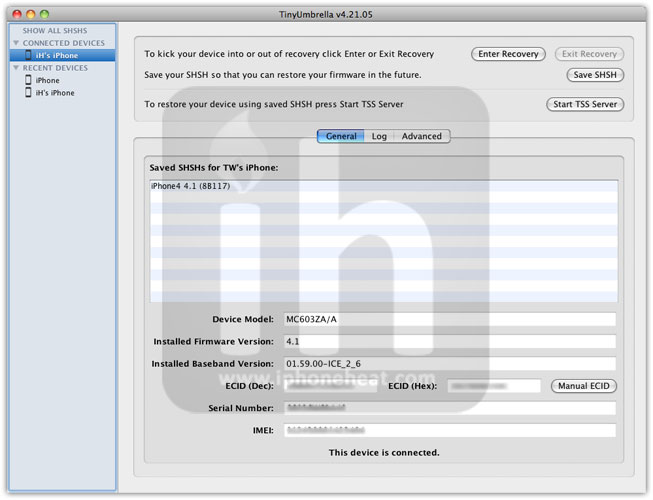
  • Run TinyUmbrella
    ***READ the TinyUmbrella README NOW. You Read it.
    iphone 4 4.2.1 baseband 01.59.00
  • Hit the Save SHSH button and make sure iPhone 4 4.2.1 SHSH blob is listed.
    iphone 4 4.2.1 baseband 01.59.00

Step 3

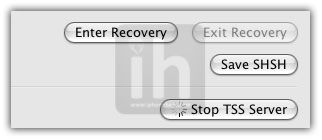
Hit the Start TSS Server button. It will kill iTunes.

iphone 4 4.2.1 baseband 01.59.00

Step 4

  • Check for ANY error.
  • Now open the iTunes. Hold down the SHIFT (Windows) or Alt/Option (Mac) key and hit the Restore button on iTunes.
  • Then browse and select your downloaded iOS 4.2.1 firmware

Step 5

Let iTunes error with 1013 error (baseband update failed – we want this :) )

That’s it. You have successfully updated iPhone 4 to 4.1 with 1.59.00 baseband. Now follow the link below to get out of recovery mode and jailbreak iPhone 4 with Greenpois0n.

Also checkout:

Digg
Twitter
StumbleUpon
Facebook
Reddit
del.icio.us

Jailbreak iPhone 4, 3GS iOS 4.2.1 Untethered with GreenPois0n RC5

In this guide, we’re going to jailbreak iPhone 4, 3G iOS 4.2.1 untethered with Greenpois0n RC5. Greenpois0n RC5 can jailbreak iPhone 4, iPhone 3GS untethered running iOS 4.2.1 firmware. Greenpois0n untethered jailbreak does NOT require SHSH blobs for iOS 4.2b3.

IMPORTANT

  • Greenpois0n recommends a clean iOS 4.2.1 restore. If you depend on unlock, do NOT update to iOS 4.1 or iOS 4.2.1 because UltraSn0w doesn’t support new basebands yet. However, iPhone 4 users can update to iOS 4.2.1 while preserving baseband with Tinyumbrella. iPhone 4 users (NOT 3GS or 3G):
    How to: update iPhone 4 to iOS 4.2.1 + Preserve Baseband 01.59.00
  • Tethered 4.2.1 redsn0w Jailbreakers can just run greeenpois0n over it for untethered jailbreak (restore only if you have problem).
  • If you’ve RedSn0w Jailbreak Monte, please restore iOS 4.2.1 first.
  • Greenpois0n can jailbreak iOS 4.2.1 iDevices out of the box.
  • Greenpois0n RC 5 supports iPhone 4, 3GS (any bootrom), iPod Touch 4G, 3G, 2G (any bootrom) and iPad

How to Jailbreak iPhone 4, 3GS iOS 4.2.1 Untethered with GreenPois0n RC5

Step 1

Step 2

If you’re already running iOS 4.2.1, skip to the next step (Make sure you read the imporant part above). Connect your iPhone 4 or iPhone 3GS to your computer via USB cable and restore iOS 4.2.1.

Step 3

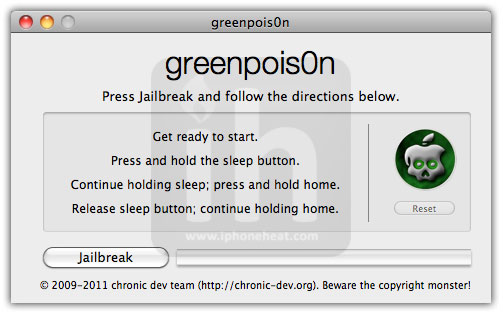
Execute Greepois0n and hit the Jailbreak button.

jailbreak iphone 4 3gs 4.2.1 greenpois0n

Step 4

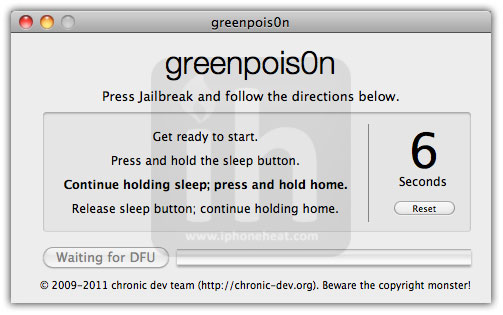
Follow the onscreen instructions to put iPhone into DFU mode.

  1. Press and hold the sleep button for 2 seconds
  2. Continue holding sleep; press and hold home for 10 seconds.
  3. Release sleep button; continue holding home for 15 seconds.

jailbreak iphone 4 3gs 4.2.1 greenpois0n

Step 5

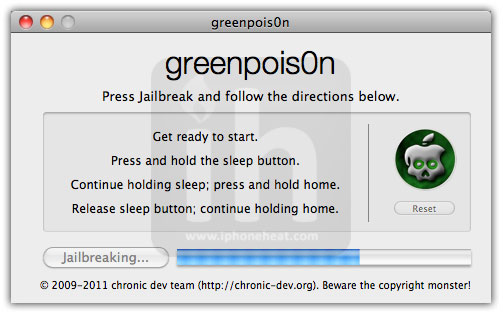
GreenPois0n will start Jailbreaking your iPhone 4, 3GS iOS 4.2.1 untethered.

jailbreak iphone 4 3gs 4.2.1 greenpois0n

Step 6

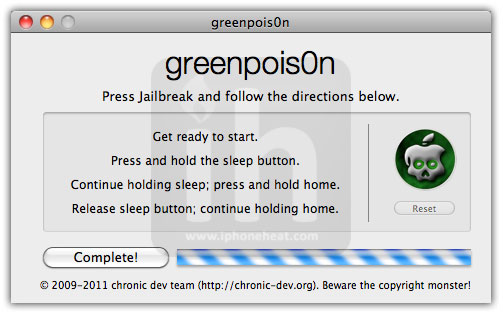
Once done, Greenpois0n will show the Complete button and there’ll be a flood of commands running on your iPhone screen :) .

jailbreak iphone 4 3gs 4.2.1 greenpois0n

Step 7

You’ve jailbroken your iPhone 4 or 3GS on iOS 4.2.1. Now open the Loader app from your iPhone home screen and install Cydia (Servers are being slammed so it may take several attempts).

That’s it! have fun with your untethered jailbreak iOS 4.2.1 on iPhone 4, 3GS. Now iPhone 4 users who preserved their baseband to 01.59.00 can unlock using the following guide:

How to Unlock iPhone 4 baseband 01.59.00 with UltraSn0w

You can follow us on Twitter, Join us at Facebook, and also Subscribed to RSS Feed to receive latest updates.

Also checkout:

Digg
Twitter
StumbleUpon
Facebook
Reddit
del.icio.us

Download Greenpois0n RC5, Untethered Jailbreak iOS 4.2.1

Greenpois0n RC5, the untethered jailbreak for iOS 4.2.1 firmware is out now. You can download Greenpois0n RC5 from the link below. As the exploit has been patched in iOS 4.3, so the Chronic Dev Team went ahead and released the untethered iOS 4.2.1 jailbreak before iOS 4.3 goes live.


Greenpois0n RC5 can jailbreak iOS 4.2.1 untethered on the following devices: iPhone 4, iPhone 3GS, iPod Touch 4G, iPod Touch 3G, 2G & Apple TV 2. There’s no need of SHSH blobs saved.

Download Greenpois0n RC5

Greenpois0n RC5 is available for Mac OS X and Windows.

Do NOT use Greenpois0n RC4

Detailed step-by step guide will be posted shortly is here:

You can follow us on Twitter, Join us at Facebook, and also Subscribed to RSS Feed to receive latest updates.

Digg
Twitter
StumbleUpon
Facebook
Reddit
del.icio.us

Greenpois0n RC5 to Support Custom/Animated Boot Logo [Video]

Jaywalker9988, a member of the Chronic Dev Team confirms that the Greenpois0n RC5, the upcoming untethered iOS 4.2.1 jailbreak, will support customized/animated boot logo on iPhone, iPad and iPod Touch. This new feature, in Greenpois0n RC5, will let you replace Apple boot logo with a video or an animated logo.

Checkout the video demo of Greenpois0n RC5 Animated Custom boot logo after the jump…

greenpois0n rc5
Initially, these animations will be available via Cydia. Later, there’ll be *sources* to make our own animated bootlogos.

As reported earlier, Greenpois0n RC5 will untethered jailbreak all iOS devices; iPhone 4, 3GS, 3G, iPod Touch 4G, 3G, 2G and iPad. Unlick RedSn0w Monte jailbreak, Greenpois0n RC5won’t need SHSH blobs saved. [via Jaywalker9988]

You can follow us on Twitter, Join us at Facebook, and also Subscribed to RSS Feed to receive latest updates.

Also checkout:

Digg
Twitter
StumbleUpon
Facebook
Reddit
del.icio.us

Pre-Order Your Verizon iPhone 4 Now!

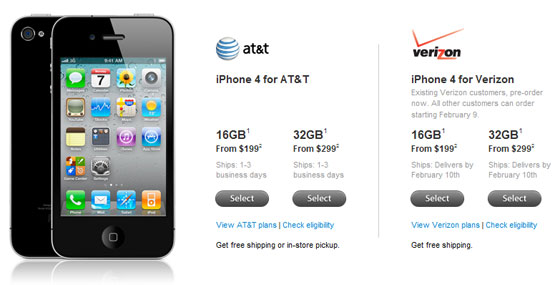
Verizon iPhone 4 is now available for pre-order. Both Apple and Verizon has started accepting pre-orders for the iPhone 4 CDMA model. These pre-ordered devices will arrive “by February 10″.

Verizon iPhone, just like the GSM model, is available in two different storage capacities; 16GB model for USD.199 and the 32GB model for USD.299 with two-year contract. However, monthly tariffs are very different. Sales in Apple and Verizon Wireless retail stores will begin on Thursday, Feb 10th.

preorder your verizon iphone 4 now

Pre-Order Verizon iPhone 4

You can pre-order your Verizon iPhone 4 (CDMA Model) on Apple’s website here and also on Verizon’s site here. Demand is expected to be high and orders will be fulfilled on a first come, first served basis. So be quick if you want one.

Note: You have to be an existing Verizon user if you’re purchasing from Apple Store.

You can follow us on Twitter, Join us at Facebook, and also Subscribed to RSS Feed to receive latest updates.

Also checkout:

Digg
Twitter
StumbleUpon
Facebook
Reddit
del.icio.us

iOS 4.3 Beta 3 is Now Available for Download [Devs Only]

Apple has just pushed the iOS 4.3 beta 3 to developers. iOS 4.3 beta 3 firmware is now available for download for iPhone 4, 3GS, iPad, iPod Touch 4G, 3G, Apple TV 2G. The build number is 8F5166b. It’s available now in the iOS Dev Center.

We have already posted a detailed post on iOS 4.3 features. We’ll update the features post as soon as we know more about iOS 4.3 beta 3. Stay Tuned!

Download iOS 4.3 beta 3 build 8F5166b

iOS 4.3 is available to developers only. Developers can download iOS 4.3 beta 3 from the iOS Dev Center. However, if you still want to give it a shot, Google the queries listed below. (Please don’t ask for the links)

Download iOS 4.3 beta 3 for iPad

  • iPad1,1_4.3_8F5166b_Restore.ipsw
  • ios_4.3_beta_3__ipad__8F5166b.dmg

Download iOS 4.3 beta 3 for iPhone 4

  • iPhone3,1_4.3_8F5166b_Restore.ipsw
  • ios_4.3_beta_3__iphone_4__8F5166b.dmg

Download iOS 4.3 beta 3 for iPhone 3GS

  • iPhone2,1_4.3_8F5166b_Restore.ipsw
  • ios_4.3_beta_3__iphone_3gs__8F5166b.dmg

Download iOS 4.3 beta 3 for iPod Touch 4G

  • iPod4,1_4.3_8F5166b_Restore.ipsw
  • ios_4.3_beta_3__ipod_touch__4th_generation__8F5166b.dmg

Download iOS 4.3 beta 3 for iPod Touch 3G

  • iPod3,1_4.3_8F5166b_Restore.ipsw
  • ios_4.3_beta_3__ipod_touch__3rd_generation__8F5166b.dmg

Download iOS 4.3 beta 2 for Apple TV 2G

  • AppleTV2,1_4.3_8F5166b_Restore.ipsw

You can follow us on Twitter, Join us at Facebook, and also Subscribed to RSS Feed to receive latest updates.

Also checkout:

Digg
Twitter
StumbleUpon
Facebook
Reddit
del.icio.us

Download iOS 4.2.6 Firmware for Verizon iPhone 4

Apple has released iOS 4.2.6 for Verizon iPhone 4. You can download iOS 4.2.6 firmware for Verizon iPhone 4 from the link below. iOS 4.2.6 has build number 8E200.


iOS 4.2.6 is a 652MB IPSW file which also indicates iPhone3,3 as Verizon iPhone identification number.

Verizon iPhone 4 was announced on Jan 11, 2011, at a special event held by Verizon wireless. Verizon iPhone was running iOS 4.2.5 on the announcement day, it looks like Apple has tweaked the iOS a little since then.

iOS 4.2.6 comes with all iOS 4.2.1 features with an addition of Verizon’s CDMA network support, and the Personal Hotspot feature that lets users to turn their idevices into hotspots to share device’s internet with other devices. AT&T iPhone will be getting personal hotspot feature starting with iOS 4.3.

Download iOS 4.2.6 for Verizon iPhone

You can download iOS 4.2.6 for Verizon CDMA iPhone from here.

Download iTunes 10.1.2

You can follow us on Twitter, Join us at Facebook, and also Subscribed to RSS Feed to receive latest updates.

Digg
Twitter
StumbleUpon
Facebook
Reddit
del.icio.us

OS7 Theme – Windows Phone 7 Theme for iPhone, iPod Touch

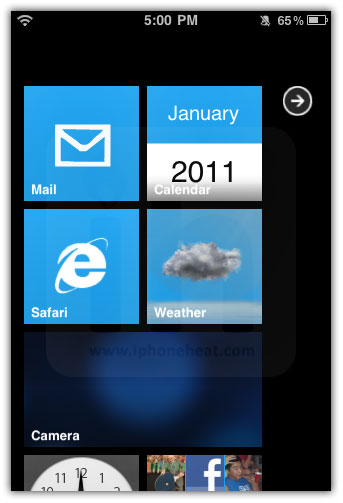
wyndwarrior, a jailbreak iPhone theme creator has brought OS7 theme, a Windows Phone 7 Theme for iPhone and iPod Touch. OS7 theme is decent Windows Phone 7 experience on iPhone and iPod Touch featuring the Windows Phone 7 live tiles and displaying applications.

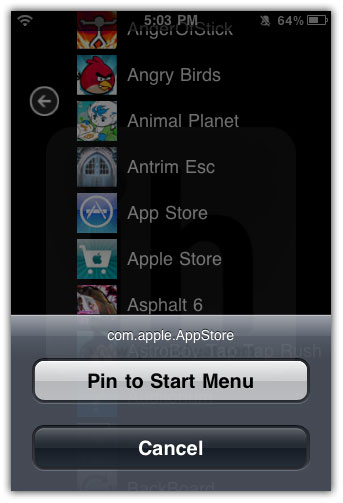
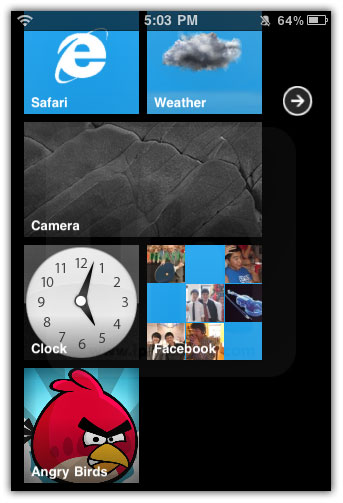
OS7 theme requires your iPhone to be jailbroken. You can Pin application to Start Menu and can also unpin from Start. Of course, even jailbroken, don’t expect too much from it due to iOS certain limitations. Still, the result is impressive. Checkout the screenshots below to see what OS7 will offer you, once installed on your iPhone or iPod Touch.

Features

A simple plug-n-play theme for iPhone and iPod Touch. Static tiles and application lists are both auto-created. Easily customizable start menu, including live tiles. Requires NO paid tweaks or even Winterboard.

Live Tiles & Application List

os 7 theme windows phone 7os 7 theme windows phone 7os 7 theme windows phone 7

Customizable Start Menu

os 7 theme windows phone 7os 7 theme windows phone 7os 7 theme windows phone 7

How to Install OS7 Theme

OS7 theme creator has not determined the theme price yet. However, OS7 public beta is available for download. Follow the steps below to install OS7 theme on iPhone and iPod Touch.
** we assume that your iPhone / iPod Touch is already jailbroken.

  1. Open Cydia, go to Search tab, search for Backboard and install it.
  2. Open Backboard and hit the ‘+’ button and input any name, then hit Create button. (This will backup your current iPhone state)
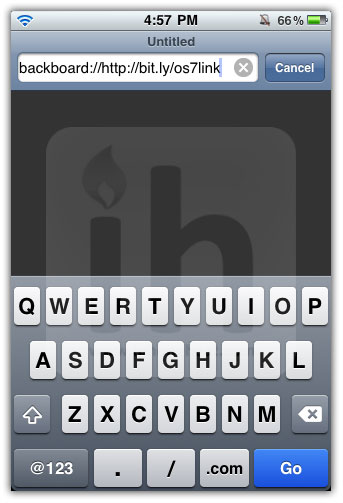
  3. Open safari Browser on your iPhone / iPod Touch and input the following URL:

    backboard://http://bit.ly/os7link

  4. This link should open Backboard
  5. Backboard should prompt you to download OS7 theme, hit Yes and wait for it to download (about 4MB).
  6. Once done, it will notify now. Hit Dismiss button.
  7. Now select OS7 from Backboard. Press Install. Respring.

os 7 theme windows phone 7os 7 theme windows phone 7os 7 theme windows phone 7

os 7 theme windows phone 7os 7 theme windows phone 7os 7 theme windows phone 7

os 7 theme windows phone 7os 7 theme windows phone 7os 7 theme windows phone 7

os 7 theme windows phone 7os 7 theme windows phone 7os 7 theme windows phone 7

OS7 Theme Demo

via [Modmyi]

Digg
Twitter
StumbleUpon
Facebook
Reddit
del.icio.us

Angry Birds Rio Trailer [Video]

To all Angry Birds fans, a new edition of the blockbuster iOS game is coming in March, and it’ll be called Angry Birds Rio. Here’s the first Angry Birds Rio trailer which was produced by Rovio in collaboration with 20th Century Fox.

Hit the jump to watch the Angry Birds Rio Trailer…
angry birds rio icon

Rovio and 20th Century Fox join forces to create a new game, Angry Birds Rio! The game will launch with 45 dedicated levels based on the highly-anticipated motion picture, with regular updates lined up for the future. The game will be available for download on smart phones and tablets worldwide.

Angry Birds Rio Trailer

We’ll keep you posted as soon as Angry Birds Rio for iPhone, iPod Touch and iPad hits the App Store. Stay Tuned!

You can follow us on Twitter, Join us at Facebook, and also Subscribed to RSS Feed to receive latest updates.

Also checkout:

Digg
Twitter
StumbleUpon
Facebook
Reddit
del.icio.us