Barack Obama and the iPad-in-Chief

US President Barack Obama has been well-known for his love of RIM’s BlackBerry, at least until last year when he admitted that the device is now “no fun” because of the security strictures he faces as Commander-in-Chief. The President has also said that technology in the White House is “30 years behind,” with a lack of “really cool phones and stuff.” The President recently admitted he got an iPad, but until a recent photo, it wasn’t clear whether he got the old model or the new iPad 2. Consider this mystery solved, because based on this photo of him boarding Marine One it’s clear the President is toting around a brand-new iPad 2, complete with a Smart Cover.

The iPad-in-Chief

We’re still not sure what the President uses his iPad for, though it’s funny to picture the world’s most powerful politician playing Angry Birds on Air Force One while the “football” sits nearby. It seems Apple’s device has been cleared by White House security, which typically is not an easy feat — the President reportedly had trouble getting clearance for his BlackBerry. If you work for a company whose IT department has been reticent about letting the iPad in, you’ve now got some potent ammunition for your counterargument.

Thanks for the tip, Alex!

Barack Obama and the iPad-in-Chief originally appeared on TUAW on Mon, 25 Apr 2011 10:00:00 EST. Please see our terms for use of feeds.

Source | Permalink | Email this | Comments

HazeOver dims background windows to help you focus

HazeOver

Have you ever wished that you could fade out non-active windows in the background, leaving you to focus on the task at hand? HazeOver does just that in a simple and Mac-like fashion.

A small utility that runs in the background, HazeOver dims any non-active windows automatically in a smooth ramp down to darkness. The amount of dimming is adjustable, from 10 to 80 percent, with an option to have a menu bar icon for quick access to settings. When you switch to a new window it is instantly thrust into the light, but when you switch away from it, HazeOver will fade it out smoothly into the background darkness.

It’s a really nice little utility that creates a very Mac-like effect and helps you focus on one window at a time. For US$0.99, HazeOver is worth a buck to add a little spice to your desktop and help you focus in on the task at hand. Hit the break to see HazeOver in action.

Continue reading HazeOver dims background windows to help you focus

HazeOver dims background windows to help you focus originally appeared on TUAW on Mon, 25 Apr 2011 09:00:00 EST. Please see our terms for use of feeds.

Source | Permalink | Email this | Comments

TUAW’s Daily App: Starfront Collision

Gameloft has earned a reputation for, ahem, “borrowing” some game ideas for the App Store. A lot of the company’s (very popular) games are more or less copies of popular titles on other platforms. One of Gameloft’s latest games, Starfront Collision, is no different; it’s basically a clone of StarCraft.

But here’s the thing: Who cares? Blizzard hasn’t actually put out a version of StarCraft for iOS, and to be honest, the RTS options are pretty limited. So if Gameloft wants to “borrow” the genre and even some of its various factions and units, that doesn’t bother us one bit.

Unfortunately, it doesn’t quite have the polish of StarCraft (what does?), but it’s a working RTS, built from the ground up for the iPhone. While it would be nice to see some official Blizzard games on iOS, we don’t have those yet. In the meantime, fans of the genre and Blizzard’s classic can check out Starfront Collision, either as a free version with in-app purchases for content, or by buying the app at US$2.99.

TUAW’s Daily App: Starfront Collision originally appeared on TUAW on Mon, 25 Apr 2011 08:00:00 EST. Please see our terms for use of feeds.

Source | Permalink | Email this | Comments

Four apps for the Royal Wedding

royal wedding
When it comes to European royalty, Americans go crazy. Beyond the garden-variety obsession with royalty, British royalty in particular is like Yank catnip. The ultimate bonkers-maker, however, is British royal weddings.

When there’s a royal wedding across the pond, Americans absolutely seem to lose their marbles. There’s just no getting around it. You can’t listen to the radio or turn on the TV without hearing about Prince William and Kate Middleton. Seriously, right now those two are bigger than Justin Bieber and Selena Gomez, which I didn’t think was even possible.

And don’t even think about browsing a newsstand. Close to half of the magazines have the royal and royal-to-be on the cover. Maybe it’s the romanticism of it all or the fact that we Americans tend to mix fantasy with aspiration, but whatever the cause, I’m happy to contribute to the hysteria. Without further ado, here is a list of four iOS apps that allow you to live out the royal wedding on your iPhone and iPad. Best of all, all the apps are free, so you can hold onto the family jewels.

The Royal Wedding by Hello! — This app, brought to you by one of the trashiest gossip magazines in the UK, is little more than a photo scrapbook of the fairytale romance between Wills and Kate. It’s got dedicated albums for the bride and groom, along with albums dedicated to royal wedding rings, wedding dresses and gifts. One of the cooler albums shows images from past royal weddings.

Continue reading Four apps for the Royal Wedding

Four apps for the Royal Wedding originally appeared on TUAW on Mon, 25 Apr 2011 07:00:00 EST. Please see our terms for use of feeds.

Source | Permalink | Email this | Comments

Testing the Sonos-AirPlay solution

AirPlay is a very cool technology, but it’s limited to the second generation Apple TV and a few receivers. Sonos, as I reported last week, has come up with its own way to integrate AirPlay into a multi-room music system, and the company was nice enough to lend me an Apple AirPort Express to try it out.

Since I already had a Sonos music system, the AirPort Express was the only missing piece. You plug AirPort Express in, connect it to one of your Sonos ZonePlayers with an Ethernet cable, and run a stereo mini-plug to stereo RCA cable from the AirPort Express to your Sonos unit.

From there, you open the AirPort Utility (it ships with OS X, and you can download a Windows version) and configure it in a couple of easy steps. You then move to your updated free ZonePlayer software version 3.4 to let the Sonos system know that the AirPort Express is there. That’s it.

From that point on you can wirelessly stream audio from your iPhone, iPod touch or iPad into your Sonos system. The Sonos is smart enough to auto switch to the correct input, and then you can hear the music on any individual ZonePlayer or on all of them at the same time. Of course, since the playlists on my iPhone and iPad are subsets of the music that Sonos normally has access to from my Mac, there’s not much advantage there. On the other hand, I went out running yesterday listening to a podcast, and when I got back to the house, I was just a couple of taps away from hearing it on any or every audio system I had in the house. When the audio switched, not even a word was dropped.

Continue reading Testing the Sonos-AirPlay solution

Testing the Sonos-AirPlay solution originally appeared on TUAW on Mon, 25 Apr 2011 06:00:00 EST. Please see our terms for use of feeds.

Source | Permalink | Email this | Comments

Talkcast reminder: Holiday edition, 10 PM ET Sunday

It’s talkcast time again, and since it’s also Easter Sunday we expect that some of our usual gang of chatterboxes may be tied up with religious or family obligations (and possibly sleeping off an overdose of Peeps).

With that in mind, we’re not going to worry too much about polishing the agenda or sorting out our topics of conversation ahead of time; if you show up, and there’s something you want to talk about, we’ll talk about it. Rumored MacBook Air refresh? iPhone finally turning white? iOS location leaks and privacy concerns? Apple grabbing the lion’s share of wireless profits? You name it, we’ll tawk.

To participate on TalkShoe, you can use the browser-only client, the embedded Facebook app, or download the classic TalkShoe Pro Java client; however, for maximum fun, you should call in. For the web UI, just click the TalkShoe Web button on our profile page at 4 HI/7 PDT/10 PM EDT Sunday. To call in on regular phone or VoIP lines (yay for free cell phone weekend minutes!): dial (724) 444-7444 and enter our talkcast ID, 45077 — during the call, you can request to talk by keying in *8.

If you’ve got a headset or microphone handy on your Mac, you can connect via the free Blink or X-Lite SIP clients; basic instructions are here (if you like Blink, the pro version is available in the Mac App Store). Talk to you tonight.

Talkcast reminder: Holiday edition, 10 PM ET Sunday originally appeared on TUAW on Sun, 24 Apr 2011 15:30:00 EST. Please see our terms for use of feeds.

Source | Permalink | Email this | Comments

Jailbreak iPad 4.3.2 with PwnageTool 4.3.2 [Untethered]

You can jailbreak iPad 4.3.2 iOS untethered with PwnageTool 4.3.2. These are the steps to jailbreak iPad 4.3.2 firmware with PwnageTool 4.3.2. Staps to jailbreak iPad 1, iPhone 4, 3GS, iPod Touch 4G, 3G with PwnageTool are the same.


Note: There’s no iPad 2 jailbreak out yet. These jailbreak steps applies to iPad 1 only.

Jailbreak iPad 4.3.2 with PwnageTool 4.3.2

Step 1

Rest of the steps to jailbreak iPad 4.3.2 with PwnageTool 4.3.2 are exactly similar to the guide posted earlier:

How to: Jailbreak 4.3.2 with PwnageTool 4.3.2

How to Jailbreak iOS 4.3.2

You can follow us on Twitter, Google Buzz, Facebook, and Subscribed to RSS Feed to receive latest updates.

Also checkout:

Downgrade iOS 4.3.2

Digg Twitter StumbleUpon Facebook Reddit del.icio.us

Unlock iPhone 4.3.2 with UltraSn0w

Ultrasn0w 1.2.2 can unlock iPhone 4.3.2 firmware on iPhone 4 and iPhone 3GS. This UltraSn0w unlock does NOT include any new iPhone baseband sport, instead, it just fixes the iOS 4.3.2 compatibility issues.

Important

  • Compatible Basebands: 01.59.00 | 04.26.08 | 05.11.07 | 05.12.01 | 05.13.04 | 06.15.00
  • Not-Compatible Basebands: 02.10.04 | 03.10.01 | 04.10.01 | 05.14.02 | 05.15.04 (Dev-Team is working on Downgrade Baseband method)
  • iPhone 3GS (not-compatible baseband) users can upgrade to 06.15.00 baseband which is unlockable (Here is How to). Upgrading your iPhone 3GS baseband to the 06.15.00 iPad baseband hack to unlock MAY cause you to lose your GPS!

Let’s Unlock iOS 4.3.1 with UltraSn0w Unlock on iPhone 4 and iPhone 3GS.

How to Unlock iPhone 4.3.2 with UltraSn0w

***T-Mobile USA users please disable 3G network first. (Settings >General >Network and turn the “Enable 3G” switch to OFF.)

Your iPhone 4 or iPhone 3GS must already jailbroken on iOS 4.3.2. Jailbreak iOS 4.3.2 guides are linked at the bottom.

Assuming that your iPhone 4 or 3GS is jailbroken on iOS 4.3.2;

  1. Open the Cydia;
  2. Let the Cydia Load and Update if it prompts you;
  3. Go to Search tab and search for ultrasn0w and install it.
  4. Installing UltraSn0w will unlock iPhone 4 or iPhone 3GS iOS 4.3.2 with baseband 01.59.00 / 04.26.08 / 05.11.07 / 05.12.01 / 05.13.04 / 06.15.00. Once the installation is completed, reboot your iPhone.

unlock ios 4.3.1 ultrasn0wunlock ios 4.3.1 ultrasn0wunlock ios 4.3.1 ultrasn0w

Voila! You have unlocked iPhone 4.3.2 on iPhone 4 / 3GS with UltraSn0w and can use SIM from any carrier now.

How to Jailbreak iOS 4.3.2

You can follow us on Twitter, Google Buzz, Facebook, and Subscribed to RSS Feed to receive latest updates.

Also checkout:

Downgrade iOS 4.3.2

Digg Twitter StumbleUpon Facebook Reddit del.icio.us

Sunday Shopping: Rugged Cases, Sound Amplifying Car Mount, Speaker Case & More

Welcome to Sunday Shopping, a new series where I highlight the week’s most interesting iPhone accessories from the new AppleiPhoneReview.com shop.

Today’s Sunday Shopping installment will highlight a collection of tough iPhone cases, a car mount that doubles as a passive amplifier for your iPhone, a case that also charges your iPhone, and more. All orders in the shop are directed through Amazon.com for the best prices & customer service.

1. Rugged iPhone Cases

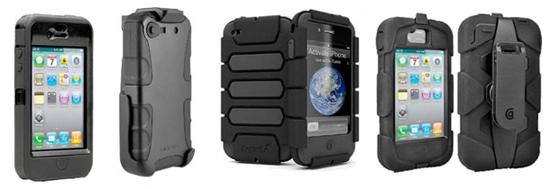
First, check out our roundup of rugged iPhone cases, a collection of must-have cases if you are at all worried about damaging your iPhone. Because over 300 readers have written into this blog with stories of cracked iPhone screens, a rugged iPhone case is undoubtedly a wise investment.

Rugged Cases for iPhone

I have personally reviewed the Otterbox Defender and can attest to its toughness. In the shop, I have listed 7 iPhone cases that are among the most rugged:

View Rugged iPhone Cases»

2. Kensington iPhone Mount

Kensington Mount for iPhone

What sets the Kensington iPhone Mount apart from other car mounts for the iPhone is its Sound Amplifying system, which channels noise from the iPhone’s built-in speaker and outputs it at double the volume. This passive sound amplification requires no battery or cables.

View Kensington iPhone Mount»

3. iMainGo2 Speakers

iMainGo2 iPhone

I have previously tested the iMainGo2 speakers and can vouch for the reliability of this speaker case. It cushions your iPhone and protects it well while blasting music out of small speakers that are surprisingly loud. It’s even got a wrist strap for carrying the speaker case around with you.

The iMainGo2 is also compatible with other portable media devices, including smartphones and iPods. For a more high-tech counterpart to the iMainGo2, see the iMainGo X.

View iMainGo2 Speakers»

4. Mophie Juice Pack for iPhone 4

iMainGo2 iPhone

The Mophie Juice Pack is a unique iPhone case in that it is also an add-on battery for your iPhone. The Mophie Juice Pack is said to double the iPhone’s battery life while also protecting your iPhone.

For such a powerful battery, it is surprisingly slim and won’t add too much bulk to your pocket or purse.

View Mophie Juice Pack for iPhone»

What did you think of this Sunday Shopping installment? Have you tried any of these iPhone accessories? Please feel free to share your opinion in the comments.

Sunday Shopping: Rugged Cases, Sound Amplifying Car Mount, Speaker Case & More is a post from Apple iPhone Review.


Talkcast reminder: Holiday edition, 10pm ET Sunday

It’s talkcast time again, and since it’s also Easter Sunday we expect that some of our usual gang of chatterboxes may be tied up with religious or family obligations (and possibly sleeping off an overdose of Peeps).

With that in mind, we’re not going to worry too much about polishing the agenda or sorting out our topics of conversation ahead of time; if you show up, and there’s something you want to talk about, we’ll talk about it. Rumored MacBook Air refresh? iPhone finally turning white? iOS location leaks and privacy concerns? Apple grabbing the lion’s share of wireless profits? You name it, we’ll tawk.

To participate on TalkShoe, you can use the browser-only client, the embedded Facebook app, or download the classic TalkShoe Pro Java client; however, for maximum fun, you should call in. For the web UI, just click the TalkShoe Web button on our profile page at 4 HI/7 PDT/10 PM EDT Sunday. To call in on regular phone or VoIP lines (yay for free cell phone weekend minutes!): dial (724) 444-7444 and enter our talkcast ID, 45077 — during the call, you can request to talk by keying in *8.

If you’ve got a headset or microphone handy on your Mac, you can connect via the free Blink or X-Lite SIP clients; basic instructions are here (if you like Blink, the pro version is available in the Mac App Store). Talk to you tonight.

Talkcast reminder: Holiday edition, 10pm ET Sunday originally appeared on TUAW on Sun, 24 Apr 2011 15:30:00 EST. Please see our terms for use of feeds.

Source | Permalink | Email this | Comments

Local TV station visits Apple’s data center

A Fox affiliate in Charlotte, North Carolina took a closer look at Apple’s new data center in the town of Maiden. The news story and accompanying video is rife with speculation about the intended usage of this 500,000 square foot building.

Once you get past the references for Apple’s supposed “Netflix-Killer” video streaming service, a rumor kicked off by analyst Peter Misek of Jefferies and Company, the video has some shots of the data center and pithy facts about the land Apple occupies.

The short video takes a quick tour of the land around the center and the extensive amount of property that Apple owns. Besides the 180 acres on which the data center sits, the Cupertino company also owns 70 acres right across the street. The data center only takes up one-third of the 180 acre plot, and with over 190 combined acres of land available, some are speculating Apple may be looking to build an East Coast campus.

Locals are certainly enthusiastic about this rumored opportunity. “I’m ready to get the phone call and to proceed with building anything they want,” said Scott Millar, President of the Catawba County Economic Development Corporation. Read on to watch the video from the Charlotte news team.

[Via Apple 2.0/Fortune]

Continue reading Local TV station visits Apple’s data center

Local TV station visits Apple’s data center originally appeared on TUAW on Sun, 24 Apr 2011 14:00:00 EST. Please see our terms for use of feeds.

Source | Permalink | Email this | Comments

US Army opts for Android over iPhone

Wired is reporting that the US Army has chosen to use an Android-based phone as its first smartphone for US troops. Now in prototype stage, the US Army Android smartphone is called the Joint Battle Command-Platform and will have its SDK released to Android developers in July. Currently, the phone has mapping apps and apps that track where friendly forces are.

It’s really no surprise the US Army opted for an Android phone over an iPhone. Android phones allow the US Army to build their own specific hardware and not rely on a company like Apple for system-level improvements.

Also, a sleek design style doesn’t seem to be a priority for the army as they need smartphone hardware that can take a beating, which a phone like the iPhone or even current Android phones like the HTC Thunderbolt don’t seem capable of. The prototype Joint Battle Command-Platform currently weighs in at two pounds.

It should also be noted that while the US Army is currently testing Android as its smartphone OS of choice, Wired states that could change. However, given Apple’s relatively closed iOS ecosystem it’s hard to imagine the US Army choosing Apple’s platform over other smartphone OS makers.

US Army opts for Android over iPhone originally appeared on TUAW on Sun, 24 Apr 2011 12:30:00 EST. Please see our terms for use of feeds.

Source | Permalink | Email this | Comments

Art of the iPad brings out the creativity of toddlers and tots

Jonathan Gay works as a project manager for a pre-school in Newton, PA and has created a project he named Art of the iPad. He wanted to see how creative very young kids could be using new technology without the usual prerequisite of training.

Not wanting to use any of the existing art apps for children, Jonathan decided on using ArtRage (US $6.99), a fully featured painting app with a simple interface that includes pencils, brushes, rollers, spray paint and other tools that can create quite realistic painting effects with a swipe of the finger. ArtRage3 is far more than a coloring book and is not geared to use by kids.

In turn, each child, who was given next to no instruction, had a go to see what they could come up with. Jonathan watched the first child. “I watched him scan up and down the device and I watched as a sudden spark lit up the room as soon as the student touched the screen for the first time.” The child was amazed as as “all of a sudden, his finger became a burgundy crayon that produced a line across the page.” The class took to the iPad with no trouble at all and quickly adapted to the idea that their fingers can create.

Children used different tools. They mixed paints to come up with a new colors, some layered paint to build textures and one even used the eraser to create white lines. Art, on a simple level, seemed to transcend age as the children used techniques and styles not usually attributed to their age group.

Continue reading Art of the iPad brings out the creativity of toddlers and tots

Art of the iPad brings out the creativity of toddlers and tots originally appeared on TUAW on Sun, 24 Apr 2011 11:00:00 EST. Please see our terms for use of feeds.

Source | Permalink | Email this | Comments

Applecore helps keep your cables organized

Apple’s in-ear bud cords are just like any other — they’ll get tangled up sooner or later. I can’t tell you how many times I’ve stuffed the earbuds in my pocket on the way out the door, only to have to spend a few minutes untangling them when I want to listen to music or podcasts on my iPhone. But this nifty little cord organizer, cleverly called an Applecore, might actually help.

They’re nice and cheap too — the smallest one is only $1.99, and there are two larger sizes for $2.99 and $4.99 in a variety of colors. Of course, you’ll still have to wind and unwind the cables every time you want to use them (which will probably cause a little more wear and tear than just your standard tangling), but an organized cable is worth it, right? And you have to admit, that’s a pretty elegant design. No better way to make your earbud cables stay organized and look good.

[via BGR]

Applecore helps keep your cables organized originally appeared on TUAW on Sun, 24 Apr 2011 09:30:00 EST. Please see our terms for use of feeds.

Source | Permalink | Email this | Comments

Apple files trademark for "Startup" retail store program

Apple has filed a new application for a trademark on the word “Startup,” centering around the category of “[r]etail store services featuring computers, computer software, computer peripherals, mobile phones, and consumer electronic devices, and demonstration of products relating thereto.” Presumably this is for a new program to set up various computers and devices in the Apple Store, though it may be more of an internal procedure than something customers are told about.

Plus, Apple registers lots of trademarks — as with patents, this may just be the company covering its bases on a name rather than laying the groundwork for some super secret program. But given that more and more of Apple’s mobile devices and computers are requiring a little setup to be done in-store, this “Startup” likely has something to do with those procedures.

Apple files trademark for “Startup” retail store program originally appeared on TUAW on Sun, 24 Apr 2011 08:00:00 EST. Please see our terms for use of feeds.

Source | Permalink | Email this | Comments