AirPort Extreme and Time Capsule part numbers, FCC filings surface

In further evidence that updates to the AirPort Extreme and Time Capsule are due any day now, Engadget reports that FCC filings for the next-gen AirPort Extreme have surfaced, while 9to5 Mac has received part number info on both the AirPort Extreme and two models of Time Capsule.

Supposedly prices will drop across both AirPort devices, and the Time Capsule will come with two choices in capacity for its built-in drive, either 2 TB or 3 TB. Supplies for the Time Capsule in particular have been constrained in physical stores for a few weeks, and shipping times for the device have slipped in many of Apple’s online stores, too. References to both devices cropped up in a recent AirPort Utility software update, so all signs definitely point to a product refresh soon.

Engadget notes that Apple typically likes to debut new hardware on the store on Tuesdays; while we can confirm that’s traditionally the case, more minor bits of accessory-type hardware occasionally crop up on other days instead. The next time the Apple Store goes down (if it actually goes down at all), don’t be surprised if there’s a bunch of new AirPort hardware waiting for you when it comes back up.

AirPort Extreme and Time Capsule part numbers, FCC filings surface originally appeared on TUAW – The Unofficial Apple Weblog on Tue, 21 Jun 2011 05:45:00 EST. Please see our terms for use of feeds.

Source | Permalink | Email this | Comments

Mobile apps leaving the web behind in usage

Mobile ad company Flurry has released a new analysis on its official blog stating that customers are making the transition lately from using the mobile web to spending more of their daily time in mobile apps. In the early days of smartphone prominence (and by “early days,” we mean about three years ago), the main feature on mobile phones was the web. You could check email, look up web pages, or browse the web on your smartphone, and that’s how most people used them.

Since the rise of iOS, however, mobile apps are picking up that time spent. And as you can see from the chart above, customers are now putting more time into mobile apps (about 9 percent more, it turns out) than browsing the mobile web. It should be noted that both stats are still growing — customers are spending more time on mobile phones than ever. But mobile app usage is growing even faster.

It’s not hard to see why this is, either. Mobile apps are maturing quickly, and it’s easier to get information from many of them now than it was just browsing around the web. Mobile apps also offer features like offline access and other things that the web doesn’t, so this shouldn’t be much of a surprise to anyone.

Mobile apps leaving the web behind in usage originally appeared on TUAW – The Unofficial Apple Weblog on Tue, 21 Jun 2011 04:00:00 EST. Please see our terms for use of feeds.

Source | Permalink | Email this | Comments

Talking Ben and friends get representation from William Morris

How do you know that you’re on the fast track to Hollywood stardom? Getting a good agent is the first step — and the fuzzy, funny characters in Outfit7’s app stable have found the best.

Talking Ben the Dog, Talking Tom Cat and the rest of the Talking Friends apps animated characters are now represented by William Morris Endeavor, the Tinseltown powerhouse led by Entourage inspiration Ari Emanuel (the brother of Chicago mayor Rahm Emanuel). The companies intend to bring the characters into films, TV and other entertainment properties.

The company’s apps have been downloaded over 135 million times across both Android and iPhone platforms; they feature characters that repeat back what you say in supposedly adorable fashion, and they react to various pokes, strokes and smacks in a cartoony manner. The latest Talking Tom 2 app (available free for both iPad and iPhone, but in separate versions) features interaction with Talking Ben (a cantankerous former chemistry teacher, which is actually quite academically impressive for a dog) and the option of having Tom call the ‘old’ Talking Tom on the phone so the two cats can mimic each other in a loop.

If you’re thinking “Wow, as a parent I have to be sure never to let my kids get hold of any of these apps, lest I lose my bearings and throw my iPhone out the car window in a fit of temporary madness,” it’s probably too late already. Did I mention they’ve been downloaded 135 million times?

Talking Ben and friends get representation from William Morris originally appeared on TUAW – The Unofficial Apple Weblog on Tue, 21 Jun 2011 03:00:00 EST. Please see our terms for use of feeds.

Source | Permalink | Email this | Comments

iPhone 5 is set to be released on September 7th

In a little over two months Apple will be releasing the iPhone 5. It is also rumored that the highly anticipated iOS5 will come preloaded.

The iPhone 5 will come pre-loaded with the iOS 5, the latest version of Apple’s mobile operating system. Apple fans were dejected that the tech giant broke with tradition this year and refrained from saying anything about the next generation iPhone in its annual Worldwide Developers Conference (WWDC).

Source: ‘Apple to release iPhone 5 on September 7; will come pre-loaded with iOS 5′

Tool: SVG Level Builder For Corona With Full Physics Support

I recently mentioned the excellent LevelHelper, and in the past I have mentioned quite a few level building, and editing tools.  I haven’t talked about too many Corona SDK tools on this site.. as they have become a dime a dozen, and many are somewhat overpriced.  This one however is somewhat different from those.

This tool is from Karnak Games and allows you to build your levels in the excellent open source Inkscape vector editing tool, which means that you can create some very complex paths like bezier curves with ease.  The builder also supports every Corona SDK physics property so you can implement complex physics within your games without needing to program.

Here’s a video of the level builder in action:

You can find the official page for the level editor here:
http://levelbuilder.karnakgames.com

If you haven’t seen Inkscape you can download it here:
http://inkscape.org/

The price is $49 at the time of this writing and apparently will be going up to $129 once the roadmap is complete (see the official page). The price seems very reasonable at $49, considering you see so many Corona tools at that price range that accomplish less.

©2011 iPhone, iOS 4, iPad SDK Development Tutorial and Programming Tips. All Rights Reserved.

.

DeliciousTwitterTechnoratiFacebookLinkedInEmail

Tutorial: Building A Location Based App That Shows Nearby Gas Prices

Location based apps are in high demand, and there are so many ideas yet to be implemented.

I’ve found an excellent post mortem style tutorial by Matt Gallagher demonstrating the creation of an app that gathers gas price info from an RSS feed, and displays nearby gas prices within a beautiful user interface.

The tutorial demonstrates Matt’s thinking during the creation process of the app and the tutorial provides for an excellent code example demonstrating a multitude of functionality including how to retrieve RSS feeds, how to cache the data, how to get the location, how to use geocoding within the Google API and much more.

You can find the tutorial and source code here:
Process Of Writing iOS Application

It will take some time to go through this great example.

©2011 iPhone, iOS 4, iPad SDK Development Tutorial and Programming Tips. All Rights Reserved.

.

DeliciousTwitterTechnoratiFacebookLinkedInEmail

ScrollView Example in iPhone

In this application we will see how to TextField implement in the ScrollView. So let see how it will worked. Another ScrollView example you can find out from here ScrollView Example

Step 1: Open the Xcode, Create a new project using View Base application. Give the application “ScrollView_Example”.

Step 2: Xcode automatically creates the directory structure and adds essential frameworks to it. You can explore the directory structure to check out the content of the directory.

Step 3: Open the ScrollView_ExampleViewController.h file and make the following changes:

#import <UIKit/UIKit.h>

@interface ScrollView_ExampleViewController : UIViewController {

IBOutlet UIScrollView *scrollView;

IBOutlet UITextField *textfield1;
IBOutlet UITextField *textfield2;
IBOutlet UITextField *textfield3;
IBOutlet UITextField *textfield4;
IBOutlet UITextField *textfield5;
IBOutlet UITextField *textfield6;
IBOutlet UITextField *textfield7;
IBOutlet UITextField *textfield8;

}

@end

Step 4: Double click the ScrollView_ExampleViewController.xib file and open it to the Interface Builder. First drag the ScrollView from the library and place it to the view window. Next drag eight Label and eight UITextField from the library and place it to the view window (See the figure 1). Select the ScrollView from the view and bring up Size Inspector and changed the y position (-200) (See figure 2). Now Save the ScrollView_ExampleViewController.xib file , close it and go back to the Xcode.


Figure 1


Figure 2

Step 5: In the ScrollView_ExampleViewController.m file make the following changes:

#import "ScrollView_ExampleViewController.h"

@implementation ScrollView_ExampleViewController

(void)dealloc
{
[super dealloc];
}

(void)didReceiveMemoryWarning
{
[super didReceiveMemoryWarning];

}

#pragma mark – View lifecycle

// Implement viewDidLoad to do additional setup after loading the view, typically from a nib.
(void)viewDidLoad
{

[super viewDidLoad];

scrollView.frame = CGRectMake(0, 0, 320, 460);
[scrollView setContentSize:CGSizeMake(320, 678)];

}

(BOOL)textFieldShouldReturn:(UITextField *)textField{
[textField resignFirstResponder];
return YES;
}

(void)viewDidUnload
{
[super viewDidUnload];
// Release any retained subviews of the main view.
// e.g. self.myOutlet = nil;
}

(BOOL)shouldAutorotateToInterfaceOrientation:(UIInterfaceOrientation)interfaceOrientation
{
return (interfaceOrientation == UIInterfaceOrientationPortrait);
}

@end

Step 6: Now compile and run the application on the Simulator.

You can Download SourceCode from here ScrollView_Example

Apple’s infrared ‘camera kill switch’ patent application hits a nerve

Picture this: You’re out for a stroll on the streets of Vancouver when suddenly you find yourself caught up in a depressed mob of hockey fans. Riot police are striking a young man with their batons near a squad car. You pull out your iPhone to capture a video of this seeming abuse of force — only to see a flashing message on the screen that says ‘Recording Disabled.’

Earlier this month, Patently Apple analyzed a patent application filing that Apple originally submitted in December of 2009. The patent application covered several ways to communicate with a cellphone through its camera using a coded infrared light transmission.

Simply pointing your phone’s camera at a properly equipped museum exhibit, for example, could load a webpage about the artifact on display or offer additional details about its origins. An auction house or fashion show could easily provide pricing, availability or ‘click to bid’ buttons. The technology would work like a giant, invisible QR code — although it couldn’t do the bidirectional sharing that Google’s demo showed earlier. You also couldn’t block it with a bit of masking tape, since the infrared data stream is captured by the phone’s camera itself, not by a separate sensor.

That’s the user-affirming side of the patent. The other big use case, however, is for the infrared transmission to tell the phone “Hey, no pictures here!” The suggested applications are for concert halls, movie theaters or even sensitive corporate/government facilities — giving those venue owners an easy way to block photography or videotaping of copyrighted or classified materials. Whether you think that’s a terrible idea or an awesome idea may rest on whether or not you own a concert hall or a movie theater.

Of course, Apple patents or patent applications often don’t evolve into actual, shipping Apple products. (Remember the ‘undead ads for content time‘ patent? Ick.) Nevertheless, even in the hypothetical case, the spectre of a ‘kill switch’ for the iPhone camera is not sitting all that well in certain circles.

The Save the Internet coalition has published a suggested open letter to Steve Jobs that suggests this patent application is deeply repugnant to the ideals of freedom: “[T]housands of people across the Middle East have used cellphone cameras to document violent government abuses. This technology would also give tyrants the power to stem the flow of protest videos and crack down on their citizens with impunity.” The petition continues, “If this tool fell into the hands of repressive regimes or malicious corporations, it would give tyrants and companies the power to silence one of the most critical forms of free expression.”

Now, there’s a wide gulf between blocking cameras at concerts and quashing dissent by democratic activists — at least in theory. First of all, would-be repressive regimes would have to set up expensive equipment in advance, which would work only at short range — and even if they did that there’d be no guarantee that all the phones in the area would comply with the invisible orders, so the requisite shakedown of all camera-enabled devices by armed enforcers would still have to be done. In the chaos and commotion of the kind of situations that would tend to motivate large-scale iPhone videography, it’s by no means clear that this ‘kill switch’ would even work. As my colleague Chris Rawson points out, your average infrared TV remote control is thoroughly flummoxed by simple sunlight.

None of this, however, means that it’s prudent to stand atop the slippery slope of external device controls and say “Looks like a nice ride down.” It’s easy to think, as I did when first reading the admittedly hyperbolic language of the petition, “Look, the iPhone is not the only camera in the world; professional bootleg videographers don’t use crappy cameraphones at all, protesters have many different kinds of phones and cameras at their disposal, and as soon as this capability gets rolled out people will simply jump to another platform to work around it.” [Never mind the fact that Flickr now shows the iPhone 4 as the most popular camera on the site, bar none. -Ed.]

The problem is that market reaction takes time, and in the thought experiment I played out at the beginning of this post there’s no time to react. If you were in a traffic stop that went wrong, a political rally with a bad outcome, a movie theater where someone was being assaulted — there’s no chance to go back in time and say “You know, that iPhone camera kill switch may not have been such a good idea after all.”

It’s impossible to say, without access to Apple’s labs, whether this technology is truly viable, whether it would work in daylight, and whether it could really be used in the situations envisioned by the petition writers. It’s equally impossible to say whether Apple intends to implement and commercialize this invention, or even if the company’s patent application would be granted. Maybe Apple’s secret objective in pursuing this patent is not to implement it in products — to keep the concept off the market in perpetuity, or at least for the life of the patent. But that doesn’t seem likely, and in the absence of comment from Apple about whether and how the capability would be implemented in future iPhones (a comment that is undoubtedly not coming anytime soon), all we have is our questions.

Apple’s infrared ‘camera kill switch’ patent application hits a nerve originally appeared on TUAW – The Unofficial Apple Weblog on Mon, 20 Jun 2011 23:30:00 EST. Please see our terms for use of feeds.

Source | Permalink | Email this | Comments

Dropbox security bug temporarily allowed logins without authentication

Earlier today, a code update to Dropbox introduced a bug that temporarily allowed access to users’ accounts and files without authentication via the company’s web interface. For approximately four hours, from the time that Dropbox made the changes until the service’s developers were able to correct the error, user accounts were accessible by merely typing in the email address associated with the account.

“This should never have happened,” Dropbox says on its blog. “We are scrutinizing our controls and we will be implementing additional safeguards to prevent this from happening again.”

TechCrunch notes that many Dropbox users store sensitive files using the service, and it’s a sobering thought that such files were theoretically freely accessible by anyone for any period of time. Dropbox claims that less than one percent of users logged into the service while authentication was inadvertently optional, and it logged out all user sessions as a precaution.

This is not the first time concerns have been raised over possible security issues with Dropbox, but the fact that user accounts and files were accessible without authentication may mean that users looking for a secure online file storage system may want to look elsewhere when iCloud debuts this fall.

Dropbox security bug temporarily allowed logins without authentication originally appeared on TUAW – The Unofficial Apple Weblog on Mon, 20 Jun 2011 23:00:00 EST. Please see our terms for use of feeds.

Source | Permalink | Email this | Comments

Samsung denies being in talks with Apple

The Apple/Samsung legal feud continues. This week a US district judge suggested to the two companies that they should try to settle their patent infringement suits out of court, citing the companies’ close business relationships. Apple’s and its legal council seemed to agree and Apple’s lawyer told the judge that executives “at the highest levels” of two companies were actively meeting to work things out. However, Samsung denies those talks are even happening.

The Korean company told UK site V3 that “We are unaware of any meetings or discussions between the two sides over this matter.” Apple recently came to a patent settlement agreement with Nokia, and many in the industry — not to mention the courts — hope Apple and Nokia can come to a similar settlement. However, the primary argument Apple has with Samsung isn’t about technology patents, it’s about Samsung stealing the look and feel of the iPad and iPhone to use in its own products. Needless to say, it’s unlikely that a case will be settled out of court when one company says that it’s talking to the other to try to resolve the issue and the other company says no such talks exist.

Samsung denies being in talks with Apple originally appeared on TUAW – The Unofficial Apple Weblog on Mon, 20 Jun 2011 22:10:00 EST. Please see our terms for use of feeds.

Source | Permalink | Email this | Comments

MacBook Air could sport new Intel ULV processors

The rumored revision of the MacBook Air, which is expected to go on sale by the end of July, could sport Intel’s new ULV chipsets, according to Cnet. “ULV” stands for “ultra-low voltage” — something that is very important for ultra-slim laptops like the MacBook Air.

In addition to the low power dissipation of the new ULV chips, they also offer much faster processing speeds. Here’s a rundown of the ULV chipset offerings (and their prices) that Intel just announced:

  • Core i7-2677M: 2 cores, 1.8 GHz (turbo boost to 2.9GHz), 4MB cache, 17 watts, $317
  • Core i7-2637M: 2 cores, 1.7GHz (turbos to 2.8GHz), 4MB cache, 17 watts, $289
  • Core i5-2557M: 2 cores, 1.7GHz (turbos to 2.7GHz), 3MB cache, 17 watts, $250

Earlier today another next-generation MacBook Air rumor surfaced that alleges the next version of the Air will also come in a black anodized aluminum body.

MacBook Air could sport new Intel ULV processors originally appeared on TUAW – The Unofficial Apple Weblog on Mon, 20 Jun 2011 21:18:00 EST. Please see our terms for use of feeds.

Source | Permalink | Email this | Comments

Apple email reveals iCloud storage details

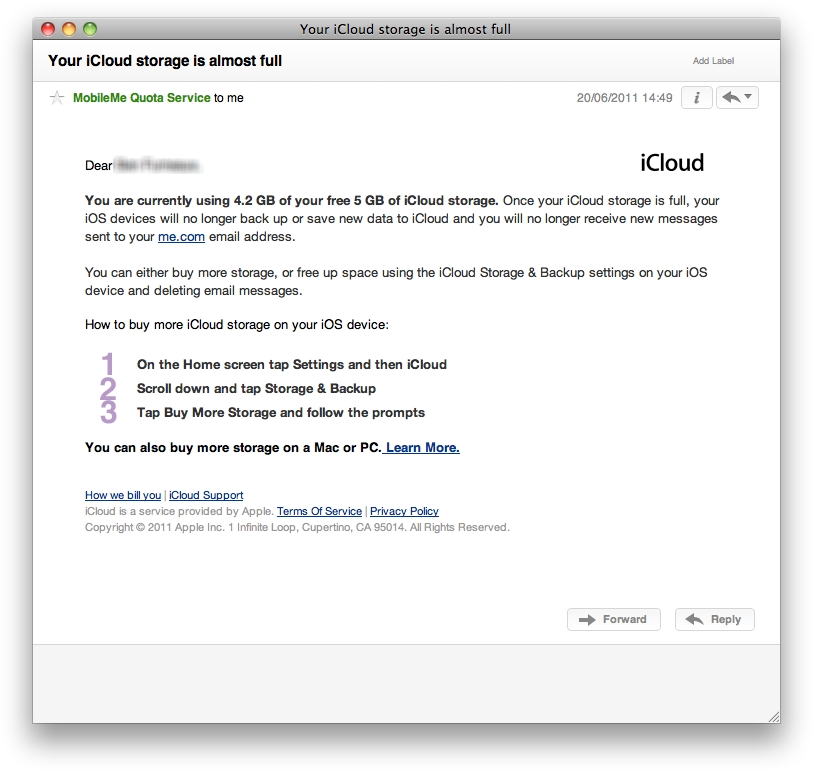
An email sent from Apple to a MobileMe member reveals some details about Apple’s upcoming storage allocation in iCloud. When users sign up for a free iCloud account they will receive 5 GB of cloud storage. However, when users near their 5 GB limit they’ll receive an email from Apple like the one this MobileMe member received today, as MacRumors reported. The email reveals what happens if you hit your 5 GB limit.

If you max out your data storage your iOS devices will no longer back up or save new data to iCloud and any emails sent to your me.com email address will bounce back to the sender. The good news is that any media or apps you purchased through iTunes doesn’t count against your 5 GB iCloud allotment.

Still, if you’re going to be saving many large files on iCloud, you’re probably going to need more than the 5 GB of free storage eventually. The email from Apple states that iCloud users can buy more storage right from their iOS devices or on a Mac or PC, however it doesn’t state any pricing or in what increments users can buy additional storage.

iCloud is expected to fully roll out in the fall with the release of iOS 5, but users with an iTunes account can test out some of its services now by redownload apps they’ve already purchased.

Apple email reveals iCloud storage details originally appeared on TUAW – The Unofficial Apple Weblog on Mon, 20 Jun 2011 19:30:00 EST. Please see our terms for use of feeds.

Source | Permalink | Email this | Comments

Capcom puts iOS titles on sale, post-Father’s Day weekend

Capcom didn’t get the memo about hosting app sales this past Father’s Day weekend apparently — the company has instead put four of its titles on sale for just a buck today. Right now, you can pick up Street Fighter IV, Devil May Cry 4 refrain, Dead Rising Mobile or Resident Evil Mercenaries all for just a Washington each. Those are all solid titles, and well worth a buck of entertainment.

The great Death Rally (which, disclaimer, I’m in as a cameo) is also on sale for 99 cents, and there might be a few other sales from the weekend still poking around: Army of Darkness Defense is still free, for example. If you’re interested in one of those, better grab it quick!

Capcom puts iOS titles on sale, post-Father’s Day weekend originally appeared on TUAW – The Unofficial Apple Weblog on Mon, 20 Jun 2011 19:00:00 EST. Please see our terms for use of feeds.

Source | Permalink | Email this | Comments

Five ways for iOS developers to deal with Apple’s new subscription guidelines

Over the weekend, Hulu subtly updated its iOS application to comply with Apple’s revised in-app subscription guidelines. As Mike Schramm posted earlier, it removed the link on its main sign-in page that allowed users to visit hulu.com/plus to sign up for service.

Apple states in section 11.14 of the developer agreement that applications can provide access to material from subscriptions outside the application so long as the application doesn’t provide an external purchase link — this is a retreat from Apple’s original position on subscriptions, which is that they had to give App Store sales ‘most favored nation’ pricing equivalence with sales from outside the system. Users can visit your website and sign up there, but if you sell from within the product, it has to go through Apple’s in-app purchase system. Apple receives 30% of those sales.

Here’s the current verbiage on the agreement:

11.14 Apps can read or play approved content (specifically magazines, newspapers, books, audio, music, and video) that is subscribed to or purchased outside of the app, as long as there is no button or external link in the app to purchase the approved content. Apple will not receive any portion of the revenues for approved content that is subscribed to or purchased outside of the app

For all we know, Hulu was okay with its change. After all, it won’t have to fork over 30% of its app-sourced subscriptions to Apple. The conversion rate from free app to paid subscriptions through that link might have been very small indeed. At the same time, could Hulu have lived by the wording of the guidelines without sacrificing the sales push from app to site to signup?

TUAW brainstormed up five other ways Hulu might have played things. Here are our suggestions that developers might want to consider when facing the same guidelines and the same need to move forward to a compliant app.

Use indirection. Instead of providing a sales link, provide a help link. “Learn more about Hulu Plus” could transfer the reader to information about what Hulu Plus is. That in turn could convert to sales through a further link, without providing direct in-app links to a purchase page.

Downside: Apple isn’t stupid. Unless the page truly provides information about the product rather than a sales pitch, you’re better off avoiding the indirection.

Skip the link. So long as your text does not provide a live link or button, you should be able to specify how to sign up for service, e.g. “Interested in Hulu video access? Visit hulu.com/iwantmyhulu from any browser.” If the URL isn’t clickable, that’s within the rules as written. It could even be more indirect than that, mediated by a search: “Want thousands of TV episodes at your fingertips? Use Google or Bing and search for ‘Hulu Plus sign-up’ to join.”

Downside: Again, this might not make it through Apple review. While it respects the letter of the developer agreement, it certainly breaks the spirit. True, “button or external link” is a fairly clear guideline; a text URL without a hyperlink behind it is not a ‘link’ in the generally understood sense… but the App Store reviewers might not see it that way.

Promote the benefits. Speak to your users, explaining why subscription services would help them with your app from within the app. You can verbally and visually upsell your app, even adding buttons and screens that discuss “what subscribing to Hulu Plus can do for you,” without ever linking to that external website.

Downside: Apple may determine that your sales pitch for materials not included in the basic application detract from the user experience.

Leverage social marketing. A “Tell a friend about Hulu Plus” link could send off an e-mail with all the information and links you need to explain the service and allow users to sign up.

Downside: Users might not get that the information on signing up for service is available for them as well as for their friends. It’s a pretty indirect way to get your message and links across. Of course, there could be a ‘Copy me on this email’ checkbox in the Tell a Friend UI.

Be aggressively transparent. Hulu did not hide why its update shipped. In “What’s New in Version 2.3.2” in iTunes, Hulu writes, “Compliance with new rules for subscription-based apps.” At the same time, it didn’t make a big deal about it on its home page. Was that a missed opportunity?

Websites can act as a bully pulpit as well as a sales tool. Front and center, Hulu might have described why the update shipped, i.e. to remove the link in order to comply with Apple’s rules, and further promoted its product — but it did not. As a large brand with excellent presence, it probably didn’t need the extra push-to-monetize that website editorializing might have brought.

Downside: This is a really indirect way to gain sales that you used to promote through your product. Why tick off Apple publicly if you don’t have to? On the other hand, Apple does respond to community pressure. If your cause is just and true, you shouldn’t have to feel that you can’t publicly stand behind it while still doing business with Apple.

So there you have it. Five suggestions that could help upsell your subscriptions without violating 11.14. Agree with these? Or do you think there are better ways to handle your sales pushes? Let us know in the comments.

Five ways for iOS developers to deal with Apple’s new subscription guidelines originally appeared on TUAW – The Unofficial Apple Weblog on Mon, 20 Jun 2011 18:30:00 EST. Please see our terms for use of feeds.

Source | Permalink | Email this | Comments