 Pokémon Go is about to get bigger, according to a handful of Starbucks employee guides that found their way online early this week. The images have not been verified by Niantic, the Pokémon Company or Starbucks, but Reddit sleuths claim…
Category: I-phone
Iphone ,Apple I-Phone Tutorials,Jailbraik,3g,3gs,2g, 3gs untethered ,3.1.2,3.1.3,geohot
Google Play adds 4K movies to its catalog
 When we reviewed the Chromecast Ultra, one of our biggest gripes was the dearth of 4K content to justify it — not even Google's own movie store had material to watch. The company is fixing that glaring omission, though. As of now, Google Play Movies…
Trump team wants to meet with Silicon Valley execs next week
 The Trump transition team has invited a number of tech industry leaders to New York next week for a roundtable discussion. USA Today reports that Reince Priebus, Trump's chief of staff, Jared Kushner, Trump's son-in-law, and advisor Peter Thiel are e…
‘Coloring Book’ is the first streaming-only album up for a Grammy
 Meghan Trainor announced the nominees for this year's Grammy Awards on Monday night. Beyonce, deservedly, is leading the field with 9 nominations followed closely by Drake, Rhianna and Kanye West who all have 8 apiece. But more surprising is the cate…
Twitch brings video calls to its game communication app
 Twitch wants to move beyond live streaming to cover your game communications, and to that end it bought Curse back in August. Just what is it doing with its newly acquired app, though? Well, now we know: Curse is rolling out desktop support for both…
Google expects to run solely on renewable energy in 2017
 Google has made it a point to run as much of its business on renewable energy as possible, and it looks like the company is close to reaching its ultimate goal. The internet pioneer now expects that all of its offices and data centers will be relyin…
Samsung’s Galaxy S8 may ditch the headphone jack
 With Apple, Motorola and others releasing phones without 3.5mm headphone jacks this year, there's been a looming question: will Samsung follow suit? Like it or not, SamMobile sources claim the answer is yes. Reportedly, the Galaxy S8 will rely sole…
Dropbox saves whole folders for offline viewing on mobile
 Look, it's not hard to save Dropbox files for offline viewing on mobile. But when you need to make sure you have access to a bevy of documents for work or school wherever you go, the app's latest premium feature sounds like a useful addition. The ser…
Solar beads can make some very cool lamps and flashlights
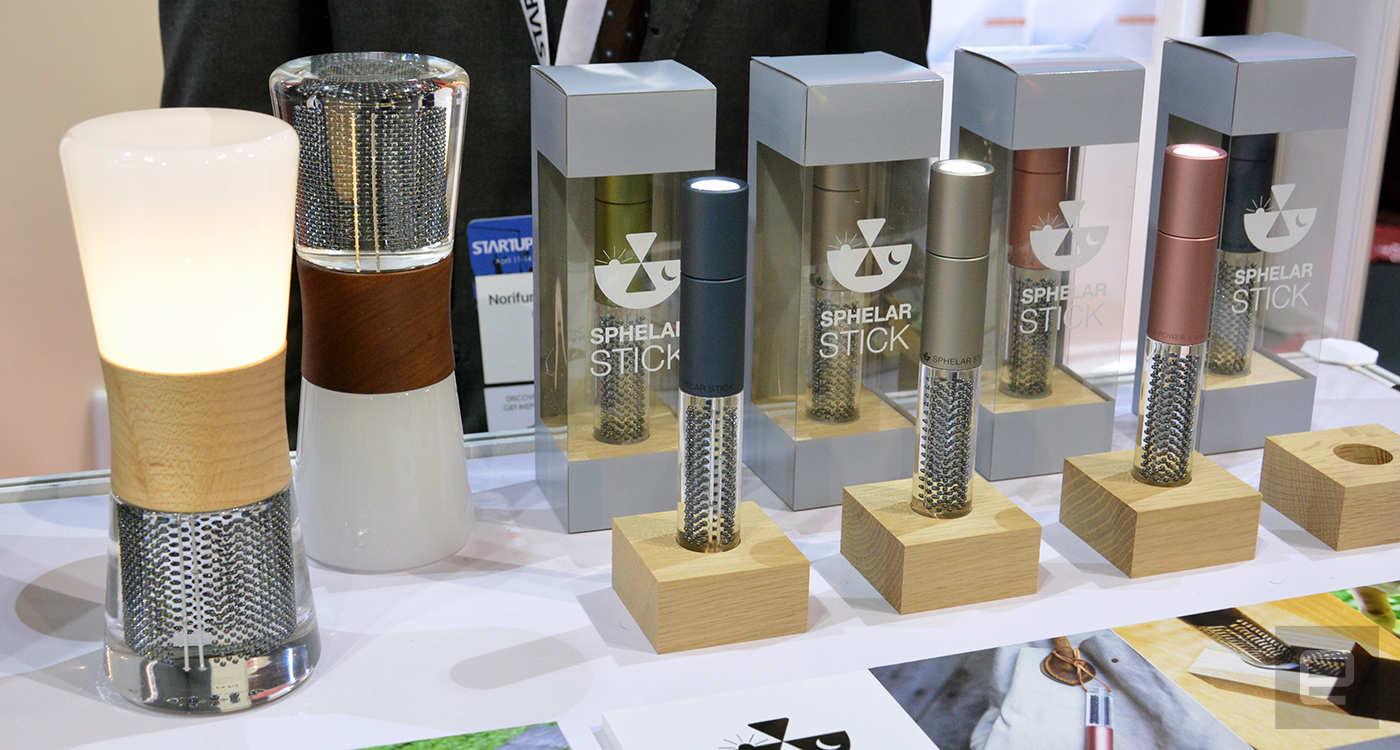 Conventional solar panels aren't exactly the prettiest objects on the planet, which is why companies like Tesla, SRS Energy and SunTegra have been focusing on blending this technology into roof tiles. As for those who don't have a roof or land to spa…
The Novint Falcon: Haptic joystick turned futuristic sex toy
 I'm standing in the studio at Engadget's San Francisco headquarters, holding the remains of a pulverized, cream-filled doughnut. The pastry's sticky, off-white filling clings to the shaft of a bright pink vibrator, taped to the end of a silver, cone-…
Setapp Beta Invitations
Setapp is a new subscription software service for the Mac. You pay one flat monthly fee, and you get the latest versions of all the apps, including any new ones they add. You get updates too, for the lifetime of your subscription. As long as you’re current, all the apps run — without any ads or limitations.
I’ve been testing it for a couple of months, and the user experience is pretty good. You get a subfolder in your Applications folder, with stubs for each of the apps. When you launch one, you’ll see a description and some zoomable screenshots, just like on the Mac App Store. If you want it, just click a button, and the app downloads immediately, replacing the stub. You can get as many as you want.
I don’t have any stake in Setapp (I don’t really use a Mac anymore, either), and I don’t get any referral fee or anything; it’s just an interesting thing I’ve been trying out. The launch is in 2017, but it’s in public beta right now (press release here). If you sign up for a free trial, you go into a waiting list to get a beta invitation — but, since I’m apparently super-important or something, I have a hundred instant-access invitations to give away.
If you’re fast enough, you can get your invitation here. If they’ve already been used up by the time you click the link, you’ll go into the regular waiting list. It shouldn’t take long to get your invitation then either.
Once again, get your invitation here. Don’t say I never give you anything.
AppWage – An Open Source Mac OS Tool For Viewing And Tracking Data Using iTunes Connect
AppWage is an open source Mac OS based iTunes reporting tool from Hankinsoft with a great interface for viewing app sales information, track competition and more using iTunes Connect data.
With AppWage you can view sales reports, reviews, rankings, and track the competition. You can send daily emails using your own SMTP server, and automatically translate app reviews.
Here’s an image from the readme showing AppWage in action:

You can find AppWage on the homepage here.
You can find the source code on Github here.
A nice tool for tracking app data.
Original article: AppWage – An Open Source Mac OS Tool For Viewing And Tracking Data Using iTunes Connect
©2016 iOS App Dev Libraries, Controls, Tutorials, Examples and Tools. All Rights Reserved.
RATreeView – Custom iOS Table View Component For Displaying Tree Data Structures
RATReeView is an open source iOS and tvOS UI component built on UITableView for displaying tree data structures easily from Rafal Augustyniak.
RATreeView will automatically create nested table views with tree data complete with built in editing features. UIRefreshControl is supported by RATReeView for pull-to-refresh.
HEre’s an animation from the readme showing RATreeView in action:

You can find RATreeView on Github here.
A great component for displaying nested data.
Original article: RATreeView – Custom iOS Table View Component For Displaying Tree Data Structures
©2016 iOS App Dev Libraries, Controls, Tutorials, Examples and Tools. All Rights Reserved.
Snowflake – A Swift SVG Library Featuring A Clean Syntax And Animatable Layers
Snowflake is an open source Swift based library from Khoa Pham for working with SVG files.
SnowFLake allows you to display SVG data and loads it into a Shape and Style elements which can be modified, or you could manipulate the Shape and Style within code to create SVG elemnts in Swift.
The SVG elements are drawn using CASHapeLayer’s and can the different SVG laters can be manipulated as CAShapeLayers so you can do some great things such as Animation.
This image from the readme shows an example of animating an SVG image as a CAShapeLayer:

You can find Snowflake on Github here.
An interesting Swift SVG library.
Original article: Snowflake – A Swift SVG Library Featuring A Clean Syntax And Animatable Layers
©2016 iOS App Dev Libraries, Controls, Tutorials, Examples and Tools. All Rights Reserved.
ASHorizontalScrollView – Open Source iOS UI Component For Easily Creating Horizontal Scrolling Views
ASHorizontalScrollView is an open source component allowing you to easily create horizontal scrolling views easily from a set of views.
ASHorizontalScrollView can be used where the subviews to be used in the scroll view are the same size and automatically calculates how to display the subviews.
This animation from the readme shows ASHorizontalScrollView in action:

You can find more about ASHorizontalScrollView on Terence Chen’s blog.
You can find the source code repo for ASHorizontalScrollView on Github here.
A handy component for easily making horizontal scrolling views.
Original article: ASHorizontalScrollView – Open Source iOS UI Component For Easily Creating Horizontal Scrolling Views
©2016 iOS App Dev Libraries, Controls, Tutorials, Examples and Tools. All Rights Reserved.