One of Tesla’s biggest investors took an 11.4% stake in rival Nio

Baillie Gifford & Co., the second-biggest shareholder of Tesla stock, has taken an interest in Nio, the Chinese electric vehicle automaker that recently became a publicly traded company.

Baillie Gifford now owns an 11.44 percent stake in Nio, according to a regulatory filing posted Tuesday. The company disclosed that it had purchased 85.3 million shares, which were valued at about $515 million as of the close of trading Monday.

Baillie Gifford is the largest outside shareholder of Tesla stock. CEO Elon Musk, Tesla’s largest shareholder, own about 20 percent of the company.

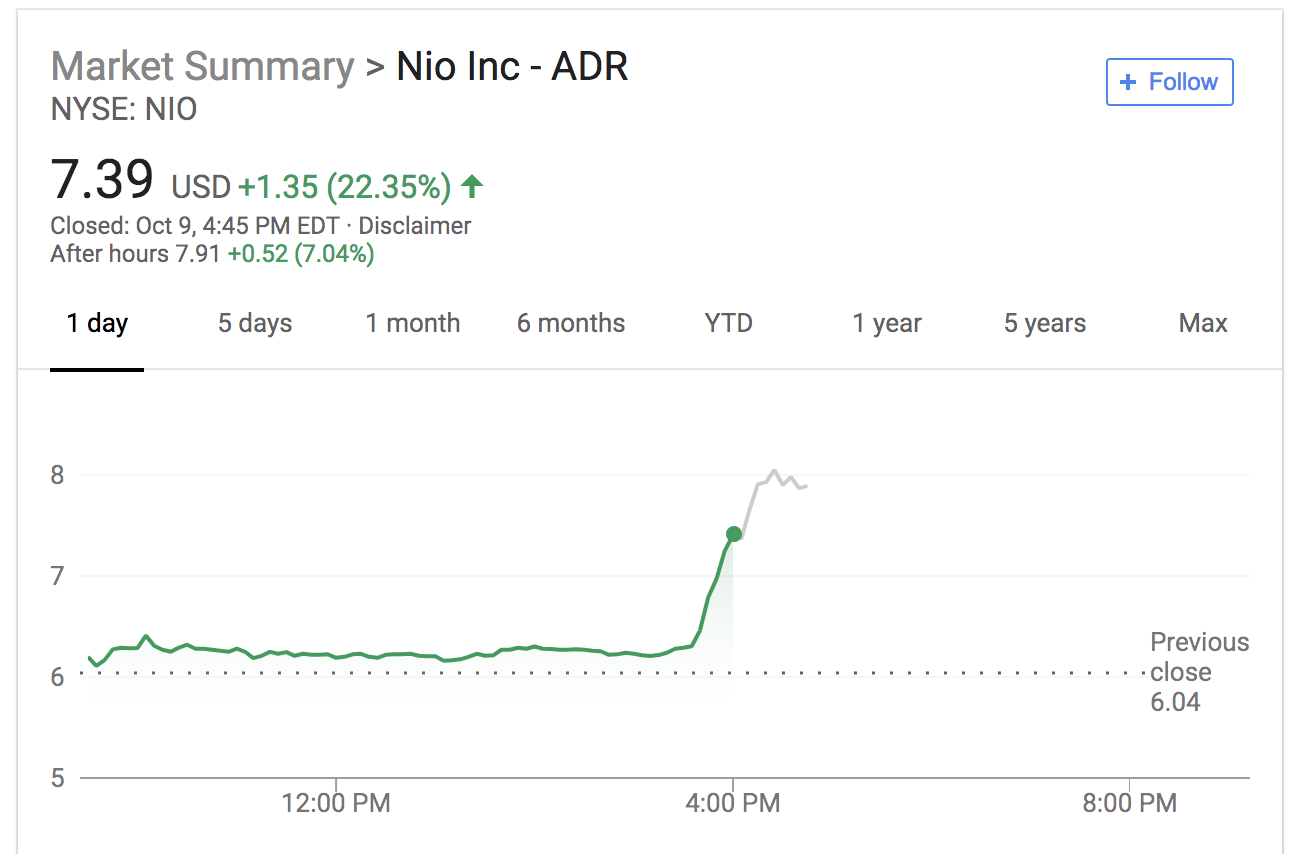
The filing pushed shares of Nio to close at $7.39, up from its opening of $6.19 this morning. Shares are up another 7 percent in after-hours trading and are continuing to climb.
Nio shares

Nio raised $1 billion when it debuted on the New York Stock Exchange last month.

Nio wants to become the Tesla of China — and beyond. The company has operations in the U.S., U.K. and Germany, although it only sells its ES8 vehicle in China. The 7-seater ES8 SUV is priced at 448,000 RMB, or around $65,000. That’s cheaper than Tesla’s vehicles, especially since new, higher import tariffs have driven up the price of its Model X SUV and Model S sedan.

Those tariffs, plus other costs like shipping Tesla vehicles overseas, is pushing the U.S. automaker to accelerate its China factory plans.

Hands-on with Google’s Pixel Slate

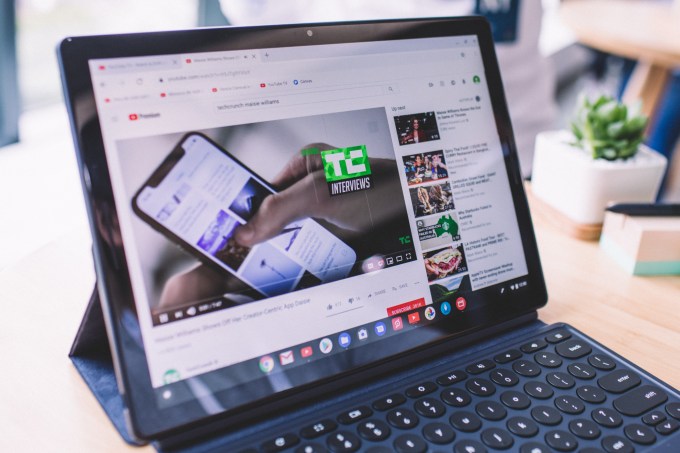
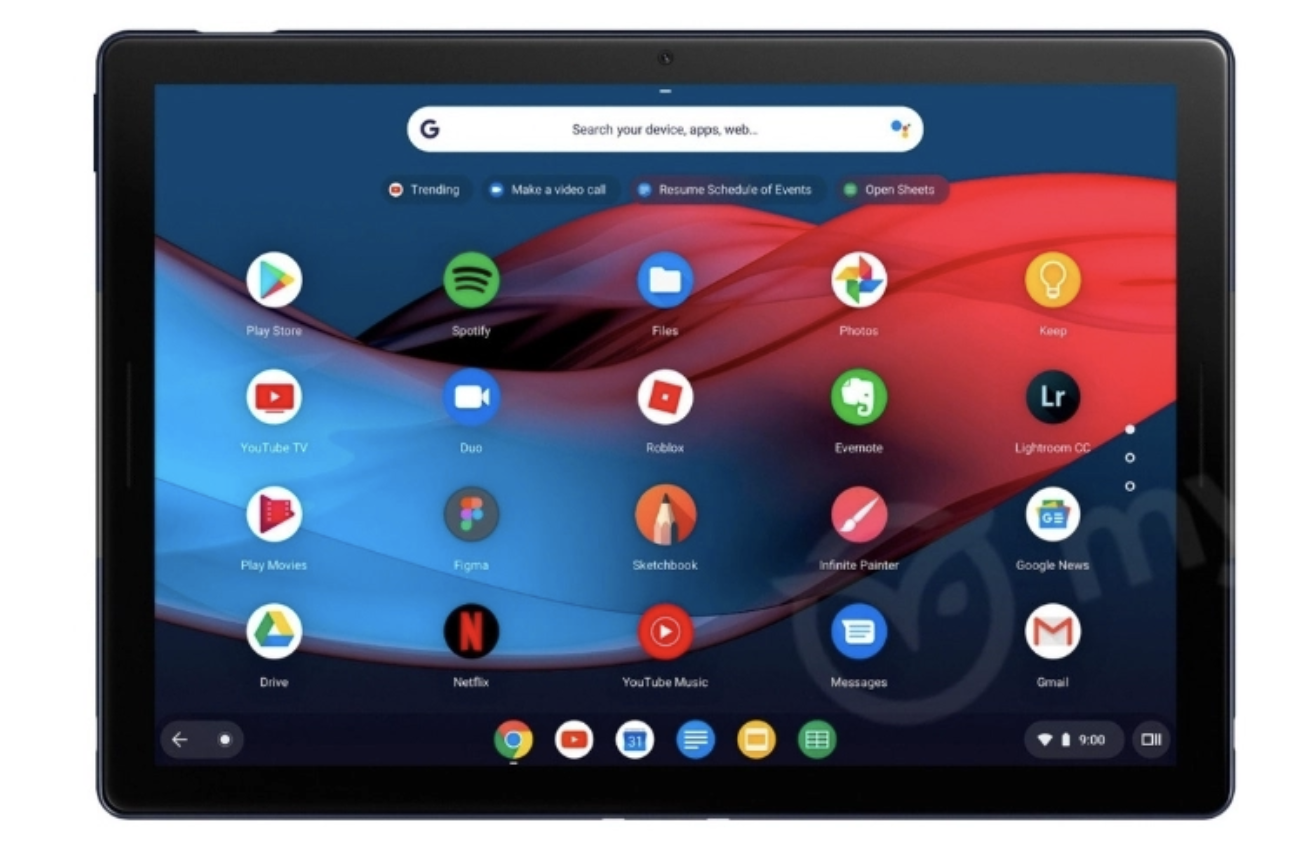
Google unveiled a new lineup of devices today, including the Pixel Slate, a tablet that the company described as the next evolution of Chrome OS — but could also be seen as the company’s answer to both Apple’s iPad and Microsoft’s Surface.

After the presentation, I had a chance to try the Pixel Slate for myself. There wasn’t time to test out everything (a packed room full of journalists isn’t the best place to try out the speakers, and there didn’t seem to be much new with the accompanying Google Pen), but it was enough to get a taste of the main selling points.

The first thing I noticed was the screen. Google is pitching this as a device that can be used for both work and entertainment, with a particular emphasis on content creators. The display seems to be up to the task — it’s 12.3 inches in size, with a resolution of 203ppi. The result is that everything from YouTube videos to email composition screens looked sharp and vivid.

There’s also an emphasis on thinness and lightness. The Pixel Slate has an official weight of 1.6 pounds, and it did feel easy to carry, and to adjust the angle to my liking using the case/stand. (The real test, of course, will be seeing how my arms and fingers felt after several hours of Netflix.)

There’s also an optional keyboard. It includes nice touches like rounded keys, but I was most intrigued by the quietness touted by Google’s presenters. Loyal TechCrunch readers will know that I’m a notoriously loud typer, so I couldn’t resist trying to bash away at it.

Turns out it was as quiet as promised. To be honest, I would’ve appreciated a little more noise, but I’m sure everyone in my immediate vicinity felt otherwise. And even with the relative absence of sound, the experience was still satisfyingly tactile — I didn’t hear the keys, but I felt them clacking under my fingers.

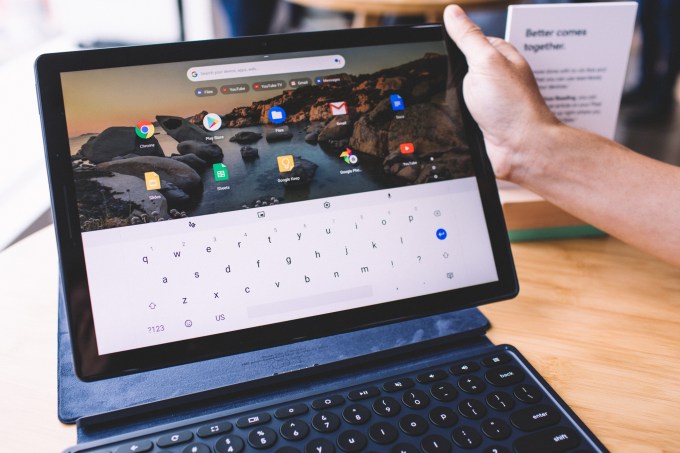
The Slate also appeared to move seamlessly back-and-forth between desktop and tablet modes. As the name suggests, desktop mode looks like a more mouse- and keyboard-oriented interface (with capabilities like snapping two applications side-by-side as a splitscreen), while tablet mode is a more standard, touch-friendly interface, along with an on-screen keyboard.

The Slate automatically snaps back-and-forth between the modes — in my demo, you just had to pull it away from the aforementioned keyboard to trigger the switch, though apparently it’s the presence of a trackpad or mouse that really makes the difference.

Other features include front- and rear-facing cameras, Google Assistant and a fingerprint reader. Pricing starts at $599, with an additional $199 for the keyboard and $99 for the Pen.

more Google Event 2018 coverage

Dropbox finally adds automatic OCR for all your PDFs and photos

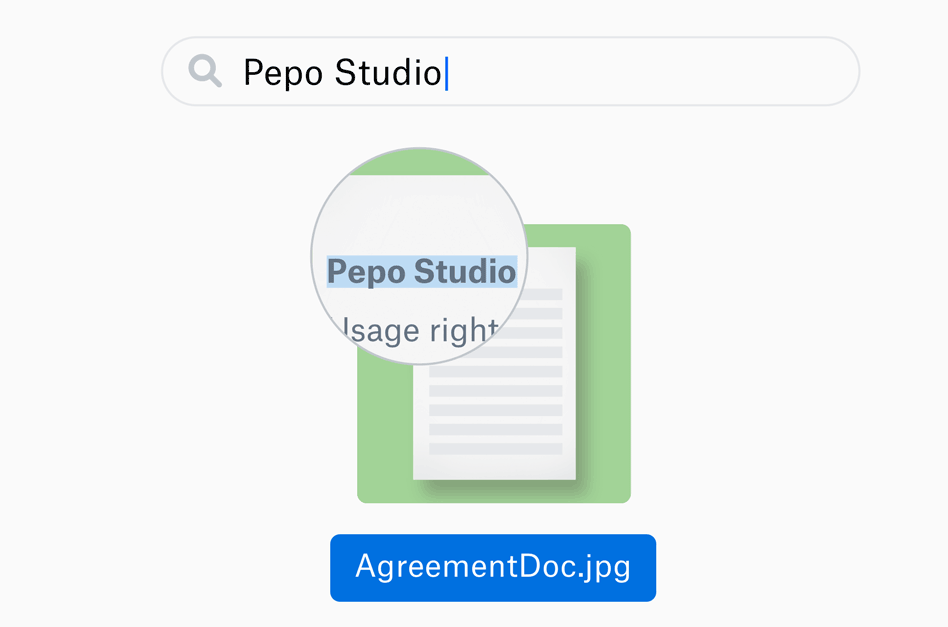
Enterprise Dropbox users have a useful new feature that some would say is long overdue for the cloud storage company: optical character recognition that automatically transcribes all their images and PDFs. No more rummaging around in your saved photos for a receipt or opening dozens of mysteriously named documents to find the right one. Just search and ye shall find.

Dropbox’s text recognition engine is rolling out to Dropbox Pro, Business Advanced and Enterprise accounts over the next few months, but admins might want to check to see if they can get early access.

When it comes into effect, every image and PDF you have will be scanned for text, which will be added to metadata allowing you to search for it that way. Of course, all this data will be kept as secure as the document itself. Handy, though of course much depends on how accurate the transcription is. OCR can be fiddly.

Box, Dropbox’s perennial and more concisely named competitor, added comprehensive OCR last year, though with the added capability of recognizing objects. So although this doesn’t bring Dropbox quite up to the level of feature parity, it definitely narrows the gap and fits the most common use cases.

Previously you could specifically scan documents you wanted OCR’ed, but this is obviously more convenient. You can read a bit about how they built their own OCR system (Box leveraged Google’s, which accounts for its head start) at this rather interesting technical blog post.

If you’re part of a group that gets access to this useful new feature, it’ll come into play automatically and will back-process all your documents already in the system.

Turn your Google Home Mini into Google Home Mickey

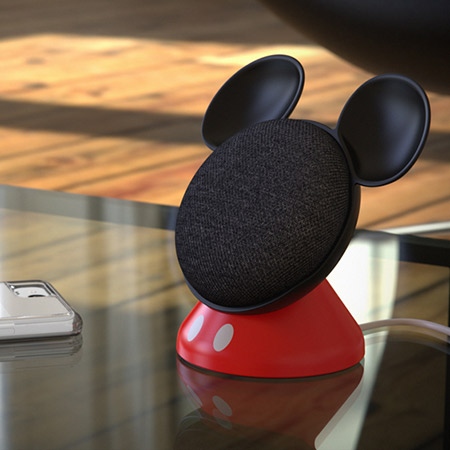
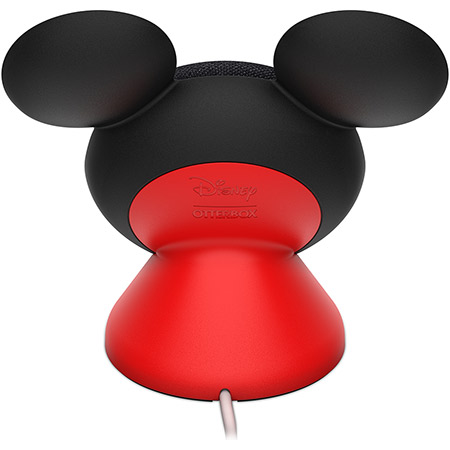
Behold, the Google Home Mickey. It’s an official collaboration with Google and Disney that OtterBox is selling for $20. The base props up Google’s best-selling smart speaker and gives it iconic mouse ears and red suspenders in the process. It also helps the Mini project by propping it up at an angle.

Oh, and the power cord happens to double as a tail.

The clunkily named Den Series for Google Home Mini featuring Disney Mickey Mouse will be available through the case maker’s site. No specific availability just yet, and yes, Home Mini is sold separately.

Apparently the product wasn’t able to sneak its way into today’s overly crowded Google hardware keynote. But then, the company didn’t spend much time on the Home line, outside of the new Hub.

No word yet on Donald, Goofy or, most appropriately of all, a Google Home Minnie.

more Google Event 2018 coverage

The Salto-1P now does amazing targeted jumps

When we last met with Salto the jumping robot it was bopping around like a crazed grasshopper. Now researchers have added targeting systems to the little creature, allowing it to maintain a constant hop while controlling exactly when and where Salto lands.

Called “deadbeat foot placement hopping control,” the Salto can now watch a surface for a target and essentially fly over to where it needs to land using built-in propellers.

Researchers Duncan Haldane, Justin Yim and Ronald Fearing created the Salto as part of the Army Research Office, and they will be exhibiting the little guy at the 2018 IEEE/RSJ International Conference on Intelligent Robots and Systems.

The team upgraded Salto’s controller to make it far more precise on landing, a feat that was almost impossible using the previous controller system, SLIP. “The robot behaves more or less like a spring-loaded inverted pendulum, a simplified dynamic model that shows up often enough in both biology and robotics that it has its own acronym: SLIP,” wrote Evan Ackerman at IEEE. “Way back in the 1980s, Marc Raibert developed a controller for SLIP-like robots, and people are still using it today, including Salto-1P up until just recently.”

Google’s latest hardware innovation: Price

With its latest consumer hardware products, Google’s prices are undercutting Apple, Samsung and Amazon. The search giant just unveiled its latest flagship smartphone, tablet and smart home device, all available at prices well below their direct competitors. Where Apple and Samsung are pushing prices of its latest products even higher, Google is seemingly happy to keep prices low, and this is creating a distinct advantage for the company’s products.

Google, like Amazon and nearly Apple, is a services company that happens to sell hardware. It needs to acquire users through multiple verticals, including hardware. Somewhere, deep in the Googleplex, a team of number-crunchers decided it made more sense to make its hardware prices dramatically lower than competitors. If Google is taking a loss on the hardware, it is likely making it back through services.

Amazon does this with Kindle devices. Microsoft and Sony do it with game consoles. This is a proven strategy to increase market share where the revenue generated on the back end recovers the revenue lost on selling hardware with slim or negative margins.

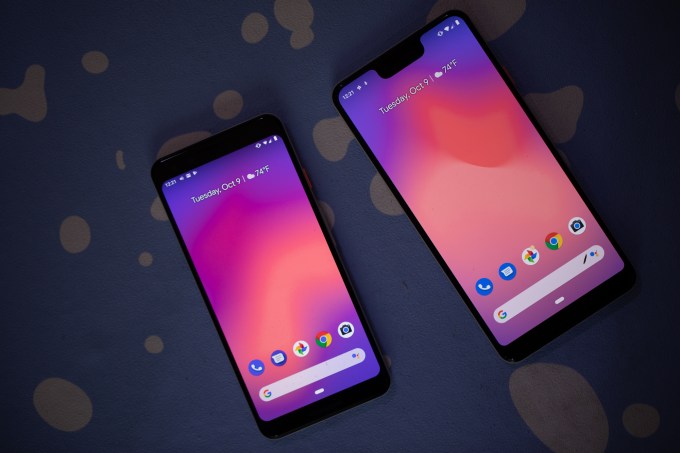
Look at the Pixel 3. The base 64GB model is available for $799, while the base 64GB iPhone XS is $999. Want a bigger screen? The 64GB Pixel 3 XL is $899, and the 64GB iPhone XS Max is $1,099. Regarding the specs, both phones offer OLED displays and amazing cameras. There are likely pros and cons regarding the speed of the SoC, amount of RAM and wireless capabilities. Will consumers care that the screen and camera are so similar? Probably not.

Google also announced the Home Hub today. Like the Echo Show, it’s designed to be the central part of a smart home. It puts Google Assistant on a fixed screen where users can ask it questions and control a smart home. It’s $149. That’s $80 less than the Echo Show, though the Google version lacks video conferencing and a dedicated smart home hub — the Google Home Hub requires extra hardware for some smart home objects. Still, even with fewer features, the Home Hub is compelling because of its drastically lower price. For just a few dollars more than an Echo Show, a buyer could get a Home Hub and two Home Minis.

The Google Pixel Slate is Google’s answer to the iPad Pro. From everything we’ve seen, it appears to lack a lot of the processing power found in Apple’s top tablet. It doesn’t seem as refined or capable of specific tasks. But for view media, creating content and playing games, it feels just fine. It even has a Pixelbook Pen and a great keyboard that shows Google is positioning this against the iPad Pro. And the 12.3-inch Pixel Slate is available for $599, where the 12.9-inch iPad Pro is $799.

The upfront price is just part of the equation. When considering the resale value of these devices, a different conclusion can be reached. Apple products consistently resale for more money than Google products. On Gazelle.com, a company that buys used smartphones, a used iPhone X is worth $425, whereas a used Pixel 2 is $195. A used iPhone 8, a phone that sold for a price closer to the Pixel 2, is worth $240.

In the end, Google likely doesn’t expect to make money off the hardware it sells. It needs users to buy into its services. The best way to do that is to make the ecosystem competitive though perhaps not investing the capital to make it the best. It needs to be just good enough, and that’s how I would describe these devices. Good enough to be competitive on a spec-to-spec basis while available for much less.

more Google Event 2018 coverage

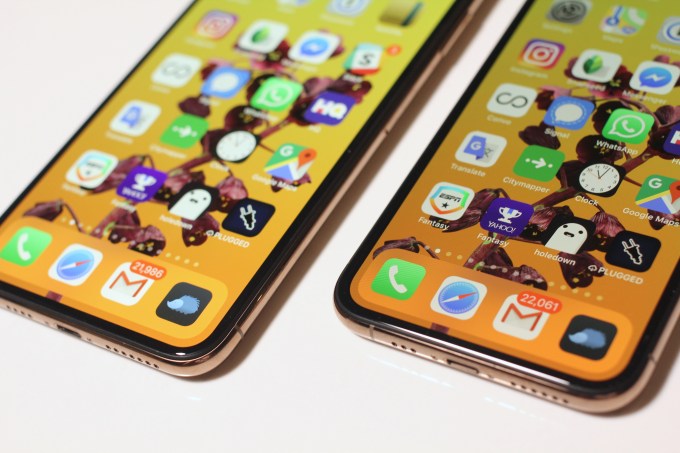
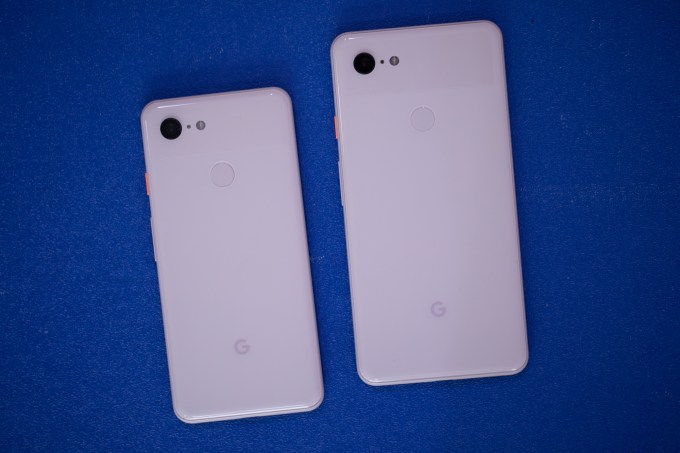
Google’s Pixel 3 vs Apple’s iPhone XS: How do they stack up?

So you need a new phone do ya? Well, as is the case each year, there are some hot new pieces of metal and glass out there from Apple and Google, and to make sense of how they stack up against each other we’ve got some fine comparison details here for you.

This was an iterative year for both the iPhone and Pixel lines. The most notable upgrade for the iPhone XS was the introduction of the iPhone XS Max, which balloons the screen size, but otherwise the main differences come in the computational photography tweaks to the camera, in which Apple has lagged behind Google. Google’s new phone had a rather leaky introduction, but pulled off an interesting release with some camera features we’ll be tempted to check out more in-depth once review units come in.

This isn’t the fairest of fights, as we’ve had some flesh and blood time to examine the iPhone XS warts and all while the Pixel 3 is a shiny new enigma that we’re kind of taking Google at their word for until we can stress test the little bugger.

Here’s a bare-bones view of the specs you really should be caring about: display, rear camera and price.

Pixel 3

  • Starts at $799 (64 GB)
  • 5.5 inch 443 ppi OLED screen
  • 12.2MP “dual-pixel” rear camera

Pixel 3 XL

  • Starts at $899 (64 GB)
  • 6.3 inch 523 ppi OLED screen
  • 12.2MP “dual-pixel” rear camera

iPhone XS

  • Starts at $999 (64 GB)
  • 5.8 inch 458 ppi OLED screen
  • Dual 12MP wide-angle and telephoto cameras

iPhone XS Max

  • Starts at $1,099 (64 GB)
  • 6.5 inch 458 ppi OLED screen
  • Dual 12MP wide-angle and telephoto cameras

First off, if you’re strapped for cash, or more accurately just want to be more responsible with the cash you do have, the price tags of these devices communicate some loud differences. The Pixel 3 and Pixel 3 XL go for $200 less than the iPhone XS and iPhone XS Max, respectively. Paying $1,000 for a phone is wild, but it’s the world we live in and, honestly, given the amount of quality time we spend with our phones, it’s some of the more functional coinage you’ll be spending.

In terms of displays, the Pixel 3 is un-notched, while the Pixel 3 XL, iPhone XS and iPhone XS Max all have the little bulbous feature. If you hate the notch, you’re probably going to have to adapt and embrace it for at least a generation or two, but the Pixel 3 gives you a chance to kick that can down the road. These are big devices with big displays, though in terms of sheer size, the iPhone still holds a much more substantial screen-to-body ratio. While the smaller and larger phones are very comparable in sheer size, the OLED on the iPhone squeezes out the extra fractions of an inch that brings the display right up to the edge.

Based on design, it depends on your preference or whatever, but I definitely think the iPhone XS has the upper hand here. It’s a premium phone with premium heft because of its more premium price.

It’s again worth reiterating that the Pixel 3 XL and iPhone XS Max are both giant phones, but the Pixel 3 XL is a hair smaller by manner of width and nearly an ounce lighter. Here’s a dimensions breakdown of the different devices.

  • Pixel 3
    5.7″ height x 2.7″ width x 0.3″ depth (148 grams)
  • Pixel 3 XL
    6.2″ height x 3.0″ width x 0.3″ depth (184 grams)
  • iPhone XS
    5.65″ height x 2.79″ width x 0.3″ depth (177 grams)
  • iPhone XS Max
    6.2″ height x 3.05″ width x 0.3″ depth (208 grams)

The spec that’s least helpful up above is the camera hardware because Apple and Google are increasingly shifting focus to camera software tweaks as their distinguishing marks. It is fascinating that Google is maintaining the single rear camera solution given the real potential dual lenses open up, including wild features like the iPhone XS depth-of-field adjustments. But the lack of dual lenses on the back of the phone didn’t stop Google from highlighting some of the new camera features they’re opening up, including what they’re calling Night Sight, which promises extremely good low-light performance strengthened by machine learning. I’m skeptical, but given how stellar the Pixel 2’s camera has proven, I’m sure they have something unique there.

More here on the Pixel 3 camera announcements:

And here’s our iPhone XS review for some camera details there:

There are a bunch of other specs that you can find on the Pixel 3 and iPhone XS product pages, but when shopping for a phone in 2018, tech specs of flagship phones are telling you less and less about where the major differences actually lie. We’ll have more thoughts on the Pixel 3 and Google’s performance claims when it comes out later next week, but if you’re hankering to smash that pre-order button, ponder your options and check that bank account.

more Google Event 2018 coverage

Facebook Workplace adds algorithmic feed, Safety Check and enhanced chat

Workplace, the version of Facebook tailored to enterprises that has over 30,000 organizations as paying customers, is ramping up the service today with a rush of new features to help it competes with the likes of Slack and Microsoft’s Teams.

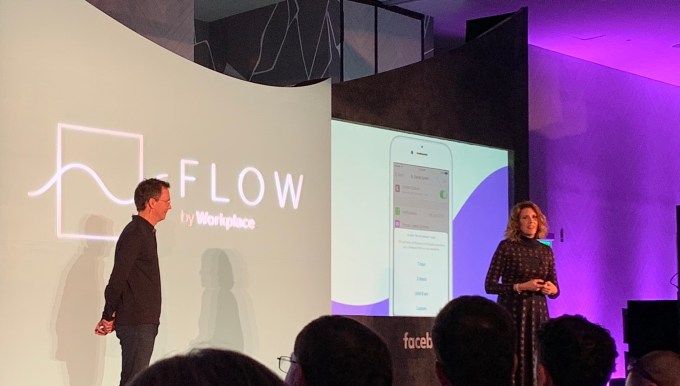
The additions are being announced at a new, standalone conference called Flow — the first time Facebook has built what’s likely to become a recurring event for a specific product, Workplace’s head Julien Codorniou told me in an interview. He described Workplace as “Facebook’s first SaaS startup.” He tells us that for existing clients, the goal of Flow is to show off new features that deepen employee engagement with Workplace so they can’t imagine switching away. And for enterprise software partners Facebook integrates with, it’s to foster an ecosystem surrounding Workplace so it can adapt to any business.
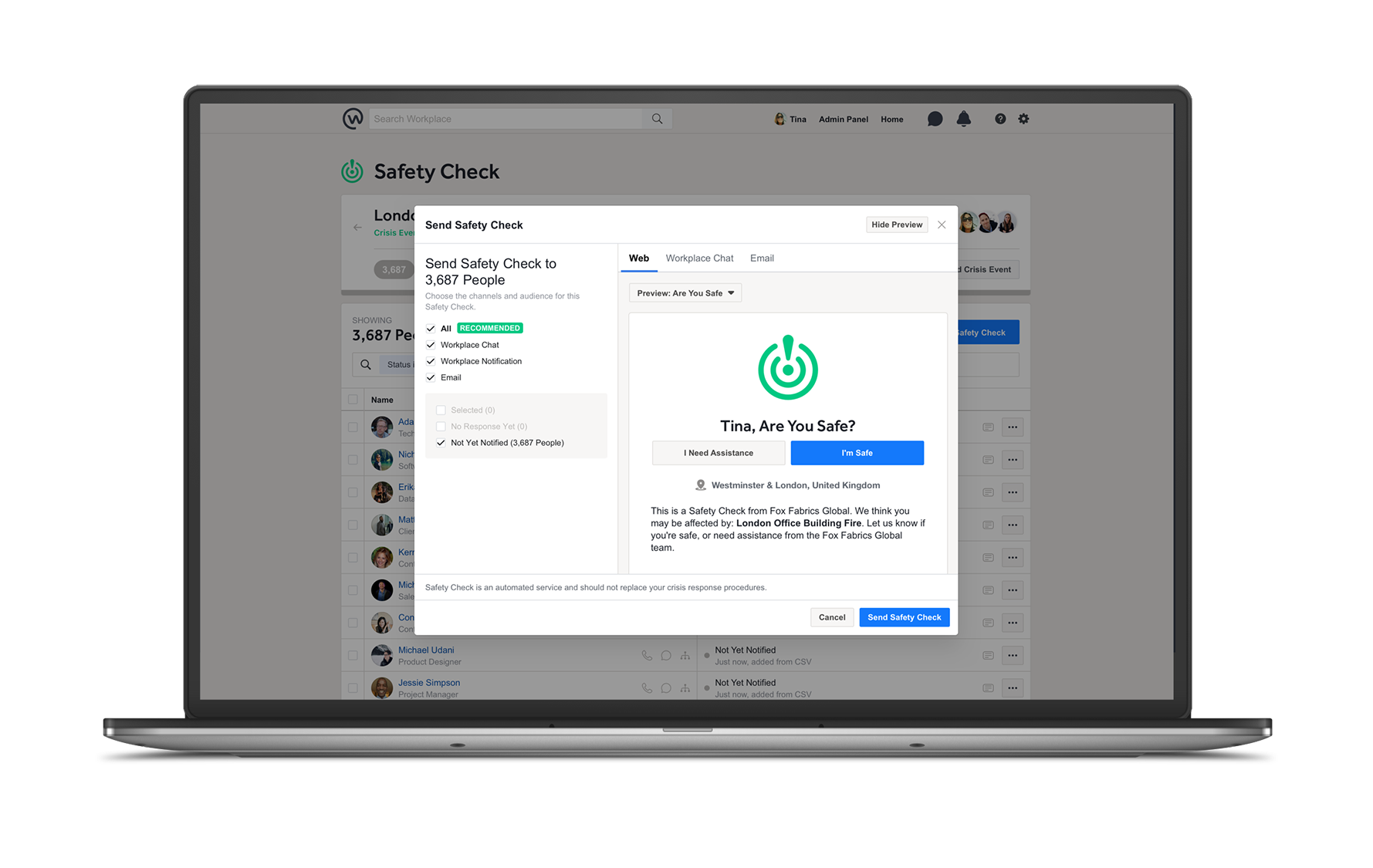
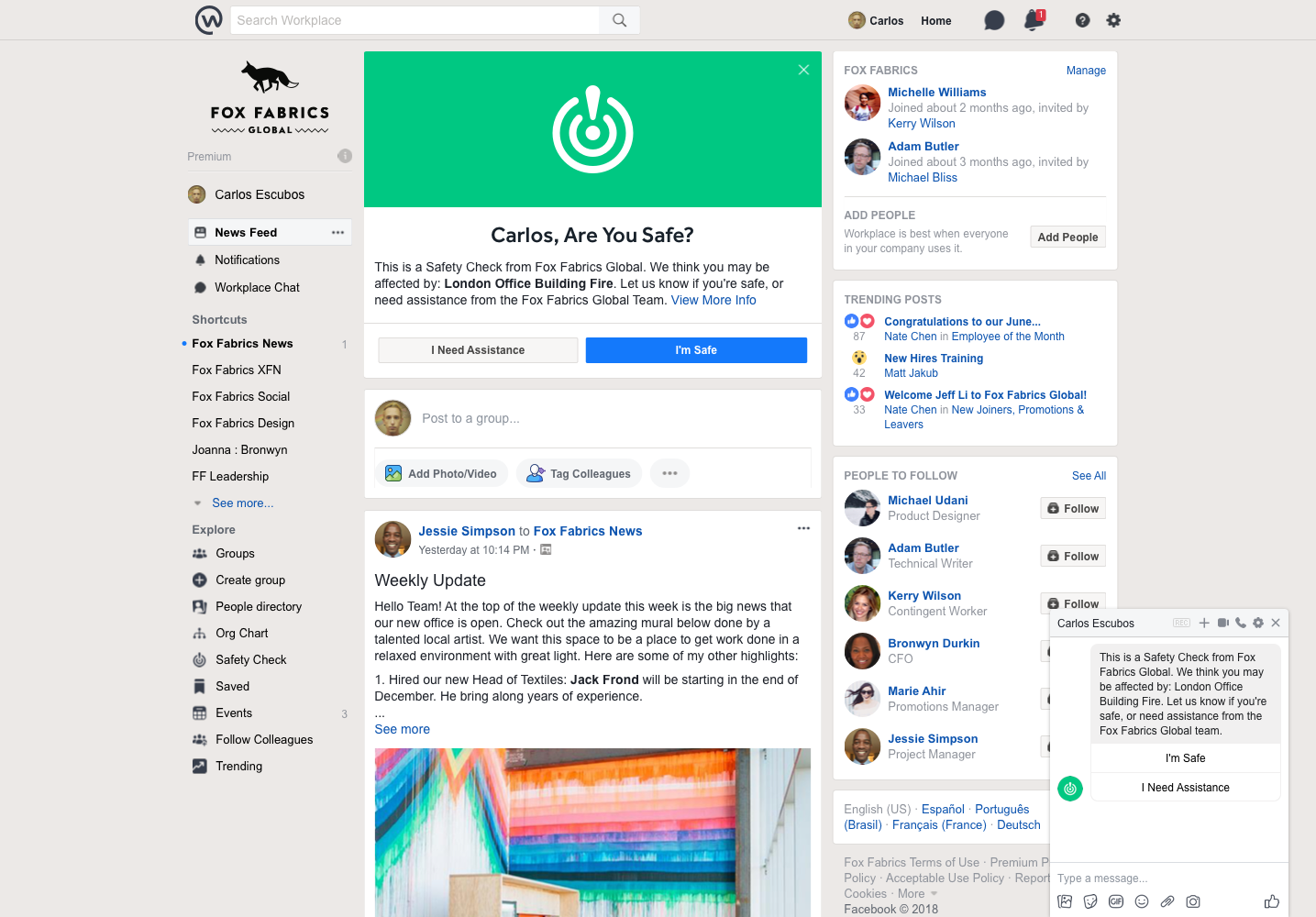
In a big upgrade to the “chat” features of Workplace (conversations that happen outside the news feed, first launched last year), users will now be able to start chats, calls and video conversations either one-to-one or in groups, in the style of WhatsApp or Messenger. Facebook is also making it easier to navigate through high volumes of messages in your channels by adding in replies, do not disturb and pinning features — Facebook’s first move to bring in algorithmic sorting to Workplace. And Facebook is also bringing its Safety Check feature from the main app to Workplace, delivered via Workchat, as a tool that can be controlled by admins to check on the status of employees during a critical incident.

Workplace has picked up 30,000 businesses as customers in the two years since it launched (including some biggies like Walmart, the world’s largest employer); and today it also added a couple of notable large enterprises to the mix: GSK, Astra Zeneca, Chevron, Kantar, Telefonica, Securitas, Clarins UK, Jumia and GRAB.

But Facebook has never revealed how many users (or “seats”, in enterprise parlance) it has on Workplace. As a point of comparison, Slack today has 8 million users across 70,000 organizations, and Facebook hasn’t updated its 30,000 figure in a year.
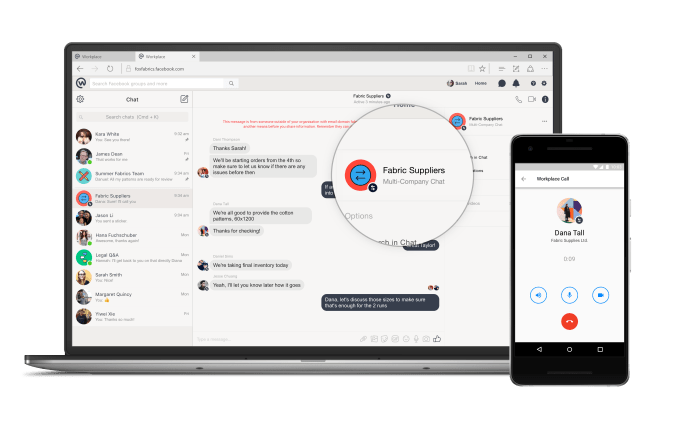
Facebook Workplace multi-company chat

The range of features Facebook is introducing today are notable both for their breadth and for what they are aiming to do. Some help put Workplace more on par with the core Facebook experience in terms of functionality, but ultimately they are all squarely aimed at making Workplace into something that fits more closely with how enterprises already use IT.

The chat features that are being incorporated build on the minimal chat features that were already present in Workplace and essentially create something like WhatsApp or Messenger that sits within the same secure framework as Workplace itself. It’s effectively Facebook’s first step forward into unified communications — a specific branch of enterprise IT that used to be centred around PBXs and other expensive physical equipment, but has more recently become more virtualised with the rise of voice of IP and cloud-based systems that can be used over any internet connection.

Workplace had already had a feature in place for up to 50 companies to converse in multi-organizational conversations on the platform, and now if some members of those groups want to take the conversation to a more direct channel potentially with voice or video calling, they can do that directly from within the app without having to open a separate messaging client (which may or may not be under the control of IT). Up to 50 people can join a video call in Workplace.

The three features that help you better organise your conversations — do not disturb, replies and pinning important items — will be especially welcome to people who have especially “noisy” channels on Workplace.

Replies, Codorniou said, will work “like on WhatsApp” — where you can select a message and reply to it and it will appear with its mini thread later in the feed.

But they are perhaps most notable of all because they will be the first time that Facebook is introducing “algorithmic” sorting to Workplace. For those who already use normal Facebook, or Twitter, or other social media services, algorithmic sorting is something that is well-known, as it plays with the sequence of posts to show you what is deemed to be more important, versus what’s most recent.

In the case of pinning, Facebook is letting the IT admins, and users, effectively play a part in the algorithmic sorting: Admins can pin “important” posts to the top of a feed, and that will affect what users see and can respond to first. “If the CEO posts a message, this might be more important than something posted an intern,” he said.

Do not disturb, meanwhile, will let users set times when they do not get pinged with messages, but when you “return” again to Workplace, Facebook decides what gets sorted to the top of what you view.

Facebook’s VP of Workplace Julien Codorniou

Codorniou notes that Facebook uses machine learning and AI “to make sure that if you don’t use Workplace for two weeks [as an example] you have the most relevant information on top of the news feed.” Signals that it uses to sort include who you work with, and which groups you are most active in. “It’s algorithmic by default,” he noted, and added that this was something that was requested by Workplace users. “People don’t believe in the chronological feed anymore,” he said. “It’s important to guarantee reach to communications teams.”

The Safety Check also fits into this concept. Here, Facebook will be putting IT managers/Workplace admins into the driver’s seat, “giving them the keys to the feature”, said Codorniou, and letting them control the use and distribution of a feature that in regular Facebook is controlled by Facebook itself.
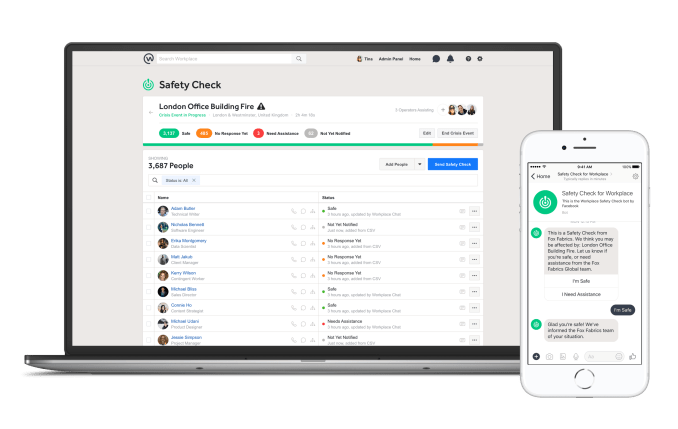
Frederic takes a deeper diver into Safety Check here, but the main idea, as Codorniou described it to me, is that it allows companies “to track and clear who is safe and who is not” when a particular location has been through an emergency or critical incident. There are apps that companies can use to run safety checks, or sometimes they might use SMS, but these tend to work more manually and are harder to execute quickly, he said. Facebook doesn’t reveal how well penetrated their apps are at organizations like Walmart and Starbucks, but this potentially becomes one lever to helping get Workplace distributed more widely.

“Employees are a company’s number-one asset of the company, and this helps make sure you are safe,” he added. “People don’t want to play Candy Crush, but things like Live” — which Workplace launched last year — “and Safety Check are relevant. They help turn companies into communities.”

(Community, of course, is the big theme for Facebook these days.)

All these updates are happening at a time when many people have been scrutinising Facebook for its approach to user privacy and personal data.

The issue was notably highlighted over the Cambridge Analytica scandal many months ago, specifically over how third parties were able to access users’ information; and then more recently Facebook faced criticism two weeks ago, when it emerged that a bug in one of its features exposed user information to malicious hackers. Both of these problems were squarely about Facebook’s core consumer app, but I couldn’t help but wonder what kind of an impact it has had on the company’s enterprise business — given that levels of security in workplace networks typically tend to be higher as they are connected to corporate information.

“We had a few questions of course but we have no reason to believe that Workplace was affected,” Codorniou said. He noted that there had once been a feature to log in to Workplace using a user’s Facebook ID, but that was disabled some time go. “We have been investigating, but most customers are on single sign on,” he noted, which uses services like Okta, One Login and Ping to connect and sign in employees to their Workplace spaces.

Facebook’s scale brings it huge advantages in the enterprise. The consumerization of the office stack means Facebook can easily port over its familiar features. It’s big enough to extensively dogfood Workplace within the company. And it already has advertising relationships with many of the world’s top brands. But being a tech giant comes with the associated scandals and constant criticism. Facebook will have to convince business leaders that its social troubles won’t muddy their suits.

Workplace by Facebook launches Safety Check for business users

Workplace, Facebook’s communications platform for enterprises, is launching its own version of Safety Check today. Safety Check itself is obviously not a new feature. Indeed, Facebook has now activated this tool, which lets you report your status during a crisis, thousands of times. For business users, though, Facebook is now offering a number of new tools that allow them to activate this feature at will, run drills with their workforce and get an accurate headcount of their employees’ status.

“Safety Check for Workplace is essentially the enterprise version of the Safety Check that we have in the big blue app [Facebook’s name for its flagship mobile app],” Facebook CIO Atish Banerjea told me. He noted that a few years ago, Facebook first built a version of this for its own employees. “Then the idea came of extending this to the customers of Workplace, primarily because given the global expansion of companies, with people traveling all over the world, keeping track of employees during times of crisis and during a natural disaster has become a very difficult challenge,” he explained.

Safety Check lets businesses locate their employees and notify them through Workplace Chat and other avenues when they are in harm’s way. The tool also allows these companies to regularly ping those who haven’t confirmed themselves as safe yet.

Facebook notes that Workplace doesn’t use any mobile geolocation technologies here to identify where employees are. That data has to come from the companies that use the tool and the travel services they use to know when they are on the road and the employee data they have to know who works in which location. Banerjea noted that this is very much on purpose and in line with the way Workplace handles data. This is not the Facebook app, after all, so none of the employee data is ever shared with Facebook.

What’s interesting here is that this is the first time Facebook has taken a tool that its own internal Enterprise Engineering group built for its employees and brought it to a wider audience. Typically, this group only builds tools for Facebook’s own growing employee base, but the team decided to take this one public. The challenge was then to ensure that this tool, which was meant to handle the demands of Facebook’s more than 30,000 employees and run on its own proprietary stack, could scale up to work for companies that are far larger. “As you can imagine, the scaling challenges are significantly different,” Facebook’s VP of Enterprise Engineering Anil Wilson told me. “Where we are talking about going from tens of thousands of employees at Facebook and going to supporting hundreds of thousands of employees in many companies.”

To get Safety Check for Workplace up and running, the company organized an internal hackathon in February of this year. “We had to completely rebuild the product,” Wilson said. “We had to switch out the backend technology to help with scale.” The team also redid its data models to accommodate new features and redesigned the user experience to be more in line with the rest of the Workplace experience. In the process, the team also added support for new features, including multi-language support.

Unsurprisingly, the Enterprise Engineering group is now also looking at bringing to a wider audience other tools that Facebook first developed for its internal usage. “There’s tons of opportunity,” Wilson said. “We don’t have the specific products mapped out yet.” Most of the tools that his team builds are very much meant for Facebook’s own specific use cases, no matter whether those are HR applications, or tools for the finance group or the marketing and sales teams. But he believes there is plenty of room for taking some of those and making them available to Workplace customers as premium offerings.

Wilson also noted that this move to bringing more of these internally developed tools to the public is going to help his group with hiring. “We’re already a pretty interesting organization to come and work for,” he said. “But the fact that some of our products are now potentially going to be launched externally adds an additional dimension of interest for engineers who are coming to work on our team.”

Google Home Hub up close and hands on

While the rumors and leaks didn’t leave much to the imagination ahead of today’s event, I will admit to being a bit surprised by the shape Google’s Home Hub actually took. The renders didn’t do justice to the actual product.

For starters, the seven inch screen splits the difference between the Echo Show and Spot in an interesting way. It’s not a compact device, per say, but it’s a lot smaller than I’d initially expected, and as such, it should fit in a lot more spots at home than the larger Show.

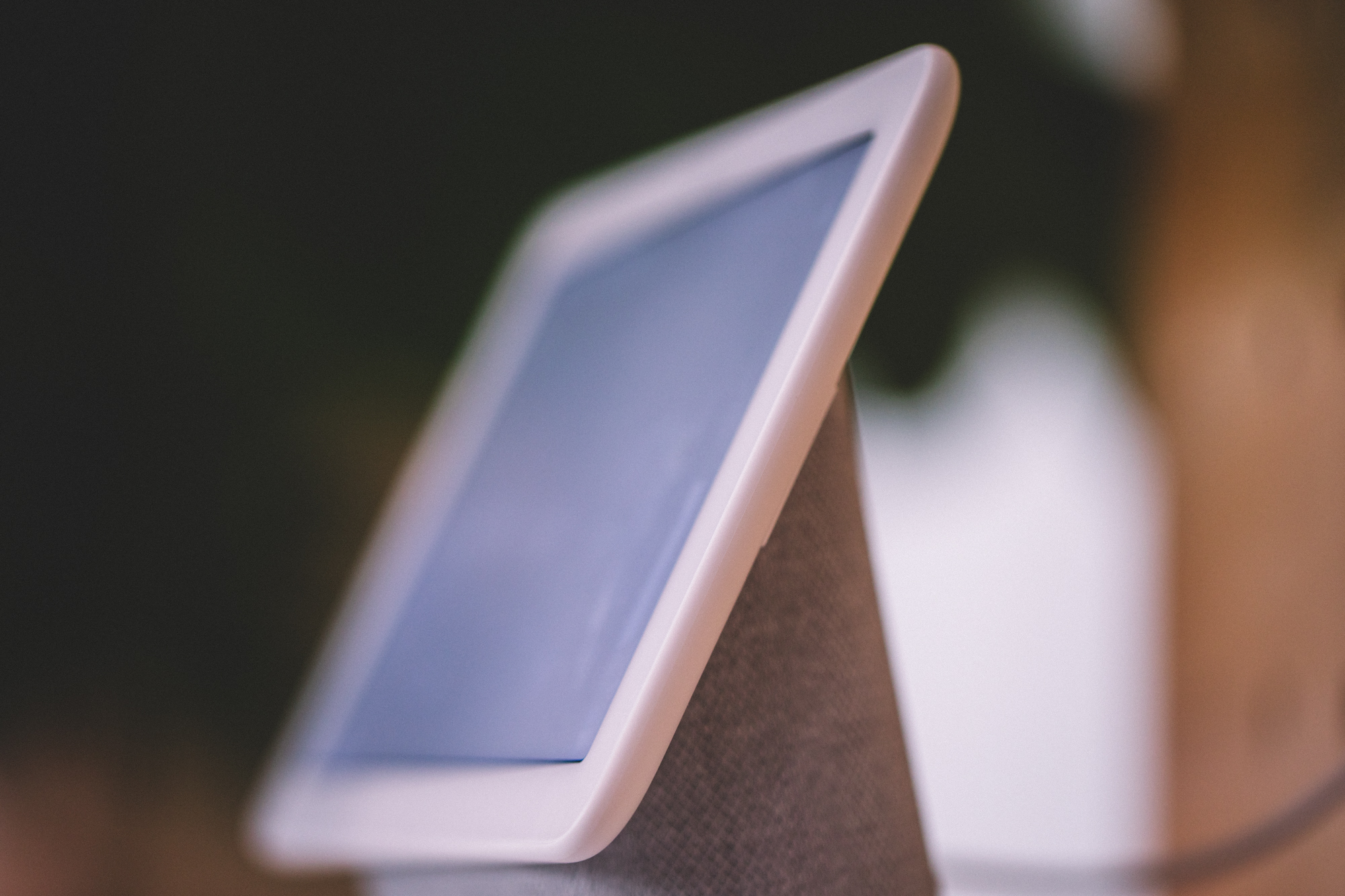
From a design standpoint, the product is best described as a seven-inch tablet resting atop a speaker at ~ a 25 to 30 degree angle. The idea is to give you a screen you can view from the other side of the room. After all, this is a voice first product. While it does have touch functionality enabled, that’s primarily secondary. As such there are certain things you can’t do here like, say, pinch to zoom.

That’s largely a moot point here, given the fact that the product doesn’t have, say, a standard web browser, unlike the new Show. Of course, part of the reason Amazon offers a browser on its own devices is so you can access YouTube. That’s obviously not a problem on a product that very much has native YouTube support.

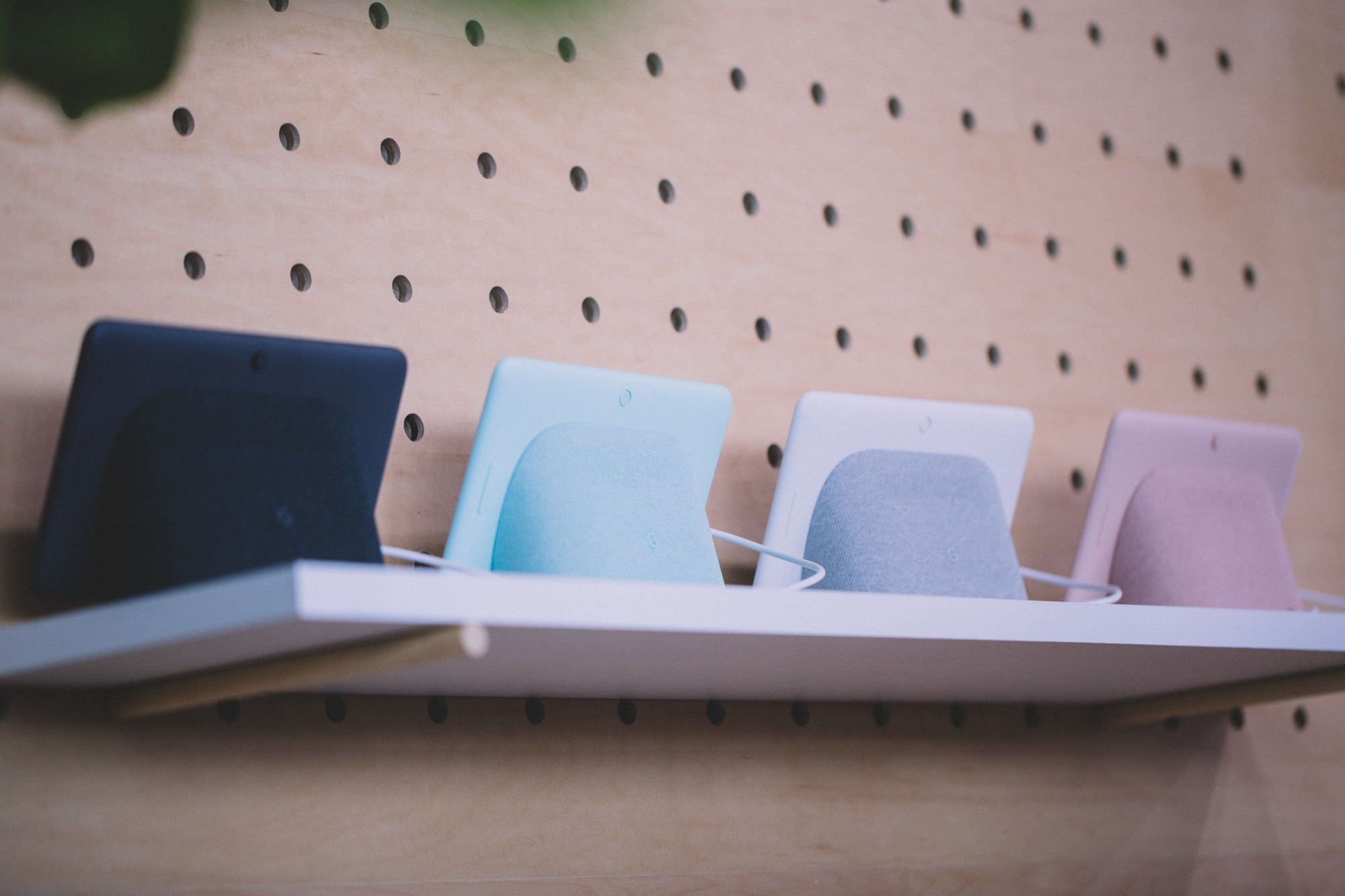
The other thing the peculiar design affords the product is multi-directional sound. Like the Show, the bulk of the fabric-covered speaker faces back, toward the wall. There is, however, an exposed sliver on the bottom, which sends some of that sound toward you.

The sound is decent for a product of this size, but again, I wouldn’t rely on it as any sort of home entertainment system. If you’ve got multiple Home devices at home, however, you can tell Assistant, “extend to my Home Mini,” etc, and the music will follow you into the other room.

Google also notes that this isn’t really an entertainment consuming machine. The Home Hub isn’t designed for watching movies or even TV shows. Rather, if anything, it’s kind of a YouTube delivery device, in much the same way that the Portal is a real world manifestation of Facebook’s video chat. Of course, right out of the gate, this product is going to offer a much fuller experience than Portal — Facebook, after all, is still kind of testing the water to see what users want our of their devices.

That said, Google tells me that the company is still assessing whether users are interested in smart home hub functionality via something like Z Wave. It’s a bit of a glaring omission here, based on both the added focus on connected home features and the fact that the damn thing has hub in its name. That said, Google seems to prefer building that kind of syncing in via bluetooth, much like it did with those newly announced GE lights.

The Hub does fall under Google’s “Smart Display” category, meaning it’s a direct competitor with products from Lenovo, JBL and LG. The company tells me that there was a gap in announcements simply because it took the company longer to build the product from the ground up. The Hub wasn’t built via hardware partner, but rather from the ground up.

One of the upsides there is pricing. $149 certainly makes this a competitive offering versus the Show and Portal.

more Google Event 2018 coverage

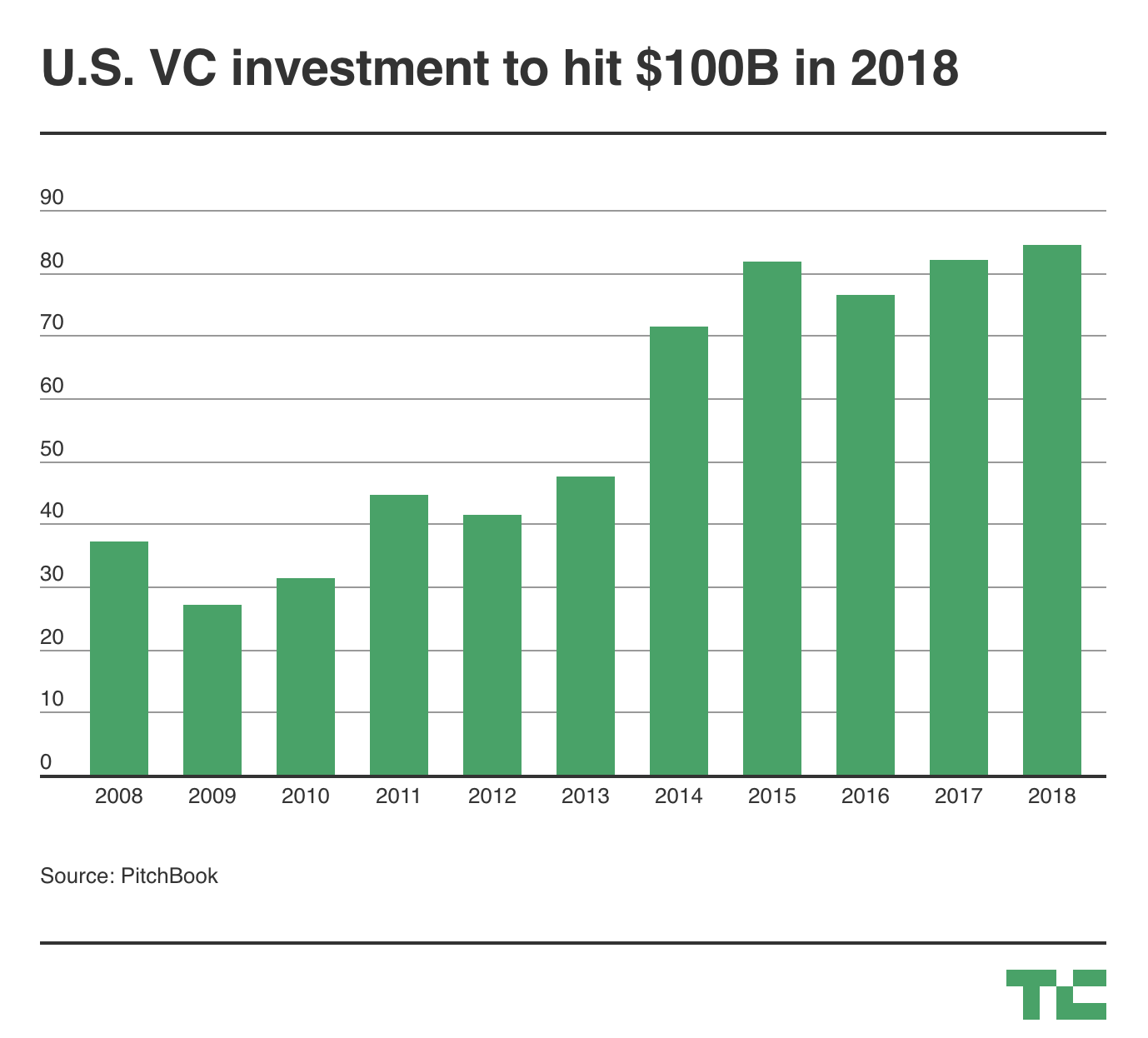
Venture capital investment in US companies to hit $100B in 2018

So many new unicorns valued at $1 billion-plus, countless $100 million venture financings, an explosion of giant funds — it’s no surprise 2018 is shaping up to be a banner year for venture capital investment in U.S.-based companies.

There are more than 2.5 months remaining in 2018 and already U.S. companies have raised $84.1 billion — more than all of 2017 — across 6,583 VC deals as of Sept. 30, 2018, according to data from PitchBook’s 3Q Venture Monitor.

Last year, companies raised $82 billion across more than 9,000 deals in what was similarly an impressive year for the industry. Many questioned whether the trend would — or could — continue this year, and oh, boy has it. VC investment has sprinted past decade-highs and shows no signs of slowing down.

Why the uptick? Fewer companies are raising money, but round sizes are swelling. Unicorns, for example, were responsible for about 25 percent of the capital dispersed in 2018. Those companies, which include Slack, Stripe and Lyft, have raised $19.2 billion so far this year — a record amount — up from $17.4 billion in 2017. There were 39 deals for unicorn companies valuing $7.96 billion in the third quarter of 2018 alone.


Some other interesting takeaways from PitchBook’s report on the U.S. venture ecosystem:

  • Nearly $28 billion was invested into early-stage startups in 2018, with median deal size increasing 25 percent to  $7 million last quarter.
  • Ten funds have raised more than $500 million this year and another five, including Lightspeed Venture Partners and Index Ventures, have closed on more than $1 billion.
  • Companies based on the West Coast were responsible for 54.7 percent of deal value in 3Q but other regions are catching up: New England (12 percent), the Mid-Atlantic (20 percent) and The Great Lakes (5 percent).
  • Investment in U.S. pharma and biotech has reached a new high of $14 billion already in 2018.
  • Corporate venture capital activity is heating up. This year, CVCs invested $39.3 billion in U.S. startups, more than double the $15.2 billion invested in 2013.
  • VC-backed companies are exiting via buyouts more than ever.

Final Draft screenwriting software goes to 11

Of all the fascinating apps to be found out in the wild I’m especially enamored of Final Draft. It’s an app dedicated to writing and developing screenplays and it has stood the test of time, going through 11 iterations to reach this latest version, the pinnacle of screenwriting warez.

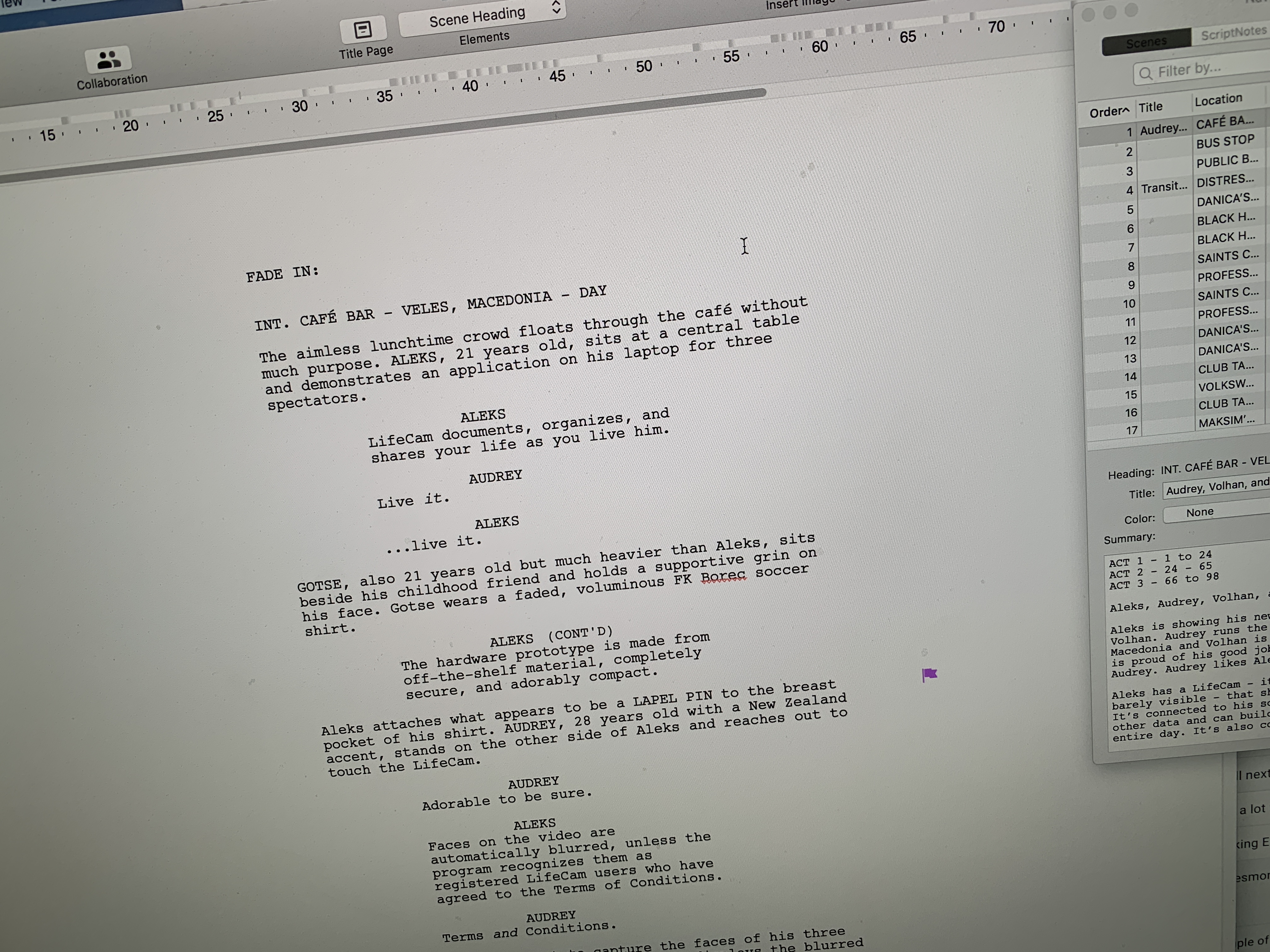
While most of us are content with Word or Google Docs, screenwriters have gotten used to Final Draft’s unique key combinations and styling but made do with software that was, to be fair, far behind the state of the art. Now the latest version is beginning to offer many competitive features including collaboration tools and powerful formatting tricks.

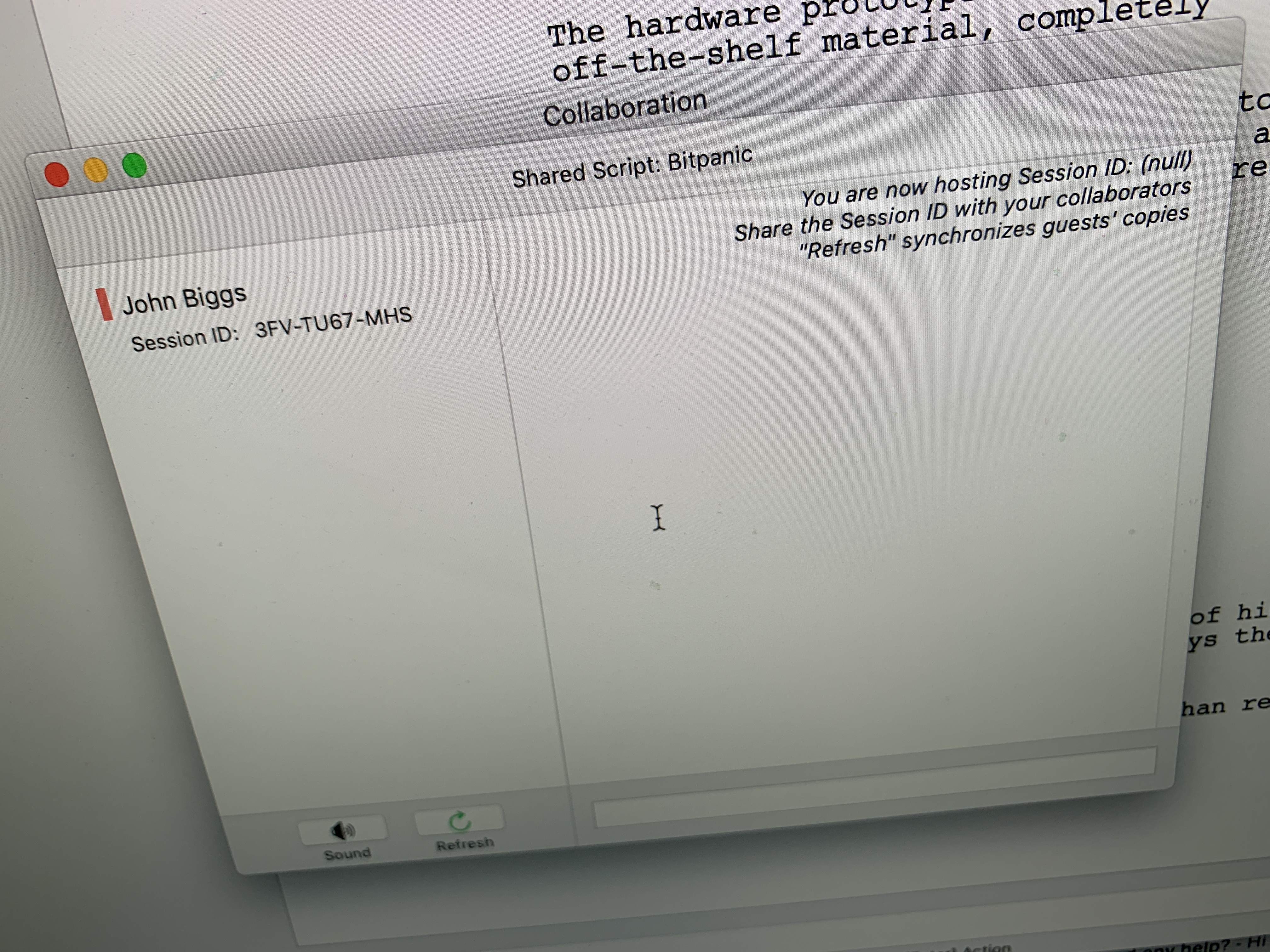
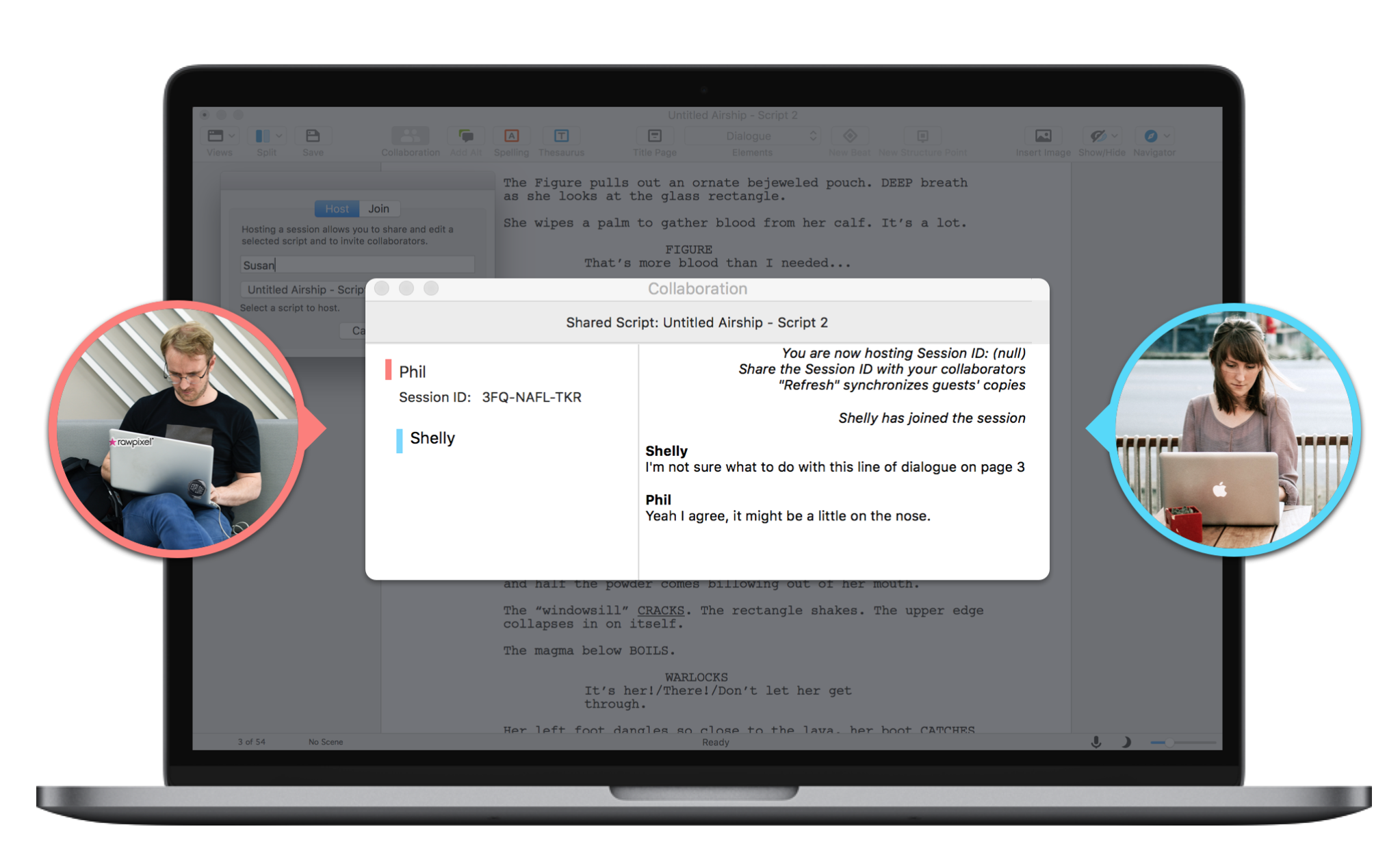
The most important change is the decidedly proprietary collaboration system. Final Draft creates a chatroom where you and your collaborators can sit and work together on a single document and the changes are visible on all copies of the text. You can also use the room to brainstorm ideas using the Beat Board view, essentially a cork board that makes it easy to put up ideas, scenes, or characters.

The system now also includes voice-to-text capabilities so you can dictate your next screenplay just by talking to your computer. It also adds tagging so you can break down scripts in terms of props, animals, actors, budgets, and schedules. You can also add images to scripts, a feature aimed at graphic novel writers and game creators.

There is also a Night Mode for when you’re deep in thought and that third midnight glass of Burgundy as you puzzle out a messy plot point.

I’ve used Final Draft for a year now – I wrote a script with a college friend – and I didn’t notice much of a UX/UI difference between Final Draft 10 and 11. The collaboration features are excellent, however, and great improvement over the previous versions. Being able to add in photos and other multimedia is icing on the cake, so to speak.

Final Draft is now aiming at a more general audience and, while there are plugins for scriptwriting in Word and Google Docs, many screenwriters swear by the software. At $249 it’s a bit pricey but as long as you’re working on your next great screenplay featuring a robot that falls in love with a washing machine it is, presumably, a tax write off. That said don’t hold me to that advice.

Marshall’s Kilburn II is a ruggedly handsome bluetooth speaker

Marshall hasn’t been been shy about capitalizing on its legacy. The legendary English amplifier company has plastered its name on cans of beer and a line of refrigerators. It’s not the most crass branding we’ve seen, but it’s pretty damn silly.

At first glance, the same can be said for its line of bluetooth speakers and headphones, save for one important thing: they’re actually quite good. It’s been several years since the company branched out into consumer electronics, and along the way, it’s been remarkably consistent with the products that bear its iconic cursive logo.

Announced this summer at IFA, the Kilburn II doesn’t stray far from the familiar Marshall amplifier style. In fact, you’d be forgiven if you mistook the thing for a practice amp. Instead, it’s just a solidly built bluetooth speaker with a rubberized faux leather design that can take some serious bumps. It’s further ruggedized by way of a chainlink metallic grille up front.

The speaker is water resistant, so you can take it outside without much concern. That said, if you need a true all-weather speaker, I’d recommend looking at something from JBL. The Kilburn isn’t going to go swimming with you, but it’ll withstand a little spilt whiskey.

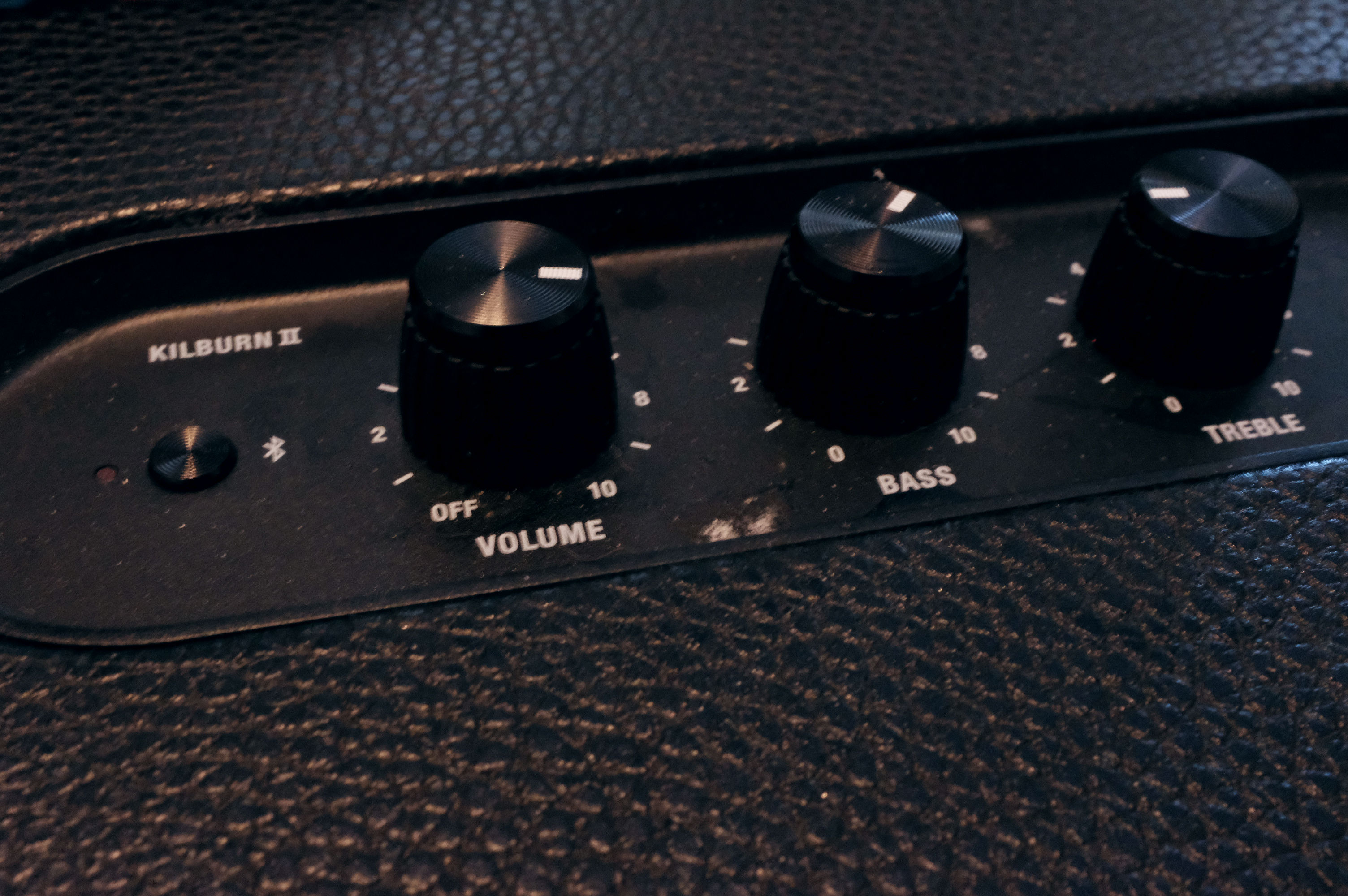
The sound quality is decent for speaker of this size. It’s not the best sound I’ve heard out of a bluetooth speaker, but if you’re looking for something portable to fill up a small room, it’s a pretty solid choice, and the treble and bass knobs up top will help you find find the perfect medium.

Unlike most bluetooth speakers, the Kilburn requires a proprietary plug for charging. That means no microUSB/USB-C. That’s understandable though, given the massive on-board battery, which should give more than 20 hours of life on a charge, watching the series of red bars creep down in the meantime.

At $299, it’s not a cheap bluetooth speaker, but it’s solid as far as the price point goes. It’s not going to replace your audiophile sound system any time soon, but at least it will look nice sitting next to your vinyl collection.

This is the Google Pixel Slate

Maybe there will be some surprises at next week’s Google event. At this rate, however, we’re not entirely optimistic at the prospect. Just as the Pixel 3 got the full hands-on treatment in Hong Kong, a new contender has emerged. Like a number of recent leaks, these new renders of the Pixel Slate come courtesy of My Smart Home Hub.

As previous leaks have suggested, the device appears to be a tablet companion piece to the company’s well-designed Pixel Book. That is to say, it’s a premium take on the Chrome OS hardware market.

While the Pixel Book is a convertible via a swiveling keyboard, the Slate does dual-duty by way of a detachable keyboard case. The case features round, typewriter-style keys, which look to be a bit more substantial than those found on other detachables at first glance.

There’s also a built-in trackpad, which puts it ahead of Samsung’s most recent Galaxy Tab offering. The top also appears to have a crease for folding, suggesting that it will prop the slate up when in laptop mode. The system appears to work with the Pixel Book Pen, as well. Not much more in the way of information here, though there does appear to be front- and rear-facing cameras, front-facing speakers and a USB-C port (take that, Microsoft Surface).

More information will no doubt arrive the morning of October 9. Patience, friends.

Banksy piece immediately shreds itself after being sold for $1.1M

In what might be the most ridiculous stunt ever pulled in the art world, a Banksy piece has, in a sense, self-destructed. Right in front of an audience of would-be buyers.

A framed canvas version of Banksy’s Girl with Balloon was set to be auctioned at Sothebys in London. As the auction came to a close with a final bid of £860,000 (a little over $1.1 million), the print’s frame began… beeping. Then, whirring. Seconds later, the canvas slid through the bottom of the frame, now almost entirely shredded.

The anonymous artist has long expressed a dislike of art galleries reselling their works, down to creating a piece featuring an audience of bidders battling over a print that reads, simply, “I can’t believe you morons actually buy this shit”. This seems to be Banksy’s latest way of expressing their discontent.

Of course, it’s easy to argue that the whole thing makes the piece even more desirable, because, well… art. If people with mountains of cash are buying art to have a ridiculously rare conversation piece that they hope others recognize, this one just rocketed up the list. It’s now that piece. Or technically those pieces, I guess.

Curiously, the canvas didn’t make it all the way through the shredder — did it jam, or was that intentional? By leaving about 1/3 of the print in the frame, the shredded bits are left attached and dangling… thus preventing them from splitting the pile of shreds into 50 more auctions with everyone vying for a slice.

So how did it all work? Writer Zoe Smith shared a video on Twitter this morning that she notes appeared briefly on Banksy’s Instagram before being pulled down (Update: it’s now back up! See below). It shows what looks to be the inside of the frame (which, in hindsight, seems comically large), shredder and all:

Update — here’s the video, as reposted by Banksy:

In the same video, it’s claimed that this was all put in process “a few years ago”. It appears that the “shredder” is a series of X-acto style blades which the canvas was raked over.

Meanwhile, a news post on Artsy suggests that the shred could’ve been triggered by someone in the audience with “a device in his hand”.

But what about power? In a video of the piece being removed post-shreddage, there doesn’t seem to be any wires behind the frame, nor anything plugged in. The piece itself is detailed as having been given to its previous owner by Banksy in 2006. Both the speakers in the frame and the motors of the shredder would require a power source. Keeping a battery ready and waiting for 12 years seems… unlikely.

The Sotheby’s listing for the piece notes that it was “Authenticated by Pest Control”. Pest Control is Banksy’s “handling service”, which will go out to verify supposed Banksy pieces to try to make sure no one drops a pile of cash on a one-of-a-kind Borksy. Perhaps part of the verification process involved double checking everything within the frame.

Some folks on Twitter, meanwhile, theorize that the original print could still be hidden within the frame, with what emerged having been shredded and rolled up in the frame long ago. That video Banksy posted showing the blades within the frame makes that seem unlikely… but could it be pranks all the way down?

Banksy posted a too-perfect still of the shred in process, with the caption “Going, going, gone…”

View this post on Instagram

Going, going, gone…

A post shared by Banksy (@banksy) on Oct 5, 2018 at 6:45pm PDT

(Top image left via Sothebys; Top image right via Banksy on Instagram)

Update: There are conflicting reports of the final bid. Some say £953,829 (around $1.25 million), others £860,000 (around $1.1 million). Banksy’s video above indicates that it was at £860,000 when the hammer dropped, so we’ve updated the post and headline accordingly. Sotheby’s price list, meanwhile, pins it at £1,042,000 (around $1.35 million). Reported amounts will vary based on how auction house fees and taxes were calculated and included.