The SF90 Stradale is Ferrari’s most powerful production vehicle: a plug-in hybrid electric that goes 0 to 62 mph in 2.5 seconds.
Category: Tech news
hacking,system security,protection against hackers,tech-news,gadgets,gaming
DJI Osmo Action Review: A GoPro Alternative You Should Try
DJI’s new action camera takes on GoPro Hero7 and succeeds, thanks to its dual screens and easy operation.
Why Tracking Your Symptoms Can Make You Feel Worse
Health apps can trigger the nocebo effect: Obsessively tracking how you feel, what you ate, and how you slept can end up being a drag on your health.
Cryptocurrency Firms Renew Push to Break Free From SEC Rules
Kik has started a crowdfunding campaign to support its legal battle, asserting that its kin coins are not securities.
Fertility Treatment Gets Less Clinical, More ’Grammable
Boutique egg freezing and IVF services are bringing personal coaches, relaxation retreats, and more to modern baby-making.
Robert Mueller Speaks, Amazon’s New Echo Show, and More News
Catch up on the most important news from today in two minutes or less.
Mueller’s Bottom Line: Indicting Trump Wasn’t Even an Option
Robert Mueller outlined the conclusions of the Russia investigation and made clear, in his own obtuse way, that the next steps belong to Congress.
Why Women Are Called ‘Influencers’ and Men ‘Creators’
It’s rooted in how social media celebrities see themselves. Also, sexism.
Watch Robert Mueller’s Statement on the Russia Investigation
Special counsel Robert Mueller is making his first public remarks since the release of his report in April.
The Secret to Soap Bubbles’ Iridescent Rainbows
The interaction of light reflecting off the front and back of a soap bubble gives it its colorful appearance. A similar effect explains color-shifting cars.
Alibaba reportedly mulling to raise $20B through a second listing in Hong Kong
Massive news just dropped for Hong Kong’s capital markets. Alibaba, one of the world’s largest tech companies, is considering raising $20 billion through a second listing in Hong Kong, Bloomberg reported on Monday citing sources.
TechCrunch has reached out to Alibaba for comment and will update the story if and when we have more information. Alibaba said it doesn’t comment on market rumors when reached out by TechCrunch.
Unnamed people told Bloomberg that the money raised in Hong Kong is intended to help Alibaba “diversify funding channels and boost liquidity.” The Chinese ecommerce behemoth is aiming to file a listing application confidentially as early as the second half of 2019, according to the report. That would come five years after Alibaba famously scored a record $25 billion listing on the New York Stock Exchange following Hong Kong’s refusal to approve its filing due to rules around company structure.
But the Hong Kong Stock Exchange is becoming an increasingly popular destination for public offerings that put Chinese tech businesses closer to investors at home, as my colleague Jon Russell explained in 2017. The turning point came when the bourse finally introduced dual-class tech stock listings last year, a major appeal that helped HKEX attract such tech darlings as smartphone maker Xiaomi and food delivery service Meituan Dianping.
The news also arrived at a time when Chinese tech firms are coping with increasing hostility in the US amid a series of prolonged trade negotiations. Huawei and dozens of its affiliate companies were hit hard after the US placed them on its ‘entity list’, meaning American companies need to seek approval from the government before doing business with these Chinese firms. Just last week, China’s largest chipmaker announced that it would delist from the NYSE and focused on its existing Hong Kong listing, although the company claimed the plan had been brewing for some time and had nothing to do with the trade war.
An original Apple I in a briefcase just sold for nearly $500k
Most people wouldn’t think too much of a computer crammed into a briefcase — but if it’s one of the few remaining examples of the first computer ever built by Apple? That’s a whole different story.
An original Apple I from 1976 — as hand-built by Steve Wozniak — just sold for £371,260 (or roughly $471,000) in a Christie’s Auction. It comes set inside a leather briefcase, complete with a built-in keyboard.
So, why the briefcase? Because the Apple I didn’t come with a case of its own. $666 got you a board ready to hook right up to a TV and keyboard, but figuring out an enclosure was up to the buyer. At some point along the road, someone thought to mount this board in a briefcase. Hey, it’s portable!
It’s estimated that around 200 Apple I computers were made, the majority of which are believed to have been destroyed. The enthusiast-run Apple-1 Registry knows of 68-or-so still in existence, of which the one being auctioned is listed as number 10.
As detailed by the Registry, this specific Apple I was owned by Rick Conte, who bought it to learn how to program BASIC. He donated it to the Maine Personal Computer Museum in 2009, after which it was sold to a series of private owners.
Also included in the auction were a ton of great extras and pieces of history — the original manuals, a handful of magazines with articles about the Apple I, an assortment of compatible hardware like the SWTPC PR-40 dot matrix printer, rare photocopies of some of the original Apple founding paperwork, and more.
Apple starts collecting data for Apple Maps in Canada
Apple has issued a short statement on its website and in various newspapers announcing Apple Maps plans in Canada. The company plans to drive around the country with cars equipped with a ton of sensors in order to improve Apple Maps in Canada.
Apple doesn’t say when it plans to finish scanning Canadian roads and processing data. If you live in Canada, it could take a few months before you notice any change.
Last year, Apple announced that it was in the process of rebuilding Apple Maps from the ground up. And you can already see some improvements in parts of the U.S. with more detailed maps, better representations of pedestrian and green areas, more accurate building shapes, etc.
The company isn’t just doing the bare minimum as its cars are equipped with a GPS rig, four LiDAR arrays and eight cameras shooting high-resolution images.
For now, Apple says it’s all about improving data quality. But the company could also leverage this data to launch new features, such as a Google Street View competitor, cycling directions and maybe turn-by-turn directions using augmented reality.
It’s hard to work on a new version of Apple Maps without telling the world about it — there are actual cars on the road. Now let’s see if the company plans to say a bit more about new features at its WWDC keynote next week.
Reminiz automatically indexes and tags videos in real time
Meet French startup Reminiz, a computer vision company that can index any type of video — it’s a sort of Googlebot, but for video content. Reminiz can add tags of people, logos or emotions on live streams and on-demand videos.
“The web is designed so that you can search for text — not video. We are making it possible to search within videos,” co-founder and CEO Jack Habra told me.
There are a few different use cases for Reminiz. First, the company works with broadcasters and telecom companies. For instance, Reminiz has a partnership with Orange so that you can learn more about who’s on the screen right now. It could potentially be leveraged for recommendations or contextual ads for external content.
Reminiz streams live channels on its servers directly, scans images and adds tags. Users then download metadata from the servers.
Second, you can use Reminiz to promote your brand on relevant videos. For instance, Hyundai sponsors Lyon’s soccer team. It wants to distribute Hyundai ads before soccer footage with the team playing. But YouTube keywords aren’t that good when it comes to targeting such a specific audience — a video might talk about the soccer team without showing any actual footage.
Brands can then whitelist videos to distribute ads on those videos in particular. You get charged based on minutes of video footage processed by Reminiz.
The company competes with AWS Rekognition and other generic video analysis APIs from cloud providers. What makes Reminiz stand out is that the company builds its own database of faces, people, brands and tags. It’s also probably easier to implement Reminiz compared to a more generic solution.
“With GDPR, everybody is contacting us to focus more on contextual data instead of personal data,” Habra said.
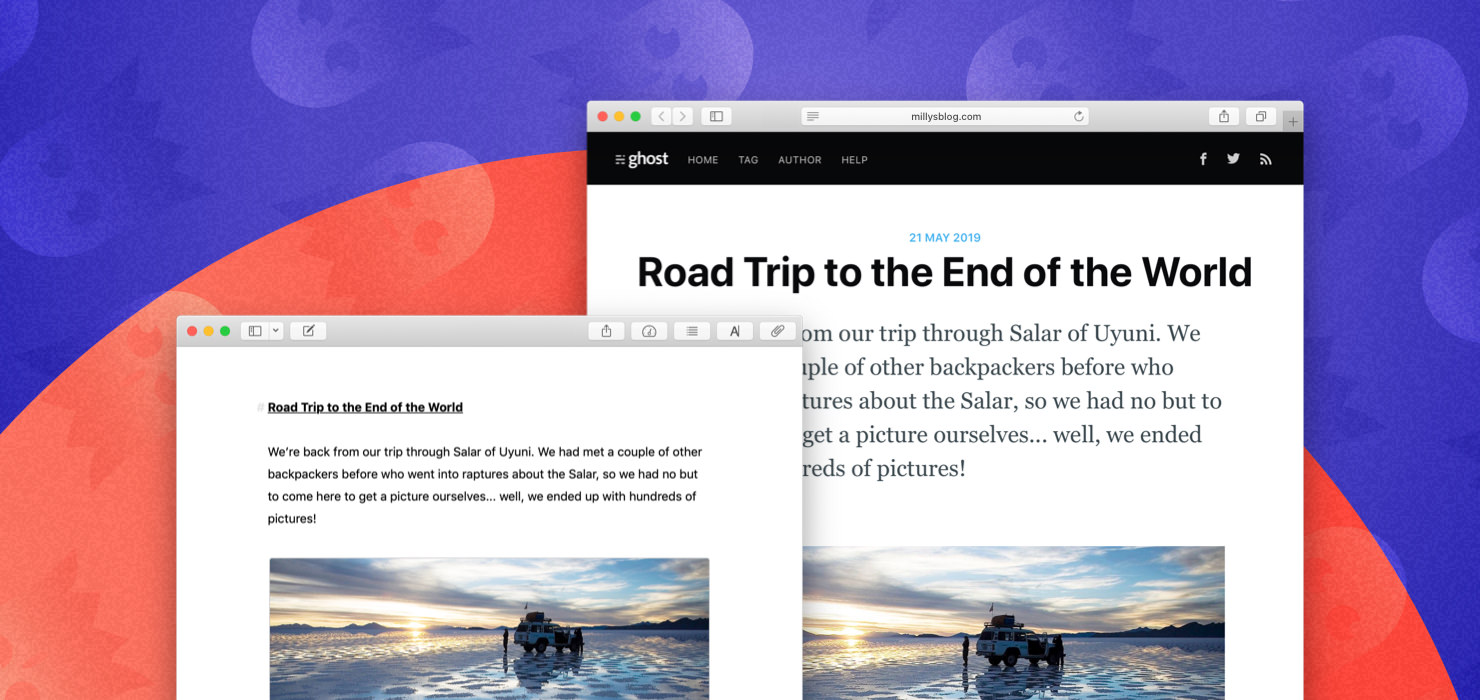
Ulysses adds split view on the iPad and support for Ghost blogs
Writing app Ulysses has been updated with a few nifty feature additions. On the iPad, you can now split the editor into two side-by-side editors — this feature alone opens up a lot of possibilities. Ulysses also now supports the option to publish your writing directly to a Ghost blog.
Ulysses is currently available on macOS, the iPad and the iPhone. It’s a Markdown editor with a library of texts that automatically stays in sync across your devices. You can export one or multiple texts in many different formats, including Markdown, HTML, rich text, PDF, ePub, DOCX and a blog.
In addition to Medium and WordPress, Ulysses now supports blogs built using Ghost, an open source CMS platform. If your website is built on Ghost, this should be a nice addition.
But I’m more excited about the ability to open two editors at the same time on the iPad. While the iPad is a great device if you’re looking for a focused writing environment, iOS still thinks “one app = one document”. Sure, you can open two Safari tabs side by side, but most apps only let you open one document at a time.
Ulysses now lets you open two documents at once. You can drag a document from the sidebar and drop it on the right side of the screen to split the screen into two panels. This way, if you’re translating a document, if you need to look at some references, you can scroll through a second document while you write in the main document.
But Ulysses doesn’t stop there. You can also open a second editor from the editor settings to look at different parts of the same document. And if you long press on the export button, you can also open a live preview of the document you’re currently working on.
For instance, you can see what your text will look like before you publish on your blog — headers, images, links and footnotes included. If you edit your text, Ulysses automatically refreshes the preview after a second.
Opening and closing documents is a fluid experience and this split view feature is well implemented. There have been rumors that Apple has been working on improvements at the iOS level to let you open multiple documents using the same app. Today’s Ulysses update is a good example of such a feature and how it would make the iPad even better.