Monzo, the UK challenger bank, raises £113M Series F led by YC’s Continuity fund at a £2B post-money valuation

Monzo, the fast-growing U.K.-based challenger bank with more than two million account holders, has raised £113 million (~$144m) in additional funding.

Confirming TechCrunch’s scoop in April, the Series F round is led by Y Combinator’s “Continuity” growth fund, and gives the company a new £2 billion (~$2.5b) post-money valuation. That’s double the £1 billion valuation it garnered in October last year.

A number of other new and existing investors have also participated in the Series F. They include Latitude, General Catalyst, Stripe, Passion Capital, Thrive, Goodwater, Accel, and Orange Digital Ventures.

The investment by London-based Latitude, the growth fund from prolific seed investor LocalGlobe, is particularly noteworthy given that LocalGlobe itself didn’t previously back Monzo. The same might be said of YC’s Continuity, considering that Monzo isn’t a YC alumni (although GoCardless, Monzo co-founder Tom Blomfield’s previous startup, did take part in the Silicon Valley accelerator).

The take-away: a growth fund attached to an early-stage fund can be a great antidote to the anti-portfolio (the list of successful companies a VC firm either missed, were unable or chose not to invest in).

Meanwhile, Monzo’s new funding round and YC’s backing should be viewed within the context of not only fast growth and increasingly convincing product-market fit in the U.K. — the challenger bank is currently adding 200,000 new sign-ups for its current account each month — but also recently unveiled plans to tentatively launch across the pond.

We first reported that Monzo was busy assembling a U.S.-based team over five months ago, and the U.K. company made its U.S. plans official last week. This will see a U.S. Monzo app and connected Mastercard debit card available via in-person signups at events to be held soon. The rollout will initially consist of a few thousand cards, supported by a waitlist in preparation for a wider launch.

The U.S. launch is being done in partnership with a local bank, but in the longer term Monzo plans to apply for its own U.S. bank license, similar to the strategy it employed in the U.K. so as to own and operate as much of its technical, product and regulatory infrastructure as possible.

In the U.K., this has helped Monzo achieve an NPS score of 80, which Blomfield previously told me is unusually high for a bank. This is seeing 60% of U.K. signups remain long-term active, transacting at once per week. As a counterpoint, however, the percentage of Monzo users that pay a salary into their Monzo account sits at between about 27% and 30% of active users, suggesting that a significant number of Monzo customers aren’t yet using it as their main account (Monzo’s definition of salaried is anyone who deposits at least £1,000 per month by bank transfer).

Success in the U.S., therefore, isn’t a given, conceded Blomfield when I had a call with him earlier this month. Instead, he argued that the key to cracking North America will be creating a fully localised version of Monzo based on carefully listening to U.S. users and once again finding product-market fit. He says there are obvious and less obvious cultural and technical differences in the way Brits and Americans save, spend and manage their finances, and this will require significant product divergence from the U.K. version of Monzo. Today’s new £113 million injection of capital is clearly designed to provide some of the breathing space required to achieve that.

As a side note, there are encouraging signs from other London-based fintechs that have ventured across the pond. One recent example is the financial “digital assistant” chatbot Cleo, which entered the U.S. around a year ago and has been more successful than the company anticipated, seeing Cleo add 650,000 active U.S. users to date. In fact, the U.S. currently makes up more than 90% of new Cleo users, prompting one source to describe the U.K. startup as effectively a U.S. company now.

At last, a camera app that automatically removes all people from your photos

As a misanthrope living in a vibrant city, I’m never short of things to complain about. And in particular the problem of people crowding into my photos, whatever I happen to shoot, is a persistent one. That won’t be an issue any more with Bye Bye Camera, an app that simply removes any humans from photos you take. Finally!

It’s an art project, though a practical one (art can be practical!), by Do Something Good. The collective, in particular the artist damjanski, has worked on a variety of playful takes on the digital era, such as a CAPTCHA that excludes humans, and setting up a dialogue between two Google conversational agents.

The new app, damjanski told Artnome, is “an app for the post-human era… The app takes out the vanity of any selfie and also the person.” Fortunately, it leaves dogs intact.

Of course it’s all done in a self-conscious, arty way — are humans necessary? What defines one? What will the world be like without us? You can ponder those questions or not; fortunately, the app doesn’t require it of you.

Bye Bye Camera works using some of the AI tools that are already out there for the taking in the world of research. It uses YOLO (You Only Look Once), a very efficient object classifier that can quickly denote the outline of a person, and then a separate tool that performs what Adobe has called “context-aware fill.” Between the two of them a person is reliably — if a bit crudely — deleted from any picture you take and credibly filled in by background.

It’s a fun project (though the results are a mixed bag) and it speaks not only to the issues it supposedly raises about the nature of humanity, but also the accessibility of tools under the broad category of “AI” and what they can and should be used for.

You can download Bye Bye Camera for $3 on the iOS App Store.

Drone Racing League is raising $50 million

The enterprise drone space has been heating up over the past couple years, but a startup in the entertainment drone space is raising the big cash now.

The Drone Racing League is in the process of raising up to $50 million from investors in a Series C round according to SEC docs published today. The startup has already raised over $26 million of that figure and is looking to secure additional investors to close out the rest. Investors in the new round appear to already include Lux Capital and RSE Ventures.

We reached out to Drone Racing League for comment.

The company had previously raised $32 million in funding from backers including Sky, CRCM Ventures and Hearst Ventures. Drone Racing League closed a $20 million Series B in 2017.

The startup, as the name implies, is in the business of speedy drone racing. It was founded in 2015 with the goal of capitalizing on some of the excitement around the technology, while aiming to build out a league that captured the thrill of airborne Formula-1 racing.

We did a deep dive on the company’s efforts back in 2016 and the surrounding drone racing enthusiast space. The athletes fly custom-built hardware at 90 miles per hour in tourneys that take place at sites ranging from empty warehouses to professional sports arenas. Races have been broadcast on NBC Sports, Twitter, Sky Sports and FOX Sports Asia according to the startup.


Apple says Spotify exaggerated how much ‘App Store tax’ it pays

In March, Spotify filed a complaint against Apple with the European Commission over the so-called “Apple tax” and claims of restrictive rules regarding the App Store. In the time since, Apple has responded with the launch of a website that takes aim at the anti-trust, anti-competitive claims against it, and most recently, a deep dive into how the process of app approvals works, by way of a CNBC profile. Now, Apple has responded to the EC complaint with its own filing that says Spotify is only paying this “Apple tax” on less than 1 percent of its paid subscribers.

This news was first reported by Music Business Worldwide (MBW) and German site Der Spiegel.

Specifically, Apple’s filing says that Spotify only pays a 15% “app tax” (revenue share) on just 0.5% of its 100 million premium subscribers, or around 680,000 customers. This revenue share only impacts those customers Spotify acquired during the 2014-2016 time frame who signed up for the subscription through an in-app purchase. Afterward, Spotify switched off the option to sign up in the app.

This is in contrast to the claim made by Spotify CEO Daniel Ek on the company’s blog in March, where he wrote that “Apple requires that Spotify and other digital services pay a 30% tax on purchases made through Apple’s payment system.”

In addition, MBW reports, citing an unnamed source, that Spotify pays even less than the standard 15% for those customers who signed up through in-app purchase due to label discounts. The source told the outlet that Spotify just wants to “pay nothing.”

However, Spotify’s claim goes beyond the Apple tax.

It also said that Apple used its App Store power to penalize the competitor in other ways — like limiting Spotify’s ability to communicate with customers, or even send emails to its iOS users. Spotify said Apple also blocked its iOS upgrades — something it brought to light years ago. Apple, meanwhile, has always maintained it has treated Spotify like any other app developer.

Apple’s responses to these latter points were also sneaked into the recent CNBC piece where a “longtime Apple veteran” who was only identified as “Bill,” made certain to tell the news site that he had “called Spotify when an update was rejected” — e.g. because Spotify had been emailing customers and asking them to pay the music streamer directly outside the App Store.

In addition to Spotify’s EU complaint, Apple is facing other attacks against its App Store in the U.S. courts.

The U.S. Supreme Court in May ruled against Apple to allow an App Store antitrust case to proceed.

And in June, two app developers proceeded to sue Apple over its App Store practices, making similar claims about Apple’s 30% commission on app sales and its requirement to price apps in tiers ending in 99 cents.

Apple had earlier responded to Spotify’s complaint in length on its own website. The company, in part, said that:

After using the App Store for years to dramatically grow their business, Spotify seeks to keep all the benefits of the App Store ecosystem — including the substantial revenue that they draw from the App Store’s customers — without making any contributions to that marketplace. At the same time, they distribute the music you love while making ever-smaller contributions to the artists, musicians and songwriters who create it — even going so far as to take these creators to court.

Apple’s approach has always been to grow the pie. By creating new marketplaces, we can create more opportunities not just for our business, but for artists, creators, entrepreneurs and every “crazy one” with a big idea. That’s in our DNA, it’s the right model to grow the next big app ideas and, ultimately, it’s better for customers.

This robot crawls along wind turbine blades looking for invisible flaws

Wind turbines are a great source of clean power, but their apparent simplicity — just a big thing that spins — belie complex systems that wear down like any other, and can fail with disastrous consequences. Sandia National Labs researchers have created a robot that can inspect the enormous blades of turbines autonomously, helping keep our green power infrastructure in good kit.

The enormous towers that collect energy from wind currents are often only in our view for a few minutes as we drive past. But they must stand for years through inclement weather, temperature extremes, and naturally — being the tallest things around — lightning strikes. Combine that with normal wear and tear and it’s clear these things need to be inspected regularly.

But such inspections can be both difficult and superficial. The blades themselves are among the largest single objects manufactured on the planet, and they’re often installed in distant or inaccessible areas, like the many you see offshore.

“A blade is subject to lightning, hail, rain, humidity and other forces while running through a billion load cycles during its lifetime, but you can’t just land it in a hanger for maintenance,” explained Sandia’s Joshua Paquette in a news release. In other words, not only do crews have to go to the turbines to inspect them, but they often have to do those inspections in place — on structures hundreds of feet tall and potentially in dangerous locations.

Using a crane is one option, but the blade can also be orientated downwards so an inspector can rappel along its length. Even then the inspection may be no more than eyeballing the surface.

“In these visual inspections, you only see surface damage. Often though, by the time you can see a crack on the outside of a blade, the damage is already quite severe,” said Paquette.

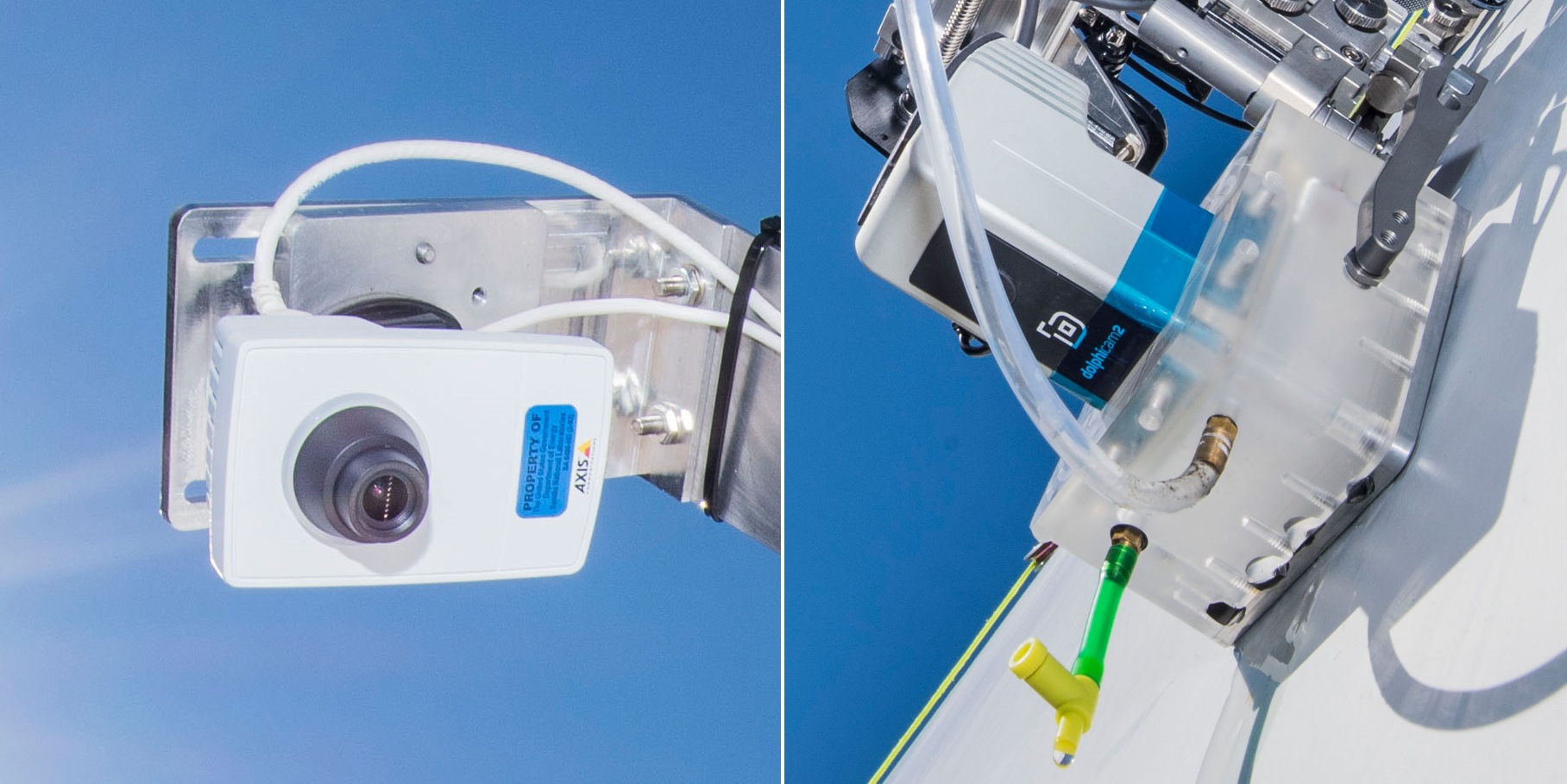
Obviously better and deeper inspections are needed, and that’s what the team decided to work on, with partners International Climbing Machines and Dophitech. The result is this crawling robot, which can move along a blade slowly but surely, documenting it both visually and using ultrasonic imaging.

A visual inspection will see cracks or scuffs on the surface, but the ultrasonics penetrate deep into the blades, making them capable of detecting damage to interior layers well before it’s visible outside. And it can do it largely autonomously, moving a bit like a lawnmower: side to side, bottom to top.

Of course at this point it does it quite slowly and requires human oversight, but that’s because it’s fresh out of the lab. In the near future teams could carry around a few of these things, attach one to each blade, and come back a few hours or days later to find problem areas marked for closer inspection or scanning. Perhaps a crawler robot could even live onboard the turbine and scurry out to check each blade on a regular basis.

Another approach the researchers took was drones — a natural enough solution, since the versatile fliers have been pressed into service for inspection of many other structures that are dangerous for humans to get around: bridges, monuments, and so on.

These drones would be equipped with high-resolution cameras and infrared sensors that detect the heat signatures in the blade. The idea is that as warmth from sunlight diffuses through the material of the blade, it will do so irregularly in spots where damage below the surface has changed its thermal properties.

As automation of these systems improves, the opportunities open up: A quick pass by a drone could let crews know whether any particular tower needs closer inspection, then trigger the live-aboard crawler to take a closer look. Meanwhile the humans are on their way, arriving to a better picture of what needs to be done, and no need to risk life and limb just to take a look.

WordPress management site WP Engine acquires Flywheel as it moves to a $1B valuation and IPO

WordPress now accounts for 34 percent of all websites globally, and today one of the key companies that helps handle the creation and management of some of those WP-hosted sites is getting a little bigger through some consolidation in the wider ecosystem. WP Engine, which works with businesses to build and manage their WordPress-hosted sites, has aquired Flywheel, a smaller competitor.

Financial terms of the deal are not being disclosed, WP Engine’s CEO and chairperson Heather Brunner said in an interview, but she confirmed to TechCrunch that it involved her company raising a small round (amount also undisclosed) from its existing investors to help finance the deal. WP Engine’s investors include Silver Lake (which last year put a whopping $250 million into the company) along with WordPress developer Automattic, Silverton, GuidePost Growth Equity (formerly known as North Bridge) and Eric Ries (of “Lean Startup” fame).

Brunner also declined to talk valuation of WP Engine, although she noted that current annual recurring revenue is at $132 million, and that Flywheel’s is $18 million, and with a current growth rate of 50%, together the two are on track to make $200 million in ARR by 2020 and likely pass the $1 billion mark for valuation, en route to a public listing.

“It is our aspiration to build a public-ready company, and this acquisition is part of making that happen,” she said. (Ironically, that could mean that WordPress’s partner, and sometimes competitor, could go public before it does.)

The deal is a sign of some consolidation in the ecosystem that has built up around WordPress. WP Engine is a veritable powerhouse in that ecosystem, having been an early mover in the space — WordPress backed it back in 2011 — and now working on building and managing sites for some 120,000 brands and agencies in 150 countries (likely totalling multiples of that in terms of actual sites).

WP Engine, as Brunner describes it, focuses largely on mid-market and larger businesses, while Flywheel — founded and currently based out of Omaha — has focused on smaller businesses. That makes the two natural complements to each other, but Brunner notes that there will be more gained from the union.

“The team there is very product focused,” she noted. “They’ve built a suite that we feel has been focused around small agencies, but they are also the types of tools that larger agencies will benefit from.” She is referring to the product Local by Flywheel, a local development application used by more than 150,000 developers.

Flywheel, founded in 2012, had only raised around $6 million in funding, including a $4 million round several years ago. The economies of scale of throwing in its lot with WP Engine will give it a much wider exposure and access to new customers.

“We founded Flywheel with the belief that in order to help creatives do their best work, we needed to create an internal culture that encourages our employees to do the same,” said Dusty Davidson, CEO and co-founder of Flywheel, in a statement. “That philosophy has led us to build an incredible company and some of the most well-loved products in WordPress, supported by an impressive group of talented people and the most remarkable open source community in the world.”

WP Engine has made a few other acquisitions prior to this, of other partners in the WordPress ecosystem, marking it out as a consolidator in the field. Brunner noted that while some of the company’s growth efforts might lead it to further acquisitions, it is also pursuing a second track of working with third party partners and acting as the intermediary platform for companies to bring in other services in aid of running their sites. Partners in the WP Engine ecosystem — alongside WordPress itself, of course — include Amazon Web Services, Cloudflare, Google, HubSpot and New Relic, she noted.

Reminder: Meet TechCrunch in NYC tomorrow

And we’re back! TechCrunch is returning to NYC for a Meet and Greet tomorrow at The Yard in Herald Square. It’s been a couple years since we’ve held an event in NYC and we’ve missed it.

Join Managing Editor Jordan Crook, Battlefield Host and Senior Writer Anthony Ha, Head of Startup Battlefield Neesha Tambe, and Hardware Editor Brian Heater on Tuesday, June 25th from 5:00pm – 6:15pm. From ExtraCrunch, our new subscription tier, to Startup Battlefield, TC’s world renowned startup launch competition, learn more about the new things at TechCrunch. You’ll have an opportunity to meet investors, startup founders and other folks in the startup community as well.

TechCrunch is actively searching for the next best startups to feature in Startup Battlefield this fall at Disrupt San Francisco and Hardware Battlefield in Shenzhen, China. If you are an investor or community manager for early stage startups, join us tomorrow evening to refer your companies. Early stage founders are invited to attend and learn more about Startup Battlefield. Founders of later stage startups are encouraged to come and network with TechCrunch Editorial at the event.

TechCrunch New York Meet and Greet

Host: The Yard – Herald Square

Time: 5:00pm – 6:15pm

Location: 106 W 32nd St, New York, NY 10001

RSVPThe event is free, but you will need a ticket to attend

Daily Crunch: Details on the new Raspberry Pi

The Daily Crunch is TechCrunch’s roundup of our biggest and most important stories. If you’d like to get this delivered to your inbox every day at around 9am Pacific, you can subscribe here.

1. The Raspberry Pi Foundation unveils the Raspberry Pi 4

While the Raspberry Pi first started as a simple computer designed to teach kids how to code, it has become a versatile device with many different use cases.

When it comes to physical design, the Raspberry Pi 4 Model B looks like the previous flagship model. It’s a single-board computer with a lot of connectors that is the size of a deck of cards. But everything has been updated.

2. Echo Show 5 review

Brian Heater says that if you’re looking for a smart home hub to double as an alarm clock, the Lenovo Smart Clock is your best bet. But if video playback and chat are important, Amazon’s got you covered.

3. Google’s new media literacy program teaches kids how to spot disinformation and fake news

The company is launching six new media literacy activities for the curriculum that will teach kids things like how to avoid a phishing attack, what bots are, how to verify that information is credible, how to evaluate sources, how to identify disinformation online, spot fake URLs and more.

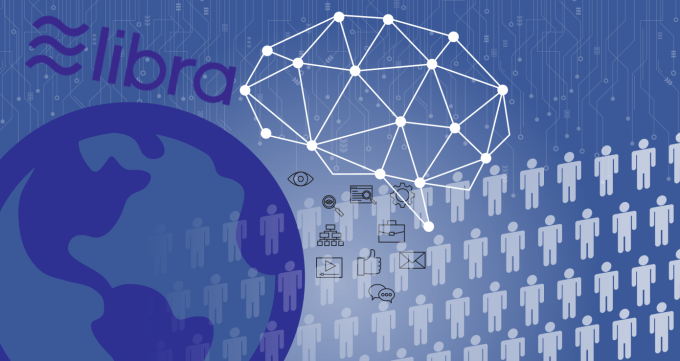
4. Who’s going to use the big bad Libra?

If you’ve been wondering who’s actually going to use Facebook’s proposed cryptocurrency, Jon Evans has some thoughts.

5. The power of Ravelry’s stance against white supremacy reaches beyond the knitting community

This weekend, Ravelry enacted a policy that explicitly bans support of Donald Trump and his administration in content posted to the site, including project entries, patterns, forum posts and profiles.

6. Transitioning from engineering to product with Adobe’s Anjul Bhambhri

An interview with the vice president of platform engineering at Adobe. (Extra Crunch membership required.)

7. This week’s TechCrunch podcasts

The Equity team discusses the role VCs have played in the development of Facebook’s Libra, Original Content reviews the Netflix series “When They See Us” and most importantly, Mixtape is back with a conversation with Uber’s Meena Harris.

iOS 13 brings many much needed quality-of-life improvements

In developer lingo, quality-of-life updates are all about refining things that already work. Thanks to these incremental improvements, it should make the end-user experience much more enjoyable. And with iOS 13, it feels like Apple’s main focus is on this concept.

Dark Mode is basically the only new flashy feature of iOS this year. But that’s not a bad thing. From my experience, all the tiny refinements across the board are really convincing. iOS 13 is a much more interesting release than iOS 12 for instance.

I’ve been playing with early beta versions of iOS 13, so here’s what you should be looking for.

Dark Mode is gorgeous

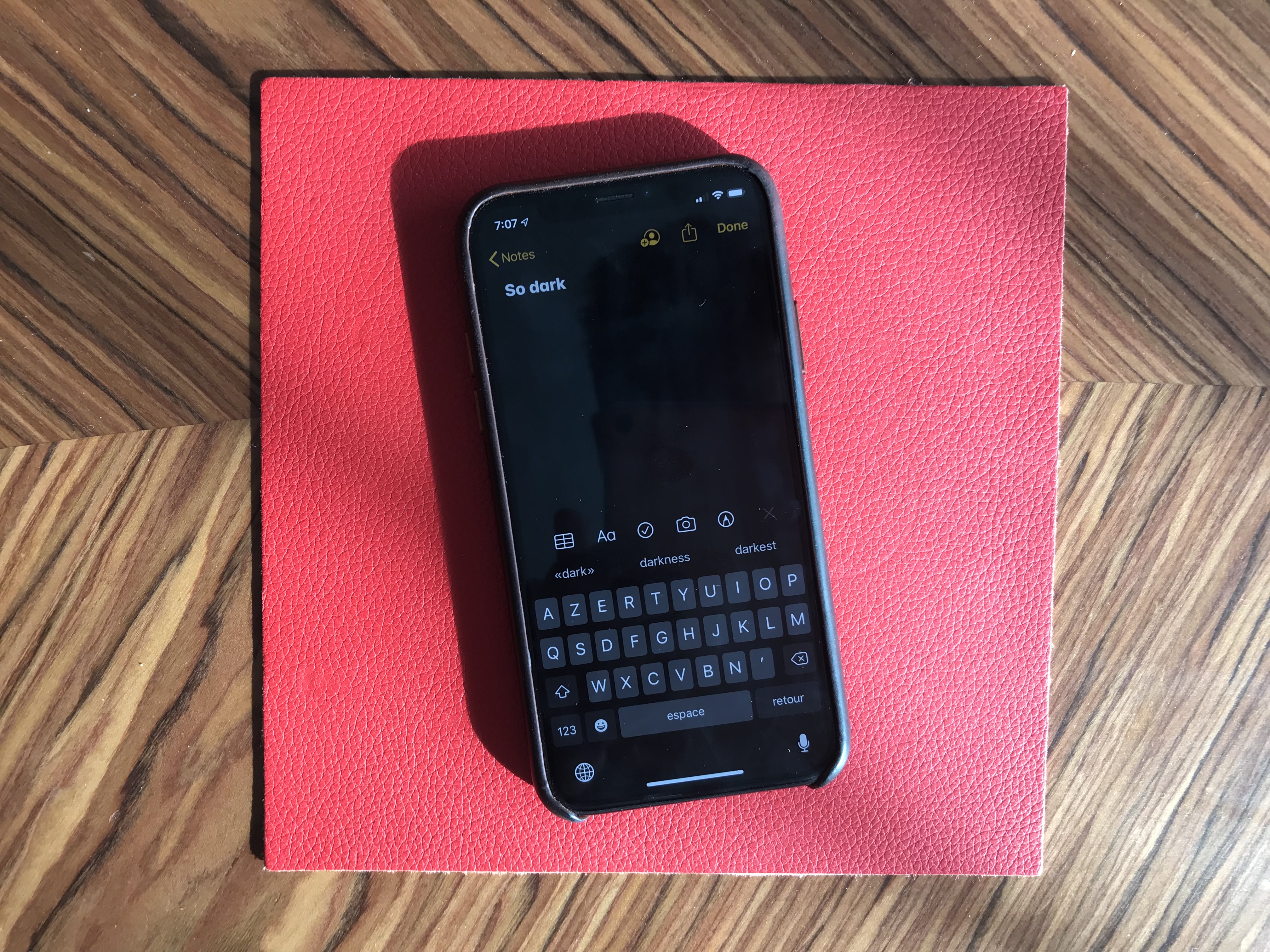
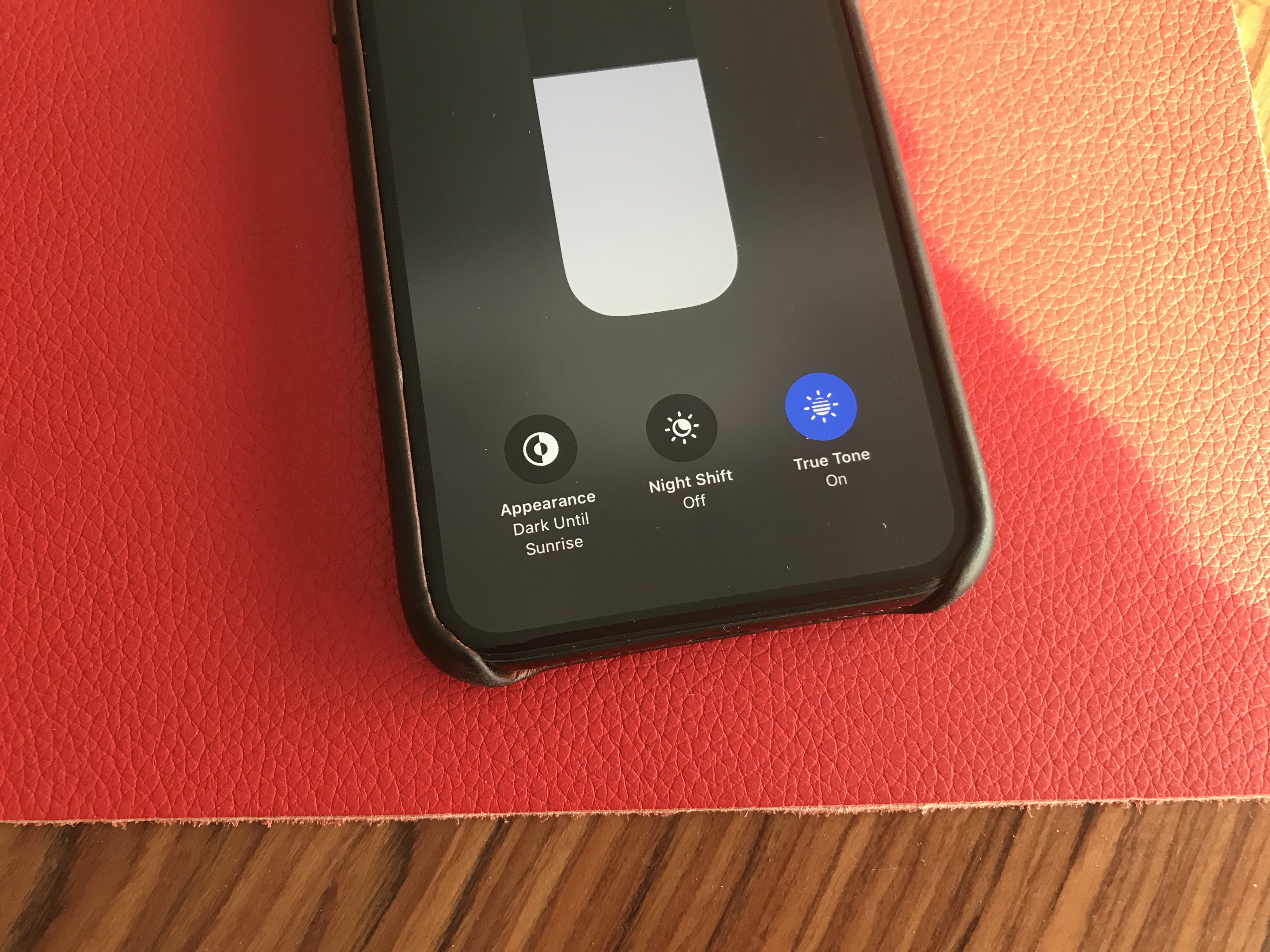
Dark Mode is here, and it looks great. It’s a system-wide trigger that completely transforms the look and feel of your iPhone — you have to play with it to really feel the difference. The easiest way to activate it is by opening the Control Center panel, long pressing on the brightness indicator and turning it on.

While you can trigger it manually, you can also select an automated mode in the settings. Right now, my phone becomes dark at night and lights up in the morning. iOS uses your current location to time the change with the sunset and sunrise.

Widgets, notifications and menus now use black or transparent black as much as possible. You can choose new Apple wallpapers that change when you turn on Dark Mode, or you can optionally dim your custom wallpapers at night.

Apple has updated all its apps to support Dark Mode, from Notes to Mail, Messages, Safari and more. And it works really well with those apps.

But the issue is that many third-party apps haven’t been updated for Dark Mode yet. So it’s a disappointing experience for now, but I’m sure many app developers will update their apps before the final release of iOS 13.

Many apps already support a dark version that you can trigger in the app settings. But Apple really wants third-party developers to follow the system-wide option going forward. So those apps will have to be updated as well.

Low-level improvements

iOS still looks like iOS. But if you carefully pay attention to your first experience of iOS 13, you’ll notice two things. First, animations have been sped up — it feels like unlocking your phone, opening and closing an app or swiping on a notification are much faster. It’s hard to know if those actions have been optimized or if it’s just Apple hitting the fast-forward button.

Second, Face ID is better. It’s not a dramatic change, but your phone recognizes you a tiny bit faster than before. iPhone users will appreciate that they don’t have to buy a new phone for this free improvement.

The two other iOS 13 changes that you can experience in any app is that the keyboard now supports swipe-to-type and the share sheet has been updated. It is now separated in three areas: a top row with suggested contacts to send photos, links and more depending on your most important contacts.

Under that row of contacts, you get the usual row of app icons to open something in another app. If you scroll down, you access a long list of actions that vary from one app to another.

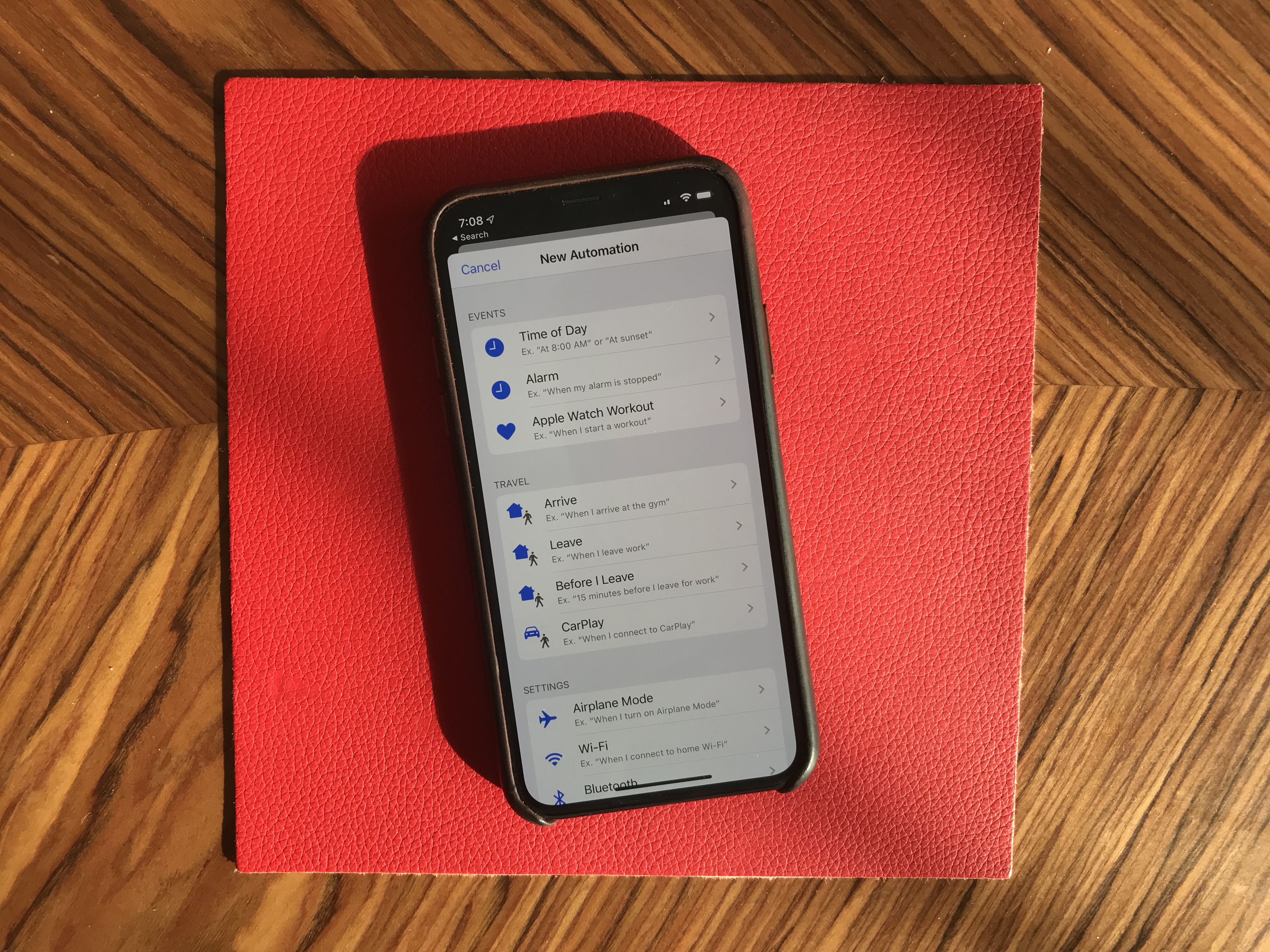
Siri and the Shortcuts app have been improved and now work more closely together. In addition to a more natural Siri voice, Shortcuts is now installed by default with iOS, which is great news for automation and scripting on your phone.

And I was surprised to see all my voice-activated Siri Shortcuts in the Shortcuts widget. For instance, since iOS 12, I’ve been able to say “Hey Siri, I’m heading home with Citymapper” to launch Citymapper with directions to my home. There’s now a button in the Shortcuts app to trigger that Siri Shortcut.

More interestingly, you can now create automated triggers to launch a shortcut. For instance, you can create scenarios related to CarPlay, a location or even a cheap NFC tag. Here are some examples:

  • Launch a music playlist when I connect my phone to CarPlay or to my car using Bluetooth.
  • Dim my screen and turn on low power mode when I activate airplane mode.
  • Turn off my Philips Hue lights when I put my phone on an NFC sticker on my nightstand.

App improvements

All first-party apps have been improved in one way or another. Some changes are small, but a few apps have received a massive update.

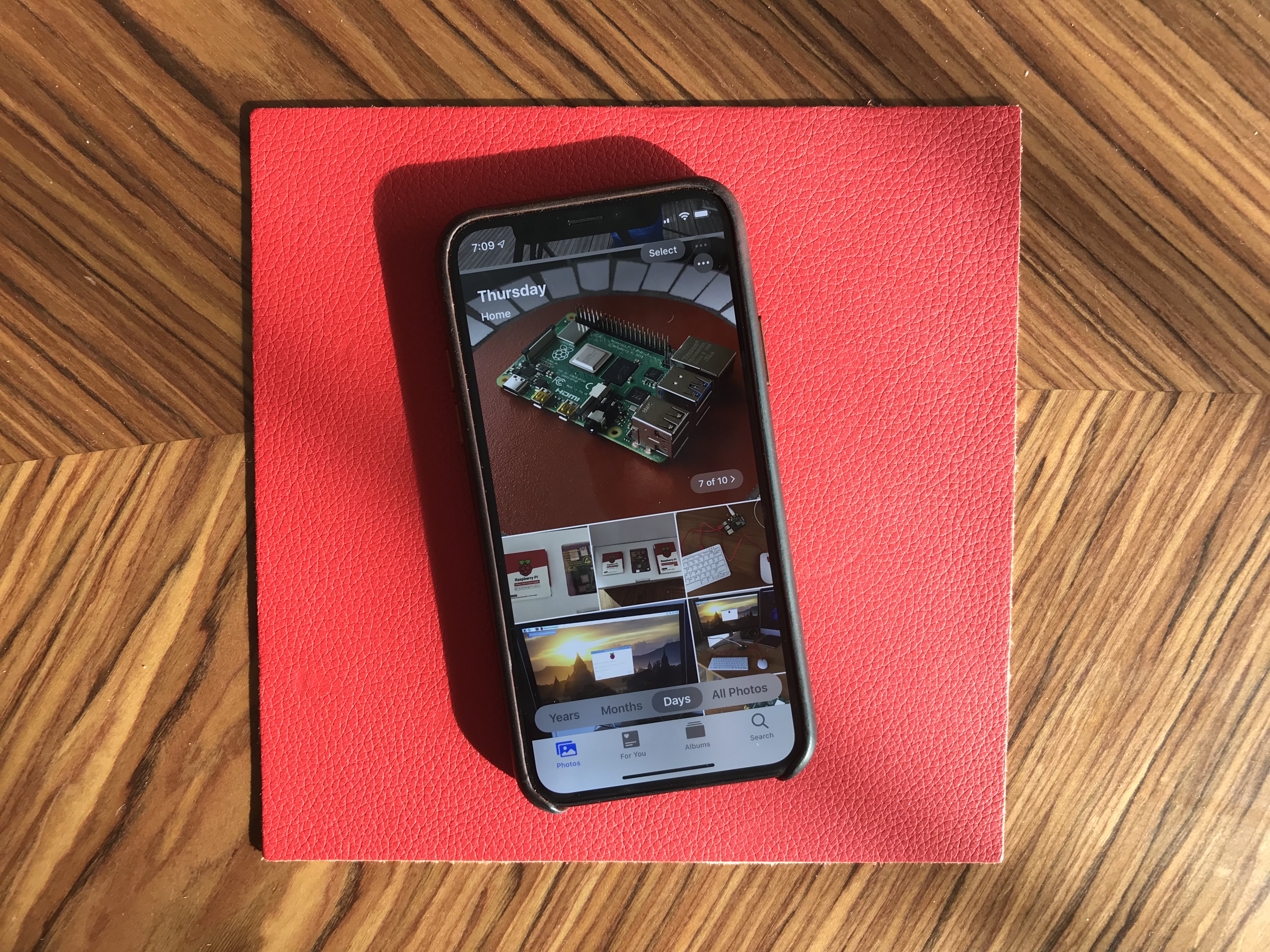
Photos looks completely different with a new main tab. Instead of a relatively boring-looking grid of photos, you now get four sub-tabs that should help you navigate your photo library more efficiently.

‘Years’ lets you jump straight to a specific year. The ‘Months’ view is the most interesting one as iOS tries to sort your photos in smart albums based on dates and locations. When you open an event, you get the best photos of this event in the ‘Days’ tab. Some photos, such as duplicates, are hidden by default.

And the last tab, ‘All Photos,’ features the traditional never-ending grid of all your photos in your camera roll. Everything is still there. Live photos and videos now automatically play by default in some views. I’ve never been a fan of autoplaying videos but I guess that’s what people like.

The camera has been slightly improved, especially when it comes to Portrait mode with better segmentation of hair. And photo editing has been redesigned — it looks more like VSCO now.

While Maps is getting a gradual update with better mapping data, most people won’t notice changes for a while. You can see real-time transit data, your flight status and share lists of places with friends, though. It might not replace Citymapper, FlightLogger or Mapstr, but more contextual data is key when it comes to competing with Google Maps.

Speaking of Google Maps, there’s a new Look Around feature that could have been called Apple Street View. I recommend trying the feature in San Francisco because it’s stunning. This isn’t just 360 photo shots — those are 3D representations of streets with foregrounds and backgrounds.

Messages is getting some much-needed improvements. You can now choose a profile name and profile picture and share it with your contacts. I hate the default grey avatar, so it’s great to let people push a profile picture to other people.

If you have a Memoji-compatible device, you can now share Memoji stickers. If you’ve used Bitmoji in the past, this is Apple’s take on Bitmoji. And finally, search has been improved and is now actually useful. You can find an address or a specific message in no time.

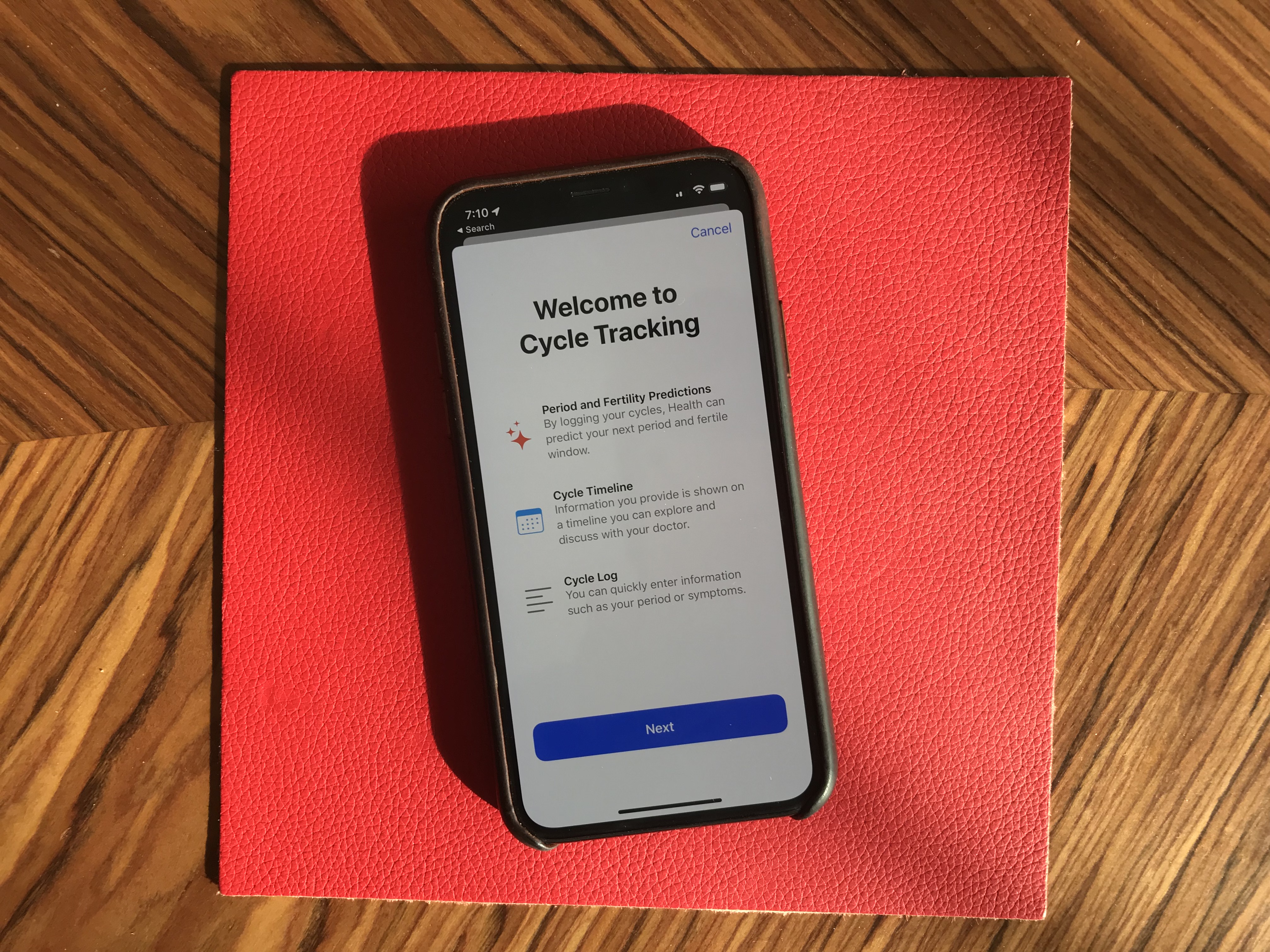
Health has been redesigned but features more or less the same data. But it’s worth noting that Apple now lets users track, visualize and predict menstrual cycles from the Health app.

Privacy

iOS 13 has a big emphasis on privacy as well thanks to a new signup option called “Sign In with Apple.” I couldn’t try it as I couldn’t see the option in any app. But Sarah Perez already wrote a great explainer on the topic.

In a few words, this button will let you create an account for a service without inputing an email address and password, and without connecting with your Google or Facebook account. Apple keeps as little data as possible — it’s all about creating a unique identifier and storing that in your iCloud keychain.

Apple is adding more ways to control your personal information. If an app needs your location for something, you can now grant access to your location just once. The app will have to ask for your permission the next time. Similarly, iOS 13 can tell you when an app has been tracking your location in the background with a map of those data points.

But I didn’t realize iOS 13 also blocks Bluetooth scanning by default in all apps. Many apps scan for nearby Bluetooth accessories and compare that with a database of Bluetooth devices around the world. In other words, it’s a way to get your location even if you’re not sharing your location with this app.

You now get a standard permission popup for apps that actually need to scan for Bluetooth devices — Mobike uses Bluetooth to unlock bikes and Eve uses Bluetooth to interact with connected objects, for instance. But the vast majority of apps have no reason to scan for Bluetooth devices. You can decline Bluetooth permission and use Bluetooth headphones normally.

Random tidbits

Let’s go through some tiny little updates:

  • App updates are smaller because iOS doesn’t download everything from their servers — only files that are relevant to your current device.
  • Files works with Samba file servers, and you can zip/unzip files.
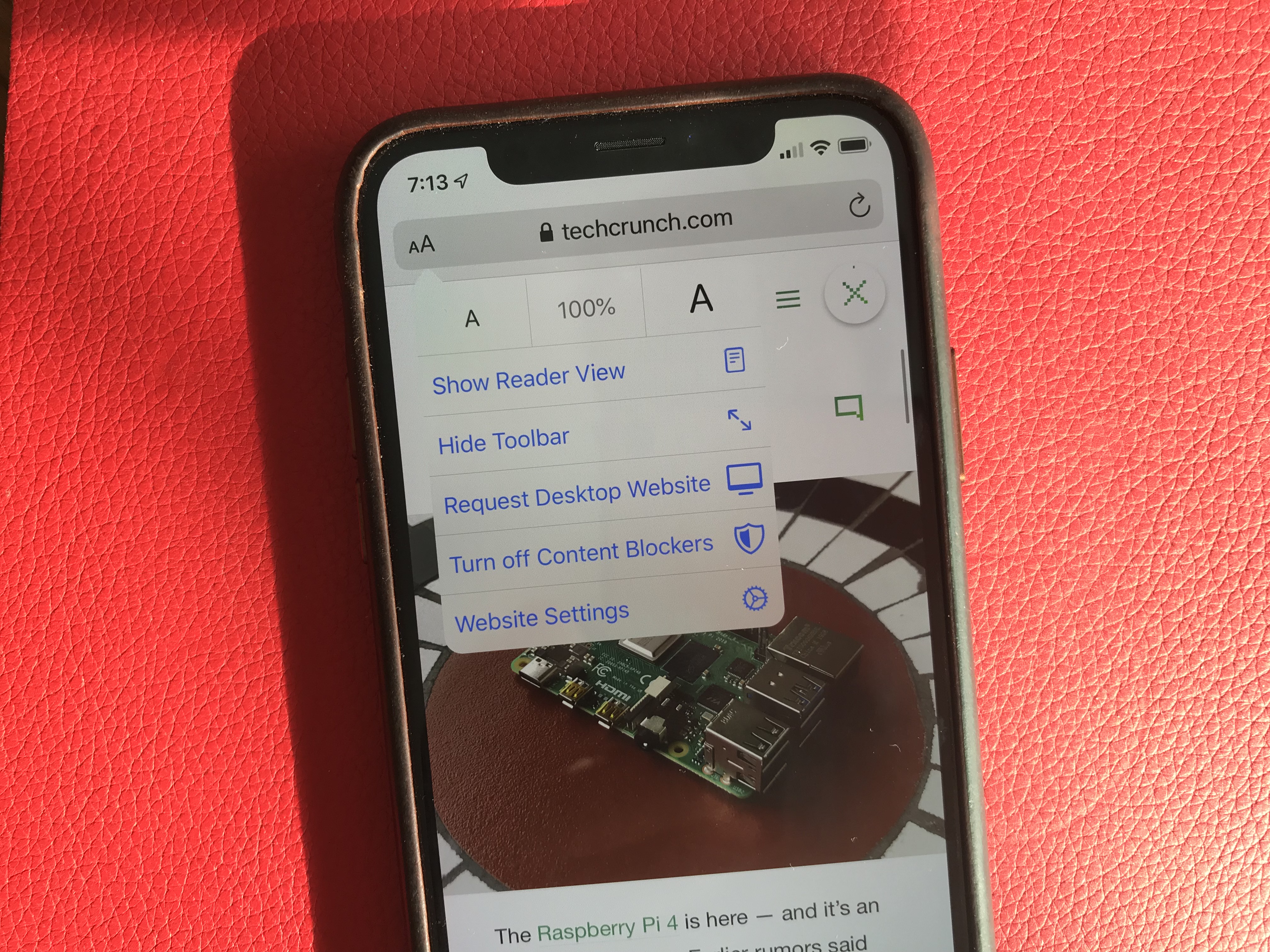
  • Safari features a new site settings popup to request the desktop site, disable a content blocker or enable reader view. This is much cleaner than before.
  • Notes has a new gallery view.
  • Mail lets you customize font style, size and color. You can also indent text, create bulleted lists, etc.
  • Find My iPhone and Find My Friends have been merged in a new Find My app. It also theoretically can help you find misplaced devices using other Apple devices from other people around your device — everything is supposed to be end-to-end encrypted.

Things I couldn’t try

  • CarPlay has been redesigned for the first time in years. But I don’t own a car.
  • You can store security camera footage in iCloud if your camera is HomeKit-compatible. But I don’t own a security camera.
  • ARKit has been improved and can detect people in the real world.
  • You can install custom fonts from the App Store and manage them from the settings. You can then use those fonts in any app.
  • Lyrics in the Music app now scroll just like in a karaoke. I haven’t tried that.
  • The Reminders app has been redesigned but I wasn’t using the app before. It feels like a full-fledged task manager now. Maybe I should use it.

Overall, iOS 13 feels like a breath of fresh air. Everything works slightly better than it used to. None of the changes are outrageous or particularly surprising. But they all contribute to making iOS a more enjoyable platform.

Apple just released the first iOS and iPadOS 13 beta to everyone

This is your opportunity to get a glimpse of the future of iOS — and iPadOS. Apple just released the first public beta of iOS 13 and iPadOS 13, the next major version of the operating systems for the iPhone and iPad. Unlike developer betas, everyone can download those betas without a $99 developer account. But don’t forget, it’s a beta.

The company still plans to release the final version of iOS and iPadOS 13.0 this fall (usually September). But Apple is going to release betas every few weeks over the summer. It’s a good way to fix as many bugs as possible and gather data from a large group of users.

As always, Apple’s public betas closely follow the release cycle of developer betas. And Apple released the second developer beta of iOS and iPadOS 13 just last week. So it sounds like the first public beta is more or less the same build as the second developer build.

But remember, you shouldn’t install an iOS beta on your primary iPhone or iPad. The issue is not just bugs — some apps and features won’t work at all. In some rare cases, beta software can also brick your device and make it unusable. Proceed with extreme caution.

I’ve been using the developer beta of iOS and it’s still quite buggy. Some websites don’t work, some apps are broken.

But if you have an iPad or iPhone you don’t need, here’s how to download it. Head over to Apple’s beta website and download the configuration profile. It’s a tiny file that tells your iPhone or iPad to update to public betas like it’s a normal software update.

You can either download the configuration profile from Safari on your iOS device directly, or transfer it to your device using AirDrop, for instance. Reboot your device, then head over to the Settings app. In September, your device should automatically update to the final version of iOS and iPadOS 13 and you’ll be able to delete the configuration profile.

Here’s a quick rundown of what’s new in iOS 13. This year, in addition to dark mode, it feels like every single app has been improved with some quality-of-life updates. The Photos app features a brand new gallery view with autoplaying live photos and videos, smart curation and a more immersive design.

This version has a big emphasis on privacy as well thanks to a new signup option called “Sign in with Apple” and a bunch of privacy popups for Bluetooth and Wi-Fi consent, background location tracking. Apple Maps now features an impressive Google Street View-like feature called Look Around. It’s only available in a handful of cities, but I recommend… looking around as everything is in 3D.

Many apps have been updated, such as Reminders with a brand new version, Messages with the ability to set a profile picture shared with your contacts, Mail with better text formatting options, Health with menstrual cycle tracking, Files with desktop-like features, Safari with a new website settings menu, etc. Read more on iOS 13 in my separate preview.

On the iPad front, for the first time Apple is calling iOS for the iPad under a new name — iPadOS. Multitasking has been improved, the Apple Pencil should feel snappier, Safari is now as powerful as Safari on macOS and more.

What startup names are most effective?

Adam Zelcer
Contributor

Adam Zelcer founded the advertising company Adboy.com.

Entrepreneurs take a long journey when naming their brainchild, comparable to a parent naming their own flesh and blood.

There are many reasons behind naming – one untalked-of and probably the most important. This is, how to choose a name that gets you more business.

Technology changes how we do business. So, when developing a business name, putting some thought into how people are going to find you and what you want them to do after they find you could go a long way.

Ignoring this could do just the opposite and result in being harder to find, getting less return from your advertising and having your competitors capitalize off your brand.

Businesses have been using things like alphabetical order, call to action, keywords and more to shape business names for optimized discovery, recall and responsiveness since the phone book.

When looking for a business, I’m sure you’ve seen at least one of these two business name optimizations frequently used in the past for discovery:

1. Optimizing for discovery in phone books

Pre-internet, a listing in the phone book was key to getting your business discovered – but how did businesses get to the top of the list in their category? Piece of cake. Free listings in the white pages were categorized by business type and ordered alphabetically. Many companies ended their name with a describing word of their category and started it with something like “AAA” “AA”, “AA1” and “A AAA” to be one of the first listings in their category. You will still find thousands of these business names in different locations by typing “AAA” into yellowpages.com.

2. And a similar strategy was used for search-engine discovery

Prior to 2012, search engine algorithms gave weight in their rankings to sites that included keywords in their domain, otherwise known as exact-match domains. So, Google was more likely to rank “accountantsmelbourne-dot-com” higher than “abc-partners-dot-com” if a user searched for “Accountants Melbourne” because the keywords matched the search with similar words in its domain.

Over time, domain names and business names alike grew longer. Many were purposefully packed with every major keyword applicable to their niche.

Only 24 hours left to apply to Startup Battlefield at Disrupt SF 2019

Early-stage startup founders it’s now or never, it’s do-or-die, it’s [insert your preferred time-crunch cliché here]. The application deadline for the Startup Battlefield at Disrupt San Francisco 2019 expires in just 24 hours.

If you’re ready to go up against a cadre of approximately 15-30 outstanding startups on the Disrupt Main stage, then apply to compete in the Startup Battlefield before the application window slams shut on June 25th at 11:59 p.m. (PT).

Competing in Startup Battlefield is free. TechCrunch does not charge fees or take any equity. If you make it through the vetting process — TechCrunch editors set a high bar — you’ll receive free, extensive pitch coaching from our Startup Battlefield-tested editors. Their advice, coaching and guidance will prepare you to deliver a killer, six-minute presentation to a panel of expert judges — notable VCs and technologists. And you’ll be ready to handle the nerve-wracking Q&A that follows your pitch.

The teams that make it into the final round will present their pitch and demo again — to a second set of judges. And from that select group, one startup will be named champion, claim the $100,000 cash prize, hoist the Disrupt Cup and get ready for a very bright future.

The entire event takes place in front of thousands of avid startup fans and influencers — investors, founders and journalists from more than 400 media outlets. We also live-stream the entire event around the world on TechCrunch.com, YouTube, Facebook and Twitter — and make it available later on-demand.

All Startup Battlefield teams benefit from competing whether they win or not. You’ll be on the receiving end of intense media and investor attention. You’ll exhibit for free in Startup Alley for all three days of the show. You’ll receive invitations to VIP events, free passes to future TechCrunch events and complimentary subscriptions to our new editorial offering, Extra Crunch. That adds up to serious opportunity.

All that opportunity expires in just 24 hours. Don’t miss your chance — apply to the Startup Battlefield before June 25th at 11:59 p.m. (PT).

There’s more than one way to stand in the Disrupt SF spotlight. Apply for our TC Top Picks program. As part of this select group, you’ll receive a free Startup Alley Exhibitor Package, VIP treatment and plenty of investor and media attention — including an interview with a TechCrunch editor on the Showcase Stage.

Is your company interested in sponsoring or exhibiting at Disrupt San Francisco 2019? Contact our sponsorship sales team by filling out this form.

Argo AI is investing $15 million into a self-driving car research center at CMU

Argo AI will invest $15 million over five years to create a center for autonomous vehicle research at Carnegie Mellon University, one of the latest efforts by the Ford-backed company to accelerate the development of self-driving cars.

The center, Carnegie Mellon University Argo AI Center for Autonomous Vehicle Research, will focus on advanced perception and decision-making algorithms for autonomous vehicles, the company said Monday.

The investment follows the introduction of Argoverse, a set of curated data and high-definition maps that Argo AI released for free to researchers. Argoverse was created to give academic researchers the ability to study the impact that HD maps have on perception and forecasting, such as identifying and tracking objects on the road, and predicting where those objects will move seconds into the future.

Argo sees Argoverse and now this research lab as ways to encourage more research and hopefully breakthroughs in autonomous vehicle technology.

“We are thrilled to deepen our partnership with Argo AI to shape the future of self-driving technologies,” CMU President Farnam Jahanian said in a statement. “This investment allows our researchers to continue to lead at the nexus of technology and society, and to solve society’s most pressing problems. Together, Argo AI and CMU will accelerate critical research in autonomous vehicles while building on the momentum of CMU’s culture of innovation.”

The announcement builds off of an earlier collaboration between CMU and Argo. In 2017, the company said it had formed affiliations with CMU and Georgia Institute of Technology to work with three faculty members to “push the limits in computer vision and machine learning.”

Argo’s investment in CMU makes sense. Argo’s headquarters aren’t far from CMU. And the university is known for its robotics program. There’s also a personal connection.

Argo was founded by a team with deep CMU roots. Co-founder and president Peter Rander earned his masters and PhD degrees at CMU. Rander and Argo AI CEO Bryan Salesky worked together for years at National Robotics Engineering Center, a unit within Carnegie Mellon University’s Robotics Institute.

Rander left and became the engineering lead at Uber ATG and Salesky went over to the Google self-driving project, now called Waymo. They left their respective jobs to form Argo in 2016.

This isn’t the first autonomous vehicle company to see potential in CMU.

In 2015, Uber announced a strategic partnership with CMU that included the creation of a research lab near campus aimed at kick starting autonomous vehicle development. But that relationship ended up gutting CMU’s own robotics lab known as as the National Robotics Engineering Center. Before the year was up, dozens of people, including the NREC’s director, had left to work at the Uber Advanced Technologies Center.

macOS 10.15 Catalina preview

There might be no better microcosm of 2019 Apple than Catalina. The latest version of macOS arrives during a transitional time for the company. The desktop is a showcase for increased focus on content, a continued push toward cross-platform compatibility and a renewed push to court creative professionals.

For a few years now, the desktop operating system has played second fiddle to iOS, but the long mobile honeymoon has begun to wane, as smartphone sales have begun to flag for the first time since Apple revolutionized the category with iPhone. The company clearly sees a future in the billion-dollar play of Apple TV+, while the return of products like long-lamented Mac Pro find it attempting to reassert its core audience.

macOS 10.15 has a lot updates to comb through, but the new stuff largely focuses on two primary categories:

  • Changes in the way Apple serves up content, with new versions of Apple Music and Podcasts (farewell, iTunes) and TV.
  • Playing more nicely with iOS and mobile devices. This, of course, has been a longtime push for the company, but the ease of porting iOS/iPadOS apps through Project Catalyst and Sidecar, which brings native second screen support to the iPad, are arguably the two biggest changes to the operating system this time around.

Apple Music
Apple users of a certain age got a little misty-eyed with this one. macOS updates are probably not the best way to mark the passage of time, but at least they appear year in, year out, like clockwork. Like the slow, silent death of the iPod Classic, the end of iTunes does point to the closing of an important chapter for the company — and digital music in general.

Apple, of course, has been prepping us for this inevitability for years now by breaking the iOS version of iTunes into separate Podcast and Music apps. Honestly, it’s a little surprising that it took so long for the desktop version to follow suit.

“Customers love iTunes and everything it can do. But if there’s one thing we hear over and over, is can iTunes do even more?” VP Craig Federighi jokingly asked onstage at WWDC — before offering a mock up of the application bundling in Calendar and Mail. That got a big laugh. Engineers love that stuff.

The company positioned the newer, leaner desktop version of Apple Music as part of the war against software bloat. That’s part of the story, but the real issue at play here is how the conversation has shifted from digital music ownership to subscription-based services. Apple Music is now more front and center, an added leg up in the company’s continued battle against services like Spotify.

Even with the name change and shift in focus, however, the app will prove familiar enough to longtime iTunes users, right down to the logo. And for those concerned about the total destruction of the nearly 20-year-old software, the iTunes name is, in fact, staying around in the form of the “iTunes Store,” which distinguishes the legacy download store from Apple’s streaming offering. No doubt labels are continuing to push access to music purchases, though whether “iTunes” will continue to exist in this small sliver of macOS remains to be seen.

For all of the sentimentality, the continued use of both “iTunes” and “Apple Music” has likely caused some level of confusion among consumers. Hell, I know I still refer to the Podcasts app as “iTunes” from time to time. Old habits, etc.

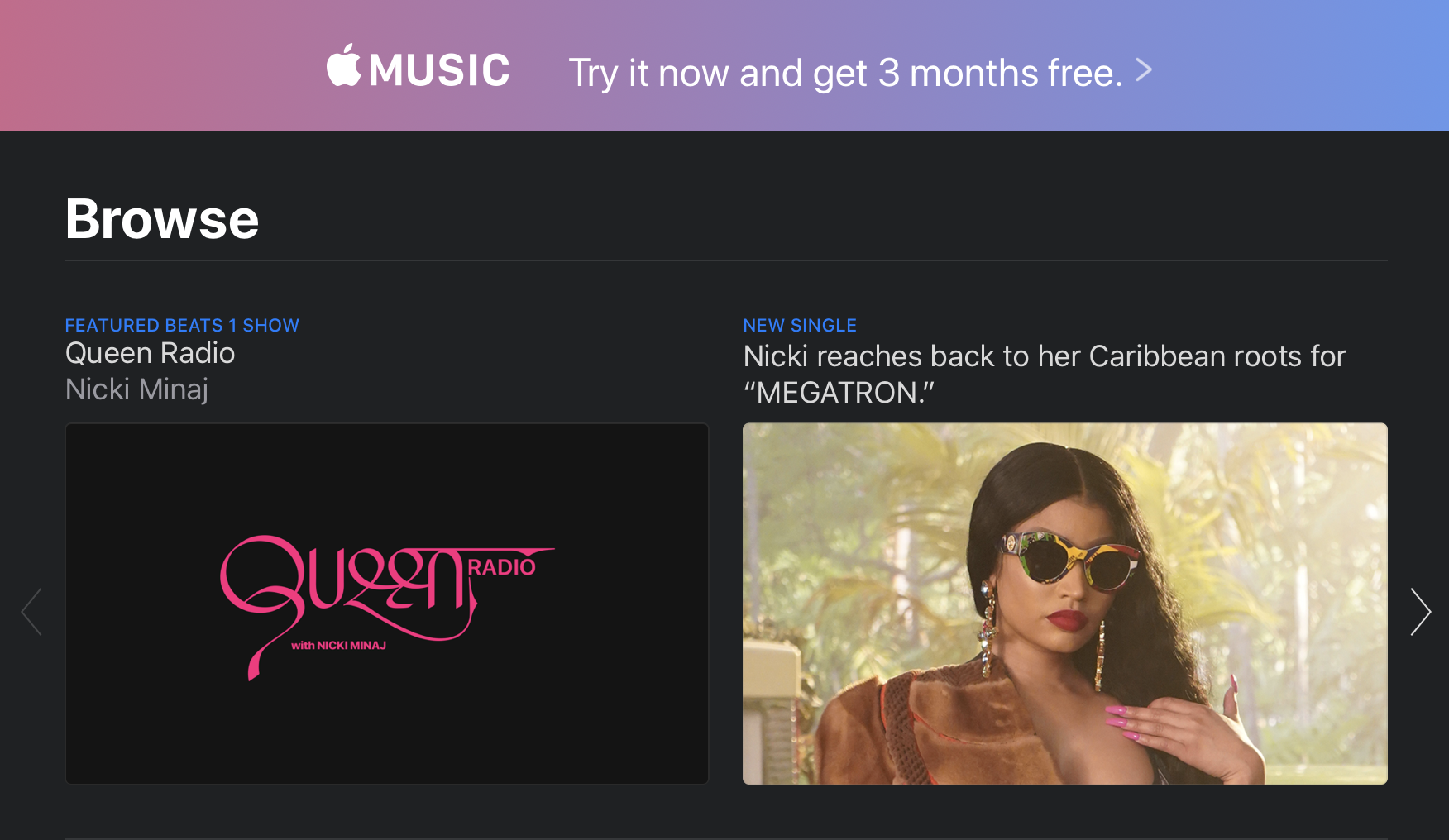
“For You” is now the centerpiece of the Apple Music experience. The homepage operates similarly to what you get with iTunes, offering up a combination of curated suggestions, recently played and recommendations from friends. The offering is more dynamic than before, tailoring more of the content to Apple Music listening.

If you’re like me (longtime Spotify user here), the app will prompt you to sign up for Apple’s service. This will no doubt serve as an annoyance for non-subscribers looking to listen to their own local music collection. You can largely avoid this by navigating directly to the Artists, Albums or Songs icons in the sidebar or by keeping your searches to “Your Library.”

Apple TV
The macOS version of the Apple TV app gets a major update following hot on the heels of its iOS counterpart. Apple’s very clearly priming the pump here to ready its billion-dollar premium streaming offering, which is due out at some point in the fall.

Like Apple Music, most of the big changes here are how the content, in preparation for what looks to be a pretty big paradigm shift for Apple heading into the end of the year. But while we’re all waiting for TV+ to drop, the company has brought one key addition to the app: Channels.

Announced at the company’s big TV event earlier this year, Channels integrates premium networks like HBO, Show and Start directly into the app. In addition to competing directly with Netflix, Hulu and the like, Apple is also hoping to replace your cable provider. And honestly, given the approval ratings of companies like Comcast and Time Warner these days, that might not ultimately be that much of a challenge. Of course, whether people look to Apple to take that step may depend on the success of TV+ as an effective Netflix replacement.

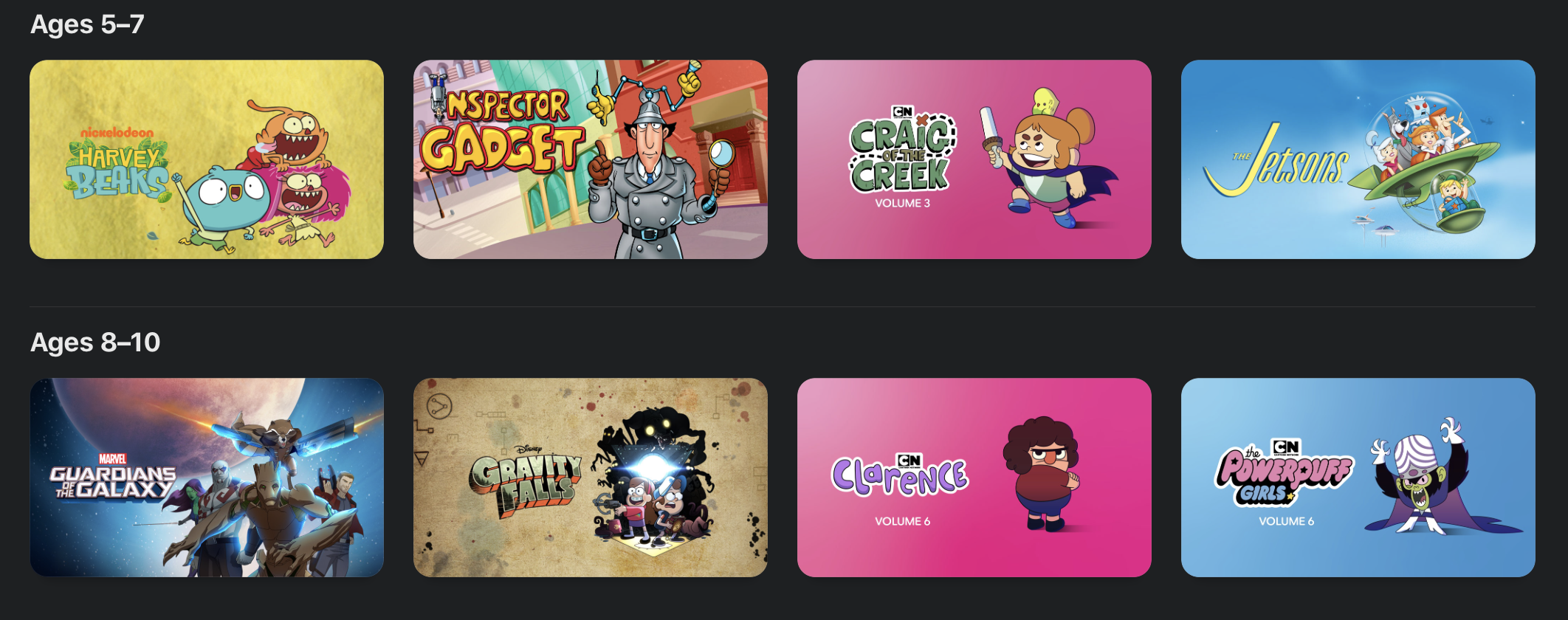
Up top, content is divided into four categories: Watch Now, Movies, TV Shows, Kids and Library. The format is similar to Apple Music, in that content discovery is pushed out from, with the library relegated to the last tab. For now, that means downloads and cable channels. In the future, that will no doubt mean a prompt up front to subscribe to Apple TV+. Likely the streaming service will have prominent placement among the Watch Now recommendation, along with its own tab up front.

Kids get their own tab this time out, as well. The tab curates family-friendly fare into a single location, including some familiar IP like Mickey Mouse and Charlie Brown, along with movies and TV broken down by age groups (2-4, 5-7 and 8-10).

Podcasts
Podcasts have long had their moment in the sun on iOS with their own standalone app. Now they’ve been liberated on the desktop. Like the new Music app, Podcasts isn’t much of a departure from iTunes. Now that there’s something in the neighborhood of 700,000 individual shows, however, it’s probably about time they’ve got their own thing. Likely the app will take on more of its own individual voice as it matures.

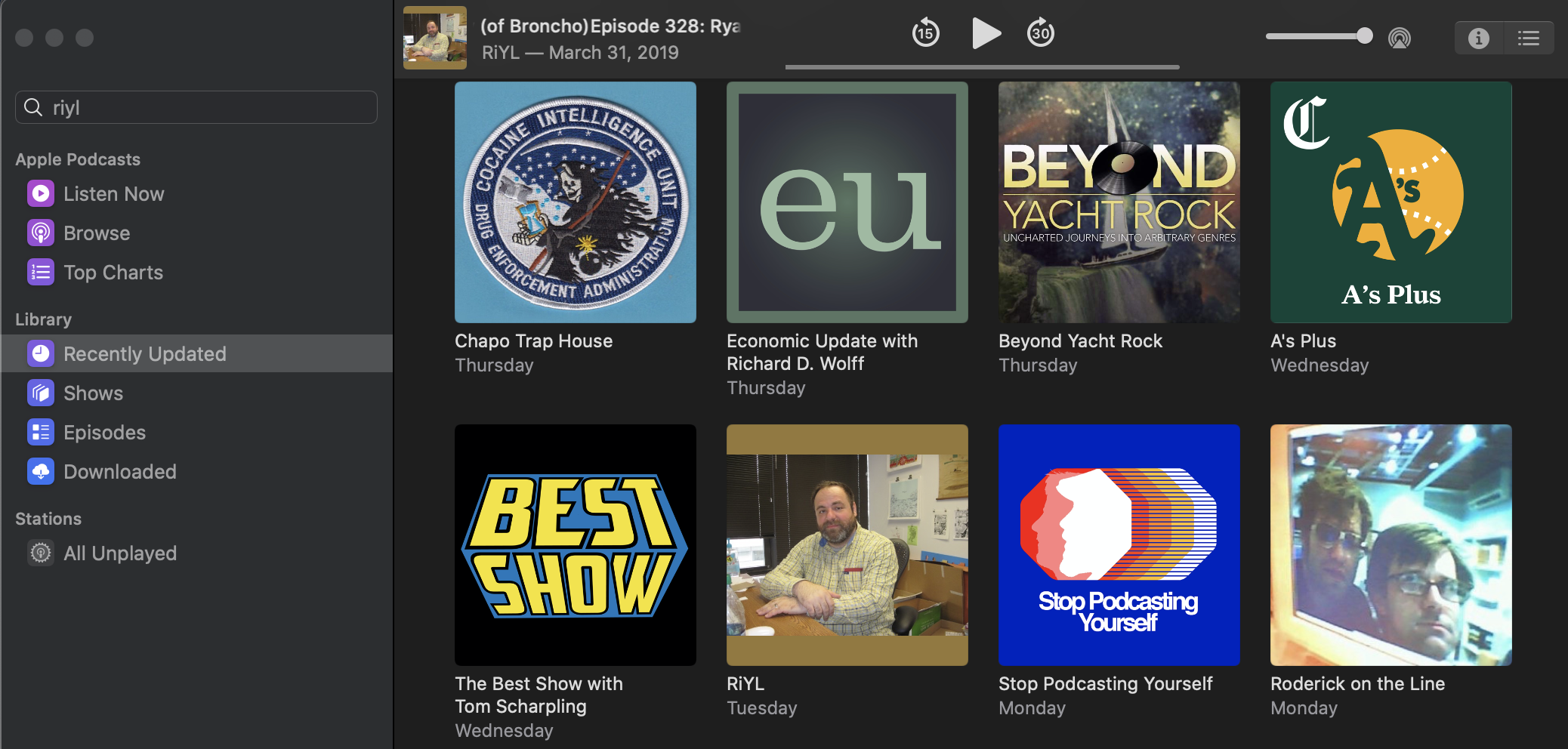
As with the mobile version, Listen Now is the primary pane, offering up shows in reverse chronological order. This change was met with mixed results when the company implemented it on iOS. As someone who prefers to listen to podcasts in the order they’re posted, I’m not a particularly big fan of the setup. I’ll be spending more time listening from the bottom up in the Downloaded section.

I do wish the company offered a little more control over how shows are served up. I’m sure I’m not the only one who’s extremely particular about these sorts of things.

Like all the the other content updates, discovery continues to be king. The company has invested a lot in editorial curation in recent years, knowing that recommendations are the best and easiest ways to get people to keep engaging. It’s always nice to see podcasts getting an increased focus from big companies — Apple in particular. After all, it was one of its product lines that gave the medium its name.

Sidebar syncing
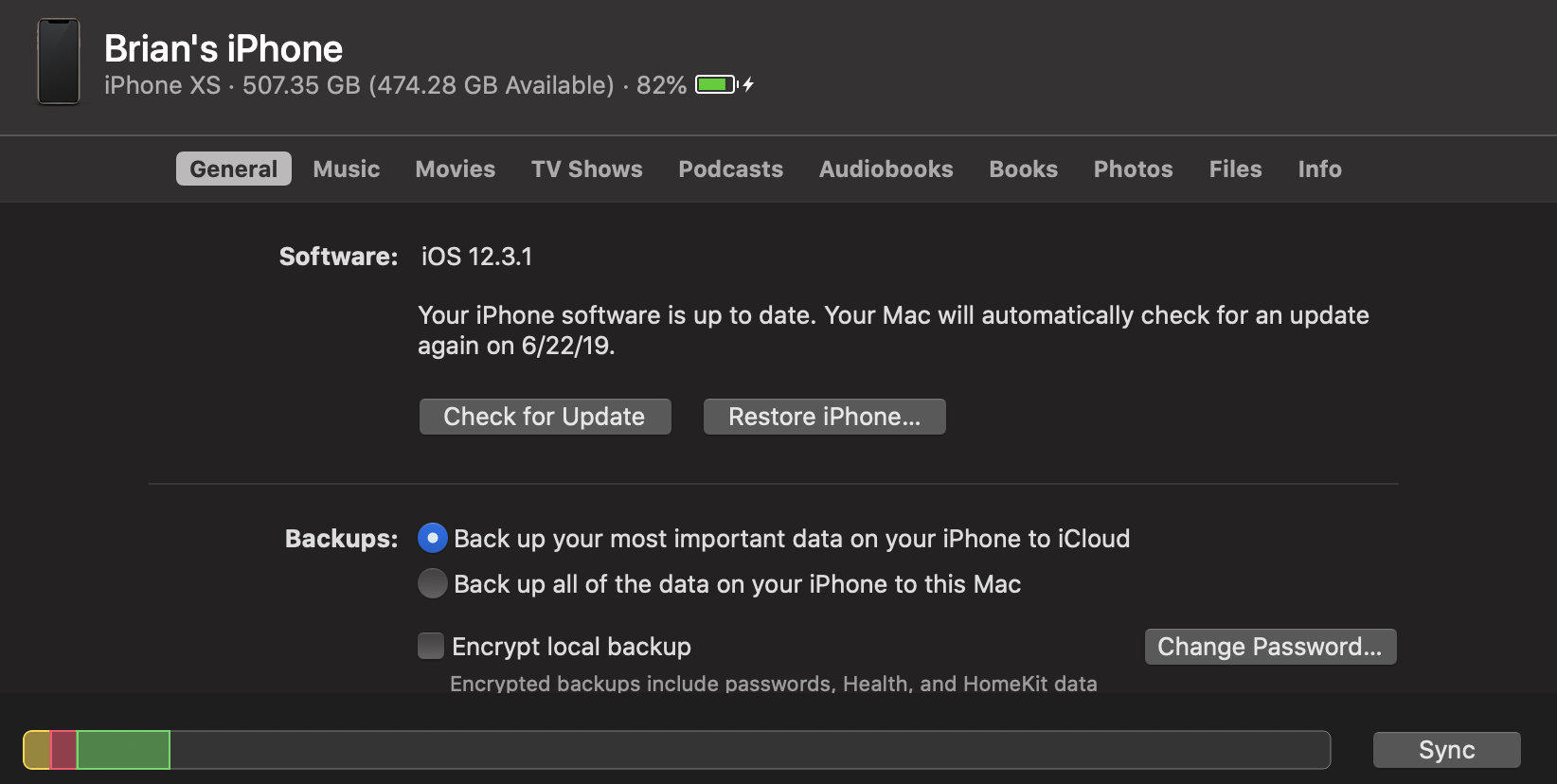
Here’s an interesting piece that didn’t get much love during the keynote earlier this month. Device media syncing has traditionally been the realm of iTunes. Now that the company has broken up and effectively sunset the app, it’s opted to integrate the feature directly into the finder.

Now when you plug in an iOS device, it will pop up in the Finder sidebar alongside other drives. From here, you can check to see if your software is up to date, restore the phone and manage backups. It also shows how much storage you’ve got left, battery charge and a bunch of other pertinent information.

A menu up top gives options for managing music, movies, TV shows, podcasts, audio books, books and photos. It’s a bit of an adjustment, managing all of that in the Finder, but it’s nice having it all up front in one location.

Photos

I’ll be honest, I don’t really use Photos very often on the desktop. In fact, I’ve apparently never actually used it on the work laptop I’ve used to install Catalina (caution, meet wind), requiring me to walk through the install process. That said, there are some nice additions borrowed from the iOS version that do make the macOS version more engaging.

Users can view photos by Days, Months or Years. If you have location on for shots, the software will present things contextually, so you can view anniversaries and the like. Apple presented a really compelling application onstage with the birthdays of a child throughout the years, allowing you to see all of that date in one place. It’s a bit like a more powerful version of Facebook’s anniversary feature.

Like the iOS version, Apple uses AI to identify the “best” shots, which are presented in a larger format, while less aesthetically pleasing ones (I regularly snap photos of my hotel room numbers, for example) are removed from scrolling. The app will also auto-play live photos as you scroll through, for a more dynamic experience.

Sidecar
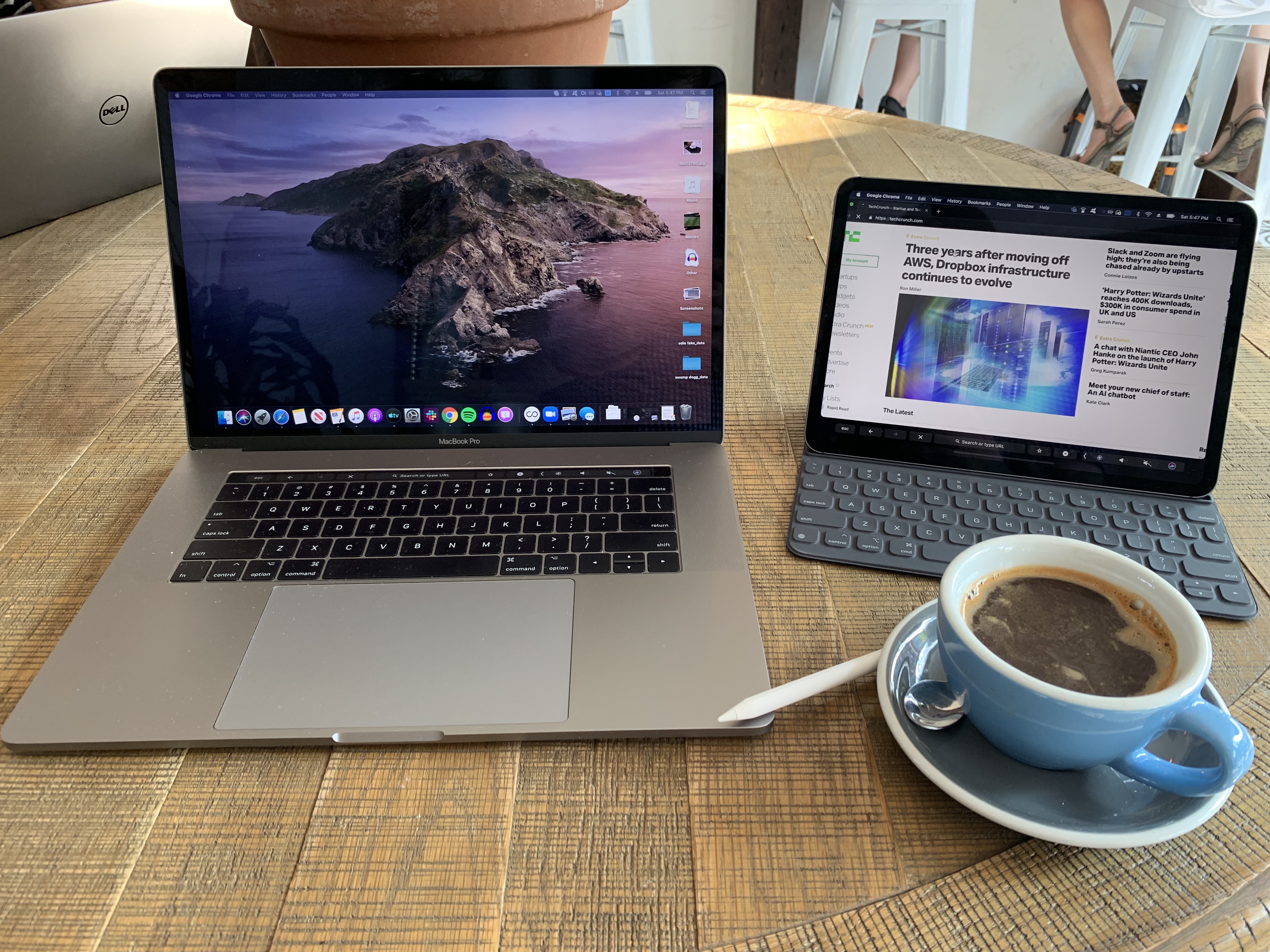
This is arguably the most eagerly awaited addition of the bunch — certainly it’s the one I’m most excited about. I’ve been a user of both Luna and Duet. Until a few months ago, I didn’t expect this would be the sort of thing Apple would bake directly into their ecosystem. But here we are, and I’m excited. Third-party solutions have relied on clever workarounds with varying effects.

With Sidecar, iPads double as a secondary display. Third-party solutions have been a godsend for me on the road. When I get to my destination, I break out the iPad, set it up on a stand and use is it for my Tweetdeck feed and online resources while writing stories in the main window.

All of this can be done with Sidecar’s extended desktop, but the feature takes things further, making this as close as we’ve come yet to an officially sanctioned touchscreen Mac, with touchscreen Apple Pencil input. The latter works by mirroring the display on the iPad. The effect is something like using a Wacom tablet to draw on the content housed on your primary display, while the Mac does all the heavy computational lifting.

That last part is particularly important, given who Apple is going after with the feature. Sure it’s handy among frequent travelers, but the real target here is creative professionals, a category that Apple once dominated outright, but for whom it has begun to experience increasing competition through the likes of Microsoft with its Surface line.

The feature is compatible with pro apps with stylus support, from Photoshop to Maya. The MacBook Touch Bar, meanwhile, lives at the bottom of the iPad display. The secondary display features a wide range of touch gestures, as well, including:

  • Cut: Double three-finger swipe up
  • Copy: Three-finger swipe up
  • Paste: Three-finger swipe down
  • Undo: Three-finger swipe left
  • Redo: Three-finger swipe right

Best of all, it works both wired and unwired, though the former is recommended in situations where there’s a lot of wireless noise around you. Per Apple, the system should be able to connect up to 10 meters away, using a combination of Bluetooth and Wi-Fi to connect and send signals with minimal lag.

I’ve taken to using the feature to spread out a bit in my local coffee shop (yes, I’m that guy, now) and have been really impressed by the responsiveness. There are a few ticks here and there that I’d change (for example, adjusting the brightness on the iPad’s touchbar just impacts the primary solution), but

Accessibility

It’s always refreshing to see companies add features make experiences more accessible for people with disabilities. Voice Control is the big one here. I’m not in a position that requires access to such features right now in my life, but I’ve been playing around with the feature using some of the actions highlighted in the video accompanying the announcement at WWDC.

Understandably, it takes a lot of getting used to, including learning the limitations of what the system is capable of. But playing around with it for a bit, it’s easy to see how this could be a game changer for users who are unable to access traditional input methods.
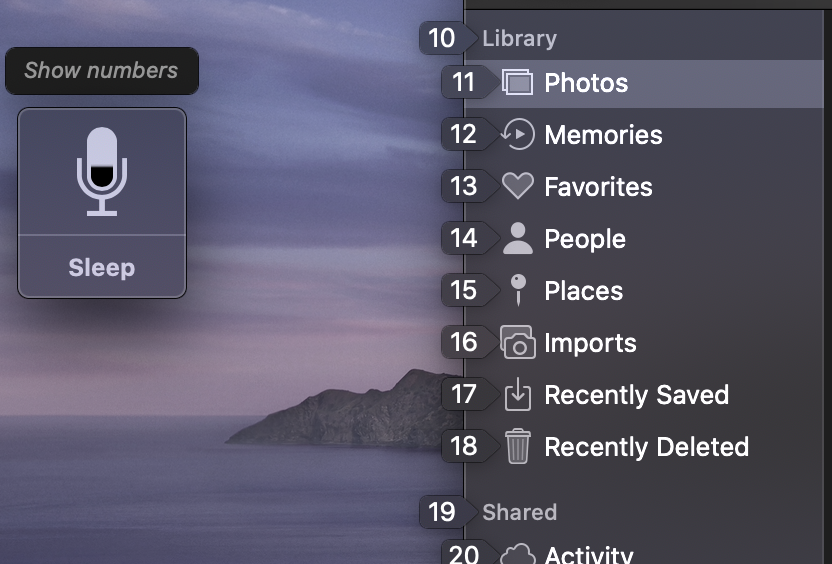
For example, I started with “Open Messages.” Then, “Show Numbers,” which overlays numbers on the variety of different actions. That means instead of saying “compose message” like I might with Siri, I say “15” and then begin inputting text on that line. It’s still early days for the feature, of course, and it may have limited application with some third-party apps, but I’m still glad to see Apple making a point of including it here.

Look for some more hands-on write-ups with various new features in the coming months. The public beta of Catalina drops today. The final version is set for release some time this fall.


Google brings together BigQuery and Kaggle in new integration

Google bought Kaggle in 2017 to provide a data science community for its big data processing tools on Google Cloud. Today, the company announced a new direct integration between Kaggle and BigQuery, Google’s cloud data warehouse.

More specifically, data scientists can build a model in a Kaggle Jupyter Notebook, known as Kaggle Kernels in the community. You can then link directly to BigQuery through the tool’s API, making it much simpler to query against the data in the data warehouse using SQL, a language data scientists tend to be very familiar with.

The benefit of this approach, according to Google, is that you don’t have to actually move or download the data to query it or perform machine learning on it. “Once your Google Cloud account is linked to a Kernels notebook or script, you can compose queries directly in the notebook using the BigQuery API Client library, run it against BigQuery, and do almost any kind of analysis from there with the data,” Google wrote in a blog post introducing the integration.

Data scientists, who have a particular way of working, get to work in a familiar fashion and it reduces the friction involved in building a model and conducting machine learning against it. Instead of moving back and forth between tools, you can do all your work in a smoother, more integrated way and it should save time and effort in the long run.

What’s more, because Kaggle is a public community of data scientists, you can share Kernels should you choose to do so. Conversely, you can search the public repository and use existing Kernels as a starting point or as a reference to experiment with different types of data sets.

The Kaggle community also provides a means to discuss issues with other data scientists in an open way. The community has 3 million users and there are currently 200,000 Kernels available to explore in the public repository.