I Had Cancer, A Social Network For Fighters, Survivors And Supporters (Private Beta Invites)

Social networks for cancer patients and survivors are not new. There’s the KnowCancer Community and Planet Cancer for younger survivors, for instance. Now there is I Had Cancer, a new resource for cancer patients, survivors, and friends and family who are supporters. The site just launched in private beta. If you have cancer or know somebody who does, we have 250 invites that you can sign up for on the beta site using the code: C55484. (People can also sign up for the beta on the regular site and will be notified when that launches).

I Had Cancer was founded by a team out of Squeaky Wheel Media in New York City: Mailet Lopez, Robert Boyle (who also created local Q&A app Crowdbeacon), and Anthony Del Monte (president and founder of Sqweaky Wheel). Lopez is a survivor of breast cancer, and she started out wanting to create a blog for other cancer survivors called I Had Cancer. But that evolved into a full-fledged community support site where survivors and family members can share their cancer stories and help others who are going through the same experience.

The site allows members to create profiles, tell their stories, and identify what type of cancer they battled against. You can find other members by location, cancer type, year diagnosed, age, or gender. The site also features discussion boards with questions and answers. Those are the public-facing parts of the site. Once you find someone with a similar experience or type of cancer, you can connect invite them to your Circle, and if they agree, you both can share more private news and messages. It is a mutual follow like Facebook, not a one-way follow like Google+ (Although it otherwise shares a similar Circles concept).

The startup has raised $750,000 in an angel round. You can learn more by watching these videos here and here.


The Beer Froster: It’s Exactly What You Think It Is

The Beer Froster is one of those devices that’s pretty easy to review. Given the name, the expectation is that it will get your brewskis very, very cold — around 24 degrees Fahrenheit — and keep them there until you’re ready to drink them. After extensive testing, I can report that it works like a charm.

Yes, there’s that old trick of throwing a six pack in your freezer for 30 minutes to chill it down quickly. But a typical home freezer gets down to zero degrees, and if you leave beer in a freezer for too long, your cans or bottles will crack or explode. And actually, the fastest way to chill any bottle or can is to submerge it in an ice bath, but that’s a temporary solution.

With this thing, just fill it and forget it. The oat sodas will stay primed in a perpetual almost-freezing state for days, weeks or months.

The Beer Froster is manufactured by Summit Appliances, a company that makes industrial fridges and freezers, like the kind you’d find holding Fanta or Ben & Jerry’s at your local convenience store. From the front, the fridge looks like your basic run-of-the-mill 1.6-cubic-foot dorm fridge (bigger sizes are available). But the cooling system inside is regulated by an extremely stable and accurate thermostat. A small LED display on the top shows the current temperature.

Ours arrived set to a default temperature of 24 degrees Fahrenheit. According to the manufacturer, this is the perfect setting for most beers. There’s just enough alcohol in beer to keep it from freezing at this temperature, but if you throw higher-alcohol barleywines or strong Belgian ales inside, you could go one notch colder (the lowest it will go is 23).

Adjustments are a trial-and-error affair. Low-alcohol beers and unfiltered microbrews are harder to get super-cold — pushing the temperature too far south will crack the bottles and rupture the cans, resulting in an icy, sticky, frothy and dangerously sharp mess.

I put a couple of bottles of Bear Republic IPA inside — about 7 percent alcohol — and set the temperature at 30 degrees. I placed them in a lidless Tupperware container just in case of an accidental explosion. I was able to nudge the thermostat down to 25 degrees without any breaches. And yes, subfreezing IPA tastes great. The maltiness was mellowed and the crisp snap of the hops was intensified.

Where the Beer Froster really shines is with watery domestics and imports — Bud, Tecate, Coors, Corona, Schlitz and the almighty Pabst Blue Ribbon — which taste markedly better at subfreezing temperatures. Some beers even get a pleasant layer of slush on top.

Use cans instead of bottles for the best results. The Beer Froster will get bottles just as cold, but cans don’t break as easily, and they have less mass, so they will get colder faster. Also, you can fit more cans inside the compact fridge. Put in just a few cans and the chill is noticeable after 10 or 15 minutes, and perfect in under 90 minutes. Pile a twelver in there and you’re best letting them chill for a few hours.

You’ve already got a fridge for your wine. Keeping those bottles at the perfect temperature and humidity is of utmost importance if you want to bring out those delicate hints of snozzberries. So why not have a fridge just for your beer, too?

WIRED Ultra-cold beer on demand. There really isn’t much more to say about this. Oh, there’s also a locking latch to keep out children and nosy roommates. Teetotalers take note, it worked fine with the Dr Pepper cans we threw in.

TIRED Finding the right temperature for your favorite brand requires trial and error — watch for explosions. Sticker on the front is ugly, but you can order one without it.

Photo: Jim Merithew/Wired. Thanks to Reggie Watts for the headline.

Lion Is Smooth, But Tries Too Hard to Be iOS

Mac OS X Lion is rich with visual enhancements, such as the new Launchpad feature for launching apps.

My head started hurting after the first hour of using Mac OS X Lion. Two words: inverted scrolling.

That’s correct — Lion’s default scrolling behavior is to scroll down when you swipe up on your multitouch mouse, and to scroll up when you swipe down, just like you would on an iPad.

This modification in scrolling clearly illustrates Apple’s ambition with Mac OS X Lion, which was to make the Mac operating system more like the mega-popular iOS software powering not just the iPad, but also the iPhone and the iPod Touch.

Apple CEO Steve Jobs previously said the company was learning lessons from the iPad and rolling them into its desktop operating system. The company envisions a future where PCs become more and more like mobile products, as they continue to get thinner, lighter, more battery-efficient and more dependent on online storage. Apple’s Lion, MacBook Air and the upcoming iCloud online storage service symbolize the gradual convergence between PCs and tablets.

And while that all sounds great, some of Lion’s iOS-like features scale up very well, while others behave very poorly in a desktop environment.

First, let me finish my rant about inverted scrolling. I wanted very badly to adapt to Lion’s new so-called “natural scrolling” behavior, but I had to shut it off after two days because it just felt too awkward.

“I’m trying to use a computer, not play freakin’ Golden Eye,” I complained to a friend.

Inverted scrolling makes sense on an iPad, where you swipe the screen in one direction and it moves in the opposite direction, like a world globe does in real life when you spin it with your fingers. But on a Mac, I believe it’s the disconnect between peripheral and screen that makes it less intimate than a touchscreen device, and therefore uncomfortable to replace traditional mouse gestures with the real-world swipe.

Same goes for side swipes, which control Spaces, Apple’s screen-management tool that gives you multiple desktop screens to work with. The default behavior of side-swiping is: Take two fingers and swipe to the right, and the screen moves toward the left so you can view your Dashboard. If you happen to have an app open in full-screen mode, you can swipe to the left, which moves you to a Space to your right, to look just at that full-screen app. Again, this swiping behavior feels unnatural on a Mac, even though it makes perfect sense on an iPad.

All that said, it’s easy to disable inverted scrolling in the system preferences. So this isn’t a major issue, but merely an example of a bigger problem in Lion: awkward usability in some of the operating system’s new interface tweaks.

I particularly didn’t like Launchpad, another iPad-like element. Hit the Launchpad icon and boom — you’ve got a large grid of beautiful, huge icons, and you can select your app there. It looks almost exactly the same as the iPad’s springboard screen.

Here’s where a lot of Mac-hating trolls will swear that Apple chooses form over function: The Launchpad just doesn’t work well with a mouse and a desktop device. Imagine how exhausted I got using Launchpad on my 27-inch iMac. My eyes had to dart across the entire screen, up and down and left to right, just to find the app I wanted to launch. And then I’d have to mouse over to click on the app.

By contrast, the experience on an iPad of finding an app and launching it with a tap is a lot quicker and more pleasant (though a 27-inch touchscreen would probably present issues as well). Ultimately, on a Mac, this experience felt tacky and inefficient, and I reverted to using the older view of my Applications folder as a list.

EXO Running Gear Makes You Perform (and Look) Like a Superhero

Performance-enhancing products are sticky things. When you ingest or inject them, you get ostracized and treated like a criminal. But when they come in the form of an external suit of armor, people call you Iron Man and make a comic book and a movie about you.

While the look of this stuff is more “Spider-Man” than “Iron Man”, Salomon’s EXO Sensifit compression running gear is designed to enhance your performance while pounding the trails. The outfit has an external layer of rubberized mesh, which staves off muscle fatigue and speeds up recovery by structurally supporting and enhancing blood flow to your muscles. You can go longer and recharge faster.

Consisting of shorts, calf sleeves, and shirts that put the squeeze on your body in key areas, the EXO Sensifit gear is sort of like a supportive, skin-tight exoskeleton. The company makes gear for both men and women. Salomon also makes a well-fitting hydration vest that carries water and nutrition. Think of it as a gas tank. Jet pack and wrist lasers sold separately.

EXO S-Lab II Shorts

The support webbing of the EXO shorts ($100) forms a cage around the thighs, thus minimizing vibration during footstrike impact. This made a huge difference for me personally, since as a “meaty” runner, thigh fatigue is an issue for me on long runs. After about ten miles, my quads usually feel like they’re sloughing around my femurs — unpleasant, to say the least. The extra support of the webbing provided a comforting squeeze, keeping my quads in place and staving off fatigue on brutal uphill trail runs as well as long, flatter runs.

There’s an internal brief to keep your goodies in place, and the waistband is lined by external gel pockets. One of the more unique features is the way the shorts go up over your stomach, which Salomon says provides abdominal support while you run. Once I got over the corset-like feel, it actually did feel pretty good. I just had to make sure not to take my shirt off during the run.

There’s also a version with regular shorts overlying the tights (the XR Short, $80) for runners who don’t want to show off their junk.

WIRED External support keeps quads in place. Elastic storage pockets. Less spandexy option available for more modest runners.

TIRED Nipple-high shorts look bizarre if you run shirtless.

$100

Rating: 8 out of 10


EXO IV Calf

They’re not hydraulic boosters, but these calf sleeves ($55) did seem to give my calves a boost on hilly runs. Essentially reinforced tube socks without feet, the EXO IV calf sleeves provide a tight squeeze on the upper and lower calves. The squeeze is firm, but not overbearing, and the way my calves felt while charging up hills definitely raised my eyebrows. Usually my calves and quads are the first things to cramp up after ten miles or so, but the sleeves provided enough support to keep my calves feeling fresh after tough singletrack runs.

The support felt so good, I kept them on after runs, too.

The rubber mesh made the calf sleeves a bit tough to put on, though, and it’s starting to peel up on one of the sleeves. It may not be an issue, but it does raise some concerns about durability.

WIRED Great support. Reflective lining adds visibility at night. Also comes in a longer size for taller folks.

TIRED Limited stretch makes putting them on require Zen-like patience. Potential durability issue.

$55

Rating: 7 out of 10


EXO S-Lab Short Sleeve Zip Tech Tee

The Tech Tee ($120) tops off the bionic man suit with compression focused more on postural support than holding your muscles together. The webbing wraps around the shoulders, arms, and underneath the chest, encouraging a straighter back and keeping a runner breathing easy. You do stand a bit taller when wearing this shirt, and during trail runs, I felt like the shirt kept nudging me into better posture whenever I started to slouch.

It’s got very lightweight, breathable fabric, which kept me from overheating on the trail. But therein lies its weakness — the lightweight shirt fabric started showing some abrasions after the first few runs, and subsequent runs led to more scratches. It was the first chink I found in this suit of armor.

WIRED Notable posture support. Great breathability for hotter weather. Makes you look like Spider-Man.

TIRED Makes you look like Spider-Man. Doesn’t hold up well to running through brush.

$120

Rating: 6 out of 10


XT Advanced Skin 5 S-Lab Set

What good is a bionic man without a battery pack? On long summer runs, many trail runners find it necessary to pack their own water and food. But the way a water-filled pack tends to bounce on a run can be enough to make dehydration seem like a good idea.

On trail runs, Salomon’s hydration and nutrition pack ($180) cut bouncing to a bare minimum with a precise fit and a great strapping system. The pack’s elastic sternum straps are firm enough to provide a snug fit, but stretchy enough to expand as I breathed, and load balancers on the tops of the shoulder straps pull the pack closer to your back for a more secure, comfortable fit. The shoulder straps are meshy and breathable, and the material was so soft that I was able to go shirtless while wearing the pack without any irritation.

I was a big fan of its storage options, too. While the main pocket only had enough room to stow a jacket or a shirt, there are five pockets for you to stash food, sunglasses, and gloves, all of which are in places that you can reach mid-stride. There are a lot of packs out there, some with more storage space, but none that allow you so much access without having to stop.

Heck, it’s even got a dedicated cellphone pocket in front to keep you wired during your run.

WIRED Fits like an extension of your body. Makes your gear accessible during a run. Keeps sloshing to a minimum.

TIRED Hard to spend $180 on something that weighs less than 2 pounds. Takes five minutes to say its name.

$180

Rating: 9 out of 10


Photo by Jon Snyder/Wired

Heavy Duty: Toshiba Thrive Tablet Reviewed

We’ve seen a flood of Android tablets this year, most of them largely the same.

They run the same operating system, and they’re pretty close when it comes to size, weight, processing power and price. So when all the big stuff is baked, it’s the little things that make a tablet stand out.

Toshiba’s Thrive tablet, a 10.1-inch slate that starts at $430 for the 8GB, Wi-Fi only model, is a stand-out, alright — it’s the biggest and heaviest of the tablets from the major manufacturers.

Being the fattest kid in class sounds like a silly way to differentiate. But the extra bulk allows for some attractive features absent in other tablets.

At 1.66 pounds, it’s much heftier than the Samsung Galaxy Tab 10.1 (1.24 pounds) and the T-Mobile G-Slate (1.38 pounds) and just a hair heavier than the HP TouchPad and the Motorola Xoom. The Thrive is also 0.63 inches thick, where almost everyone else comes in at well under half an inch.

Being the fattest kid in class sounds like a silly way to differentiate. But the extra bulk allows for some attractive features absent in other tablets.

First, the battery is user-replaceable. You can pry off the plastic back using only your fingernails and swap out the battery, which looks like a flat, 5-inch square. Toshiba sells spare batteries for $80 each. The Thrive is efficient, lasting about eight hours between charges in my tests, so you’ll really only need to swap batteries after a few years of use, or if you’re away from a power socket for an entire weekend.

And if you don’t like the black plastic rear shell — or if you crack it while taking it on and off, which seems highly unlikely given its flexibility — that’s replaceable, too. Toshiba sells a variety of colored plastic backs for $20 each.

Finally, the Thrive boasts an array of ports closer to what you’d see on a laptop than a tablet. Behind a rubber panel on the bottom edge are an HDMI port, a full-size USB port and a mini USB port. Just around the corner from those sits an SD card slot.

Using these ports, you can attach all sorts of external storage to augment the tablet’s on-board memory. The Thrive ships with up to 32GB on-board, but the cheapest model only has 8GB. With such scant storage, all the expansion options are a huge plus.

I loaded some movies and MP3s onto a USB stick and an external Seagate drive, and the Thrive could play back the media stored on either. I also fed it some SD cards, which it handled with equal success.

The tablet ships with Android 3.1 Honeycomb, which has limited ability to browse files on external storage devices. To get around this, the Thrive ships with its own File Manager app that lets you browse your USB sticks and SD cards, and to copy files to and from the tablet. The File Manager is far from elegant — it doesn’t do drag and drop, and copying and pasting files requires more tapping and OK-ing than is necessary — but it works.

The USB port can also be used to attach full-sized keyboards and mice. That’s a lot of added versatility, and should please the curmudgeons who complain about touchscreen keyboards.

Granted, the ports, the big screen and the removable back make the Thrive heavier, but you shouldn’t worry too much about that. The difference between the Thrive and the iPad 2 is only about one third of one pound. It’s still comfortable enough to hold with one hand or rest on your lap.

If there’s a problem with the tablet, its the less-than-stellar performance when scrolling in apps and playing games. This isn’t just an issue with Toshiba’s tablet — I have yet to use an Android tablet with graphics and scrolling that are as smooth as I’d like. I played some rounds of Plants vs Zombies, a Flash game, and it was playable, but not nearly as smooth as it is on the desktop. Also, playing Angry Birds was jittery, and scrolling and zooming aren’t as smooth as they should be in the browser, in Twitter, in Google Maps, and in other apps.

Video playback is, for the most part, satisfactory. Videos on YouTube and Vimeo played perfectly in both the Flash and HTML5 players, and even those videos in HD. But when I loaded up some MP4 files I ripped at 720p, the playback was a little jerky.

The Thrive’s screen is plenty bright and has a 1280×800 resolution. It’s not the best I’ve seen (the Galaxy Tab has best screen of the Androids) but it’s good enough. The stereo speakers along the bottom edge are feeble. However, you can hook it up to a real home theater using the HDMI port. You’ll need your own HDMI cable, since Toshiba doesn’t include one (bummer). The Thrive’s screen uses a 16:10 aspect ratio, which is larger than a standard HDTV at 16:9. Rather than present the entire image in a letterbox when you throw it to the big screen, the tablet crops it slightly on the sides.

The Thrive is packing a 1GHz Nvidia Tegra 2 dual-core processor and 1GB of RAM, which is on par with other tablets and provides enough juice for most games and videos. But the evidence suggests the software and hardware we’ve seen so far on Android tablets are still not fully developed enough to drive a pure home media convergence device in a way that’s as satisfying as what Apple, still the team to beat, has achieved. The Android desktop has come a long way, but scrolling in the browser and in apps, animations in games, and video playback just aren’t as elegant on Honeycomb as they are on iOS.

But if you’re eyeing the Thrive, chances are you’re attracted by the connectivity options, the ability to run Flash, the familiarity of Android, and the relative openness of the app ecosystem. Those certainly are endearing features, and for consumers who crave versatility, they trump the tablet’s annoyances.

WIRED A solid Honeycomb tablet with extra sauce on the side. The back pops off, so you can replace the battery and add a dash of color. Extra ports for storage, connectivity and input devices. Not tied to a mobile carrier.

TIRED Did we mention its bigger and heavier than the competition? Video, scrolling and animations aren’t as smooth as they should be. The 5-megapixel camera on the back shoots photos and videos, but it excels at neither. Toshiba’s pre-installed e-book storefront and RSS app are jokes, just download your own. Doesn’t do Netflix.

Update, July 19, 9:30am: Gadget Lab is reporting that some Thrive users are having difficulty waking the tablet up from sleep mode. I did not experience this problem. A software update for Toshiba arrived during my testing period. I ran the update, but it made no noticeable difference in the tablet’s operation.

What Are You Trying To Say YouTube Ad?!?

I keep trying to watch this infamous video of Wendi Murdoch trying to defend her mogul husband Rupert Murdoch from a protestor’s pie attack at his testimony in front of British parliament yesterday morning yet I keep getting distracted by this pesky YouTube ad (above).

Mind you I know nothing about  how YouTube ads are targeted and even less about how exactly tagging these things works so I’m just hoping this specific juxtaposition is some kind of algorithm accident. Because, if otherwise, damn.


IDG Ventures Pumps $3 Million Into Indian Mobile Ad Network Vserv

IDG Ventures India has invested $3 million in Vserv, which operates a mobile in-app advertising network in India. The company has developed an “App Ad-Wrapper” solution for J2ME Apps and is now extending this solution to Android apps.

It essentially offers mobile app developers a solution to potentially increase ad earnings with in-app and WAP advertising campaigns.

Vserv says it focused squarely on emerging markets, and that it has delivered ads in over 200 countries to date.


Google+ Now The Top Free App In The Apple App Store

After less than 24 hours of being live, the Google+ iPhone app has hit the number one free spot in the Apple app store, beating out “Draw ‘n’ Go: Awesomeness!” for the top slot.

This is quite impressive considering that the app, which started out buggy and continued to be buggy after the “fastest update to an iPhone app” Erick has ever seen, is currently only pertinent to at the most an estimated 18 million people in the field test AND that Google has its own mobile operating system to focus on, Android.

What makes this milestone important is the fact that Google+ competitor Facebook currently has the top downloaded free iOS app of all time  — So Google+ is in good company. Of course Google does have a lot of marketing leverage for whatever it needs to push, namely its highly trafficked homepage.

You could put anything on there (Paul Carr’s book for example) and it would do well. But, at an average of three stars currently in its pretty substandard version, I’m pretty excited to see what the app will rate/rank when it actually works.

If I were Facebook my ears would be perking up right about now. Just sayin.’


Daily Deal Stats: The Big Players Still Control The Game, Mobile Is Up (Oh, And Animal Names Are In)

Today, at BIA/Kelsey’s “Deals 3D” conference in San Francisco, Dan Visnick, VP of Marketing at The Dealmap, shared some insights into the current landscape of daily deals. Dealmap, a repository of daily deals collected from over 350 sources, allows users to view local deals in map form, along with reviews and pertinent information — on the Web and on mobile. Both through its API and its DealExchange service, which allows businesses to easily distribute deals across various channels, The Dealmap is enabling new entrants to the space to quickly populate their applications with a bulk of deals.

Through the data the company has been collecting via DealExchange and beyond, Visnick said that it has become very clear that the industry is still very top heavy, as 80 percent of deals are offered by as few as 20 sources. Inventory, then, is still largely controlled by the top deal players, with nearly 70 percent of inventory controlled by 10 sources, and 40 percent controlled by the top two. I assume, though Visnick did not say specifically, that those two sites are none other than Groupon and Living Social.

Among the top sites, the average inventory for each market, Visnick said, is 6.25 per day — compared to the median inventory per day, which is 1.29. Thus, it seems that discrepancy in inventory between the bigs and the startups is still fairly significant, with half of the 350-plus deals sites only offering 1 to 2 deals per day.

And when it comes to national distribution, the majority of daily deals sites are in less than 10 big markets. Just under 20 percent of daily deals players are in a single market, while 69 percent of sites are in between 2 and 9 markets, meaning that nearly 90 percent of sites are in less than 10 markets. Of course, as Laura Hazard Owen of paidContent point out, this will likely change in the near future as the web giants like Facebook (which just partnered with AmEx to create a daily deals platform) and Google — those with established national networks — roll out their own versions.

In other notable trends, Visnick said that mobile is becoming a much bigger factor in the space, sneaking up to 32 percent of the deal space, compared to the web at 61 percent, and email at 2 percent. The mobile deals space has really started to heat up of late, with AT&T jumping into the daily deal game yesterday, offering daily deals through YP.com. Foursquare also announced last week that it would be distributing AT&T’s Deal of The Day to its 10 million+ users.

Also worth mentioning: BI noted that venture capital firms have invested $1.6 billion in capital in daily deals sites thus far in 2011. While the number of daily deals sites has quintupled in the last year, only 22 companies have received funding in the last year. And, of the 270-some companies tracked by Daily Deal Media, only 32 have received funding from “the investor community”. Again, the top ten deals sites are the ones growing fat on VC dollars (Groupon, Living Social), while the rest are fighting for table scraps.

Yet, the most interesting trend of all cited by Visnick would have to be that 5 percent of all daily deals sites are now using some form of animal name. DealChicken, Rhino Deals, TownHog, Deal Stork, Rabbit Pack, and Rumba Fish are among the animal-related sites that come to mind. It seems that there’s just something about an animal that says “discount”. I’ll leave it up to you, reader, to determine the significance — if any — of this juicy trend.


Google+ Now Lets You Upload Address Books From Outlook, Your Mac, And More

Googler Paul Linder just pointed out that there’s now an option in Google+ for users to upload address books in order to find and invite more friends to join the company’s brand new social networking service.

As Vic Gundotra added shortly thereafter, this is a fairly big deal.

We heard the address book importing feature was coming, but it looks like it was just added a few hours ago. Look for a link that says “Upload address book” (because why complicate things) here.

To be clear, this is different from the one-click contact importer for Windows Live Hotmail and Yahoo users. Also, there appear to be some bugs, but I’ve noticed that the Google+ team is following all feedback closely and aims to quickly finetune the new feature.

And for the record: no, it won’t work for importing your Facebook contacts. But …

Here’s Linder’s post, with instructions (hat tip to Michel):

Have an Address Book? Want to invite some friends? We have the solution for you. You can now upload contacts on the Find and Invite page by clicking on the Upload address book button :

https://plus.google.com/circles/find

You’ll need an address book file on your computer. Get one by performing any of the following actions:

Outlook
Select File > Import/Export > Export from the main menu
Choose Comma Separated Values (Windows) > Select “Contacts” > Save exported file

Outlook Express
Select File > Export > Address Book from the main menu.
Select Text File (Comma Separated Values).
Click Export.

Your Other Gmail account
See https://mail.google.com/support/bin/answer.py?answer=24911

Apple Address Book
Open the Address Book application on your Mac. Click on the ‘all group’ of your contacts. Select File > Export Vcards.

Thunderbird
Click Addressbook, Select Personal Address Book. Click Tools, then Export. Save as *.csv.

Others
Most other contact managers or email systems support contact export in VCard/VCF/CSV format. Consult your local help system to find out how. Leave a comment if you want to share you exporting experience.

– If you have problems please feel free to click on the ‘Send Feedback’ link in the lower right.

Happy Inviting!

Also, almost forgot… for folks that use LinkedIn:
http://www.linkedin.com/addressBookExport


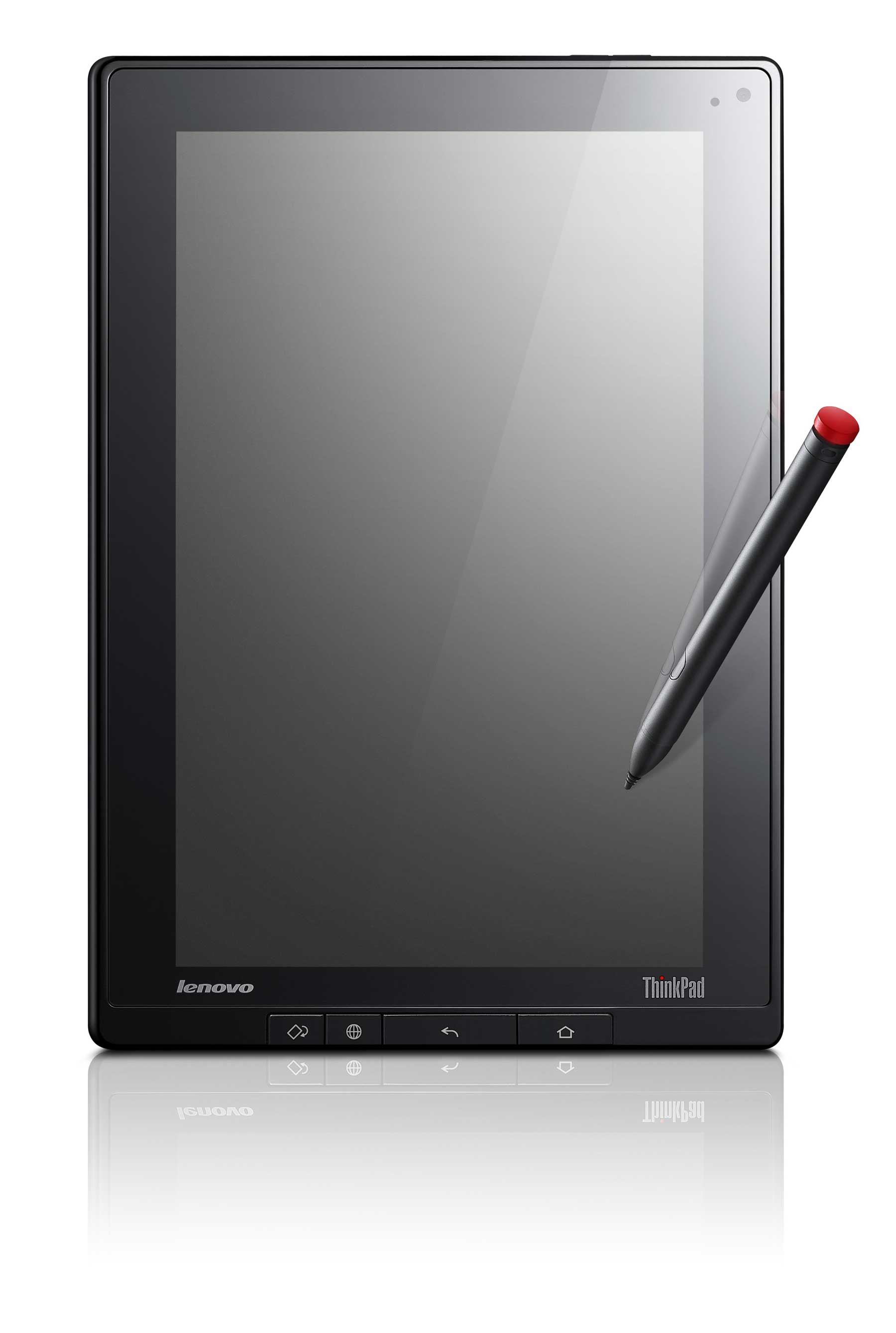
Lenovo Outs The ThinkPad Tablet, An Android Tablet You Might Actually Want

Last week I tuned into a press preview of today’s Lenovo announcement. It was an online presentation so, you know, I went on and did other things while half listening. I was nearly ready to close the tab after listening to 20 minutes of some product manager explaining every little detail about the consumer-oriented IdeaPad K1 Honeycomb tablet. All he really had to say was, “We made a Honeycomb tablet. It’s the same as the rest besides it ships with Netflix. It has 32GB of storage and ships in August for $499.” That’s all I need to report as well.

But then the presentation went to the ThinkPad tablet and I woke right up. This is the Android tablet the niche market has wanted all along.

The ThinkPad tablet is like a legitimate dream tablet. It has nearly everything a person would want in a Honeycomb tab: an affordable digitizer pen, 2GB of cloud storage, a ton of built-in 3rd party apps, and a 1280×800, 16:10 IPS screen covered with Gorilla Glass. There’s an SD card slot, dual cameras, mini HDMI out, USB 2.0 host, micro USB port, and a SIM card slot. Lenovo states the Tegra 2-powered tab can run with WiFi enabled for 8 hours.

The ThinkPad Tablet is built for enterprise and so security and encryption are throughout the whole system including SD card encryption, lost device disablement and anti-theft software. The tablet ships with McAfee and features layered data security. All this amounts to a tablet with proper data protection whether the owner needs it or not.

Lenovo seemingly built this tablet differently from other Honeycomb tablets. It’s not a closed device with limited connectivity options. There are multiple ways to get files onto the tablet. Each ThinkPad tablet has 2GB of cloud storage and there’s a built-in Windows 7 file copy and syncing tool. Then there’s of course the full size USB host and SD card slot.

The only major missing feature is the Netflix app found in the consumer IdeaPad. Still, the ThinkPad is loaded with a long list of included apps including but not limited to: Facebook, Twitter, AccuWeather, Kindle, Documents to Go, Zinio E-Mag, a ton of games, and of course, the whole Android 3.1 suite.

The ThinkPad Tablet, being part of Lenovo’s business-oriented line, is it’s dressed as such. It carries many of the design cues found on the ThinkPad notebooks like a satin black casing, clean lines and a no-frills design. The digitizer pen even has a little red cap just like the ThinkPad’s trademark mouse nub.

The ThinkPad Tablet will ship within the US next month with pre-ordering starting on August 2. The 16GB WiFi model is priced at $479 sans digitizer pen and $509 with it. The 32GB model runs $589 and ships with the digitizer pen. 3G models are on tap, but Lenovo didn’t announce the prices or release dates.

Lenovo clearly concocted the ThinkPad Tablet from a different formula. It’s priced right, has compelling features, and is a solid step in the right direction. Hopefully the ThinkPad doesn’t disappoint in real life because the specs read like a dream.


The Wait Is Over: Viber Releases Android App, Boasts 12 Million Active Users

Viber, which lets iPhone users call and send messages to contacts over 3G and WiFi, free of charge, has been teasing its Android app for a while now.

Last May, the VoIP startup finally released an Android app in beta, but only to a limited subset of some 50,000 users. Today, they’re officially launching the application for all.

The app includes several features exclusives to the Android version, such as a full call screen whenever a Viber call is received, pop-up text message notifications and a default dialer setting that enables users to use the Viber dialer for all their phone calls.

Viber also announced that it has acquired over 12 million active users (last 30 days, out of 20 million registered users) and has a call traffic volume of over one billion minutes of calls per quarter.

On average, the company says, active users talk on Viber for 11 million minutes per day, with an average of 6 minutes per call.


Kleiner Perkins Doubles Down On FindTheBest

Santa Barbara and New York based FindTheBest has nearly doubled in size since February, so it’s no wonder Kleiner Perkins is putting another bet down on the company. They invested $2 million last December. And now they’ve invested $4 million more.

I’ve been a fan of the company since I first heard about it. It’s a very useful comparison engine for large data sets (see ski resorts or nutritional supplements or colleges, for example).

And FindTheBest is starting to use their engine for other things as well. FindTheData compares large data sets for more intangible things, like crime statistics. Nannies.com lets you compare, well, you can probably guess (still in early testing mode). Plants-pedia is for the gardeners out there. And there’s also the more morbid Locate Grave.

The company has 25 employees today, and will be adding 15 more shortly, says founder Kevin O’Connor.


SynapSense Raises $16 Million To Help Data Centers Save On Energy Bills

SynapSense, which provides solutions that help data centers and large corporations improve the energy efficiency of their infrastructure, has raised $16 million in Series C financing.

The round was led by Crosslink Capital, with participation from Sequoia Capital, Aeris Capital, Emerald Technology Ventures, GE Energy Financial Services, Nth Power and Robert Bosch VC.

SynapSense offers wireless instrumentation solutions that offer energy efficiency and carbon footprint reduction for data centers operated by companies in the technology, finance, healthcare and defense industries, among others.

The additional capital will be used for boost international operations and enhance its data center optimization platform, which is comprised of a hardware and software set.

SynapSense was founded in March 2006 by former Intel exec Peter Van Deventer and Dr. Raju Pandey, Associate Professor in the Department of Computer Science at the University of California, Davis.


The Primary Colors of Secondary Markets

Editor’s Note: Guest contributor Semil Shah is an entrepreneur interested in digital media, consumer Internet, and social networks. He is based in Palo Alto and you can follow him on Twitter @semilshah.

I find myself conflicted about secondary markets. My cautionary side wonders how these private stock sales can potentially distort incentives within companies and artificially impact valuations. The libertarian side of me, however, says all in business is fair game. Everything can be bought or sold. Everyone has a price.

Secondary markets for private shares, such as SecondMarket and SharesPost, provide founders, employees, angels, and institutional investors with a new avenue for liquidity, matching them and their shares with outside demand. While the U.S. economy has struggled for the past few years, the pace of investment in technology shows no sign of letting up. And while public markets may have been icy toward public offerings for some time, secondary markets filled the void, a valve to reduce liquidity pressures facing founders and employees, and providing an additional (and attractive) financial option for institutional shareholders.

Those holding shares in hot tech companies were often met with overwhelming demand from buyers, both here and abroad, willing to pay up to own a piece of the next thing. In some cases, demand outstripped supply to the point where private valuations rose to new, unseen heights. Despite these quick increases in valuation, demand persists; for some investors, bored with public markets, there’s more promise, potential, and possible upside in buying these types of shares, rather than ploughing more cash into traditional blue chip companies.

There’s clearly supply and demand in this market, but its effects are unclear and hard to quantify. On one hand, there’s something not-quite-right about the high wealth requirements needed to purchase shares on secondary markets, the opacity of financial information required to be disclosed within each transaction, and the indirect effects trade volatility can have on a private company’s valuation. For instance, Goldman Sachs raised eyebrows when they attempted to execute a special purpose vehicle (SPV) to enable its premium clients to get a piece of the Facebook pie, valuing the company around $50B. As Fortune’s Dan Primack reported, the SPV would’ve helped Goldman circumvent the 500-shareholder limit rules around private companies traded on secondary markets.

On the other hand, if capital markets aren’t ready for public offerings, especially in relatively new industries, and if founders and employees have worked long enough to have their shares vest, and if other investors are interested in owning a piece, why should the government or the company in question regulate or block the transaction? For instance, if I worked at a big company that couldn’t yet go public but I needed some liquidity for student loans or a mortgage, shouldn’t I be able to trade in my shares for some cold hard cash to help offset debts or the cost of living?

Successful entrepreneurs and influential investors also share a range of opinions on the matter. Earlier this year, Eventbrite CEO Kevin Hartz shared some details on why his company will go public in 2012, stating that a big part of his vision for the company is to IPO a bit early. It’s part of his strategic vision for the company to have a long life after IPO and remain independent, as he believes that the controls placed upon public companies instill discipline.

On the other hand, Fred Wilson of Union Square Ventures shared his views on public markets at Techcrunch Disrupt NYC in May 2011, making the case that public markets can potentially ruin a company’s culture and place onerous requirements on it. By remaining private as long as possible, founders, employees, and investors can sell shares while the company is able to maintain its culture and also keep the lid tight on potential technologies it has developed.

These are all great arguments made by experienced people. The truth is probably somewhere in the middle, and that it depends on each company. There may be something unique about Eventbrite that leads Hartz to make this calculation, or something specific to one of Wilson’s investments that has informed his own view. Facebook has been able to avoid an IPO for now by selling shares to private investors, but then there are public companies like Google and Apple which are currently demonstrating unbelievably strong signs of continued innovation.

Through it all, though, one thing keeps nagging me: consumers that will eventually buy public stocks.

It’s a risk to buy stocks on the public market, just like any other investment is a risk. There’s no guarantee Pandora will perform like General Electric, or that General Electric should perform like Apple. If you day trade on a site like Scottrade, well, to me that’s just as risky as taking your IRA to a Vegas roulette table. Other consumers buy positions through mutual funds, which consist of hand-picked stocks based on “equity research,” which I put in quotes because, well….you know why.

No matter how these stocks are purchased, it’s up to the individual investor to make sure that he or she knows the deal. The government mandates that warning labels adorn cigarette packs, but people still buy them despite all the risks. The SEC could put a softer version of a warning label on company offerings that have been traded on secondary markets, but would public investors even care?

One company stock that is sure to generate significan demand is Facebook’s. Some people believe the company’s business prospects are so hot that it could, by 2012, have the same market capitalization as Google. Others believe the company’s valuation has been artificially driven up by excess demand and volatile secondary market trades, and that once it goes public, regular consumers will be left holding the bag.

While I am in the former group, I can understand why someone would be cautious to buy public shares. But, when I line up to buy stock next year, I will be well aware of the fact that there are risks. Despite these obvious realities, it seems as if many have forgotten that even Facebook itself was a risk. There was no guarantee the service would mean anything outside a few dorms at Harvard, or that it would attract venture capital, or that it would become a major cultural phenomenon. Each private investment in Facebook to date carried its own risks, and the same can be said for each future public investment, too.

When the gates open, let the public have their shares. The government and the SEC can investigate or crack down on secondary markets, but that won’t eliminate the risk private and public investors face. The SEC can require more disclosures in S-1 filings, but not only is it unlikely the public will read those statements carefully, it’s also unclear whether experienced financial analysts or journalists will as well. You can put a picture of a tarred lung on a cigarette box, but if someone needs a drag right now, and there’s no promise for tomorrow, then what? Eventually, private companies traded on secondary markets will need some sort of exit. Secondary markets are a short-term solution to offer shareholders partial liquidity.

That said, there is one aspect to secondary markets that does concern me, and it has to do with the potential distortion of incentives of specific company shareholders. If I’m slated to buy a public stock of a red-hot technology company, I don’t just focus on fancy numbers or accounting, or what a journalist or my broker tells me. I mainly want to know who’s steering the ship. I want to know the crew and the deckhands. If a majority of the company’s equity has traded hands from founders and early employees to a range of faceless institutions and passive investors, and less so to current employees, then who will drive the ship once I place my bet?

This isn’t a calculus that generates any finite number—it’s a subjective bet. The public may think they are investing in the promise of rising numbers or other online metrics, but that’s only half of the story. The other half brings us back to how these technology companies start and grow in the first place—with people.

Consumers looking to buy public stocks in companies that have traded on secondary markets should reflect on some of these basic questions while making their decision to invest:

  • Who has owned significant chunks of shares in the company?
  • Who sold their shares on the secondary market, and who bought them?
  • Did the founders cash out and at what rate?
  • How much have investors cashed out, and what do they still hold?
  • Will financial analysts and reporters consider secondary market activity in their recommendations?
  • Will the public market price for shares in any company reflect these concerns accordingly?

These questions get to the essence of the primary colors in secondary markets. Everything around Facebook, for instance, or any company that offers shares publicly, is a risk. There’s no such thing as a sure bet in real life and certainly not in investing.

And, that’s all public investors need to be reminded of: there’s risk everywhere. Public investors shouldn’t expect that just because companies like Facebook go public that it’s a slam dunk investment. Public investors shouldn’t assume that only companies with healthy financials and solidified business models can convince Wall Street bankers to lead their offerings.

It’s all a big poker game, and as the world has economy demonstrated since 2008, the only thing that’s certain is uncertainty. Place your bets accordingly.

Photo credit: Images of Money