Daily Crunch: Eye Array

1407

Here are some of yesterday’s stories on TechCrunch Gadgets:

Video: “Eyeborg” Replaces Eye With Functioning Wireless Video Camera
IBM Assembles Record 120-Petabyte Storage Array
Japanese Company Develops World’s Smallest And Lightest Chargers For Electric Vehicles
Hey, Ladies, Would You Like To Look At My VR-Controlled RC Car?
Kickstarter: Kammok, A Hammock For Outdoorsmen and City Folk Alike


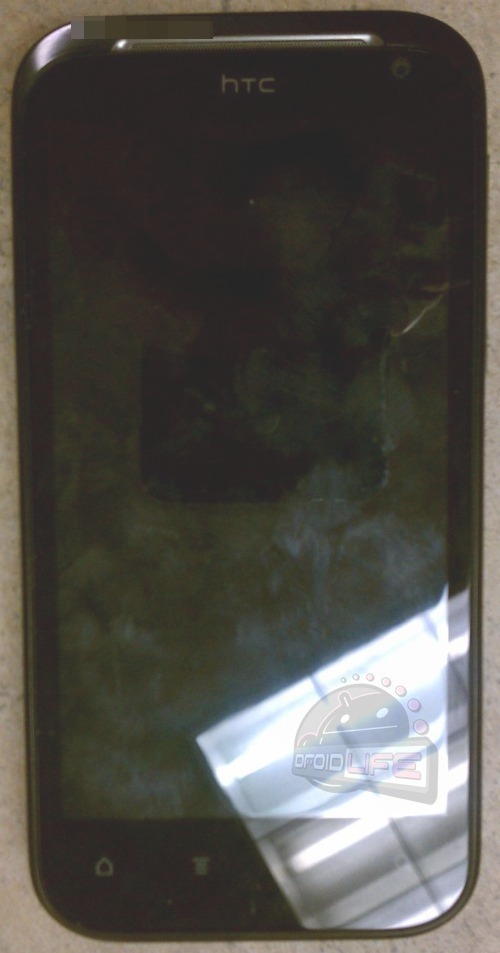
HTC Vigor Spotted In The Wild, Possibly Packing Verizon LTE

htc-vigor21

As far as Verizon devices are concerned, the Droid Bionic probably holds the crown for “Most Anticipated Handset,” but newly leaked shots of the HTC Vigor may steal a bit of that spotlight.

Rumored to be the newest addition to Verizon’s LTE line up, the Vigor sports a name that’s downright ancient in comparison: it was first spotted in a trademark application from 2009.

The Vigor made waves earlier this month when an ersatz version was spotted on a Dutch retailer’s website, but the real deal sports a less angular body that matches up nicely with HTC and Verizon’s design language. Specifically, with its funky textured back plate and red camera trim, the Vigor could easily pass for another entry in Verizon’s Incredible series.

The four capacitive buttons on the Vigor’s face mean it won’t be one of the first handsets to run Ice Cream Sandwich, but its rumored specs will dazzle many a phone geek regardless. Under the hood, the Vigor reportedly has a 1.5 GHz dual-core processor, 1 GB of RAM, 16 GB of internal flash storage and Beats by Dre audio. A 4.3 inch HD display graces the front, and if it were on, HTC’s Sense UI would be running the show.

Note that the Vigor is largely free of branding at this point, leaving the claims of its LTE compatibility and Beats audio processing in question. The device is likely in the test phases now, which could explain the overall lack of flourish, but here’s hoping the rumors hold true. Without the Galaxy S II on board, this may end up being one of Verizon’s heavy-hitters come the holidays.

[via Droid Life]


HP TouchPads Slated For Return To Best Buy?

hp-touchpad-3

It was widely reported that Best Buy was sitting on over 200,000 TouchPads before HP enacted their drastic price cut, but the fire sale has come and gone, and that would normally be that. Instead, a notice in Best Buy’s Employee Toolkit system shows that their contentious relationship with the TouchPad may not be over just yet.

The image, sent to Droid Matters by a Best Buy insider, indicates that Best Buy stores will once again begin to receive TouchPad shipments. Due to the swarms of bargain-hunters last time round, employees are being instructed to stick to a ticket system and take down the information of the interested parties that come their way.

While it’s possible the notice has been pushed out just in time to make a big splash on the front cover of the Sunday circular, you shouldn’t hold your breath. Different areas tend to have different shipping schedules, but if this holds true, it’s more likely that the units will begin trickling back into stores during the middle of the week. At this point, it’s still unknown whether the notice only applies to some stores or the whole lot of them, but thanks to a bit of corporate foresight, your nearest store may soon have a new recording in their phone system that could clear up the specifics.

It’s a bit of a surprise, to be sure: 16GB TouchPads are selling for nearly double the going rate on eBay, a testament to the fact that people have all but given up on more traditional sales outlets.

HP’s own site admits that they are only “temporarily” out of inventory, and that coupled with news of a major retailer suddenly receiving stock gives me pause: how many of these things does HP have left? And more importantly for some, how many are shipping with Android inexplicably preloaded? The answers, it would seem, may come later this week.


Joint Brings Group Chat To Twitter

joint_logo_name

About a month ago, Tom Anderson (or Myspace Tom, if you prefer) wrote a post on his new favorite social network, Google+, offering a few bits of advice for Twitter. While many of us enjoy a good Twittering now and again, Anderson pointed out that there are a few simple features Twitter might consider if it wants to boost the overall quality of its user experience. The main thrust being that the social experience of Twitter might be improved were the company to add a “discussion” or chat function that would, in Tom’s conception, give the viewer an input box by which to leave a comment and easily discuss tweets without flooding followers’ streams with one part of an on-going conversation.

Well, Tom might just be interested in a new startup launching today, called Joint. Ok, well it’s not an exact replica of the Myspace founder’s idea, but it’s attacking the same pain point long discussed by Twitter users: In that the platform is badly in need of a better way to facilitate realtime, private, and longer-form conversations. Of course, there’s some disagreement among users over whether or not Twitter should be the one offering this feature, or whether it should stay simple, just as it is.

Joint Founder Ethan Gahng says (and I tend to agree) that Twitter will be best served by staying simple in terms of its UI, and instead allowing third party startups and developers to be the ones to add further social and chat features from the outside. (And Twitter’s actions over the last few years seem to largely be in line with this philosophy.)

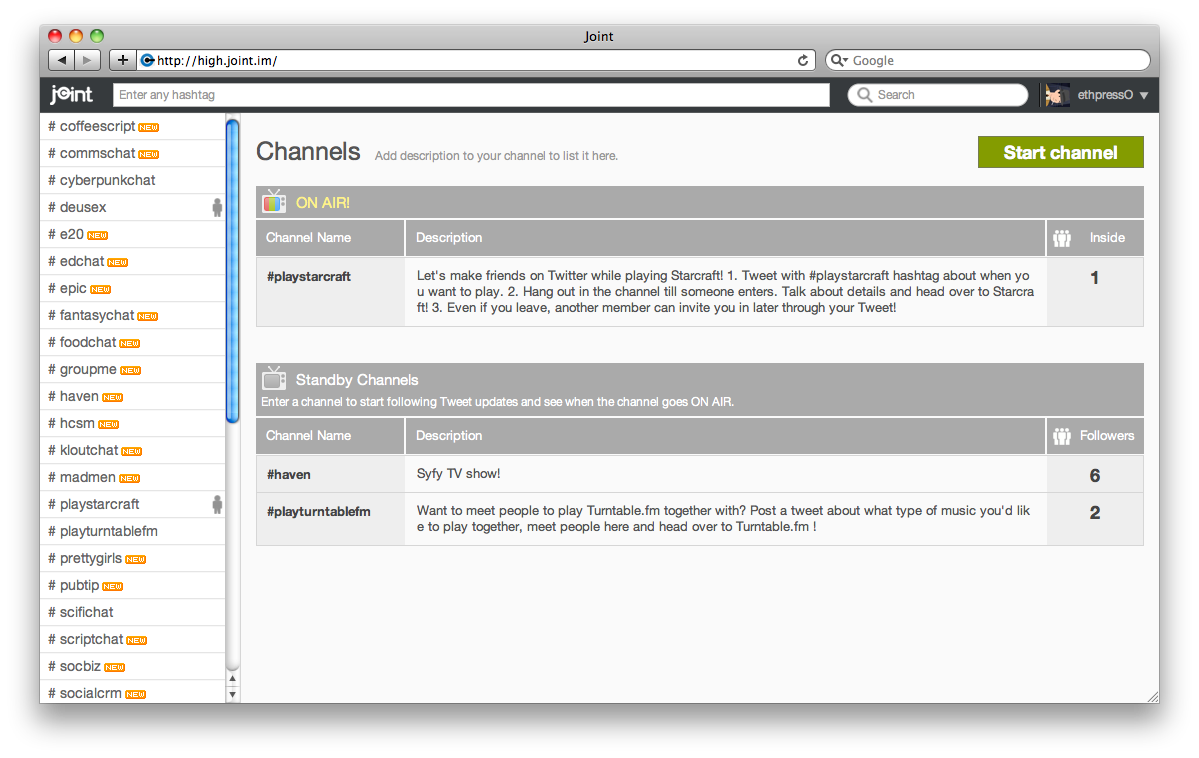
To work towards this goal, Joint essentially turns any Twitter hashtag into an IRC (Internet Relay Channel)-like chat room, which is integrated with a realtime hashtag stream from Twitter. Check it out below. This combo allows users to participate in a number of different social interactions, including a front-and-center realtime group chat feature, which populates with a live hashtag feed in the right sidebar.

Users can then pull the hashtags directly into the group chat, or invite the people who wrote the tweets into the group chat, right from the chat room, or simply hang out and enjoy synchronous chat, watching as the tweet stream populates. Compared to Hootsuite, Tweetdeck and other third party apps that let you track hashtags, being able to watch someone tweet from “outside” and bring them in and chat immediately is a subtle boundary and distinction proffered by Joint that really makes a big difference.

If you’re trying to engage in a conversation with someone on Twitter that goes beyond a few “@ replies”, you’re either forced to DM or take the conversation elsewhere. Joint allows users to easily join a group chat, as well as discuss notable or popular hashtags. For instance, of late “#irene” has become a much-used hashtag, as Hurricane Irene is poised to hit the East Coast. Joint could become a very useful resource for people looking to easily congregate and discuss ongoing situations like hurricanes, protests, or events, live, from any location.

Another cool aspect of Joint’s platform is that it’s meant to function as an off-the-record conversation medium for Twitter users, meaning that if I’m having a conversation with someone and a third person joins the chat room, they won’t be able to see the ongoing conversation. This, Gahng says, is intended to make Joint group chat more reflective of interaction in the real world.

As to Joint’s intended use cases, Gahng says that it’s easy to connect to other people on Twitter, but it’s hard to actually get to know them, so using Joint, you can meet someone on Twitter that you want to play Starcraft with — many of your followers may not want to join in on the fun. Which is why open standards warrior Chris Messina proposed the hashtag in the first place, but of course, not many people regularly follow hashtags in their day-to-day Twitter usage. Joint looks to change this by making it easy to search for different hashtags, discuss, and follow them synchronously in realtime. For an example, check out the Starcraft channel here.

Not to mention the fact that, because tweeting with hashtags means that your tweets get archived and live forever on search engines, etc., many people feel uncomfortable about having public conversations (about more private issues, especially) on Twitter. We’ve all had to delete a tweet or two, and often too late. By giving Twitter users that added benefit of social flexibility, Joint hopes to give itself a leg up on other third party Twitter apps.

Lastly, beyond simply being able to follow a hashtag group, Joint also informs a user when there’s a new user in their chat room, offers search descriptions, and gives users the ability to browse the main directory, or even start their own hashtag channel.

Joint solves a major pain point experienced often by Twitter users, and from my experience in the chat rooms and poking around on the site, the UI is straightforward, and chat is fast and easy to use. The three-person Joint team has been working on this since January, and the startup is bootstrapped at this point, but if the platform can scale and continue to function in realtime without glitches, this seems like something that can definitely have legs.

Joint and its team isn’t affiliated with Twitter in any way, but I wouldn’t be surprised if the social network comes knocking at their door at some point down the road.

For more, check out Joint at home here.


Facebook Photos Get Another Size Boost

321459_10150368494991729_20531316728_9698504_653188_n

The web’s most popular photo sharing site is getting another update.

In a blog post this evening, Facebook — which is by far the biggest photo site on the web — has announced that it’s launching a new photo viewer that presents images that are 960 pixels wide, as opposed to the 720 pixels they’ve been since March 2010 (they were 620 pixels before that). The viewer itself is also getting an update that replaces the current black lightbox with an opaque white, which it says puts more of the focus on the photo itself. Facebook also says that photos now load twice as fast, though it doesn’t get into how it’s serving the content so much faster.

Facebook’s last major Photos update came out in September 2010, when it introduced the black lightbox-based photo viewer and added support for photos as large as 2048 pixels in width (it doesn’t actually display these in the viewer, but you can download them at this size). That update finally made Facebook a viable way to share high-quality photos (before then, you could only download the low-res versions).

This has been a big week for Facebook. On Tuesday it announced a slew of tweaks largely related to its privacy controls and photo tagging  —you’ll soon be able to approve photos before they show up on your profile, which users have been requesting for years now. It also drastically changed the way Facebook Places work, placing less emphasis on check-ins. And earlier today confirmed that it’s killing off its Groupon-like daily deals just four months after launching them, though location-based deals are still around.


Company:
FACEBOOK
Launch Date:
1/2/2004
Funding:
$2.34B

Facebook is the world’s largest social network, with over 500 million users.

Facebook was founded by Mark Zuckerberg in February 2004, initially as an exclusive network for Harvard students. It…

Learn more


Recording Labels Sue YouTube Downloader Website, Fail To Grasp The Insignificance Of Their Actions

The hydra is a metaphor for something

The recording industry doesn’t have the most respectable history when it comes to lawsuits. Between asking for millions for trivial acts of piracy, and asking potentially for trillions in more serious cases, they’ve shown that they’re not only completely disconnected from reality, but totally unheeding of the actual effects of their litigation. So it’s not surprising to see them tilting at yet another windmill.

Today’s target is TubeFire, a site that should be familiar to you, at least in principle. It allows you to download and convert YouTube videos to a format more easily watched offline (FLV files can be tricky). You give it the URL, it churns for a bit, and then you can download the video in MP4 or another format. Clearly this re-containering of free content is a grave threat to the recording industry, and must be stopped at all costs. So 25 of the world’s largest labels have gotten together and sued them.

TubeFire’s services are temporarily suspended pending examination of the complaint (in its place is a note apologizing and briefly describing the situation). And to be honest, the complaint is probably valid: technically, TubeFire was modifying and redistributing copyrighted material, at least so it appears on the face of it. The site is owned by Japanese media company MusicGate, and the suit was filed in Tokyo District Court. How international content protection laws will play out is beyond the purview of this article, but an international consortium of content providers is likely to make its effect felt regardless of jurisdiction.

The funny thing is that, as it so often is with these clowns, they’re not only barking up the wrong tree for a number of reasons, but they don’t seem to understand that they’re in a whole forest of wrong trees.

TubeFire is an ace away from being a perfectly legal service. To begin with, it’s plainly providing a useful service that’s only potentially a danger to copyright. Re-encoding videos to enhance portability isn’t criminal. YouTube is a fundamentally online service, and this is a natural extension of it, the way image servers and short URLs have acted for Twitter for so long. Users want to watch these videos, which for all intents and purposes are being given away for free, in places other than YouTube, for a number of perfectly legitimate reasons: bandwidth caps, coverage issues, traveling, and yes, sharing.

Next, local copies of the videos in question may already be present on the user’s computer. By simply viewing the video, it’s possible they have duplicated the whole thing in RAM or a temp folder. This writing, rewriting, renaming, and so on must count as modifying copyrighted data, mustn’t it? If not, then TubeFire isn’t much different. The video is already being encoded multiple times, transmitted as packet data, decoded and translated to display data. One more encode in there doesn’t materially affect the product.

Furthermore, is it really TubeFire doing this? Just as it is not Bittorrent Inc that pirates movies and music, TubeFire should not be held accountable for the actions of users. Terrorists used Google Maps to plan their strikes. Stalkers use Facebook to find victims. TubeFire is a simple in-out operation that corrects a minor problem with videos that users already have access to.

And let us not forget that TubeFire is one of perhaps hundreds of tools used for this purpose. They must not have looked very hard for them. Let me help, guys. I have one myself, built into my browser! I’ve buried it in the menu so it doesn’t clutter the screen, but look at how easy it is for me to grab one of many copies of a video:

Update: Mike reminds me that we in fact had our own tool for several years. YouTube sent us a cease and desist letter and eventually disabled the tool, but no one shook us down for millions in damages. It was a TOS thing, not a copyright thing.

Many of these are easily accessible just by changing the URL slightly or other simple methods. Some sites and tools strip the audio out, another extremely easy process — and one replicable, of course, by loading the YouTube video and closing your eyes.

These companies want to have their cake and allow no one to eat it at all. They don’t seem to understand that putting content on a service like YouTube comes at a price. They are making the content publicly available, free to all. They are literally giving away the content — and then they get mad when someone takes it!

The labels are seeking what appears to be statutory lost-income damages of $300 per video for an estimated 10,000 videos. That adds up to $3 million — the amount the labels would have earned if TubeFire had licensed each video. Now there are two objections here. Why is it a license and not royalties? If anything, TubeFire “rebroadcasted” the content, more like a relay station than anything, and a standard royalty fee of however many pennies or yen seems like it might be more applicable. I’m dubious on that point, however. It’s also unclear whether TubeFire knew they should have been licensing. The service does not require that information; it takes an identifier code, downloads the associated FLV file, and repackages it. Were the labels paying their artists when a file was watched, downloaded, or only when purchased? And how do they define “download”?

If the labels are in fact successful at bankrupting and shutting down TubeFire, I must warn them that the effect will be utterly nil. Any user who wants to download a video from YouTube will do so. There will be no reduction in this practice. The site is easily cloned, as the great number of similar sites shows (I can’t even remember which one is the original, if there is one). And like most of their legal actions, this one will bring down a rain of bad PR; if anything, piracy will increase. Here’s where I would put the hydra metaphor if this article weren’t already over a thousand words long.

Why, I wonder, did they not think harder about this and try something more effective and interesting? Maybe for music videos, the YouTube version is only half the song, and then there’s a link to the artist’s site, where there’s a more secure player and various buy and share links. Or release 10-second snippets on YouTube leading up the actual release elsewhere. Or just accept that when you let the cat out of the bag, you’re unlikely to get it back in. Piracy is when people steal things. Piracy is not people taking the content you gave them and watching it somewhere else. And TubeFire is nothing but a simple shortcut for actions users would be able to carry out anyway. Unfortunately, this distinction requires a judge capable of comprehending tech issues like this, and those judges are in short supply these days.

I know the music and movie associations are famously impervious to reason, but this is beyond stupid.

[via TorrentFreak]


Life Is Crime: If You Try To Shakedown My Virtual TechCrunch Office, I Will Virtually Beat You Down

lic_areamap

There’s a simple fundamental reason why Grand Theft Auto exploded into a phenomenon. Everyone has criminal tendencies sometimes. And virtually indulging them is a hell of a lot better then actually indulging them and dealing with the moral consequences — or the physical consequences. Like prison.

But what if you could make the Grand Theft Auto concept even more immersive by tying it to the real world? That’s what Life Is Crime is all about.

The new mobile game by Red Robot Labs — a startup founded by Mike Ouye, Pete Hawley, and John Harris, former executives at Playdom, EA and SCEE — allows you to put a life of crime onto your phone. It’s a location-based game launching today for Android devices that’s likely to be highly addictive.

Think of it as Foursquare meets Grand Theft Auto meet Spymaster (remember Spymaster?) meets Gowalla — well, the old Gowalla, before they recently stated they were killing off the virtual goods element. The point is to go around your city and battle others to control properties. The point isn’t to “check-in”, it’s to attack other players with everything you’ve got in order to take over a city.

“The social utility guys have taught people how to check-in, but it’s not a real deep gaming experience,” Ouye says. “We’re going after location gaming. It’s about discovery of new places while playing a game,” he continues.

Life Is Crime uses real maps that are custom-tailored by the Red Robot Labs team to include virtual representations of key landmarks in a city. Right now, Seattle (where Red Robot Labs is unveiling the game at PAX today) is built out. Soon, San Francisco and other cities across the U.S. will be too. These maps incentivize people to fight over the Golden Gate Bridge, for example.

But any location is fair game. The team added the TechCrunch office, for example.

The fighting nature of the game is pretty straightforward. You find someone you want to fight and it becomes a battle backed by your weapons and stats. If you have a higher reputation score than your opponent, you’re likely to take them down in a fight. But maybe they have a better weapon than you to even that out a bit.

At first, the game will mainly be a single-player experience. But down the line, the Red Robot guys hope people form virtual gangs to battle other gangs for location supremacy. One idea the team has is to have Android vs. iPhone teams when the iPhone version launches later this fall. Maybe Jason and I will play it on OMG/JK.

At one point, the Red Robot team got about 200 Googlers playing it at the Googleplex, we’re told.

Eventually, as gangs form within the game, there will be different levels individual users can rise to within the gang.

Another element of the game is to pick up and drop off virtual goods with other users — both sides are rewarded in the game for this action. There are around 200 items within the game right now, and a lot of customizations for users.

More broadly, Life Is Crime is just step one of the location-based gaming platform that Red Robot Labs hopes to build. Their intention is to have three games on the platform this year — two built by them, and one by a third-party.

“Location games are wide open right now,”  Ouye says. “And we’re going after it, because they’re really sticky,” he continues.

“We’re competing for the 30 seconds or 1 minute when you’re in line waiting. Do you want to commit a virtual crime in than span, or do you want to check-in?”

You hear that Foursquare? Man up. Time to fight.

You can find Life Is Crime in the Android Market here.

Click to view slideshow.


Company:
RED ROBOT LABS
Launch Date:
1/2011

Red Robot Labs is a mobile gaming start-up located in Palo Alto, California. The company was founded in January 2011 by a team of industry veterans who are passionate…

Learn more


Facebook Kills Daily Deals, But Keeps Check-In Deals

Screen Shot 2011-08-26 at 4.21.32 PM

After quietly announcing they were killing off their nascent Deals product this afternoon, Facebook caused some confusion. You see, with the decision to kill off Facebook Places earlier in the week, everyone wondered what it meant for the location-based deals they launched alongside it? Those would remain alive, Facebook said at the time. But does today’s execution change anything?

No, says Facebook. Daily Deals are separate from Check-in Deals. The Check-in Deals will work a bit different with the end of Places, but the company will continue to support and enhance that product. Daily Deals are dead — and my email account thanks them for that.

Facebook’s statement on the matter:

After testing Deals for four months, we’ve decided to end our Deals product in the coming weeks. We think there is a lot of power in a social approach to driving people into local businesses. We remain committed to building products to help local businesses connect with people, like Ads, Pages, Sponsored Stories, and Check-in Deals. We’ve learned a lot from our test and we’ll continue to evaluate how to best serve local businesses.

In more violent terms that may be easier to understand: they’re killing off their Groupon-killer, but keeping half of their Foursquare-killer while killing off the other half of their Foursquare-killer.

Below, a reminder of what the still-alive Check-in Deals will look like on the Facebook iPhone app:


Company:
FACEBOOK
Launch Date:
1/2/2004
Funding:
$2.34B

Facebook is the world’s largest social network, with over 500 million users.

Facebook was founded by Mark Zuckerberg in February 2004, initially as an exclusive network for Harvard students. It…

Learn more


Everything You Need for World Travel, a Lot You Don’t

<< Previous
|
Next >>


Land_Rover7

<< Previous
|
Next >>

Imagine you are the kind of guy who owns a pith helmet. Imagine you live in an English castle, that you have a bunch of friends in the African Congo, that you repeatedly helicopter into rural Thailand and drive around the wilderness hunting animals whose names you cannot pronounce.

Now imagine that you are doing all this in a Land Rover. It’s the natural order of things: Jeeps are best for Moab and winning World Wars; Toyota Hiluxes like climbing twitchy volcanoes and giving other pickups atomic wedgies; Landies are used to venture into the world’s dingy parts, often (but not always) with people who smell like money at the helm.

If the LR4 looks familiar, that’s because it is. This is what Land Rovers have looked like since the first Bush administration. The LR4 looks like the 2005–2010 LR3 that came before it, which looks like the Land Rover Discovery that came before that (In the rest of the world, the LR4 is simply badged Discovery 4).

The LR4, in turn, looks nothing like the Land Rover Defender, the bare-bones, Jeep-like vehicle that has existed in Britain since Jesus was in diapers. This is on purpose. The rough-riding Defender is meant for driving around Africa, perhaps with a dead lion on the hood. The Discovery and LR4 can mostly accomplish the same thing, but with heated seats and adjustable air suspension coddling your tuchus.

In bone-stock form, a ‘12 LR4 can drive from Telluride to the top of the world or down Woodward Avenue without breaking a sweat. This is impressive stuff.

Land Rovers have long been the mountain goats of the SUV world, and the 2012 LR4 is no different. Although its looks ape those of the LR3, its guts are fresh: A 5.0-liter, direct-injection, 375-hp V-8 sits under that big clamshell hood, and a new interior has been paired with a revised chassis and updated suspension. Despite an elephantine curb weight of 5756 pounds, 60 mph comes up in 6.6 seconds.

Note: When this happens, you are perched so high and in such a narrow vehicle—the better to, say, navigate winding Alpine passes—that the sensation is a little odd. It’s like sitting on top of a rocket-powered bar stool: exaggerated motions, a vague sense of danger, and far more speed than you really need. (Interesting intersection of unnecessary velocity there: “But honey! I need all that power! I have to get to the end of the bar/world now! The ice in my drink/Antarctica is melting!”)

With a truck like this, you get exactly what you’d expect: a lot of body roll, a lot of squat and dive, and an interior that’s nicely trimmed but slightly cramped. A fancy four-wheel-drive system is standard; the LR3’s electronically controlled center differential offers two speeds and the ability to shift on the fly. The standard air-spring suspension works in concert with the standard six-speed automatic and Land Rover’s Terrain Response electronic management system, adjusting everything from ride height to shift mapping based on driver preference and a console-mounted terrain knob. (Sand? Mudded ruts? There’s an app — er, pictogram and terrain setting — for that.) If the land underfoot gets really weird, you can set the system to offer a whopping 9.4 inches of ground clearance.

Admittedly, most people won’t use any of this. But if experience is any guide, it’s dang nice to have. I drove several LR4s in several different environments, from narrow Colorado trails to urban commuting in the Midwest, and I came away impressed. You’d have to be an idiot not to. In bone-stock form, a ‘12 LR4 can drive from Telluride to the top of the world or down Woodward Avenue without breaking a sweat. This is impressive stuff.

Not that there aren’t a few drawbacks. The optional ($4,250) third-row-seat package, which includes things like navigation and satellite radio, produces a third-row bench that is frighteningly tiny and offers no legroom whatsoever. The optional satellite navigation system takes ages to respond to simple commands, and the display often locks up for no apparent reason. (Protest? Did someone, somewhere, insult the Queen?) Lastly, the exaggerated body motions can get old, and build quality — loose trim panels, uneven interior gaps — is a bit questionable.

Still, Landies are emotional things; if you want one, you want one, and you’re probably willing to put up with a few lumps. What we have here is the thinking person’s farm tractor, a sherpa with all the comforts of home. Who buys one? Anyone who can afford it, so long as they’ve got an appreciation for quirk. What the heck do they do with it? Anything they want. After all, that’s kind of the point.

WIRED The original sport-utility, a go-anywhere piece of Brit nationalism that makes you want to eat figgy pudding and raise a bunch of sheep. Looks cool, character out the arse.

TIRED Old-school electrical quirks still haven’t been banished. Nav system is slower than a becalmed Golden Hind. Like a racehorse or private plane, requires time and money to properly exercise.

Photos by Sam Smith/Wired

Study This: E-Textbook Readers Compared

<< Previous
|
Next >>


Introduction

We all thought stand-alone e-readers were going to get wiped out by the iPad, but they’re still here — and there are still a slew of reasons to recommend them.

Ebook-studythis-bugIf you’re a student, they make a vital addition to your campus survival kit. They can be pricey, and they won’t eliminate your need for a laptop, but the initial cost leads to long term advantages. Hardware e-readers give you the ability to rent or borrow digital versions of your textbooks, and in cases where you have to buy an e-book, digital titles are usually cheaper than the hard copies. They’re also more interactive, letting you highlight the study points, take notes and share them, and click hyperlinks to go deeper into a topic. Also, the convenience of reading everything on one lightweight device instead of lugging a backpack stuffed with books can’t be ignored.

Still, the e-textbook industry is young, and distribution remains shaky — read our companion piece “Are Textbook Publishers Blowing It…,” for more about the roadblocks facing e-texts on campuses.

Here, we run through the most popular options. And you could easily just read books on your tablet, or even on a notebook PC using desktop readers like Nook Study, or a web-based reading app like Amazon’s new HTML5-powered Kindle Cloud Reader app. For this reason, we’ve included a few non-e-ink options at the end.

<< Previous
|
Next >>

Photos by Jim Merithew and Jon Snyder/Wired

Kobo’s E-Reader Scores Bonus Points With Social Reading Game

With touchscreens making their way into the e-reader market, the timing is right for the arrival of Kobo’s touch-equipped device.

But the Kobo Touch remains an also-ran to Barnes & Noble’s Nook and Amazon’s Kindle, both of which are much more popular. Still, the Kobo Touch is a legitimate contender for the hearts and minds of people wanting a dedicated e-reader. Apples-to-apples, the Kobo Touch has enough going for it to recommend it as an alternative to the Nook and Kindle.

The device is a bit rough around the edges compared to its more high-profile cousins, but it does boast two big differentiating features that won me over.

First, the e-reader’s native file format is the same one offered by Kobo’s storefront, the relatively open EPUB format, which uses Adobe’s DRM. It’s important to note that you can not load books you’ve purchased from Amazon, Barnes & Noble or Apple onto the Kobo Touch (even though it has a USB port and an SD card slot). All of those booksellers use different proprietary formats which keep you indentured to their readers and apps. However, the books you buy for the Kobo Touch can be sideloaded onto other readers and reader apps on tablets. And that’s a great thing if you ever want to change your brand of reader, since your investment isn’t held hostage to a particular device from a single company.

Second, Kobo has also come up with a formula to make what is a very solitary pursuit into a truly social activity. All the manufacturers are doing it, but social integration on an e-reader isn’t just about incorporating the ability to share on Twitter, Facebook and via e-mail. Kobo gets this, and so it has added a social game-like twist with its Read On campaign (there are even stickers in the box). Read On gives you achievement-based rewards and feedback on your reading prowess. You earn badges and unlock goodies as you reach certain plateaus.

Sure, this is corny. But so is every video game. And let me remind you of the success enjoyed by both Foursquare and the Reading is Fundamental campaign.

Read On is having a “one trillion minutes read” contest (on the Kobo, natch), and is giving away thousands of dollars worth of e-books to schools and community organizations for every 10 million minutes read. Kobo tracks metrics about how much you have read, how quickly you are reading, and the dent you are (or are not) making in your library.

At this writing, I’m about halfway through “The Girl with the Dragon Tattoo” (yup, I’m way behind the meme) but have unlocked the “Happy Hour,” “Kill the Commute” and (ahem) “Better in Bed” awards.

Feedback in any pursuit is a huge motivator, and Kobo’s stats are the stuff a good cycling computer or running app are made of. They encourage (or shame) you into pushing on. Let’s face it: most of us buy more books than we read, and don’t finish every book we’d like to. Reading books is not a sport or a competition, but knowing your reading cadence and leveling up when you improve it can’t possibly be bad things.

For all of the credit Kobo gets for tracking progress, it whiffs in the end by not serving up this data while you are actually in the book. You have to put the book down to access your stats. Adding insult to injury, Kobo tells you where you are in the current chapter, which is pretty worthless, but not much of the book overall you have read, in percentage or pages.

Another software nicety: there are good discovery options for finding new books. In addition to the usual lists, Kobo also throws out some eye-catchers like “Dazzling Debuts,” “Books with Bite,” and “Famous Faces.” There’s a section for free books, but it’s not discreetly searchable. You have to scroll through dozens of pages to see what’s available — a tedious prospect even outside a latency-prone e-ink environment.

The device itself is light and comfortable to use. It’s about 24 grams lighter than the Nook a whopping 57 grams lighter than the Kindle.

Kobo eschews the hardware keyboard like the one on the Kindle. Good riddance, I say — it’s like a vestigial limb. Kobo’s reader is a tad smaller than the Nook, and it also makes use of a similar, on-demand software keyboard.

But Kobo lacks the ambidextrous page turning buttons the Nook and Kindle both have, and this makes reading with one hand difficult at best. The pillowed back makes it easier to comfortably grip with one hand than the Kindle, but both devices taper near the edges. The most comfortable e-reader to grip is still the Nook, which has an indentation in the middle of the back so you can “cup” it.

The other bad news is Kobo’s dependence on a computer, at least for initial setup. This is just so, so 2007. And you can only buy newspapers and magazine via the Kobo web site. Like everything but the Kindle, Kobo is Wi-Fi only, but you can easily tether it to your smartphone to connect to the internet.

And, finally, battery life is about half the two months claimed by Amazon and B&N for their readers. The default settings do not put the device to sleep, and my review copy died in my briefcase after a few days of neglect. I guess reading isn’t the only thing the Kobo should be nagging me about.

WIRED $10 less than comparable Kindle and Nook, making it the cheapest, smallest and lightest e-reading in the pack. Nicely motivates by projecting both the fun and sport of reading.

TIRED Faux-quilted plastic back sacrifices ergonomics. Touch screen is sometimes slow. Main page is utilitarian, illustrating only the books you are currently reading offering boring links to your library, the store and “Reading Life.” Weak battery performance. Kobo does not come with an AC adapter, increasing dependence on a computer — take the $10 you saved and spend it on a charger.

Photos by Jon Snyder/Wired

Moog Taurus 3: Modern Synth With One Foot in the ’70s

I saw an original Moog Taurus synthesizer in a magazine when I was a kid.

I didn’t know what it was. Given the bulk and odd shape — a black box sitting on the floor with horizontal slats sticking out — I assumed it was some sort of fancy shoeshine machine Geddy Lee used to polish his Mithril-tipped boots.

The older, wiser me can tell you it resembles, in both form and function, the array of bass pedals you’d see underneath a church organ. The musician can sit at the organ and play the bass lines with his feet, covering the low end and freeing both of his hands to play more complex chords.

Bob Moog’s creation, originally released in 1976, is a synthesizer version of the old organist’s foot pedals — you can play the bass with your feet while playing something else with your hands, though the companion instrument needn’t be an organ. Most players use bass pedals with stringed instruments or smaller keyboards.

The slowly pulsating lights and wooden tentacles make it look like an angry Mugwump or the glowing, metal-clad head of Cthulhu.

Moog’s original Taurus is a primitive beast. It plays just one note at a time, and it only plays bass notes in the lower octaves. It’s big, clunky and not at all portable. But absolutely nothing else can fully match the sound of its fat, gently pulsating bass tones, though just about everyone has tried. The synth tones it emits are huge and juicy, and about as subtle as a bear. When you step on a Taurus, the audience feels it.

The original Taurus was produced for just five years, from 1976 to 1981. Not for long, but long enough to become a hit, especially among the progressive rock and space-rock alchemists — Rush, Genesis, Yes, ELO, King Crimson — who were already experimenting with early analog synthesizers (and various substances).

The Taurus II arrived in 1981, changing the circuits and upping the number of foot-operated keys from 13 to 18. But it was discontinued after just a few years. Originals of both the Taurus and the Taurus II are rare these days, commanding top dollar on eBay.

Now Moog Music has revived the original design with the Moog Taurus 3, a 13-pedal array that looks a lot like the original Taurus, just beefier and shinier. But this isn’t some digital re-do. Moog has built a fully analog signal path and even recreated the same three original sounds (“Taurus,” “Tuba” and “Bass”) that are generated by two sawtooth oscillators. There’s a new sound (“Taurus 3″) that stays close to the old formula, and then 48 additional factory sounds, all analog. There are also pitch, filter and gate controls and a multiwaveform low-frequency oscillator.

It’s not entirely analog. There’s a MIDI interface to sync the Taurus 3’s built-in arpeggiator to other MIDI instruments, and a USB out, so you can use the pedals to trigger sounds and events in Abelton Live or some other performance software. Who says you can’t teach an old dog new tricks?

All that swagger adds up — the Taurus 3 retails for $2,000.

When my test unit arrived, it came in a gigantic flight case that was considerably larger than the amplifier I was plugging it into. The synth weighs 45 pounds. Pulling it out and wrangling it into position is a chore (more so than should be necessary, since it lacks any real handles). But once it’s there, it looks and feels damn impressive.

The metal chassis has wooden sides and wooden tone pedals. A neatly organized set of foot switches for selecting sounds and switching octaves runs along the face, and they are flanked by oversize wheels for adjusting volume and manipulating the tones. Between the two wheels, both big enough to be operated comfortably by your feet, are an LCD display and a set of smaller buttons (made for fingers, not toes) where you make finer adjustments.

Disembodied from the organ, a set of bass pedals is one of the weirder-looking musical instruments. The Taurus is particularly alien. The slowly pulsating lights and wooden tentacles make it look like an angry Mugwump or the glowing, metal-clad head of Cthulhu. Visitors to my home studio invariably said the same thing when they saw the Taurus splayed out on the floor: “What the hell is that thing?”

Funny looks aside, three things became apparent during my testing period.

First, this is the sound. That’s it — that’s the Taurus bass coming out of the amp. The warm, deep tone, the subtle growl of the phasing effect, the crackling highs that creep in when you roll the mod wheel away from you and open up the cutoff filter. The classic Moog sound is unmistakable, and to my ears, it’s almost identical to the original Taurus.

Second, this is not a toy. It takes some serious coordination to operate, and a lot of practice. Finding the right notes is easy enough. The pedals represent one full octave (C to C) and the chromatic steps are laid out just like a piano’s white and black keys. They are also spaced comfortably apart and the velocity-sensitive action is extremely precise.

But playing them properly is a balancing act. I had to take off my shoes and sit on a chair until I got the hang of it. When I strapped on a guitar, stood, and played it while balanced on one leg, it was like I had to re-learn everything. Playing in rhythm is especially difficult. But that’s my problem, not Moog’s.

Finally, you will get lost. The Taurus 3 is a rabbit hole. Once you tire of playing “Squonk” and “Where the Streets Have No Name” using the original voices, there are four dozen new sounds to explore. Some are variations on the vintage Taurus’ synth bass, and some are entirely 21st century. There are some washy, rolling sounds that work best as ambient drones, just pick the proper key and hold it down. There are also arpeggiated patches, mid-range voices to compliment the bass, and all flavors of LFO treachery.

It’s enough fun to cycle through the presets, find some interesting textures, and augment them by manipulating the tone wheel. But by bending over and using your hands, you can start messing with the filters and adjust the percussive attack as well as the pulse, sweep and pitch of the oscillators.

The tiny LCD screen should be larger, as the text readouts can be inscrutable. But if you’ve spent any time with other synths, or the newest Moog synths in particular, you’ll be able to find the sounds you want … eventually.

Even if all this is new to you, the Taurus 3 is fun to explore. In fact, if you have anywhere important to be, set an alarm. The experimentation will keep you occupied for hours.

The original Taurus was a brute of a machine with limited capability. The new Taurus is equally beastly, but its expanded sonic palette, new-found versatility and intelligent construction make it nothing short of beautiful.

WIRED The fattest bass synth in the galaxy — a faithful recreation of the original Taurus sound that all synths since have tried to imitate. Digital connections add versatility. Giant, shiny wood-and-metal box looks, feels and plays like the real deal.

TIRED Hard to play. Hard on the back. Hard on the wallet. You will need to buy a road case ($500 extra) if you want to gig with it.

Top photo by Jon Snyder/Wired. Road case photo by Jim Merithew/Wired


Lenovo Joins the Fray, Pumps Out a Decent Android Tablet

I paraphrase Andy Warhol when I say: Eventually, everyone will build their own tablet computer.

Like the scourge of reality television, manufacturers far and wide are trying to muscle into the tablet world, each producing a machine about the same as the last.

Lenovo’s new Android Tablet, the IdeaPad K1, is at least a credible contender in an increasingly iPad world.

The curvy slate hardly breaks any new ground on the design front, but the rounded, rubberized, and textured back is nice, giving your fingers a more solid purchase than most tablets. Naturally, it auto-swivels as you rotate from landscape to portrait and back again, and a hardware switch lets you lock the screen rotation. While it’s on the heavy side at 1.63 pounds, it’s not so massive as to cause any real arm strain after sustained use.

Android 3.1 is standard, along with a host of preinstalled apps, part of a clear strategy to grab clueless consumers who otherwise wouldn’t be able to figure out how on Earth to get Angry Birds. Spec-wise, the K1 offers a (very bright) 10.1-inch, 1280 x 800-pixel screen, 1 GB of RAM, 32 GB of storage (plus a microSD slot), and dual cameras (2-megapixel front-facing and 5-megapixel on the back). The 1-GHz Nvidia Tegra 2 processor is plenty powerful, driving solid benchmarks on all fronts and powering jitter-free video during all our tests.

Connectivity includes a monster 30-pin-to-USB connector, headphone jack and micro HDMI. As is becoming the unfortunate standard, you can’t charge via USB — the 30-pin connector has to be used with the included AC adapter to power the device.

If you’ve used other Android tablets, you’ll find a generally familiar interface here, although Lenovo’s custom skin atop Android Honeycomb makes things a little more confusing than they need to be. The task-focused launcher on the home screen (which gives you just four customizable buttons) is overly simplified and will quickly be outgrown (and disabled), while novices — which Lenovo is clearly going after — will be overwhelmed by the surplus of additional navigation options.

It’s a double-edged sword that Lenovo preinstalls so many apps for you. With several dozen out-of-the-box applications on board, I wonder if some users may not realize you can actually add additional ones or delete the ones you don’t want. And it probably doesn’t help that Lenovo has its own app store running alongside the regular Android Market.

The interface you can adapt to, but the only real problem I encountered with the device was screen responsiveness. Try as I might, I had real problems getting taps to register. The physical home button — a rarity on an Android device — was even more problematic. The button does double-duty within specific apps — pausing YouTube videos, for example — but I was more frustrated by it than anything else and eventually just stuck with the onscreen controls.

There’s nothing much else to complain about with the K1, but not much to get too fired-up about, either. In a rapidly expanding world of Android tablets, each one seems just about as good as the next. The K1 is a tough and pretty handsome entrant, though, and if you’re trying to extricate yourself from the Appleverse, it’s compelling enough to recommend.

WIRED Available in black, white or red. Largely thoughtful list of preinstalled apps will be of value to novice users. Solid performance. Textured back provides a nice grip; easy to hang on to. Relatively inexpensive at just $500 for 32 GB.

TIRED Navigation can be difficult. Just shy of six hours of battery life under full load. Volume buttons are tough to reach.

Photo courtesy Lenovo

Seedcamp Hatches The Seedhack Event: A European Hackathon On Steroids

seedhack

What if we could combine top-notch hackers with leaders from across different companies? What if we could bring talented developers from all over Europe to create innovative solutions for organizations or sectors that desperately need them? Could this format potentially form great new startups that address untapped needs?

Those are the three rhetorical questions asked by Seedcamp, the well-known European early-stage seed investment fund and mentoring programme. In its quest to get answers to those questions, the company is organizing a new, totally free event called seedhack, which will be sort of like a hackaton – like the one we organize during TechCrunch Disrupt – but not just for programmers and designers but also for business people (with or without ideas).

The event will be held at the London Business School campus on September 23rd-25th, 2011, and is sponsored by Facebook, Paypal, and .me Domains. You can register here.

Read the full article on TechCrunch Europe.


Company:
SEEDCAMP
Launch Date:
5/2007

Seedcamp is an organization to jumpstart the entrepreneurial community in Europe by putting the next generation of developers and entrepreneurs in front of a network of company builders; including…

Learn more


Freestyle AQUOS: Sharp Japan Rolls Out 4 Portable, Wireless, Ultra-Thin LCD TVs

Picture 6

Sharp in Japan updated their line of AQUOS LCD TVs with the so-called Freestyle AQUOS F5 series [JP]. The four TVs in that series, sized at 20/32/40 and 60 inches have a few common selling points: they are extremely thin, light (one of them is “portable”), and networked.

The 60-inch flagship model (pictured above and below) comes with a UV2A panel with full HD resolution, LED backlight, 1,000,000:1 contrast ratio, 176-degre viewing angle, 2x10W speakers, an HDMI interface, two USB ports (connecting external HDDs is possible), and Ethernet. It weighs 21kg and is 2.1cm at its thinnest part (3.5cm at the thickest).

The 32- and 40-inch models share the main specs but are much lighter (8.5kg and 5.5kg, respectively), prompting Sharp to choose the term “freestyle” for the series (the company says they can be moved and installed anywhere).

Like the 32-inch AQUOS, the 20-inch model only offers 1,366×780 resolution. The smallest TV in the series is based on a model Sharp showed earlier this year and weighs just 2.5kg . For an extra $80, users can attach a hook to it to make it really portable (see below).

What all the models have in common is IEEE802.11n/IEEE802.11a Wi-Fi and wireless connectivity to Sharp devices, for example AQUOS Blu-ray players or smartphones, and to various video-on-demand services and YouTube.

Sharp plans to start selling their new TVs in Japan from next month (prices: $4,930 for the biggest model, $1,950 for the 40-incher, $1,430 for the 32-inch model and $1,040 for the smallest one).