Netflix Starts Rolling Out Streaming Service To Mexico, Latin America And The Caribbean

netflix

Movie and TV subscription service Netflix has announced the arrival of its service in Mexico, Latin America and the Caribbean in the coming week. Netflix launched today in Brazil and will be launched in 43 countries in Latin America and the Caribbean by September 12.

Netflix announced in early July that it would be launching in 43 countries across Mexico, South America and the Caribbean later this year. The company also announced a deal with CBS to offer content in these regions.

Brazilian users can immediately begin a free, one-month trial of the Portuguese-language version of Netflix by going to Netflix’s site. After the free month, the monthly subscription price for Netflix will be BR$14.99.

On Wednesday the Spanish-language version of Netflix’s streaming service will become available in Argentina, Uruguay and Paraguay. The monthly subscription for unlimited streaming of movies and TV shows in Argentina is 39 pesos while in Uruguay and Paraguay the price is US$7.99 per month. On Thursday and Friday, the service will roll out to Chile (3790 pesos per month), Bolivia ($7.99), Colombia (14,000 pesos), Venezuela, Peru and Ecuador (US$7.99). On Monday September 12, Netflix will launch its service in Mexico, Central America and the Caribbean. In the Caribbean region, Netflix will be available in English and Spanish and will cost $7.99 per month.

It should be interesting to see if Netflix can take off in these regions. Already, the company is seeing success with its service in Canada, recently announcing 1 million subscribers. Of course for Netflix, broadband access will be a contributor to usage outside the U.S. and Canada. And striking international content deals is going to be key to the company’s growth beyond the U.S., where it already has major deals in place. And Netflix recently closed a deal with Telemundo for Latin American subscribers.

The company suffered a blow this past week, when Starz announced it would not be renewing a content contract with Netflix next year.


Chinese Online Gaming Giant ‘Perfect World’ To Invest $100M In A VC Fund

perfectworld

Perfect World, a publicly listed Chinese online game developer and publisher that specializes in 3D MMORPGs, this morning announced that it – or rather, “one of its entities” – will be investing in a new venture capital fund.

As a limited partner, Perfect World has agreed to invest a total of approximately RMB643.5 million (roughly $100 million) in the fund, which will focus primarily on backing technology and media companies.

Michael Chi, chairman and CEO of Perfect World, in a statement says the company’s knowledge in TMT industries will allow it to better identify opportunities, but that the fund will likely also serve as fertile ground for partnerships that can enhance Perfect World’s online platform and grow its business.

Perfect World primarily develops online games based on proprietary game engines and game development platforms. Its current portfolio of online games includes massively multiplayer online role playing games like “Perfect World”, “Legend of Martial Arts”, “Zhu Xian” and”Battle of the Immortals and an online casual game called “Hot Dance Party”.

Perfect World’s games have been licensed to game operators in a number of countries and regions in Asia, Latin America and the Russian Federation and other Russian speaking territories. The company also generates revenues from game operations in North America, Europe and Japan.

The company, which is listed on NASDAQ, recently paid roughly $21 million to acquire C&C Media, a Japanese online game operator, from computer and video game developer ATLUS.


Company:
PERFECT WORLD
Launch Date:
2004
IPO:

NASDAQ:PWRD

Perfect World is a China-based online game developer and publisher specializing in 3D MMORPGs. (NASDAQ: PWRD)

Learn more


Foodzy Turns Healthy Eating Into A Game, Launches iOS And Android Apps

foodzy

A lot has been said about gamification, dubbed badgification by some, and it seems people are still divided over whether it’s a fad or the future.

Be that as it may, one area where I think it just might work is health and fitness improvement.

Enter Foodzy, a service that enables users to keep track of what and how much they eat over time, in order to provide them with some insights on how to eat and live healthier, lose weight or simply on how their eating habits compare to their friends.

Today, the fledgling Amsterdam company behind the service (not to be confused with Foodzie by the way) is launching free applications for iOS and Android, although one needs a Foodzy Pro account ($15 per year) to log in.

The app helps people keep track of what they eat even when they’re on the move. Using Foodzy, one can access deep statistics and unlock badges (there we are!) for healthy eating habits, but also for fun ones – think Hangover badges for when you’ve consumed too much alcohol in a single night, or a BBQ badge for barbecuing more than 5 times in one Summer.

Foodzy uses localized food databases from over 58 countries, and is currently available in English, French, German and Dutch.

You can check out Foodzy free of charge, but the number of badges you can earn are limited and your eating history will not be kept longer than 30 days. Also, as I mentioned before, you need to cough up cash for the premium version of the service and to be able to use the mobile applications.

Foodzy was one of the 18 finalists at this year’s TNW Conference Startup Rally, where it was ‘soft-launched’ – they opened up for public beta about two months ago.


5 Must Have Rooted Android Apps

How-to-Root-Android-Phone.jpg

If you rock and Android device then you already know about the multitude of apps that are at your finger tips. For the sake of keeping you safe, manufacturers ship Android locked up without access to the full potential of the device. By throwing caution to the wind and rooting your device you open up a whole new world of apps, apps that can take your phone from a surfing and messaging device to a computer in your pocket.

Go ahead, unlock the full potential of your phone the install these 10 apps then you will quickly wonder why you haven’t done it sooner.

Titanium Backup Pro – This is hands down the most complete backup solution for your Android device. It allows you to easily backup and restore all of your apps, system settings, Market downloads, contacts, SMS/MMS text messages, and more. It has built in scheduling so you can schedule your backups and can even sync those vary same backups to Dropbox. If you want a powerful “set it and forget it” backup solution then this is the only way to go.

Root Explorer – This is the ultimate file manager. Just like the name says, you can explore, edit, mount, delete, and do everything else to your filesystem. If you have been looking for a way to get rid of that bloatware on your phone then look no further. Remember, this is a very powerful app and can cause some serious damage so be careful with it.

Widget Locker – This is a lock screen replacement that gives you control. Widget Locker allows for multiple sliders that can be customized to launch directly into an app like the Messaging or Dialler App. You can also add Widgets or app shortcuts directly to the lock screen bringing the power of your phone directly to your lock screen.

Tasker – Tasker allows you to perform sets of actions based on contexts like events or gestures. You can have your phone do all sorts of things based on conditions. For example, you can have a menu of your favourite media apps pop up when you plug in your headphones or you could set your phone to silence every time you have a calendar event. Its like a powerful scripting language for your phone. Although you don’t need root access to run Tasker, its probably one of the most versatile and powerful applications in the market.

Rom Manager – If you flash custom ROMs on your rooted device then Rom Manager is a must have. You can make NAND backups of your device, manage your collection of ROMs, receive notifications of ROM updates and more. There is no glitz and flash in this app, just ease of use and power.

These are only a few of the great apps for rooted Android devices. Let us know in the comments what your favourites are.

tech.nocr.at5 Must Have Rooted Android Apps originally appeared on tech.nocr.at on 2011/09/05. Reproduction of content not allowed without consent.

© tech.nocr.at 2011 | Permalink | Comments |
Read more in Tech News | Explore more in: , , , , , , | Add to del.icio.us | Stumble it | Reddit


Part Luxury Sedan, Part Hell-Beast

There isn’t one particular thing about the new Chrysler 300 SRT8 that makes it special. Not the 470-horsepower V8, which also grunts out 470 lb-ft of torque, nor the refined traction control system beneath it. It’s not the crystal-clear, 900-watt, 19-speaker sound system, nor the classy suede interior it bathes in auditory excellence.

No, what makes the 300 SRT8 so special is how well all the high-performance technology and luxury styling can co-exist so successfully in one machine. In that sense, the 2012 Chrysler 300 SRT8 is a nearly perfect car. And yes, I realize that’s a remarkable thing to say about a Chrysler.

The massive amount of brawn comes from a 6.4-liter engine developed by SRT, Chrysler’s performance division. Don’t let the HEMI badges and combustion chambers fool you, this is not an old-school American V8. That’s a good thing. Granted, nearly six and half liters of displacement is old-school huge, but everything else about it is thoroughly modern. Variable-length intakes and variable cam (there’s still only one) timing ensure a fat power curve across the 6,400 RPM rev range. An unobtrusive cylinder deactivation system kills four cylinders under light loads. This boosts the highway fuel economy to around 30 mpg, and the car maintains the burbling exhaust note even as it operates as a V4.

With roots firmly planted in Mercedes sedans from the ’90s, you’d be forgiven for dismissing the 300’s five-speed automatic as an outdated spec. But the SRT team spent a lot of time and money refining the transmission’s programming, so the box puts the power to the ground flawlessly. Unlike those old Mercedes sedans, this modern Chrysler lets you choose your own shifts via cast aluminum paddles mounted behind the wheel. Hustling the 4,365-pound behemoth around California’s Willow Springs Raceway, the gearbox actually helped me set my fastest time in “Sport” mode, with it doing the shifting for me. That’s impressive for a transmission that’s sold as part of a refined and smooth luxury car where most drivers aren’t spending a lot of time mashing the pedals.

Chrysler didn’t set out to make the 300 SRT8 a focused go-fast machine. Off the track, it’s a civilized, well-appointed luxury car — just one that can also throw down decent lap times.

The other intelligent computer is the one making decisions about your slide angles, brake applications and throttle openings. Traction control used to be a silly safety net that noticeably reduced the amount of driver control, something you’d have to switch off if you wanted to drive fast. No longer — SRT set out to design a system that focuses on the smoothest possible application of power while maintaining a high level of driver control. That means you can go flat out through race track turns while the computer helps you maintain a slight drift without cutting power. A little more throttle and that slide starts to go sideways, with you navigating through the side window as the rear tires disappear in a cloud of smoke. But the car doesn’t spin out of control. The traction control system works unobtrusively in the background, constantly monitoring your lines, braking points and slide angles, making subtle corrections to your inputs when necessary. Basically, it makes you look and feel like a hero.

As impressive as it is, all that performance stays hidden. Chrysler didn’t set out to make the 300 SRT8 a focused go-fast machine. Off the track, it’s a civilized, well-appointed luxury car — just one that can also throw down decent lap times. To do that, Chrysler gave the SRT8 an interior free of cheap plastic crap. The stereo and nav system are controlled through a touchscreen, while a few simple buttons and knobs run auxiliary controls. I was able to master the whole cockpit during a short drive from L.A out and over Angeles Crest.

The seats grip your butt surprisingly well as lateral Gs approach the magic 1.0 figure. But they’re also all-day comfortable. One thing I found was that the driver’s seat is a nice place to sit and do your best impression of the Maxell “Blown Away Guy” while the stereo system does its thing.

That Chrysler spec’d a stereo beefy enough to crack your enamel tells you something about what makes this car special. It’s nice to drive at 100 percent on the track, but it’s equally nice to drive down Sunset Boulevard in rush hour traffic with the A/C cranked and the stereo blasting distortion-free tracks through its 19 speakers.

Most new cars have a stereo that only sounds good on paper; turn the the volume beyond 75 percent and the bass drops out, the highs distort and the mids become overpowering. But SRT actually delivers. And I’m an audiophile — at home, I enjoy music through exotic custom speakers and a vintage amp I gutted and rebuilt myself. If I owned this car, I’d take it out for drives just to get my Daft Punk or Miles Davis fix at max volume.

This new 300 is part of a long legacy of Chrysler muscle cars dating back more than half a century. The original 1955 C-300 was built so Chrysler could go NASCAR racing. The 300 denoted its horsepower, which went up to 355 in 1956. By the time 1960’s 300F came around, the horsepower had climbed to 375 and the car had gained a tuned cross-ram intake system.

The variable-length intakes on the 2012 model echo the function of that cross-ram system. Even more interesting, and perhaps coincidentally, the 4,365-pound curb weight of the 2012 model is shockingly close to that of the original 4,300-pound C-300.

And, just like that 1955 original, this new 300 proves that power and luxury are not mutually exclusive.

WIRED Incredibly fast — and incredibly easy to drive at faster speeds, thanks to an advanced traction control system. Factory stereo will please even the snobbiest audio geek. Attractive luxury package will cosset you and your passengers.

TIRED Over two tons of fun. Tires commit suicide if you turn traction control off. Styling is almost too subtle, it looks too much like the soon-to-be-commonplace base model. 48 grand is a hard pill to swallow when it wears a Chrysler badge and comes on an ancient Mercedes platform.

Photo courtesy Chrysler

McTiVia Puts Web Video on Your TV … If You Can Set It Up


Solving Apple’s product deficiencies can be a lucrative business. Indeed, the frequently puzzling restrictions and shortcomings inherent to some Cupertino-designed gear has given rise to some truly fantastic pieces of software and hardware over the years.

In the case of Awind’s McTiVia, it’s not particularly hard to figure out what piece of hardware is being singled out. This tiny Wi-Fi-enabled device promises to shuffle both the audio and video on your Mac (or PC) straight to your HDTV, with zero limitations on content or services. Take that, Apple TV!

Or don’t. While the idea behind McTiVia certainly has merit, the execution and the numerous headaches associated with setting it up mean that few people will find it useful.

The actual mirroring device, which supports 802.11b/g/n and resembles a miniaturized cable box, can be set up in various configurations. As Awind points out, the best way to proceed is to use Ethernet to connect the McTiVia box to your computer. This will produce the zippiest data speeds and throughput. Of course you can also connect your McTiVia to an Ethernet router and then access it wirelessly from your computer. And if you abhor wires, each device can simply use Wi-Fi to speak to each other.

While streaming boxes like the Apple TV and Roku 2 at least have some level of straightforwardness to them, the McTiVia required over an hour of tinkering on my part to get it to work properly. After hooking up the box directly to the TV with an HDMI cable, I had to install what turned out to be some very buggy software. Then it was off to download a patch as well as a new version of said software from Awind’s site.

Unfortunately, this was only the beginning. I also had to muck around with audio, video and wireless settings for another 45 minutes just to get my laptop screen to display properly on the TV. Out of curiosity, I tried both the wired and wireless setups and found the latter to be virtually unusable and the former only adequate — not good for a device whose main selling point hinges on wireless connectivity. The MirrorOp software you install has an annoying habit of reformatting your computer screen’s resolution each time you connect to your TV. If you don’t like that default resolution (I didn’t) you’ll have to change it on both your TV and computer. I finally settled on 1024×768, which seemed like the best compromise for my plasma.

Once things were up and running, there was little pay off for all that effort. While the McTiVia supports 720p video (same as the Apple TV) and 44.1kHz audio, everything I played, from Netflix streams to native movies, looked like DVD-quality at best. Add to that the fact that many of my iTunes-purchased movies and TV shows wouldn’t display, and I was pretty much ready to throw in the towel after 90 minutes.

Here’s the thing: Almost every aspect of the McTiVia feels rushed and/or unrefined. Whether it’s the somewhat comical grammatical errors on the FAQ page and quick installation guide or the temperamental software setup, the McTiVia just isn’t as polished as other streaming options. This left me wondering not only how it managed to win the Best in Show award at Macworld 2011, but also why the device exists in the first place.

After all, TVs — typically “lean back devices” — aren’t that exciting as computer monitors anyway, which is really the main thing a McTiVia does at this point. Yes, you can use a wireless keyboard and mouse to control things, but the UI experience on a PC doesn’t really translate to bigger screens. And while it’s certainly nice to occasionally beam your desktop to a bigger screen, building an entire product around this one feature and then charging twice as much for it as other streaming boxes is perhaps not the way to go.

Not to mention the fact that for far less money, you can simply buy an adaptor (Mini DisplayPort to HDMI) for your MacBook or Mac Mini and just physically hook them up to your TV. Voila! You can still control everything wirelessly and you’ll get infinitely better video and audio results since you’re not dealing with any latency.

Don’t get me wrong, not everything in life needs to work seamlessly or install in one minute. I’m all for putting in a little extra elbow grease to squeeze some extra usefulness out of something. But in this case, all that effort produced was and an uncontrollable urge to switch back to another streaming device.

WIRED A decent option for heavy online video watchers or those who want to play PC games on a bigger screen. Comes with a USB port for hooking up a mouse or keyboard. Doubles as a wireless access point for your home network.

TIRED Grossly overpriced for what it does. HDMI cable not included. Complicated set-up (basically trial and error) and lackluster results. No extended display options. Audio limited to two channels. Wouldn’t stream iTunes-purchased movies or TV shows after OS X Lion update.

Don’t Just Feel the Burn, Watch It on Your iPhone


At some point in the near future, we’ll all give up the pretense that we can live without our iPhones for even a split second and just implant the thing under the skin of our forearms. That’s the future Scosche is betting on with the advent of its new device, the MyTrek.

It’s a training device that measures your heart rate. Most pulse monitors like this strap onto your wrist or wrap around your chest. And in the realm of comfort, the MyTrek is an improvement. The comparatively small unit uses two LEDs to illuminate your blood vessels below the skin, and a photo sensor measures the flickering of your pulse.

The size of the unit and the astonishing accuracy of its pulse measurement means the MyTrek can be worn anywhere on the body. The provided strap is too long for spindly arms, so I preferred wearing it on my calf—where, I must confess, it became rather hard to take off. In shorts, it was all too easy to whip my iPhone out of my pocket and check my pulse and calories burned while I was… watering the garden. Or walking the dog. Must walk dog faster!

But the MyTrek’s greatest strength is also its greatest weakness. In order to display and record your measurements, the unit must be connected to an iPhone or iPod Touch via Bluetooth. And like many a CEO pacing around his corner office on a conference call has discovered, Bluetooth isn’t that great over distance. If you’re not prepared to carry the iPhone with you on your workout, the MyTrek is useless — it doesn’t store any data that can be downloaded later. But adding the bulk of your iPhone to your body while running or working out negates the MyTrek’s major improvement over the competition, which is its featherweight strap-it-on-and-forget-it design.

The MyTrek literature says the device can be used within 33 feet of the iPhone, but stashing my phone in a locker on the gym floor was a no-go. Almost immediately, the red LEDSs blinked in alarm, warning me the device was no longer connected.

Scosche tries to sweeten the deal by providing buttons on the MyTrek for shuffling through your music collection. But if you’re wearing the MyTrek somewhere else besides your arm, you can’t reach the buttons — and if you’re schlepping your iPhone on the exercise bike or elliptical, it’s easier to scroll through your music manually.

Finally, the Scosche app isn’t a miracle of clarity. It’s easy enough to set small goals; for example, to achieve a particular workout zone for weight loss or performance tuning. If you have headphones plugged into your iPhone, the app notifies you when you’ve achieved your desired pulse rate and how far along into your workout you are. The app also includes a calendar that stores your stats.

Granted, pretty much any app is difficult to figure out when compared to Apple’s idiot-proof OS. But I just couldn’t figure out how to create an individualized workout program or set fitness goals with the app, or do anything besides marvel at how hard it was to get out of my resting zone each time I used it.

All in all, the MyTrek has some promising aspects to it. If you’re the type of gym rat who loves running on the treadmill or zoning out on an exercise bike, you probably won’t even notice any of its shortcomings. However, if you intend to do anything else, like long runs or weight-lifting, and if you’d like to do so without a 10-inch-square, 5 ounce piece of metal and glass taped to your body, you might want to reconsider your choice of device.

WIRED Astonishingly accurate pulse measurement. Strap can be worn anywhere on the body. App can track your distance, speed and pace using your iPhone’s GPS. Easily access your stats from a device that you most likely already own. Real-time feedback spurs you onward in the middle of your workout.

TIRED If you’re going to schlep your iPhone anyway, why wouldn’t you just buy a dedicated training device? Expensive for a heart-rate monitor. App is difficult to use. Turns out checking the mail only burns 15 calories… Bummer.

DIY: Cut The Cord With Sick Beard And SABnzbd

sicksabnzbd.jpg

Disclaimer: This How To is written to automate the process of downloading legal TV shows from newsgroups. We don’t encourage or condone downloading of copy written material.

I decided to cut the cord a few months ago after going over our expenses. We had 3 different cable boxes in the house and no one ever used them. We also watched all of our local broadcasts via an ATSC HD antenna I put up. Add those two together, mix in Netflix and iTunes, and we really had no need for cable at all.

I spent some time looking for alternatives that would download episodic shows automatically for us as soon as they aired (or at least shortly there-after) and came across a great one two combo; Sick Beard and SABnzbd.

Sick Beard bills itself as “The ultimate PVR application that downloads and manages your TV shows”, think of it as a PVR for newsgroups. It runs in the background and watches for new episodes of TV shows that are posted to Usenet. It doesn’t download the actual binary files for you (that’s what SABnzbd is for), but it does rename, generate metadata and keep your library organized.

SABnzbd makes downloading binary files from Usenet as easy as possible. All you have to do is feed it an .nzb file (which Sick Beard will do automatically) and it will download, verify, repair (if need be), and extract the file for you.

Both of these excellent programs run under Windows, OS X and Linux, but for the purpose of this How To we will be using Windows. The only other requirement you will need is access to a Usenet provider that carries binary files. I use Giganews myself.

Step 1. Download SABnzbd and install it and follow the directions on the setup wizard. For more information on the wizard options, visit the SABnzbd+ Wiki.

Step 2. Fire up your browser and head over to http://127.0.0.1:8080. Set things up the way you want paying close attention to the post-processing scripts folder. This folder will contains scripts that are run when downloads are completed. We’ll use this later to have Sick Beard organize our episodes for us.

Step 3. Download Sick Beard and install it. Much like SABnzbd, Sick Beard is configured within your browser. Open up http://127.0.0.1:8081 and click “Config” and “General”. Play around with the various configuration option so that they suit your system and needs. You will need to change “NZB Action” to “SABnzbd” so that Sick Beard uses the SABnzbd+ API to queue downloads. Fill in your SABnzbd+ information in the lower-left pane of the page. You can find the API key in the SABnzbd+ configuration on the General page. For the category, enter “tv” and for the IP and port, “127.0.0.1:8080?.

Step 4. You are going to need at least one NZB search provider since this is how Sick Beard finds the actual files. Start by picking one or two of the supported search providers and creating an account with them. You can get your UID and hash from the RSS feed URLs at the search provider.

Step 5. Now it’s time to make them work together. Remember the post-processing scripts folder from Step 2? copy all of scripts from Sick Beard into that directory. Edit the autoProcessTV.cfg script so that it looks like this:

[SickBeard]
host=localhost
port=8081
username=your SickBeard username
password=your SickBeard password

Now we have to tell SABnzbd to use the sabToSickBeard.py script for downloads in the TV category. Open up SABnzbd, go to “Config” and then “Categories”. For the “tv” category, change the script drop-down to “sabToSickBeard.py” and the processing drop-down to “D” (this tells SABnzbd to repair broken files, extract them and delete the RAR files).

Step 6. Now all you have to do is add a show. Open up Sick Beard, click “Add Show” and follow the prompts. The show will show up within a few minutes in your Show List.

Hopefully this will help you out with a over the top/over the air solution to cable. I’ll do a write up soon on adding in Couch Potato which keeps track of movies for you.

Here are some additional resources to help you along the way.

  • Sick Beard wiki
  • Sick Beard Forums
  • SABnzbd FAQ
  • SABnzbd Forums
  • tech.nocr.atDIY: Cut The Cord With Sick Beard And SABnzbd originally appeared on tech.nocr.at on 2011/09/03. Reproduction of content not allowed without consent.

    © tech.nocr.at 2011 | Permalink | Comments |
    Read more in Hacking And Security | Explore more in: , , , , , | Add to del.icio.us | Stumble it | Reddit


    DIY: Rechargeable Battery Tester

    Rechargeable-Battery-Capacity-Tester.jpg

    Rechargeable batteries are a blessing, especially if you own a ton of electrical devices that use AA’s. The problem with them is that they don’t last forever. Like every other battery, NiMh or NiCd batteries loose some of their capacity with every charge/recharge. That can lead to some headaches, especially if you’re relying on some juice only to find out that you only have 5 minutes of it.

    You could sit around with a multimeter and check each battery every time you use it, but then again you have a life, or could build yourself and automated battery capacity tester like Instructables user BrianH did and make your life a lot easier.

    BrianH has a full write up chocked full of details on building this simple circuit that drains any AA battery, 3 at a time, and records it’s useful capacity in milliamp hours. All packaged up in a nice wooden case.

    [Link to Automated Battery Capacity Tester]

    tech.nocr.atDIY: Rechargeable Battery Tester originally appeared on tech.nocr.at on 2011/09/03. Reproduction of content not allowed without consent.

    © tech.nocr.at 2011 | Permalink | Comments |
    Read more in Hacking And Security | Explore more in: , , | Add to del.icio.us | Stumble it | Reddit


    ProgressQuest – The Fire And Forget RPG

    ProgressQuest_Screenshot.jpg

    I love me a good RPG, especially an online one, but in todays super fast moving world who really has time to dedicate to one. Who has the time to sit around and interact with other people who share the same interest, who has the time to perform the menial tasks required to build up wealth and skill?

    Enter ProgressQuest; the greatest MMORPG I have ever seen. All you have to do is roll up your character, walk away and let the game progress. All you have to do is watch the progress meter go, no interaction, no mining, no nothing. The game was originally developed by Eric Fredricksen in 2002 as a parody of EverQuest and quickly caught fire, so much so that almost 10 years later it’s still being played by thousands of people around the world. They even have online servers that you can join, adding the MMORPG aspect to the gameplay.

    The client is Windows only, but a dedicated fan has created a Chrome App that will allow you to play the game under any operating system that runs Google’s Chrome browser. If you decide to play and are looking for a guild to join, think about the “Slogs of Hatred” (Guild tag +SoH+) in the Spoltog realm and fight along side my Level 57 Inner Mason.

    [Link to ProgressQuest]

    tech.nocr.atProgressQuest – The Fire And Forget RPG originally appeared on tech.nocr.at on 2011/09/03. Reproduction of content not allowed without consent.

    © tech.nocr.at 2011 | Permalink | Comments |
    Read more in Gaming | Explore more in: , , | Add to del.icio.us | Stumble it | Reddit


    Amazon Is Only Launching A 7? Tablet? Genius. (Plus A Mockup!)

    Mockup 4

    The Amazon Kindle tablet is real. Very much real. As in, MG has held it in his very own hands. I threw together the mockup above based on what he shared with me.

    As MG explained, we now know that the Kindle tablet won’t initially ship in both 7-inch and 10-inch variants, contrary to previous rumors. After a change in plans earlier this summer, Amazon only intends to launch with a 7-inch model.

    That decision might just be the best one that Amazon could have possibly made — and it ought to have Samsung and all of the other Android tablet manufacturers shaking in their boots.

    Before we dive in, we need to establish some numbers. So far this year, the iPad has maintained roughly 70-80% of the tablet marketshare. While certain Android tablets are undoubtedly more popular than others, that only leaves 20-30% of the market for all of the Android tablet manufacturers to split. While Apple sits with the biggest piece of the pie all to themselves, the Android tablet manufacturers are battling for left overs. Even if the entire Android tablet marketshare belonged to one tablet (which, again, it definitely does not), said tablet still wouldn’t have sold even half as well as the iPad.

    From this, we’ve learned at least one thing: competing with the iPad by trying to be the iPad.. doesn’t really work.

    Over the past few months, I’ve noticed something strange. Among my geekier circles, I’m always hearing the same question: iPad, or Xoom/Galaxy Tab/Android-tablet-name-here? Among less tech-minded folks (you know, like the majority of the population) though, the question seems to shift: iPad, or Kindle?

    Now, it’s not that the less tech-savvy people wouldn’t like an Android tablet… they just don’t really seem to know they exist. There are just too many strikingly similar tablets, all battling for that one smaller sliver of the pie.

    To go all anecdotal again here for a second: just this past Monday — as I do every Monday — I was playing trivia at a pub in the Bay Area. Trivia Night at this pub is something of a huge deal, with around 25 teams (4-6 people each) playing each week. Mid-way through the second round, the trivia master asked: “Two pointer here, folks: What is the name of Motorola’s tablet device? What is the name of Dell’s tablet?”

    Three teams could name Dell’s tablet. Six teams got Motorola’s. Out of 25 teams, each made up of a handful of drinking-age adults, less than a third could conjure up the name of one of the biggest Android tablets around. Though we’ll gladly babble on it for days on end, the tablet market is still something of a niche — and in a niche market, recognition is everything. The iPad is the iPad. Everything else is.. well, everything else. If they were to launch with a 10″ tablet, Amazon would be throwing themselves in with everything else.

    But they’re not. Rather than taking on Apple on their own court, they’re moving to keep a lock on a game they’re already kicking butt at (the e-reader market), while upping the odds that anyone weighing “iPad or Kindle?” will be swayed in their favor. By launching with a 7″ tablet (and only a 7″ tablet), Amazon is making it clear: they don’t want the Kindle tablet to be the iPad. They want it to be everything the iPad is not.

    They want it to be small, and comfortable to read in bed. This is a Kindle, after all. For many folks who just want something to read in bed or throw into their bag to read on the train, the iPad’s nearly 10-inch display can feel a bit gigantic.

    They want it to be cheap. Smaller displays are cheaper right up front, require less plastic for the body, and can get by with a lesser battery and a smaller backlight. More than a year after launch, the cheapest iPad you can buy new will set you back $499. According to the same source whose Kindle tablet we used, Amazon currently has it priced at half that: just $250. Even launching a 10-incher alongside would increase R&D costs, as well as lead consumers to believe that the 10″ model is the flagship (thereby throwing it up directly against the iPad and everything else.)

    Meanwhile, they’re moving away from the direction that most other Android tablets have taken. This isn’t a be-all, do-all machine — it’s a new and improved Kindle, just as the name will imply. They’re aiming for simplicity, distilling the homescreen down to a Cover Flow-esque arrangement, making the entire experience all about your books, movies, and other media. And if you happen to want it to do other stuff? Sure, it can do that — they even have their very own App Store! But this isn’t an Android tablet. It’s a Kindle, and it just happens to run Android.

    As for Samsung, LG, Motorola, and all the other tablet makers out there: unless they’re happy with whatever sliver of the minority chunk they’ve nabbed so far, they better take this as a shot right across the bow. For Android tablet manufacturers, the next big step will be figuring out how to ensure that the general consumer has any idea that their tablet exists — and here comes Amazon, swooping in with their cheap, small tablet and bringing the iconic, incredibly well-established Kindle brand (and their incredibly powerful distribution channel) with them. Genius.


    Video: “Der Kritzler,” An Automatic Scribbling Machine

    scribbler

    An automatic scribbling machine sounds less than useful, admittedly, but it’s really just the style of line created by this motorized drawing machine. It’s reminiscent of ASCII art, in which heavier characters are used to create darker tones; in this case, the more jiggle added to the drawing platform, the more ink is put on the drawing surface. It’s kind of mesmerizing.

    Check out the video (there’s another here):

    It’s put together from mostly off-the-shelf parts (Arduino-powered, naturally), though it’s far from simple. The process uses vector graphics and turns it into a tone map, and given a known starting point for the pen, it “prints” by moving the pen along rows and adding jitter to darken the “pixels” to whatever degree is necessary. It looks like it has about four discrete tones it can make — not the greatest range, but in aggregate it works quite well.

    You can read how it was put together at the creator Alex Weber’s blog, and he has also put the source, documentation, and so on up on Github.


    Call Of Duty’s $50 Per Year Subscription Service Heralds An Expensive Future For Gaming

    elite_space

    The world’s largest game franchises have become businesses unto themselves. World of Warcraft supports a huge halo industry of gold farming and grey markets. Farmville and its ilk have turned microtransactions into millions. The teams developing individual games like Assassin’s Creed or Gears of War are larger than many entire companies. So it’s not surprising that the stakes keep getting raised.

    Call of Duty is among the most popular games in the world, and although selling millions of copies of the game at $40-60 is a real source of revenue, Activision is hoping that their new Call of Duty Elite service will bring in recurring revenue and rally the fanbase. But will that fanbase accept a yearly $50 fee on top of the game itself?

    Part of the Elite services will be available for free, like mobile apps, stat sharing and analysis, and official clan creation. But the paid portion of Elite has just been detailed, and what it implies about the new gaming order is equally exciting and discouraging.

    The primary draw will be the new content, in the form of maps, modes, and presumably weapons and character decorations. There will also be daily refereed tournaments with prizes like iPads. Activision described a “nine month DLC season” with around 20 pieces of content — a lot by any standard, and perhaps more than even CoD’s fans are willing to stomach. Many developers are already being accused of selling half the game at launch and doling out the rest over the next year or so, and although the boxed game will likely be enough for many, the emphasis placed on after-purchases is distressing.

    So far, so predictable, but the larger implications are more interesting. Valve has talked about “games as services,” but their idea of DLC is slightly less money-grubbing than Activisions. The Team Fortress 2 community and the dozens of add-ons they’ve done aren’t an example everyone can follow, but you’re unlikely to find a more satisfied gaming community in the world. This idea of Activision’s puts CoD practically in the territory of Second Life or alternate reality games than anything else. People are already very serious about their “careers” in online games, but the social integration we’re seeing (like Battlefield 3′s Battlelog, above), the increased level of integration with other platforms, and the huge increase in money involved make this next generation of “big” games pretty serious business.

    It’s a bit like TV adding premium channels like Showtime and HBO back in the day. You kind of have to commit to it, and the community created is parallel to the more mundane one surrounding networks, but far more dedicated. But there can only be so many Showtimes, especially if the currency in trade is time. Someone with money can afford to purchase all the premium channels, but with Call of Duty, WoW, Halo, and so on all expanding to become entire worlds to live in, a gamer can only do so much. This trend will continue, because there’s a hell of a lot of money in it.

    Will we stop seeing “traditional” games that just sell for $50 and then that’s it? Something has to give when companies like Valve and Activision can afford to provide more for the money (though they may extract more from you later). The rise of inexpensive downloadable games on XBLA and PSN seems to offer a middle path. I’d expect way more titles between $5 and $20, hits like Braid and Bastion that don’t attempt to build a platform, just tell a story and have some fun. In the meantime, you’ll be paying more and more for the premium experience of the big dog franchises.

    Is it a pro for gamers? Once the pricing and exclusivity hiccups work themselves out, I think so. People really enjoy these deep gaming experiences, and while I don’t share their need to, say, publicize my achievements, I can certainly see the draw. Clearly Activision does too, and they also see opportunity. Let’s hope the transition isn’t too rough. The generation that grew up with cartridges and arcades might have to give way. It had to happen some time.


    Google Acquires Digital Coupons/Incentives Platform Zave Networks To Bulk Up Commerce

    zavenetworks_groupshot

    Since 2006, Zave Networks has been working on digitizing coupons and loyalty rewards programs with products like Zavers. With the rise of smartphones, the market has been exploding. Today, Zave Networks takes their cause to a much bigger potential audience: Google has just acquired them.

    As they have announced on their site, “When we had the opportunity to join Google, we felt it was the perfect fit for our company and the perfect opportunity to rapidly drive the deployment and use of our platform to the next level.”

    Says a Google spokesperson:

    “We’re thrilled to welcome the Zave Networks team to Google. They have developed an impressive platform to connect consumers with coupons, special offers and reward programs for their favorite businesses, and we look forward to their joining our Commerce team.”

    We hear that Zave will continue to offer their services to consumers, retailers, and marketers for now. But the play for Google here appears to be to bulk up their Commerce and Wallet products.

    Terms of the deal are not being disclosed.


    Company:
    GOOGLE
    Launch Date:
    7/9/1998
    IPO:

    25/8/2004, NASDAQ:GOOG

    Google provides search and advertising services, which together aim to organize and monetize the world’s information. In addition to its dominant search engine, it offers a plethora of…

    Learn more


    Baidu Looks To Leapfrog Google With Cloud-Based Mobile OS (Update)

    baidu_logo

    Chinese search giant Baidu is reportedly developing a cloud-based smartphone platform in attempt to dip its toes into the mobile pool. Mobile internet users in China totaled 233 million in 2010, projected to reach 957 million by 2014. For some perspective, the total population of both the European Union and the United States was approximately 800 million last year. So in China, mobile is less of a pool and more of a vast ocean.

    This should be interesting.

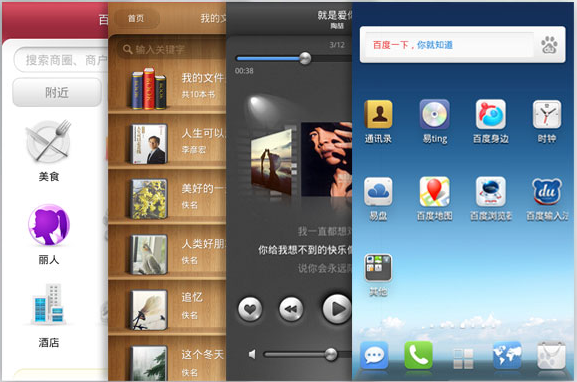
    The company is calling its platform Baidu Yi, which translates to “Easy.” Similar to the Bing integration in Mango, this OS is all about search. Smartphones that run Yi will load up a search box within seconds of turning on the phone. Other components will load in the background, but users will be able to perform a web search almost instantly. The system will also offer up to 180 GB of cloud storage space. Sounds nice — but so did webOS. Will Baidu Yi fare better?

    Baidu isn’t the only Chinese company looking to get in on the OS game. Local players like Hangzhou-based Alibaba and Shenzhen-based Huawei have announced similar cloud-based platforms recently, but as far as local competition is concerned, Baidu seems unfazed. “To us, cloud computing is much more natural than to an e-commerce company or a telecom equipment maker because we have the capability to handle data, just as Google has, that’s why they’re so good at it,” said Baidu VP Wang Jing to the Financial Times.

    Baidu certainly has taken a page out of the Google playbook. But just one. The current version of Yi is based on Android, but the Android you’d see in China isn’t our Android. In most cases (not Baidu’s), it’s called Ophone, a fork of Android, and it effectively removes Google from the picture. The core Android operating system is made up of a Linux kernel, licensed under GPL, with Apache middleware and user stacks. Major components of the upper layers, such as the Android Market, are Google’s to license. Chinese carriers gladly do without those core Google software products and opt to integrate their own or third-party replacements.

    In other words, Android’s success in China is a bit hollow, even if it is the basis for Ophone, and now Baidu Yi. What’s more, Mr. Wang mentioned that “it is possible that we [will] launch our own operating system in the future.” Google already has big problems in China, and Android getting left behind entirely (rather than marginally) by its biggest Chinese competitor would only make things worse.

    But how does Mr. Wang feel about our other hometown hero — Apple. The company has already tapped China Unicom’s 200,000 subscribers, and reportedly has plans to launch the iPhone with China Mobile, which has a user base topping 600,000. Apple only has four (non-fake) Apple stores in the country, but China is its fastest growing market in terms of sales. With those stats, it hardly seems as though Baidu Yi poses a threat.

    But nothing is ever as it seems. China is both an irresistible and incredibly dangerous market for American tech companies, and Apple faces a number of obstacles within the market. For one, the Chinese government requires special wireless internet technology (TD-SCDMA) on its mobile phones. And then there’s the massive black/grey market in China for iPhones and iPads.

    Baidu’s co-founder and CEO seemed to know back in March that Apple would be one of its main competitors in the mobile space. In an interview with the Financial Times, Mr. Li made mention of the new OS as compared to iOS.

    “Right now when you power on an iPhone, it takes 45 seconds before you can do anything,” he said. “In the future, one second, you turn on the device, and you can start using the box. That’s our mission for the future of the internet.” His plan is to build an OS that uses search as the basis for everything. “The goal is to let people become increasingly dependent on the Baidu Box.”

    And that’s all we really need: to be even more dependent on our smartphones. Good work, Baidu.

    Update: So it would seem that Baidu Yi has gone live. The OS features include an eBooks app called Yue, a Google-places style app called Shen Bian, Baidu-powered maps, and a music app called Ting. Check out the video after the jump to see Baidu Yi in action.

    [Image credit: The Register]

    [Video credit: MicGadget]


    Company:
    BAIDU
    Launch Date:
    11/10/1999
    IPO:

    5/8/2005, NASDAQ:BIDU

    Baidu is the largest Chinese language search engines. Baidu’s mission is to provide the best way for people to find information online, including Chinese language web pages, news, images…

    Learn more


    Company:
    APPLE
    Launch Date:
    1/4/1976
    IPO:

    1980, NASDAQ:AAPL

    Started by Steve Jobs, Steve Wozniak, and Ronald Wayne, Apple has expanded from computers to consumer electronics over the last 30 years, officially changing their name from Apple Computer,…

    Learn more


    Company:
    GOOGLE
    Launch Date:
    7/9/1998
    IPO:

    25/8/2004, NASDAQ:GOOG

    Google provides search and advertising services, which together aim to organize and monetize the world’s information. In addition to its dominant search engine, it offers a plethora of…

    Learn more