Square-Enix Working On Chrono Trigger, Final Fantasy For Android

androidtrigger

While they’ve pumped out over 30 iOS apps to date, Square-Enix is now looking to revive a few of their classic titles on an Android phone (hopefully) near you. While Nintendo has officially disavowed the notion of making smartphone games, their long-time software associate seems to have no compunction in churning them out.

According to Japanese gaming magazine Famitsu, Square-Enix is hard at work preparing a selection of RPGs for a 2012 launch in the Android Market. Among them is Chrono Trigger (my personal favorite), the 1995 time-bending fan-favorite that first debuted on the SNES. Also on the list is Dragon Quest: Monsters, a popular Enix creation that pretty much hinges on making those iconic blue blobs fight each other, and Final Fantasy: Mystic Quest, the SNES Final Fantasy game that no one really played. Square-Enix will release the games through their own Square-Enix Gaming Portal, but hopefully they see a stateside (re?)release soon.

These games will be a welcome addition to Square-Enix’s current Android line-up, which currently consists of two apps. I think Square-Enix, unlike Nintendo, has the right idea here: while it seems like Nintendo President Iwata thinks that smartphone gaming will sully Nintendo’s history, Square-Enix is using different platforms to reignite existing fanbases and test out some interesting new IPs.

Square-Enix jumped headfirst into alternative gaming platforms years ago, with games like Song Summoner making an appearance on non-touch iPods of all places. It was a novel idea, and the end result was a refreshing gimmick on top of a classic Square-esque turn-based strategy game. Nintendo needs to realize that smartphone platforms aren’t where classic franchises go to die. It can be a place where new games and IPs can test the waters, and old ones can find a new audience.

[via Recombu]


HootSuite Raises $3M From Hearst And Others, Buys Twitter Data Analysis Tool TwapperKeeper

hootsuite-1

As we reported yesterday, social media dashboard company HootSuite had raised a new round of funding, according to an SEC filing. We’ve confirmed the funding with the company, and today, the startup is announcing a $3 million raise from previous investors and new investor, Millennium Technology Ventures. HootSuite has previously raised $1.95 million from Blumberg Capital, Hearst Ventures and Geoff Entress.

HootSuite offers brands and businesses a comprehensive social media dashboard that allows teams to collaboratively schedule and monitor updates to Twitter, Facebook, Linkedin, WordPress and other social networks via web, desktop or mobile platforms. Via the application, HootSuite users can also track campaign results, analytics and other data.

The company is also announcing a new ‘strategic acquisition’ of social storage and reporting startup TwapperKeeper.com. TwapperKeeper helps academic organizations, conference leaders, marketing departments, customer service teams and PR companies to archive, track, monitor, and analyze Twitter data. Basically, TwapperKeeper allows users to archive tweets by hashtag, keywords, or person, and offers an API as well. The app will be integrated into HootSuite’s dashboard.

By way of history, TwapperKeeper ran into some trouble with Twitter earlier this year for violating the network’s terms of service.

This follows previous acquisitions of SwiftApp (now HootSuite for Android), and TwitterBar, which enables users to post to a variety of social networks straight from the web address bar (now HootBar).

HootSuite, which now has over 2.5 million users is a profitable, and has a $8 million run rate (estimated $10 million by end of year). The company will use the new funding to make acquisitions, for sales and marketing efforts and for hiring. The company has also added Steve Johnson (former VP of Channel Partners from Constant Contact and Blackbaud) as chief revenue office; Darren Suomi (formerly at SAP and Business Object) as VP of Sales and Greg Gunn as VP of Business Development.

Similar to social media app Seesmic, HootSuite started as a third-party Twitter app, but has found a viable business offering a more enterprise-focused dashboard for agencies, brands and others. HootSuite was also the first application in which Twitter began testing its own in-stream ad product.


Company:
HootSuite
Website:
hootsuite.com
Funding:
$4.9M

HootSuite helps organizations use the social web to launch marketing campaigns, identify and grow audience, and distribute targeted messages across multiple channels.

Using HootSuite’s unique social media dashboard, teams can collaboratively schedule updates to Twitter, Facebook, Linkedin, WordPress and other social networks via web, desktop or mobile platforms plus track campaign results and industry trends to rapidly adjust tactics.

Launched in Dec. 2008 by Invoke Media, HootSuite’s rapidly growing user base includes governments, artists and organizations like The White House,…

Learn more


CrunchDeals: Take 50% Off Everything On Belkin.com Today

dead-rising

See ya in two weeks, paycheck! Belkin.com is running a huge sale today. Everything, and I mean everything as there isn’t a minumum purhcase amount, can be yours for 50% under list today. That is if their website comes back to life before midnight tonight.

The news of the sale hit the standard deal sites this morning and then reblogged by several gadgets sites including Gizmodo. The site was up long enough to confirm the “FB50” coupon code works, but then it crashed hard. As of this post’s writing, Belkin.com is up but responding very slow. And for good reason, too. This sort of sale is rare even on Black Friday. Belkin is offering 50% off everything they sell including their just-announced iPad accessory line. Under-the-counter iPad mount. It’s $25 today. Power monitor? $15 bucks today. Keyboard folio case? $50.

Shop smart, though. Some items like the Conserve Valet USB charging station with smart power is already half off on Amazon and Belkin’s shipping seems to start at $7.50.


Moprise Is Launching A “Flipboard For The Enterprise”

coaxion-ipad2

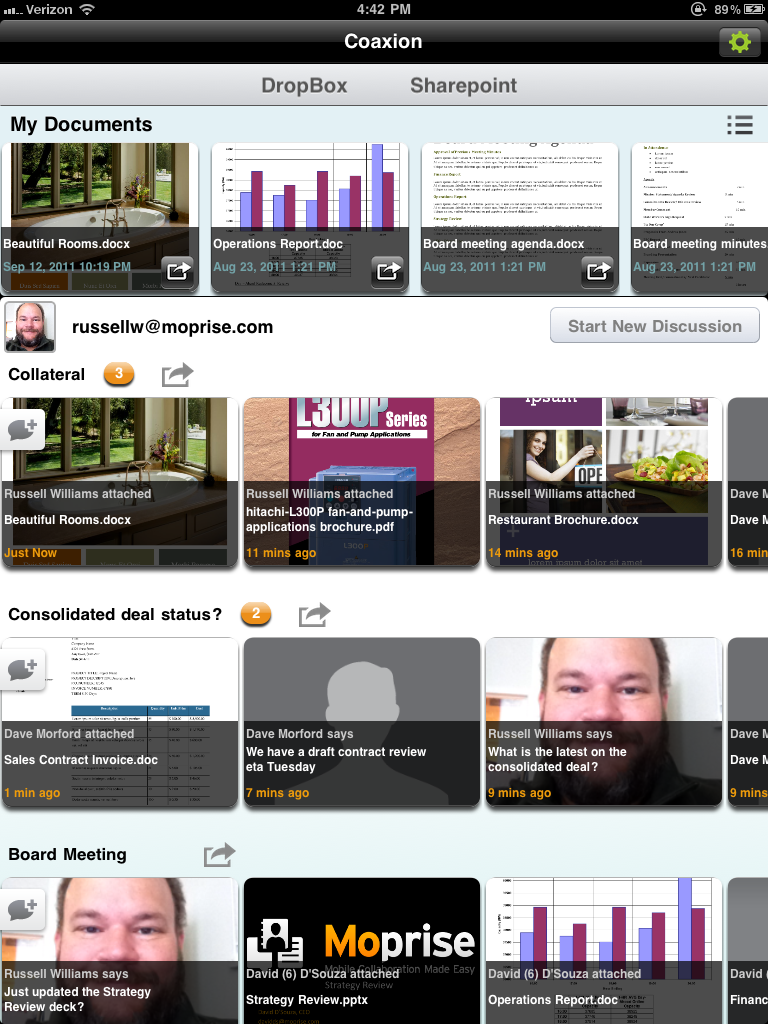
Moprise is launching a new iPad application it’s calling a “Flipboard for the Enterprise.” The app is a tablet-optimized version of the company’s currently available Coaxion iPhone application. The Flipboard analogy isn’t quite right, however. Flipboard is about reading news and articles, browsing photos and viewing updates from your social networks in a magazine-like format. Coaxion and Flipboard are only similar in that they both have easy-to-browse, touchable, swipe-friendly user interfaces. But Coaxion’s content is corporate documents, not news or tweets.

At launch, Coaxion for iPad will connect to both Dropbox and SharePoint services. For the former, you need your username and password to connect, and for the latter, all you need is that, and a SharePoint URL. The I.T. department doesn’t necessarily have to be involved in the setup or configuration, allowing for a bottom-up adoption cycle.

Moprise’s platform can connect to SharePoint out of the box, something which two of Moprise’s Co-founders, David D’Souza and Russell Williams, both ex-Microsofties, know a little something about.

Documents in Coaxion are dragged down to the iPad from these services, where they can be made available for offline viewing. In addition, the main Coaxion interface has user-generated streams called “Discussions.” Files are dragged-and-dropped into these streams and individual users can be added as contributors. They can then add their own files and share notes within the stream, which the rest of the stream’s subscribers can view.

Future versions of the application will include support for other services, including Google Docs and Salesforce. Box.net support may or may not be available at launch, too.

Later updates will include more synchronization features, allowing Coaxion users to tap a “sync” button to automatically synchronize their offline documents with the versions hosted in the cloud. Even further down the road this process will be automated – no button-pushing needed. This would solve one the app’s primary issues at present: documents will quickly become out-of-date  if you don’t keep pulling down the most recent version.

This is less of an issue for users on the Enterprise level of service, though. Enterprise customers can use special Moprise software on their internal infrastructure to push changes down to iPad users as needed, but this is a premium feature. Meanwhile, for a limited subset of services and offline documents, the app will be free. The next step up is a $20/month per user plan. Enterprise pricing varies.

The iPad app will be available in a few weeks time.

Moprise raised $500,000 in angel funding in July. It has 6 full-time employees, based in the Seattle area. The company is not looking to raise additional funding at present, it says.


Company:
Moprise
Website:
moprise.com
Funding:
$500k

Moprise is a mobile collaboration cloud-based solution that enables workgroups and enterprise users to securely access, share, and collaborate on any business content from their mobile device.

Learn more


Confirmed: Fred Wilson And Bijan Sabet To Leave Twitter’s Board

Fred Wilson

Two of Twitter’s earliest investors, Fred Wilson of Union Square Ventures and Bijan Sabet of Spark Capital, are leaving its board of directors, Twitter has just confirmed with me. Peter Kafka reported news this morning and we independently heard the same thing from sources last night. Nobody will be replacing their seats on the board. (The remaining board members are Jack Dorsey, Dick Costolo, Evan Williams, Peter Fenton, Mike McCue, David Rosenblatt, and Peter Currie).

The changing of the guard comes just as Twitter recently closed another $800 million in funding, in which preferred shareholders including Union Square and Spark are believed to have sold some shares to new investors in that transaction. As early investors, it is prudent for both to take some money off the table, but it also signals that their commitment to the company (at least financial) has also shrunk.

A Twitter spokesperson provided the following statement: “Bijan Sabet and Fred Wilson both played important and greatly appreciated roles in our success. Both saw what Twitter could become before most anyone else. We look forward to their continued input as both investors in the company and passionate users of the product.”

Wilson, in particular, has always been a key board member guiding the company from its very earliest days. This is also not the first time he’s sold shares. Last May at Disrupt NYC, when I asked him whether he had sold any of his Twitter shares, he responded that in general he likes to align himself with company founders and feels comfortable selling shares when they do. Even now, Union Square still owns shares in Twitter.

The departures come at a time when there is a general changing of the guard at Twitter (for instance, chief scientist Abdur Chowdury is also leaving, and, of course, founders Evan Williams and Biz Stone are already gone.

Twitter’s $800 million funding is very much like a mini-IPO within the company in the sense that early employees and shareholders are able to cash out. When people cash out, they leave. It’s just as true for shareholders as for employees. Whenever you infuse that much cash into the system, things are going to change.


Company:
Twitter
Website:
twitter.com
Funding:
$1.16B

Twitter, founded by Jack Dorsey, Biz Stone, and Evan Williams in March 2006 (launched publicly in July 2006), is a social networking and micro-blogging service that allows users to post their latest updates. An update is limited by 140 characters and can be posted through three methods: web form, text message, or instant message. The company has been busy adding features to the product like Gmail import and search. They recently launched a new site section called “Explore” for…

Learn more

Fred Wilson began his career in venture capital in 1987. He has focused exclusively on information technology investments for the past 17 years…In 1996, Fred co-founded Flatiron Partners. While at Flatiron, Fred was responsible for 14 investments including, ITXC, Patagon, Starmedia, TheStreet.com and Yoyodyne. Fred currently serves on the boards of Alacra, Comscore, iBiquity, Return Path, Instant Information and Tacoda Systems. (Source : Union Square Ventures)

Learn more

Bijan Sabet is a General Partner at Spark Capital. Bijan led Spark’s investments in Twitter, thePlatform (acquired by Comcast), Boxee, OMGPOP, Ex.fm and Tumblr.

Prior to joining Spark, Bijan was Senior Vice President, Corporate Development of GameLogic after serving as an Entrepreneur-in-Residence at Charles River Ventures (CRV). Before his work at CRV, Bijan was Vice President, Business Development and Product Management at Moxi Digital where he was responsible for establishing and managing strategic relationships with cable and satellite operators as…

Learn more


HTC Vigor Renamed Incredible HD, Poised for October Release?

incredible-hd-release

When the first shots of the HTC Vigor started making the rounds, I offhandedly mentioned that the funky backplate and red trim made it look like a new entry in Verizon’s Incredible series. As it turns out, that hunch may have just been confirmed, as a recently leaked release indicates that a very similar device called the Incredible HD is slated for an October launch.

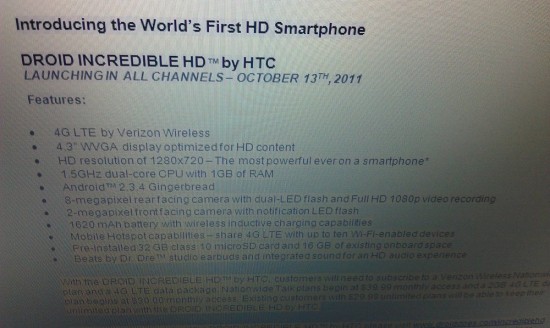
According to the details in the release, the Incredible HD is a new Verizon LTE device with a 4.3-inch screen, a 1.5 GHz processor, 1 GB of RAM, and support for Beats audio. Coincidentally, these specs match up nearly exactly to those leaked alongside the original Vigor pictures.

The release goes on to paint a very impressive portrait of the Vigor/Incredible HD: like the Runnymede, it will reportedly ship with a pair of Beats headphones, and the device will come with a whopping 48 GB of storage out of the box (16 onboard, 32 in a pre-installed microSD card).

As compelling as the image makes the Incredible HD out to be, though, some of the details just don’t add up. The release lists the Incredible HD as having a WVGA display, which comes out to a resolution of only 800×480 — hardly what one would call HD quality.

What’s worse is the fact that the spec listing contradicts itself: it mentions that the Incredible HD sports an actual “HD resolution of 1280×720″ right after it lauds the phone’s WVGA screen. While it could be a simple typo (1280×720 is occasionally referred to as WXGA, though not usually in the context of a phone), it could also be the work of a rookie forger mixing up their jargon.

The Incredible HD, if real, looks to pack a real wallop when it supposedly ships on October 13. While it would certainly spice up the holiday season’s smartphone wars, the whole package almost looks to be too good to be true.


Tethras Helps Developers Translate And Localize Their Mobile Apps

teth

Tethras is launching its mobile app localization platform in the U.S. The company, which is based in Ireland, helps developers translate their iOS and Android apps into various languages.

The company’s localization as a Service platform connects developers to a multi-region community of language translators. Tethras can help translate apps into over forty languages. And Tethras allows translators and developers to preview what a translation will look like within the app itself.

Because Tethras is based in the cloud, updating and managing translations is an easy process and the startup’s offering can integrate with the app development process. You simple upload your app to Tethras’ platform, and you’ll get quotes on how much it will cost to develop the localized version. After upload, the number of words in the app are counted, and quotes are generated for forty-plus languages. Pricing ranges from $0.10 to $0.28 per word.

As mobile app usage explodes internationally, especially in countries like China and South Korea, it makes sense for app developers to translate and localize their apps for these regions. Tethras should be able to capitalize on the mobile app explosion.


Company:
Tethras
Website:

Learn more


Lyst Comes Out Of The Closet To Open Up High Fashion World

34-291673487_large_flex

While the retail or ‘high street’ fashion world has been gradually populated by startups looking to create communities of fashion lovers (such as WIWT), the more rarified world of high fashion has remained largely untouched by online. This is an anomaly, because if there is one thing to be said about high fashion it’s that it has passionate followers. Done right, that ought to translate into passionate users of online services.

Lyst, a startup founded by Chris Morton, Sebastjan Trepca and Devin Hunt, is gaining traction with high fashionistas and looking to achieve just that. It’s latest enhancement – launched to coincide with London Fashion Week – is designed to allow fashion fans to be alerted as soon as clothes on the catwalk become available to purchase, usually some weeks later.


Company:
Lyst
Website:

Lyst is a social curation platform that’s changing the way people discover fashion online.

Learn more


Lexus Hybrid Hatchback Is Study in Contrasts and Compromises

<< Previous
|
Next >>


Lexus' hatchback hybrid

<< Previous
|
Next >>

Denny Rehberg is the finest congressman from the state of Montana. Even his fiercest opponents and strongest detractors would agree with that statement.

Denny Rehberg is also Montana’s only congressman.

Lexus is hoping that similar logic will win over buyers to the CT 200h, the world’s first and only entry-luxury segment sport hybrid hatchback. Unfortunately, buyers don’t shop by class — they cross-shop cars with similar attributes. That means the baby Lex is pitted squarely against the likes of the Audi A3 TDI and VW Golf TDI. As a hybrid, the CT can never escape the shadow of Toyota’s own Prius.

The CT 200h, introduced as a 2011 model, is a hybrid in more ways than one. It’s not cheap, but it’s not as expensive as other Lexuses in the lineup. It doesn’t have record-breaking fuel economy, but it manages in the low 40s. And it sure isn’t fast, but it offers a relatively spirited driving experience compared with other battery-powered cars. The “h” might stand for hybrid, but the “C” stands for compromise.

Though the powertrain is almost the same as the Toyota Prius, Lexus stiffened the suspension and gave the CT slightly weightier steering. It helps the CT feel more firmly planted on the pavement than a lollygagging Prius, but it’s certainly not a sports car.

I spent a week with the CT 200h and found it an ideal commuter, delivering an average of 41.5 mpg in a mix of highway, city and stop-and-go traffic. Though the powertrain is almost the same as the Toyota Prius, Lexus stiffened the suspension and gave the CT slightly weightier steering. It helps the CT feel more firmly planted on the pavement than a lollygagging Prius, but it’s certainly not a sports car.

The CT offers three settings: Sport, Eco and Normal. I ignored Normal, swapping between Sport for around-town driving and Eco for traffic jams. Forget to turn the knob, however, and merging in Eco becomes an agonizingly slow, white-knuckle exercise in waking the laziest throttle I’ve ever encountered.

Like the Prius, acceleration can be entertaining at low speeds when the electric motor is helping. Mash the pedal on the highway, though, and you’ll hear just the kind of groan you’d expect from a 98 hp gas engine mated to a CVT. Regenerative brake action is somewhat nonlinear, grippy and accompanied by sound effects vaguely reminiscent of Mike Mulligan’s steam shovel.

As small cars can easily get lost in parking lots, Lexus helpfully painted our tester a fluorescent shade known as Daybreak Yellow Mica, a color apparently inspired by Neil Diamond’s onstage wardrobe. Otherwise, the CT is a handsome if somewhat nondescript vehicle. The flared rear fenders give the illusion of a foreshortened sedan, while the sloped C-pillar keeps it from looking too much like a Matrix.

Our tester was also equipped with a power driver’s seat, black “Nuluxe” fake leather and a “premium” sound system that offered vaguely better fidelity from FM broadcasts than AM ones. Space was adequate for two people up front, though rear seat and cargo room was significantly pinched compared to the current generation Prius.

Mounted high above the dash was an almighty navigation screen controlled by a trackball-like apparatus known as Lexus Remote Touch. While the name sounds inspired by the seedier reaches of Craigslist, it’s a pretty cool party trick. The remote controller gives haptic feedback that gently nudges the mouse pointer over available on-screen selections, meaning you don’t have to aim the mouse at 60 mph. I had no problem using it while driving and keeping my eyes on the road, and Lexus engineers claim it distracts drivers less than touch screens or scroll wheels.

The gauge cluster is free of most hybrid-related frippery. Under “Eco” or “Normal” settings, the CT features one of the most intuitive hybrid function meters I’ve ever seen. With labels for “Charge” “Eco” and “Power,” it not only shows exactly what the drivetrain is doing at any given time, but also encourages drivers to lay off the gas to save fuel. I ignored the poorly animated energy diagram that also took up valuable dashboard real estate.

Dialing up “Sport” mode trims the gauge cluster in red and replaces the hybrid meter with a tachometer. Though I’ve been driving hybrids for almost a decade, there’s still novelty in seeing the needle stay at 0 under electric-only acceleration.

Unfortunately, the interior was far from flawless. The initial impression of clean lines gave way to a center stack cluttered with superfluous buttons. I counted four distinct ways of changing the radio station, and separate selectors for radio, CD and satellite could’ve been simplified into a single “mode” button. Those with sensitive tushes might appreciate the 29-position (!) seat heater selector. My posterior must be woefully unrefined, as it couldn’t even tell the difference between levels as disparate as 4 and 19.

As Lexus defines it, the CT 200h is a great car. But cars can’t be judged in a single-vehicle class vacuum. If you’re interested in this car, I’d recommend you first take a trip down to your Audi dealer and try out the A3 TDI. With only slightly lower fuel economy numbers and a very similar MSRP, it’s the driver’s choice. A fully-loaded Golf TDI might not have the cachet of a premium brand, but it does have an optional stick shift. If it’s the all-important mileage number you’re after, load up a Prius to the gills, get 53 mpg on the highway and take a vacation with the money you save.

Should you end up loving the Lexus, that’s your prerogative. There are plenty of people who prefer Paul to George, Starship to Jefferson Airplane and The Honeydrippers to Led Zeppelin. If you’ve got a two-hour stop-and-go commute from some godforsaken sprinkler city, it might just be the ideal car.

Give the CT 200h a chance. Just don’t assume that it’s the best because it’s the only one of its kind.

WIRED Relatively handsome. Better handling than a Prius. Great for traffic-prone commutes. Haptic “mouse” keeps eyes on the road. Great gauge cluster.

TIRED Distracting dashboard. Subpar sound system. Middling MPG. Questionable color choices. Other options abound.

Photos courtesy of Toyota Motors

Droid Bionic Review: A Shape-Shifter With Some Baggage

Like Optimus Prime or Al Gore, the Droid Bionic is a robot in disguise.

Sure, the Bionic looks like it’s just a massive, industrial-styled phone, just like our favorite Transformer looked like nothing other than a badass eighteen-wheeler.

But the Droid Bionic can also change into a laptop, a desktop workstation, and other things which are decidedly un-phone-like.

We’ve been waiting to see a finished version of this phone since Motorola first showed off the Bionic in January. Though it was supposed to launch months ago on Verizon’s 4G LTE network, Moto sent the phone back to the drawing board for improvements (ostensibly to better stack up against HTC’s 4G LTE offering, the Thunderbolt). The phone came back as a connectivity beast with lots of optional peripheral attachments, turning the Bionic into a successor of sorts to the Atrix, Motorola’s most recent dual-core, peripheral-enhanced handheld.

Moto’s premise is simple: Our phones are increasingly becoming more powerful, useful and versatile in our everyday lives. Why not allow them to adapt — or transform, if you will — to what we need them to be in different situations?

The “Lapdock,” for instance, is literally a laptop shell driven by the Bionic. After plugging the phone into the station on the back hinge, the Bionic launches Motorola’s “webtop” interface, which is essentially a desktop-lite environment powered by the phone’s hardware.

There’s a catch to all of this connectivity, however: You’ll have to pony up a lot of dough. The Lapdock accessory will run you $300, while the HD station — which gives you access to the same interface but lets you use your own keyboard, mouse and display — costs a C-note. Add a car charger, HDMI mini-display adaptor and navigation dock to that, and you’re closing in on $1000. That’s a hell of a lot of money to spend on tricking out your phone, even if it’s no longer just a phone once you plug these things in.

Of course, you don’t have to buy an accessory to get a good experience out of a Bionic. But it somewhat misses the point if you don’t. The draw of the device is in its shape-shifting capacity, a re-imagination of what a smartphone should be able to do. Otherwise, you’d probably be better off going with a similarly spec’d phone for a lower starting price — and those are definitely out there.

Conceptually, ultra-connectivity is brilliant. With the Atrix and the Bionic, Motorola is trying to hard to differentiate from the existing glut of Android smartphones on the market.

Execution, however, leaves much to be desired. Casual browsing on the Lapdock was wonky, stutter-filled and nothing like cruising the web on my tried-and-true laptop. The keys on the board were chintzy and small, most likely a casualty of keeping the cost of the peripheral below $300 (unlike the launch price of the Atrix’s lapdock, which was a hefty $500). Desktop simulation on an HDTV through a webtop dock was a little less jerky, but still subpar.

It takes some beef to run all the peripherals, and the handset itself is no slouch. Under the hood, this bad boy is packing more power than a Plymouth. It’s running on a dual-core 1GHz chip backed by a gigabyte of RAM, 16GB of internal storage plus a microSD card slot. It ships with a 16GB card, but it can accept a card up to 32GB. Swiping through menu screens was snappier than most of the other phone I’ve tried this year — it’s definitely one of the most responsive phones you can buy. My gaming experience on resource-heavy apps like Nova 2 HD was excellent.

Given all the brawn, the Bionic requires a lot of juice to keep it running — and it certainly shows. After starting my day with a fully-charged phone, my battery was dead before the end of the workday. That’s after moderate-to-heavy use. I made a few phone calls, used my data connection liberally, and pumped the screen brightness up to full blast (the display, by the way, isn’t the sharpest I’ve seen). This is how we all use our phones, so I expected better battery performance.

The real battery suck comes from the LTE radio. Leave your 4G turned on all day and you’ll be dead before nightfall. Use your high-speed connectivity judiciously, however, and you may make it to midnight or beyond, even under normal use conditions. It’s sad that we have to ration our own bandwidth use, but alas, that’s the name of the game with today’s devices.

Thankfully, using Verizon’s 4G network at full tilt is worth the energy drain. Our average download speeds clocked in around 10 Mbps in the San Francisco Bay Area on average, with upload speeds ranging from 4 to 6 Mbps.

In short, the handset itself is speedy, powerful and — battery life aside — has all the stuff you want in a high-end smartphone. But so do four or five other Android options currently on the market. Unfortunately, the extra products that were supposed to tip the scales in the Bionic’s favor end up falling far short of their potential.

WIRED Power, speed and connectivity options are damn near unrivaled in the mobile space. Android 2.3.4 Gingerbread is current, and well-skinned. HDMI, expandable microSD, DLNA, oh my!

TIRED Unless you’re a baller, dropping this much coin on the Bionic and its accessories might leave you eating ramen noodles for a month. Battery life suuuuuucks. Peripherals don’t live up to their potential.

Photos by Jim Merithew/Wired

Wood-Powered Camp Kettle Heats Water Fast … if You Can Light It

<< Previous
|
Next >>


mKettle

Photo by Jon Snyder/Wired
<< Previous
|
Next >>

Normally, a camper has to choose between the whimsy of cooking over an open fire and the efficiency of a backcountry stove. But with the mKettle, a double-walled stove/kettle combo, you can have the best — and worst — of both worlds, all in a compact, lightweight package.

To use the mKettle, you build a mini fire in its removable base. The flames travel up through the chimney at the center of the aluminum canteen, heating the surrounding cylinder of water to a boil inside 10 minutes. That’s the theory, anyway.

In practice, the heat transfer is extremely efficient, and the neoprene sleeve around the outside of the canteen ensures that the warmth goes into your soup-to-be, not into the surrounding air.

But for the magic to happen, you need actual flames, and those are more easy to imagine than create.

The major advantage of the mKettle over gas-powered camping stoves is that you don’t have to lug your fuel with you. Instead, you burn whatever you find in camp. But what if it’s raining? And windy. And you need boiling water in order to eat. Shudder.

You get the point: Unless you’re a Navy SEAL or an Eagle Scout, trying to light a fire in a tiny space under non-ideal conditions is enough to ruin your day. Even under ideal conditions, it can be frustrating and time-consuming.

If you do get a fire going strong, your 18 ounces of water can be hot in as fast as 3.5 minutes, if you believe mKettle’s specs. I never did better than 6 minutes myself.

I also tried alternative fuels,. I can tell you that a lemon-scented soy votive candle is not sufficiently powerful to boil water in the mKettle, even if you’re willing to let its delightful fragrance fill your campsite for nearly an hour.

The kettle comes with a food-grade silicone stopper so you can use it as a canteen to transport water. But don’t leave the stopper in once you light your fire or it’ll turn into a projectile.

The mouth of the kettle is too small for cleaning, so you’re limited to heating water inside of it. But the company has very recently introduced a new accessory, a titanium cross-stand that fits over the chimney so you can place a pot there, letting you cook a meal and heat your water at the same time.

I can imagine a situation — say, natural disaster or zombie attack — where having a light (13-ounce), portable, fuel-agnostic water-boiling tool might mean the difference between game over and level up. But for regular camping? I’ll stick with gas.

WIRED Transfers heat extremely well from flame to water. Neoprene sleeve stays cool as water boils. You can use it as a canteen, too. Base nestles inside canteen’s chimney for compact storage.

TIRED Building and maintaining flames can be tricky and is not for the impatient. At 13 ounces, doesn’t really qualify as ultralight.

Note: Discussions have surfaced on web forums accusing the Ultra Light Kettle Company of copying the design of a competing chimney kettle product called the Backcountry Boiler. We asked the company about the controversy. A representative told us that the mKettle is an independent design, and that the company has been producing them and selling them commercially for more than a year.

Olympus’ Slimmed-Down PEN Mini Serves Big on Center Court

<< Previous
|
Next >>


Olympus PEN Mini E-PM1

Photo courtesy of Olympus
<< Previous
|
Next >>

Camera manufacturers have been slugging it out in an entirely new product category this year: the micro sharpshooter.

Much as the revived Mini Cooper helped change the compact car category in the last decade by offering style and performance in a small package, Panasonic, Sony, and Olympus are hoping their compact system cameras (CSC), which use tiny interchangeable lenses, will present a pint-sized alternative to digital SLRs.

Earlier this summer, I shot with the petite Sony NEX-C3 at a dress rehearsal of the Broadway musical Chicago and generally liked the results. Recently, I had a chance to use the similarly diminutive new 12.3- megapixel Olympus PEN Mini E-PM1, which, as with other cameras in this category, doesn’t have a DSLR’s internal flip-up mirror, allowing for the miniscule body size.

But how small are these camera systems, really? As I mentioned in my review of the NEX-C3, when you put a large zoom on a mirrorless CSC, it may be smaller than a DSLR, but it’s still not going to fit in your pocket. The same is true of the Olympus PEN Mini E-PM1, a camera capable of producing some surprisingly splendid images given its small size. But with the PEN Mini, as with the NEX-C3 and Panasonic’s Lumix GF3, to enjoy the full promise of compactness, you have to use them with a “pancake” style prime lens.

Image quality, in good light, was positively sparkling. Shots of the tennis players were close to the sharpness and quality of photos I shot at the US Open a few years prior using a professional DSLR and pricey lens.

During an Olympus press event at the US Open tennis tournament in New York City, I got to shoot with the PEN Mini E-PM1 and four M.Zuiko lenses: a 14-42mm f3.5-5.6 kit lens, a 12mm f/2.0 prime lens ($800), a 40-150mm f4.0-5.6 zoom ($260), and a 75-300mm f4.8-6.7 zoom ($750). Of course, the one I liked best happened to be the most expensive: the 12mm f/ 2.0. The 12mm lens — which converts to a 24mm because the PEN Mini’s Micro Four Thirds-size sensor magnifies by 2x — provided a nice, compact tool to shoot stills and 1080i HD video of the US Open’s racket stringing room, but I switched to the 40-140mm and 75-300mm lenses to cover the action on the court.

Like much with the Olympus PEN Mini E-PM1, the camera performed surprisingly well in capturing the frantic, stop-and-start movement of the tennis players. It shoots an impressive (maximum) burst of five frames per second at full resolution, which was just quick enough to keep up with an opening round match between Andy Murray and Somdev Devvarman. In comparison, some of the professional photographers I was sitting next to in the court dugout behind the players were using Canon and Nikon DSLRs that were firing at around 10fps.

One somewhat distracting feature of Olympus’ PEN models when shooting at long range is that their image stabilizers are built into the body of the camera, not in the lens. Consequently, when you’re zooming in at 300x (or 600x thanks to the 2x magnification of the Micro Four Thirds sensor) the image you see on the LCD or optional electronic VF-3 viewfinder ($180) is going to look mighty shaky even though photos came out relatively sharp. This was most evident when I photographed a female tennis player down on the court from up high on the roof of Arthur Ashe Stadium. The end result was crisp, but I felt a little nauseous from the shaky subject matter. Speaking of shooting from the roof of the stadium, I got a nice simulated tilt-shift effect using the E-PM1’s Diorama art filter, which made portions of the court look miniaturized (see the image in the gallery).

The PEN Mini uses the same, vastly improved autofocus system employed on Olympus’ latest flagship PEN model, the larger PEN E-P3. Called FAST (Frequency Acceleration Sensor Technology), the silly-named system lets you choose between 35 separate focus points to help zero in on action in different parts of the frame. The AF did a good job of keeping up with Andy Murray as he wound up for a colossal serve or charged the net for a volley.

Later, when I tested the autofocus system in more difficult, darker lighting, it felt half a step slower. This is not surprising for a contrast-detection-based AF system — which is what all these types of cameras use — and a marked improvement over previous models. This is in part because of the E-PM1’s AF illuminator LED, which helps lock in on subjects in low lighting. On the other hand, there’s no built-in flash on the tiny PEN Mini, so if you want to further light up your subject, you need to attach the small electronic flash included in the kit. It fits into the accessory shoe on the top of the camera.

Where the PEN Mini really struggled was in its frustratingly slow start-up time. It took me over three seconds to power the camera on and get to first shot. This got annoying as I walked the grounds of the USTA National Tennis Center and spotted pro tennis players I wanted to photograph but had to wait for the camera to be ready to shoot. Hopefully a firmware upgrade down the line for the Mini will improve its start-up speed.

Image quality, in good light, was positively sparkling. My shots of the tennis players captured with the PEN Mini E-PM1 were close to the sharpness and quality of photos I shot at the US Open a few years prior using a professional DSLR and pricey lens. It’s worth noting now that the PEN Mini and the 14-42mm kit lens retail for very reasonable street price of $500.

Colors were slightly on the oversaturated, “warm” side, which is not unusual for a consumer camera. If you find this a bit much, you can tone down the Color Saturation in the Mini’s software. Conversely, if you want more saturation, crank it up or just choose the “Pop Art” mode under the Art Filters.

I wouldn’t depend on this model for high ISO, low light shots, though. As with its big brother, the E-P3, which uses the same 12.3 Live MOS sensor, the Mini produced images that were noticeably crunchier than the Sony C3 at over ISO 1600. The Sony, it should be said, uses a slightly larger, 16.2MP APS-C size sensor.

In terms of design, the polycarbonate and metallic E-PM1 has a clean and luxurious look and feel to it, despite its affordable pricing. If I had one gripe, it’s that the Mini’s smooth body is a little on the slick slide. And there’s no handgrip, so make sure you keep a good hold on it. Also, while the 3-inch LCD screen on the back was larger, its 460,00 pixels of resolution made images look on the soft side in playback. But if you want a better screen, there’s always the larger and more expensive E-P3.

Overall, the E-PM1 was a fun camera to shoot with, producing surprisingly sharp, high-quality images of fast-moving action at the US Open. It also fared well as a little video camera, capturing crisp 1080i footage of the racket-stringing room with stereo sound. You can start shooting video via a single touch of a button on the back of the camera. If the camera has a few drawbacks, such as its annoyingly slow start-up time and its confusing menu navigation set-up, which requires too many button pushes and knob turns, those are relatively minor quibbles for this sprightly Mini.

WIRED Fast autofocus system and 5fps burst shooting mode are enough to keep up with some of the world’s best tennis players. Crisp 1080i HD movies with stereo sound available at the touch of a button. 2x magnification factor from Micro Four Thirds sensor turns a 300mm lens into a frackin’ 600mm lens. Simple and elegant camera body makes it look more expensive than it is. Available in six colors, including purple.

TIRED Attach a zoom lens and the Mini becomes decidedly less mini. Very slow start-up time might cause you to miss shots of famous celebrities. Images above ISO 1600 are noisy. Menu navigation involves too many button pushes and knob turns. No built-in flash.


Steampunk MP3 Player

pocket-music-library-steampunk-mp3-player-by-will-rockwell.jpg

If you’re a fan of the steampunk style, then you already know who Will Rockwell is. This time around Mr. Rockwell has blessed us with what he calls the “Pocket Music Library”. You probably already guessed that it’s an MP3 player, since it’s in the title.

Inside this amazingly crafted case lives an Archos Vision – an MP3 player that is also a video player, flash drive, voice recorder and has an FM radio. The Vision isn’t modded at all, instead the case is made to fit the Archos; a smart idea if the Vision ever breaks and you need to replace or repair it. Even though the MP3 player within isn’t modded, the Archos can be fully controlled from the stylish buttons on the case.

The unit isn’t cheap, for $350 you get the Pocket Music Library, headphones, USB connector and a fancy tin case.

[Link to Pocket Music Library]

tech.nocr.atSteampunk MP3 Player originally appeared on tech.nocr.at on 2011/09/11. Reproduction of content not allowed without consent.

© tech.nocr.at 2011 | Permalink | Comments |
Read more in Gadgets | Explore more in: , | Add to del.icio.us | Stumble it | Reddit


Cruising America, Euro-Style

<< Previous
|
Next >>


airstream-front-3-4-ii

<< Previous
|
Next >>

“It’s probably some rich surfer,” echoes a voice through the open tailgate, across the wood-paneled cabinets, and toward the galley where I’m rummaging for a late-morning snack.

Flanked by Camrys and Civics, it’s not surprising that my weekend ride is the buzz of Moonstone Beach. I’ve been piloting a nearly 23-foot-long, 10-foot-tall Interstate 3500, a silver monolith made by Airstream. It’s not the evocative, bullet-shaped trailer from your parents’ Super-8 archives, but rather a less visually striking yet considerably more lavishly appointed Mercedes-Benz Sprinter-based RV that makes Winnebagos look like… well, Winnebagos.

Life is good here in the silver mothership, an apartment on wheels that’s propelled my wife and me over 200 miles from home. Cool air is billowing from the roof-mounted, 13,500 BTU air conditioner, Pacific Ocean swells are crashing against the craggy rocks below, and the missus is sunning on the rear seats, which fold flat to form a makeshift bed. When we arrived in Cambria, California the previous night, we maneuvered this hunk of rolling architecture along a plot of land overlooking the water, and slept the sleep of babies on the bed’s buttery soft surface. More on the road trip in a moment.

Many Class B conversions (that is, van-based RVs) are built on Ford, Dodge, or GM chassis. But this Airstream is the Mercedes-Benz of motor homes — literally.

The Airstream is somewhat of an oddity in the universe of recreational vehicles. Many Class B conversions (that is, van-based RVs) are built on Ford, Dodge, or GM chassis. But this Airstream is the Mercedes-Benz of motor homes — literally. And while I’ve tested numerous triple-pointed stars, this is the first I’ve driven halfway up the California coast that didn’t require booking a hotel room.

Unlike competitors and other models with American iron under the hood, the Airstream is powered by a petite 3.0 liter, intercooled turbodiesel that puts out only 188 horsepower — less than a base model Hyundai Sonata. But torque is the name of the game when it comes to tugging mass, and the mill’s 325 lb-ft of torque is enough to help it to get out of its own way. Kinda.

Launching the Airstream up to legal speeds requires patience for those accustomed to high-revving sports cars, or even reasonably frisky sedans. After all, you’re lugging along a microwave, a two-burner stove, a 3.1 cubic foot fridge, a 19-inch flatscreen TV, a bathroom with a built-in shower, and of course, the proverbial (and literal) kitchen sink. The Corian counter top and freshwater tank capable of holding up to 32 gallons don’t encourage forward movement either. Though once these 8,000-plus pounds of amenities get rolling, acceleration is acceptably expedient, with a subtle whistling that creeps into the cabin as the turbo spools up.

Despite a five-speed automatic gearbox, trundling along at 65 mph translates to a lazy 2,500 rpm. And thanks to the diminutive power plant, it’s possible to attain 18 mpg while draining the 26.4 gallon diesel tank. Handling can get topsy turvy in crosswind conditions and the vehicle’s wide sweep during low speed turns requires full attention from the uninitiated. But the Airstream is generally manageable by most drivers when posted speed limits (and common sense) are obeyed. Incidentally, ride quality is sufficiently controlled at most speeds, but the back of the bus has a tendency to gyrate at highway velocities, making at-speed power naps all but impossible.

Parking the beast requires acclimating yourself to its tall-yet-narrow proportions, aided by a video camera that transmits an aft view to a small screen where the rear view mirror would sit. Amateur arborists note: if you position this bad boy near any sort of low-lying trees, branches will be compromised.

Which brings us back to our improvised beachfront property here in beautiful Cambria. If we were entertaining guests, the front captain’s chairs would be swiveled rearward and the table inserted into its aluminum base for aperitifs, with incidental light and an ocean breeze spilling in from the sliding side door. We could run accessories off the twin 12-volt batteries and fire up the 2.5 kW generator when necessary (a 50-watt solar panel is an available option.) And while the Interstate can travel with up to eight passengers, it only sleeps two, which would leave our hypothetical guests scrambling to find some place to cozy up before nightfall. But it’s just the two of us, scribbling away at our laptops as we field questions from curious strangers.

If my weekend escape is any evidence, the Airstream is a surprisingly efficient, luxurious, and comfortable way to go road-tripping. While its skinny proportions don’t quite feel congruous with the broad scale of the American West, think of this six-wheeled ride as a Euro take on the RV, trading square footage for fuel thriftiness, a smaller footprint, and maneuverability. Nitpickers may fault the faux wood on the dashboard and a few rough edges around the Alcantara-trimmed interior panels, but the Interstate’s $121,274 starting price makes it, pound-for-pound, a relative bargain.

The Airstream Interstate 3500 uncovered intriguing aspects of the motor-home lifestyle, delivering an ultra-civilized camping experience that adds a new dimension to road travel. That said, I personally haven’t quite reached the life stage where I’m inspired to crisscross America, Albert Brooks-style, in an RV.

But would I indulge if I were a rich surfer? Like, totally, dude.

WIRED A Winnebago for the stylish set. Thrifty fuel economy enables 475-mile cruising range. Plush interior and swanky indirect lighting lends a sense of occasion to overnighting.

TIRED Plasticky dashboard bits don’t live up to the plush leather seats or wood cabinets. Wish it had more classic Airstream caché, less über-van mojo. Rear overhang turns the convertible sofa into a trampoline at highway speeds.

Photos by Basem Wasef/Wired

Would You Like a Computer to Go With Your Shovelware?

Lenovo’s IdeaPad series — the bulkier, cheaper and more consumer-friendly little sibling to the ThinkPad line — gets little love, but why? Surely not just because Lenovo replaced the vaunted ThinkPad keyboard with little chicklets, right? (More on that in a bit.)

The IdeaPad Y570 has so much going for it that it’s hard to know where to start. The specs — similar to the recent Toshiba Satellite P755 — are high-end for a computer that’s priced under $1,000: 15.6-inch LCD (1366×768 pixels), 2.3GHz Core i5, 4GB of RAM, and a 500GB hard drive comprise the basics, and an Nvidia GeForce GT 555M provides more graphical oomph than you’re likely to need.

Those graphics, by the way, are switchable: Flip the slider on the front of the Y570 and it powers the GeForce down, letting Intel’s integrated graphics kick in. It makes a difference: With the graphics turned off you’ll get nearly four hours of battery time, even under full brightness and heavy load.

Performance is otherwise very good, about average with the usual productivity apps, and quite good with games. As with the Toshiba P755, the Y570 excels with older titles, and turns in respectable frame rates on newer ones.

Designed with entertainment in mind, the Y570 features loud and capable speakers (from JBL) and a crisp, good-looking LCD (though the brightness could be better). But Lenovo takes the consumer focus a bit too far, as evidenced by its preloaded software bar (the Lenovo “Smile Dock”) that drops down from the top of the screen, always when you want it the least, and whose sole purpose is to try to sell you crap. Making matters worse: The computer is absolutely loaded to the gills with shovelware, with 16 icons appearing on the desktop when you boot up for the first time. During setup, hapless users will find themselves inundated with “special offers” for everything from DSL service to a new laptop lock. Horrifyingly, registration is required to actually use the computer for the first time.

With four USB ports (two USB 3.0, one eSATA combo), SD card slot, and a full-size HDMI port, the Y570 has all the connectivity you need, but it’s the vast and spacious trackpad that really caught my eye… er, thumb. Wider than the space bar and featuring both a subtle texture and big, easy-to-hit buttons, it’s one of the few laptop touchpads of late I can actually get excited about. I have to unfortunately withhold that love from the keyboard, another trendy, island-style job that’s hard to type on and did nothing for my accuracy.

Complaints about crapware and keyboard aside, the Y570 is actually an extremely capable laptop with a solid build and impressive performance. Just let it be noted: Most of us would rather pay an extra 20 bucks up front and get back the time and frustration wasted on uninstalling junk.

WIRED Great combination of performance and price. Outstanding battery life from just a six-cell unit.

TIRED Hefty at six big pounds. Status lights and buttons above keyboard difficult to make out from a distance of more than eight inches. Don’t have a shovel large enough to get rid of all this preinstalled junk and upsell come-ons. Not sold on the burnt orange trim.

Photo by Jim Merithew/Wired