Predator-Inspired Ammo Backpack Cobbled Together By Soldiers In Afghanistan

original

A group of Iowa National Guardsmen, fresh from a harrowing two-and-a-half-hour firefight in Afghanistan earlier this year, found itself questioning the effectiveness of some of their new equipment. They had been issued M240B light machine guns for support fire, but they found themselves constantly reloading with new 50-round belts, which necessitated a ammo bearer with a bunch of belts at the ready. “The ammunition sacks that came with it made it too cumbersome and heavy to carry over long, dismounted patrols and especially when climbing mountains. Initially, we came up with using 50-round belts and just reloading constantly, which led to lulls of fire and inefficiency,” said Staff Sgt Vincent Winkoski.

While discussing the shortcomings of their setup (as you might do if your lives depended on it), someone mentioned the movie Predator, in which Jesse Ventura’s character had an ammo box for his minigun strapped to his back. They laughed about it, but Winkowski got to thinking, and with a can-do attitude that becomes of a soldier, decided to put something like it together.

He took some modular gear they had lying around (a carrying frame, all-purpose pouch), combined it with some parts from a remote weapons station, and with a little tinkering and glue, he had himself a working ammo backpack.

They tested it on the range, and it worked. And when their squad was ambushed in a valley by a group of enemy fighters, it proved it was more than just an experiment. Winkowski sent pictures and a description to science advisers in the Army’s research division. They loved it.

Within 48 days, they had redeployed a new, lighter, stronger prototype into the theater. “We were able to put everything together very quickly and were able to prove that with a combat load — that’s 43 pounds with 500 rounds, inclusive of the weight of the kit itself — that still gives the Soldier 17 pounds worth of cargo weight to attach to the frame and still be within the design specifications for the MOLLE medium,” said Dave Roy, who received the design and oversaw the prototyping.

I don’t post this just in the “cool new guns” spirit, though it’s certainly a neat gadget from that perspective. I just thought it was fantastic how the spirit of innovation pops up when you least expect it, and it seems that even within the tightly-regulated world of the Army, a good idea occasionally can take root and be on the ground fast enough to save a few lives. The freedom to create and hack is important and powerful, and providing the tools for people to do it (in this case, forward-thinking modular systems and a willingness to experiment) is an advantage in industry as well as battle.

Thanks to the 1st Battalion, 133rd Infantry Regiment, 2nd Brigade Combat Team, 34th Infantry Division, Iowa National Guard for their hard work overseas.

[via TechZwn; images courtesy of the 133rd]


Google Wallet Now Lets You SingleTap That App

googlewalletshot

Google Wallet continues on its slow (but exciting) march toward letting you pay for things simply by tapping your phone against a special, NFC-enabled credit card reader. Today, in a post on Google’s Official Blog, the wallet team announced that it’s rolling out support for SingleTap — a new feature that lets you both pay and redeem coupons at a given retailer, without having to clip (or print out) and paper coupons. Instead, the phone ‘remembers’ the Offers you’ve saved or purchased, and redeems them automatically.

The feature was first demoed back when Wallet was unveiled in May, but when the service launched in beta last month you could only use it for payments, not offers. Of course, Google Wallet is still only available to consumers that have the Sprint Nexus S 4G (not even the T-Mobile or AT&T variants of the Nexus S work). But that will hopefully change soon — I won’t be surprised if we see some announcements around this at the Android event in Hong Kong this week.

Google’s post also notes that the interface for the Google pre-paid credit card — which lets you preload a virtual card with money, in case your credit card isn’t natively supported by Wallet — will now feature more details about each of your transactions.

And finally, Google Wallet has landed some new retailers that will be integrating the service soon, including: Chevron, D’Agostino, Faber News Now, Gristedes Supermarkets and Pinkberry, who join American Eagle, Macy’s, Jamba Juice, and more (you can see a full listing of the partners here).

From the post:

The Offers tab in Google Wallet has been updated to include a new “Featured Offers” section with discounts that are exclusive to Google Wallet. Today, these include 15% off at American Eagle Outfitters, 10% off at The Container Store, 15% off at Macy’s and an all-fruit smoothie for $2 at Jamba Juice. There are many more Google Wallet exclusive discounts to come, and you can save your favorites in Google Wallet so they’ll be automatically applied to your bill when you check out.

Organizing loyalty cards in your wallet is getting easier too. Today, Foot Locker, Guess, OfficeMax and American Eagle Outfitters are providing loyalty cards for Google Wallet so you can rack up reward points automatically as you shop. More of these are on the way.


:
Website:

Learn more


Watch The 2011 Web 2.0 Summit Live

Screen Shot 2011-10-17 at 3.52.22 PM

We’re at the Palace Hotel for the 2011 Web 2.0 Summit where the lineup for the next three days consists of  almost everyone on the entire Internet. In case you didn’t get to be a part of the in-person action, you folks at home can follow along from the Livestream above, starting at 2pm PST.

Today’s speaker highlights include Supyo’s Sean Parker, Salesforce’s Marc Benioff and About.me’s Tony Conrad.

Full schedule below. 

2:00pm Plenary
Room: Grand Ballroom
Opening Welcome John Battelle (Federated Media Publishing Inc.), Tim O’Reilly (O’Reilly Media, Inc.)
2:10pm Plenary
Room: Grand Ballroom
Sean Parker, Co-founder, Supyo Sean Parker (Founders Fund), John Battelle (Federated Media Publishing Inc.)
2:35pm Plenary
Room: Grand Ballroom
John Donahoe, President & CEO, eBay John Donahoe (eBay Inc.), John Battelle (Federated Media Publishing Inc.)
3:05pm Plenary
Room: Grand Ballroom
Marc Benioff, CEO, salesforce.com Marc Benioff (salesforce.com), Tim O’Reilly (O’Reilly Media, Inc.)
3:25pm Plenary
Room: Grand Ballroom
Paul Otellini, CEO, Intel Corporation Paul Otellini (Intel Corporation), John Battelle (Federated Media Publishing Inc.)
3:45pm Plenary
Room: Grand Ballroom
Pivot Tony Conrad (about.me, True Ventures & Sphere)
3:50pm Plenary
Room: Grand Ballroom
Ross Levinsohn, EVP of Americas, Yahoo! Ross Levinsohn (Yahoo!), John Battelle (Federated Media Publishing Inc.)
4:20pm Plenary
Room: Grand Ballroom
High Order Bit Christopher Poole (4chan & Canvas)
4:30pm Plenary
Room: Grand Ballroom
High Order Bit Deb Roy (Bluefin Labs)
4:40pm Plenary
Room: Grand Ballroom
High Order Bit Genevieve Bell (Intel Corporation)
4:50pm Plenary
Room: Grand Ballroom
High Order Bit Brad Rencher (Adobe Systems Incorporated)
5:00pm Plenary
Room: Grand Ballroom
U.S. Senator Ron Wyden, Oregon Ron Wyden (U. S. Senate), John Heilemann (New York Magazine)
5:25pm Plenary
Room: Grand Ballroom
Closing Remarks
7:00pm Dinner
Room: Grand Ballroom
Web 2.0 Summit Dinner with Special Guest: Dick Costolo Dick Costolo (Twitter), John Battelle (Federated Media Publishing Inc.)


:
Website:

Learn more


Y Combinator Alum Curebit Wants To Optimize Your Referral System, Turn Your Customers Into Marketers

147762v2-max-250x250

Word-of-mouth is the tried and true way to spread the word about your business, news, or product updates. For businesses, allowing your customers to tell their friends about how awesome your product or service is can be a great way to increase your brand recognition and attract new customers to come in and check out what you’re doing. As Basecamp wrote back in September, the web-based project management system has grown increasingly in popularity because customers have been able to tell their friends and colleagues about it and bring them over to the service.

Curebit, an alum of the Y Combinator winter class of 2011, launched at demo day back in March as a way for online stores to increase revenue through referrals by turning existing customers into marketers. Curebit wants to optimize referral systems for eCommerce platforms, and today they’re launching a new product to help do that more effectively. It’s called the “Social Referral Optimizer” and Curebit Co-founder and CEO Allan Grant tells us that his product is essentially like Google Web Optimizer for referral systems: It solves the hard problem of getting high conversion rates from referral systems.

Curebit supports the type of split referral incentivization that has worked so well for companies like Dropbox. For those unfamiliar, this split referral system is when you recommend Dropbox to a friend, and when they sign up, both you and your friend get some kind of reward, be it 5GB of storage for free or a shiny nickel.

According to Grant, Dropbox worked at optimizing their referral system for months before it began to have any real sort of effect on customer acquisition and conversion, so Curebit wants to take this optimization (i.e. pain in the butt) out of the process for any site — even yours.

What the Curebit team came to understand as they tested different form of referral optimization is that conversion depends a great deal on the details of the offer (the language the offer is presented in, the type of incentive, etc.), so their Social Referral Optimizer allows sites to automatically break an offer into its various permutations and test them across Curebit’s partner sites to see which has the highest conversion rate.

The startup’s optimizer enables sites to vary the amount of the discount, the offer text, the message one uses to share it with friends (whether that be via Facebook or Twitter), the landing page, as well as the graphic design of each page. But really the coolest part is the cross-site optimization: For sites that don’t have enough volume to get those statistically significant results, users are able to take advantage of Curebit’s software, which learns as it tests from other sites across the Web (about 700 of these are already available for testing).

Interestingly, from the data the startup has collected so far, they’ve learned that the conversion rate depends not so much on the amount of the discount that one offers friends for their referrals, but more on the text one uses — how the entire offer is expressed. And so far, the results have been encouraging. With Curebit’s optimizations, users are able to get 30 to 60 percent of of the customers that buy to share exclusive offers with their friends, resulting in a direct, measurable life in sales of up to 15 percent.

The startup is also launching an additional two new features today, including “Facebook Sponsored Stories” integration, which is designed to optimized shared messages, turning them into high-conversion social ads, as well as “Social Influencer Tracking”, in which Curebit identifies customers that have shared an offer (and are super influencers) so that merchants can personally thank them.

For example, when Gina Bianchini, co-founder of Ning, shared one of Curebit’s offers, the DODOcase founders got an email about it right away and were able to reach out to say thanks immediately thereafter. Next time the Ning co-founder buys something that uses a Curebit referral, the DODOcase guys will know right away, even if she doesn’t share. Pretty cool.

For more on Curebit, check out the video below:


Company:
Curebit
Website:
curebit.com

Curebit helps online stores increase revenue through referrals by turning existing customers into marketers. When customers check out from a Curebit-enabled store, they are presented personalized deals that they can gift to their friends by posting to Facebook or forwarding a link. The deals give both the the original customer and their referred friends a rebate on their purchase at this store.

Learn more


IBM Posts Q3 Revenue Of $26.2B With Net Income Up 7 Percent To $3.8B; Ups Outlook

ibm

IBM has released its third quarter results today, with non-GAAP diluted earnings coming in at $3.28 per share, compared with operating diluted earnings of $2.85 per share in the third quarter of 2010, an increase of 15 percent. Analysts were expecting $3.22 per share with revenue of $26 billion. The company posted diluted earnings of $3.19 per share, compared with diluted earnings of $2.82 per share in the third quarter of 2010, an increase of 13 percent.

Big Blue’s third-quarter net income was $3.8 billion compared with $3.6 billion in the same quarter in 2010, an increase of 7 percent. Operating (non-GAAP) net income was $4 billion compared with $3.6 billion in the third quarter of 2010, an increase of 9 percent. Total revenue for the third quarter of 2011 of $26.2 billion increased 8 percent from the third quarter of 2010.

IBM chairman and CEO Samuel J. Palmisano said this in a statement: “In the third quarter, we drove revenue growth, margin expansion and increased earnings as a result of our innovation-based strategy and continued investment in growth initiatives…Growth markets delivered outstanding revenue performance across software, hardware, and services and contributed to the company’s expanded margins. We also achieved strong results in Smarter Planet, business analytics and cloud.”

Some of the growth markets he’s referring to are from the BRIC countries — Brazil, Russia, India and China. Revenues in the BRIC countries increased 17 percent, with total revenues from the company’s growth markets increased 19 percent. Growth markets revenue represents 23 percent of IBM’s total geographic revenue for the third quarter.

Revenues from the Software segment were $5.8 billion, an increase of 13 percent. Hardware revenues totaled $4.5 billion for the quarter, up 4 percent. IBM ended the third-quarter 2011 with $11.3 billion of cash on hand and generated free cash flow of $3.5 billion, up approximately $300 million year over year.

Because of this quarter’s strong earnings, IBM is raising its 2011 full-year operating earnings per share expectations to to at least $12.95 from at least $12.87, and for non-GAAP earnings to at least $13.35, from $13.25 per share.

You can listen and comment on IBM’s third-quarter earnings call, which starts at 4:30 pm ET, below.


Google Wallet Now Lets You SingleTap That App

googlewalletshot

Google Wallet continues on its slow (but exciting) march toward letting you pay for things simply by tapping your phone against a special, NFC-enabled credit card reader. Today, in a post on Google’s Official Blog, the wallet team announced that it’s rolling out support for SingleTap — a new feature that lets you both pay and redeem coupons at a given retailer, without having to clip (or print out) and paper coupons. Instead, the phone ‘remembers’ the Offers you’ve saved or purchased, and redeems them automatically.

The feature was first demoed back when Wallet was unveiled in May, but when the service launched in beta last month you could only use it for payments, not offers. Of course, Google Wallet is still only available to consumers that have the Sprint Nexus S 4G (not even the T-Mobile or AT&T variants of the Nexus S work). But that will hopefully change soon — I won’t be surprised if we see some announcements around this at the Android event in Hong Kong this week.

Google’s post also notes that the interface for the Google pre-paid credit card — which lets you preload a virtual card with money, in case your credit card isn’t natively supported by Wallet — will now feature more details about each of your transactions.

And finally, Google Wallet has landed some new retailers that will be integrating the service soon, including: Chevron, D’Agostino, Faber News Now, Gristedes Supermarkets and Pinkberry, who join American Eagle, Macy’s, Jamba Juice, and more (you can see a full listing of the partners here).

From the post:

The Offers tab in Google Wallet has been updated to include a new “Featured Offers” section with discounts that are exclusive to Google Wallet. Today, these include 15% off at American Eagle Outfitters, 10% off at The Container Store, 15% off at Macy’s and an all-fruit smoothie for $2 at Jamba Juice. There are many more Google Wallet exclusive discounts to come, and you can save your favorites in Google Wallet so they’ll be automatically applied to your bill when you check out.

Organizing loyalty cards in your wallet is getting easier too. Today, Foot Locker, Guess, OfficeMax and American Eagle Outfitters are providing loyalty cards for Google Wallet so you can rack up reward points automatically as you shop. More of these are on the way.


:
Website:

Learn more


Y Combinator Alum Curebit Wants To Optimize Your Referral System, Turn Your Customers Into Marketers

147762v2-max-250x250

Word-of-mouth is the tried and true way to spread the word about your business, news, or product updates. For businesses, allowing your customers to tell their friends about how awesome your product or service is can be a great way to increase your brand recognition and attract new customers to come in and check out what you’re doing. As Basecamp wrote back in September, the web-based project management system has grown increasingly in popularity because customers have been able to tell their friends and colleagues about it and bring them over to the service.

Curebit, an alum of the Y Combinator winter class of 2011, launched at demo day back in March as a way for online stores to increase revenue through referrals by turning existing customers into marketers. Curebit wants to optimize referral systems for eCommerce platforms, and today they’re launching a new product to help do that more effectively. It’s called the “Social Referral Optimizer” and Curebit Co-founder and CEO Allan Grant tells us that his product is essentially like Google Web Optimizer for referral systems: It solves the hard problem of getting high conversion rates from referral systems.

Curebit supports the type of split referral incentivization that has worked so well for companies like Dropbox. For those unfamiliar, this split referral system is when you recommend Dropbox to a friend, and when they sign up, both you and your friend get some kind of reward, be it 5GB of storage for free or a shiny nickel.

According to Grant, Dropbox worked at optimizing their referral system for months before it began to have any real sort of effect on customer acquisition and conversion, so Curebit wants to take this optimization (i.e. pain in the butt) out of the process for any site — even yours.

What the Curebit team came to understand as they tested different form of referral optimization is that conversion depends a great deal on the details of the offer (the language the offer is presented in, the type of incentive, etc.), so their Social Referral Optimizer allows sites to automatically break an offer into its various permutations and test them across Curebit’s partner sites to see which has the highest conversion rate.

The startup’s optimizer enables sites to vary the amount of the discount, the offer text, the message one uses to share it with friends (whether that be via Facebook or Twitter), the landing page, as well as the graphic design of each page. But really the coolest part is the cross-site optimization: For sites that don’t have enough volume to get those statistically significant results, users are able to take advantage of Curebit’s software, which learns as it tests from other sites across the Web (about 700 of these are already available for testing).

Interestingly, from the data the startup has collected so far, they’ve learned that the conversion rate depends not so much on the amount of the discount that one offers friends for their referrals, but more on the text one uses — how the entire offer is expressed. And so far, the results have been encouraging. With Curebit’s optimizations, users are able to get 30 to 60 percent of of the customers that buy to share exclusive offers with their friends, resulting in a direct, measurable life in sales of up to 15 percent.

The startup is also launching an additional two new features today, including “Facebook Sponsored Stories” integration, which is designed to optimized shared messages, turning them into high-conversion social ads, as well as “Social Influencer Tracking”, in which Curebit identifies customers that have shared an offer (and are super influencers) so that merchants can personally thank them.

For example, when Gina Bianchini, co-founder of Ning, shared one of Curebit’s offers, the DODOcase founders got an email about it right away and were able to reach out to say thanks immediately thereafter. Next time the Ning co-founder buys something that uses a Curebit referral, the DODOcase guys will know right away, even if she doesn’t share. Pretty cool.

For more on Curebit, check out the video below:


Company:
Curebit
Website:
curebit.com

Curebit helps online stores increase revenue through referrals by turning existing customers into marketers. When customers check out from a Curebit-enabled store, they are presented personalized deals that they can gift to their friends by posting to Facebook or forwarding a link. The deals give both the the original customer and their referred friends a rebate on their purchase at this store.

Learn more


Nokia Launches New NFC-Enabled Games

nfc-card-game2

Over the weekend, Nokia launched a suite of casual games developed at Nokia Research Center which are meant to demonstrate how NFC can enable new forms of mobile gaming. The three new games include Nokia World Flags, Nokia Shakespeare Shuffle and Nokia Nursery Rhyme Shuffle. All can be played now on any Nokia Symbian NFC-enabled phone including the Nokia C7 Astound, C7-00, 600, 603, 700 and 701.

Nokia calls the games “tangible” mobile games because of the way they interact with physical objects in the real world using NFC tags. The games don’t have to read or write to the tags in order to work – they only need to detect the tags’ presence. That means they will work with blank NFC tags or even “contactless” credit cards, transit cards or ID cards, the company explains.

Frankly, the user interfaces for the games are only so-so, but to be fair, these are more akin to demo apps than “real” games meant to attract thousands of users. Instead, it’s the idea behind these games that’s meant to be the focus of this news.

For example, one game involves NFC-tagged playing cards which are used to play a digitized version of a child’s simple matching game. Traditionally, you would play this game by flipping over cards to find the matched pairs. With the NFC game, however, you tap the card with your phone. While I’m not sure if a game like this is screaming out for NFC, the concept of combining playing cards with NFC in new ways has some appeal. Imagine playing a NFC-enabled version of one of those “Magic: The Gathering” type games where with a tap you could actually see the battles between wizards animated on your phone’s screen, while the mobile app also kept score for you. That might be cool (well, for nerds, wink wink).

The two other Nokia games now available involve tapping cards to mix up either nursery rhymes or Shakespeare quotes. They look pretty boring.

In a video, Nokia shows off a fourth concept (not available) where you tap different parts of a stuffed animal with an NFC phone to launch different games. That could provide toy makers a new avenue for upselling that was previously limited to ads that appear on their toys’ boxes and in their instruction manuals. Still, as much as I personally love technology, the idea that my child’s teddy would simply serve as an avenue to toddler’s first gaming addiction kind of makes me sad. Whatever happened to actually playing with your toys? (Maybe I’m just getting old.)

Nokia, it should be noted, is not the first to have ideas about NFC-enabled gaming. One high-profile example comes from Rovio, which, launched an NFC-enabled version of Angry Birds called Angry Birds Magic earlier this year. That game also works on Symbian.

Widespread NFC adoption is several years out, and is still waiting on Apple’s participation. That means opportunities for NFC-enabled gaming are few and far between today.

Nokia is often early to the smartphone space with innovative concepts, but it’s not until Apple executives upon them do they really reach the mainstream. Something tells me that NFC mobile gaming will be just another example of this ongoing trend.


Company:
Nokia
Website:
nokia.com
IPO:

NYSE:NOK

Nokia is a Finnish multinational communications corporation. It is primarily engaged in the manufacturing of mobile devices and in converging Internet and communications industries.

They make a wide range of mobile devices with services and software that enable people to experience music, navigation, video, television, imaging, games, business mobility and more.

Nokia is the owner of Symbian operation system and partially owns MeeGo operating system.

Learn more


Typo Positive

I am writinjg this on the Magic Cube projection keyboa[[rd. I am a 65-words-per-minute touch typisst but the Magic Cube can appaRENTLYy only handle peck and hunt typing. [[[[[ k

Now I am back on my iPad’s on-screen virtual keyboard. Much better.

The Magic Cube laser-projects a virtual, full-size, 63-key keyboard onto just about any flat and opaque surface. You tap on the table in front of you, and the Magic Cube’s magic eye translates your virtual keystrokes into real keystrokes.

The device itself is tiny, but it ostensibly makes typing easier than on the tiny keyboards on mobile devices. And it works on a wide range of mobiles. It connects via Bluetooth to iPhones (3GS or later), iPads, Android 2.0 phones, and Blackberry tablets. You can also connect the cube to a Windows or Mac computer using USB.

Celluon says the projection keyboard handles input speeds greater than 50 words per minute. That’s theoretically, because the “Projection Keyboard Perception Chipset” within tracks finger movements optically (if not optimally) instead of the physically activated switches of a regular keyboard.

In a series of tests with an iPad, iPhone and a Gateway notebook, the Magic Cube proved less than magical when it worked at all. The sentence at the beginning of this review represents the best the Magic Cube could deliver when I typed at full speed. On many tries, the keyboard would start typing random characters without any human input. Or, it would switch to all caps when my hands were nowhere near the caps lock key.

Since typing on a flat surface provides no touch feedback, the Magic Cube uses an audible click for each tap. Welcomed at the start, the clicks soon became annoying. Their volume can only be adjusted using a Function-key combo. Yeah, just try to tap two keys at once on a projection keyboard. It is about as effective as a Band-Aid on a coronary.

While the tiny device is lightweight and portable, its battery life is listed as 2.5 hours. Type on a flat surface for even an hour and aspirin will be mighty tempting. But even if you are a trooper, 2.5 hours of power doesn’t cut it when you aren’t near a recharge.

The Magic Cube sadly is like the surfaces it lets you type on — flat.

WIRED Tiny and battery powered. Laser projection brings a full-sized keyboard to portable devices. Can be set up on any flat, opaque surface.

TIRED Touch typist? Forget about it. Accuracy goes out the window. Short battery life.

Cheap Android Tablet Tries to Out-Cool the Fire

The battle over the mainstream tablet market all but over, smart competitors are turning to a familiar tactic to attempt to compete with the iPad juggernaut: Slashing prices.

Bargain tablets are set to hit the market in droves — expect CES 2012 to be flooded with the things — as manufacturers race to hit that magic price point that drives so many consumer electronics devices, $200.

Velocity Micro — a brand better known for its ultra-pricey, high-end gaming rigs — is getting there. Its first tablet product, the 7-inch Cruz T301, was met with general disdain, and VM went back to the drawing board to upgrade its offerings. The Cruz T408 (8-inch) and T410 (10-inch) tablets are more grown-up.

While originally introduced at $240, a price that managed to significantly undercut the rest of the market, the 8-inch tablet saw a price drop this week, one month after its release. It’s now available for $200, right in line with Amazon’s Kindle Fire (The larger tablet remains at $300).

Beyond simple cost, the biggest pro about the Cruzes (both of them) is the way they look: These are sophisticated, highly refined tablets that look great and feel sturdy. They’re considerably thinner than most tablets — the T410 is almost half the thickness of the IdeaPad K1, and 20 percent lighter to boot — and their svelte design makes using them a breeze.

VM also throws in a few preinstalled apps, namely Angry Birds and the full version of QuickOffice, for whatever business users might snap up a Cruz.

That said, I can’t imagine anyone doing real “work” on the Cruz, because in order to get the price down, corners clearly had to be cut, and lots of them. Let’s start with biggest problem, the screen: Resolution is a bit lower than on competing tablets (800 x 600 and 1024 x 600 pixels, respectively, on the T408 and T410), but it’s the dimness and rotten viewing angles that are actually the bigger issue. Unless you’re looking at the Cruz dead-on, the screen is completely illegible. While the T410 is marginally better than the T408, neither are even remotely acceptable.

The interface is no-frills and, thanks to Google licensing issues, last year’s model: Android 2.3, a plain vanilla build that’s pretty much straight out of the box. VM promises it will be upgradeable to Ice Cream Sandwich, whenever that ships (holidays?), but for now, you’re stuck with old news. Amazon’s app store is also installed in lieu of the Android Market (again, Google is blamed), and, as an awfully weak second concession, the GetJar app store appears pre-loaded in the tablets’ favorites.

Specs are minimal: The Cruzes pack an ARM Cortex A8 CPU, 512MB of RAM, a paltry 4GB of onboard storage, and a microSD slot. The camera is a weak, front-facing VGA lens, and there are no other ports aside from one Micro-USB port and a headphone jack. As you’d expect, benchmarks underperformed quite a bit in general, but graphics performance (measured with the Quadrant benchmarking app) was surprisingly and considerably above expectations. Battery life is pretty dismal: Just over 3 hours on the T408, 4 hours on the T410.

It adds up to, well, nothing very impressive. But fortunately the Cruz has a major ace in its sleeve in the form of pricing that can undercut its competition by half. If price is your primary concern, it may be worth a look. But then again, if you’re that broke you probably shouldn’t be buying a tablet in the first place.

WIRED Surprisingly nice design for a budget tablet; very clean, slim, and lightweight. Rock-bottom pricing. Graphics performance is good.

TIRED Unusable screen. Specs are disappointing, performance is uninspired. Angry Birds would be livid about this battery life. MicroUSB used for connection to a PC or wall power, but no charging over USB.

Photo courtesy of Velocity Micro

Take Your Party to the Park

ENO DoubleNest Hammock

Whether you’re sick of sleeping on the cold, hard ground every time you go backpacking or you just want a better place to relax in your garage, this hammock is one sweet chariot.

As the name suggests, the DoubleNest is built for two. At 6′8″ wide by 9′10″ long, there’s plenty of room for two or three people — up to 400 pounds total. But the real coup here is portability. The nylon nest packs down into a softball-sized package weighing less than two pounds. Stuffing it into a carry-on for your next island getaway is a no-brainer.

Setup takes about two minutes with ENO’s Slap Straps ($20, sold separately). Find two anchor points (aka trees, or the steel columns over by the copier) and loop the straps around them. Then, clip the DoubleNest’s carabiners to the straps and commence napping.

WIRED Far more comfortable than sleeping on rocks. Simple setup. Lightweight, takes up almost no space in a pack.

TIRED Useless when there aren’t any anchor points around. Nylon isn’t comfortable against bare, sweaty skin when it’s hot out.

$65, Eagles Nest Outfitters

Stanley Nineteen13 Carbonated Drink Bottle

Bringing your beer (or soda, or Perrier) on a ride to the park or the beach entails a lot of risk: Glass bottles can crack, aluminum cans can be punctured, and both have a tendency to sweat condensation, potentially soaking whatever else is in your bag. Not to mention the drinks’ explosive tendencies when you finally open them up.

With unique design features like dome-shaped ends, and an aggressive thread on the screw-top lids, Stanley’s Nineteen13 Carbonated Drink Bottle defuses any carbonated pyrotechnics.

The domed top and bottom, combined with the wide-mouth opening’s beefy threads, keep the bottle from cracking under pressure, while grooved threads in the narrow-mouth opening release pressure gradually, keeping the drink from foaming up and spilling out.

A rubber hand strap provides a solid grip, a tall profile makes for easy packing, and an insulating foam sleeve keeps your beverage cold during transit. It carries 32 ounces and sports a wide opening for easy filling and cleaning, and a narrow opening for spill-free drinking.

WIRED Completely leak-proof. No more explosions when opening your beer/soda. Keeps your drink cold.

TIRED 32-ounce bottle can be a bit unwieldy. Friends may pressure you to share.

$28, Stanley

With Siri, the iPhone Finds Its Voice

Apple never specified what the “S” stands for in iPhone 4S, and it may as well stand for Siri.

Sure, the fifth-generation iPhone’s superb camera and speedy dual-core processor are classy additions. But Siri is the reason people should buy this phone.

When I step out of my apartment today, a reminder will pop up on my iPhone 4S to deposit checks at the bank. Tonight I’m meeting my friend Peter, who wants to eat steak, so I can say, “I want prime rib” to find steakhouses nearby. I have a meeting with a colleague Alexis this Thursday, and I can add that in my calendar just by saying, “Schedule meeting with Alexis on Thursday at 3 p.m.”

With Siri and Apple’s new Reminders to-do list app, it’s unlikely I’ll forget anything important again because the process is so effortless.

I did all of this with the iPhone 4S’s new built-in app Siri, a voice-recognition technology that Apple inherited when it acquired Siri Inc., a San Jose-based startup, in 2010. The enhanced voice tool is an iteration on Apple’s previous Voice Control feature that debuted in the iPhone 3GS in 2009, which only allowed voice-powered phone dialing and music selection.

To give you an idea of how convenient Siri is, it takes about three seconds to create a reminder with a voice command, as opposed to the 10 seconds it takes me to manually type an event into a to-do list or calendar entry. Before, with the standard iPhone calendar, I would often forget to add an event because I was too busy to type it, and as a result I would forget I had something scheduled altogether. With Siri and Apple’s new Reminders to-do list app, it’s unlikely I’ll forget anything important again because the process is so effortless.

It’s kind of like having the unpaid intern of my dreams at my beck and call, organizing my life for me. I think Siri on the iPhone is a life changer, and this is only the beginning.

Voice-powered artificial intelligence like Siri and Google Voice are shaping up to become the next-generation user interface. The first iPhone’s introduction of capacitive touchscreens were a major leap into making technology fluent to people of all ages and skill levels. The sense of touch is one of the first experiences we become accustomed to after we’re born, so it wasn’t surprising to see that even children and our grandparents could pick up an iPhone or an iPad and figure out how to use it in seconds. Swiping, tapping and pinching interactive objects on a screen? No problem.

Voice-controlled UI is the logical next step. We learn how to speak when we’re infants, and most of us can talk faster than we type. Therefore, as the technology matures, voice commands will become the quickest way to get in and out of our phones (until Apple or Google figure out mobile telekinesis).

Just imagine what powerful voice-recognition software means for people who barely touch keyboards or mice. And imagine how important this tool is for the visually impaired — their lives are about to get much easier. In the coming years, voice control is going to be huge.

Currently Siri works with some core features of the iPhone, and Apple’s initial partners incorporating the voice-powered AI are Wolfram Alpha and Yelp. That means in its beta state, Siri is limited to controlling the iPhone’s built-in apps (e-mail, SMS, phone, iPod, calendar, web search, looking up directions), finding restaurants or businesses with Yelp, or performing gimmicky calculations such as “How many inches to the moon?” with Wolfram Alpha.

If you hold the iPhone up to your ear, Siri is activated, so it looks like you’re talking to someone on the phone rather than talking to the phone itself.

You would think that dictating commands to a phone would look awkward in public, but Apple thought of a trick to make this less weird. By default, if you hold the iPhone up to your ear, Siri is activated, so it looks like you’re talking to someone on the phone rather than talking to the phone itself. Clever, huh?

I suspect most iPhone 4S customers will primarily be using Siri for controlling the iPhone’s default apps, such as creating reminders, setting the alarm clock and composing an e-mail or text message.

But if and when Apple opens up Siri to third-party app makers, the possibilities are endless. Some hypothetical examples include using Siri to pay your credit card bill through the Chase app, or to order your Chinese delivery through GrubHub, or to book your flight through the Kayak app.

Seeing as Google has already opened voice-recognition to Android programmers, it’s a safe bet we’ll see Apple eventually allow third-party iPhone apps to take advantage of Siri, too.

I’ve spent a week with an iPhone 4S loaned to me from Apple, and I got hooked on Siri quickly. Creating Reminders with Siri was the most useful. I found it silly, however, that items you create with Reminders do not show up in the Calendar app. That means if I create reminders and calendar events, I have to open two different apps to see everything I have to do. I’m hoping Apple integrates Reminders into Siri in a future update.

The only other problem with the iPhone 4S is that once you start using the robot assistant, you’ll wish it did a lot more. It is limited, but really good at what it can do so far.

Here are some of my favorite examples from experimenting with Siri:

Me: “I’m drunk.”

Siri: “I found a number of cabs fairly close to you.” (Perfect; it didn’t dial my ex-girlfriend.)

Me: “I have a flat tire.”

Siri: “I found 14 towing services. 12 of them are fairly close to you.”

Me: “Remind me to steal a ream of paper when I arrive at the office.”

Siri: “Here’s your reminder for when you get to work: Steal a ream of paper. Shall I create it?”

Me: “I’m going to kill myself.”

Siri: “I found four mental health agencies. Three of them are fairly close to you.” (This was just a test — don’t be alarmed.)

And here are some examples of where Siri let me down:

Me: “Book me a table at Mission Beach Cafe tonight at 7.”

Siri: “OK, here’s Mission Beach Cafe. It looks pretty close to you.” (No option to book the restaurant. That’s disappointing because before Apple’s acquisition, the older Siri app had partnered with OpenTable.com to book restaurants for you.)

Me: “Add Steve Urkel to my address book.”

Siri: “Sorry, Brian X. — I’m not allowed to create contacts.” (Shucks. It still takes too long to add a new person to my address book, and the third-party app Bump for wirelessly swapping contact information is very poorly designed.)

Me: “Lower screen brightness.”

Siri: “Sorry, I don’t understand ‘Lower screen brightness.’” (This would be really useful, because it takes too many steps to do this on the iPhone normally.)

Me: “Remind me to buy toothpaste when I arrive at Safeway.”

Siri: “When would you like me to remind you?” (Turns out Siri and the Reminders app can’t yet create a geo-fence for anywhere besides your office location or your home. And dammit, I forgot to buy toothpaste again when I was at Safeway yesterday.)

With all that said, the list of what Siri can already do is quite long, and this is a great start. It will be exciting to see where Apple, and presumably its army of app developers, take voice-powered AI in the years to come.

Snip, Snip: With iOS 5 and iCloud, Apple Cuts the Cord From iTunes

<< Previous
|
Next >>


Photo-Oct-11,-4-47-21-PM

<< Previous
|
Next >>

Apple’s newest mobile operating system, iOS 5, debuts Wednesday with an exhausting list of 200-plus new features. That’s enough new stuff to keep you busy nerding out for weeks.

And despite that, the software’s focus is to cut the cord between your iOS device and your computer, so you can spend less time managing your digital content. With several interface improvements, new apps and new services, iOS 5’s goal is to get us in and out of our iDevices more quickly.

Of the many new items, iCloud, Notifications Center, Reminders and iMessage are the most noteworthy. They all work together to streamline the way you access and share data between multiple devices, like your computer and your iPhone, to make your digital life tidier and easier to manage.

But one thing in particular makes iOS 5 feel like Apple’s most ambitious mobile software update yet: iCloud. This is not Apple’s first try at an online storage and synchronization service. MobileMe, iCloud’s most recent predecessor, had a buggy launch that eventually resulted in an e-mail outage affecting thousands of customers. Critics dubbed the episode “MobileMess.”

In his keynote speech introducing iOS 5, Steve Jobs promised that iCloud would “just work” — but not without owning up to the embarrassing failure of MobileMe.

“You might ask, why should we believe them?” Jobs said. “These are the people who brought us MobileMe.”

The good news is that unlike MobileMe, iCloud does work fine with the key features in iOS 5, which suggests Apple may finally have a solid “cloud” solution on its hands.

Snip, snip

The iCloud service is integrated into some key aspects of iOS 5: photos, e-books, device backups, document storage and, of course, iTunes music.

I imagine that the most popular iCloud-powered feature among customers will be PhotoStream, an option you can toggle on to automatically synchronize photos across multiple devices. This was my favorite feature of iCloud. (Yes, Microsoft did this first with Windows Phone 7 and SkyDrive, and it worked about the same.)

On your iPhone, you toggle on PhotoStream and log in with your Apple ID, and then whenever you snap a picture, that same photo appears on your Mac or Windows PC through the PhotoStream channel. If you have an iPad running iOS 5, you can turn on PhotoStream and access your iPhone-taken photos there right away, too.

You no longer have to plug your iOS device into a computer with a USB cord (unless you really want to). Backups and synchronization can all happen on the device itself, as long as you’ve stored your data in iCloud.

It’s kind of like having a camera with a magic photo roll — you snap your photo once, and you can access it immediately on multiple devices. That spares you the trouble of having to import photos manually just to see them on another screen. This also works as an automatic backup system: It’s unlikely you’ll lose photos in the future, because they’ll be kept safe inside your PhotoStream.

My main complaint is that PhotoStream only kicks in when Wi-Fi is turned on, so if you’re outdoors without access to a router, you’ll have to wait till you get back home to transfer the photos over Wi-Fi to your PhotoStream. That’s a lame limitation, and I suspect the carriers have something to do with it.

The other most useful iCloud feature is over-the-air backups for the iPhone, iPad and iPod Touch. Just by switching on “iCloud Backup,” you can automatically back up device data over the internet.

Then if you lose your iPad, for example, and you take a brand-new one out of the box, you can log in to iCloud and tap “Restore from backup,” and you’ll have your apps, notes, calendar and everything back. I tested this on an iPad 2 running iOS 5, and it took only about 5 minutes to restore from a backup. It worked great. (Yes, this requires Wi-Fi, too.)

The big picture of iCloud’s over-the-air device backup and restoration is that the days of “Connect to iTunes” are over. You no longer have to plug your iOS device into a computer with a USB cord (unless you really want to). Backups and synchronization can all happen on the device itself, as long as you’ve stored your data in iCloud.

The other aspects of iCloud are a little less interesting, though certainly welcome. If you’re reading an e-book through iBooks on your iPhone, and you create a note, you can later pop open the same book on your iPad and see the same note.

Same goes for documents. Edit a Keynote presentation in the Keynote app on your iPhone, for example, and that edit will appear in Keynote app when you open the same presentation on your Mac. I was already doing this with Dropbox long before this feature’s debut, so it’s not very impressive to me, but it works fine.

iCloud also synchronizes your purchased content across devices. With iTunes music, if you buy a song through iTunes on your Mac, you can automatically download the same song onto your iPhone as well, without having to pay for it again. That’s convenient, but I wish we could just store all our music on iCloud and stream the songs wirelessly instead, rather than have to download the files locally.

Same goes for apps — apps purchased on one device in the App Store can be downloaded on another iOS device through iCloud.

iCloud is also integrated into the Apple calendar apps now, so when you create a calendar event, it shows up in the calendar app on your other Apple devices, too.

Overall, in its current state, iCloud is mostly beneficial for people who own an Apple family of products: a Mac and at least one iOS device. I doubt Windows users will get much out of iCloud, because the only easily usable feature available to them is PhotoStream.

And that’s really Apple’s goal: to reel you into its ecosystem with the convenience of iCloud. If you own an iPhone, now it makes more sense than ever to have a Mac and an iPad, versus a Windows PC and an Android tablet, just to take advantage of iCloud.

You get 5 GB of free space for iCloud. Your PhotoStream, music, apps, e-books and TV shows don’t count against your free storage.

The iPhone 4S Is Siriously Smarter

Siri iPhone 4S

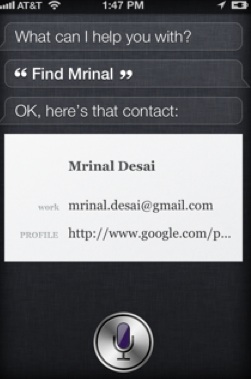
Editor’s note: The following guest post was written byMrinal Desai, an early employee of LinkedIn who is also co-founder of CrossLoop and addappt. You can follow him on Twitter.

Like many, I am absolutely amazed by Siri, the talking assistant on the iPhone 4S.  It was the one thing that really stood out for me during the launch event when Scott Forstall introduced it ten days ago. And now we finally get to play with it.

After an Apple product launch, my usual evening at home is telling (umm .. selling) my wife the new features and how I need to have it. It’s a path of persuasion of how the product is not a want. Those “needs” now have been met by the prior generations of the iPhone, both generations of iPad, Apple TV, MacBook, MacBook Pro and a home surrounded by wireless bits on an Apple router.  But when I went home that night, it was all about Siri—”the other person” in my life. I never uttered a word about the specs of the dual core A5 processor or how it has 7x better graphics or even the HSPA+ download speeds—she does not care. An average person, unlike many of us, couldn’t care less for what is under the hood, couldn’t care less whether the product is open or closed, couldn’t care less about Flash, HTML5 or native apps. I found myself listing all the scenarios of how productive I was going to be, how finally something that can actually be used was here. It would be the perfect companion to get all my to-dos done!

Reminders are a common work flow issue for me and I always add them to my calendar.  Setting up meetings—we do that all the time. Rerouting as we drive—very frequent. Often working in the ‘Indian Stretchable Time’ zone, I find myself sending texts to people that I am running late. There is an entire industry of virtual assistants out there because we want to focus on important things, not busy things. I can imagine a few more Siri applications in the future that I know I would love to have:

  • Parking space as you drive around looking for one
  • Flight status: Siri, is United flight # 1234 on time?
  • Travel bookings: Siri, what is the cheapest ticket to Boston on Deceomber 15th? Kayak in the future?
  • More local: search for a type of business, say a tailor. Is the business open? Siri, call the business. Pay per call advertising?
  • Deals:  Is there a deal within a mile of where I am at?
  • Movies: Siri, can you tell me where The Ides of March is running? Is the movie ‘Delhy Belly’ available on Netflix Instant? If yes, please add it to my queue.
  • Commerce: Siri, can you tell me if a pair of Adidas Forest Hills are available at a store nearby? After Siri finds it (if available), Siri can then help me map the directions
  • Social: Headed to a meeting. Siri, can you tell me who are my mutual contacts with this person?

Asking questions is an inherent quest to learn, to search. Add context and meaning and suddenly we go far beyond keywords. One of the continuous things Google works on is figuring out context.  When you search with keyword “apple”, did you mean to look for the fruit or the company? Apple just changed the rules of the game—again.  It made the phone smarter, not just do more.

Finally and very importantly, user acquisition. Being in a noisy world and a salesman within, one thing that I obsess about a lot is user acquisition. I am a hungry student of product design elements that inherently attract new users. I am hungry to learn why people buy what they buy; why do they use what they use. How did they discover what they use?

So rewind back a little.  I remember when I got my first iPhone (3GS). I was so giddy with excitement with my new toy that I couldn’t stop telling everyone I knew about it. Not only that, I did demos too. I convinced as many as I could to let go of their Blackberrys (I switched from one) and move on. The closer was always apps. My favorite one was Ocarina. I would blow through the microphone exhibiting my hidden musical skills (or lack thereof). The smoothly rotating globe with music being played all around the world never ceased to draw the “wows” and the “oohs”—and I assure you that they were not about how well I played the Ocarina. It was the single largest and most well lubricated organic word-of-mouth machine I had ever seen. It was a lot like the advertising we all do when we carry out shopping bags with a ‘Macy’s’ logo on it or akin to wearing a Gap hoodie or when we wear a Barcelona team shirt. We pride ourselves in the product we associate with and we are more than comfortable paying (big dollars when it comes to European football with jerseys at $70-$80 a pop) to advertise them. Its an emotion so strong that it soon becomes an integral part of our identity that we wish to share.


With Siri, needless to say the millions (Apple reported a more than million pre-orders, and analysts now expect millions more to be sold this quarter) of iPhone 4S users are going to be marching around showing off their new friend Siri to friends, family and colleagues. If it works as demoed, it is going to make everyone want one. So in a genius stroke, Apple handed each of us ammunition to evangelize and advertise their brand through a product that is on us all the time. With Siri, they have also given us a reason to take out the phone from our pockets even more often now and demo it to complete strangers.

Deep within, I am fearfully hopeful that juuuuust maybe, Siri will be able be to recognize my first name—something that most people send through a paper shredder. And yes, if you forget your anniversary in the future and have a 4S, blame it on Siri. I know I would have loved to have it on my last anniversary.


:
Website:

Learn more

Company:
Apple
Website:
apple.com
Launch Date:
January 4, 1976
IPO:

October 14, 1980, NASDAQ:AAPL

Started by Steve Jobs, Steve Wozniak, and Ronald Wayne, Apple has expanded from computers to consumer electronics over the last 30 years, officially changing their name from Apple Computer, Inc. to Apple, Inc. in January 2007.

Among the key offerings from Apple’s product line are: Pro line laptops (MacBook Pro) and desktops (Mac Pro), consumer line laptops (MacBook) and desktops (iMac), servers (Xserve), Apple TV, the Mac OS X and Mac OS X Server operating systems, the iPod (offered with…

Learn more

Person:
Mrinal Desai
Website:
Companies:
CrossLoop, LinkedIn

Learn more


Google Axes More Services: Jaiku, Buzz, Code Search & More

GoogleAxe

According to a new post by Google VP of Product Bradley Horowitz, on the official company blog, Google is delivering the death blow to several more products and services, including its code search engine, Buzz, Jaiku, iGoogle features and the University Research Program for Google Search, the latter which provides API access to Google Search results for a small number of academic institutions.

Here are the details on the new shutdowns, per Google:


  • Code Search, which was designed to help people search for open source code all over the web, will be shut down along with the Code Search API on January 15, 2012.
  • In a few weeks we’ll shut down Google Buzz and the Buzz API, and focus instead on Google+. While people obviously won’t be able to create new posts after that, they will be able to view their existing content on their Google Profile, and download it using Google Takeout.
  • Jaiku, a product we acquired in 2007 that let users send updates to friends, will shut down on January 15, 2012. We’ll be working to enable users to export their data from Jaiku.
  • Several years ago, we gave people the ability to interact socially on iGoogle. With our new focus on Google+, we will remove iGoogle’s social features on January 15, 2012. iGoogle itself, and non-social iGoogle applications, will stay as they are.
  • The University Research Program for Google Search, which provides API access to our search results for a small number of approved academic researchers, will close on January 15, 2012.

Google also said that it will be closing down the Google Labs site, as it promised earlier. That site will be gone as of today, so get your last visit in now. In addition, Boutiques.com and Like.com will now be replaced by Google Product Search.

These latest closures come on the heels of several other service shutdowns from the company whose previous strategy seemed to involve throwing a bunch of a spaghetti on the wall to see what sticked. In June, it shut down Google Health. In August, Google killed off the projects from its Slide acquisition, and in September, it killed Aardvark. Despite all the streamlining and shutdowns, Google has previously stated that its “20% Time Project” isn’t going anywhere.