iFixit Tears Apart The Droid RAZR, Reveals Incredible Innards

razrblownout

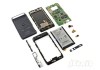
The Droid RAZR was only just released today, but silly things like release dates don’t mean anything to the folks at iFixit. In a strange departure from their usual process, they’ve taken a giant knife to Motorola’s latest and greatest to show us all exactly what’s lurking under the hood.

Photos like this have limited appeal, I’m sure, but it’s a perfect opportunity to feast your eyes on a Qualcomm MDM6600 baseband chip or a Skyworks 77449 power amplifier module if you haven’t already. But seriously, if you thought the RAZR looked good on the outside, check out what Motorola had to do to cram all that good stuff inside. Regardless of how you may feel about the RAZR, iFixit’s teardown manages to illustrate how smart Motorola had to be with engineering and component placement.

Also revealed in the teardown is the RAZR’s massive 1750 mAh battery. As expected, it’s incredibly thin, and it’s nearly as big the RAZR’s entire backplate. Strangely, that didn’t keep our review unit from being a little fussy when it came to power consumption.

Now that I’ve met my daily quota for circuit board lust, you’ll have to excuse me: now I need to decide if I want to buy one of these things.


Keen On… The Three Cardinal Rules for Startup Entrepreneurs (Learn These and You’ll Become a Billionaire)

Case

As the co-founder of Priceline, serial entrepreneur Scott Case is a natural startup guy. Indeed, his fever for startups is so intense that he is now CEO of StartUp America Partnership, a “movement of entrepreneurs for entrepreneurs” designed to inspire young companies with expertise, capital and talent.

Case gave an inspirational keynote at last week’s Fast Company’s Innovation Uncensored event in San Francisco, where he revealed his three rules for startup entrepreneurs. And after his talk, he was generous enough to list these rules to me on camera, as well as show off his colorful footwear and explain how America can once again become a startup nation.

This interview is part of a week-long series from Innovation Uncensored. Check out earlier interviews such as my conversation with Virgin America CEO David Cush. Still to come in the series is a particularly lively conversation with Seth Priebatsch, Chief Ninja of SCVNGR, who explains to me why his $50 billion market is so cool.


Atari’s Classic Asteroids Franchise Finds New Life On iOS

IMG_0098

Instead of actually doing something productive this weekend (like getting a long overdue haircut), I may just lay around playing Atari’s new iOS-friendly take on the Asteroids franchise. It’s not easy to take a beloved classic and update it for modern audiences, but Atari managed to take Asteroids’ retro DNA and make it shine on the small screen with Asteroids Gunner.

The main game is divided into 50 levels (or “waves,” as they’re referred to), with each becoming more frenetic and difficult than the last. There are two additional campaigns consisting of 50 levels each, and two extra ships to fly, but those require you to purchase some aptly-named “Space Bucks.” I’m personally not a fan of having to buy content that’s already in the game, but thankfully the basic Dart ship works just fine.

Even with the most basic ship, the game manages to strike a fine balance between “challenging” and “madness-inducing,” thanks in large part to the simple controls. Asteroids has always been one of those games that plays better with a joystick (or even a keyboard), so the transition onto a touchscreen was a little jarring at first. Thankfully, Gunner uses the same simple dual-stick layout as seen in games like Geometry Wars — one thumb controls your ship’s movement, while the other controls where your ship fires.

One big change comes to mind immediately, and it’s one that Asteroids purists may not take kindly to: the absence of inertia. Once your navigation finger leaves the screen, your movement stops completely. It makes the game easier to play, sure, but it feels sort of unnatural considering it’s a pretty major tweak to a decades-old formula.

Gunner introduces some new tweaks to the Asteroids formula, like the ability to upgrade your ship. Blowing up certain asteroids reveal crystals that allow you to upgrade your weapons and armor, which is downright required for some of the later waves. In-game achievements also make an appearance, with over 200 waiting to be unlocked by unflinching perfectionists.

All things considered, Atari did a commendable job with Asteroids Gunner. It’s a far cry from the Atari classic of yore, but the mix of old and new is balanced enough to make it a terribly efficient timewaster. Asteroids Gunner is available for free in the iOS App Store now.


Google Joins Kleiner Perkins’ Social sFund As A Strategic Partner

kleiner

Kleiner Perkins has just announced that search giant Google has joined the venture firm’s sFund as a strategic partner. Kleiner unveiled the sFund last year $250 million fund dedicated to what partner John Doerr calls the Third Wave. The fund is organized around investing social startups in all industries – consumer, enterprise, health and mobile.

Back in October of 2010, Zynga, Comcast, Allen & Co., Liberty Media, Amazon and Facebook all joined as investors and strategic partners. The $250 million fund makes investments ranging from $100,000 to $100 million, and is led by Kleiner partner Bing Gordon.

Considering the list of initial partners, it was actually surprising that Google didn’t participate at launch considering the company’s own social ambitions. It’s unclear how much Google invested in the sFund to become a strategic partner.

As part of the partnership, Facebook, Amazon, Google and the other partners help provide sFund companies with “special support and networking opportunities.” Previous sFund companies include Lockerz, Erly, Klout, Path, Flipboad, Rent The Runway, Spotify, Square and Cafebots. So far, 16 companies have been funded by the sFund. We’re told that Katango, which was acquired by Google yesterday, is actually the first exit of the sFund.


Fly Or Die: Can Batch Find Its Own Path Among The Photo Apps?

Batch fly or die

Does the world need another photo-sharing app? That is the question John Biggs and I debate in this episode of Fly or Die (watch the video above). We take a look at one of the latest photo apps to hit iTunes, Batch, which launched ten days ago and is currently one of the Top 50 photo apps for the iPhone (currently at No. 48). The mobile app is a new product from DailyBooth, whose CEO Brian Pokorny joins us after we each give our verdicts on the app.

Batch does one thing really well: it lets you group photos together from your iPhone into albums and share them with friends via the app itself, Facebook, Twitter, or email. (Here is a batch I took during the taping of the show). The nice thing about it is that you don’t have to keep on sending links to individual photos. With one link, you can share 10, 20, or 100 photos, and as you keep adding photos to a batch, the album updates automatically.

Biggs thinks the batching feature will become part of Instagram at some point and, thus, you will no longer need Batch. But I disagree. If an app is well-made and fills a need, it can gain its own following no matter how crowded the field. Instagram could add albums, and it should, but that will never be Instagram’s core feature. Instagram is about sharing one great picture at a time. Batch is about capturing events and organizing the photos on your phone into discrete albums.

The sharing model is also key to what makes Batch useful. When you sign on, it automatically matches you with all your Facebook friends already using the app so you can see their photo batches in your stream from the get-go. You can add a comment or thumbs up to any photo, and tag people in the batches you upload. Batches can be private, shared only to your friends in the app, or distributed more broadly to Facebook and Twitter. But you decide what to share on a batch-by-batch basis and who to share it with.

In my mind, Batch is less like Instagram and more like a cross between Path and what Color was supposed to be. It isn’t quite as private as Path and has a simpler way to group photos than Color. Batch strikes a balance in between. Although I do have one feature request. Right now, only the person who creates a Batch can add photos. Other people should be able to add photos to a Batch with the permission of the person who created it—that would make it even more social.


Logitech Falls Prey To Google’s Beta Mentality, To The Tune Of $100 Million

logitech-revue-8

Since its very first moments in the public eye, Google TV has been something of a disappointment.

Attendees of Google I/O 2010 will recall the product’s flubbed launch demo, when a series of connectivity problems prevented Google TV’s product leads from actually controlling the device, leading to some remarkably awkward pauses. They finally got it working — sort of — but the promise of an easy-to-use internet/TV hybrid was tarnished by the fact that it clearly wasn’t so easy to use.

As it turned out, the demo was only a taste of things to come. It’s long been known that Google TV hasn’t been a hit, and during an Analyst and Investor event on Wednesday Logitech announced some concrete numbers outlining just how badly its Google TV-powered device, the Logitech Revue, wound up hurting it in the end. The final tally?

Over $100 million.

As reported by The Verge, according to Guerrino De Luca, Logitech’s Chairman of the Board and Acting President and CEO, “Operational miscues in EMEA and Logitech Revue cost us well over $100M in operating profit” in the last fifteen months.

He explained that Google TV had launched with software that “was not complete and not tuned to what the consumers want at the living room let alone all the issues with content delivery that the threat of the proceeds threat that Google posed us to other content providers generated.” In other words, it simply wasn’t ready for prime-time.

Logitech’s misstep in the process was to commit to building a huge number of devices, as it expected many consumers to line up during the Christmas 2010 season to snap up the Revue at its then-$300 price point. Which obviously didn’t happen. As a result of the ordeal, De Luca said that Logitech doesn’t have any Revue followups in the works.

Now, Logitech was obviously overambitious when it came to launching the still-unproven product, but they aren’t the only manufacturer that was burned by Google’s overeager desire to ship software before it was ready. Motorola’s Xoom, which was released early this year as an iPad competitor, was one of the worst devices I’ve ever used at launch. That was partially because it was a little too bulky compared to the iPad, but it was primarily because Honeycomb — the tablet version of Android — was a buggy mess.

Google wanted to get Google TV out the door for the same reason it wanted to ship Honeycomb as soon as possible: we’re in a land rush as Apple, Google, and Microsoft race to get consumers to buy into their app and content ecosystems. From Google’s perspective, it’ll be easier to acquire new users now than it will be to get them to ‘turn sides’ several years from now, once they’ve already built up their libraries in iOS or on their Xboxes.

But in both cases — the Google TV and Honeycomb — that strategy hasn’t worked at all.

Beta labels are acceptable on free software, but when consumers are shelling out money for a device, it’s another story. And Google doesn’t just hurt its own image when it ships software prematurely on these hardware devices — oftentimes consumers will actually blame the device manufacturer for releasing a bad product.

Which means that Google is running out of strikes. It has enough cachet to be able to announce the likes of Sony, Logitech, Samsung, HTC, and Motorola as launch partners (and many of them want early access to Android). But if Google makes a habit of helping them launch bad products, those manufacturers are going to walk. And Logitech already has.

Here’s a relevant portion of the Analyst Day transcript, per Seeking Alpha.

The second mistake we made is Logitech Revue and it’s not a mistake of intention, it’s not a mistake of strategy, it’s a mistake of implementation of a gigantic nature. You are all familiar with Logitech Revue with the set top box that enables Google TV and every HDMI television. Google TV is a great concept, Google TV has the potential to completely disrupt living room, except that was not the case when we launched Logitech Revue. Logitech Revue was launched with some, I wouldn’t call it beta properly but a software that was not complete and not tuned to what the consumers want at the living room let alone all the issues with content delivery that the threat of the proceeds threat that Google posed us to other content providers generated.

To make the long story short, we thought we had invented slice bread and we just made them. We’ve made commitment we just build a lot because we expected everybody to line up for Christmas and buy these boxes $300 that was a big mistake. I would do it again, I would definitely want to have Google establish Google TV, but with a significantly smaller and more prudent approach. It’s always the case people will tend to overestimate the short-term and underestimate the long-term.

Google TV or a child of Google TV or the grandchild of Google TV will happen. The integration of television in Internet is inevitable. But the idea that it would happen overnight in Christmas 2010 was very misguided and that also caused us dearly. As you know, we dramatically reduced the price of the box to what we thought the consumers valued it and actually doing fine.


Teach Your Lego Robot How To Tweet With A Dexter Industries WiFi Sensor

1-Wifi-From-Dexter-Industries

When I was a wee lad, Lego were dead simple: nearly every piece was a square or a rectangle, and if you were lucky, you could split two pieces off of each other without breaking a finger. Consider my surprise then when the tinkerers over at Dexter Industries managed to create a WiFi sensor for Lego’s Mindstorms NXT line of smart blocks.

The Mindstorm NXT line, to be brief, is the Lego set you buy for the person in your life who’s just a little too obsessed with robots. Essentially, you construct a machine out of the included plastic bits, and use the NXT Intelligent Brick to feed your creation commands and programs.

Now, with the inclusion of the WiFi sensor, Dexter Industries has opened up those piles of bricks to the power of the internet. To celebrate the sensor’s release, Dexter Industries has also outlined some basic projects for the fledgeling networking buff in all of us. Behold in amazement as your little robot sends a tweet! Or set it up as a web server that can figure out what the weather is like! The possibilities are endless!

Alright, I’m being glib, but these seemingly dull applications are just the tip of the iceberg. Once the Mindstorms community starts playing with these things, we’re sure to see some creative new usage scenarios. The WiFi sensor’s $99 price tag is far in excess of the rest of the sensors you can strap onto a Mindstorms robot, but it’s a neat way to teach youngsters and adults alike the basics of networking. And really, what better way to inspire the next generation of geeks than to let them figure out something complex and useful?


Nyoombl Debuts Social Video Broadcasting Platform For Conversations

nny

Nyoombl (pronounced ‘nimble’), a stealthy startup we wrote about earlier this year, is finally debuting its social broadcasting platform. While the site is still private, we have a number of details about how it works, and more. In fact, the first 100 readers that join the waiting list here will  have their emails activated right away and can start using the service.

Founded by Oladayo Olagunju, Nyoombl aims to make conversations public. It’s a mix between Skype and YouTube and allows people to broadcast and then archive live conversations for the entire world to listen in on, watch, and learn.

Users simply log-on to the platform via their Facebook account, and they can then choose to converse with another specific user of their choice, or broadcast alone. All broadcasts are simultaneously live and archived. During debates or interviews, viewers can easily ask both broadcasters questions live and receive responses instantly via voice or IM. The archived version becomes ready and sharable 5 seconds after the conversation is over.

All broadcast conversations have a duration of no more than 7 minutes. And the conversations that are most “liked” or Tweeted and the conversations about recent or trending global events of significance are automatically featured prominently on the homepage. Currently, Nyoombl is Flash-based plans to move to HTML5 as the site scales.

And to prevent the Chatroulette problem, the site has implemented habit-premised algorithms to track and shut down inappropriate behavior. Olagunju says that most of the site’s early users and testers are from college campuses so universities are a focus initially, but eventually he has ambitions for the site to become a dedicated place to share and broadcast conversations.

Olagunju explains: “We are democratizing conversations by letting everyday people to do what Larry King did and empowering the unsung Oprah Winfrey’s in our midst…We allow any two people in different locations to take their conversations public. We’re doing to conversations what LinkedIn did to resumes, what Facebook did to pictures, and what Twitter did to thoughts.”

Nyoombl is seed-backed chiefly by Chris Kelly, former Chief Privacy of Facebook and counts entrepreneur Adam Rifkin, Sun Microsystems co-founder Scott McNealy, and venture capitalist Lara Druyan as advisors.

Of course, Nyoombl already has a few competitors. In terms of individual broadcasting, YouTube, Justin.TV, Ustream and others play in this space. And for sharing conversations, Google Hangouts, and recently launched Spreecast are also providing a social broadcasting platform for conversations. Sean Parker’s Airtime may also combine social with video broadcasting.


KinderTown Launches Educational App Store For Parents

ipad_filter

KinderTown is a newly launched app store for parents which offers a curated collection of kid-friendly applications. What makes the store unique is that it only includes apps which have been deemed to have “substantial educational value” for kids three to six years old. In order to evaluate the apps’ quality, each app is first reviewed by early childhood educators, then tested by parents and kids before admission.

At launch, KinderTown’s app store is available as a universal app that works on the iPhone, iPad and iPod Touch. When you launch KinderTown, you can filter the app selections by platform (iPhone, iPad or Universal), recommended ages, subject matter (e.g., math, language, art, science, etc.) and price (free or paid).

Apps that match your search filters appear on screen, and you can tap on them to see descriptions, screenshots and pricing information. A tap on the “get the app” button will then pop you over to the iTunes App Store to start the download.

The KinderTown staff includes two former teachers responsible for the app reviews. Kay Welch specializes in early childhood education and has more than 20 years of experience teaching and writing curriculums for school districts. Carolina Nugent spent five years as a kindergarten teacher and received recognition for her integration of technology and apps in the classroom.

The concept for the KinderTown itself comes from serial entrepreneur and DreamIt Ventures co-founder Steve Welch. Steve previously founded Mitos, a global company in the biotech-manufacturing field, which was later sold to a Fortune 500 company. He says that the idea for KinderTown emerged from his own frustration in finding good educational apps for his own 4-year old daughter.

As a geek parent myself, I know that feeling. Although my child is only now pushing two, she’s already madly addicted to the iPhone and iPad, shouting “monkey!” (thank you, Monkey Preschool Lunchbox) every time she sees either device. In a home filled with many beloved gadgets, it’s only a matter of time before she’s completely sucked into the iOS gaming world.

But with an App Store that now boasts over half a million applications, it’s beyond challenging to find appropriate, functional, and hopefully not entirely brain-rotting apps these days.

Although Apple could one day upgrade its own “Genius” offering to allow for more granular filtering and searching, that day hasn’t yet arrived, allowing KinderTown to step in and serve this need. For now, the app will support itself through the App Store affiliate program, but it may offer premium subscriptions for additional learning products in the future.

Self-funded KinderTown is now available as a free download here on iTunes.


Camera Obscura

A couple of years ago, I wrote just about the most rave review of my career — a love letter to Canon’s then-new S90 point-and-shoot camera.

What did I say? “The S90 is the best compact camera I’ve ever used.”

So, here is the good news: Two years and two models later, the successor to the S90, the Canon PowerShot S100, is even better by just about every measure. The lens still is nice and fast at the wide end, down to f2. The zoom is slightly better, now 24-120mm equivalent.

In our testing, the S100 handled every situation we threw at it beautifully. From portraits of preschoolers to landscape shots at dawn, I was very happy with the results.

It’s got Canon’s latest Digic V image processing chip. It’s got GPS now, so you can tag your photos, and if you’re going to shoot video, it will now take full 1080p. The case has been slightly tweaked, including a subtle hand-hold on the front that answers the prayers of all of us S90 owners who dropped it more than once.

In our testing, the S100 handled every situation we threw at it beautifully. Focus is faster than the S90, and it deals with low-light even more gracefully. From portraits of preschoolers to landscape shots at dawn, I was very happy with the results. Images had the typical Canon slight color over-saturation, but that can be handled in post-processing.

The S100 is a great camera, a camera you will be thrilled with if you buy it.

But I’m not sure you should.

If you’re the sort of person who buys a camera to take quick shots of the kids when they’re blowing out the candles on their birthday cake, you don’t need a camera like the S100. In fact you probably don’t need a camera at all.

Those utility photos that used to be the realm of the cheap point-and-shoot rig are now completely the property of your cell phone. Don’t talk yourself into buying a point and shoot — spring for an iPhone instead.

For instance, the iPhone 4S actually will take photos faster than the S100. With the iPhone, there’s a lag of about 0.8 seconds between each shot; the S100 manages 1.2 seconds between shots. (The S100 does have a burst mode for multiple shots. This is the recovery time between single shots.) The iPhone also has a great sensor for its size, and some very clever software and filtering to make your casual snaps look great. And it’s in your pocket already.

Most people who take pictures don’t want to think about ISO, or what the zoom equivalent is, or how to adjust white balance, or debate the merits of RAW vs. JPEG. They just want a picture. They want what my friend Rob Capps called Good Enough.

The S100 isn’t a camera for Good Enough. It’s not a point-and-shoot. It’s a think-and-compose-and-tweak-and-fuss. For dedicated photographers, to have the level of power and control that the S100 offers in such a small form factor is still thrilling — that’s what has made this whole series so successful. So, if you’re that kind of photographer, and you’re looking for something small, the Canon S100 is still at the top of the heap.

But just make sure you really need it.

WIRED All the stuff that made its predecessors great, with some nice new features like GPS and full HD video. CMOS sensor uses tech from Canon’s DSLR line.

TIRED More camera than many need; and perhaps less than pros would demand. Dedicated movie button on backside eliminates one photo control.

Photo by Ariel Zambelich/Wired

Rare Book

It really is the Sony Way. Take a product that’s been around for a while, soup it up, throw in every possible feature imaginable, and make it smaller and lighter than everyone else’s machine.

Then double the price.

Such is the state of Sony’s entry into the suddenly white-hot ultrabook space, a market experiencing a full-scale pile-on as a half dozen competitors all attempt to outdo the nearly three-year-old Apple MacBook Air.

If anyone’s going to best Apple at its own game, it’s probably going to be Sony, and for one reason: If you’re looking at sheer specs, Sony has this round won with the new Vaio Z Series.

Versus the 13-inch Air, the Vaio Z is faster (with a 2.7GHz Core i7 versus a 1.8GHz CPU on the Air), has better screen resolution (1600 x 900 versus 1440 x 900), and — the critical measure for ultrabooks — is a half-pound lighter (2.5 pounds versus 3 pounds).

Those aren’t trivial differences, and it’s clear that Sony has spared no expense in bringing the Vaio Z to market. The benchmarks, at least the non-graphics ones, are exceptional, especially for a computer this thin and light. It’s not a gaming machine — what ultrabook is? — but its PCMark 7 score was more than double that of the Acer Aspire S3.

But man does not live on specs alone, and the Vaio Z, officially the VPCZ214GX/B (again, the Sony Way), does have its share of problems. They start with the physical interface: The keyboard buttons have almost no travel, and the touchpad is a disaster. Not only is it incredibly small (with even smaller buttons), it is positioned way too far to the right, centered on the computer instead of centered with the space bar. It’s so far out of whack that when your fingers are at rest on the “home row,” your left thumb doesn’t even make contact with the touchpad, and it blends in so well that even the backlit keyboard doesn’t help to find it. It’s baffling how a design mistake this glaring could have slipped through QA.

I’m not sold on the hinge design, either. When you open the Vaio, the rear hinge causes the base of the laptop to prop up a few millimeters. It’s not enough to make any difference whatsoever to keyboard comfort, but it does make opening the lid with one hand much tougher, and it tends to grab on to anything underneath, dragging papers around your desk. Overall it just feels like an awkward and unnecessary design feature.

There is also some confusion over the Z’s hard drive, which has been wrongly reported elsewhere as consisting of dual 128GB SSDs. The Z actually includes a single 128GB SSD with two controllers. This does seem to offer some performance improvement, but it’s not in the same class as having real dual hard drives.

The Z also includes a docking system of sorts — a standalone box that includes a slot-loading Blu-ray drive, and an exact duplicate of the ports on the Z itself (1 USB 2.0, 1 USB 3.0, HDMI, Ethernet, and VGA). Few other ultrabooks even have this as an option. Curiously, the docking station also includes a discrete graphics processor, an AMD Radeon HD 6650M, which offers much better video performance, about triple the gaming framerates over the (non-docked) onboard graphics. That said, the point of an ultrabook is to be a featherweight traveling companion, and I doubt many users will spend their time with the Vaio anchored to both the breakout box and a power brick. (And gamers can get far better performance for this kind of cash.)

But that elephant in the room just isn’t going away: At $2,500, the Vaio Z is $900 more expensive than the most expensive MacBook Air. Is there any possible way to justify that kind of outlay? For me, it’s an impossibly hard sell. Put it another way: Is it worth it to pay an $100 extra per ounce of computer you don’t get?

WIRED Awesome display: Great resolution and brightness, and very vivid colors. Truly impressive performance. Unrivaled combination of musclebound power with feather weight. Fair battery life (4.5 hours).

TIRED Very loud fan under load. Invasive Vaio software suite bundle is simply unnecessary. Cost equivalent to feeding thousands of starving children for a month.

Photos by Jim Merithew/Wired
Lightning Speed, Shocking Price

Any product showcasing a new and burgeoning technology has two obligations to fulfill: It must be superior on its own merits, and it must uphold the potential of new and better gadgets down the line.

These are the unfortunate burdens carried by LaCie’s Little Big Disk 240GB Thunderbolt series SSD, the first third-party solid-state drive equipped with a new Thunderbolt transfer port. It will be available through Apple’s website in late November.

Introduced in the latest line of MacBook Airs, Thunderbolt (itself a joint collaboration between Apple and Intel) enables transfer speeds at 10 gigabits per second, 20 times better than USB 2.0 and twice as potent as USB 3.0. What you do with that throughput is up to you, but to this point, your options were limited to hooking up your Mac to one of Apple’s swanky HD displays.

While the Little Big Disk SSD doesn’t blow away other external drives on functionality or price, Thunderbolt is the star here, and one can’t help but think beyond this device and what other applications may eventually benefit from its inclusion.

With this connection now standard on all new MacBook Airs, Mac Minis, iMacs, and MacBook Pros, the immediate future of Thunderbolt is not in high-def displays, but in external drives that can transfer HD movies, entire music libraries, and years of iPhoto backups in several minutes, not hours. While the Little Big Disk SSD doesn’t blow away other external drives on functionality or price, Thunderbolt is the star here, and one can’t help but think beyond this device and what other applications may eventually benefit from its inclusion.

From the design end, the Little Big Disk doesn’t look out of place in a cabal of Cupertino-produced gadgetry. With a svelte form factor that’s roughly 25 percent larger than an iPhone, the drive comes with a cushioned stand that you screw on after unboxing. It’s powered by an external adapter, which can feel clunky for those used to USB-powered drives, but at least the folks at LaCie include four different plug adapters that should cover you on international jaunts. The drive automatically turns on once you connect to wall power and plug your computer into one of the two Thunderbolt ports in the back. You’ll know it’s functioning when the bright, dime-size blue light in front illuminates like a friendlier-looking HAL 9000 clone. The light also serves as an on/off switch, should you ever want to give the constantly humming internal fan a needed respite.

As a serviceable solid-state drive, the Little Big Disk delivers, with speeds that would’ve made my USB 2.0 ports blush in shame. Transferring of a 5GB collection of MP3s to my dependable Toshiba 1TB hard drive using USB 2.0 took 3 minutes, 52 seconds. The Little Big Disk did the same work in 34 seconds flat.

Angry Birds

Alfred Hitchcock warned us about kamikaze birds taking over our lives. Turns out that’s not such a bad thing.

You already own it. Maybe in more than one version. You’ve played it in elevators, bathroom stalls, meetings, and traffic. Long past the point of meme-dom, Angry Birds topped 300 million downloads in less than two years and is now available on every major mobile platform (as well as a host of desktop apps).

As ubiquitous as a Mario brother, the birds have infiltrated nearly every facet of pop culture, with spin-offs from stuffed plush toys and pig-faced flip-flops to an upcoming feature film. There’s even a board game from Mattel. And they’ve evolved over time — the game now offers more levels, more characters of a different feather, and more structures to destroy. But the basic anatomy remains the same.

The mechanics aren’t groundbreaking. Titles like Worms and Scorched Earth featured similarly cartoonish bomb-lobbing combat years ago. But the developer, Rovio Mobile, didn’t need to reinvent the wheel. Its genius was to combine simplicity and cutesiness with a physics engine that lends itself perfectly to touchscreen devices.

The game also manages the rare trick of appealing to all age groups. Where more violent handheld shooters target 18- to 24-year-old males, Rovio’s “shooter” plays just as well with kids and adults.

As unassuming as it seems, Angry Birds is an irresistible force. Globally, we log more than 200 million minutes of swine-sniping gameplay every day. We’re hooked.

  • iPhone: $1
  • iPad: $5
  • Android: Free
  • Windows Phone: $3

Spirits for iPad

You have to free wispy white spirits from the subterranean caverns they inhabit to progress through this puzzle game, but you have to use those same spirits to engineer the escapes. Tapping one gives you the option to transform him into a bridge, say, or a gust-blowing cloud; doing so in the right place will send your other spirits to safety.

WIRED Art so beautiful it could have been lifted from a Miyazaki movie. Intuitive controls keep challenges manageable.

TIRED Levels all look similar.

Spirits for iPad

Space Miner: Space Ore Bust

Space is the new Wild West, and you’re digging for ore. This rollicking shooter meshes top-down gameplay with RPG-style spaceship upgrades. Save Uncle Jeb’s mining station by collecting ore, fending off robot miners, and rescuing tourists through 48 levels, which can take up to 10 minutes each to complete.

WIRED Characters and dialog are as fun as the gameplay.

TIRED “Space ore bust,” “HardcORE” difficulty — enough with the puns!

Space Miner: Space Ore Bust