The Gillmor Gang – John Borthwick, Robert Scoble, John Taschek, and Steve Gillmor – are recording live at 9am PT.
Recording has concluded.
Blancer.com Tutorials and projects
Freelance Projects, Design and Programming Tutorials
hacking,system security,protection against hackers,tech-news,gadgets,gaming

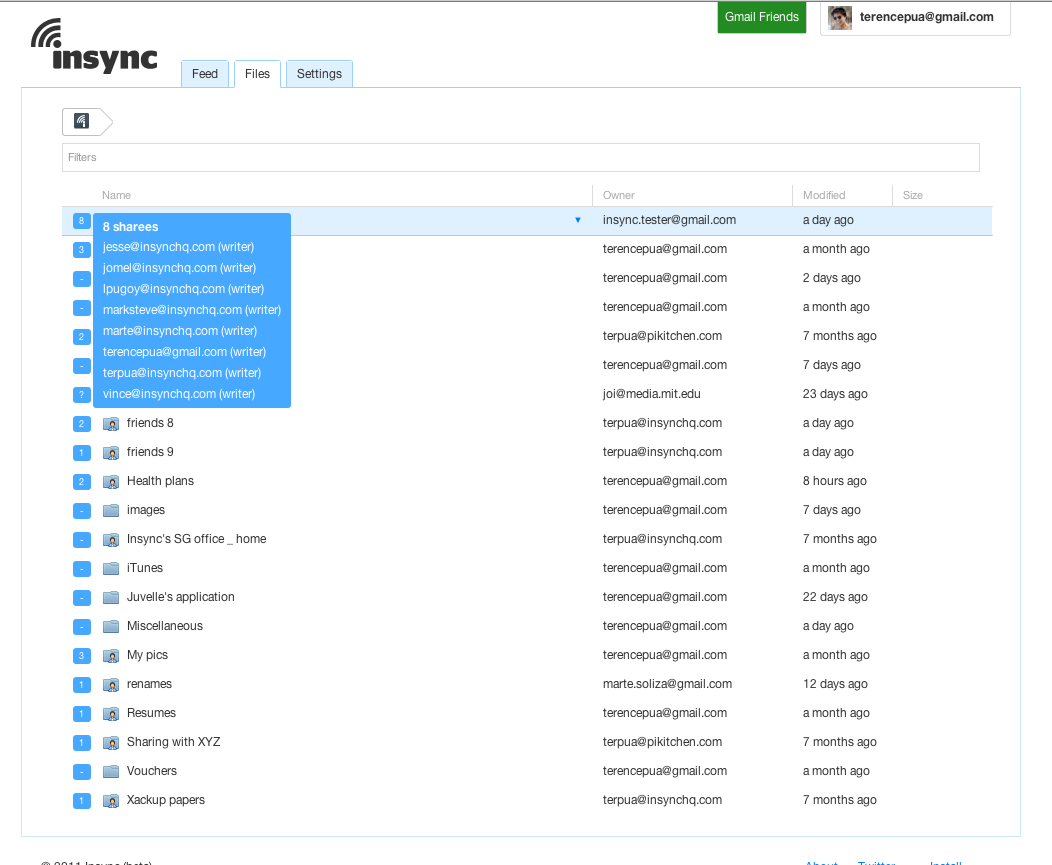
File synchronization and sharing platform Insync has been around for over a year now, and today, the eponymous startup has rolled out a totally revamped version of its “Dropbox for Google users”. Insync 2.0, so t speak, is more focused on Google Docs as ever, removed registration and sync limits, streamlined the user experience, and is now free to use.
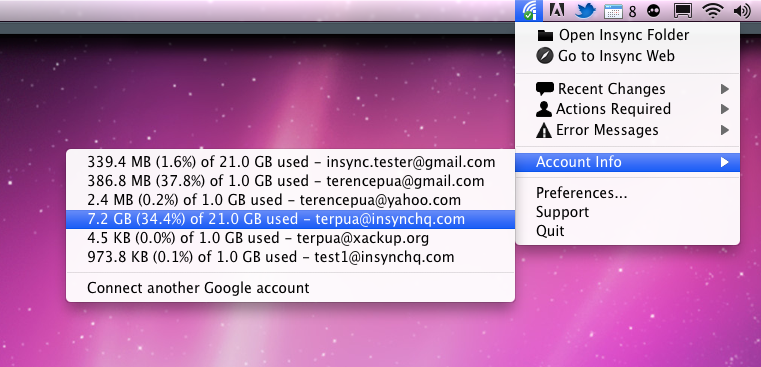
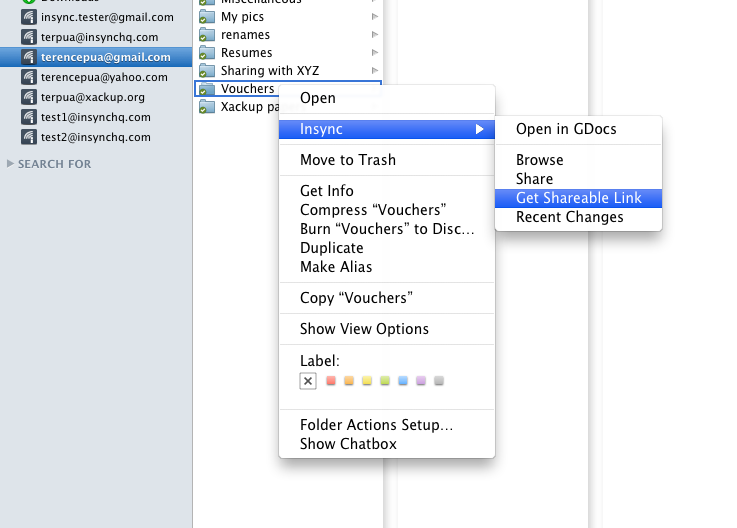
The main target group here are GDocs users who want Dropbox-like functionality when it comes to handling files (the more Google accounts, the more useful Insync should become). In a nutshell, Insync allows you to automatically sync, update, manage, and share files stored on GDocs on your Mac or Windows desktop (in Finder or Explorer).
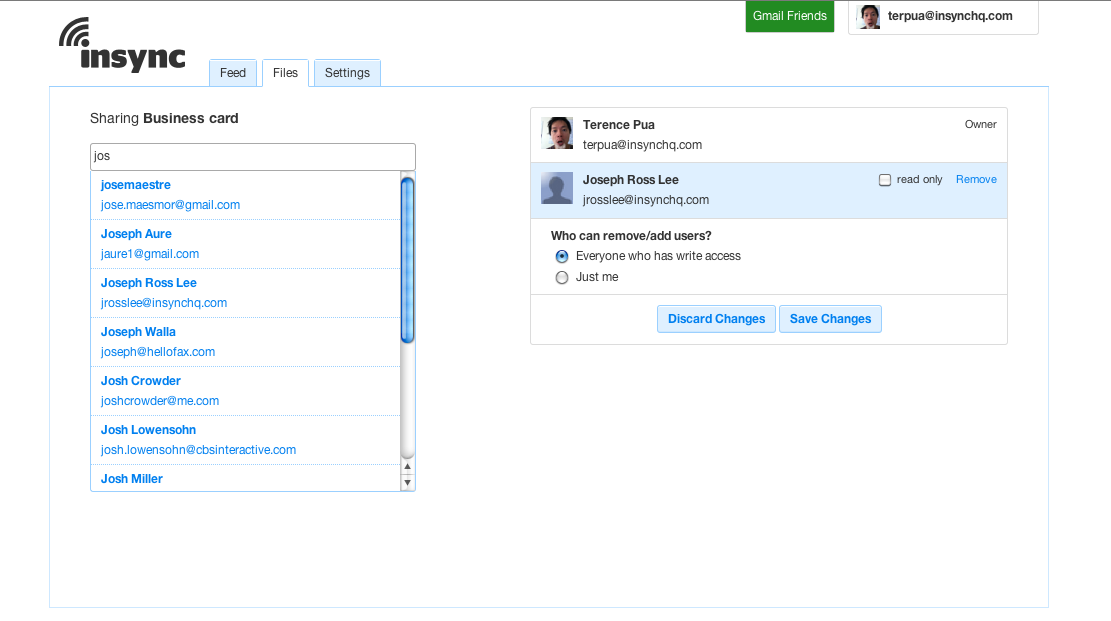
For example, nested or individual sharing of files is possible (Dropbox only supports sharing of folders), as is assigning read/write or read only permissions to others. All file formats, including MP3, exe, dmg, MS Office documents, etc. are supported.
Insync doesn’t require a sign-up anymore: just visit the site, sign in with your existing Google account, download and install the client, link the account with your PC or Mac, and you’ll find all files synced on your computer’s desktop. (According to the company, Insync’s now simpler web app is currently in the process of getting another “facelift”, too.)
Insync co-founder and CEO Terence Pua says a key bullet point is price: while his service now went free (existing users can ask for a refund or credit), Dropbox loses the price comparison with Google’s storage offering by 1:8. For example, US$100 a year gets you 50GB at Dropbox but a whopping 400GB at big G (overview). For its own platform, Insync removed syncing limits entirely.
Insnyc, which is based out of Singapore and Manila, just raised a US$800,000 angel round from Joi Ito (via Neoteny Labs), Reid Hoffman, Toivo Annus (co-founder at Skype), and Santosh Jayaram (ex-COO at Twitter).

If you had to describe your company’s mission in a single sentence, what would your pitch read or sound like? One good way to summarize what you do and boil it down to one clear sentence, in my opinion, is following the advice of Founder Institute founder Adeo Ressi (see above).
This is how it’s done: “my company, _(insert name of company)_, is developing _(a defined offering)_ to help _(a defined audience)_ _(solve a problem)_ with _(secret sauce)_”.
Simple, right? In your dreams. Now, I know that the sentence above is somewhat vague (and I also realize that we’ve posted Ressi’s advice over a year ago already) but it’s spot-on, and even just thinking about this is a very useful exercise. In the short video below, you can watch Ressi talk more about his proposed one-sentence pitch setup along with some concrete examples.
I’ve seen the man explain the importance of writing, refining and delivering the one-sentence pitch to a group of aspiring startup founders just a few months ago, and I thought it was great (and amusing to see even experienced entrepreneurs struggling with this). It’s way more difficult than you’d think.
So, startup founders, watch the video below, think about it carefully, and give us your best one-sentence pitch in the comments of this post. If you can’t or won’t use our comment section, feel free to email us at [email protected], but please stick to one sentence.
I asked Ressi if he wanted to help judge the entries and jump into the comment section to voice his opinion on pitches, and he agreed, so we’ll both be looking at your submissions attentively.
The best one-sentence pitches get featured in a separate post on the first day of next year.
Inspired by: Inside FI: Our Favorite #Startup VC Pitching Resources (must-click)

In November, Mobile ad network Millennial Media reported that Amazon’s new tablet devices Kindle Fire, was seeing ad impressions grow at an average daily rate of 19% since its launch to the public in the middle of the month. Millennial says it’s not just seeing millions of impressions and the device is on a monthly run rate of hundreds of millions of impressions. But that data was gathered from a few weeks of usage from consumers in November, and as Amazon reported yesterday, December’s holiday season brought record sales for the Kindle Fire, with over 4 million Kindle devices sold in December. The Kindle Fire was the most gifted and wished for product on Amazon this season.
Today, Millennial is releasing data from its ad network showing impressive growth numbers from the Kindle Fire over the holiday weekend. In November, impressions on the Kindle Fire grew an average rate of 19 percent every day. Over this past weekend, Millennial says that as consumers opened and used their new Kindle Fires, ad impressions increased even more. As millions of consumers unwrapped new Kindle Fires, Millennial saw an average daily growth rate of 113 percent.
On December 24, impressions grew 32 percent; and on Christmas day in particular, impressions on the Kindle Fire grew 261 percent. The day after Christmas saw a 46 percent jump in ad impressions.
Of course, the Kindle Fire wasn’t the only tablet that saw a spike from the holidays. From December 23 to 26, the iPad had a daily growth rate of 6 percent. The iPad remained the leading tablet overall on Millennial’s platform during this time period, although the massive gain from the Kindle Fire helped to significantly close the gap.
The Kindle Fire’s impression growth on the platform has slightly outpaced that of the iPad when the iPad launched in early 2010. Millennial says that though the Kindle Fire has been introduced into a more mature tablet market than the market which greeted the original iPad, Amazon’s entertainment-focused platform and the lower price point have helped drive this early use by consumers.
Now that the holiday gifting season if over, it should be interesting to see if consumer usage of the Kindle Fire continues to grow at such a rapid pace. For example, the release of a new version of the iPad could effect Kindle Fire growth in 2012.

Thirty-six hours ago, the recently founded software development firm Wappwolf launched Dropbox Automator, which is sort of like an IFTTT for Dropbox. IFTTT, for those of you not up to speed on the latest Internet trends (where have you been?!), is a pretty amazing online tool that automates tasks to trigger when a particular action has occurred. For example: when my Facebook profile picture changes, update my Twitter profile pic too; email me when Amazon posts its free Android app of the day; text me when a get a new email; etc.
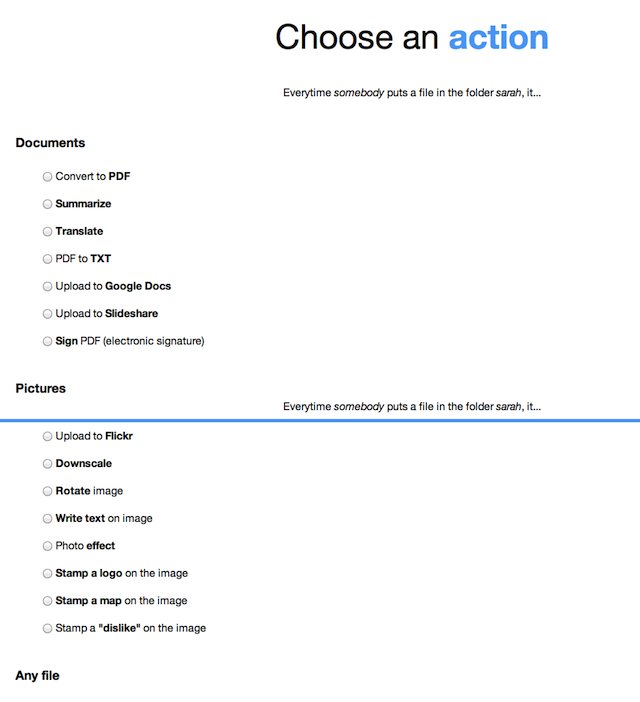
Like IFTTT, Dropbox Automator is capable of triggering a similar series of actions, based on what kind of files have been added to your Dropbox folders.
In IFTTT, these actions are called “Recipes,” but in Dropbox Automator, they’re called “automations.” Not only are they trigged by file type (e.g. a photo, a .doc, a PDF, etc.), they’re also triggered based on which Dropbox folder the file has been placed into.
For documents, you can choose from actions like convert to PDF, convert PDF to text, summarize, translate, upload to Google Docs, upload to Slideshare and more. Photos can be uploaded to Facebook, Flickr, rotated, annotated with text, a map or a logo, have effects applied, and downscaled.
Any file can be emailed, zipped, renamed, FTP’d, encrypted or decrypted, saved to another Dropbox, tweeted, or set as a Facebook status.
The only problem I had with the service is that the results were not immediate, as I expected. It took a good ten minutes for photos to show up on Flickr, for example. The speed of other actions may vary based on the processing speed required and the current server load. (The company says its new and improved server engine will be ready next week.)
If speed is of a concern, then, this service is not ideal…at least not in its present form. But if you’re simply automating stuff that you don’t want to forget to do later on (e.g. put photos on Flickr, upload to Google Docs), then Dropbox Automator could be quite the useful tool.
Since its launch barely two days ago, the company has signed up 1,500 users on the platform. Given Dropbox’s popularity and the loyal, nerdy following of IFTTT, my guess is they’re about to get a bunch more.
You can try out Dropbox Auotmator for yourself from here.
iOS devices are generally very accessible for most people. But for felines? Apparently so according to the video recently tweeted by Halfbrick Studios, the developer of Fruit Ninja. It’s clear within seconds of the video starting that the cat has done this before. This cat slashes fruit like a boss.
As UberGizmo notes, the cat displays a surprising amount of accuracy and navigates the arcade mode with ease. But Fruit Ninja is one thing. I wanna see this cat slice and dice its way through Infinity Blade II.
Check out this awesome video of a clever kitty playing Fruit Ninja! Could this be the real-life Puss In Boots? bit.ly/sGVXxb
—
(@Halfbrick) December 29, 2011

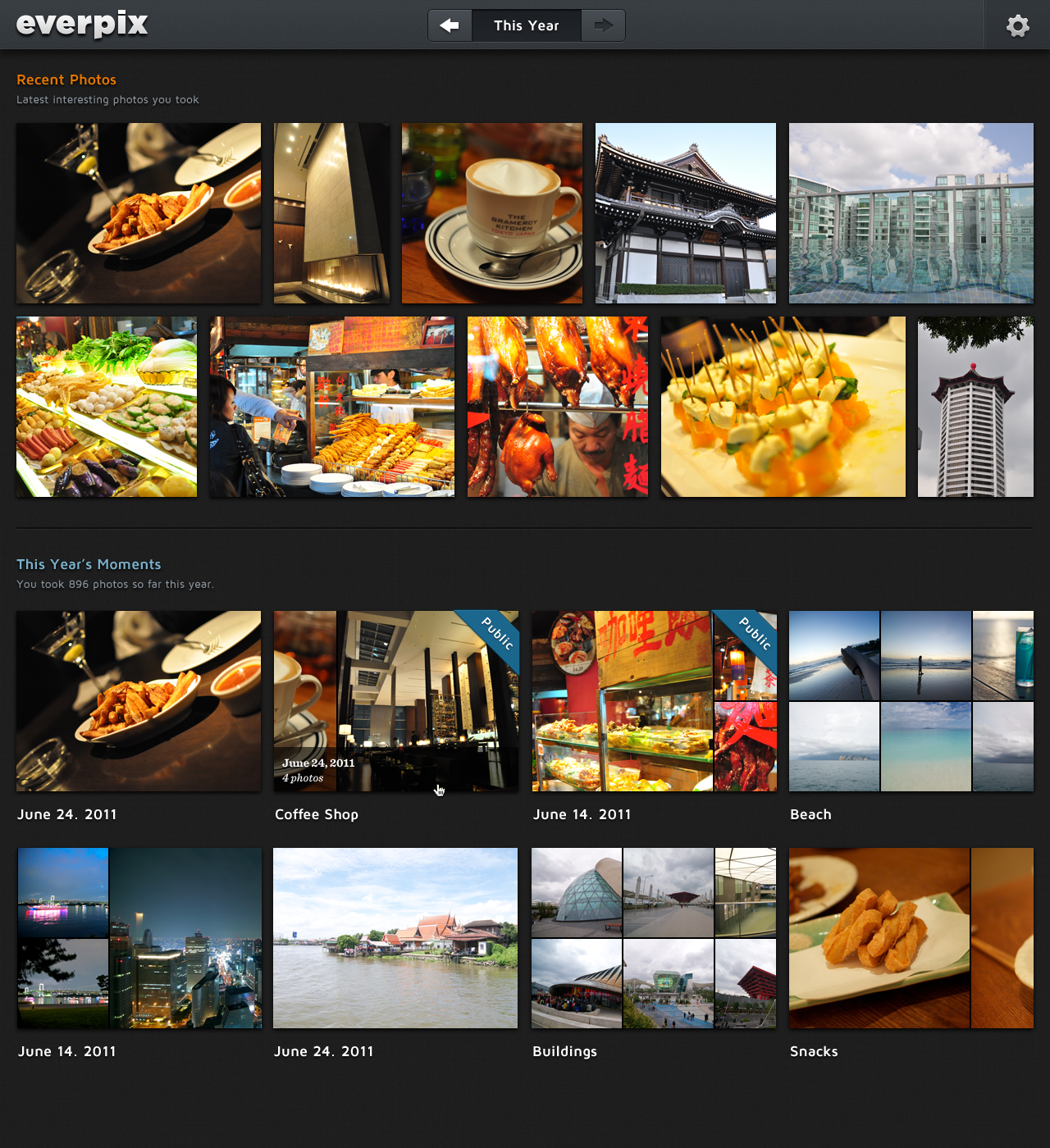
Photo organization service (and TechCrunch Disrupt finalist) Everpix has just launched into public beta, bringing with it a number of changes to its backend infrastructure, web interface and its desktop software.
The service, for those unaware, automatically organizes and combines all your photos, whether they’re stored on your computer or in the cloud. It then combines them into an online photo gallery where groups of photos are laid out into attractive albums called “Moments.”
The service currently supports only Mac computers (iPhoto, Aperture, Lightroom), but plans to support Windows in the future. It also gathers photos from your online collections on Facebook, Twitter, Instagram, Flickr, Picasa and can even locate photos found in your email.
Once connected, Everpix uses a feature called “assistive curating” to create “Moments,” which are similar to iPhoto’s “Events,” but are built for you automatically. You can see an Apple-like design aesthetic here, which is not surprising given that two of Everpix’s Co-founders, Pierre-Olivier Latour and Kevin Quennesson, each spent several years with the company. Meanwhile, the third Co-founder, Wayne Fan, was previously at frog design.
Within these “Moments,” Everpix automatically detects bad photos, like those that are blurry, out of focus or under or overexposed and hides them from view. You can also share photos or albums using a simple one-click setting.
Since exiting its alpha, Everpix made a number of changes and improvements. It has increased its performance and handles your imported photos better than before. The company says that it improved color accuracy, timestamp detection, and the preview and thumbnail quality of the photos, among other things. It also automatically reconciles duplicates on import and merges the corresponding metadata.
The Mac uploader software has been updated, too, with more options, partial support for Picasa Mac (hooray!) and more.
However, the most exciting news is that the Everpix iOS application is almost here. (It’s in the review queue at Apple right now). When launched, this app will automatically mirror your entire Everpix photo collection to your iOS device, while also supporting social sharing and offline access to photos. In the future, support for photo uploads is planned as well.
You can sign up for the Everpix public beta here.

It’s the end of the year and that means Zaraguza Digital has cooked something special for all tech bloggers struggling to find something to post on a very slow news day, and for their bored audiences.
Last year, it was Drunk TechCrunch, and this year they’re throwing a Meme Karaoke Party … and every procrastinator’s invited! Enjoy, and if I don’t see you anymore, Happy New Year boys and girls.

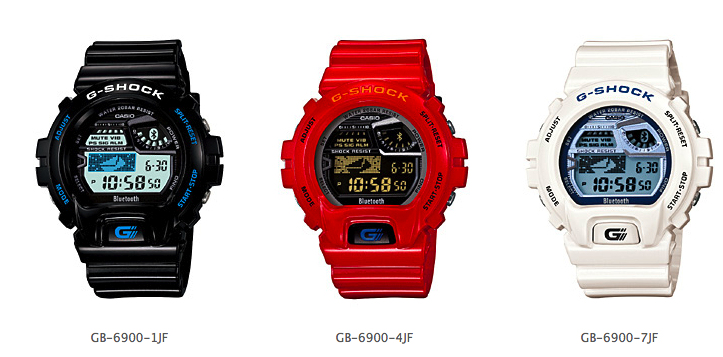
Casio Japan is planning [JP] to roll out the G-SHOCK GB-6900 on March 16 next year, a wristwatch that connects to certain smartphones via Bluetooth LE (LE=low-energy, a standard that’s baked into Bluetooth 4.0). The device will be compatible with the Medias LTE N-04D Android phone from NEC (to be released next year) and NEC’s Medias PP N-01D.
Casio says that the G-SHOCK not only synchronizes the time with the phones but also shows incoming calls, emails, or SMS on its display. Users can also switch their handsets to vibration mode by pushing a button on the watch or set alarms.
The watch isn’t the first that connects to phones, but the main selling point here is the Bluetooth LE feature (in fact, it’s the first watch with Bluetooth 4.0 on board): Bluetooth LE consumes a fraction of the energy of other Bluetooth versions. In the case of the G-SHOCK GB-6900, Casio says users can expect a battery life of about 2 years with one conventional CR2032 button battery.
The company initially planned to start selling the watch in December but had to push back the release date to March 16 because of the floods in Thailand (which dampened production). It will cost 18,000 Yen (US$231).

Jeffrey Morgenthaler’s carbonated take on the Americano cocktail is poured into bottles for serving. Photo by Jeffrey Morgenthaler
The steel briefcase arrived inside two other boxes, Russian doll-style. Its combination-lock latches flipped skyward with a gratifying snap. In the briefcase, snug inside custom-shaped foam, lay a device that looked like it was designed by a committee made of Steve Jobs, Q from James Bond lore and a sex therapist.
My therapy, however, would be the liquid kind — I’d be carbonating cocktails at home.
The idea came to me following a pair of road trips to visit with two of the best and trendiest bartenders in the country: Craig Schoettler at The Aviary in Chicago and Jeffrey Morgenthaler at Clyde Common in Portland, Oregon. At the terribly tony Aviary, Schoettler and his crew make Dark and Stormys, carbonating the whole drink, booze and all, then pouring it in a soda bottle, capping it and serving it in a paper bag, hobo style.
Morgenthaler’s technique was to mix the ingredients for his cocktails — a classic Americano, and a Broken Bike, his signature spin on the Bicyclette — in Tupperware vats overnight, allowing the flavors to steep, then carbonating and bottling the mix the next morning so all a busy bartender has to do is pop the cap.
4½ oz Campari
6 oz Dolin sweet vermouth
13½ oz filtered water
peel of one orange
peel of one grapefruit
Refrigerate overnight, then strain out peels. Place contents into an iSi Twist ‘n’ Sparkle, carbonate, and fill four 187ml glass bottles with drink. Seal with a crown cap, chill, and serve.
Recipe by Clyde Common’s Jeffery Morgenthaler
I sampled many of the duo’s drinks, serious cocktails with a festive splash of fizz. Then I came home and looked at my slightly beat-up, $80, plastic SodaStream carbonator and had a thought: outside the manufacturer’s warning against carbonating anything but water, what stopped me from having some friends over and making my own carbonated drinks?
I’d pre-mix the drinks the night before (à la Morgenthaler) and get to do the showy, fizz-making part in front of a group of astonished guests. I’d skip the bottling process and pour the drinks straight into their glasses, thus joining the ranks of the super-trendy cocktail elite with the push of a button.
Morgenthaler and Schoettler shared five recipes with me, but they didn’t make it easy. They were conceived for larger crowds, and the measurements were tricky to downscale — Morgenthaler’s notes were in ounces, and Schoettler sent two in grams and one in ounces. No mention anywhere of, say, parts, jiggers, cups or tablespoons.
I took a swig from the nearest bottle and winged it. In the morning, I admired my chilled pitchers of beautiful, bright-colored liquid, artfully strewn with citrus peels.
In the name of science and a good excuse to try a few more drinks, however, I decided to try three different carbonators. I would also need some backup machinery in case SodaStream’s warning was right and I ended up with a drink called “Broken Bike on the Kitchen Walls”.
I brought in Schoettler’s recommended kit, the Bond-esque Perlini Carbonated Cocktail System ($200) with a set of cartridges, an injector widget and the three-piece carbonating container. I also tested Morgenthaler’s preferred method, the iSi Twist ‘n’ Sparkle (about $50) that came in a fanfare-free cardboard box.
It’s easy to appreciate the simplicity of my SodaStream, which just requires cold liquid in the bottle (the carbonation takes better when the booze is cold) and a press or three of the button on top, depending on how fizzy you’d like your drink. Plus, compared to the other two systems that take single-use gas cartridges, the SodaStream runs for weeks at a time on larger tanks.
Texting charges suck. Google Chat lets users bypass them. (It uses your mobile data connection, not your text allotment.) These other Android apps do that and more, with features like group chat and video sharing.

The ability to sort your contacts into groups and text them in batches makes GroupMe — which Skype purchased in 2011 — like Google+ Circles for smartphones. The easy-to-navigate app is perfect for coordinating multiperson meetups, but it can also do one-on-one chats.
WIRED: Available on iOS, BlackBerry, and Windows Phone 7. Conference- call option, also via data connection.
TIRED: Reverts to SMS — and the resulting charges — if recipient doesn’t have the app.
FREE | Group Me

Facebook profiles are nearly as ubiquitous as phone numbers, so texting from within your friend list is almost as effective as texting from within your address book. Almost. Your profile-holdout friends are as good as phoneless to you here.
WIRED: Familiar UI. Integrates past chats and texts into one history for each contact.
TIRED: Nixing notifications to avoid the constant mass-message invites (you’ll be tempted) renders the app useless as an SMS alternative.
FREE | Facebook Messenger

Like Google Voice, this app assigns you a phone number you can use to send free messages to other users. It integrates all of your stored contacts nicely, but constantly having to give out a second number gets old fast.
WIRED Diverts automatically to Facebook chat to contact friends who don’t use the app.
TIRED Only the iOS version has free inbound calls. No voicemail. Incomplete conversation threading between phone and web interfaces.
FREE | Pinger Textfree

One type of sea life has proven tough to keep in home aquariums: jellyfish. The blobby beasties get shredded like Kleenex in the filters. This 7-gallon tank — a project that got funded through Kickstarter — solves that by using a laminar-flow system to circulate the water in a controlled swirl, nudging the jellies to the middle of the tank and away from danger. The kit takes about 10 minutes to assemble and includes a voucher for three moon jellyfish, shipped overnight in Styrofoam coolers along with a six-month supply of frozen brine shrimp. Slip them into the water, turn on the color-changing LED light, and … dude, whoa!
WIRED Most hypnotic office/dorm room/studio decoration ever. Brainlessly simple setup and care.
TIRED Stoned friends will never leave now. Air pump motor is about as loud as a refrigerator. Life expectancy of a moon jelly is only a year; new ones cost $50 each.


The best camera is always the one you have with you, and lately that means your phone. These add-on lenses will up your mobile photo game.
The Basics
Why do I need an aftermarket lens for my iPhone?
With a five-element f2.4 lens grabbing light for its CMOS sensor, the iPhone 4S is a true 8-megapixel camera that rivals many point-and-shoots. One thing it’s missing, though, is an optical zoom, which would require a telescoping lens. The iPhone’s 5X digital zoom can get you in a bit tighter — walking closer is still the best solution — but it can’t go any wider.
What’s the difference between digital and optical zoom?
Digital zooms crop the middle section of what the sensor sees and then enlarge it to fill the frame; image quality degrades noticeably. Optical zooms use telescopic elements to magnify the image before it reaches the sensor. Results depend on the quality of the glass, but optical will always trump digital.
How do these lenses attach?
The lenses in our review use cases, clips, and threaded mounts to fit over the built-in iPhone lens. The low tech approaches may have some Apple engineers cringing, but even the worst lens here handles photographic situations that the iPhone can’t on its own. How that lens attaches is probably the most important factor to consider.
Buying Advice
Wide-angle lenses are a smart addition. They’re small and portable and make it possible to shoot in confined spaces like cars and restaurant booths. We’re less excited by the telephoto options. Those heavy lenses generally require a tripod or some other means of stabilization. Besides, holding an iPhone up to a good pair of binoculars works just as well.


When it comes to book-length reading, no glowing LCD tablet screen can hold a backlight to the eye-saving e-ink of these readers.
The Basics
Why not a full-fledged tablet?
Entry-level e-readers have become better, faster, and more stylish. Considering their low cost, featherweight portability (6 to 7 ounces), battery life (up to a month per charge), and superior readability, it’s easy to justify having an e-reader and a tablet. Also, the lack of distractions on a dedicated reader is nice.
Are these really that much better than my first-gen e-reader?
Yes. It’s comparable to the differences in smartphones before and after the iPhone. E-readers used to have tiny QWERTY keyboards; today, most have touchscreens or navigation buttons instead. Manufacturers have reduced both the length and the number of the obnoxiously distracting flashes as the screen refreshes between pages. The devices are also about 40 percent lighter now.
What about their associated ebookstores?
Every dedicated e-reader worth buying is tied to an ebookstore—Amazon.com, Barnes & Noble, and so on. This means you’re generally limited to that store’s selection and prices. Publishers make most new books available at the same price for each retailer, but there are gaps between catalogs. For example, Kobo’s ebookstore has 41 newspapers and magazines, while the Amazon store has more than 300.
Buying Advice
Don’t worry about memory. Even the cheapest readers can hold hundreds of books. Your two factors are bookstore and price. If you’ve already bought a bunch of ebooks from Barnes & Noble, why switch to a Kindle? After that, get the cheapest unit you’re comfortable with. But note that some e-readers flicker more between pages than others. If you think a flicker is slightly annoying in the store, it will drive you absolutely nuts by page 200 of that Murakami novel.

Let’s say you want to identify the mold on that leftover pizza or do a very discreet paternity test. You’re going to need DNA. A lot of it. Labs take the few molecules from a cheek swab and replicate them with a PCR machine until there are billions. But those machines cost $3,000 and up. The new OpenPCR box does the same for the cost of an iPad, and it’s about as easy to use. Place a little bit of your sample into a 0.2-ml plastic tube along with a few microliters of PCR mix, drop the tube into one of the dimples on top of the box, and enter the times and temperatures on the desktop control software. A few hours and dozens of heating and cooling cycles later, you’ve got enough DNA for sorting and sequencing. You do have a sequencing machine, right?
WIRED Excellent documentation. Coffeemaker footprint. Works with Windows, Mac, or Linux machines.
TIRED Assembly takes four hours. Pedestrian control software. No optics for monitoring reactions as they progress.