How The Cult Of Zuck Will Survive Sheryl’s IPO

Facebook F fmc print

A tug of war between innovation and monetization as Facebook grows could dilute The Hacker Way, says a paywalled piece from Fortune. But a plan hatched since it filed its S-1 to IPO. Rather than sacrifice the user experience for revenue or vice versa, Facebook is merging the two. Content is being transformed into ads, and those ads are being blended into blank spaces and feeds where they’re less obtrusive.

Scaling a company from 200 twenty-somethings to 3,000 thirty-year-olds is no cakewalk. If the plan works, though, Facebook could bridge the gap between engineering and advertising, make the company feel a whole lot smaller, and let The Hacker Way live on.

Fortune’s Miguel Helft and Jessi Hempel describe Facebook as an organization split in two:

“One, Zuckerberg’s world, is a meritocratic, coder-led organization that develops the Facebook site; the other, which is charged with making money out of it, is subordinate. It is more hierarchical and corporate and is the domain of Zuckerberg’s handpicked deputy, Sheryl Sandberg…Yet as the importance of the business side grows once Facebook goes public, the inherent tension between the two is certain to be magnified under the glare of Wall Street. It all amounts to the paradox that on the eve of its IPO, Facebook is a powerhouse, yet it feels a bit fragile.”

Facebook started as a hacker culture, where the primary goal was making the site more fun to use. It would be years before monetization became a serious question. As the site and team grew but co-founders and early employees left, Zuckerberg became increasingly responsible for shepherding the product. Growing reverence for the leader’s ability to see what people want before they do led Facebook Director of Engineering Andrew Bosworth to say “The reason Mark has final word is because he is fucking brilliant.”

Fortune noted that “The cult of Zuck is downright Jobsian in its intensity.” [Correction: This statement was by Fortune’s writers, not Bosworth as this article originally indicated.]

Going a little overboard, Fortune write that Facebook “holds bootcamps to teach engineers to “think like Zuck,” forces people to change projects midstream, and even mandates all-nighters.” That’s not completely accurate, Bosworth wrote on Facebook this morning:

Still, Facebook engineering’s mantra is “move fast. break things.” It doesn’t matter who comes up with a product. If it’s great, it will get shipped. Even Zuckerberg’s letter to investors in the S-1 described The Hacker Way as “an approach to building that involves continuous improvement and iteration” and his belief that “we don’t build services to make money; we make money to build better services.”

Taken at face value, these ideals seem at odds with the polished, no-nonsense business wing of Facebook run by Sheryl Sandberg. There, the money to fund the site’s innovation must be made, and it’s more about who you know than what you do. Fortune explains:

“There’s a term spoken quietly around Facebook to describe a cadre of elites who have assumed powerful positions under the leadership of Zuckerberg’s chief operating officer: They’re FOSS, or friends of Sheryl Sandberg. Many have followed her there after studying with her at the Harvard Business School or working with her at the U.S. Treasury Department or Google. Several middle and senior executives who have left the company say that Sandberg has put friends in powerful positions, sometimes even when they were less qualified than other Facebook employees, and once there they enjoy special status. “You can’t really cross a FOSS,” says one former senior manager.”

This distortion of the meritocracy might be the biggest threat to Facebook’s culture, and something Zuckerberg should seek to curtail.

But the secret to merging Zuck and Sheryl’s halves of Facebook is that profitability and site usability are not a zero-sum game. Facebook doesn’t have to make its advertising sidebars bigger and the rest of the site smaller, nor must it paste banners atop its mobile interfaces. It’s going to make the ads vanish before our eyes by turning them into content that fits naturally across the site.

At yesterday’s Facebook Marketing Conference, Facebook unveiled its plan. Gone are the old premium ad units where brands could plaster any message they wanted. Now all premium ads are built directly off of the organic content published by a brand’s official Facebook Page. And instead of appearing just in the sidebar, those ads can appear on the web news feed, the mobile news feed, and even on the logout page in a unit many times larger than Facebook has ever sold.

Shill too hard, and a brand will seem sleazy compared to your friends in the news feed. But if a brand provides inspiring text, beautiful photos, or funny videos…hey, that’s a lot like what my friends share. When it shows ads on the logout page, Facebook simply makes the revenue pie bigger because there’s no social content there to distract us from. Plus, Facebook has found that ads which are really content get much better click-through rates and produce brand favorability.

There are dangers on this road. We want the most relevant news feed possible. Too much artificial presence of brands, even just mentions of how our friends interact with those brands, could make the site less addicting. Rate limits on news feed ads must be upheld, and Facebook will need to do everything in its power to teach brands what resonates.

The shift to ads as content could unchain Zuck’s visionary engineering and product teams. They won’t have to slow down to ask or be asked “how will this make money?” — a question that contributed to the stagnation of the tech giants before it. They can work confidently and autonomously on the original mission of making the site fun. The shift will relieve Sheryl’s driven ads team, who won’t have to figure out how to shoehorn ads into the sidebar or convince clients to buy space in tiny boxes.

This is how the cult of Zuck and the friends of Sheryl Sandberg are teaming up. If it succeeds, The Hacker Way stays and Facebook won’t have to decide whether “Stay Focused, Keep Shipping” means the product carrying the content, or the ads that pay for it. They’ll be unified, and so will the company.

[Image Credit: Ali Manazano and Mark Zuckerberg]


Focus on the Future

Photo: Ariel Zambelich/Wired.com

After two weeks with the Lytro camera, I still can’t decide if it’s a highly refined proof-of-concept or an uneven look at the future of photography. It’s simultaneously addictive and frustrating. It’s also, as advertised, a truly unique photographic experience.

If you missed the hype surrounding the announcement of Lytro’s light-field camera last year, the short explanation is that it allows you to focus your photos after you’ve taken them.

That’s the addictive part. No Lytro photo is ever finished. You can continually readjust an image to focus on the foreground, middle, or background merely by clicking around the image. This also means it’s nearly impossible to take an out-of-focus picture. Just aim and shoot, then focus later.

It’s nearly impossible to take an out-of-focus picture. Just aim and shoot, then focus later.

Lytro calls these “living pictures,” and all the data that powers this re-focusing trick travels with each square-cropped image. Post a Lytro photo (using the company’s custom Flash widget) on your blog, on Facebook or on Twitter, and your friends and followers can refocus the picture in their browsers without downloading any special software. It’s like a choose-your-own-ending Instagram.

At the core of the Lytro camera are the light-field sensor (hardware) and light-field engine (the software). The sensor, which looks like a flat, square fly’s eye, enables the camera to capture all the light traveling in every direction in a scene, rather than just the rays aimed directly at the lens. Think of all the light you see through a typical viewfinder as a rectangular cube. A conventional photo focuses on one plane of that cube. A light-field image captures the whole thing. Instead of megapixels, Lytro measures the sensor’s power in terms of how many millions of rays of light it captures — in this case, 11 million, or 11 megarays.

As I said, playing around with these images is addictive. But the camera suffers from design and usability issues. It’s a first-generation piece of hardware that has to solve problems no one has ever faced before. So, as would be expected, there are some kinks. The touch-sensitive zoom is too sensitive, and the 1.5-inch touchscreen feels too small and unresponsive. Also, while the always- in-focus nature of the camera does simplify one aspect of photography, taking a compelling light-field image requires more time and compositional forethought than normal point-and-shoot snapping. There’s a learning curve here that Lytro’s hardware design doesn’t really help.

Vibram Gets Dirty With New Spyridon LS Trail Runners

Photo: Ariel Zambelich/Wired.com

In March, Vibram Five Fingers will release its first trail-specific running shoe, thus taking its campaign to popularize barefoot running from the smoother paths and beaches to the rugged trails in the backcountry.

The obvious thing that sets the Spyridon LS apart from the premiere barefoot running brand’s other models is the outsole design. It uses square-shaped cleats. The nubs generally have a low profile, as you’d expect from a shoe intended to give the same feel as running barefoot, but the cleats are raised in specific areas to provide traction on uphill runs and to help with braking while running downhill. The Spyridon’s upper is thicker than most of Vibram’s previous shoes as well, and combines with speedlock lacing to provide a very snug, supportive fit.

Less obvious is the feature that really identifies the Spyridon LS as a trail running shoe: its rock plate. Off-road running puts the feet in contact with exposed rocks, roots and other obstacles, and a hard step on a pointed rock can ruin a runner’s day. Most trail running shoes combat that issue with a stiff TPU rock plate placed between the shoes’ midsole and outsole to absorb the force of impact. The problem with adding a traditional TPU rock plate to a Five Finger shoe is that its stiffness would negate its main selling points: the shoe’s flexibility and the foot’s tactile connection with the ground underneath it.

On test runs, the shoe felt like it had a better grip than other Vibrams. The tread dug into all types of trails, from packed dirt to crumbling granite. Even running downhill on a leaf-covered path felt reasonably stable.

Vibram’s solution is to take a slip of woven, heavy-duty nylon fabric (think bulletproof vest material) and bake it into the top of the Spyridon LS’s outsole. The fabric disperses the force of impact with trail debris without limiting flexibility or sacrificing groundfeel.

The added protection makes the shoe more substantial, but you can still fold it and twist it like a wet rag. On test runs, the shoe felt like it had a better grip than other Vibrams. The tread dug into all types of trails, from packed dirt to crumbling granite. Even running downhill on a leaf-covered path felt reasonably stable.

And the “rock plate” certainly works. It took much of the impact not only when I stepped on a rock, but it also seemed to take a lot of the footstrike impact. I normally cap a run in barefoot shoes at around five or six miles, but I did a 14-mile singletrack run in the Spyridons with only some minor soreness to show for it. The shoe’s upper held up as well; despite multiple creek crossings and granite scrambles, the exterior dried quickly and showed no signs of wear.

Make no mistake — you’ll still feel the trail. The burly outsole and rock protection eliminated the sharp pain, hopping, and cursing that would generally be part of a Five Finger trail run, but you’ll remain aware of every rock, root, and obstruction underfoot. You’ll still have to step lightly as you would with any other Five Finger shoe.

I like the balance of flexibility and protection enough to say that the Spyridon LS shoe is my favorite offering so far in the Five Finger line. It makes trail running a whole different experience, since I could go full-speed without sacrificing the feel of running barefoot or worrying about injuries.

It might be difficult to grasp until you experience it yourself, but running “barefoot” through the mountains like a caveman looking for dinner is a darn good feeling.

WIRED Flexible sole lets you feel the trail while keeping bone bruising at bay. Protective nylon layer doesn’t reduce barefoot feel, and is a welcome twist on the stiffer rock plate. Durable upper — a mix of stretchy mesh, coconut and active carbon — acts like a tough second skin. Anti-microbal sockliner is snug and comfy. Men’s and women’s sizes available.

TIRED Yes, they’re still toe shoes, and yes, you still get weird looks from non-believers. A bit more expensive at $120. I can already feel the heat from the comment section.

Windows Phones: 4 Models Tested and Rated

<< Previous
|
Next >>


Overview and Buying Advice

As iOS and Android duel for supremacy and BlackBerry struggles to hang on, Microsoft’s unique mobile platform makes its move.

The Basics

What does the Windows Phone OS have over Android and iOS?

Consistency, for one thing. Unlike the myriad flavors of Android, Microsoft’s interface looks the same on every device. And compared with the static home screens of Apple’s iOS, Windows’ “live tile” menus are a Mardi Gras of activity. Animated squares cascade down as you scroll through a column of options, all continually updated with photos from Twitter, Facebook, and the phone’s memory.

Are there many apps available?

How many do you need? The Windows app selection pales in comparison with the hundreds of thousands available for iOS and Android. But Microsoft’s Marketplace has quickly swelled to more than 50,000 titles. And the essentials — Facebook, Netflix, Angry Birds — are all there.

Will Windows Phone play nice with the web services I use daily?

Yes, but not in the way you’d think. The OS is focused on people rather than apps. For instance, when you select a contact, Windows Phone serves up your entire interaction history, from Gmail conversations to Facebook chats. The What’s New feature streams real-time social network updates, serving up the latest tweets and check-ins. And with Exchange, Office, and XBox Live support built in, Windows phones are perfect for those already hooked into Microsoft’s application suite.

Buying Advice

If you’re happily running Windows on your computer, there’s no reason to hesitate. Windows Phone is a solid mobile choice. Before buying a handset, think about what you’ll do with it. Movie buffs and YouTubers will want a crisp AMOLED screen. Shutterbugs need a camera with at least 5 megapixels (top-of-the-line models boast 8MP). In terms of overall performance, ignore any smartphone with a processor slower than 1GHz. And remember, a new Windows phone without version 7.5 (aka Mango) isn’t a new phone at all.

<< Previous
|
Next >>

User Report: Senior Citizen Tackles the Telikin Touch

Photo: Greg Broom

This stripped-down desktop package is aimed at senior citizens and billed as “quite possibly the world’s easiest computer.” We sent one to Peggy Clay, the 67-year-old aunt of one of our photo editors. Here are her first impressions.

“When I open the box there’s just the keyboard, mouse, monitor thing, and a little nine-page manual. The cables and holes have different shapes, so connecting it is easy. There’s a sticker that says using the touchscreen is optional. That’s good, because I keep automatically going to the mouse. OK, let’s try e-mail. Oh, doggonit! Right to the mouse! Now, how do I get onto AOL? This says ‘mac address.’ This isn’t a Mac, is it? Wi-Fi? We don’t Wi-Fi. [Editor’s note: We determined that Peggy had Wi-Fi and got her connected.] This is too different from computers I’m used to, but the instructions are too simplified for novices. OK, here’s my e-mail. Ooh, the fonts are big and easy to read. But the scroll bar on the touchscreen is kind of slow. And now I’ve left a big streak on the glass. There are fingerprints all over it! This needs one of those covers like on an iPhone so you can take it off and clean it. How do I quit e-mail? Maybe over here? Oh, I have four messages from support. ‘Download update for version 2.3.0.’ What’s that?! ‘New software has been downloaded. Please restart to install.’ Well, I’m not going to do that.”

Work Out Smarter: 3 Fitness Apps for iOS

All-in_Fitness_icon.png

All-In Fitness

Like that huge gym you contemplated joining, this app is cool but a touch overwhelming. Beyond weight, cardio, and yoga workouts, you can track calories eaten and burned and even use the personal-trainer algorithm to construct a regimen based on your age, weight, gender, and goals.

WIRED 700 exercises plus the ability to add your own. Smart video tutorials.

TIRED Layer upon layer of menus. Laborious data entry to track reps and sets.

Rating: 7 out of 10

$1 (iOS) | All-in-Fitness

IconFree512.png

Daily Yoga Free

This refreshingly simple app does just one thing: It guides you through a 20-, 40-, or 60-minute yoga session. Video and audio tutorials take you from child pose to Virabhadrasana II and help keep your Utkatasana on form.

WIRED Clear instructions. Soothing ocean-wave background option.

TIRED Limited poses. No way to create custom routines. Has banner ads and just one level; ad-free version ($2.99) delivers only one more level.

Rating: 6 out of 10

Free (iOS) | Daily Yoga Free

iPhoneApp-icon-HIGHRES copy.jpg
P90X

The official app of this workout craze offers clear video guides to ensure proper form, while timers keep you moving from set to set. But it includes only one routine: abs. The rest are sold separately at $6.99 a pop.

WIRED Great video quality and simple navigation. Calendar and to-do list keep you from slacking.

TIRED Necessary “extras” are pricier than the app. $60 complete bundle will exhaust you and your wallet.

Rating: 4 out of 10

$5 (iOS) | P90X

Big Phone, Big Hassle

On paper, the Samsung Galaxy Note is rich with top-of-the-line features. It has a 1.4GHz dual-core processor, 16GB of internal storage and an 8-megapixel camera, all tied to AT&T’s speedy 4G LTE network.

But see the Note in the flesh and you’ll notice one thing above all else: its massive 5.3-inch display.

The screen is positively gigantic. Comically huge to the point of shame. Closer to a tablet than a phone, the Note dwarfs the iPhones and Droids around it. Hold it up to your face to make a call and everyone around you laughs. Seriously, it never gets old.

It’s not all punchlines, though. Watching videos and playing games are amazing experiences, and it’s more comfortable to read web pages and e-books on the Note than on any other phone I’ve tested. The large, bright, HD Super AMOLED screen requires more power to run, but since the phone is bigger, Samsung could slip in a bigger 2,500mAh battery battery. I was able to watch movies continuously for about four and a half hours, and I could browse the web and read books for more than twice that long. During six days of regular use (texting, browsing, Rdioing) I only had to recharge the phone for a few hours every other day.

But it’s just too big. The Galaxy Note’s girth makes it tough to carry in your front pocket comfortably while walking around or riding a bike. Stick it in your back pocket, and its bulkiness requires you to take it out when you sit down. Will I have to resort to a man-purse?

The large screen also makes a chore out of using the on-screen keyboard and menus. It’s too wide to type or scroll comfortably with the thumb of one hand, so the Galaxy Note quickly shows itself to be a two-handed device. For a smartphone, this is a no-no. There were too many times when I needed to thumb my way through text messages, menus or web pages with one hand.

Granted, typing with two hands on that big screen is easier, and mistakes are less frequent. But I have to use two hands all the time to type comfortably.

Speaking of input, the Galaxy Note’s other marquee feature is its stylus. Samsung calls it the S Pen, and it slots into the bottom right corner of the phone. The S Pen uses conductive technology from Wacom, so it doesn’t need a battery, and it has 256 levels of pressure sensitivity as well as a small button on the side to modify your input gestures. It’s well-designed and easy to hold, and it sits in the phone snugly, so I never worried about losing it.

There’s more trouble here, though. The stylus is not capacitive, so while it works on the screen, it doesn’t work on the capacitive Android buttons under the screen. If you want to go back in the browser, see a menu, or return to the home screen, you have to momentarily swap in a finger.

The Note comes with a systemwide app called S Memo Lite. From anywhere in the OS, a double-tap of the stylus calls up a notepad so you can jot down a note (there’s also the more full-featured S Memo that you launch like a regular app). It’s convenient if you’re just writing “Remember the milk”-type notes. Beyond that, using the stylus for writing is a pain. The handwriting recognition software is undercooked. It works some of the time, but it guesses wrong far too often. I found thumb-typing to be faster, more accurate, and more efficient — an impression that didn’t change with a week of practice. It was also easier to move the cursor around with my fingers. If this thing is going to force me to use two hands, I’d still rather just leave the stylus tucked out of sight and finger-tap everything.

That’s not the only issue with the stylus. Samsung has released an SDK for developers to build apps specifically for the S Pen, but there are a scant few available. Most are boring sketchpad apps (Skitch by Evernote is the best one). And how is it for drawing? Not great. The input lags, so if you draw briskly, your pen is always an inch ahead of the lines appearing on the screen. It’s not natural at all, and I had to slow way down to get good results. A far cry from my Moleskine.

The final bummer: the Galaxy Note is a Gingerbread device. It’s running last year’s OS — oddly fitting for a machine that immediately brought back memories of my old Handspring.

I suppose there’s a sector of society that will love the Galaxy Note: people who spend a lot of time on the train or the bus watching videos, playing games, and reading text, (and who also own a purse or satchel). For everyone else, I’d recommend sticking with Samsung’s Galaxy Nexus, which also has a big, beautiful screen, but runs Ice Cream Sandwich and is comfortable enough for most of us to type on using one hand.

WIRED Huge 1280 x 800 Super AMOLED screen is phenomenal for videos and games. Powerful processor, great camera, great battery life. 4G network speeds are fantastic. You can place voice calls on your e-book reader just like you’ve always wanted to. Samsung’s Kies app makes it easy to connect to your other networked computers.

TIRED It’s too big to carry comfortably, and too bulky use with one hand. The stylus is nice, but the software to support it isn’t there yet. Also, it has a stylus. Android 2.3 with Samsung’s TouchWiz skin makes me yearn for ICS. Astounding amount of AT&T shovelware out of the box.

Photos by Ariel Zambelich/Wired

Brayola Wants To Help Women Find The Perfect Bra

Brayola2

For many women finding the right bra is a challenge. Enter Israeli startup Brayola, a new site that aims to make it easier for women to find their next favorite bra. Brayola helps women find their perfect bra size and discover new bras that match the style she likes.

Founder Orit Hashay explains that online stores currently rely on e-commerce software fails to consider how important bras are to women, and that finding a bra is a highly personal experience. Additionally, an ill-fitting bra can cause serious discomfort, including back pain and other problems. The result is that most online shoppers buy a bra that they already own, since they are familiar with the brand.

Brayola takes a different approach. The website helps women find bras by asking them a simple question: “What is the bra that you love to wear?” When a Brayola user first gets started with the service, she is asked to create her own personal Brayola drawer. This is a collection of bras that she already owns and loves, that fit perfectly, and match her own personal style.

Brayola then looks at the bras a user has selected, and finds other users in the system who own the same bras with the same size. Brayola employs its bra fitter technology, a smart recommendation algorithm, to suggest new bras from e-commerce sites for the user based on the preferences of similar women.

Brayola gives each user a custom set of virtual drawers filled with different styles and types of bras. Each bra is chosen especially for the user based on her Brayola bra size. Brayola aggregates bras to purchase from a number of different sites including Macy’s, Amazon, and others. You actually purchase the bras through the retailers’ sites but in the future you’ll be able to buy through Brayola.

Brayola has received seed funding from Roi Mor and Shahar Smirin.


LTE-Packing Samsung Galaxy Tab 7.7 Hits VZW Shelves On March 1

galaxy-tab-77

For those of you who feel that the Galaxy Tab 8.9 is too big and the Galaxy Tab 7.0 Plus is too small, the LTE-packing Galaxy Tab 7.7 should feel just right. And according to Verizon, the little 7-incher should be available on March 1 on the big red network, just as we expected.

The GalTab 7.7 was announced way back in September alongside the international Galaxy Note, and as my controversial review proves, we’re already playing around with the Note here in the States. That said, a little memory refresh seems to be in order.

The Galaxy Tab 7.7 sports a 1280×800 resolution Super AMOLED Plus display at (obviously) 7.7-inches. A 1.4GHz dual-core processor can be found under the hood, and both the front and back of the tablet are equipped with cameras, 2-megapixels and 3.2-megapixels respectively. The rear camera can shoot video in 720p.

Unfortunately, the Galaxy Tab 7.7 won’t ship with ICS so hopefully you’re a fan of Honeycomb. Even more unfortunately, the GalTab 7.7 wears a $499 on-contract price tag. This means it’s going up against the likes of a 10-inch iPad, or priced way more expensively than the $200 Kindle Fire.

The good news is that you have two whole days (thanks, leap year) to mull over these options. Good hunting.


We Watch Our Phones More Than We Watch TV, But The PC Wins The Day

tv versus pc

Earlier today we saw a significant move from MTV to launch a social mobile TV service and some research out from InMobi today underscores just why these kinds of moves are so important right now for TV companies:

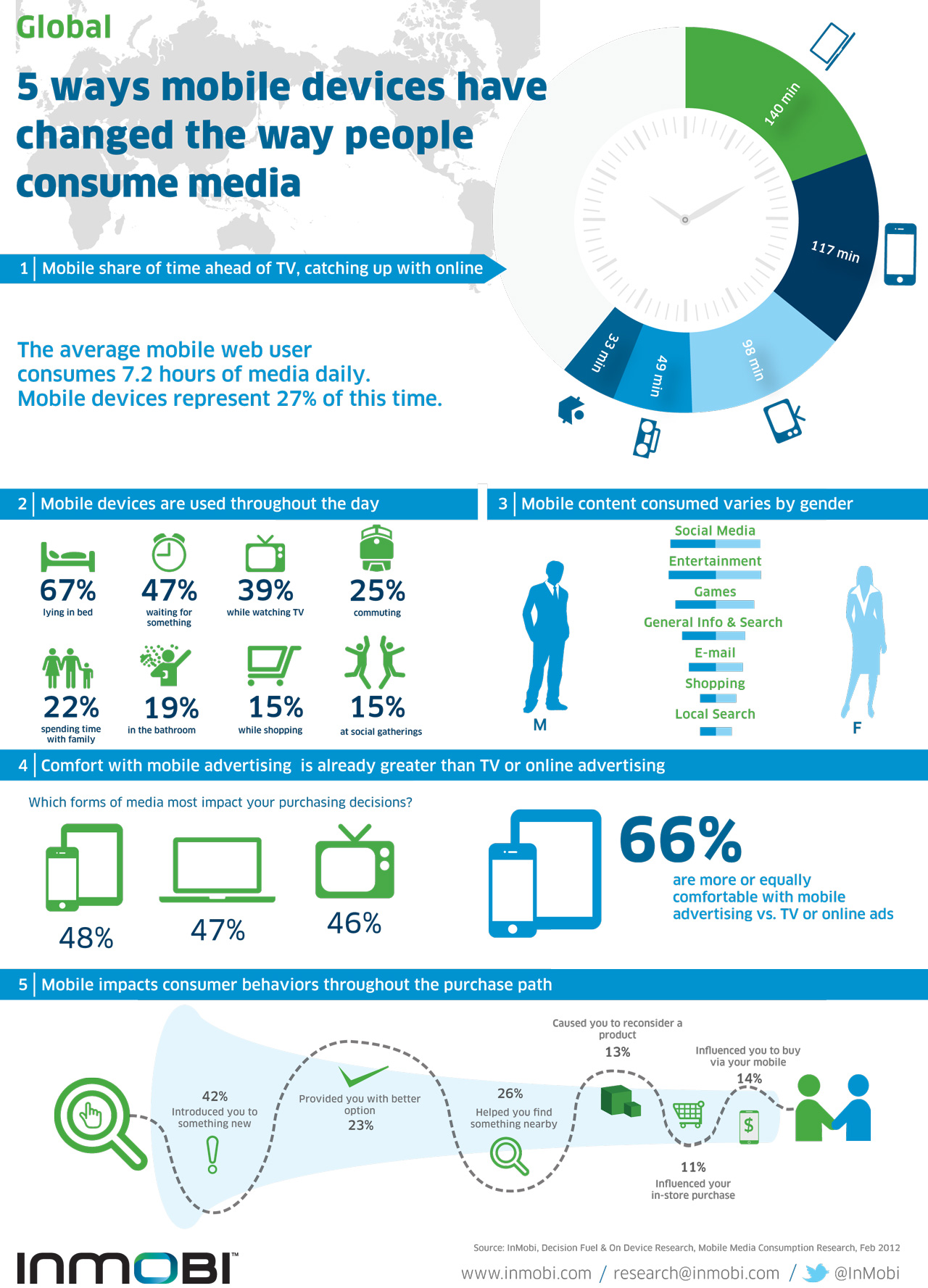
In its most recent quarterly report on mobile media consumption, InMobi surveyed some 20,000 consumers using both feature phones and smartphones across 18 different markets and found that they are, on average, spending 27 percent of their time on the mobile web, while they are only spending 22 percent of their time watching TV. (We’re assuming that’s leisure time, not all time.) PC usage trumps them both, though: they spend 32 percent of their time online.

The findings call this “mobile web” usage, so that means if you factor in other kinds of content — for example videos or music on your handset — there’s a chance that the gap between traditional media like TV and new media like mobile and PC could be even bigger.

InMobi also found that the most-popular categories among mobile web users are social media, entertainment and search. That points to the fact that mobile is seeing very much a dual-track growth in terms of how it is used: it’s for fun, but also for practical uses, too.

That speaks to the opportunities that are there not just for media and entertainment companies like MTV but for those who are focused more on information and productivity.

On the latter point, there are some encouraging signs for all those many companies trying to do more in mobile commerce: some 76 percent of respondents said they would probably use their phones to buy services or products in the next year. Of course, that could mean one measly app purchase, but more optimistically it could mean more.

InMobi itself focuses on mobile advertising and marketing — it claims to be the largest independent mobile ad network in the world — so it drilled down also into how those areas are progressing:

Some 66 percent of respondents said that they were as comfortable with mobile ads as they are TV or online ads. That’s not a brilliant number: turned around 36 percent said they felt uncomfortable with mobile ads. (That’s a problem that was highlighted in another survey last week, from Upstream, which provided a pretty dismal picture for how mobile ads are viewed today.)

Among those that are happy with mobile ads, InMobi’s numbers seem to point to small numbers when it comes to the benefits of these ads: only 14 percent said a mobile ad influenced them to buy something via a mobile device; and only 23 percent said that mobile ads saved them time and money.

(Photo: stickwithjosh, Flickr)


Verizon CTO: Shared Data Plans Coming Mid-Year

verizon-wireless

We’ve been hearing about Verizon’s forthcoming shared data plans for quite a while, but it’s possible that we’ve finally been given a timeline, albeit a vague one. At an investors conference Verizon CTO Fran Shammo said that family data plans will probably be offered around the middle of this year.

But it won’t be as simple as a launch date. Mr. Shammo explained that the company has spent a great deal of time (a year, basically) researching shared data. It’s “a very complex equation because we have to make sure that it’s good for Verizon and it’s also good for the customer,” said Shammo. “It’s important to realize that the day we launch this account billing, everbody won’t be migrating to the account billing day one. This is going to be a long-term migration into where we want to get data plan sharing, but this will be more of a 4G play.”

Speaking of 4G, it would seem that only 5 percent of Verizon’s customers have transitioned to the superior network. The service is currently available to 200 million Americans on 20+ devices. Still, we’re just now picking up momentum on the hardware front with some really stellar 4G LTE offerings, so I’d expect to see more customers make the transition in the next few months.

Of course, Verizon will do everything it can to help push that along. We’ve already seen plenty of 4G LTE ad campaigns out of Verizon, and with the release of the Droid Razr Maxx, customers can finally believe in a solid battery when they look into 4G devices.


Float Does Simple Scheduling For Teams (And Simple Is Hard!)

Float-Schedule-Hero

Float (no, not that Float – what is with the duplicate names for startups lately?), is a new, minimilist scheduling application for teams. The software comes from the New York-based startup Pixel Paddock, whose three co-founders have some 30 years of combined digital agency experience behind them. They know first-hand what agencies need, and designed the software to suit. But agencies aren’t the only one who could benefit from using Float – studios, firms, and other small teams that need a simple scheduling complement to their project management suite or current workflow may find Float useful.

Although the project/task management space seems to be a crowded field, with all-in-one solutions like Clarizen and Podio, Basecamp, and new entrants like Schedule and ResourceGuru, just to name a few, Float was designed to be easy and straightforward to use. It’s also not meant to replace more complex PM tools, only to run alongside them.

To use Float, admins set up project tasks, which they can drag-and-rop into the scheduling space. Employees are tagged with their skill set (like “Photoshop,” Javascript,” etc.) for easy search and assignment, and several built-in reports give you both a view of your team’s current utilization, their utilization over the coming weeks, or in the past. There are also built-in email notifications, so Float can send out weekly schedules to team members, as well as schedule updates.

“The trouble with agencies is that they’re the ones that have the most problem with having multiple teams and multiple projects and having to balance the time between those,” explains Glenn Rogers, CEO of the bootstrapped startup’s focus on the digital agency.

“But to be honest, Float would apply to any group of people, whether that’s freelancers with a small team under them, small studios, or even accounting firms that have clients they need to service,” he says.

To that end, Float already has 120 active accounts helping it beta test the software (for free, it should be noted). And it will continue to offer a free version in addition to the three pricing plans starting at $19/month. (Just scroll down on the pricing page – they’re sneaky about tucking away the free plan below the fold).

As for the simplicity? That was the hardest part.

“Simple is hard. Every feature that’s in this had to fight to be a feature,” says Rogers. “And we took a lot of features out because it either complicated the user flow or just wasn’t quick enough. It’s very easy to add a feature, but it’s very hard to take a feature out.”

More info on Float is available on the homepage here.


YouTube Improves Captions With New Formats, Languages, And More

youtubelogo

Captions on YouTube videos can’t be all that exciting. It’s been around since 2006. But apparently caption functionality has been widely extended, according to a blog post by YouTube.

The video sharing platform that takes up half the work day for most of us has introduced new languages to YouTube’s caption feature. Automatic captions and transcript synchronization are now available for Japanese, Korean and English, and there are over 155 supported languages for manual captions and subtitles. YouTube rentals will also start telling you what subtitles are available to you before you rent.

Channel owners will also now have support for their chosen format when it comes to broadcast video captions. In other words, text will be seen in its original position and style, and can be placed near the speaker, italicized to indicate off-camera voice over, or even set to scroll if the captions were generated in real-time model.

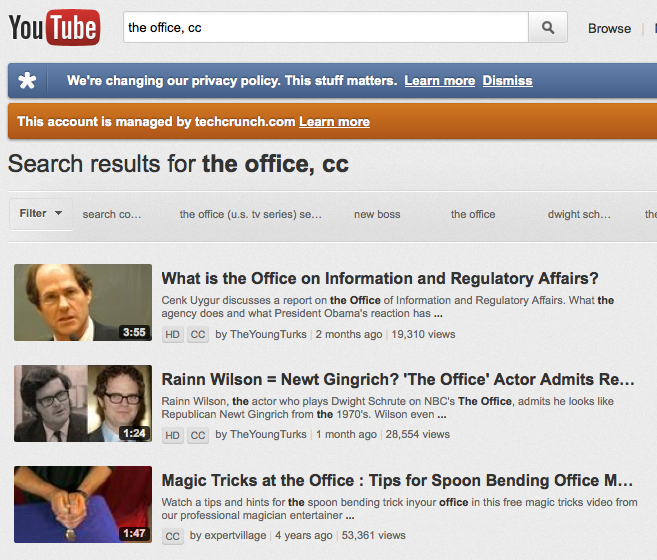
Of course, we’re looking for videos on YouTube more often than we’re posting them (in most cases). That said, YouTube has added a new search option for closed captions. Simply add “, cc” to any search or click Filter > CC.

And while finding what you’re looking for is great, customizing what you’re looking at can be even better. YouTube has added caption settings to let you change the font size and colors used. Just click on the “CC” icon and then the “Settings” menu. It should be self-explanatory from there.

Last, but certainly not least, YouTube has added support for new caption formats used by broadcasters including .SCC, .CAP, EBU-STL, and more. Any closed captions created for TV or DVDs will be converted by Youtube.


Hearsay Social Signs Up Northwestern Mutual And Other Financial Firms To Social Media Management Platform

hearsay-social

Hearsay Social, a SaaS dashboard for national businesses and their local branches to manage Facebook, LinkedIn, Google+ and Twitter pages, is announcing that a number of financial firms have been added to its customer roster, including Northwestern Mutual, Thrivent Financial for Lutherans, and California Casualty, an insurance provider.

Hearsay Social, which launched to the public in February and has raised $21 million in funding from New Enterprise Associates and Sequoia Capital, aims to help big brands who have local branches (i.e. Starbucks, BestBuy), manage Facebook, Twitter and other social media pages. Because of the highly distributed nature of some companies that have local branches, managing social media pages for stores or offices that are still in compliance with a company’s regulation is a challenging process.

Hearsay Social is optimized for “corporate/local” enterprises to allow local representatives, agents, advisors, franchisees or store managers to manage social media pages while ensuring local representatives stay in compliance with brand guidelines, and content regulations. The SaaS application puts compliance, workflow, content management and analytics on top of Facebook, LinkedIn, Twitter and most recently, Google+.

For Hearsay, Northwestern Mutual, which will be using Hearsay’s full suite of products, is a huge customer wine. The firm announced this week that it has standardized its more than 6,000 FINRA-registered representatives using LinkedIn, Twitter, and Facebook onto the Hearsay Social platform. Northwestern Mutual

The startup is also announcing that it is debuting new FINRA and SEC compliance capabilities, making it easier for compliance staff to safeguard firm liability at scale. Basically, the Hearsay Social Compliance Module provides complete compliance and coverage for all firm employees on all major networks, no matter their point of access. The platform allows advisors to use social media to build their books while meeting FINRA and SEC regulations on advertising, monitoring, and record retention.

For example, Hearsay is launching continuous monitoring and real-time remediation for infractions. So if anyone posts prohibited words and phrases (e.g. free, guaranteed, profanities), private customer data, stock ticker symbols, and other infractions, these are identified as they happen and automatically deleted or flagged for resolution.

As CEO and founder Clara Shih explains to us, “We are confident in saying we own financial services for social media.” She explains that in particular, the realtime monitoring for infractions is key for financial services compliance. She adds that the company is also seeing adoption across other industries including hotels, auto, and real estate.


Charles River Ventures Raises $375 Million For Its 15th Fund

Screen Shot 2012-02-28 at 6.03.13 AM

Veteran VC firm Charles River Ventures is announcing its 15th fund today, increasing its fund size from $325 million in its last raise to $375 million in its latest “heavily oversubscribed” round.

Charles River Ventures partner George Zachary tells me that the firm, which has 42 years of investment behind it, is looking to go in early and at a high percentage in “change the world” companies. It eschews fancy later stage grandstanding in favor of the undervalued treasure.

Putting its money where its mouth is, CRV was the original investor in Twitter and the lead investor in Yammer, Millennial Media, Zendesk and Udacity. Current portfolio companies with promise include the aforementioned as well as Hubspot, iControl and Orchestra.

The modest firm has the distinction of being the first VC to get into early stage seed investing through its Quick Start program, “We pioneered and successfully delivered on the “venture seed investor” model since 2006,” Zachary tells me, “We were the first and now most other firms have attempted to clone our program when they mocked it.”

In addition to Zachary, CRV consists of partners Izhar Armony, Jon Auerbach, Saar Gur, Bruce Sachs and Devdutt Yellurkar.

“We are a partnership of equals (in every way) where founders can easily talk with and tap each and every partner’s relationships and networks,” Zachary tells me, “Zero politics to bring founders fast answers and introductions.”

The raise is impressive in and of itself in this fiscal climate, as many in VC are finding that the gap between “haves and have nots” and the distance between the first tier firms and everyone else is increasing. According to Dan Primack, the fund was aiming for a $300 million target, and exceeded that in a little under two months.

While CRV isn’t doing massive late stage rounds like A16Z or isn’t as storied a local brand as Sequoia, it’s definitely one of the haves.