Mo Content, Mo Problems: Google’s Frommer’s Acquisition Could Lead To Additional Antitrust Scrutiny

Frommer_s Travel Guides logo

With its recent purchase of Zagat and today’s announcement that it is acquiring travel guide company Frommer’s, there can be little doubt that Google is getting deeper into the content business. This move makes a lot of sense for Google, which is trying to add more content to its local reviews business and Knowledge Graph, but it could also put the company under additional scrutiny from antitrust investigators in the U.S. and elsewhere. Already, the consumer advocacy organization Consumer Watchdog is calling upon government regulators to block the acquisition.

“There is a fundamental conflict between being a search provider and a content provider.”

“There is a fundamental conflict between being a search provider and a content provider,” said John M. Simpson, Consumer Watchdog’s Privacy Project Director. “As Google has increased its content and services, it has unfairly favored them in its search results and damaged competitors.” The deal, says Simpson, means “Google executives are thumbing their noses at regulators” and “if it is allowed with conditions, there is absolutely no reason to believe the Internet giant will live up to it’s word.”

The FairSearch.org group, which counts TripAdvisor, Expedia, Kayak and Microsoft among its members, also just issued a statement in which it “encourages government officials to look closely at its ability to use its dominance in search and search advertising to steer users away from competitors in order to keep users on Google’s own pages longer, and the potentially devastating effects that could have on the online economy.”

It’s worth noting that a number of companies – including some that could be considered to be Frommer’s competitors – have accused Google of highlighting its own content over that of its competitors in its search results over the last few years. Last year, for example, Yelp CEO Jeremy Stoppelman told the Senate Judiciary Committee that he believes Google has abused its market dominance in search. Earlier this year, Nextag CEO Jeffrey Katz, one of Google’s most outspoken critics, wrote an op-ed piece in the WSJ in which he noted that the company “needs to become more transparent about when advertisers get better placement in search results and when a result is a Google-owned property.”

With more of its own content to highlight on Google Search, chances are Google will indeed face additional pressure from antitrust regulators to ensure that it doesn’t give preference to its own content on its search results pages. Google, of course, argues that it simply tries to provide the best search results for its users but chances are that the executives over at Rough Guides, Fodor’s and Lonely Planet would have preferred to see Google stay out of the travel content business.



Obvious-Backed Branch Comes Out Of Public Beta To Foster Conversations Online

Screen shot 2012-08-13 at 2.13.44 PM

Back in March, Obvious Corporation, the mini accelerator founded by Biz Stone, Ev Williams and early Twitter employee Jason Goldman, announced its second incubation in Branch, a stealth startup co-founded by developers Josh Miller, Cemre Güngöre, and Hursh Agrawal. Branch was — in their words — on a mission “to turn the Internet’s monologues into dialogues.”

The startup also grabbed $2 million from Obvious, Lerer Ventures and SV Angel and moved back to New York City, where it set up shop in Betaworks’ offices, using the capital to put the finishing touches on their product. While the team shared some high level info at the time, it had been unclear just what Branch was cooking, but today the startup is officially emerging from private beta and sending invitations out to the public.

From the startup’s announcement on its blog today:

Today, Branch is coming out of private beta and will begin sending invitations to the public. Our team is so excited to show you what we’re building, but before we do, we want tell you why we’re building it.

We think the internet is an incredible tool. It’s given each of us a voice, and the power to share our voice instantly with millions of people around the world. But gaining the power to talk to the world hasn’t lessened the value of talking to each other. If anything, we think it’s more important than ever.

That’s why we wanted to build a new way to talk to each other, and why we’ve built Branch. Between articles, blog posts, and tweets, the internet is dominated by monologues. So we want to build a home for dialogues online, by combining the intimacy of a dinner table conversation with the power of the Internet.

In essence, this means that Branch is building on and expanding the 140-character world of Twitter, allowing users to pull content from just about anywhere on the Web and start a dialogue about that content and publish it to the world. As the team explains in its post, the service is designed as a way to quiet the noise of communication tools on the Web and focus on what’s important and who you want to include in that discussion.

Like blog posts, the team explains, Branches are public and you can decide who is included in the dialogue and expand on a particular tweet or video, for example, that got your juices flowing. Other users can respond to those comments, share it, or subscribe to that user. It also applies Github’s “forking” to conversations and threads, allowing the “branching” of conversations (by clicking a “Branch this” button), which creates a post next to previous one. This allows users to riff on whatever’s being said without taking the whole conversation off track.

Users can ask questions of their friends, initiate public debates, share media and publish their own ideas. Really, Branch is combining the Facebook status with a bit of Yammer’s curation and information sharing and the comment section model — all within the context of Twitter’s realtime media landscape.

But the problem with Twitter is that in the fast-paced world of ultra-sharing, other than hashtags, conversations on Twitter tend to lack context. Branch seems to be trying to provide users with that context or canvas on which they can find a happy medium between blogging and sharing in 140 characters. To that point, the team has also released a bookmarklet that enables users to import threads from Twitter and expand on them, giving them context and making them easier to process and follow.

The other nifty feature here is that Branch threads can be embedded in blogs (like WordPress and Tumblr, for example), allowing you to display conversations in context, rather than relying on screenshots of comment sections or sharing the sensitive information (within the professional context) of Yammer.

The design, so far, looks great, and, as with everything else, this will be all about the user experience and how much value it creates for users beyond the world of Twitter sharing, blogging and Facebook. There seems to be plenty of opportunity there to give voice to experts and give space to important conversations happening among people you trust, in a broader way than you might find in a Quora thread. Clearly, Branch thinks there’s room to build and with the backing of the same guys who helped Twitter come to life, you know there’s been a lot of cross-pollination and talk of how this can improve on the Twitter experience.

The rest of Branch’s blog post is below as is its introductory video:

What makes Branch different? First, we value the diverse perspectives the internet gives us access to, but we also know that too many voices can make things noisy. So on Branch, you can pick who you talk to—but, like blog posts, branches are public, so you don’t miss out on the openness of the web. And we’ve recently added a feature called “branching” to the product; it’s like Github’s forking meets traditional threading. Last, we know it’s important to be connected to the rest of the web, so we made sure you can grab anything from the web, talk about it with anyone, and publish it anywhere.

We built Branch with you—all of you—in mind. We want it to be a place for you to talk about all the things that are happening in your world. So far, our team has used it to talk about rap music, swap travel ideas, discuss the presidential election, explore a new neighborhood, ask for advice on iOS design, and reminisce about our favorite childhood technologies.


Back To School: The Best Ultrathin Notebook

scaled-2-7

Ultrabooks aren’t a hard sell. They’re super thin, really light, and powerful enough to handle everyday tasks (including a little gaming) with aplomb. That’s why I’d recommend them to students looking for a thin, light, and cheap way to get some great computing power without weighing down your backpack.

To that end, we gathered up four promising thin-and-light laptops (called Ultrabooks in the PC world) including a fairly fresh MacBook Air and a cute little blue number from Lenovo. In the end, many of these laptops are approximately the same but there are some rules of thumb when it comes to picking a laptop.

First, internal memory is the number to look at. Get the most you can afford. Processor speed is important, but the more memory apps have to work with the faster the machine will seem to be. Also keep in mind that some newer laptops don’t have expandable hard drives or memory, so what you buy is what you get for a few years. We understand that for many of you guys a laptop may be your primary machine, so we recommend that you buy the most laptop you can afford now.

MacBook Air 13-inch
Starting at $1,199
Geekbench Score: 6872
Processor: Core i7 (2.40GHz)
Processor: 1.8GHz dual-core Intel Core i5
Memory: 4GB
The MacBook Air is wonderfully thin and light and quite capable. It topped our Geekbench score and at its lowest configuration is in price parity with similarly outfitted ultrabooks. You’re obviously dealing with Apple software and hardware here so if you’re using specific software for engineering or design tools you may need to check for compatibility issues (although this is increasingly not an issue).

Keep in mind that you get two USB 3.0 ports, a Thunderbolt port, and an SD Card slot, so you’ll probably need to invest in a USB hub to add extra peripherals as well as an adapter to connect to an external monitor.

Arguably, the $1,199 price for an entry level model is a little pricey but you get a lot for your money. It’s a stable, solid machine that won’t go obsolete for at least three years, give or take.

Pros: Very thin and light, nice performance.
Cons: No built-in Ethernet, pricey when you get into more powerful models.

Asus Zenbook UX32V
Starting at $1,299
Geekbench Score: 6168
Processor: 2.4GHz Core i7 (2.40GHz)
Memory: 4GB
The Asus has one good thing going for it – its keyboard. The keyboard is big, comfortable, and the keys are deep and springy. A huge trackpad adds a bit of comfort for long hours browsing the web or working on documents and the 1,920×1,080 pixel screen is bright and clear.

The Asus also goes the Air route with three USB ports, an HDMI port, and an SD card slot. No Ethernet means you won’t be able to hardwire in without an external USB Ethernet jack.

Pros: Comfortable keyboard, not cramped. Very light.
Cons: Seemingly slow performance for some applications, including games.

Lenovo Ideapad U310
Stating at $719
Geekbench Score: 5036
Processor: Intel Core i5 (1.70GHz)
Memory: 4GB

If you’re on a budget the Ideapad U310 could be a good choice. While I like Lenovo for it’s ThinkPad offerings, their “consumer” line is a little bit chintzier and this one is no exception. Slower performance hinders the overall price/value proposition while the size makes it a little smaller than an average laptop. The single benefit? An Ethernet port built in.

Pros: Acceptable benchmarks
Cons: Definitely not a premium device. It’s a bit thicker than any of the other machines.

Acer Aspire S5 6106
Stating at $800
Geekbench Score: 6106
Processor: Intel Core i7 (2.4GHz)
Memory: 4GB

Acer’s offering is aimed a bit more at multimedia consumption and less hardcore computing but that doesn’t mean it won’t make a good classroom companion. The best thing? This laptop has a wild system for hiding the ports on the back. When not needed, all of the ports slide up – automatically – with the push of a single button. A little motor literally pushes the ports in and out of the case.

Gimmicks aside, this is a solid machine with good scores and a nice design. It’s a bit thicker than the MacBook Air and clad in plastic, which keeps the price down, but it’s one of the more able ultrabooks we’ve seen so far.

Pros: Stylish, solid, nice keyboard.
Cons: Odd keyboard layout makes it difficult to type. Difficult touchpad interaction.


Read the rest of our 2012 Back-To-School Advice here, including a great post from a Google intern.


Talkin’ Bout A Revolution: The All-Star Enterprise Panel At Disrupt

Arrington P

As we keep saying with these things, this year’s Disrupt SF is going to be huge so get your tickets here. And if you are interested in becoming a sponsor, opportunities can be found here as always. With Yammer’s $1.2 billion acquisition by Microsoft, Box’s recent raise of $125 million (valuing the company at a whopping $1.2 billion), and Asana’s cash infusion from Founders Fund, Benchmark, Andreessen Horowitz, and Mitch Kapor, enterprise these days is anything but boring.

Which is why you should tune in to our all-star enterprise panel at TechCrunch Disrupt, which will feature Box CEO Aaron Levie, Asana co-founder Justin Rosenstein, Okta CEO Todd McKinnon and Cloudera’s COO Kirk Dunn.

Between the “consumerization” of applications, rapid expansion to mobile devices, and data and analytics deluge, we’re seeing the Enterprise space go through a major revolution. Companies like Cloudera, Box, Asana, and Okta are all leading the way in this new era of enterprise computing; And nows your chance to see them onstage at TechCrunch Disrupt San Francisco.

Kirk Dunn

COO, Cloudera

Kirk is the COO of Cloudera where he uses his diversified range of technology engineering, marketing, sales and management experience to oversee Cloudera’s business operations. During his nearly 20-year career, Kirk has worked extensively with established companies, high-growth organizations and Fortune 200 accounts, successfully building strategic sales and product divisions, and leading international expansions.

Kirk served as the CEO of PowerFile, Inc, which was successfully sold to Hitachi LG Data Storage, and was CEO of Bang Networks Inc. Prior to joining Bang Networks, Kirk served as VP of North American Field Operations at Inktomi. He came to Inktomi from Network Equipment Technologies, Inc. (NET), where he held executive positions in sales, marketing and professional services. Kirk also worked for IBM in senior sales positions. He holds a BA in mathematics and applied sciences from the University of California, Los Angeles.

Aaron Levie

CEO and Co-founder, Box

Aaron Levie co-founded Box with friend and Box CFO Dylan Smith in 2005. The Box mission is to provide businesses and individuals with the simplest solution to share, access and manage their information. Aaron is the visionary behind Box’s product and platform strategy, which is focused on incorporating the best of traditional content management with an elegant, easy to use user experience suited to the way people collaborate and work today. Box is one of the fastest growing companies in enterprise software, used by more than 11 million individuals and 120,000 businesses worldwide.

Aaron studied business at the Marshall School of Business at the University of Southern California before leaving to found Box.

Todd McKinnon

CEO, Okta

Todd McKinnon is the CEO of Okta, a company he co-founded in 2009 with the mission of empowering businesses to realize the full benefits of their cloud-based applications. Okta helps companies of all sizes get control of their users, applications and data – both in the cloud and behind the firewall – and provides end-users with one place from which they can access all applications, from any device, anywhere.

From 2003 to 2009, Todd worked at Salesforce.com leading the engineering, user interface design, documentation and localization teams. Under Todd’s leadership, the team grew from 15 to more than 250 people, and the Salesforce.com service grew from 3 million transactions per day to more-than 150 million with industry-leading performance and reliability. Todd’s team developed and launched Force.com, the industry’s first platform-as-a-service product, and AppExchange, the first online marketplace for cloud computing applications.

From 1995 to 2003, Todd worked in various engineering and leadership roles at PeopleSoft in the PeopleTools group, building the underlying platform for the company’s applications.

Justin Rosenstein

Co-founder, Asana

Justin Rosenstein is the co-founder of Asana, along with Facebook co-founder Dustin Moskovitz. Asana’s software enables organizations to coordinate their people and teams without effort, providing key communication infrastructure to companies like Twitter, Airbnb, and Foursquare.

Justin has led the development of products that hundreds of millions of people use daily. At Facebook, he was the tech lead for projects including the Like button and Facebook Pages, and designed the in-house project management system that Facebook relies on to this day Facebook. At Google, he product-managed several projects in the communication/collaboration division, and created the initial prototype for Gmail Chat.

Justin majored in Math and got part way through a Master’s in Computer Science at Stanford.

Levie, Kirk, McKinnon and Rosenstein will join a full Disrupt lineup which already includes speakers like: Yahoo CEO Marissa Mayer, Brian Lee, Marc Benioff, Ron Conway, Kevin Rose, Jessica Alba, Dave Morin, TechCrunch founder Michael Arrington, Vinod Khosla and many others yet to be announced.


QuicklyChat Brings “Push-To-Talk” Video To Small, Remote Teams

screenshot-buddylist

QuicklyChat, a Y Combinator-backed startup participating in the Summer 2012 program, has an interesting take on video conferencing. With its newly launched solution designed for small teams working remotely, QuicklyChat is trying to bring back ad hoc conversations, which are still the most valuable aspect to the in-office work environment. With its “push-to-talk” video chat system, your co-workers can immediately reach you – but only when your status indicator says you’re not busy.

And here’s the key selling point – that status indicator updates automatically based on what you’re currently doing on your computer. In your IDE coding? It’s red. Surfing Reddit? It’s green. Reading email? It’s probably yellow.

“We think video is really the best way to communicate with anybody,” says co-founder James Harvey, “because you get more context than you do with IM. But Skype and things like that are too formal,” he adds. “It’s like having your phone ringing. You wouldn’t want to have your phone ringing every time someone asked you a 10-second question.”

Harvey and co-founders Yuran Lu and Shaung You, all of whom met while at MIT, felt that this system needed two main things to be successful: an automatically adjusting indicator and the elimination of the ring-then-answer connection process.

The system works quite differently than how IM, Skype and other messaging programs have worked in the past. In all those scenarios, users have to configure their own status indicator to reflect whether or not they can be reached or if it’s OK to bother them. It’s really difficult to guess, though, whether that status indicator is accurate. You may remember to go red when you jump on a call, but then forget and leave it red all day. Other times, you may be slammed, but your green light keeps telling people “please ping me!”

With QuicklyChat, which runs as desktop software on either Windows or Mac (Linux is in the works), you no longer have to manually switch your status light indicator from green to red throughout the day. (Hooray!) However, you also no longer have the ability to ignore a video call, either. It just appears.

To be clear, the system does respect your privacy – it doesn’t tell co-workers what you’re doing specifically (e.g. surfing Reddit, reading email) – it only shows them the green/red/yellow indicator. And this can be further customized in the app’s settings. For example, it’s likely that a video editor is working when they’re visiting YouTube,  not watching funny cat videos. Or you might feel that email reading is a “red” not a “yellow.”

Still, such a system takes a little getting used to. With most people, Harvey says that once they get over the initial “this is kind of weird” feeling, they appreciate the benefits. “We had one user say that he realized that this means when he works from home, he actually has to wear a shirt,” Harvey said with a laugh, “but that’s not that much effort to make,” he adds.

Eventually, the plan is to develop QuicklyChat into a freemium service, but for now the company is working on additional features like screen-sharing, for example, and they’re interesting in finding out what other additions users may want included, like file sharing or collaboration, perhaps. Meanwhile, during this public beta period, QuicklyChat is a free download from here.


Groupon Posts Stronger-Than-Expected Q2 Earnings, But A Top Line Miss: $568.3M Revenue, $28.4M Net Income

Groupon-Logo1

Groupon today announced its financial results for the second quarter of 2012, its third quarterly earnings report since its initial public offering in November 2011.

Groupon’s revenue for the second quarter was $568.3 million, up 45 percent year-over-year. Revenue was up 1.6 percent on a quarter-over-quarter basis, compared to the $559.3 million Groupon brought in during the first quarter of 2012. These top-line Groupon’s results were lower than analysts expected — the average of analyst expectations for Groupon’s revenue was $574.8 million.

However, the company had a stronger-than-anticipated performance at the bottom line. Groupon’s net income for the second quarter was $28.4 million, or $0.04 per share — which is a boost from the average of its Wall Street analysts’ estimates for the quarter which was $0.03 per share.

Groupon has had a rough go of it on the stock market in recent months, and it doesn’t look like today’s mixed results will give it the boost it needs. At market close today its stock was trading at $7.55 per share, a major fall from its $20/share IPO price. In after-hours trading the company slid even further — 15 minutes after the company’s earnings release hit the wire, the company’s stock was down more than 13 percent, to $6.51 per share.

Looking ahead, though, Groupon is optimistic that its quarter-over-quarter growth will pick up: The company said it expects its third quarter revenue to be between $580 million and $620 million,with income from operations expected to be between $15 million and $35 million.


Social Publishing Startup Scribd Gets A Facelift: New Website, New Logo, New iPhone App

scribd logo

Social publishing site Scribd has given itself a new look over the past month or so, with a new logo, a redesigned website, and an update to its iPhone app.

CEO Trip Adler and his team gave me a quick tour of the new features last week. The website was previously dominated by your social feed, showing you the documents uploaded and read by other users that you’re following. Now the social feed has been pushed off to the side, and in its place there’s a feed of “featured” content, which has been hand-picked by Scribd.

The problem with the old layout, apparently, was the fact that the social feed can be pretty empty when you first sign up and haven’t found anyone to follow. Adler also says the site has lots of good content that “wasn’t getting surfaced enough.” With the new layout, Scribd can help ensure that the best content doesn’t get buried, while also giving new and casual users something interesting to read without their having to hunt for it.

The distinction between new users and “power users” came up repeatedly during our conversation. It seems that Scribd is making a big push to make the service more friendly to new users while still serving the more serious fans. In this case, if you’re already following a lot of other users, the social feed hasn’t disappeared — it’s just a bit less prominent.

The iPhone app has also been redesigned with a new featured section, and it includes a bookmarking feature for reading documents offline. We can expect to see the redesign and the bookmarking feature to appear Android and the mobile web, too — Scribd’s goal is to eventually bring the mobile website to feature parity with the native apps. Adler also notes that mobile is becoming an increasingly large part of the company’s business, now accounting for 10 percent of traffic and 20 percent of ad revenue.

As for the new logo, it’s not a dramatic change. (The current logo is the one at the top of the post, while the previous logo is directly to the right of this paragraph.) However, the Scribd team says that by flattening the logo out and removing the extra color, they’re hoping to make it a little more “modern” and “mature”, as well as easier to reproduce in a variety of contexts.

It has been a relatively quiet year for Scribd, at least from a press perspective, aside from the near-sale of its newsreading app Float. Still, Adler says the company has been growing, with 25 million “quality” documents uploaded by its users. (The number doesn’t includes things like documents that are entirely privately.) The company has also made two big additions to the management team — VP of Engineering Sabeen Minns, formerly VP of Product and Wireless Software Development at Palm, and Head of Product Lilia Martinez-Coburn, formerly VP of Product and Marketing at TownHog.

And Adler says Scribd is now profitable, with about 50 percent of its revenue coming from ads and 50 percent coming from payments (either for premium for features or for certain documents/e-books).


SlideKlowd Offers New Presentation Capabilities With Smart Phones and Tablets

slideklowd

Power Point has spurred a refresh in innovation from companies that know there are better way to do presentations.

You can see this innovation with new companies such as  SlideKlowd.com, which shows the  new capabilities that come with smart phones and tablets in presentation environments.

SlideKlowd, developed by Klowd.com, offers a service that creates connections between the presenter and the audience on their mobile devices or through their browsers. SlideKlowd acts s a management platform that allows the presenter a wider range of uses such as employee training, sales presentations, surveying and executive presentations.

Here’s how it works. When the audience enters an event key, it creates a connection between the presenter and the devices used by the audience. SlideKlowd offers apps for iOS and Android devices.

Once connected, the presenter knows who is attending. Through the connection they can tell the level of engagement and if they are doing other things. The service collects individual and overall information about each of the interaction slides.

The presenter can get thumbs up or down from the audience. The company will soon integrate the Twitter API to offer a new way to share a presentation.

The data is captured and presented later in an analytics report.

SlideKlowd is easy to use and provides a fresh take on presentations. The presenter gets real-time feedback. The audience can be anywhere, as long as they have a mobile device.

But te presentation market is a crowded space and that will pose a challenge for SlideKlowd. Microsoft still dominates the market and there are established providers such as Prezi and SlideRocket, which you know are thinking of new ways to broaden interaction.


Google+ Starts Rolling Out Vanity URLs For Some Accounts

plus_logo

A few weeks ago, the Google+ team punked The Oatmeal by redirecting its Google+ profile URL to a slightly more interesting (and profanity-laden) URL. That, it turns out, what just a test for today’s wider rollout of vanity URLs for a subset of verified business pages and profiles on Google+. Google has already enabled this feature for a number of big brands and celebrities like Toyota, Delta Airlines and Britney Spears, but don’t get too excited yet: it’s not clear when Google plans to roll out custom URLs to all of its users.

This new feature, says Google, will be available worldwide, but it’s unclear how Google plans to choose the first batch of users who will get first dibs to pick their custom URL. In its announcement, Google only notes that it is introducing this feature for “a limited number of verified profiles and pages” and that this is just a “first step.”

Vanity URLs have long been among the most requested features of Google+’s most dedicated users. The standard Google + profile and page URLs don’t exactly lend themselves to memorization, after all, and businesses aren’t likely to use these ugly URLs in their marketing materials (you can currently find TechCrunch’s updates at https://plus.google.com/103037366582313115962/posts, for example).

When Facebook launched its vanity URLs back in 2009, it created somewhat of a land rush as its users hustled to get their URL of choice. Facebook, too, first allowed a few select brands and celebrities to claim their custom URLs a few months ahead of its other users.


The Microsoft Surface Is Safe From Apple’s Zealous Patent Lawyers

hero (1)

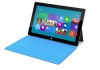
Compare the Microsoft Surface to the iPad: They are both thin slate devices with black bezels. Likewise, the Samsung Galaxy Tab is also a thin slate device with a black bezel. Except only one of these companies is suing the other.

It was revealed today in the third week of the Apple/Samsung courtroom battle that Microsoft is licensing several unnamed Apple design patents for the Surface. This deal reportedly stems from Microsoft and Apple’s long-standing cross-licensing agreement. There are some caveats but it seems for the most part that Microsoft is safe from Apple’s legal hounds — and therefore the Surface has an edge on the tablet market.

Reuters reports that this deal contains a so-called anti-cloning provision, which prevents the two companies from copying (i.e. cloning) each others devices.

According to Apple’s patent director, Boris Teksler, Apple rarely licences these patents. He said he could count on one hand how many times Apple has offered to do so. That includes at least one offer to Samsung which the Korean company supposedly turned down.

Apple vigorously defends its patents and trademarks. Just ask Samsung. The two companies are currently locked in a heated trial. According to Apple, the Samsung Galaxy Tab and smartphone is a bit too similar to the iPad and iPhone. In fact it was revealed last week that Apple approached Samsung in 2010 and offered to license its design patents for $30 per phone and $40 per tablet sold. Samsung said no to the offer and continued releasing products that are eerily similar to Apple’s. And now the two are battling it out in court.

The iPad dominates the tablet market thanks in part to its simple design. For the most part Samsung replicated the iPad’s design cues, but did so without the proper licences. But Microsoft got the nod from Apple and it’s hard to deny that the Surface is a good-looking tab. Now, if Microsoft can price it properly, the Surface could be the next big tablet and Apple’s lawyers cannot do a thing about it as long as Microsoft plays by the aforementioned rules.


YogiPlay Debuts “YogiMeter,” An Educator-Based Rating System For Children’s Learning Apps

yogiplay_logo_rgb

YogiPlay, a Menlo Park-based company from husband-and-wife team Cedric and Michal Selling, is attempting to tackle the critical problem of surfacing appropriate, trusted, and carefully vetted educational apps for children. The company recently raised $1 million in VC funding from DN Capital and Richmond Park Partners, in order to develop a system for rating apps for kids, specifically targeting the ages 2 through 8. Today, YogiPlay is announcing the results of those efforts with YogiMeter, its new app rating system designed to help parents find learning apps for children that have been vetted by a team of educational experts.

The Sellins are both Stanford-trained engineers, with Cedric hailing from Aruba Wireless and Michal an early Google employee. But they’re also parents who grew frustrated with how difficult it was to find quality learning apps for children. Cedric says they were inspired to start the company after watching their two-year old daughter interacting with mobile apps, and realized what powerful learning tools they could be.

In June, the company hired Dr. Jim Gray, who previously served as the Director of Learning at LeapFrog, where he was in charge of all curricula for the last seven or so years. At YogiPlay, he led the development of the YogiMeter system, which has been designed to assess the engagement levels and educational qualities of mobile apps.

“It’s using the same principles I’ve been using all along from my knowledge of child development and interactive media,” he says of YogiMeter. “I’ve structured in a way with some very specific ways to look at how and why kids would be engaged, and if they’re engaged, how and why they might learn.” He also vetted this rubric with other colleagues not associated with YogiPlay to get their feedback and input.

While there are a few startups working to rank and review mobile apps, like KinderTown, for instance (which also vets apps with educators), Dr. Gray says that he believes the YogiMeter system uses a more developmental approach with techniques common to those familiar in child development and education. “The others are not as rigorous, research-based, structured and consistent,” he says describing YogiMeter’s competition.

The system he developed ranks and analyzes apps in two main areas – engagement and educational quality. For determining an app’s engagement, it looks at things like user interactions, user experience, intrinsically motivated engagement, extrinsically motivated engagement and socially motivated engagement. And to analyze the app’s ability to teach, it looks at whether the app will actually engage the child in learning, as it proposes to do, and whether that learning is deep, authentic, personalized, differentiated, and whether or not parents can track the child’s progress throughout. On that last front, it should be noted that YogiPlay also offers mobile developers an SDK which allows them to integrate parental communication tools within their iOS or Android app. Less than twenty developers on iOS and Android are now using this SDK in their apps today.

The YogiMeter rankings will soon be featured visually in the company’s online parent-facing app discovery center and personalized dashboard as well as within its standalone mobile apps, all of which are undergoing massive redesigns right now.  (Hence, no screenshots are appropriate here). YogiPlay’s mobile app is available on Android currently, but has been held up in Apple’s approval queue for around three months. However, since the apps are HTML5-based, it seems that even if it was rejected from iOS, the company could easily make it accessible on mobile devices.

To date, YogiPlay has rated over 600 apps with YogiMeter, and is adding new apps to the system daily. The company has also seen some 45,000 parents register on the site, providing their email and their child’s age and other details. Although parents can’t see the YogiMeter rating just yet on YogiPlay.com, all the apps have now been vetted through the system.


Facebook Lets You Announce That You’re Expecting A Baby

Facebook Expecting A Baby

Facebook seems to be feelings its biological clock ticking, as today it launches a new Timeline event that lets you share that you’re expecting a baby, the due date, and whether it’s a boy or girl. Baby announcements appear in the Celebrations home page sidebar beside birthdays on the day the kid is expected to pop out, along with showing up in the news feed. Facebook tells me it’s exploring whether the feature will power an existing advertising option to target “expecting parents” that could be very lucrative.

This new life event for expecting a baby also opens up a new advertising is another sign that Facebook is maturing as its original user base of college kids from 2004 start hatching little ones who can join Facebook 13 years from now.

The feature replaces a more confusing option to add an “Expected: Child” to your list of family members. You can add a baby life event by selecting the announcement from the Life Events drop down in the publisher on your Timeline. Facebook doesn’t discriminate about who can say they’re expecting. Single, in a civil union, or otherwise, you can still say a kid is on the way.

You can add additional info like who the other parent is, location (is that conceived or where it will be born?), and a longer story. You can set a future publishing date if you want to wait until the bump starts to show. Also, you can add a photo to the story, which might encourage more ultrasounds to end up on Facebook. That Unbaby.me extension for removing photos infants from your feed is about to get a lot more useful if it can detect fetuses too.

Once published, the story will appear in the news feed immediately, and grace the Celebration sidebars of friends’ home pages on the due date. Facebook has offered an “expecting parents” ad targeting option for about six months but it was essentially guessing based on what Pages you Liked and other options.

Now it will have concrete structured data about who’s a parent-to-be. It won’t be using this data to power ad targeting just yet, but you can imagine how useful advertisers would find the ability to accurately target expected parents with ads for maternity clothes, parenting classes, strollers, and anything else someone needs to be a mom or dad. The ads would likely be popular with the rapidly spawning babyTech companies chasing the big money people pay to be world-class moms and dads

Today’s feature release follows the added ability to announce the date of your upcoming marriage on Facebook. And who knows, maybe the push is Zuck’s subtle way of saying him and his new bride are expecting. Just kidding. This is about making Facebook a host for the most important moments in your life, and maybe making some money off those moments down the line.


Groovideo Launches Mobile App To Easily Create Awesome Group Videos

groovideo

The mobile video space is heating up, as a number of startups have launched to help users create and share interesting videos with one another. To date, most have been limited to individual users uploading videos and posting them to other social networks like Twitter and Facebook. Maybe they can add filters, maybe automatically edit their videos and stitch them. But the idea of “social” video has been mostly limited to “Here, social friends and followers — watch my video.”

Groovideo has a different idea for how to make videos social, by letting users create awesome content together through its mobile and web apps. Groovideo works like this: Users invite their friends to contribute to videos, each shoot their own short clips, which they upload to Groovideo’s servers, and the startup automatically stitches them all together.

According to founder Ron Zohar, Groovideo was created out of a desire to simplify the process of creating videos for special events — like weddings and birthdays. What they found was that the process of getting multiple video files from friends and family was a huge hassle in and of itself, and that’s before someone even gets to editing.

Groovideo simplifies the whole process by using an editing algorithm to automatically create videos once users upload clips. When more clips are added, the app recuts those videos. Users can upload files that they’ve shot with their mobile cameras, or record greetings from a web cam.

In its early release, Zohar says the team is seeing pretty impressive number from users asking friends and family to contribute to their videos. The average video has about 25 people invited to participate, with 10-12 actually uploading clips. Final videos tend to be about two minutes long, according to Zohar.

I’ve seen a few other apps like this — most notably Vyclone, which I like a whole lot. But while Vyclone relies on location to determine whether videos should be automatically edited together, Groovideo lets users contribute their content from anywhere. So you could create a crowdsourced wedding video from different clips shot by attendees — but users who weren’t necessarily at the wedding can also contribute their own thoughts and well wishes.

Groovideo was founded by a team of five friends in Tel Aviv, and the startup participated in Upwest Labs, an incubator focused on bringing Israeli entrepreneurs to Silicon Valley.


India Launches Antitrust Investigation Against Google

india07

Google currently faces a number of antitrust investigations in the U.S. and Europe. To make matters worse, the Competition Commission of India (CCI) just announced that it is also launching an inquiry into Google’s business practices. The announcement follows a complaint by Indian consumer advocacy group Consumer Unity and Trust Society (CUTS) International. That, sadly, is also the extend of the information given by India’s Competition Commission, but an August 2011 letter from CUTS to the Competition Commission (PDF) argues that “Google can potentially engage in anticompetitive activities to the possible detriment of these markets in India and that therefore such activities in this regard need to be thoroughly investigated by the CCI.”

In an additional press release from last year, CUTS also stresses that its basic concern is that “Google does not use its dominance in the search engine/online advertising markets to affect the growth of Indian search and advertising markets as well as related fast growing e-commerce markets like online shopping and online travel sites.” According to ZDNet’s Zack Whittaker, the CCI can levy fines of up 10% of a company’s revenue or 300% of its net profits.

Earlier this year, the WSJ already reported that this investigation was forthcoming. At the time, it looked like the investigation would only focus on Google’s advertising services and Google hadn’t been notified of the investigation yet.

Google currently faces similar investigations around the world. In the U.S., for example, the FTC and a number of state attorneys general are currently looking into Google’s business practices. The European Commission, too, has opened an investigation into a number of antitrust-related complaints against the company. It’s also facing similar investigations in Argentina and Korea and a number of British politicians have recently asked their government to look into Google’s tax practices in their country.


Last Year’s Sony HDTV Is Still This Year’s LCD to Beat

Sony’s 46-inch Bravia XBR 929 television. It may not exactly be new, but chances are it’s exactly what you want in an LCD panel. Photo courtesy of Sony Electronics Inc.

The flagship of Sony’s 2011 HDTV line, the Bravia XBR-46X929, will probably sail into the end-of-life sunset at the end of this year. That’s actually a good thing, because you might be able to score one at a price that more accurately reflects its size and capabilities.

See, while this 46-inch LED-based LCD comes loaded for everything from 3-D to Netflix to, you know, television, it’s priced considerably higher than competing models. Even a supposedly pricier plasma like Panasonic’s TC-P55ST50 sells for $800 less, and it spans 55 inches.

Save for a few minor glitches, the 46HX929 is one seriously excellent TV.

But, hey, are you gonna let your checkbook stand between you and one of the most eye-pleasing LCDs ever to adorn your living room? Save for a few minor glitches, the 46HX929 is one seriously excellent TV.

For starters, it’s a looker, with a Gorilla Glass one-piece lending a sexy all-black façade to the front side. Skinny, too, measuring just 1.5 inches, except for an unfortunate wart that’s home to a barely necessary RS-232 port.

Sony throws around a lot of made-up-sounding specs to describe some of its imaging technology, words like X-Reality Pro, Intelligent Peak LED, and Motionflow XR 960. Here’s the real-world translation: ridiculously perfect color, spot-on local dimming (that is, area-specific automatic backlight adjusting), and super-smooth action scenes.

Note to Sony: If you need some marketing-speak for your ultra-deep black levels, which rival any I’ve seen on any TV ever, might I suggest: BlackTastic.

Less ‘tastic, however: the dreaded soap-opera effect, which bathes images in a painfully 2-D-looking veneer. Thankfully, it’s easily remedied by switching to Cinema mode or turning off the MotionFlow feature (one of many, many advanced video settings you’ll need the manual to decipher).

The 46X929 also stumbles on the 3-D front. Sony supplies no glasses, though its $100 Titanium active-shutter specs are the least dorky-looking pair I’ve ever seen. They’re almost stylish. Too pricey? Sony also sells a way dorkier all-black pair for $50. Either way, the TV’s 3-D images look decent so long as you sit totally upright. Tilt your head and the picture degrades horribly.

To charge the glasses, you’ll need to tap the TV’s two easily accessible USB ports, which commendably stay powered even when the TV is off.

Sony’s overstuffed menu system, which scrolls horizontally along the bottom and vertically along the side, connects you with enough internet services to make your head spin. Among them: Amazon Instant Video, Hulu Plus, and Netflix, of course, but also Pandora and Slacker, YouTube, Yahoo Widgets, the Sony Entertainment Network, Skype (with an optional webcam), a web browser, and plenty more. Roku box, shmoku box.

With an overall picture quality that’s second to none (well, few), it’s easy to overlook a couple less-than-perfect features. Assuming you don’t mind paying a premium, the Sony Bravia XBR-46HX929 makes a sweet addition to any living room.

WIRED Some of the best color and deepest blacks you’ll find in any modern LCD. Tons of streaming media options, plus built-in Wi-Fi to deliver them. Supports 1080p/24 video sources.

TIRED Priced like a 46-inch TV from 2008. No 3-D glasses included, though maybe that’s for the best. Slightly muffled-sounding audio. Overcrowded and unintuitive remote.