Expo WebView not displaying on iOS but works on Android

I’m working on an Expo project that uses a WebView component to display web content. While everything works fine on Android devices, the screen appears blank on iOS. Below is the relevant code and details about my environment and the steps I’ve taken to debug the issue.

My Environment:
Expo SDK Version: 51
React Native WebView Version: 11.26.1
Development Environment: macOS
Target iOS Version: iOS 16
Testing Device/Simulator: iPhone 14 simulator
Code Example:
Here’s the simple implementation of the WebView component in my app:

import React from 'react';
import { WebView } from 'react-native-webview';

export default function App() {
  return (
    <WebView
      source={{ uri: 'https://example.com' }} // Loading a test URL
      style={{ flex: 1 }} // Ensuring it takes the full screen
    />
  );
}

What I’ve Tried:
Verified Basic Setup: Ensured that the WebView is correctly imported and configured as shown in the code above.
Checked iOS Permissions: Reviewed app.json and Info.plist to ensure necessary permissions are added (e.g., NSAppTransportSecurity for HTTP URLs).
Simplified Testing: Used a basic URL (https://example.com) to eliminate potential issues with the target content.
Rebuilt the Project: Tried clearing the cache and rebuilding the app using expo build.
Despite these efforts, the issue persists.

Observed Behavior:
Android: The WebView loads the content as expected.
iOS: The screen remains blank with no error messages in the Expo logs.
My Questions:
Are there any additional iOS-specific configurations required for the WebView to work properly?
Has anyone encountered a similar issue and found a solution?
Thanks in advance for your help!

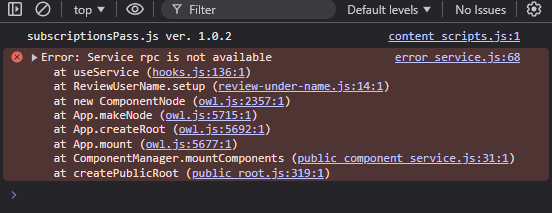
Odoo OWL error Service rpc is not available

I’m trying to use the Odoo OWL libraries and I’m following what is explained in the documentation.

import { Component } from "@odoo/owl";
import { useService } from "@web/core/utils/hooks";

export class ReviewUnderName extends Component {

    static template = "devolive_review.ReviewUnderName";
    static props = {};

    setup() {
        this.rpc = useService("rpc");
        this.loadData();
    }

    async loadData() {
        const response = await this.rpc(`/devolive/review/`);
        console.log("response", response);
    }

Unfortunately, I’m getting the error: Service rpc is not available
Does anyone know if there is extra steps to be able to use the rpc service with Odoo OWL Components?

Odoo OWL error  Service rpc is not available

Cannot build reactR shiny widget

Im trying to create a reactR/htmlwidgets based package in R, that wraps react-flow.

Im following the official guide from reactR and use the following, but I get errors that I don’t understand.

In the end, I want to replicate the official guide, which has this react code:

import { useCallback } from 'react';
import {
  ReactFlow,
  MiniMap,
  Controls,
  Background,
  useNodesState,
  useEdgesState,
  addEdge,
} from '@xyflow/react';

import '@xyflow/react/dist/style.css';

const initialNodes = [
  { id: '1', position: { x: 0, y: 0 }, data: { label: '1' } },
  { id: '2', position: { x: 0, y: 100 }, data: { label: '2' } },
];

const initialEdges = [{ id: 'e1-2', source: '1', target: '2' }];

function Flow() {
  const [nodes, setNodes, onNodesChange] = useNodesState(initialNodes);
  const [edges, setEdges, onEdgesChange] = useEdgesState(initialEdges);

  const onConnect = useCallback((params) => setEdges((eds) => addEdge(params, eds)), [setEdges]);

  return (
    <ReactFlow
      nodes={nodes}
      edges={edges}
      onNodesChange={onNodesChange}
      onEdgesChange={onEdgesChange}
      onConnect={onConnect}
    >
      <MiniMap />
      <Controls />
      <Background />
    </ReactFlow>
  );
}

export default Flow;

MWE

create the scaffold

# make sure we have the latest versions available
# install.packages(c("shiny", "devtools", "usethis", "htmlwidgets", "reactR"))
sapply(c("shiny", "devtools", "usethis", "htmlwidgets", "reactR"), packageVersion)
#> $shiny
#> [1] 1 9 1
#> 
#> $devtools
#> [1] 2 4 5
#> 
#> $usethis
#> [1] 3 1 0
#> 
#> $htmlwidgets
#> [1] 1 6 4
#> 
#> $reactR
#> [1] 0 6 1

# create the package
usethis::create_package("reactflow")
# getwd() # to check that we are already in reactflow/

# add the react-flow dependency, note @xyflow/react as described here
# https://github.com/xyflow/xyflow/tree/main/packages/react
reactR::scaffoldReactWidget("reactflow", list("@xyflow/react" = "^12.3.5"), edit = FALSE)

system("yarn --version", intern = TRUE)
#> [1] "1.22.19"
system("yarn install") # takes a while...
#> ...
#> success Saved lockfile.

# check the packages
paste(readLines("packages.json"), collapse = "n")
#> {
#>  "private": true,
#>  "dependencies": {
#>    "@xyflow/react": "^12.3.5"
#>  },
#>  "devDependencies": {
#>    "webpack": "^4.27.1",
#>    "webpack-cli": "^3.1.2",
#>    "@babel/core": "^7.2.0",
#>    "babel-loader": "^8.0.4",
#>    "@babel/preset-env": "^7.2.0",
#>    "@babel/preset-react": "^7.0.0",
#>    "css-loader": "^5.0.1",
#>    "style-loader": "^2.0.0"
#>  },
#>  "scripts": {
#>    "watch": "webpack --watch",
#>    "build": "webpack"
#>  }
#> }


system("yarn run webpack")
#> ...
#> Hash: 27f31466a4896d55fa04
#> Version: webpack 4.47.0
#> Time: 9896ms
#> Built at: 11/27/2024 8:26:31 AM
#>            Asset      Size  Chunks                   Chunk Names
#>     reactflow.js  1.06 KiB       0  [emitted]        main
#> reactflow.js.map  4.81 KiB       0  [emitted] [dev]  main
#> Entrypoint main = reactflow.js reactflow.js.map
#> [0] external "window.reactR" 42 bytes {0} [built]
#> [1] ./srcjs/reactflow.jsx 81 bytes {0} [built]

# I then fix the roxygen tags in R/reactflow.R
devtools::document()
devtools::install(quick = TRUE)
# installs correctly

shiny::runApp()

The MWE app (without react flow) works as expected, hence I suspect I set up everything correctly.

Add react flow

First I want to have a minimal react flow element, which means I change R/reactflow.R to this

reactflow <- function(message, width = NULL, height = NULL, elementId = NULL) {
  nodes <- list(
    list(id = "1", position = list(x = 0, y = 0), data = list(label = "1")),
    list(id = "2", position = list(x = 0, y = 100), data = list(label = "2"))
  )
  edges <- list(
    list(id = "e1-2", source = "1", target = "2")
  )
  component <- reactR::component(
    "reactflow",
    list(nodes = nodes, edges = edges)
  )

  # create widget
  htmlwidgets::createWidget(
    name = 'reactflow',
    component,
    width = width,
    height = height,
    package = 'ReactFlowR',
    elementId = elementId
  )
}

and srcjs/reactflow.jsx to

import { ReactFlow } from '@xyflow/react';
import '@xyflow/react/dist/style.css';

import { reactWidget } from 'reactR';

reactWidget('reactflow', 'output', ReactFlow);

now, running devtools::document(); devtools::install(quick = TRUE); shiny::runApp() builds everything correctly, but the app does not work anymore.

Instead I see an empty element where the reactflow should be, and when I look at the JS console, I see the following error

error message

I reran the yarn install and yarn run webpack but get another error:

ERROR in ./node_modules/@xyflow/react/dist/esm/index.js
Module not found: Error: Can't resolve 'react/jsx-runtime' in '.../node_modules/@xyflow/react/dist/esm'

Note this issue suggests upgrading to React 18 should fix it, but reactR:::react_version() reports 18.2 already and I am using @xyflow/react version 12.3.5.
I also tried to configure webpack.config.js with this

resolve: {
    alias: {
        "react/jsx-dev-runtime": "react/jsx-dev-runtime.js",
        "react/jsx-runtime": "react/jsx-runtime.js"
    }
}

but got the same error.

Any idea how I can start fixing this?
How do Object.getOwnPropertySymbols and Reflect.ownKeys handle Symbols in Javascript?

No two Symbols are equal in JavaScript. So Symbol(‘foo’) == Symbol(‘foo’) is false. If I have an object with a Symbol property I cannot access that property if I hadn’t already saved that symbol in a variable.

obj = {[Symbol('foo')]: 'bar'};
console.log(obj[Symbol('foo')]); // undefined

But using Object.getOwnPropertySymbols and Reflect.ownKeys I can retrieve Symbol property:

console.log(obj[Object.getOwnPropertySymbols(obj)[0]]); // bar
console.log(obj[Reflect.ownKeys(obj)[0]]); // bar

How these two static methods can access the same Symbol. Do they have access to internal structure of Symbol repository?

How i can make the object steady 180 degrees?

i have clothe object where user can rotation the cloth, i am using orbit control to rotation the object here, and the interface, user can change the color of clothe, there is a button to see the back of clothe, so i want to make sure when user click it it gonna show the back on cloth

here is how i animate is with anime js

this is how i init 3D and call function doSmething for show the back of cloth object

let _scene;
let _camera;
let _control;

function init3D() {
    _scene = new THREE.Scene();
    _camera = new THREE.PerspectiveCamera(75, container.value.clientWidth / container.value.clientHeight, 0.1, 1000);
    _control = new OrbitControls(_camera, container.value);
}

init3D()

function doSometing() {
    gltfloader.load(
    url,
     (gltfModelOnLoad) => {
       _scene.add(gltfModelOnLoad.scene);
      
       anime({
          targets: _scene.rotation,
          y: _scene.rotation.y - Math.PI,
          duration: 2000,
          easing: 'easeInOutQuad',
          update: () => {
            renderSceneAndCamera();
          }
        });
   }, 
  undefined, 
  undefined

  )}
}

const renderSceneAndCamera = () => {
  _renderer.render(_scene, _camera);
}


  anime({
          targets: _scene.rotation,
          y: _scene.rotation.y - Math.PI,
          duration: 2000,
          easing: 'easeInOutQuad',
          update: () => {
            renderSceneAndCamera();
          }
        });

when i do this _scene.rotation.y - Math.PI it is not always rotation the back of clothe, also when i am on position 180 degree already, the scene becomes rotation the front of cloth ,

is that any way to make always the object rotation 180 degree what ever the rotation y changed ?

double enter not working AddEventListener for keydown enter key

A project from freecodecamp, created it as a telephone booth to make it fun.
Currently stuck and confused for days why when I hit again the enter key (which is supposed to clear the input), the if statement (execTime === 1) is not working. The first enter only works but the second enter doesn’t work. What do you think’s the problem? is it the order of the logic statement or there is a better alternative to write the logic?

const checkBtn = document.getElementById('check-btn');
const clearBtn = document.getElementById('clear-btn');
const resultDiv = document.getElementById('results-div');
const validatorText = document.getElementById('validator');
const userInput = document.getElementById('user-input');
const buttons = document.querySelectorAll('.numbers button');
let execTime = 0;

function validator() {
  const input = userInput.value.trim();
  const countryCode = '^(1\s?)?';
  const areaCode = '(\([0-9]{3}\)|[0-9]{3})';
  const spacesDashes = '[\s\-]?';
  const phoneNumber = '[0-9]{3}[\s\-]?[0-9]{4}$';
  const phoneRegex = new RegExp(`${countryCode}${areaCode}${spacesDashes}${phoneNumber}`)

  if (!input) {
    alert('Please provide a phone number');
    return
  }
  if (execTime === 1) {
    clearFields();
    return;
  }

  validatorText.textContent = `${phoneRegex.test(input) ? 'Valid' : 'Invalid'} US number:`;
  userInput.classList.toggle('hidden');
  resultDiv.innerHTML = `<p>${input}</p>`;
  execTime = 1;
}

function clearFields() {
  execTime = 0;
  const input = userInput.value.trim();
  if (!input) {
    return;
  }
  userInput.value = '';
  userInput.classList.remove('hidden')
  validatorText.textContent = 'ENTER A PHONE NUMBER:';
  resultDiv.innerHTML = '';
}

userInput.addEventListener("keydown", (e) => {
  if (e.key === "Enter") {
    if (execTime === 1) {
      clearBtn.classList.add('active');
      clearFields();
      setTimeout(() => clearBtn.classList.remove('active'), 100);
      spaceEnter = 0;
      return;
    } else {
      checkBtn.classList.add('active');
      validator();
      setTimeout(() => checkBtn.classList.remove('active'), 100);
      spaceEnter++;
    }
  }
});

checkBtn.addEventListener('click', validator);
clearBtn.addEventListener('click', clearFields);

Here is for the UI

<!DOCTYPE html>
<html>
  <head lang="en">
    <title>American Telephone Number Validator</title>
    <meta charset="utf-8">
    <meta name="viewport" content="width=device-width,initial-scale=1.0">
    <link rel="stylesheet" href="styles.css">
  
<link rel="preconnect" href="https://fonts.googleapis.com">
<link rel="preconnect" href="https://fonts.gstatic.com" crossorigin>
<link href="https://fonts.googleapis.com/css2?family=Doto:wght@900&display=swap" rel="stylesheet">
  </head>

  <body>
    <div class="head-container">
      <p>AMERICAN TELEPHONE NUMBER VALIDATOR</p>
    </div>
    <div class="main-container">

      <div class="phone-container"> 
          <div class="phone"></div>  
          <div class="top"></div>
          <div class="top2"></div>
          <div class="top3"></div>
          <div class="middle"></div>
          <div class="bottom"></div>
      </div>

      <div class="column-container">
        <div class="display-container">
          <div class="screen">
            <p id="validator">ENTER A PHONE NUMBER:</p>
            <input id="user-input">
            <div id="results-div">
            </div>    
          </div>
        </div>
        <div class="digits-container">
          <div class="keypad">
            <div class="upper-keypad">
              <button id="check-btn">Check</button>
              <button id="clear-btn">Clear</button>
            </div>
            <div class="numbers">
              <div class="keys">
                <button onclick="userInput.value += '1'">
                  <p class="up">.,@</p><p class="down" value="1">1</p>
                </button>
                <button onclick="userInput.value += '2'">
                  <p class="up">abc</p><p class="down" value="2">2</p>
                </button>
                <button onclick="userInput.value += '3'">
                  <p class="up">def</p><p class="down" value="3">3</p>
                </button>
              </div>
              <div class="keys">
                <button onclick="userInput.value += '4'">
                  <p class="up">ghi</p><p class="down" value="4">4</p>
                </button>
                <button onclick="userInput.value += '5'">
                  <p class="up">jkl</p><p class="down" value="5">5</p>
                </button>
                <button onclick="userInput.value += '6'">
                  <p class="up">mno</p><p class="down" value="6">6</p>
                </button>
              </div>
              <div class="keys">
                <button onclick="userInput.value += '7'">
                  <p class="up">pqrs</p><p class="down" value="7">7</p>
                </button>
                <button onclick="userInput.value += '8'">
                  <p class="up">tuv</p><p class="down" value="8">8</p>
                </button>
                <button onclick="userInput.value += '9'">
                  <p class="up">wxyz</p><p class="down" value="9">9</p>
                </button>
              </div>
              <div class="keys">
                <button class="down" value="*" onclick="userInput.value += '*'">*</button>
                <button onclick="userInput.value += '0'">                  
                  <p class="up">_</p><p class="down" value="0">0</p>
                </button>
                <button class="down" value="#" onclick="userInput.value += '#'">#</button>
              </div>
            </div>
          </div>
        </div>
        <div class="coin-container">
          <div class="dot"></div>
          <div class="coin-return"></div>
        </div>
      </div>
      
    </div>
    <script src="script.js"></script>
  </body>
</html>

I expect it to clear the input when I hit enter again. To make the if (execTime === 1) call the clearFields function.

React Native Expo App: Location Tracking Stops While Background Running After 1 Day Using Expo Location Library

I am developing an Android mobile app using React Native with the Expo framework. The app is designed to track the user’s location continuously, even when running in the background. For this, I have implemented the expo-location library to set up the GPS listener and handle background tracking.

The app works correctly for about 24 hours, but then it stops tracking the user’s location. It seems like the background location tracking stops functioning entirely after a day.

I need help understanding why this happens and how I can make location tracking work continuously without interruption.

I tried using the expo-location library to implement background location tracking. I have:

  • Set up background and foreground location permissions.
  • Added listeners to track location changes.

I expected the app to track the user’s location continuously without stopping, even after 24 hours about month. However, the tracking stops after running for one day.

I am looking for suggestions on:

  • The root cause of this issue.
  • How to resolve this to ensure reliable, uninterrupted background location tracking in an Expo-based app.

If expo-location is not suitable for this use case, I would appreciate recommendations for alternative libraries or approaches.

import React, { useEffect, useState } from 'react';
import { View, Text, StyleSheet } from 'react-native';
import * as Location from 'expo-location';
import LottieView from 'lottie-react-native';
import { auth } from '../firebaseConfig';
import { db } from '../firebaseConfig';
import { doc, updateDoc, collection, addDoc, getDoc } from 'firebase/firestore';
import * as TaskManager from 'expo-task-manager';
import NetInfo from '@react-native-community/netinfo';
import { BackHandler } from 'react-native';
import { Timestamp } from 'firebase/firestore';

let lastFirebaseUpdate = 0; 
let isInitialLocationUpdated = false;

// Define the background task at the top-level scope
TaskManager.defineTask('background-location-task', async ({ data, error }) => {
  if (error) {
    // Check if location services are enabled
    if (error.code === 'E_LOCATION_SERVICES_DISABLED') {
      console.log("Location services turned off in background");
      await sendNotificationToAdmin("Location services turned off in background");
    } else {
      console.error("Error in background task:", error);
    }
    return;
  }

  // Check network connectivity
  try {
    const response = await fetch("https://www.google.com", { method: "HEAD" });
    if (!response.ok) {
      throw new Error("Network unavailable");
    }
  } catch (e) {
    console.log("Network disconnected in background");
    await sendNotificationToAdmin("Network disconnected in background");
  }

  if (data) {
    const now = Date.now();
    const { locations } = data;

    if (locations && locations.length > 0) {
      const currentLocation = locations[0];
      console.log("Background Task - New Location:", currentLocation);

      if (isInitialLocationUpdated) {
        isInitialLocationUpdated = false; 
        return;
      }

      // Reverse geocode to get the address
      const reverseGeocode = await Location.reverseGeocodeAsync({
        latitude: currentLocation.coords.latitude,
        longitude: currentLocation.coords.longitude,
      });

      const formattedAddress = reverseGeocode[0]?.formattedAddress || " ";
      const uid = auth.currentUser.uid;
      
      if (now - lastFirebaseUpdate >= 900000) {
        lastFirebaseUpdate = now; // Update the timestamp

        const firestoreTimestamp = Timestamp.now();
        // Store the updated location in Firestore and add to Location History subcollection
        try {
          // Update main document
          await updateDoc(doc(db, 'Sales Rep', uid), {
            Latitude: currentLocation.coords.latitude,
            Longitude: currentLocation.coords.longitude,
            Address: formattedAddress,
            Timestamp: firestoreTimestamp, // Store the current timestamp
          });

          // Add to Location History subcollection
          const locationHistoryRef = collection(db, 'Sales Rep', uid, 'Location History');
          await addDoc(locationHistoryRef, {
            Latitude: currentLocation.coords.latitude,
            Longitude: currentLocation.coords.longitude,
            Address: formattedAddress,
            Timestamp: firestoreTimestamp,
          });

          console.log("Location updated in Firestore and Location History subcollection.");
        } catch (error) {
          console.error("Error updating Firestore:", error);
        }
      }
      else {
        console.log('Skipped Firebase update; less than 15 minutes elapsed');
      }

    }
  }
});

export default function SalesRepView() {
  const [location, setLocation] = useState(null);
  const [address, setAddress] = useState('');
  const uid = auth.currentUser.uid; // Get the current user's UID

  // Get location permission and start background tracking
  useEffect(() => {
    const getPermissionsAndLocation = async () => {
      let { status: foregroundStatus } = await Location.requestForegroundPermissionsAsync();
      if (foregroundStatus !== 'granted') {
        console.log("Foreground location permission not granted");
        return;
      }

      let { status: backgroundStatus } = await Location.requestBackgroundPermissionsAsync();
      if (backgroundStatus !== 'granted') {
        console.log("Background location permission not granted");
        return;
      }

      // Start tracking the location in the background every 15 minutes
      await Location.startLocationUpdatesAsync('background-location-task', {
        accuracy: Location.Accuracy.High,
        timeInterval: 900000, // 15 minutes in milliseconds
        distanceInterval: 0, // Receive updates as the user moves
        showsBackgroundLocationIndicator: true,
        foregroundService: {
          notificationTitle: 'Douglas & Sons (pvt) Ltd'
        },
        pausesUpdatesAutomatically: false,
      });

      let currentLocation = await Location.getCurrentPositionAsync({});
      setLocation(currentLocation);
      console.log("Initial Location:", currentLocation);

      if (currentLocation) {
        let reverseGeocode = await Location.reverseGeocodeAsync({
          latitude: currentLocation.coords.latitude,
          longitude: currentLocation.coords.longitude,
        });

        const formattedAddress = reverseGeocode[0]?.formattedAddress || " ";
        setAddress(formattedAddress);
        console.log("Address:", formattedAddress);

        const intialTimestamp = Timestamp.now();
        // Store initial location in Firestore
        try {
          await updateDoc(doc(db, 'Sales Rep', uid), {
            Latitude: currentLocation.coords.latitude,
            Longitude: currentLocation.coords.longitude,
            Address: formattedAddress,
            Timestamp: intialTimestamp,
          });

          // Add initial location to Location History subcollection
          const locationHistoryRef = collection(db, 'Sales Rep', uid, 'Location History');
          await addDoc(locationHistoryRef, {
            Latitude: currentLocation.coords.latitude,
            Longitude: currentLocation.coords.longitude,
            Address: formattedAddress,
            Timestamp: intialTimestamp,
          });

          console.log("Initial location stored in Firestore and Location History subcollection.");
          isInitialLocationUpdated = true;

        } catch (error) {
          console.error("Error storing initial data in Firestore:", error);
        }
      }
    };

    getPermissionsAndLocation();
  }, []);

  // Network disconnected monitoring
  useEffect(() => {
    const unsubscribeNetInfo = NetInfo.addEventListener(async (state) => {
      if (!state.isConnected || !state.isInternetReachable) {
        // Optionally notify the admin
        await sendNotificationToAdmin('Network disconnected');
      }
      
    });

    return () => unsubscribeNetInfo();
  }, []);

  // Location services monitoring
  useEffect(() => {
    const checkLocationServices = async () => {
      const isLocationEnabled = await Location.hasServicesEnabledAsync();
      if (!isLocationEnabled) {
        await sendNotificationToAdmin('Location services turned off');
      }
    };

    const intervalId = setInterval(checkLocationServices, 60000); // Check every 1 minute
    return () => clearInterval(intervalId);
  }, []);

  // Send notification to admin
  const sendNotificationToAdmin = async (Message) => {
    const uid = auth.currentUser.uid; // Get the current user's UID
    const salesRepRef = doc(db, 'Sales Rep', uid); // Reference to the sales rep's document

    try {
        // Fetch the sales rep's profile data
        const salesRepDoc = await getDoc(salesRepRef);

        if (salesRepDoc.exists()) {
            const { Name, Department } = salesRepDoc.data(); // Destructure Name and Department

            // Add notification to AdminNotifications collection
            const adminRef = collection(db, 'AdminNotifications');
            await addDoc(adminRef, {
                Department,
                Message,
                Name,
                Timestamp: Timestamp.now(),
            });
            
        } else {
            console.error('Sales Rep document not found');
        }
    } catch (error) {
        console.error('Error fetching sales rep data:', error);
    }
};

  // Handle back button press
  useEffect(() => {
    const backAction = () => {
      console.log("Back button pressed");
      return true; // Prevent the default back button behavior
    };

    BackHandler.addEventListener("hardwareBackPress", backAction);

    return () => BackHandler.removeEventListener("hardwareBackPress", backAction);
  }, []);

  
}

What is the Best Authorization Technique for SSR Pages in Next.js with a Separate Backend

I am building a Next. js app where the first pages are server-side rendered (SSR). The backend for the app is separate and deals with the business logic and data. So I have to add a strong authorization method for these SSR pages security.

I have looked into NextAuth. js works well here based on your specific architecture. In particular, I am worried about:

How well NextAuth. js, which is actually a separate backend.

Whether NextAuth. Another thing is that in this case it might be an overkill to use come up with a polygot state machine with Stately.js for handling SSR authorization.

Alternatives to NextAuth. js for SSR and external backends.

What is the best practice.

Can someone please answer this question please. Its Javascript

function getAverage(scores) {
  let sum = 0;

  for (const score of scores) {
    sum += score;
  }

  return sum / scores.length;
}
function getGrade(score) {
  if (score === 100) {
    return "A++";
  } else if (score >= 90) {
    return "A";
  } else if (score >= 80) {
    return "B";
  } else if (score >= 70) {
    return "C";
  } else if (score >= 60) {
    return "D";
  } else {
    return "F";
  }
}

function hasPassingGrade(score) {
  return getGrade(score) !== "F";
}

Question: Complete the studentMsg function with totalScores and studentScore for parameters. The function should return a string representing a message to the student.

If the student passed the course, the string should follow this format:

Example Code
Class average: average-goes-here. Your grade: grade-goes-here. You passed the course.
If the student failed the course, the string should follow this format:

Example Code
Class average: average-goes-here. Your grade: grade-goes-here. You failed the course.
Replace average-goes-here with the average of the total scores. Replace grade-goes-here with the student’s grade.

function studentMsg(totalScores, studentScore) {  
   if (hasPassingGrade==="F"){
    console.log ("Class average:+getAverage(totalScores).+Your grade:+getGrade(studentScore).+You failed the course.")
  }else{
    console.log("Class average:+getAverage(totalScores).+Your grade:+getGrade(studentScore).+You passed the course.")
    
  }
} 
console.log(studentMsg([92, 88, 12, 77, 57, 100, 67, 38, 97, 89], 37));

Using LeaderLine with Bootstrap tabs

I’m trying to use LeaderLine within v5.3 Bootstrap tabs but for some reason the arrows disappear when I switch tabs. My example code can be found here: https://jsfiddle.net/4wvp78cq/

As you can see, the arrows disappear as soon as you switch tabs. It should instead display 2 new arrows and hide the previous 2. What’s funny is that as soon as you resize the window the arrows appear as expected. It’s like the position() method doesn’t work as I expect?

I found the following working example with Bootstrap tabs but the same doesn’t seem to apply to my code for some reason: https://jsfiddle.net/zut6eofr/

Could someone point me in the right direction?

Code for reference:

JS:

window.addEventListener("load", function () {
  // More game weapons available, I'm just using 2 (wand & book) as example

  const weaponLines = {
    wandLines: [],
    bookLines: [],
  }

  const weapons = {
    weapon1: document.getElementById("weapon1-tab").innerHTML.toLowerCase(),
    weapon2: document.getElementById("weapon2-tab").innerHTML.toLowerCase(),
  }

  var wand = document.getElementById("wand")
  var book = document.getElementById("book")

  if (wand) {
    weaponLines.wandLines = [
      new LeaderLine(
        document.getElementById("b1"),
        document.getElementById("b2"),
      ).setOptions({
        size: 3,
        color: "#333134",
        path: "straight",
      }),
      new LeaderLine(
        document.getElementById("b2"),
        document.getElementById("b3"),
      ).setOptions({
        size: 3,
        color: "#333134",
        path: "straight",
      })
    ]

    wand.addEventListener(
      "scroll",
      AnimEvent.add(function () {
        weaponLines.wandLines.forEach((element) => element.position())
      }),
      false,
    )
  }

  if (book) {
    weaponLines.bookLines = [
      new LeaderLine(
        document.getElementById("b8"),
        document.getElementById("b9"),
      ).setOptions({
        size: 3,
        color: "#333134",
        path: "straight",
      }),
      new LeaderLine(
        document.getElementById("b9"),
        document.getElementById("b10"),
      ).setOptions({
        size: 3,
        color: "#333134",
        path: "straight",
      }),
    ]

    wand.addEventListener(
      "scroll",
      AnimEvent.add(function () {
        weaponLines.bookLines.forEach((element) => element.position())
      }),
      false,
    )
  }

  console.log("First weapon: " + weapons.weapon1)
  console.log("Second weapon: " + weapons.weapon2)

  const tab = document.querySelector("#weapon2-tab")

  tab.addEventListener("show.bs.tab", (event) => {
    console.log("Show triggered")
    console.log("Hide: " + weapons.weapon1 + ", Show: " + weapons.weapon2)
    weaponLines[weapons.weapon1 + "Lines"].forEach((element) => element.hide())
    weaponLines[weapons.weapon2 + "Lines"].forEach((element) =>
      element.position().show(),
    )
  })

  tab.addEventListener("hide.bs.tab", (event) => {
    console.log("Hide triggered")
    console.log("Hide: " + weapons.weapon2 + ", Show: " + weapons.weapon1)
    weaponLines[weapons.weapon2 + "Lines"].forEach((element) => element.hide())
    weaponLines[weapons.weapon1 + "Lines"].forEach((element) =>
      element.position().show(),
    )
  })
})

HTML:

<ul class="nav nav-tabs" id="myTab" role="tablist">
    <li class="nav-item" role="presentation">
        <button class="nav-link active" id="weapon1-tab" data-bs-toggle="tab" data-bs-target="#wand" type="button" role="tab" aria-controls="wand" aria-selected="true">Wand</button>
    </li>
    <li class="nav-item" role="presentation">
        <button class="nav-link" id="weapon2-tab" data-bs-toggle="tab" data-bs-target="#book" type="button" role="tab" aria-controls="book" aria-selected="false">Book</button>
    </li>
</ul>
<div class="tab-content p-5" id="myTabContent">
    <div class="tab-pane fade show active" id="wand" role="tabpanel" aria-labelledby="weapon1-tab" tabindex="0">
        <div class="d-flex gap-5">
            <div id="b1" style="background: red; height: 30px; width: 30px">1</div>
            <div id="b2" style="background: red; height: 30px; width: 30px">2</div>
            <div id="b3" style="background: red; height: 30px; width: 30px">3</div>
            <div id="b4" style="background: red; height: 30px; width: 30px">4</div>
            <div id="b5" style="background: red; height: 30px; width: 30px">5</div>
        </div>
    </div>
    <div class="tab-pane fade" id="book" role="tabpanel" aria-labelledby="weapon2-tab" tabindex="0">
        <div class="d-flex gap-5">
            <div id="b6" style="background: blue; height: 30px; width: 30px">1</div>
            <div id="b7" style="background: blue; height: 30px; width: 30px">2</div>
            <div id="b8" style="background: blue; height: 30px; width: 30px">3</div>
            <div id="b9" style="background: blue; height: 30px; width: 30px">4</div>
            <div id="b10" style="background: blue; height: 30px; width: 30px">5</div>
        </div>
    </div>
</div>

Not able load to asset images/fonts avaible using vite config

I have project structure as shown below.
This project am using as bundle.js in other application.
So, the assets folder images, font file like .ttf, woff are not been loaded and showing 404 error.
The other application does not have asset folder, but bundle.js does have, is it relative path issue.

I am using vite.config and lit element. can help please

my-app/
├─ node_modules/
├─ dist/
│  ├─ assets/
|  |    | index.js
|  |    | index.css        
│  ├─ index.html
├─ index.html
├─ main.js
├─ style.scss
├─ package.json
   vite.config.js

Is there a way to establish a webSocket connection to maintain a constantly flow of data?

I’ve made a live server, which when hosted with a live server, if anyone connects to it, will forward a request to my computer, and then my computer will return the response, which is a basic web-proxy setup. I can get the basic HTML code from Google, but I can’t maintain a stable connection, which doesn’t allow me to load videos and such. In conclusion, I just need help getting the webSocket setup and displaying the responses in real time in a div (since iFrames don’t work). My code (that only gets the response)-
Index.js:

let tabCount = 1;

function showTab(tabId) {
  const tabs = document.querySelectorAll('.tab-content');
  tabs.forEach(tab => {
    tab.classList.remove('active');
  });
  document.getElementById(tabId).classList.add('active');

  const tabElements = document.querySelectorAll('.tab');
  tabElements.forEach(tab => {
    tab.classList.remove('active');
  });
  event.target.classList.add('active');
}

function addNewTab() {
  tabCount++;
  const newTabId = `tab${tabCount}`;
  const newTab = document.createElement('div');
  newTab.className = 'tab';
  newTab.textContent = `Tab ${tabCount}`;
  newTab.setAttribute('onclick', `showTab('${newTabId}')`);
  document.querySelector('.add-tab').before(newTab);

  const newTabContent = document.createElement('div');
  newTabContent.id = newTabId;
  newTabContent.className = 'tab-content';
  newTabContent.innerHTML = `
    <img src="https://www.google.com/images/branding/googlelogo/1x/googlelogo_color_272x92dp.png" alt="Google Logo" class="logo">
    <div class="search-box">
      <input type="text" id="${newTabId}-search-input" placeholder="Search Google or type a URL">
      <button id="${newTabId}-search-btn">&#x1F50D;</button>
    </div>
    <div class="buttons">
      <button>Google Search</button>
      <button>I'm Feeling Lucky</button>
    </div>
    <div id="${newTabId}-results" class="search-results">
      <iframe id="${newTabId}-iframe" class="search-iframe" style="width: 100%; height: 80vh; display: none;" frameborder="0"></iframe>
    </div>
  `;
  document.body.appendChild(newTabContent);
}

document.addEventListener("keydown", function (event) {
  if (event.key === "Enter") {
    const activeTab = document.querySelector('.tab-content.active');
    const searchInput = activeTab.querySelector('input[type="text"]');
    const inputValue = searchInput.value;

    const isUrl = /^https?:///i.test(inputValue);
    const fetchUrl = isUrl ? `/urls?url=${encodeURIComponent(inputValue)}` : `/search?q=${encodeURIComponent(inputValue)}`;

    fetch(fetchUrl)
      .then((response) => response.text())
      .then((data) => {
        console.log(data);
      })
      .catch((error) => {
        console.error(error.message);
      });
  }
});

Server.js:

const express = require('express');
const https = require('https');
const http = require('http');
const app = express();
const port = 5505;

app.use(express.static('public'));

const rewriteUrls = (html, baseUrl) => {
    return html.replace(/(href|src)="([^"]*)"/g, (match, attr, url) => {
        const absoluteUrl = new URL(url, baseUrl).toString();
        return `${attr}="/proxy?url=${encodeURIComponent(absoluteUrl)}"`;
    });
};

app.get('/search', (req, res) => {
    const query = req.query.q;
    const googleSearchUrl = `https://www.google.com/search?q=${encodeURIComponent(query)}`;
    https.get(googleSearchUrl, (response) => {
        let data = '';
        response.on('data', chunk => {
            data += chunk;
        });
        response.on('end', () => {
            const rewrittenData = rewriteUrls(data, googleSearchUrl);
            res.send(rewrittenData);
        });
    }).on('error', (err) => {
        res.status(500).send('Error: ' + err.message);
    });
});


app.get('/urls', (req, res) => {
  let targetUrl = req.query.url;
  const client = targetUrl.startsWith('https://') ? https : http;

  client.get(targetUrl, (response) => {
    let data = '';
    response.on('data', (chunk) => {
        console.log('Sending URL results back');
      data += chunk;
    });
    response.on('end', () => {
      res.send(data);
    });
  }).on('error', (err) => {
    console.error('Error fetching URL:', err);
    res.status(500).send('Error: ' + err.message);
  });
});

app.get('/proxy', (req, res) => {
    const resourceUrl = req.query.url;
    https.get(resourceUrl, (response) => {
        response.pipe(res);
    }).on('error', (err) => {
        res.status(500).send('Error: ' + err.message);
    });
});


app.listen(port, () => {
  console.log(`Server running at http://localhost:${port}`);
});

Index.html:

<!DOCTYPE html>
<html lang="en">
<head>
  <meta charset="UTF-8">
  <meta name="viewport" content="width=device-width, initial-scale=1.0">
  <title>Thing</title>
  <style>
    body {
      font-family: Arial, sans-serif;
      margin: 0;
      padding: 0;
      background-color: #f1f3f4;
    }
    .tabs {
      display: flex;
      justify-content: center;
      align-items: center;
      background-color: white;
      border-bottom: 1px solid #ccc;
      box-shadow: 0 2px 5px rgba(0, 0, 0, 0.1);
      padding: 10px 0;
      position: sticky;
      top: 0;
      z-index: 10;
    }
    .tab {
      padding: 10px 20px;
      margin: 0 5px;
      cursor: pointer;
      font-size: 16px;
      color: #5f6368;
      border-bottom: 3px solid transparent;
      transition: border-color 0.3s;
    }
    .tab:hover {
      color: #202124;
    }
    .tab.active {
      color: #1a73e8;
      border-bottom: 3px solid #1a73e8;
    }
    .add-tab {
      font-size: 24px;
      font-weight: bold;
      cursor: pointer;
      color: #5f6368;
      padding: 0 10px;
      transition: color 0.3s;
    }
    .add-tab:hover {
      color: #202124;
    }
    .tab-content {
      display: none;
    }
    .tab-content.active {
      display: block;
      text-align: center;
      margin-top: 50px;
    }
    .logo {
      margin: 20px auto;
    }
    .search-box {
      margin: 20px auto;
      width: 60%;
      display: flex;
      align-items: center;
      border: 1px solid #dfe1e5;
      border-radius: 24px;
      background-color: white;
      padding: 5px 15px;
      box-shadow: 0 2px 5px rgba(0, 0, 0, 0.1);
    }
    .search-box input {
      flex: 1;
      border: none;
      outline: none;
      font-size: 16px;
      padding: 10px;
    }
    .search-box button {
      background: none;
      border: none;
      cursor: pointer;
      color: #5f6368;
      font-size: 18px;
    }
    .buttons {
      margin: 20px auto;
    }
    .buttons button {
      margin: 5px;
      padding: 10px 20px;
      font-size: 14px;
      color: white;
      background-color: #1a73e8;
      border: none;
      border-radius: 4px;
      cursor: pointer;
      transition: background-color 0.3s;
    }
    .buttons button:hover {
      background-color: #1669c1;
    }
  </style>
</head>
<body>
  <div class="tabs">
    <div class="tab active" onclick="showTab('tab1')">Tab 1</div>
    <div class="add-tab" onclick="addNewTab()">+</div>
  </div>
  <div id="tab1" class="tab-content active">
    <img src="https://www.google.com/images/branding/googlelogo/1x/googlelogo_color_272x92dp.png" alt="Google Logo" class="logo">
    <div class="search-box">
      <input type="text" placeholder="Search Google or type a URL">
      <button>&#x1F50D;</button>
    </div>
    <div class="buttons">
      <button>Google Search</button>
      <button>Random Button</button>
    </div>
  </div>
  <script src="index.js"></script>
</body>
</html>

React How to Get Value of Function Component in Class based Main Component?

I Moved one form outside my Class Component.

Eg: main.js

<FormGroup>
  <Col sm={2} style={{ textAlign: 'right' }}>
    <input ref='emp_name' value='sam' />
  </Col>
</FormGroup>
<FormGroup>
  <Col sm={2} style={{ textAlign: 'right' }}>
    <input ref='emp_salary' value='20k' />
  </Col>
</FormGroup>

I moved salary portion into function component into separate js file.

SalaryInfo.js:

<SalaryInfo
   <FormGroup>
  <Col sm={2} style={{ textAlign: 'right' }}>
    <input ref='emp_salary' value='20k' />
  </Col>
</FormGroup>
</SalaryInfo>

but am not able to get value of emp_salary in main.js

How to get value of Child component in main component?
I tried ‘refs’ also state / props nothing helps.

am using react 16.14.0

How to Fix Line Numbers in RTL CodeMirror Editor with Custom Layout?

I’m working on a custom CodeMirror editor setup that supports RTL and LTR in the same page. I followed the CodeMirror RTL guide https://codemirror.net/examples/bidi/ and copied the example to my local server using this command:

wget –mirror –convert-links –adjust-extension –page-requisites –no-parent https://codemirror.net/examples/bidi/

Here’s the HTML code I’m using to understand the RTL:

<!doctype html>
<html lang=en-US>
<meta charset=utf8>
<meta name="viewport" content="width=device-width, initial-scale=1">
<title>CodeMirror Right-to-Left Text Example</title>
<link rel="stylesheet" href="../../style/site.css">
<style>
  body {
    background-color: #181a1b; 
    color: #ffffff; 
  }

  h1, p {
    color: #ffffff; 
  }

  .CodeMirror-rtl {
    direction: rtl;
    text-align: right;
  }

  .CodeMirror-rtl .CodeMirror-gutters {
    direction: rtl; 
    text-align: right;
    order: 1;
  }

  .CodeMirror-rtl .CodeMirror-sizer {
    margin-right: 30px;
  }

  .CodeMirror-rtl .CodeMirror-scroll {
    display: flex;
    flex-direction: row-reverse;
  }
</style>
<header>  
</header>
<article>
  <h1 id="example%3A-right-to-left-text" tabindex="-1">Example: Right-to-Left Text</h1>
  <div id="rtl_editor" style="direction: rtl"></div>
  <script src="../../codemirror.js"></script>
  <script src="bidi.js"></script>
</article>
</html>

if i used codemirror.js from a CDN, I keep getting the following error:

Uncaught ReferenceError: CM is not defined bidi.js:7

Uncaught ReferenceError: CM is not defined bidi.js:80

Additionally, I want to achieve a translation mode layout where the English code is on the left and the Arabic code is on the right. Similar to this demo. https://codemirror.net/5/demo/merge.html

enter image description here

I’ve been trying to fix the issue with the line numbers in the RTL editor for several days, but I haven’t succeeded yet.

<!DOCTYPE html>
<html lang="en">
<head>
    <meta charset="UTF-8">
    <meta name="viewport" content="width=device-width, initial-scale=1.0">
    <link rel="stylesheet" href="CodeMirror/css/codemirror.min.css">
    <link rel="stylesheet" href="CodeMirror/css/dracula.min.css">
    <link rel="stylesheet" href="CodeMirror/css/style.css">
    <title>CodeMirror translate mode</title>   
</head>
<body>
    <div class="editor-container">
        <div class="editor-wrapper">
            <h2>LTR</h2>
            <textarea id="editor-ltr"></textarea>
        </div>
        
        <div class="editor-wrapper" id=rtl_editor style="direction: rtl">
            <h2>RTL</h2>
            <textarea id="editor-rtl" style="direction: rtl;"></textarea>
        </div>
    </div> 
    <script src="CodeMirror/js/codemirror.min.js"></script>    
    <script src="CodeMirror/js/closetag.min.js"></script>
    
</body>
</html>

I used the following commands to download the necessary files:

mkdir -p CodeMirror/css CodeMirror/js
wget -P CodeMirror/css https://cdnjs.cloudflare.com/ajax/libs/codemirror/6.65.7/codemirror.min.css
wget -P CodeMirror/css https://cdnjs.cloudflare.com/ajax/libs/codemirror/6.65.7/addon/hint/show-hint.min.css
wget -P CodeMirror/css https://cdnjs.cloudflare.com/ajax/libs/codemirror/6.65.7/theme/dracula.min.css

wget -P CodeMirror/js https://cdnjs.cloudflare.com/ajax/libs/codemirror/6.65.7/codemirror.min.js
wget -P CodeMirror/js https://cdnjs.cloudflare.com/ajax/libs/codemirror/6.65.7/mode/python/python.min.js
wget -P CodeMirror/js https://cdnjs.cloudflare.com/ajax/libs/codemirror/6.65.7/addon/edit/closetag.min.js
wget -P CodeMirror/js https://cdnjs.cloudflare.com/ajax/libs/codemirror/6.65.7/addon/hint/show-hint.min.js
wget -P CodeMirror/js https://cdnjs.cloudflare.com/ajax/libs/codemirror/6.65.7/addon/hint/python-hint.min.js

Question:

How can I fix the code to ensure line numbers display correctly in the RTL editor? Any guidance would be appreciated!