Can I get a JSON object with name value?

I’m trying to make Covid-19 tracker App by ReactJS.
I want to get data that only an object (a specific province value) from JSON API with ProvinceChange event.

the problem

I can’t get data that only an object (a specific province value).

what I tried

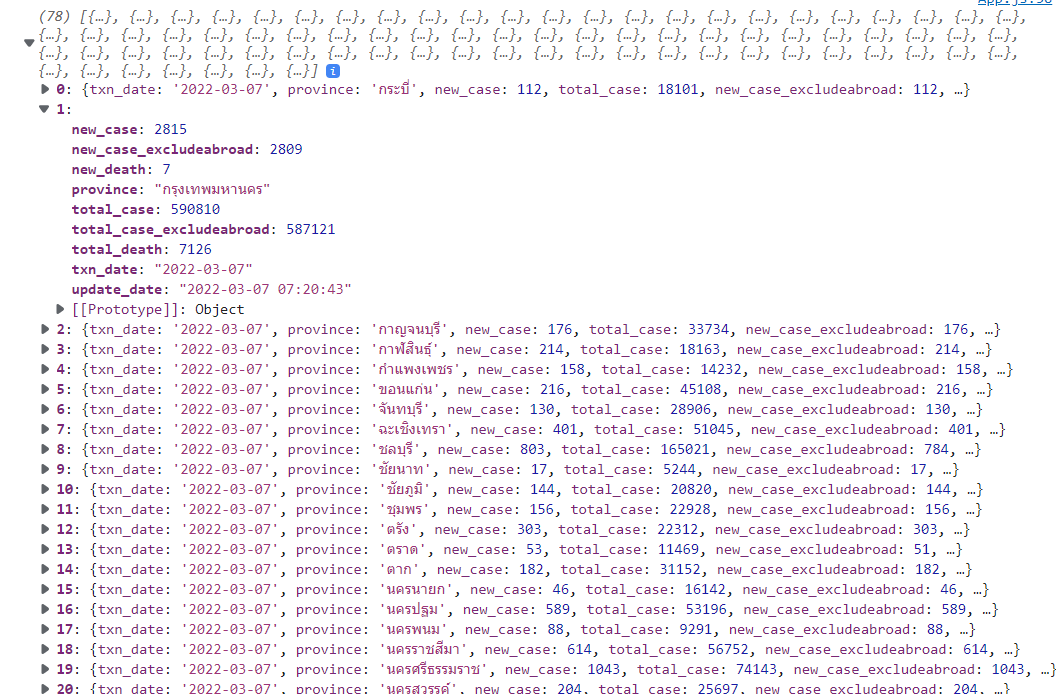
I tried method filter using province.name but is not work,like I get
enter image description here

Sample JSON API

[
{
    "txn_date": "2022-03-07",
    "province": "กระบี่",
    "new_case": 112,
    "total_case": 18101,
    "new_case_excludeabroad": 112,
    "total_case_excludeabroad": 17838,
    "new_death": 2,
    "total_death": 93,
    "update_date": "2022-03-07 07:20:43"
},
{
    "txn_date": "2022-03-07",
    "province": "กรุงเทพมหานคร",
    "new_case": 2815,
    "total_case": 590810,
    "new_case_excludeabroad": 2809,
    "total_case_excludeabroad": 587121,
    "new_death": 7,
    "total_death": 7126,
    "update_date": "2022-03-07 07:20:43"
},
{
    "txn_date": "2022-03-07",
    "province": "กาญจนบุรี",
    "new_case": 176,
    "total_case": 33734,
    "new_case_excludeabroad": 176,
    "total_case_excludeabroad": 33684,
    "new_death": 2,
    "total_death": 214,
    "update_date": "2022-03-07 07:20:43"
},
{
    "txn_date": "2022-03-07",
    "province": "กาฬสินธุ์",
    "new_case": 214,
    "total_case": 18163,
    "new_case_excludeabroad": 214,
    "total_case_excludeabroad": 18159,
    "new_death": 0,
    "total_death": 97,
    "update_date": "2022-03-07 07:20:43"
},]

This is my code

const App = ()=>{
  const [provinces, setProvinces] = useState([]);
  const [province, setProvince] = useState("thailand");
  const [provinceInfo, setProvinceInfo] = useState({});

  useEffect(() => {
   
   const getProvincesData = async  () => {
     fetch("https://covid19.ddc.moph.go.th/api/Cases/today-cases-by-provinces")
      .then((response) => response.json())
      .then((data) => {
        const provinces = data.map((province) => ({
          name: province.province,
        }));
        setProvinces(provinces);
      });
   };
  
    getProvincesData();
  }, []); 

  const onProvinceChange = async (event) =>{
    const provinceCode = event.target.value;
    //setProvince(provinceCode);

    const url = 
      provinceCode === "thailand"
       ? "https://covid19.ddc.moph.go.th/api/Cases/today-cases-all"
       : 'https://covid19.ddc.moph.go.th/api/Cases/today-cases-by-provinces' ;

    await fetch(url)
    .then(response => response.json())
    .then(data => {
      const provinceInfo = data.filter((data) => {
          return data.name === '{province.name}'
        })
        setProvince(provinceCode);
      // All of the data from the province response
        setProvinceInfo(data);
        });
    
    };
  
  console.log(provinceInfo);

  return (
    <div className="app">
      <div className='app__left'>
        <div className="app__header">
          <h1>COVID-19 TRACKER in Thailand</h1>
          <FormControl>
            <Select variant="outlined" onChange={onProvinceChange} value={province}>
              <MenuItem value="thailand">ประเทศไทย</MenuItem>
              {provinces.map((province) => (
                <MenuItem value={province.name}>{province.name}</MenuItem>     // Loop through all the province and show drop down list of the option 
              ))}

            </Select>
          </FormControl>
       </div>
    </div>
  
  );
}
Best way to handle value tied to conditional

In a function I have I try to take a value, and if the value ends up as undefined, then I call the same function but with a different parameter

let price = await getPrice(name, category, '1');

if (price === undefined) {
   price = await getPrice(name, category, '2');

   if (price === undefined) {
      price = await getPrice(name, category, '3');
   }
}

I’m told that this approach can be very error prone, and after a bit of analyzing, I can see why. However, I don’t know if there’s a better way to handle this.

I need the third parameter since I use it to process a URL, as that URL has one of those strings.

static getPrice(productName, productCategory, variantNumber) {
 ...
 let url = `https://exampleurl.com/${productName}cat=${productCategory}${variantNumber}`;
 ...
}

Angular Datatables not working with button in td

When I remove the update and delete button the code work sometime and sometime says no data available and sometime the datatable also didn’t show up.. Can anyone help me removing the problem..the following code is given below

import { Component, OnInit } from '@angular/core';
import { Router } from '@angular/router';

import { User } from 'src/app/Model/user.model';
import { UserService } from 'src/app/Service/user.service';

@Component({
  selector: 'app-user-list',
  templateUrl: './user-list.component.html',
  styleUrls: ['./user-list.component.css']
})
export class UserListComponent implements OnInit {
  users!: User[];
  constructor(private userService: UserService, private router: Router) { }
  dtOptions: DataTables.Settings = {};
  ngOnInit(): void {
    this.dtOptions = {
      pagingType: 'full_numbers',
      pageLength: 5,
      lengthMenu: [5, 10, 15],
      processing: true
    };
    this.userService.findAll().subscribe(data => {
      this.users = data;
    });
    // $('#datatable-userlist').DataTable();
  }
  deleteUser(userId: number) {
    this.userService.deleteUser(userId).subscribe(
      data => {
        this.userService.findAll().subscribe(data => {
          this.users = data;
        });
      },
      result => this.gotoUserList());
  }
  gotoUserList() {
    this.router.navigate(['/users']);
  }

  updateUser(user: User) {
    this.router.navigate(['update', user]);
  }
}
<div class="panel panel-primary">
    <div class="panel-heading">
        <h2>User List</h2>
    </div>
    <div class="panel-body">
        <table datatable [dtOptions]="dtOptions" 
        class="table table-striped table-bordered table-sm row-border hover"
         cellSpacing="0" width="100%">
            <thead>
                <tr>
                    <th>Id</th>
                    <th>Name</th>
                    <th>ContactNo</th>
                </tr>
            </thead>
            <tbody>
                <tr *ngFor="let user of users">
                    <td>{{user.userId}}</td>
                    <td>{{user.userName}}</td>
                    <td>{{user.contactNo}}</td>
                    <td>
                        <div class="user-update-btn">
                        <button (click)="deleteUser(user.userId)" class="btn btn-danger shiv">Delete</button>
                        <button (click)="updateUser(user)" class="btn btn-success shiv">Update</button>
                    </div>
                    </td>
                </tr>
            </tbody>
        </table>
    </div>
</div>

Its showing No data available in table even the data is in table When I remove the update and delete button the code work sometime and sometime says no data available and sometime the datatable also didn’t show up.. Can anyone help me removing the problem..

I want to get the value of this function but i cant access it

How can I access the value of function result into a variable, actually I am trying to get the value from this function and save it into a variable so then I can submit this value into POST request, but right now I am unable to get the value, what I did in this function I have puppeteer node js code I have a result of OCR into a variable and I just need to submit this OCR result into POST login function.

  let res = "";
  // Run and wait the result
  ocrSpaceApi.parseImageFromLocalFile(imageFilePath, options)
    .then(function (parsedResult) {
      //console.log('parsedText: n', parsedResult.parsedText);
      res =  parsedResult.parsedText;
      console.log(res);
    }).catch(function (err) {
      console.log('ERROR:', err);
    });
    console.log(res);

want the parsed result in RES varaiable.

Javascript addeventlistener with parameter in for loop [duplicate]

I am trying to add onclick listeners to a list of buttons, the id of the buttons is in a range of 0-array length in this pattern btn1-btn2-btn3 and so on

I use a for loop to get the buttons by id and the event listeners against the fetched dom element:

for(var i =0; i<length; i++){
  console.log("log 1: Adding listener for "+i);
  document.getElementById("btn"+i).addEventListener("click", function(){
  myFunc(i);
  });
}

The Function

myFunc(i){
  alert(i);
}

The Problem

No matter what button I click, I always get the last number in the for loop in the alert. I have checked and all buttons have different id’s and the log 1 output is correct( ten logs 0-9). However log 2 output is the last number 10 no matter what button I click.

I want to know how I can pass the iterator(i) in the onclick listener. Any advice or suggestion will be agreat help to this newbie,Thanks!

Focusing a text input using a ref works but focusing a radio input does not

I have a simple React example created here: https://codesandbox.io/s/cocky-browser-bjj9z8?file=/src/App.js

The goal is to have 2 outcomes:

  1. The first button causes the text input to gain focus (this works)
  2. The second button causes the radio input to gain focus (this does not work)

I have implemented the refs and focus events on the buttons in the same way but the radio input does not gain focus for some reason. Attempting to tab and shift+tab through the document will show that both input elements have the ability to be focused.

How to add a field to an array of objects using useState in react

I’m building an app in react native and I want a way in which I can regularly add a field to one ore all of the user data before pushing it to the database, It is an array of objects and I know the index of each object. I’m aware of object destructuring but I don’t know how to go about this.
In the example below, how do I add the field “hobby” and a value of “Football” to smith alone? Thanks in advance.

const [usersData, setUsersData] = useState([
  {
    name: "Jane",
    sex: "female",
    age: "20",
  },
  {
    name: "Doe",
    sex: "male",
    age: "29",
  },
  {
    name: "Smith",
    sex: "male",
    age: "24",
  },
]);

const addHobby = (index, hobby) => {
  //Adding the field here//
};

Sync two scrolls with different sizes

I have been trying to sync two different divs with different sizes. As you can see in this jsfiddle I’m almost there. But while move the bigger horizontal scroll the inner one doesn’t finish at its final scroll end. I want both to be synchronized, start and finish in their own sizes. I have tried to play with their width but cannot make it work. I believe an offset is missing.

 $(function() {
   // move along with container
   $('#container').on('scroll', e => {
     $('#container2').css(
       'transform',
       `translate(${e.target.scrollLeft}px, ${e.target.scrollTop}px)`,
     );

     const containerElement = $('#container'),
       bigPanelElement = $('#big-panel'),
       container2Element = $('#container2'),
       bigPanelWidth = bigPanelElement.width(),
       bigPanelHeight = bigPanelElement.height(),
       containerScrollLeft = containerElement.scrollLeft(),
       container2ScrollLeft = container2Element.scrollLeft(),
       containerScrollTop = containerElement.scrollTop(),
       container2Width = container2Element.width(),
       container2Height = container2Element.height();

     const newScrollLeft =
       bigPanelWidth === 0 ?
       0 :
       (container2Width * containerScrollLeft) /
        bigPanelWidth,
       newScrollTop =
       bigPanelHeight === 0 ?
       0 :
       (container2Height * containerScrollTop) /
       bigPanelHeight;

     //console.log(`newScrollLeft ${newScrollLeft}`);

     container2Element.scrollLeft(newScrollLeft).scrollTop(newScrollTop);

   });
 });

Secondly, would be nice to have that the inner horizontal scroll also scroll the outer one in sync too.

Chrome Extension Scraping Loop

I am trying to learn web scraping through chrome extensions. I scrape some hard to scrape things and I have built some custom scraping extensions. This is the first one where I am trying to loop, and automatically open and hopefully close tabs in a loop.

The problem I have seems to have to do with active = false windows. When I use active = true windows I get presumably all the AJAX loading of the page however I don’t get the full data when I do it with false windows. It is like the AJAX loading doesn’t occur.

I believe my code fires when the page is fully loaded.

I scrape these pages normally by simply loading the page active and sending a message from the content to a textarea using the same code as in payload.js. Then I finish parsing in PHP ;(

I used this answer in my solution. Open tab, wait for it to finish loading then close it

Does anyone know why I get different results using the same content script (payload.js) for active and inactive windows?

{
    "manifest_version": 2,

    "name": "Loop",
    "description": "A simple Looping page-scraping extension.",
    "version": "1.0",
    "author": "willrich33",

    "background": {
        "scripts": ["popup.js"],
        "persistent": true
    },

    "permissions": [
        "tabs",
        "http://*/",
        "https://*/",
        "storage"
    ],
    
    "content_scripts": [{
        "matches": ["<all_urls>"],
        "all_frames": true,
        "js": ["jquery-3.6.0.min.js"],
        "run_at":"document_start"
    }],
    
    "browser_action": {
        "default_icon": "logo.png",
        "default_popup": "popup.html"
    }
}

popup.js

//Simple button on the popup
document.addEventListener('DOMContentLoaded', function () {
    
    var btn = document.getElementById('myOpen');
    
    btn.addEventListener('click', function() {       
                       
        var arr = document.getElementById('pagearea').value.split("n");
        var urls = arr.map(element => {
           return element.trim();
        });
        
        document.getElementById('pagearea').value = "";
             
        create_tab(urls);       

    });
});

//Javascript Promise timer
const timer = ms => new Promise(res => setTimeout(res, ms));

// We need to wrap the loop into an async function for this to work
async function create_tab (urls) { 

//loop through urls
for (let i = 0; i < urls.length; i++) {
    
    chrome.tabs.create({url: urls[i], selected: false }, myTab => {
      
      function listener(tabId, changeInfo, tab) {
          // make sure the status is 'complete' and it's the right tab
          if (tabId === myTab.id && changeInfo.status == 'complete') {
              
              chrome.extension.getBackgroundPage().chrome.tabs.executeScript(
                      tabId, 
                      { file: 'payload.js' },
             );
              
             chrome.tabs.onUpdated.removeListener(listener);
          }
      }
      chrome.tabs.onUpdated.addListener(listener);
    });
    
    await timer(10000); // then the created Promise can be awaited
  }
}

// Listen to messages from the payload.js script and write to popout.html
chrome.runtime.onMessage.addListener(function (message) {
    
    document.getElementById('pagearea').value =  message;
    
});

payload.js

chrome.runtime.sendMessage(document.body.outerHTML);

popup.html

<!doctype html>
<html>

<head>
    <title>Loop</title>
    <script src="popup.js"></script>
</head>

<body>
    <h3>Loop</h1>
    <p id='pagetitle'></p>
    <textarea id='pagearea' cols="40" rows="6"></textarea><br>
    <button id="myOpen">Open Page</button>
    
</body>
</html>

Exporting Async API call to another file

Im’trying to seperate api call from return/rendering but when importing teams (which contains data) shows as undefined. Is it because of the async await function?
How can I export the data and map it in the return on Teams.js?
Is there a better way to seperate the Api call from the return/rendering component?

FormTeams.js

import { useState, useEffect } from 'react';
import { Spinner } from "react-bootstrap";
import 'bootstrap/dist/css/bootstrap.min.css';

const FormTeams = () => {
    const BASE_URL = process.env.REACT_APP_URL

    const [isLoading, setIsLoading] = useState(true);
    const [teams, setTeams] = useState([]);

    useEffect(() => {
        getTeams();
    }, []);

    const getTeams = async () => {
        try {
            const response = await fetch(`${BASE_URL}/teams`)
            return response.json()
                .then(data => {
                    setTeams(data)
                    setIsLoading(false)
                })
        } catch (error) {
            console.log(error)
        }
    }

    if (isLoading) {
        return (<Spinner animation="border" variant="primary" />)
    }

    const deleteTeam = async (id) => {
        try {
            await fetch(`${BASE_URL}/teams/${id}`, {
                method: "DELETE",
            }).then(response => {
                setTeams(teams.filter(team => team.id !== id))
                return response.json()
            })
        } catch (error) {
            console.log(error)
        }
    }
    
    return {teams, deleteTeam}
}

export default FormTeams

Teams.js

import { Link, } from "react-router-dom";
import { Button, ButtonGroup } from "react-bootstrap";
import FormTeams from './FormTeams'

const Teams = () => {
   const {teams, deleteTeam} =FormTeams()

    return (
        <div>
            <h2 className='centered'>Clubs</h2>
            <div><Link to="/Teams/add" className="link">Add New</Link></div>
            <table className='teams'>
                <thead>
                    <tr >
                        <th>№</th>
                        <th>Team</th>
                        <th>Actions</th>
                    </tr>
                </thead>
                <tbody >
                    {teams.map((team, index) => (
                        <tr key={team.id}>
                            <td>{index + 1}.</td>
                            <td>{team.team_name}</td>
                            <td>
                                <ButtonGroup>
                                    <Link to={`/Teams/${team.id}`} className='link'>View</Link>
                                    <Link to={`/Teams/edit/${team.id}`} className='edit'>Edit</Link>
                                    <Button variant="danger" onClick={() => deleteTeam(team.id)}>Delete</Button>
                                </ButtonGroup>
                            </td>
                        </tr>
                    ))}
                </tbody>
            </table>
            <Link to={'/'} className='link'>Back To Home Page</Link>
        </div>
    )
}

export default Teams

WHAT KIND OF DATA IS THIS? [closed]

I GOT THIS KIND OF API DATA FROM COUPLE OF SPORTS WEBSITES DATA REQUEST API ENDPOINT

I am really confused, what kind of data it is: [restfull api] but this is different.

SA÷1¬~KA÷Overall¬~KB÷Last matches: Brest¬~KC÷1645970400¬KP÷WQoEqPaQ¬KF÷Ligue 1¬AC÷3¬KG÷77¬KH÷France¬KI÷L1¬KJ÷Brest¬FH÷Brest¬FJ÷¬KK÷Lorient¬FK÷Lorient¬FL÷¬KL÷0:1¬KU÷0¬KT÷1¬EC÷r9aDJ9eM-0WuPn6K0.png¬ED÷lxyXOLFG-0WuPn6K0.png¬KN÷l¬KS÷home¬~KC÷1645365600¬KP÷pY5JNsw7¬KF÷Ligue 1¬AC÷3¬KG÷77¬KH÷France¬KI÷L1¬KJ÷Reims¬FH÷Reims¬FJ÷¬KK÷Brest¬FK÷Brest¬FL÷¬KL÷1:1¬KU÷1¬KT÷1¬EC÷2JjdGrBr-EJoO9TRD.png¬ED÷r9aDJ9eM-0WuPn6K0.png¬KN÷d¬KS÷away¬~KC÷1644760800¬KP÷QgSdK8WE¬KF÷Ligue 1¬AC÷3¬KG÷77¬KH÷France¬KI÷L1¬KJ÷Brest¬FH÷Brest¬FJ÷¬KK÷Troyes¬FK÷Troyes¬FL÷¬KL÷5:1¬KU÷5¬KT÷1¬EC÷r9aDJ9eM-0WuPn6K0.png¬ED÷OpHyYkgl-bD8HhLBn.png¬KN÷w¬KS÷home¬~KC÷1644163200¬KP÷tr00FbTk¬KF÷Ligue 1¬AC÷3¬KG÷77¬KH÷France¬KI÷L1¬KJ÷Rennes¬FH÷Rennes¬FJ÷¬KK÷Brest¬FK÷Brest¬FL÷¬KL÷2:0¬KU÷2¬KT÷0¬EC÷IsanuwAr-jq9ih1dt.png¬ED÷r9aDJ9eM-0WuPn6K0.png¬KN÷l¬KS÷away¬~KC÷1643400000¬KP÷EFIpYZQp¬KF÷Coupe de France¬AC÷3¬KG÷77¬KH÷France¬KI÷CDF¬KJ÷Nantes¬FH÷Nantes¬FJ÷¬KK÷Brest¬FK÷Brest¬FL÷¬KL÷2:0¬KU÷2¬KT÷

Orthographic perspective map ̀problems

I was trying to make a sphere using some data I found on Wikipedia about the Orthographic projection of a map and there’s been something that has been keeping me busy for some time. When I run the project, on the center of the sphere there apears one pixel that is colored in a wrong way when changing the longitude. I tried to solve this problem in a lot of ways like using ifs to separe the wrong pixel from the rest of them or delaying the longitude of the wrong pixel but neither of those worked, can somebody help me?

var Canvas = document.getElementById("MainCanvas");
Canvas.style.imageRendering = "pixelated";
var Context = Canvas.getContext("2d");
var Sphere = {
    radius: 80,
    lat: 0,
    long: 0
}

Render();
function Render()
{
    let ImgData = Context.createImageData(Canvas.width, Canvas.height);
    //Sphere.lat += 0.02;
    Sphere.long += 0.01;
    document.getElementById("Display").innerHTML = Sphere.long;
    for(var y = 0; y != Canvas.height; y++)
    {
        for(var x = 0; x != Canvas.width; x++)
        {
            /*Get the true position*/
            let TrueX = x - Canvas.width / 2;
            let TrueY = Canvas.height / 2 - y;
            /*Get the distance*/
            let Dist = Math.sqrt(TrueX * TrueX + TrueY * TrueY);
            if(Dist < Sphere.radius)
            {
                let C, CurrLat, CurrLong;
                /*Get the depth of a sphere point*/
                C = Math.asin(Dist / Sphere.radius);
                /*Color the pixel*/
                if(TrueX === 0 && TrueY === 0)
                {
                    CurrLong = (Sphere.long) % (Math.PI);
                    CurrLat = (Sphere.lat) % (2*Math.PI);
                }
                else
                {
                    /*Get the latitude (Clamped the value to 0 → π)*/
                    CurrLong = (Math.asin(Math.cos(C)*Math.sin(Sphere.long)+(TrueY*Math.sin(C)*Math.cos(Sphere.long))/Dist)) % Math.PI;
                    /*And the longitude (Clamped the value to 0 → 2π)*/
                    CurrLat = (Sphere.lat + Math.atan2((TrueX*Math.sin(C)), (Dist*Math.cos(C)*Math.cos(Sphere.long) - (TrueY*Math.sin(C)*Math.sin(Sphere.long))))) % (2*Math.PI);
                }
                
                ImgData.data[4*((y * Canvas.width)+x)]   = (CurrLong / (Math.PI)) * 255;
                ImgData.data[4*((y * Canvas.width)+x)+1] = 0;
                ImgData.data[4*((y * Canvas.width)+x)+2] = (CurrLat / (Math.PI * 2)) * 255;
                ImgData.data[4*((y * Canvas.width)+x)+3] = 255;
            }
            else
            {
                ImgData.data[4*((y * Canvas.width)+x)]   = 200;
                ImgData.data[4*((y * Canvas.width)+x)+1] = 200;
                ImgData.data[4*((y * Canvas.width)+x)+2] = 200;
                ImgData.data[4*((y * Canvas.width)+x)+3] = 255;
            }
        }   
    }
    Context.putImageData(ImgData, 0, 0);
    requestAnimationFrame(Render);
}
#MainCanvas
{
    position: absolute;
    top: 0;
    left: 0;
    width: 100vw;
    height: 100vh;
    background-image: url("https://c.tenor.com/k9yAts9ymaIAAAAM/loading-load.gif");
    background-size: 100vw 100vh;
}
#Display
{
    position: absolute;
    top: 10px;
    left: 10px;
    z-index: 10;
}
<!DOCTYPE html>
<html>
    <head>
    </head>
    <body>
        <canvas id="MainCanvas" width="400" height="200"></canvas>
        <div id="Display"></div>
    </body>
</html>

Lucky Wheel but i need to limit the number of spin

as the topic says , i am doing a Wheel of Fortune / Lucky Wheel but i would like to limit the number of spins the guest can make. I am doing a little form at first for the player to enter his username and choose the number of spins.

First Form :

    <form action="functions/check_step.php" method="post" class="bg-light p-5">
                        <div class="text-center mb-4 mt-n4">
                            <h1 class="text-uppercase font-weight-bold">Spin The Wheel</h1>
                            <h6 class="text-uppercase"><span class="iconify mr-1 mt-n1 ml-n2" data-icon="simple-icons:onlyfans" data-width="24" data-height="24" style="color: lightblue; padding-top:-10px;"></span>onlyfans.com/melibabies</h6>
                        </div>
                        <hr>
                        <div class="text-center my-4">
                            <h4 class="text-uppercase font-weight-bold">Step 1 : CHOOSE YOUR PACKAGE</h4>
                        </div>
                        <div class="form-outline mb-4">
                            <input type="text" id="frm1_name" class="form-control" />
                            <label class="form-label" for="frm1_name">Your Username</label>
                        </div>
                        <div class="mb-4">
                            <select class="select" name="frm1_nbspin">
                                <option value="1">1 Spin</option>
                                <option value="2">2 Spins</option>
                                <option value="3">3 Spins</option>
                            </select>
                            <label class="form-label select-label">Choose your Package</label>
                        </div>
                        <div>
                            <button type="submit" name="frm1_submit" class="btn btn-primary btn-block">START</button>
                        </div>
                    </form>

Here is the Jscript for the wheel

function myfunction(){
    
    var x = 1024; //min value
    var y = 9999; // max value

    var deg = Math.floor(Math.random() * (x - y)) + y;

    document.getElementById('box').style.transform = "rotate("+deg+"deg)";

    var element = document.getElementById('mainbox');
    element.classList.remove('animate');
    setTimeout(function(){
        element.classList.add('animate');
    }, 5000); //5000 = 5 second
}

And here is my html page for the wheel (i dont include the css but if its required let me know i will post/add it.

<body>
    <div id="mainbox" class="mainbox">
        <div id="box" class="box">
            <div class="box1">
                <span class="span1"><b>Option1</b></span>
                <span class="span2"><b>Option2</b></span>
                <span class="span3"><b>Option3</b></span>
                <span class="span4"><b>Option4</b></span>
            </div>
            <div class="box2">
                <span class="span1"><b>Option5</b></span>
                <span class="span2"><b>Option6</b></span>
                <span class="span3"><b>Option7</b></span>
                <span class="span4"><b>Option8</b></span>
            </div>
        </div>

        <button class="spin" onclick="myfunction()">SPIN</button>
    </div>

    <script src="script.js"></script>
</body>

I am not really good with javascript I am really a beginner with it … i am better with html/css and php lol … So i really don’t know where to start to add that function of limited spins. Thanks already to the stackoverflow community for helping =)