How to fix JsonWebTokenError in node.js using express and reactjs?

I am trying to show the page only if the Jsonwebtoken is verified and the user is logged on to the website, else show him the sign-in page.

However, I can see the token is generated in MongoDB, and also when I console log I can see that it is all good. But the issue is when I try to verify it using an already generated jwt token i.e.

req.cookies.signinToken

it shows an error.

Please the detail code below:

On app.js

const dotenv = require("dotenv");
const mongoose = require("mongoose");
const express = require("express");
const app = express();

const jwt = require("jsonwebtoken");
const cookieParser = require("cookie-parser");

dotenv.config({ path: "./config.env" });
require("./db/connection");

app.use(express.json());
app.use(cookieParser());

app.use(require("./router/route"));

const PORT = process.env.PORT;

app.listen(5000, () => {
    console.log(`server running on ${PORT}`);
});

On route.js

const express = require("express");
const bcrypt = require("bcrypt");
const router = express.Router();
const jwt = require("jsonwebtoken");

require("../db/connection");
const User = require("../model/newUserSchema");
const auth = require("../middleware/auth");

// router.get("/", (req, res) => {
//     res.send("hello am backend sever");
// });

//Signup or  Register Part
router.post("/signup", async (req, res) => {
    const { username, email, cpassword, retypePassword } = req.body;

    if (!username || !email || !cpassword || !retypePassword) {
        return res.status(422).json({ error: "please enter valid details" });
    }

    try {
        const UserExist = await User.findOne({ email: email });

        if (UserExist) {
            return res.status(422).json({ error: "email already exist" });
        } else if (cpassword !== retypePassword) {
            return res.status(422).json({ error: "password incorrect" });
        } else {
            const user = new User({
                username,
                email,
                cpassword,
                retypePassword,
            });

            const userResgister = await user.save();

            if (userResgister) {
                return res.status(201).json({ message: "signup successfully" });
            }
        }
    } catch (error) {
        console.log(error);
    }
});

//Login Part
router.post("/signin", async (req, res) => {
    try {
        const { email, cpassword } = req.body;

        if (!email || !cpassword) {
            return res.status(400).json({ error: " please enter valid credentials" });
        }

        const userLogin = await User.findOne({ email: email });

        const token = userLogin.generateAuthToken();

        res.cookie("signinToken", token, {
            expires: new Date(Date.now() + 25892000000),
            httpOnly: true,
        });

        if (userLogin) {
            const isMatch = await bcrypt.compare(cpassword, userLogin.cpassword);

            if (isMatch) {
                return res.status(200).json({ message: "sigin in scuccessfully" });
            } else {
                return res.status(400).json({ error: " Invalid credentials" });
            }
        } else {
            return res.status(400).json({ error: "  Invalid credentials " });
        }
    } catch (error) {
        console.log(error);
    }
});

//watchlistpage
router.get("/watchlist", auth, (req, res) => {
    console.log("  this is jwt token test  " + req.cookies.signinToken);
    res.send(req.rootuser);
    console.log(req.rootuser);
});

module.exports = router;

On newUserSchema.js:

const mongoose = require("mongoose");
const bcrypt = require("bcrypt");
const jwt = require("jsonwebtoken");

const newUserSchema = new mongoose.Schema({
    username: {
        type: String,
        required: true,
    },
    email: {
        type: String,
        required: true,
    },
    cpassword: {
        type: String,
        required: true,
    },
    retypePassword: {
        type: String,
        required: true,
    },
    tokens: [
        {
            token: {
                type: String,
                required: true,
            },
        },
    ],
});

newUserSchema.pre("save", async function (next) {
    if (this.isModified("cpassword")) {
        this.cpassword = await bcrypt.hash(this.cpassword, 12);
        this.retypePassword = await bcrypt.hash(this.retypePassword, 12);
    }
    next();
});

newUserSchema.methods.generateAuthToken = async function () {
    try {
        let token = jwt.sign({ _id: this._id }, process.env.SECRETKEY);
        this.tokens = this.tokens.concat({ token: token });
        await this.save();
        return token;
    } catch (error) {
        console.log(error);
    }
};

const User = mongoose.model("newUser", newUserSchema);

module.exports = User;

On auth.js (this is also my middleware)

    const jwt = require("jsonwebtoken");
const User = require("../model/newUserSchema");

const Auth = async (req, res, next) => {
    try {
        console.log(JSON.stringify(req.cookies.signinToken) + "  this is jwt token test");
        const token = req.cookies.signinToken;
        const verifytoken = jwt.verify(token, process.env.SECRETKEY);

        const rootuser = await User.findOne({ _id: verifytoken._id, "tokens.token": token });

        if (!rootuser) {
            throw new Error("user not found");
        }

        req.token = token;
        req.rootuser = rootuser;
        req.UserID = rootuser._id;

        next();
    } catch (error) {
        res.status(401).send("Unauthorized access");
        console.log(error);
    }
};

module.exports = Auth;

The API call result in postman
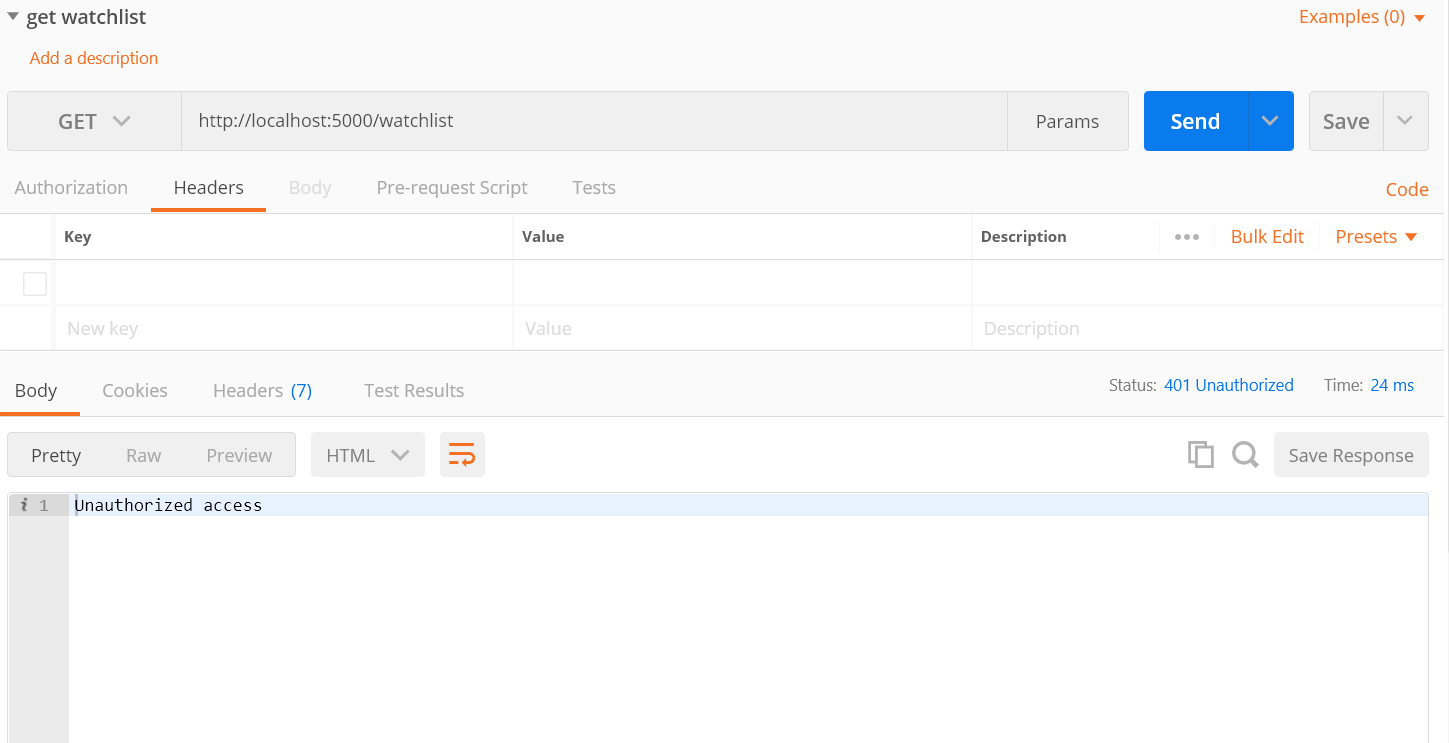
postmanimg

The terminal error :

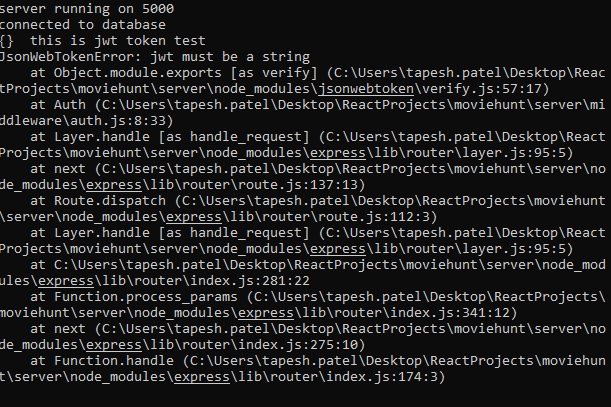
terminalimg

Could you please help to correct the error also please let me know why is this error coming?

Thanks a million in advance for any tips or suggestions.

JS/React Drawing Application with TouchMoveEvent

I am trying to build a react app and I need one component for simple handwriting and drawing on mobile/touch devices.
The problem im am facing is that the TouchMoveEvent is not fired upon small movements. Therefore it gets pretty hard if someone has a small handwriting. Sometimes some parts of letters or numbers are missing because the touchmoveevent was not fired and subsequently no line has been drawed.
Has anyone an idea how to lower the treshhold to fire the touchmoveevent or has someone a different approach to this? The goal is just a very simple mobile drawing app but the touchmoveevent is not sufficient for very detailed and small drawings as it is not fired upon small movements.

This is my code so far:

import React from "react";
const Immutable = require('immutable');
class DrawArea extends React.Component {
    constructor(sized) {
        super();

        this.state = {
            lines: new Immutable.List(),
            isDrawing: false
        };
        console.log(sized)
        this.handleMouseDown = this.handleMouseDown.bind(this);
        this.handleMouseMove = this.handleMouseMove.bind(this);
        this.handleMouseUp = this.handleMouseUp.bind(this);
        this.handleTouchStart = this.handleTouchStart.bind(this);
        this.handleTouchMove = this.handleTouchMove.bind(this);
        this.handleTouchEnd = this.handleTouchEnd.bind(this);

    }

    componentDidMount() {
        document.addEventListener("mouseup", this.handleMouseUp);
        document.addEventListener("touchend", this.handleTouchEnd);

    }

    componentWillUnmount() {
        document.removeEventListener("mouseup", this.handleMouseUp);
        document.removeEventListener("touchend", this.handleTouchEnd);

    }

    handleMouseDown(mouseEvent) {
        if (mouseEvent.button != 0) {
            return;
        }

        const point = this.relativeCoordinatesForEvent(mouseEvent);

        this.setState(prevState => ({
            lines: prevState.lines.push(new Immutable.List([point])),
            isDrawing: true
        }));
    }

    handleMouseMove(mouseEvent) {
        if (!this.state.isDrawing) {
            return;
        }
        const point = this.relativeCoordinatesForEvent(mouseEvent);

        this.setState(prevState =>  ({
            lines: prevState.lines.updateIn([prevState.lines.size - 1], line => line.push(point))
        }));
    }

    handleMouseUp() {

        this.setState({  isDrawing: false });
    }

    handleTouchStart(e) {
        console.log("s")

        let touch = e.touches[0];
        const point = this.relativeCoordinatesForEvent(touch);
        this.setState(prevState => ({
            lines: prevState.lines.push(new Immutable.List([point])),
            isDrawing: true
        }));
    }
    handleTouchMove(e) {
        console.log("m")

        if (!this.state.isDrawing) {
            return;
        }
        let touch = e.touches[0];
        const point = this.relativeCoordinatesForEvent(touch)
        this.setState(prevState =>  ({
            lines: prevState.lines.updateIn([prevState.lines.size - 1], line => line.push(point))
        }));

    }
    handleTouchEnd() {
        console.log("e")
        this.setState({  isDrawing: false });

    }

    relativeCoordinatesForEvent(mouseEvent) {
        const boundingRect = this.refs.drawArea.getBoundingClientRect();
        return new Immutable.Map({
            x: mouseEvent.clientX - boundingRect.left,
            y: mouseEvent.clientY - boundingRect.top,
        });
    }

    relativeCoordinatesForTouchEvent(mouseEvent) {
        const boundingRect = this.refs.drawArea.getBoundingClientRect();
        return new Immutable.Map({
            x: mouseEvent.clientX - boundingRect.left,
            y: mouseEvent.clientY - boundingRect.top,
        });
    }

    render() {
        //console.log(this.state.lines)
        //this.state.lines.map(s => console.log(s))
        return (
            <div
                className="drawArea"
                ref="drawArea"
                onMouseDown={this.handleMouseDown}
                onMouseMove={this.handleMouseMove}
                onTouchStart={this.handleTouchStart}
                onTouchMove={this.handleTouchMove}
                onTouch
            >
                <Drawing sized={this.props.sized} lines={this.state.lines} />
            </div>
        );
    }
}

function Drawing({ lines, sized }) {
    return (
        <svg className="drawing">
            {lines.map((line, index) => (
                <DrawingLine key={index} sized={sized} line={line} />
            ))}
        </svg>
    );
}

function DrawingLine({ line, sized }) {
    let multi = sized ? 1.0 : 0.5;
    const pathData = "M " +
        line
            .map(p => {
                return `${p.get('x')*multi} ${p.get('y')*multi}`;
            })
            .join(" L ");

    return <path className="path" d={pathData} />;
}

export default DrawArea;
ยดยดยด


How can I drag an image tag to overlaying on a canvas tag?

How can I arrange ‘objy’ next to ‘objx’ and able to drag ‘objz’ to overlaying on ‘objy’ or ‘objx’? Thank you so much for any help/suggestions. How can I arrange ‘objy’ next to ‘objx’ and able to drag ‘objz’ to overlaying on ‘objy’ or ‘objx’? Thank you so much for any help/suggestions. How can I arrange ‘objy’ next to ‘objx’ and able to drag ‘objz’ to overlaying on ‘objy’ or ‘objx’? Thank you so much for any help/suggestions.

<html>
<body>
    <canvas id="objx" ondragover="dropZone(event)" ondrop="dropImg(event)"></canvas>
    <canvas id="objy" ondragover="dropZone(event)" ondrop="dropImg(event)"></canvas>
    <img id="objz" src="object.png" draggable="true" ondragstart="dragImg(event)"> </img>

    <script>
        let obj_x = document.getElementById("objx")
        let obj_y = document.getElementById("objy")
        let obj_z = document.getElementById("objz")
        var x = obj_x.getContext('2d');
        var y = obj_x.getContext('2d');
        var z = obj_x.getContext('2d');

        if (obj_x.getContext && obj_y.getContext) {    
            obj_x.width = 200;
            obj_x.height = 200;           
            x.moveTo(0, 0);
            x.lineTo(0, 200);
            x.lineTo(200, 200);
            x.lineTo(200, 0);
            x.lineTo(0, 0);
            x.lineWidth = 1;
            x.strokeStyle = "black";
            x.stroke();  

            obj_y.width = 200;
            obj_y.height = 200;    
            y.moveTo(200, 0);
            y.lineTo(200, 200);
            y.lineTo(400, 200);
            y.lineTo(400, 0);
            y.lineTo(200, 0);
            y.lineWidth = 1;
            y.strokeStyle = "red";
            y.stroke();   
        } else {   
            document.write("Canvas Unsupported"); 
        }   

        function dragImg(e) {
        e.dataTransfer.setData('imgId', e.target.id);
        }

        function dropZone(e) {
            e.preventDefault();
        }

        function dropImg(e) {
            var mId=e.dataTransfer.getData('imgId');
            e.target.appendChild(document.getElementById(mId));
            e.preventDefault();
        }
    </script>
</body>

Manege more request ajax

Hy guys, I have a problem with async call in ajax jquery. This is my code:

$(document).on('click', '#search', function () {
    
        $.get(context + '/AjaxGetIvaNoleggio', function (data) {
            iva = (data / 100) + 1;
        });
        cont = 0;
        var dataDal = $('#dataDal').val();
        var dataAl = $('#dataAl').val();
        $.get(context + '/AjaxRendimento?tipoUtente=-1&dataDal=' + dataDal + '&dataAl=' + dataAl + "&all=" + all, getAll).done(
                $.get(context + '/AjaxRendimento?tipoUtente=0&dataDal=' + dataDal + '&dataAl=' + dataAl + "&all=" + all, getAll).done(
                $.get(context + '/AjaxRendimento?tipoUtente=1&dataDal=' + dataDal + '&dataAl=' + dataAl + "&all=" + all, getAll).done(
                $.get(context + '/AjaxRendimento?tipoUtente=3&dataDal=' + dataDal + '&dataAl=' + dataAl + "&all=" + all, getAll))));

});
const  getAll = function (data) {
var numNoleggio = 0;
var imponibile = 0;
var iva = 0;
var tot = 0;
var table =  '<table class="table table-bordered table-striped tableData ">n'
        + '<tr>';
if (cont === 0) {
    table += '<th colspan="4" class="text-center">ALL</th>';
} else if (cont === 1) {
    table += '<th colspan="4" class="text-center">USER</th>';
} else if (cont === 2) {
    table += '<th colspan="4" class="text-center">AGENCY</th>';
} else if (cont === 3) {
    table += '<th colspan="4" class="text-center">ADMIN</th>';
}

//here I iterate the data 
table += //here create the table with datas in data;
$('.rendiconto').append(table);
cont++;
};

I tried with done, after and then but the results are not in order, how can I do it?
I want the first call in cont ===0, the second call in cont ===1, the third call in cont ===2 and the fourth call in cont===3.

django and javascript question show and hide edit form from list of selected queries

I have the following in my index

 <div id="posts">
{% for post in posts %}
<div class="card">
    <div class="card-body">
        <h5 class="card-title"><a href="{% url 'profile' post.user.username %}">{{post.user.username}}</a> wrote:</h5>
        {%if post.user_id == user.id %}
        <div class="cardn">
            <a href="#" onclick="editpost()">Edit</a>

            <div class="card-body" id="card-body" style="display: none">
                <form action="editpost/{{post.id}} " method="post">
                    {% csrf_token %}
        
                    <div class="form-group">
                        <label for="post_text" class="h4">Edit Post</label><br>
        <textarea name="post_text">{{post.text}}</textarea>            </div>
                    <button type="submit" class="btn btn-primary btn-sm">Edit</button>
                </form>
            </div>
        </div>
        {%endif%}
        <p class="card-text" id="post_text_{{post.id}}"> {{ post.text }}</p>
   
        <p class="card-text"><small class="text-muted">on: {{post.post_date}}</small></p>
        <p class="card-text">
            <div data-id="{{post.id}}"
                class="card-link {% if post.current_like > 0 %} fas {%else%} far {% endif %} fa-heart">&nbsp<small
                    class="text-muted">{{post.like_set.count}}</small>
                    </div>
        </p>
    </div>
</div>
{% empty %}
<h2>No posts</h2>
{% endfor %}

what i would like to reach is to show only the edit form for the clicked edit button using javascript

here is my view

 def editpost(request, id):
post = Post.objects.get(
            id=id)
if request.method == "POST":
        text = request.POST.get("post_text")
        Post.objects.filter(
            id=id, user_id=request.session['_auth_user_id']).update(text=text)
        return HttpResponseRedirect(reverse("index"))
else:
    return render(request, "network/editpost.html",  {
    'post': post
    })

my JS thats not working
document.addEventListener(“click”, editPost);

function editPost(event){ // Listener sees triggering event
  const clickedThing = event.target; // Event has useful properties
  const userCard = clickedThing.closest(".cardn");
  if(userCard){ // Makes sure button has a `card` ancestor before proceeding

    // Now, with the correct card identified, we can collect values from it
    document.querySelector(`#card-body`).style.display = "block";
      // ...etc, as described above
  }
}

thanks in advance

Adobe pdf embede api – How to generate the file ID to place in metaData

I am using Adobe PDF Embedded API to view, edit & save the PDF and it is working fine.

The problem is when I tried to get the add or get the annotation list there is a File ID inside a metaData object which has to pass to it mandatory.

Using the below code to access the annotations from the PDF:

 document.addEventListener("adobe_dc_view_sdk.ready", function()

 {

  var adobeDCView = new AdobeDC.View({clientId: "<YOUR_CLIENT_ID>", divId: "adobe-dc-view"});

  var previewFilePromise = adobeDCView.previewFile({

   content:   {location: {url: "https://documentcloud.adobe.com/view-sdk-demo/PDFs/Bodea Brochure.pdf"}},
   //id is 
   metaData:  {
          fileName: "Bodea Brochure.pdf", 
           /* file ID */
          id: "77c6fa5d-6d74-4104-8349-657c8411a834"}

  },

  {

   enableAnnotationAPIs: true,

  });


  previewFilePromise.then(adobeViewer => {

   adobeViewer.getAnnotationManager().then(annotationManager => {

    // All annotation APIs can be invoked here

   });

  });

 });

Can anyone tell me how to get the File ID to add inside a metaData Object.

Carousel not working properly if closed and re-opened

I’m having an issue with a carousel. Let me explain.
When i click on any of the photos, it opens a modal/carousel which is working as planned. But once i close this said modal and try to click on any other photo, when clicking on the next button, it’s not doing +1, but +2 and increasing each time i close the modal.

Any solution ? Code below (i tried to comment it as much as possible to make it being understandable.

let currentState = 0
//Display photo/video inside modal + carousel
function displayPhoto() {
    const photos = document.querySelectorAll(".photo")
    const prevButton = document.querySelector(".prev-button");
    const nextButton = document.querySelector(".next-button");
    console.log(photos)

    for(let i = 0; i<photos.length; i++) {
        photos[i].addEventListener("click", () => {
        currentState = i
        var imageSrc = photos[i].getAttribute("src")  

        photoModal.style.display = "flex"
        //Insert image into the singlePhoto div
        singlePhoto.appendChild(img).setAttribute("src", imageSrc)

        //Next photo
        nextButton.addEventListener("click", () => {
            if(currentState < photos.length - 1) {
                currentState += 1
                console.log("current", currentState, "i", i);
                singlePhoto.appendChild(img).setAttribute("src", photos[currentState].getAttribute("src"))
            } else { 
                currentState = 0
                console.log("current", currentState, "i", i);
                singlePhoto.appendChild(img).setAttribute("src", photos[currentState].getAttribute("src"))
            }
        })
 
        //Close photo modal/carousel
        function closePhoto() {
            closePhotoModal.addEventListener("click", () => photoModal.style.display = "none")
        }
        closePhoto()

    })
  }
}

How to select different ModelForms based on select value for DJANGO model form

I have a list of values. Within the list of values is a status which has a hyperlink to a particular model form.

I want to dynamically change the hyperlink based on the select value to direct the user to different forms based on the select value.

So, for example, when the Model value is pending, I want the hyperlink to go to the pending form. When the status is invoice sent and the use clicks the hyperlink I want the user to to go to the payment form.

The code is below

              <table id="example1" class="table table-bordered table-striped" data-order='[[ 0, "desc" ]]' data-page-length='25'><button onClick="refreshPage()" class="btn btn-secondary float-right" title="Refresh"><i class="fa fa-sync"></i></button>
                <thead>
                  <tr>
                    <th>Script No.</th>
                    <th>Entered on</th>
                    <th>Script Type</th>
                    <th>Patient</th>
                    <th>Address</th>
                    <th>Email</th>
                    <th>Contact No</th>
                    <th>Product</th>
                    <th>Form</th>
                    <th>Units</th>
                    <th>Dispensing Price</th>
                    <th>Status</th>
                    <th>Dispatch Date</th>
                    <th>Worksheet ID</th>
                    <th></th>
                  </tr>
                </thead>
                <tbody>
                 {% for script in scripts %}
                 <tr>
                  <td>{{script.pk}}</td>
                  <td>{{script.entered_on}}</td>
                  <td>{{script.get_script_type_display}}
                  <td>{{script.patient}}</td>
                  <td>{{script.patient.address}}&nbsp;{{script.patient.city}}&nbsp;{{script.patient.AU_states}}&nbsp;{{script.patient.postal_code}}</td>
                  <td>{{script.patient.email}}</td>
                  <td>{{script.patient.mobile_number}}</td>
                  <td>{{script.product}}</td>
                  <td>{{script.product.form.description}}</td>
                  <td>{{script.quantity}}</td>
                  <td>$&nbsp;{{ script.dispensing_price }}</td>
                  {% if script.dispatch_date is not none %}
                  <td>{{script.get_script_status_display}}</td>
                  {% else %}
                  <td> <a class="edit" href="#" data-url="{% url "script:script_update_status" script.pk %}">{{script.get_script_status_display}}</a></td>
                  {% endif %}
                  {% if script.dispatch_date is none %}
                  <td>Not Sent</td>
                  {% else %}
                  <td>{{script.dispatch_date}}</td>
                  {% endif %}
                  {% if script.document_id is none %}
                  <td>Not Made</td>
                  {% else %}
                  <style></style>
                  <td>{{script.document_id}}</td>
                  {% endif %}
                  <td><small><a href = "{% url 'script:script_detail' script.pk %}">View</a>&nbsp;|&nbsp; <a href="{% url "script:script_update" script.pk %}">Edit</a>&nbsp;|&nbsp;<a href="{% url 'label:product_label' script.pk %}">Lab Label</a>&nbsp;|&nbsp;<a href="{% url 'label:dispense_label' script.pk %}">Dispense Label
                  </a>&nbsp;|&nbsp;<a href="{% url 'label:shipping_label' script.pk %}">Shipping Label</a>&nbsp;|&nbsp;<a href="{% url "label:receipt" script.pk %}" >Health Fund Receipt</a>&nbsp;|&nbsp;<a href="{% url "label:repeat" script.pk %}">Repeat</a><!--0&nbsp;{% if script.patient.target_species == 'A' %}|&nbsp;<a href = "{% url 'communication:send_counselling_email' script.pk %} ">Counselling Email</a>{% endif %}--></td>
                </tr>
                {% endfor %}
              </tbody>
            </table>
            <script>
              document.querySelectorAll('#example1 a.edit').forEach(function(a) {
                a.addEventListener('click', function(e) {
                  e.preventDefault();
                  const url = this.dataset.url;
                  window.open(url, "_blank", "toolbar=yes,scrollbars=yes,resizable=yes,top=500,left=500,width=400,height=250");
                });
              });
            </script>
          </div>```

Thanks in advance for any help.

Kind Regards,
AC

How to make Third Party Javascript [duplicate]

I’m a web developer and I want to use third party Javascript in my html file. I tried uploading it to google drive and then using the scr attribute of the script tag but it doesn’t work. Please help.

Html code:

<!DOCTYPE html>
<html>
<head>

</head>
<body>

<script src = "https://drive.google.com/uc?export=download&id=1WU2AoUgwBxgH0yLoed9SQ71rP-JnBvgR" >

</script>
</body>
</html>

Javascript I uploaded:

console.log("Hello World");

So how can I make the Javascript Code (console.log(“Hello World”);) a Third Party Javascript? I don’t have my own website domain though so please give some suggestions like Google or something that I can use to host my Third Party Javascript code. Thank you so much!

need to access dynamically the array name and properties

I have javascript object with array as showing below

const object1 = {
        "sublists": {
        "item": [
            {            
                "line": "1",
                "amount": "1200.00",
                "id": "227",
                "item": "227",
                "item_display": "5800520002800",
                "quantity": "1"
            }
            
        ] ,
        "shipping": [
            {            
                "line": "1",
                "amount": "1200.00",
                "id": "227",
                "quantity": "1"
            }
            
        ]
        }
    }

here is the code

jv = jsonData.sublists ;

 function printValues(obj) {
        for(var k in obj) {
        //    console.log(k+obj[k]);
            if(obj[k] instanceof Object) {
                printValues(obj[k]);
            } else {
                console.log(k+''+obj[k] );
            };
        }
    };
printValues(jv );

with this code i can get the array properties and values but cant get the desired output as showing below

desired output

Array name :item, line: , 1 
Array name :item ,amount : 1200 
Array name :item, id : 227 and so son

and so on … the array properties can varry depending on the json ouput , im looking for a dynamic script in which i could access the array name and properties

Read a Javascript cookie-value from a .NET codebehind

In my part of the web page I have put a value in a Javascript cookie like this:

function SkrivJSCookie() {
         document.cookie = "test_cookie=Test99";
         }

In my codebehind (VB), I want to have the value of the cookie (‘Test99’) transferred to a textbox (Textbox1) when a button is clicked.

From a large Google search it seems, that the solution may be to use ‘HttpServletRequest’ in some way, but I cannot make it work at all.

It seems like a pretty simple issue but how can this be accomplished?

Thank you in advance!

How to target array index position correctly in Vuejs?

HelloWorld.vue

<template>
  <div>
    <div v-for="(piza, index) in pizas" :key="piza.pname">
      {{ piza.pname }}
      <List
        :content="matchpizza"
        :pname="piza.pname"
        :qname="quantitys[index] ? quantitys[index].qname : ''"
      />
    </div>
  </div>
</template> 

<script>
import List from "./List.vue";
export default {
  name: "HelloWorld",
  components: {
    List,
  },
  data() {
    return {
      pizas: [
        {
          pname: "chicken pizza",
        },
        {
          pname: "chicken pizza spl",
        },
        {
          pname: "mutton pizza",
        },
        {
          pname: "plain pizza",
        },
      ],

      quantitys: [
        {
          qname: "one",
        },
        {
          qname: "two",
        },
        {
          qname: "three",
        },
        {
          qname: "four",
        },
        {
          qname: "five",
        },
      ],

      matchpizza: [
        {
          matchnum: "1",
          availability: "later",
          pname: "plain pizza",
          qname: "five",
        },
        {
          matchnum: "2",
          availability: "buy now",
          pname: "chicken pizza",
          qname: "one",
        },
        {
          matchnum: "3",
          availability: "buy now",
          pname: "plain pizza",
          qname: "five",
        },
        {
          matchnum: "4",
          availability: "buy now",
          pname: "chicken pizza spl",
          qname: "five",
        },
        {
          matchnum: "5",
          availability: "later",
          pname: "mutton pizza",
          qname: "five",
        },
      ],
    };
  },
};
</script>

List.vue

<template>
  <div>
    <div v-if="matchpizza.length > 0">
      <div
        v-for="match in matchpizza"
        :key="match.matchnum"
        :class="{
          green: match.availability === 'buy now',
          red: match.availability === 'later',
        }"
      >
        <div v-for="quantity in quantitys" :key="quantity.qname">
          {{ quantity.qname }}
        </div>
        <div class="next-data-two">{{ match.availability }}</div>
      </div>
    </div>
    <div v-else class="next-data"><p>No availability</p></div>
  </div>
</template>
<script>
export default {
  components: {},
  props: {
    content: {
      type: Array,
      required: true,
    },
    pname: {
      type: String,
      required: true,
    },
    qname: {
      type: String,
      required: true,
    },
  },
  data: function () {
    return {};
  },
  methods: {},
  computed: {
    quantitys() {
      return this.content.filter((a) => a.qname === this.qname);
    },
    matchpizza() {
      return this.content.filter((a) => a.pname === this.pname);
    },
  },
};
</script>
<style scoped>
.next-data {
  display: flex;
  flex-direction: row-reverse;
  margin-top: -2%;
  margin-right: 40%;
  color: blue;
}
.next-data-two {
  display: flex;
  flex-direction: row-reverse;
  margin-top: -1%;
  margin-right: 42%;
  color: red;
  margin-bottom: 1%;
}
</style>

See my working code here:-

https://codesandbox.io/s/data-display-tcr8oj?file=/src/components/HelloWorld.vue

From the helloworld.vue you can see this line :qname=”quantitys[index] ? quantitys[index].qname : ””

Where as per the above code, from the quantitys array. it is not pointing to the particular index value correctly?.

According to my output from codesandbox:-

For chicken pizza it showing as , chicken pizza –> one –> later
But correct path is, chicken pizza –> later –> five

Similarly for others too, having same issue….

Is it because of index position wrong or issue with logic??

discord.js throws TOKEN_INVALID when I use the token I got from browser in discord.com

My final goal : I would like to get every single channels in every single guilds I belong to.

As a first step, created simple program that I identify that I am logged in as myself.

I first found my token via this video

In a nutshell the video instructs to get the token via

Chrome -> discord.com -> F12 -> Application -> Local Storage -> filter “token” -> click “Toggle device toolbar” -> voila

Threw it in .env as variable TOKEN=... and my index.js is implemented as followings

const Discord = require("discord.js");
const dotenv = require("dotenv");
dotenv.config();

const client = new Discord.Client({
  intents: [
    Discord.Intents.FLAGS.GUILDS,
  ]
});

client.on('ready', ()=> {
  console.log(`Logged in as ${client.user.tag}`);
});

client.login(process.env.TOKEN);

However, when I run node index.js I receive following errors

D:SourceTreediscord.js0_get_server_channel_listnode_modulesdiscord.jssrcclientwebsocketWebSocketManager.js:129
    const invalidToken = new Error(WSCodes[4004]);
                         ^

Error [TOKEN_INVALID]: An invalid token was provided.

Is the token found in the video wrong?
Or is there something else I am doing wrong?

Salesforce REST API returns only first 10 reports how to get them all?

For my project in javascript I am using salesforce API to get all reports what user have in salesforce account.
At current API GET call to
Reports/GetReportList?search=&offset=0
it returns only first 10 reports from the start.

  • offset -The starting row offset into the result set returned.
    proof
    proof of 10 reports
    full call/method looks like
let result = await this.Api.Service.get(`Reports/GetReportList?search=${search}&offset=${offset}`)
//where search is '' and offset is 0

Using:

  • for REST api calls I am using axios package
  • salesforces api version v2 (I am not sure what exactly it means v2 or version v2x)
  • javascript as programming language

Main question is how to get all reports from salesforce?