Custom crop method isn’t working in iPhone

Im facing this STRANGEST issue in my website. The method given below takes a base64 string and the crop, zoom and rotation values and returns a modified base64 string. This method works absolutely fine on all the android devices and desktops. But when an iPhone is used, this methods returns a base64 string that when converted is a plain black image. I have no clue why its behaving like this on all the iPhones.

Extra info : This only happens for the HEIF images that are automatically converted to jpeg when a user selects them from the iPhone’s gallery. For other formats like jpg and png the method works fine even on iPhone.

Here’s the crop method

async function getCroppedImg(imageSrc, pixelCrop, rotation) {

        console.log('imagesrc : ', imageSrc)
        const image = await createImage(imageSrc);
        const canvas = document.createElement("canvas");
        const ctx = canvas.getContext("2d");
        const maxSize = Math.max(image.width, image.height);
        const safeArea = 2 * ((maxSize / 2) * Math.sqrt(2));
        canvas.width = safeArea;
        canvas.height = safeArea;

        ctx.translate(safeArea / 2, safeArea / 2);
        ctx.rotate(getRadianAngle(rotation));
        ctx.translate(-safeArea / 2, -safeArea / 2);
        ctx.drawImage(
            image,
            safeArea / 2 - image.width * 0.5,
            safeArea / 2 - image.height * 0.5
        );

        const data = ctx.getImageData(0, 0, safeArea, safeArea);
        canvas.width = pixelCrop.width;
        canvas.height = pixelCrop.height;

        ctx.putImageData(
            data,
            0 - safeArea / 2 + image.width * 0.5 - pixelCrop.x,
            0 - safeArea / 2 + image.height * 0.5 - pixelCrop.y
        );

        // As Base64 string
        return canvas.toDataURL("image/jpeg");
    }

const createImage = (url) =>
        new Promise((resolve, reject) => {
            const image = new Image();
            image.addEventListener("load", () => resolve(image));
            image.addEventListener("error", (error) => reject(error));
            image.setAttribute("crossOrigin", "anonymous");
            image.src = url;
        });

function getRadianAngle(degreeValue) {
        return (degreeValue * Math.PI) / 180;
    }
asp:GridView allow Edit button, but remove Update and Cancel buttons

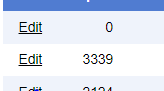
This one is pretty straightforward. The asp:GridView automatically adds an Edit hyperlink to the left of every column like this:

enter image description here

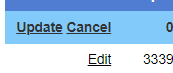
which is fine because I need that functionality anyways. However, I’ve made it so clicking the Edit hyperlink brings up a new panel that allows the user to edit more properties than are shown in the GridView, so I don’t want the Update and Cancel buttons to appear after clicking Edit.

enter image description here

Ive added the Edit functionality by implementing an event handler that Handles GridView.RowCommand when e.CommandName = “Edit”. I would like to just keep the Edit hyperlink there, or maybe programatically click Cancel, or really anything that will keep the Update and Cancel hyperlinks from showing when the user finishes working with the Edit panel. I’ve tried calling the event handler and sending in args with e.CommandName = “Cancel” but that didn’t work.

Another option I’m willing to explore is removing the Edit button entirely and making my event handler handle a different event, but I haven’t found any good resources for that either. Mostly it’s people trying to disable an Edit button that they’ve manually created on certain rows. I didn’t create this Edit hyperlink, though, and I can’t get it to go away.

How to return each separate item in a for loop

I am using a for loop to loop and extract the names of “people in space” from an API. The variable “people” in the for loop returns all 13 names of the people in space as a string. I then want to insert each name into a list using a template literal. When I run the code as I have it, only the first name shows up on the page 13 times. How do I adjust the code so that all 13 names show up, and not 1 name 13 times?

const peopleInSpace = async function() {
    try {
        const res = await fetch('http://api.open-notify.org/astros.json');
        const data = await res.json();

        for(let i = 0; i < data.people.length; i++) {
            const people = data.people[i].name;
            console.log(people);

            const markup = `
            <li class="list--item"><span>Name:</span> ${people} <span>Craft:</span> ISS</li>
            <li class="list--item"><span>Name:</span> ${people} <span>Craft:</span> ISS</li>
            <li class="list--item"><span>Name:</span> ${people} <span>Craft:</span> ISS</li>
            <li class="list--item"><span>Name:</span> ${people} <span>Craft:</span> ISS</li>
            <li class="list--item"><span>Name:</span> ${people} <span>Craft:</span> ISS</li>
            <li class="list--item"><span>Name:</span> ${people} <span>Craft:</span> ISS</li>
            <li class="list--item"><span>Name:</span> ${people} <span>Craft:</span> ISS</li>
            <li class="list--item"><span>Name:</span> ${people} <span>Craft:</span> ISS</li>
            <li class="list--item"><span>Name:</span> ${people} <span>Craft:</span> ISS</li>
            <li class="list--item"><span>Name:</span> ${people} <span>Craft:</span> ISS</li>
            <li class="list--item"><span>Name:</span> ${people} <span>Craft:</span> ISS</li>
            <li class="list--item"><span>Name:</span> ${people} <span>Craft:</span> ISS</li>
            <li class="list--item"><span>Name:</span> ${people} <span>Craft:</span> ISS</li>


            `;
            peopleContainer.innerHTML = markup;
            
        }

Text wrapping, right aligned icon, and button height with Bootstrap 5 button with flex box

Using Bootstrap 5 button code with centered text and a right aligned icon with multiple buttons in a flex box situation, how do I stop the button text overlapping the icon when it wraps, and how do I set the height of the button while keeping the text center aligned vertically when it wraps?

You can see whole code with the wrapping and overlapping issues in this fiddle by moving the center column with your mouse and making the display area bigger and smaller.

Here’s the html code for a single button:

 <a href="#" target="_blank" class="btn custom-btn" onmouseover="openRegion(event, 't1')">This Section<img src="https://svgshare.com/i/fPK.svg" class="icon-arrow-new" /></a>

Here’s the css (on top of Bootstrap 5):

.custom-btn, .custom-btn:visited {
    position: relative; 
    padding: 1.5rem 0.5rem;
    margin: 0.5rem 0.5rem;  
    font-size: 0.95rem;
    border-radius: 0;
    line-height: 1.2rem;
    background-color: #c1c1c1;
    border-color: #c1c1c1;
    flex: 33%;
    text-transform: uppercase;
    color:#fff;
    box-sizing: border-box;
    letter-spacing: 0.8px;
    height: 70px;
  }
  .custom-btn:active, .custom-btn:hover {
    background-color: #7d7c7c;
    border-color: #787878;
    text-transform: uppercase;
    color:#fff;

  }
  .icon-arrow-new{
    position: absolute;
    right:10px; 
    width: 22px;
  }

Change button image on jwplayer

I have implemented the newest JW Player (8.24) and I would like to customize it, so that it has a fast forward button. Standard only has a -10 sec rewind. it would be nice with a forward +10 sec as well. And someone has already done it! And I have also implemented this script but it only show the icon in – transform = “scaleX(-1)”; – which shows the icon reversed, which is kind a drag. Is there anyone who is good at javascript who can help a noob with this small problem?

How can I get the icon/image not to be shown in reverse, or how can I replace it?

The script which I implemented is this:

const playerContainerSelector = '#jwplayer-container';
const player = jwplayer('#player');
const playerContainer = document.querySelector(playerContainerSelector);

// display icon
const rewindContainer = playerContainer.querySelector('.jw-display-icon-rewind');
const forwardContainer = rewindContainer.cloneNode(true);
const forwardDisplayButton = forwardContainer.querySelector('.jw-icon-rewind');
forwardDisplayButton.style.transform = "scaleX(-1)";
forwardDisplayButton.ariaLabel = "Forward 10 Seconds"
const nextContainer = playerContainer.querySelector('.jw-display-icon-next');
nextContainer.parentNode.insertBefore(forwardContainer, nextContainer);


// control bar icon
playerContainer.querySelector('.jw-display-icon-next').style.display = 'none'; // 
hide next button
const buttonContainer = playerContainer.querySelector('.jw-button-container');
const rewindControlBarButton = buttonContainer.querySelector(".jw-icon-rewind");
const forwardControlBarButton = rewindControlBarButton.cloneNode(true);
forwardControlBarButton.style.transform = "scaleX(-1)";
forwardControlBarButton.ariaLabel = "Forward 10 Seconds";
rewindControlBarButton.parentNode.insertBefore(forwardControlBarButton, 
rewindControlBarButton.nextElementSibling);

// add onclick handlers
[forwardDisplayButton, forwardControlBarButton].forEach(button => {
   button.onclick = () => {
    player.seek((player.getPosition() + 10));
   }
})

The script is from this github thread:
https://github.com/jwplayer/jwplayer/issues/3894

Any help is is much obliged.

imported apiService undefined in typescript

We are using typescript and exporting one class as following (we are using nuxt and class style component if this relates to webpack issue).

export class ApiService {
  static apiHost = '/';
}

When we try to import it as following, it gives ApiService as undefined and so gives error on apiHost access as ApiService gets undefined.

import { ApiService } from '../services/api-service';

Trying to use AXIOS for get request, error “require is not defined”

My code is below. This is my first time using NodeJS and axios.

I have installed NodeJS on Windows using the downloadable installer. I then installed Axios using npm install axios in powershell as admin.

I’m obviously copy/pasting the boilerplate nodejs code for an axios get request.

I’ve tested the php file using a curl get request from command line (installed actual curl, not the windows shortcut to another program.) So the PHP is accepting get requests and serving json back properly.

The issue I’m stuck on is how to setup axios and node js properly so that my js file runs the get request properly.

This is my code

const loginForm = document.getElementById("login-form");
const loginButton = document.getElementById("login-form-submit");
const loginErrorMsg = document.getElementById("login-error-msg");
const vanillaUrl = "localhost:8081/hospital/php/addapt.php";
const getUrl = "localhost:8081/hospital/php/getpatientappt.php?PatientID=1";

const axios = require('axios')
//get request to get appt for patient id1
axios
    .get(geturl)
    .then(res => {
        console.log(`statusCode: ${res.status}`)
        console.log(res)
        alert(res)
    })
    .catch(error => {
        console.error(error)
    })


loginButton.addEventListener("click", (e) => {
    e.preventDefault();
    const username = loginForm.username.value;
    const password = loginForm.password.value;
    if (username === "user" && password === "1") {
        alert("You logged in!");
        location.reload();
    } else {
        loginErrorMsg.style.opacity = 1;
    }
}
)

These are the errors I’m getting in chrome from the javascript console

Uncaught ReferenceError: require is not defined
    at login-page.js:7:15

DevTools failed to load source map: Could not load content for chrome-extension://hnfanknocfeofbddgcijnmhnfnkdnaad/content.js.map: System error: net::ERR_BLOCKED_BY_CLIENT

DevTools failed to load source map: Could not load content for http://localhost:8081/hospital/login/requestProvider.js.map: HTTP error: status code 404, net::ERR_HTTP_RESPONSE_CODE_FAILURE

When I run incognito I get

Uncaught ReferenceError: require is not defined
    at login-page.js:7:15

there is no file requestProvider.js.map or content.js.map

This is all being hosted on localhost with xampp. I’m not sure if that affects anything.

I’m not sure what this error is. Got stuck googling it. And I’m not sure how to integrate this code properly.

If it returns query value to the database, put the checkbox

I’m doing it this way so the checkbox stays checked if the database value is returned

$(document).on('click', '.upd_glic', function(){
  var id = $(this).parents("tr").attr("id");
  $.ajax({  
      url:"editarglic.php",  
        method:"POST",
        cache: false,               
        data:{id:id},               
        dataType:"json",  
        success:function(data){

      for (var i = 0; i < data.length; i++) {
        Id = data[i][0];
        Validar = data[i][6];
        
        $('#idgli').val(Id);
        $('#validart1').prop('checked', Validar);
        
      }
        }
    });
});
<script src="https://cdnjs.cloudflare.com/ajax/libs/jquery/3.3.1/jquery.min.js"></script>

<a href="#" class="dropdown-item btn btn-warning upd_glic"><i class="metismenu-icon pe-7s-note"></i> Alterar</a>

<form method="POST" class="row g-3 insgli1">
  <input type="hidden" class="form-control" name="idgli" id="idgli">
  <div class="col-md-4 valt">
    <div class="form-group checkbox">
      <input type="checkbox" id="validart1" name="validart1" value="Sim">
      <label for="validart1"> Realizada correção com insulina após pesquisa</label>
    </div>
  </div>
</form>

I already checked and it returns the value of the database, but the checkbox is never checked.

Can you help?

WebdriverIO issue

In webdriverIO, browser quits itself without interacting with webelements on the browser. It doesn’t follow next steps that I have written in my code after opening a browser. Pls suggest me a solution.

Is there any way to test the health of a RedisClient connection?

I’m having problems with a socket.io server that’s using Redis pub/sub clients to manage sockets. If Redis crashes then the whole system needs to be restarted to get the Redis interactions working again.

How can I check to see that Redis is ready and available before allowing new socket connections to resolve anything in my ‘connect’ functionality?

Show POST information from ajax success

For a project I have, I need to write all the code on one page and finding it very challenging. I need ajax, js and PHP but am not allowed to reload the page. I currently have everything working after 6 hours but I want to show a message below my submit button with the information a person has entered into the form. I have looked at ajax success and was thinking is their a way to do it via that or even better just have a div place holder with the id of #message that will change to the information in my POST.

This is my current ajax and js

function myFunction() {
        var title = document.getElementById("title").value;
        var firstname = document.getElementById("firstname").value;
        var lastname = document.getElementById("lastname").value;
        var address = document.getElementById("address").value;
        var teleno = document.getElementById("teleno").value;
        var email = document.getElementById("email").value;
        var dataString = 'title1=' + title + '&firstname1=' + firstname + '&lastname1=' + lastname + '&address1=' + address + '&teleno1=' + teleno + '&email1=' + email;
        if (title == '' || firstname == '' || lastname == '' || address == '' || teleno == '' || email == '') {
            alert("Please Fill All Fields");
        } else {
            $.ajax({
                type: "POST",
                url: "index.php",
                data: dataString,
                cache: false,
                success: function(information) {
                    alert(html);
                }
            });
        }
        return false;

along with my php, I’m just using this code so I can make sure the data is actually going into my tables.

$title = mysqli_real_escape_string($conn, $_POST['title1']);
$firstname = mysqli_real_escape_string($conn, $_POST['firstname1']);
$lastname = mysqli_real_escape_string($conn, $_POST['lastname1']);
$address = mysqli_real_escape_string($conn, $_POST['address1']);
$teleno = mysqli_real_escape_string($conn, $_POST['teleno1']);
$email = mysqli_real_escape_string($conn, $_POST['email1']);

if (isset($_POST['title1'])) {
    $sql = "INSERT INTO form (title, firstname, lastname, address, teleno, email) VALUES ('$title','$firstname','$lastname','$address','$teleno','$email')";
    $count = mysqli_num_rows($result);

    if (mysqli_query($conn, $sql)) {
    } else {
        echo "Error: " . $sql .
            "<br>" . mysqli_error($conn);
    }
}

$sql2 = "Select * From form";

$result = mysqli_query($conn, $sql2);

$contacts = array();
while ($row = mysqli_fetch_array($result)) {
    $contacts[] = $row;
}
mysqli_close($conn);
foreach ($contacts as $contact) :

    echo $contact["id"] . " ";
    echo $contact["title"] . " ";
    echo $contact["firstname"] . " ";
    echo $contact["lastname"] . " ";
    echo $contact["address"] . " ";
    echo $contact["teleno"] . " ";
    echo $contact["email"] . " ";
    echo "<br>";

endforeach;

?>

Why does my scrolling get “stuck” when scrolling on Safari?

A website I recently built is getting “stuck” when scrolling on mobile Safari. Once it gets stuck, you can’t scroll (it just bounces back), and have to click around frantically where it after while fixes itself.

I have another site created with very similar components that doesn’t have this problem, and I’ve troubleshooted this tons already by process of elimination, but have yet to find the cause.

Steps to reproduce:

Uploaded a video to my public S3: https://general-public-aw.s3.us-west-1.amazonaws.com/silly-safari-bug.mp4

Does anyone have any ideas what this might be?

Any assistance is much appreciated. Thanks!