HTML Accordion closes immediately when run from asp.net website

I am trying to create a collapsible menu and I have adapted the following code to suit my needs (Credit https://codepen.io/AndreasFrontDev/pen/zBZZvq). The html file opens and behaves as expected when opened directly and when placed on the default website. I am trying to use it in an asp.net application from a Vendor and I find it displays the 4 main headings correctly and when I click on 1 heading, I can see the content for about a second and it immediately closes. Can anyone explain why this is happening or how to troubleshoot this. The code is as follows. I don’t know why this file behaves differently when the file is referenced from the application. Thanks for your help.

<!DOCTYPE html>
<html>
<head>
<meta name="viewport" content="width=device-width, initial-scale=1">
<style>
.accordion {
  background-color: #eee;
  color: #444;
  cursor: pointer;
  padding: 18px;
  width: 100%;
  border: none;
  text-align: left;
  outline: none;
  font-size: 15px;
  transition: 0.4s;
}

.active, .accordion:hover {
  background-color: #ccc;
}

.accordion:After {
  content: '02B';
  color: #777;
  font-weight: bold;
  float: right;
  margin-left: 5px;
}

.active:after {
  content: "2212";
}

.panel {
  padding: 0 18px;
  background-color: white;
  max-height: 0;
  overflow: hidden;
  transition: max-height 0.2s ease-out;
}
</style>
</head>
<body>

<h2>Accordion with symbols</h2>
<p>In this example we have added a "plus" sign to each button. When the user clicks on the button, the "plus" sign is replaced with a "minus" sign.</p>
<button class="accordion">Section 1</button>
<div class="panel">
  <p>Lorem ipsum dolor sit amet, consectetur adipisicing elit, sed do eiusmod tempor incididunt ut labore et dolore magna aliqua. Ut enim ad minim veniam, quis nostrud exercitation ullamco laboris nisi ut aliquip ex ea commodo consequat.</p>
</div>

<button class="accordion">Section 2</button>
<div class="panel">
  <p>Lorem ipsum dolor sit amet, consectetur adipisicing elit, sed do eiusmod tempor incididunt ut labore et dolore magna aliqua. Ut enim ad minim veniam, quis nostrud exercitation ullamco laboris nisi ut aliquip ex ea commodo consequat.</p>
</div>

<button class="accordion">Section 3</button>
<div class="panel">
  <p>Lorem ipsum dolor sit amet, consectetur adipisicing elit, sed do eiusmod tempor incididunt ut labore et dolore magna aliqua. Ut enim ad minim veniam, quis nostrud exercitation ullamco laboris nisi ut aliquip ex ea commodo consequat.</p>
</div>

<script>
var acc = document.getElementsByClassName("accordion");
var i;

for (i = 0; i < acc.length; i++) {
  acc[i].addEventListener("click", function() {
    this.classList.toggle("active");
    var panel = this.nextElementSibling;
    if (panel.style.maxHeight) {
      panel.style.maxHeight = null;
    } else {
      panel.style.maxHeight = panel.scrollHeight + "px";
    } 
  });
}
</script>

</body>
</html>

How to align Date regardless the length of comments

As shown in the picture

I want the date to always be aligned to the far left, regardless of the length of the comment, just like the longest comment.enter image description here

My related current code is as follows:

LatestReviewList.vue

This is the outermost part.

<template>
  <div class="card">
    <div class="latest-reviews-container">
      <span class="latest-reviews-text">全站最新点评</span>
    </div>
    <br>
    <br>
    <PostPreViewList
      :showAuthor="true"
      :showAvatar="true"
      @update:array-size="handleArraySizeChange"
    />
    <Pagination :totalNum="childArraySize"/>
  </div>
</template>

<style lang="css" scoped>
.card {
  width: 1000px;
  margin: 0 auto;
  background-color: var(--background-color);
  padding: 16px;
  box-shadow: 0 2px 4px var(--border-color);
  border-radius: 8px;
}
.latest-reviews-container {
  text-align: center;
  margin-top: 10px;
  width: 100%;
}
</style>

PostPreViewList.vue

This is the list.

<template>
    <div v-for="(post, index) in posts.slice(0, displayNum)" :key="index">
      <PostPreView
        :author="post.author"
        :avatar="post.avatar"
        :time="post.time"
        :course="post.course"
        :teacher="post.teacher"
        :content="post.content.comment"
        :showAuthor="showAuthor"
        :showAvatar="showAvatar"
      />
    </div>
</template>

PostPreView.vue

This is the component

<template>
    <div class="review-container">
        <t-space>
            <div v-if="showAvatar" class="avatar-container">
                <t-avatar  size="50px" :image="avatar" alt="用户头像" shape="circle" />
            </div>
            <div class="info-container">
                <t-space direction="vertical">
                    <div class="top-row">
                        <t-space>
                            <router-link v-if="showAuthor" :to="{name: 'user', params:{id : 1}}">
                            <span  class="author">
                                {{ author }}
                            </span>
                            </router-link>
                            <span v-if="showAuthor" class="tip">点评了</span>
                            <router-link :to="{name: 'course', params:{id : 1}}">
                            <span class="course-teacher"
                            :class="{'large-font': !showAuthor}">
                                {{ course }}({{ teacher }})
                            </span>
                            </router-link>
                        </t-space>
                        <span class="time">{{ time }}</span>
                    </div>
                    <div class="content-container">
                        <span class="content">
                            {{ truncatedContent }}
                            <router-link :to="{name: 'course', params:{id : 1, reviewId: 1}}">
                            <span class="read-more">>>更多</span>
                            </router-link>
                        </span>
                    </div>
                </t-space>
            </div>
        </t-space>
        <t-divider />
    </div>
</template>

<style scoped lang="scss">
    a {
        text-decoration: none;
    }
    .review-container {
        padding: 10px 0;
        width: 100%;
    }
    .avatar-container {
        margin-right: 10px;
    }
    .content {
        display: -webkit-box;
        -webkit-box-orient: vertical;
        overflow: hidden;
        text-overflow: ellipsis;
        line-height: 1.8;
        font-size: 14px;
        color: var(--text-color);
    }
    .read-more {
        color: var(--read-more-color);
        cursor: pointer;
        margin-left: 4px;
    }
    .info-container {
        display: flex;
        flex-direction: column;
        width: 100%; /* 确保占据整个可用空间 */
    }
    .top-row {
        display: flex;
        align-items: center; /* 垂直居中 */
        justify-content: space-between; /* 左右分布 */
        width: 100%;
    }

    .time {
        color: var(--date-color);
        font-size: 12px;
        margin-left: auto; /* 如果不使用 space-between,也可通过 margin-left: auto 推到右侧 */
    }
    .author {
        font-weight: bold;
        color: var(--author-name);
    }
    .content-container {
        display: flex;
        width: 100%;
    }
    .course-teacher {
        font-weight: bold;
        color: var(--course-teacher-color);
    }
    .large-font {
        font-size: 18px;
    }

</style>

In the component’s style section, I set the width of all containers to 100%, but they don’t fill the outer container as I expected. Instead, the width of the top-row ultimately ends up being the same as the comment-container, and I thought the info-container should be the same. In other words, the width is determined from the inside. However, I don’t want to handle it this way. I want their width to be fixed and fill the outer container. But I can’t set a fixed length, so I don’t know what to do.

How do I dynamically pass a variable to a URL to fetch data from an API endpoint? [closed]

All,

I have a website that fetches a list of publicly-traded companies from an API endpoint. I take that returned JSON data to then populate a dropdown element called, “mySelect”, with the company stock ticker symbols. I need to do two things:

  1. Pass the first company’s symbol that gets populated in the dropdown menu to a query parameter in a URL that will then fetch the price data for that company so that I can display it on a chart.

  2. Change the symbol that gets passed to that price data URL from the first company’s symbol that gets loaded when the page loads, to the symbol of the company that is selected from the dropdown menu.

I’m struggling to figure out how to do this in the same script. I’d previously had two different javascript files – one that grabs the first value on page load, and the second grabbed the selected company value. This seemed really duplicative. Not sure why I can’t wrap my head around how to pass these values dynamically to the second URL. Any guidance would be appreciated. I’m happy to provide additional information. Thanks!

Sample abridged code:

// function to handle fetches:
function getCompanies(url) {
    return fetch(url)
        .then(response => {
            if(!response.ok) {
                throw new Error('Bad Network Request');
            }
            return response.json();
        })
        .catch(error => {
            console.error('Fetch error:', error);
            throw error;
        });
}

// use the getCompanies function to fetch the list of companies from an API endpoint and populate a dropdown menu on the webpage:
getCompanies('/api/company_list')
    .then(function fetchData(data) {
        let option = '';            
        for (let i = 0; i < data.length; i++) {
            option += '<option value="' + data[i].symbol + '">' + data[i].stock_rank + ' - ' + data[i].company_name + '  (' + data[i].symbol + ')' + '</option>';
        }
                    
        $('#mySelect').append(option);
    })
    .catch(error => {
        console.error('Error:', error);
    });

// use the getCompanies function to fetch the pricing data for the symbol selected in the dropdown menu:
getCompanies(`/api/prices?symbol=${symbol}`)
    .then(function chartData(data) {
        //do something with the data...
    })


document.getElementById("mySelect").onchange = function () {getSymbol()};

// store the selected company symbol as the variable "myVal" (need to pass this to the stock price URL)
function getSymbol() {
    var myVal = $("#mySelect").val();
    return myVal;
}

console.log write parameter from function as undefined

I use the following code to get AWS ECS status. But while try to debug I recognized that
serviceName is always “undefined”. Why?
It seems that the AWS SDK functions inside this codeblock use serviceName with the correct value.

async function checkServiceStatus(clusterArn, serviceName) {

    const listTasksParams = {
      cluster: clusterArn,
      serviceName: serviceName
    };
    
    const listTasksResult = await ecs.listTasks(listTasksParams).promise();
    
    if (listTasksResult.taskArns.length === 0) {
        console.log('No tasks found');
        return 500;
    }
    
    // Describe the tasks to get their status
    const describeTasksParams = {
      cluster: clusterArn,
      tasks: listTasksResult.taskArns
    };
    
    const describeTasksResult = await ecs.describeTasks(describeTasksParams).promise();
    
    const taskStatuses = describeTasksResult.tasks.map(task => task.lastStatus);

    console.log(serviceName);
    return "200";

  }
  
module.exports = {

    checkCall: async function(srvName){
        const clusterArn = process.env.ECSCLUSTERARN;

        var ecsResponse = ""

        return new Promise(async function (resolve, reject) {

            try {
                ecsResponse = await checkServiceStatus(clusterArn, srvName);
              } catch (err) {
                reject(err);
              }  
              
            resolve(ecsResponse );
            
        });
    }
};    

Upgrade Marker to AdvancedMarkerElement

I get the notification to upgrade Marker in my generic javascript code.
However I don’t really understand how to modify the script to have AdvancedMarkerElement instead of Marker.
This code is completely generic and loads data from Mysql
The documentation is not very clear on the subject and requires some explanation to proceed with the upgrade

class GoogleMap {
    /**
     * @param {Object} Libraries
     * @param {Object} options
     */
    constructor(Libraries, options) {
        this.g = Libraries;
        this.OS = null;
        this.lang = null;
        this.origin = null;
        this.map = {
            id: 'gmap_map',
            options: {
                zoom: 15,
                mapTypeControl: true,
                mapTypeControlOptions: {
                    style: google.maps.MapTypeControlStyle.DROPDOWN_MENU,
                    position: google.maps.ControlPosition.TOP_RIGHT
                },
                navigationControl: true,
                panControl: true,
                scrollwheel: false,
                streetViewControl: true
            },
            instance: null,
            directions: null,
            markers: [],
            infowindows: []
        };
        this.marker = null;
        this.markers = [];
        this.flags = [];
        this.goTo = null;
        this.layers = 0;

        this.options = {
            marker: {
                label: false,
                autoLabel: false
            }
        };

        if(typeof options === 'object') this.set(options);
        if(this.markers.length > 0) this.init(Libraries.Map, Libraries.Marker,  Libraries.LatLngBounds);
    }

    /**
     * @param {object} options
     */
    set(options) {
        let instance = this;
        for (var key in options) {
            if (options.hasOwnProperty(key)) instance[key] = options[key];
        }
    }

    /**
     * Retrieve address information from marker content
     * @param content
     * @returns {{company: string, address: string, city: string, country: string}}
     */
    getAddressInfos(content) {
        var newC = {
            company: '',
            address: '',
            city: '',
            country: ''
        };

        content = content.split('<br />');
        newC.company = content[0];
        newC.address = content[1];
        content = content[2].split(', ');
        newC.city = content[0];
        newC.country = content[1];

        return newC;
    }

    /**
     * Change address into the direction panel
     * @param {InfoWindow} infowindow
     */
    changeDirection(infowindow) {
        let GM = this;
        GM.goTo = infowindow;
        let content = GM.getAddressInfos(infowindow.getContent());
        let pos = infowindow.getPosition();
        document.querySelector('#address .address').textContent = content.address;
        document.querySelector('#address .city').textContent = content.city;
        document.querySelector('#address .country').textContent = content.country;
        let href = (GM.OS === 'IOS' ? 'http://maps.apple.com/maps?ll=' : 'geo:') + pos.lat() + ',' + pos.lng() + '?q=' + encodeURIComponent(content.address + ',' + content.city + ',' + content.country);
        document.getElementById('openapp').setAttribute('href',href);
    }

    /**
     * Re center map
     * @param toBounds
     * @param offsetX
     * @param offsetY
     */
    centerMap(toBounds, offsetX, offsetY) {
        let GM = this;
        let center;
        let newCenter;

        if (toBounds) {
            GM.map.instance.panToBounds(GM.map.instance.getBounds());
            /*GM.map.instance.fitBounds(GM.map.instance.getBounds(),{
                bottom: 0,
                left: offsetX,
                right: 0,
                top: offsetY
            });*/
            center = GM.map.instance.getCenter();
        } else {
            center = GM.map.options.center;
            GM.map.instance.setZoom(GM.map.options.zoom);
        }

        let scale = Math.pow(2, GM.map.instance.getZoom());

        let worldCoordinateCenter = GM.map.instance.getProjection().fromLatLngToPoint(center);
        let pixelOffset = new GM.g.Point( (offsetX/scale) || 0,(offsetY/scale) || 0 );

        let worldCoordinateNewCenter = new GM.g.Point(
            worldCoordinateCenter.x - pixelOffset.x,
            worldCoordinateCenter.y + pixelOffset.y
        );

        newCenter = GM.map.instance.getProjection().fromPointToLatLng(worldCoordinateNewCenter);

        GM.map.instance.setCenter(newCenter);
    }

    /**
     * Empty direction panel then check for new content to apply custom scrollbar
     */
    showDirectionPanel() {
        let directions = document.getElementById('r-directions');
        directions.classList.add('sizedirection');
    }

    /**
     * Show initials Markers from the map
     * @param markers
     */
    showMarkers(markers) {
        let GM = this;
        let map = GM.map.instance;
        let mm = GM.map.markers;
        for (let i = 0; i < mm.length; i++) {
            mm[i].setMap(map);
            mm[i].setOpacity(1);
            mm[i].setVisible(true);
        }
    }

    /**
     * Hide initials Markers from the map
     */
    hideMarkers(markers) {
        let GM = this;
        for (let i = 0; i < markers.length; i++) {
            markers[i].setMap(null);
            markers[i].setOpacity(0);
            markers[i].setVisible(false);
        }
    }

    /**
     * @param layer
     */
    hideLayer(layer) {
        if(layer.length > 1) {
            layer.forEach((item) => GM.hideLayer(item));
        }
        else {
            if(typeof layer.setMap === 'function')
                layer.setMap(null);
            if(typeof layer.setOpacity === 'function')
                layer.setOpacity(0);
            if(typeof layer.setVisible === 'function')
                layer.setVisible(false);
        }
    }

    /**
     * Hide everything on the map except the initials markers
     */
    clearMap() {
        let GM = this;
        let layers = GM.map.instance.data;
        for (let i = GM.layers.length; i < layers.length; i++) {
            let layer = GM.map.instance.data[i];
            GM.hideLayer(layer);
        }
        GM.layers = GM.map.instance.data;
    }

    /**
     * Remove direction renderer
     */
    delDirections() {
        let GM = this;
        if (GM.map.directions !== null) {
            GM.hideMarkers(GM.flags);
            GM.map.directions.set('directions',null);
            let directions = document.getElementById('r-directions');
            directions.classList.remove('sizedirection');
        }
        GM.clearMap();
        GM.showMarkers(GM.map.markers);
    }

    /**
     * Trace la route sur la carte
     */
    setDirection() {
        let GM = this;
        let item = GM.origin;
        let dest = document.getElementById('getadress').value;

        if (dest.length > 0) {
            GM.delDirections();

            //GM.map.instance;
            let request = {
                origin: dest,
                destination: GM.goTo.getPosition(),
                travelMode: google.maps.DirectionsTravelMode.DRIVING
            };
            let directionService = new GM.g.DirectionsService();
            directionService.route(request)
                .then((result) => {
                    if (result) {
                        let leg = result.routes[0].legs[0];
                        let bounds = new GM.g.LatLngBounds();
                        bounds.extend(leg.start_location);
                        bounds.extend(leg.end_location);

                        let flags = [
                            {
                                position: leg.start_location,
                                icon: {
                                    url: "/"+GM.lang+"/gmap/?marker=grey&dotless=true",
                                    labelOrigin: {x:14, y:13}
                                },
                                label: 'A',
                                content: leg.start_address
                            },
                            {
                                position: leg.end_location,
                                icon: {
                                    url: "/"+GM.lang+"/gmap/?marker=main&dotless=true",
                                    labelOrigin: {x:14, y:13}
                                },
                                label: 'B',
                                content: GM.goTo.getContent()
                            }
                        ];
                        GM.hideMarkers(GM.map.markers);
                        flags.forEach((flagDetails,index) => {
                            flagDetails.map = GM.map.instance;
                            let flag = new GM.g.Marker(flagDetails);
                            let infowindow = new google.maps.InfoWindow({
                                content: flagDetails.content
                            });
                            flag.addListener('click', () => {
                                infowindow.open({
                                    map: GM.map.instance,
                                    anchor: flag
                                });
                            });
                            GM.flags[index] = flag;
                        });
                        if (GM.map.directions === null) {
                            GM.map.directions = new google.maps.DirectionsRenderer({
                                preserveViewport: true,
                                suppressMarkers: true
                            });
                        }
                        GM.map.directions.setMap(GM.map.instance);
                        GM.map.directions.setPanel(document.getElementById('r-directions'));
                        GM.map.directions.setDirections(result);
                        GM.showDirectionPanel();

                        let x = document.getElementById('gmap-address').getBoundingClientRect().width;

                        GM.map.instance.fitBounds(bounds,{
                            bottom: 0,
                            left: x,
                            right: 0,
                            top: 0
                        });
                    }
                })
                .catch((e) => {
                    alert("Could not display directions due to: " + e);
                });
        }
    }

    /**
     * Formulaire de recherche d'itinéraire
     */
    getDirection() {
        let GM = this;
        document.querySelector('.form-search').addEventListener('submit',(e) => {
            e.preventDefault();
            GM.setDirection();
        });

        let btn = document.querySelector('.hidepanel');
        btn.addEventListener('click',() => {
            let block = document.getElementById('gmap-address');

            btn.classList.toggle('open');
            block.classList.toggle('open');
        });
        let showform = document.getElementById('showform');
        showform.addEventListener('click',() => {
            if(showform.classList.contains('open')) {
                GM.delDirections();
                //if(self.markers.length > 1) {
                let bounds = new GM.g.LatLngBounds();
                GM.markers.forEach((markerDetails, index) => {
                    let point = new google.maps.LatLng(markerDetails.lat, markerDetails.lng);
                    bounds.extend(point);
                });
                GM.map.instance.fitBounds(bounds);
                if(GM.map.markers.length === 1) {
                    GM.map.instance.setZoom(GM.map.options.zoom);
                }
                document.getElementById('getadress').value = '';
            }
            showform.classList.toggle('open');
        });
    }

    /**
     * @returns {{OriginContent: *, OriginAddress: *, originPosition: *}}
     */
    init() {
        let GM = this;

        if (GM.markers.length > 0) {
            GM.origin = {
                OriginContent : GM.markers[0].company,
                OriginAddress : GM.markers[0].address,
                OriginCity : GM.markers[0].postcode + ' ' + GM.markers[0].city,
                OriginCountry : GM.markers[0].country,
                OriginPosition : {lat: GM.markers[0].lat, lng: GM.markers[0].lng},
                OriginRoute: 1,
                OriginMarker: GM.marker
            };
            GM.map.options['center'] = new google.maps.LatLng(GM.markers[0].lat,GM.markers[0].lng);
            GM.map.instance = new GM.g.Map(document.getElementById(GM.map.id),GM.map.options);

            let bounds = new GM.g.LatLngBounds();
            GM.markers.forEach((markerDetails,index) => {
                let company = (markerDetails.link === '' || markerDetails.link === null) ? markerDetails.company : '<a href="'+markerDetails.link+'">'+markerDetails.company+'</a>';

                let point = new google.maps.LatLng(markerDetails.lat,markerDetails.lng);
                let markerOptions = {
                    map: GM.map.instance,
                    position: point,
                    icon: "/"+GM.lang+"/gmap/?marker=main",
                };

                if (GM.options.marker.label) {
                    if (markerDetails.label && !GM.options.marker.autoLabel) {
                        markerOptions.icon += '&dotless=true';
                        markerOptions.label = markerDetails.label;
                    }
                    else if (GM.options.marker.autoLabel && index > 0) {
                        markerOptions.icon += '&dotless=true';
                        let label = '';
                        let labelLength = 1;
                        let i = index+1;
                        if (index > 25) {
                            labelLength = Math.floor(Math.log(i) / Math.log(26));
                            for (let k = 1; k < labelLength; k++) {
                                label += String.fromCharCode(64 + k);
                            }
                        }
                        label += String.fromCharCode(64 + i%26);
                        markerOptions.label = label;
                    }
                }

                let marker = new GM.g.Marker(markerOptions);
                bounds.extend(point);

                let infowindow = new google.maps.InfoWindow({
                    content: company +'<br />'+markerDetails.address+'<br />'+markerDetails.postcode+' '+markerDetails.city+', '+markerDetails.country
                });

                GM.map.infowindows[index] = infowindow;
                GM.map.markers[index] = marker;
                if (index === 0) {
                    GM.goTo = infowindow;
                    infowindow.open({
                        map: GM.map.instance,
                        anchor: marker
                    });
                }

                infowindow.addListener('closeclick', () => GM.changeDirection(GM.map.infowindows[0]));
                marker.addListener('click', () => {
                    GM.map.infowindows.forEach((iw) => iw.close());
                    infowindow.open({
                        map: GM.map.instance,
                        anchor: marker
                    });
                    GM.changeDirection(infowindow);
                });
            });
            if(GM.map.markers.length > 1) {
                GM.map.instance.fitBounds(bounds);
            }

            GM.layers = GM.map.instance.data;

            document.querySelectorAll('.select-marker').forEach((select) => {
                select.addEventListener('click',(e) => {
                    e.preventDefault();
                    let target = document.getElementById('#address');
                    let targetPosition = getPosition(target);
                    window.scroll({
                        left: 0,
                        top: targetPosition.y,
                        behavior: 'smooth'
                    });
                    let i = select.dataset.marker;
                    google.maps.event.trigger(GM.map.markers[i], "click");
                });
            });
            if(GM.origin.OriginRoute && GM.goTo !== null) GM.getDirection();
            if(GM.map.options.streetViewControl) {
                let stv = GM.map.instance.getStreetView();
                google.maps.event.addListener(stv, 'visible_changed', () => {
                    let visible = stv.getVisible();
                    let gmapAddress = document.getElementById('gmap-address');
                    gmapAddress.style.opacity = visible ? '0' : '1';
                    gmapAddress.style.visibility = visible ? 'hidden' : 'visible';
                });
            }
        }
    }
}
async function initMap() {
    const { Map } = await google.maps.importLibrary("maps");
    const { Marker } = await google.maps.importLibrary("marker");
    const { LatLngBounds } = await google.maps.importLibrary("core");
    const { Point } = await google.maps.importLibrary("core")
    const { DirectionsService } = await google.maps.importLibrary("routes");
    const { DirectionsRenderer } = await google.maps.importLibrary("routes");

    let gMap = new GoogleMap({
        Map: Map,
        Marker: Marker,
        LatLngBounds: LatLngBounds,
        Point: Point,
        DirectionsService: DirectionsService,
        DirectionsRenderer: DirectionsRenderer
    }, configMap);
}

(g=>{var h,a,k,p="The Google Maps JavaScript API",c="google",l="importLibrary",q="__ib__",m=document,b=window;b=b[c]||(b[c]={});var d=b.maps||(b.maps={}),r=new Set,e=new URLSearchParams,u=()=>h||(h=new Promise(async(f,n)=>{await (a=m.createElement("script"));e.set("libraries",[...r]+"");for(k in g)e.set(k.replace(/[A-Z]/g,t=>"_"+t[0].toLowerCase()),g[k]);e.set("callback",c+".maps."+q);a.src=`https://maps.${c}apis.com/maps/api/js?`+e;d[q]=f;a.onerror=()=>h=n(Error(p+" could not load."));a.nonce=m.querySelector("script[nonce]")?.nonce||"";m.head.append(a)}));d[l]?console.warn(p+" only loads once. Ignoring:",g):d[l]=(f,...n)=>r.add(f)&&u().then(()=>d[l](f,...n))})({
    key: configMap.api_key,
    v: "weekly",
    lang: configMap.lang
    // Use the 'v' parameter to indicate the version to use (weekly, beta, alpha, etc.).
    // Add other bootstrap parameters as needed, using camel case.
});

initMap();

WebSocket : chrome and firefox don’t support sending large data?

When I use chrome or firefox browser as client, and send a base64 image string with websocket.send(my_base64_image_string) method, chrome (or firefox) sends the data in many fragments, so no problem.

But when I look the fragments received by my websocket server, I notice that the first byte of the first fragment equals 129, that is say “10000001” in binary.

So that means that the first fragment has a FIN equals 1 (instead of 0) and opcode equals 1 (“Text Frame”), so that means that the first fragment is like a complete message, not a part of a fragmented message.

Normally, the first fragment must have a FIN equals 0 and opcode equals 1 as the RFC 6455 says :

EXAMPLE: For a text message sent as three fragments, the first
fragment would have an opcode of 0x1 and a FIN bit clear, the second
fragment would have an opcode of 0x0 and a FIN bit clear, and the
third fragment would have an opcode of 0x0 and a FIN bit that is set.

My websocket server is written in php. So the code to get FIN value and opcode value from a message (data) is :

function get($data)
{
    $firstByteInBinary = decbin(ord($data[0]));
    
    $firstByteInBinary = str_pad($firstByteInBinary, 8, "0", STR_PAD_LEFT);
    echo "First byte in binary : ".$firstByteInBinary."n";
    
    $this->FIN = substr($firstByteInBinary, 0, 1); 
    $this->RSV1 = substr($firstByteInBinary, 1, 1); 
    $this->RSV2 = substr($firstByteInBinary, 2, 1); 
    $this->RSV3 = substr($firstByteInBinary, 3, 1); 
    $this->opcode = bindec(substr($firstByteInBinary, 4)); 
    
    echo "FIN (1 bit), in binary : ".$this->FIN."n"; 
    echo "RSV1 (1 bit), in binary : ".$this->RSV1."n"; 
    echo "RSV2 (1 bit), in binary : ".$this->RSV2."n"; 
    echo "RSV3 (1 bit), in binary : ".$this->RSV3."n"; 
    echo "opcode (4 bits), in decimal : ".$this->opcode."n"; 
        
    ...
        
}   

So does chrome (or firefox) not support sending large data ?

Accessibility Issue: The narrator announces the selected radio button as “non-selected” when the focus moves to the radio button

Working on the Angular 16 reactive form, where we are creating the p-radiobutton dynamically. When the user uses the screen-reader to select a radio button, the JAWS/Narrator announces it as non-selected even though it is selected. In the accessibility tree, we can see the checked property shows as false when we select the radio button via Spacebar/Enter.

Accessibility Tree screenshot

I tried aria-checked attributes, checked attributes, ChangeDetector etc. but it is still not working. My expectation is when a user is using a screen-reader and on selecting the radio button using Spacebar/Enter keyboard, it should announce it as “Marketing radio button selected 1of 2”.

Code

<div class="card flex justify-content-center">
  <form class="flex flex-column gap-3" [formGroup]="formGroup">
    <div *ngFor="let category of categories" class="field-checkbox">
      <p-radioButton
        [inputId]="category.key"
        [value]="category"
        formControlName="selectedCategory"
      />
      <label [for]="category.key" class="ml-2"> {{ category.name }} </label>
    </div>
  </form>
</div>

How to Highlight Search Terms in HTML Ignoring Case and Accents Using JavaScript?

I am working on a scenario where I want to highlight words or parts of words that people search for. I have a function called addMarks that wraps the searched word in the <mark> tag. Of course, this search needs to be case-insensitive, but more than that, it also needs to ignore accents.

Using the function .normalize('NFD').replace(/p{Diacritic}/gu, ''), I am able to perform searches that ignore accents. However, I am struggling to wrap the searched word in the <mark> tag correctly.

For example, if someone searches for “éner”, the highlighting works as expected. But when searching for “ener” (without the accent), the highlighting does not work.

My question: How can I modify the code so that the <mark> tag wraps the search term correctly even when accents are missing ? For instance, if someone searches “ener” instead of “éner”, the highlight should still work.

Thanks in advance for your help!

Here also the MRE

    const search = 'éner';

    function escapeRegExp(s) {
        return s.replace(/[.*+?^${}()|[]\]/g, '\$&');
    }

    function addMarks(liItem, q) {
        if (liItem.textContent.toLowerCase().normalize('NFD').replace(/p{Diacritic}/gu, '').includes(q.toLowerCase().normalize('NFD').replace(/p{Diacritic}/gu, ''))) {
            liItem.innerHTML = liItem.innerHTML.replace(
                new RegExp(
                    `(>[^<>]*)(${escapeRegExp(q)})([^<>]*<)`,
                    'gi',
                ),
                '$1<mark>$2</mark>$3',
            );
        }
    }

    for (const liItem of document.querySelectorAll('li')) {
        addMarks(liItem, search);
    }
<ul>
    <li>
        <article>
            <h2>Mot avec accent : <b>énergie</b></h2>
            <p>L'importance de l'<dfn>énergie</dfn> renouvelable ne cesse de croître dans le monde moderne.</p>
        </article>
    </li>
    <li>
        <article>
            <h2>Expression avec caractères spéciaux : <b>Ça va ?</b></h2>
            <p>En français, <dfn>ça va ?</dfn> est une façon courante de demander des nouvelles.</p>
        </article>
    </li>
    <li>
        <article>
            <h2>Proverbe français : <b>À cœur vaillant rien d'impossible</b></h2>
            <p>Ce proverbe met en avant la détermination face aux défis :À cœur vaillant rien d'impossible.</p>
        </article>
    </li>
</ul>

Problem sending large graphic file in Base-64 with toDataURL and Ajax

I need to send a 60 MB graphic file to the server. This comes from a fabric.Canvas object that I have made changes to by adding shapes.

To do this I obtain a string with the content returned by the toDataURl() method.

dataURL = canvas.toDataURL({
        format: 'bmp',
       quality: 1.0
});

From that string I extract only the content of Data, which is the representation of the graphic file in Base-64.

dataURL = dataURL.substr(dataURL.lastIndexOf(',') + 1, dataURL.length - dataURL.lastIndexOf(',') - 1);

Since it is a large file, I send it with Ajax, chopping up the string. Each new send is only started once the server confirms that the send has been sent back and the method that processes the sent string has been executed.

 async function exportarCanvasF1(nombrearchivo, start_) {
       
        const chunkSize = 90000; // size of each chunk
        let start = Number(start_);
        let start_limite = (start == 0 ? Number(start_) : Number(start_) + 1) + chunkSize;
        if (start_limite > dataURL.length) {
            start_limite = (start_limite - (start_limite - dataURL.length - 1));
        }
        let dataURL_;

        if (Number(start) < dataURL.length) {            
            dataURL_ = dataURL.substr(start, chunkSize);
           
            $.ajax({
                type: "POST",
                url: "Respuestaajax.aspx/Respuestaaj",
                contentType: "application/json; charset=utf-8",
                data: '{"parametro":"funcion","valor":"TroceadoFileBase64","tabla":"' + dataURL_ + '","campo":"' + nombrearchivo + '","criterio":"' + start_limite + '","v1":""}',
                dataType: "json",
                success: function (devolucion) {
                    if (devolucion.d) {                        
                        var d = JSON.parse(devolucion.d);                       
                        exportarCanvasF1(d[0][1], d[1][1]);
                    }
                },
                error: function (req, status, error) {
                    alert("No hubo respuesta desde el servidor. Prueba otra vez.");
                }
            });
        }
        else if (!Number(start) < dataURL.length) {
            $.ajax({
                type: "POST",
                url: "Respuestaajax.aspx/Respuestaaj",
                contentType: "application/json; charset=utf-8",
                data: '{"parametro":"funcion","valor":"TroceadoFileBase64_fin","tabla":"' + nombrearchivo + '","campo":"","criterio":"","v1":""}',
                dataType: "json",
                success: function (devolucion) {
                    if (devolucion.d) {
                    }
                },
                error: function (req, status, error) {
                    alert("No hubo respuesta desde el servidor. Prueba otra vez.");
                }
            });           
        }      
    }

I check on the server that the Base-64 string is identical to the one initially generated on the client, then the transfer has been successful.

In each Ajax sending the data has been written to a TXT file. Finally I retrieve the full content of that text file with File.ReadAllText.

To create the graphic file on the server I convert the Base-64 to byte array with the Convert.FromBase64String method and then pass this array as a parameter to File.WriteAllBytes.

string strtextfile = File.ReadAllText((string)HttpContext.Current.Server.MapPath("~") + "google/archivoseditados/" + Left(nombrefile, nombrefile.Length - 4) + ".txt");

                byte[] b = null;

                b = Convert.FromBase64String(strtextfile);

                File.WriteAllBytes((string)HttpContext.Current.Server.MapPath("~") + "google/archivoseditados/" + nombrefile, b);

Sometimes the BMP file has been created, but almost always it gives me the error “The length of the string is not valid for a Base-64 string”.

I wonder if the toDataURL() method has any limitations on the maximum size it can handle.
I have reviewed everything and seeing that the Base-64 string is identical to the Data generated in the client, it is not possible to think that the transfer has been erroneous or has introduced changes.

The reason for sending the file through Ajax in this way is because the origin is the fabric.Canvas and not a File object or an existing file. I need the changes made to the fabric.Canvas.

am doing a project of employee management system i need not find the solutions for the below changes [closed]

validation to name field is not possible in php laravel framework
not saved in database when submitting the form the form validation is done in it
the employee registered successfully message displayed as pop up when form submitted
the view button must displayed as modal form as background the employee list page also displayed

please send anyone the corrected code in this project

Otp is not verifying

Tech stack being used: Next js jsx, Prisma, Postgre, Zod, Nodemailer, Crypto

Issue: When I sign up and fill in the required data (Name, email, Password), an otp (one-time password) is generated and is sent to the entered email, and it is also stored in the db model called “OTP” but when I enter the otp received in the email it shows the error Invalid or expired OTP in frontend.

This is the verifyOtp.js code

export default async function handler(req, res) {
  if (req.method === "POST") {
    const { email, otp } = req.body;
    try {
      const storedOtp = await prisma.otp.findFirst({
        where: { email, otp },
        orderBy: { createdAt: "desc" },
      });

      if (
        !storedOtp ||
        new Date() - new Date(storedOtp.createdAt) > 10 * 60 * 1000
      ) {
        return res.status(400).json({ message: "Invalid or expired OTP" });
      }

      const { name, password } = req.body;
      const existingUser = await prisma.user.findUnique({
        where: { email },
      });

      if (existingUser) {
        return res.status(400).json({ message: "User already exists" });
      }

      const user = await prisma.user.create({
        data: {
          email,
          name,
          password,
          emailVerified: new Date(),
          role: "USER",
        },
      });

      await prisma.otp.deleteMany({ where: { email } });

      return res
        .status(200)
        .json({ message: "OTP verified successfully, user created", user });
    } catch (error) {
      console.log("Error verifying OTP", error);
      return res
        .status(500)
        .json({ message: `Error verifying OTP: ${error.message}` });
    }
  }

  return res.status(405).json({ message: "Method Not Allowed" });
}

While this is the sendOtp.js code

import { prisma } from "@/lib/db";
import nodemailer from "nodemailer";

export default async function handler(req, res) {
  if (req.method === "POST") {
    const { email } = req.body;
    const otp = Math.floor(100000 + Math.random() * 900000).toString();

    try {
      await prisma.otp.create({
        data: {
          email,
          otp,
        },
      });
      const transporter = nodemailer.createTransport({
        service: "gmail",
        auth: {
          user: process.env.GMAIL_USER,
          pass: process.env.GMAIL_PASS,
        },
      });

      const mailOptions = {
        from: process.env.GMAIL_USER,
        to: email,
        subject: "Your OTP Verification Code",
        text: `Your OTP Verification code is ${otp}`,
      };

      await transporter.sendMail(mailOptions);

      return res.status(200).json({ message: "OTP sent successfully" });
    } catch (error) {
      console.error("Error sending OTP:", error);
      return res
        .status(500)
        .json({ message: "Failed to send OTP", error: error.message });
    }
  } else {
    res.status(405).json({ message: "Method Not Allowed" });
  }
}

and this is the verifyOtp.jsx

"use client";
import { useState } from "react";
import axios from "axios";
import { useRouter } from "next/navigation";

export default function VerifyOtp() {
  const router = useRouter();
  const [data, setData] = useState({
    email: localStorage.getItem("userEmail"),
    otp: "",
  });
  const [error, setError] = useState(null);
  const [isVerified, setIsVerified] = useState(false);
  const [loading, setLoading] = useState(false);

  const handleChange = (e) => {
    const { name, value } = e.target;
    setData({ ...data, [name]: value });
  };

  const handleOtpSubmit = async (e) => {
    e.preventDefault();
    setLoading(true);

    if (!data.email) {
      setError("Email not found");
      setLoading(false);
      return;
    }

    try {
      const response = await axios.post(
        "http://localhost:3000/api/verifyOtp",
        data
      );
      if (response.data) {
        setIsVerified(true);
        router.push("/SignIn");
      }
    } catch (error) {
      console.log(`Error verifying OTP: ${error.response?.data?.message}`);
      setError(`${error.response?.data?.message}`);
    }

    setLoading(false);
  };

  return (
    <div className="bg-gray-50 font-[sans-serif]">
      <div className="min-h-screen flex flex-col items-center justify-center py-6 px-4">
        <div className="max-w-md w-full">
          <div className="p-8 rounded-2xl bg-white shadow">
            <h2 className="text-gray-800 text-center text-2xl font-bold">
              Verify OTP
            </h2>
            <form onSubmit={handleOtpSubmit} className="mt-8 space-y-4">
              <input
                name="otp"
                type="text"
                value={data.otp}
                onChange={handleChange}
                placeholder="Enter OTP"
                className="w-full py-3 px-4 text-sm tracking-wide rounded-lg border border-gray-300"
                required
              />
              {error && <p className="text-red-500 text-sm mt-2">{error}</p>}
              {isVerified && (
                <p className="text-green-500 text-sm mt-2">OTP Verified!</p>
              )}
              <button
                type="submit"
                className="w-full py-3 px-4 text-sm tracking-wide rounded-lg text-white bg-blue-600 hover:bg-blue-700 focus:outline-none"
                disabled={loading}
              >
                {loading ? "Verifying..." : "Verify OTP"}
              </button>
            </form>
          </div>
        </div>
      </div>
    </div>
  );
}

Also when the otp is sent, only one otp is received in the mail, while two otps are stored in two rows on postgre with the same email.

Form generating twice in Apps Script using JQuery

While creating a small WebbApp with Google Apps Script and JQuery, I am struggling with a form which generates itself twice…

My app is composed of 4 files below :

Code.gs

function doGet(request) 
{
  return HtmlService.createTemplateFromFile('Index').evaluate();
}

function include(filename) 
{
  return HtmlService.createHtmlOutputFromFile(filename).getContent();
}

Index.html

<!DOCTYPE html>
<html>
  
  <head>
    <script src="https://code.jquery.com/jquery-3.7.1.js" type="text/javascript"></script>
  </head>
  
  <?!= include('Javascript'); ?>

  <body>
    <div>
      <button type="button" class="BTN_new">Show</button>
      <button type="button" class="BTN_hide">Hide</button>
    </div>
    <div class="section Screen DataScreen"></div>    
    <?!= include('Templates'); ?>
  </body>

</html>

Javascript.html

<script>  
  $(document).ready(function($)
  {  
    $('.Screen').hide();
 
    $(document).on('click', '.BTN_new', function(event) {
      var GetTemplateData = $('.New_Project').html();
      $('.DataScreen').html(GetTemplateData);
      $('.DataScreen').show();
    });

    $(document).on('click', '.BTN_hide', function(event) {
      $('.Screen').hide();});
    });
</script>

Templates.html

<div class="Screen New_Project" style="display:none;">
    <div id="home">
      <script> 
        var elements = ["room1", "room2"];
        var c_room1 = 0;
        var c_room2 = 0;

        for (var i = 0; i < elements.length; i++) {
          document.getElementById("home").innerHTML += '<div>'+ elements[i] +'</div><div><div id='+ elements[i] +'><button type="button" id="'+ elements[i] +'_minus">-</button><span class='+ elements[i] +' disabled></span><button type="button" id="'+ elements[i] +'_plus">+</button></div></div>';
        }
      
        $('#room1_plus').click(function(){ c_room1++; $('.room1').html(c_room1);});
        $('#room1_minus').click(function(){ c_room1--; $('.room1').html(c_room1);});
        $('#room2_plus').click(function(){ c_room2++; $('.room2').html(c_room2);});
        $('#room2_minus').click(function(){ c_room2--; $('.room2').html(c_room2);});
      </script>
</div>

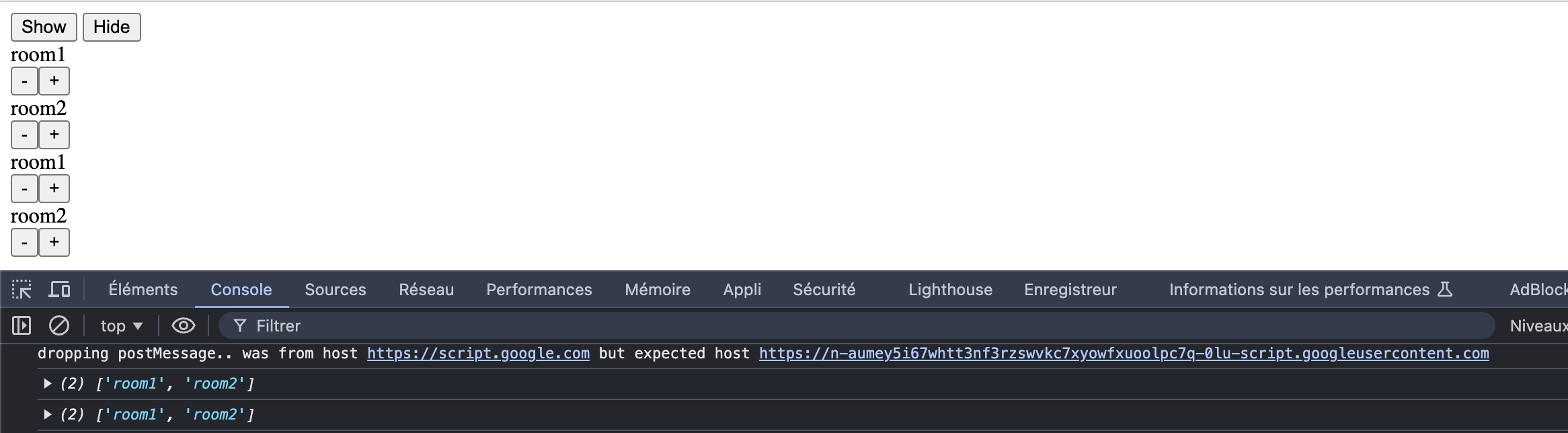
In this WebApp, the target is to increase or decrease the count number of each values through buttons. But the problem I encounter is the fact this list of “rooms” is generated twice instead of once. Here is what we see when the app is launched :
List is generated twice instead of once

Second problem which is link to the first one I guess, I noticed only the “+” and “-” buttons of the first list are working correctly. On the example below, the first room1
“+” & “-” buttons are working for both room1 values, but the second “+” & “-” buttons of room1 doesn’t have any effect on both of the values.

enter image description here

Here is what I already tried so far :

  • I tried to merge all files under one file, nothing change

  • I tried to switch “elements” variable from var to const, which solve the double generation of the list (as you can see below), but when doing so, none of the buttons are working anymore.
    enter image description here

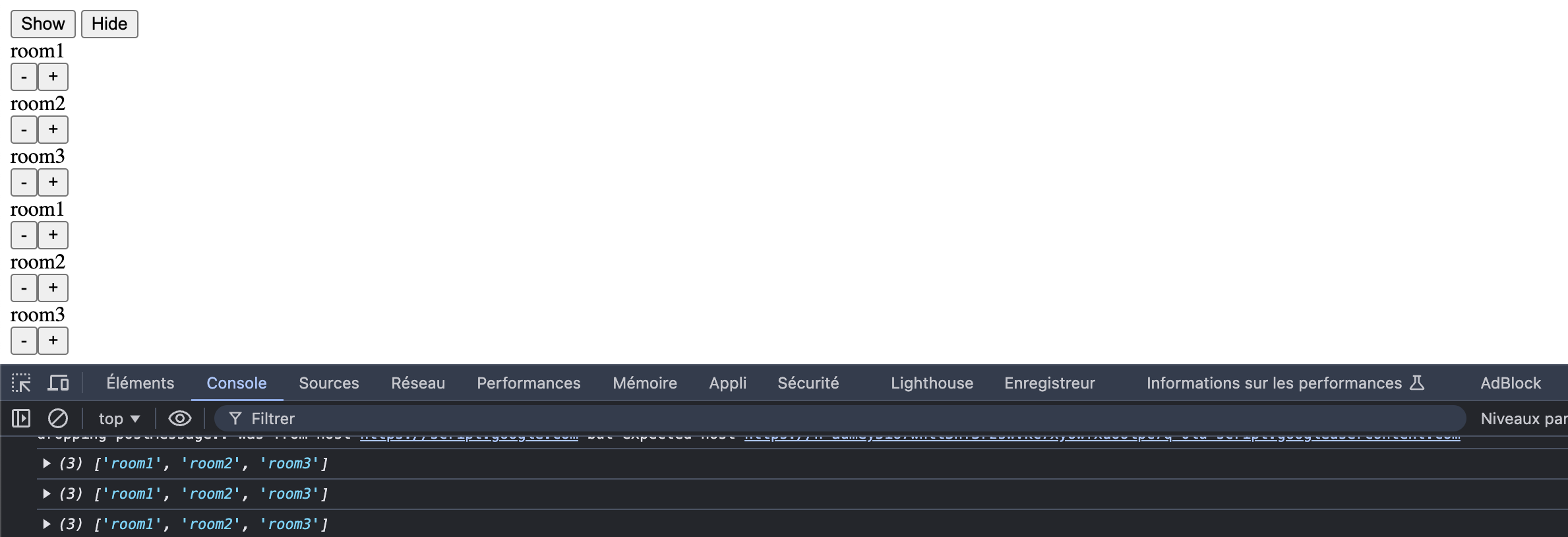
  • When I look at the inspector, interestingly I noticed the list is generated twice when we have 2 elements, but 3 times when we have 3 elements, and so on…
    enter image description here
    enter image description here

I might be missing something is my loop I guess? I am not a professional dev, and I found my knowledge blocked at this point, any help will be much appreciated.

Thanks,

Razorpay Order Creation Fails in Firebase Cloud Function: “No token received” Error

I am integrating the Razorpay payment gateway into my Flutter application and using Firebase Cloud Functions to handle backend operations. However, I am encountering the following error when trying to create an order via Razorpay’s API

code:

const functions = require("firebase-functions");
const Razorpay = require("razorpay");
const admin = require("firebase-admin");
admin.initializeApp();

exports.createRazorpayOrder = functions.https.onCall(async (data, context) => {

  console.log("Request received:", data);

  const {token, amount} = data;

  // Validate token
  if (!token) {
    console.error("No token received");
    throw new functions.https.HttpsError(
      "unauthenticated",
      "User must pass authentication token",
    );
  }

  // Decode token and authenticate user
  try {
    const decodedToken = await admin.auth().verifyIdToken(token);
    console.log("Decoded Token:", decodedToken);

    if (!amount || amount <= 0) {
      throw new functions.https.HttpsError("invalid-argument", "Invalid amount");
    }

    // Create Razorpay instance
    const razorpay = new Razorpay({
      key_id: "secret_id",
      key_secret: "secret_key",
    });

    // Create Razorpay order
    const options = {
      amount: amount, // Amount in paise
      currency: "INR",
      receipt: `receipt_${decodedToken.uid}_${Date.now()}`,
      notes: {
        userId: decodedToken.uid,
        email: decodedToken.email || "unknown",
      },
    };

    const order = await razorpay.orders.create(options);
    console.log("Razorpay Order Created:", order);

    // Return order details to the client
    return {
      orderId: order.id,
      amount: order.amount,
      currency: order.currency,
      receipt: order.receipt,
    };
  } catch (error) {
    console.error("Error occurred:", error);
    throw new functions.https.HttpsError("internal", "Failed to create order");
  }
});

What I Have Tried:
Verified the Razorpay API keys.
Double-checked the functions.config() values for key_id and key_secret.
Ensured that the amount and currency fields are correct.

Why does the discount price show for a second and then show the full price a second later?

So I have a gravity form that stores prices and the product variables. I have the code so that when a quantity of 3 or more it starts discounting the price per length and the total price however the discounted price per length and the total discounted price only show for a second before it reverts back to the non discounted price.

The URL you can see this on is https://wordpress-714066-4065525.cloudwaysapps.com/product/custom-bunting/

So I have tried Price calculation code needs to be duplicated in create total price  mutation function

My code is

//Get Custom Quantity Field
                const customQuanityField = document.querySelector('.gfield--type-number input');
                customQuanityField.value = 1;

                //Get the default Quantity Field
                const defaultQuanityField = document.querySelector('input[name="quantity"]');
                defaultQuanityField.parentElement.setAttribute('style', 'display: none');
                //defaultQuanityField.disabled = true;
                
                let isProgrammaticChange = false;

                defaultQuanityField.addEventListener('change', (e) => {
                    if (isProgrammaticChange) {
                        isProgrammaticChange = false;
                        return;
                    }

                    const quantity = e.target.value;
                    isProgrammaticChange = true;
                    customQuanityField.value = quantity;
                });

                customQuanityField.addEventListener('change', (e) => {
                    if (isProgrammaticChange) {
                        isProgrammaticChange = false;
                        return;
                    }

                    const quantity = e.target.value;
                    isProgrammaticChange = true;
                    defaultQuanityField.value = quantity;
                });

                //
                //
                //Custom Bunting Update price to read £xx.xx per car flag
                //
                //

                // Select the node that will be observed for mutations
                const dynamicPriceEl = document.querySelector('.product_totals ul > li:last-of-type > div');

                const perFlagTextEl = document.createElement('p');
                perFlagTextEl.textContent = ' per length';
                perFlagTextEl.classList.add('per-length-text');
                
                dynamicPriceEl.appendChild(perFlagTextEl);

                // Options for the observer (which mutations to observe)
                const config = { attributes: false, childList: true, subtree: true };

                // Callback function to execute when mutations are observed
                const createTotalPrice = (mutationList, observer) => {
                    console.log('createTotalPrice');
                    for (const mutation of mutationList) {
                        if (mutation.type === "childList") {
                            
                            const target = mutation.target;
                            const splitPrice = target.innerHTML.split('').slice(1).join('');
                            const calculatedPrice = parseFloat(splitPrice);

                            const totalPrice = (customQuanityField.value * calculatedPrice).toFixed(2); 
                            console.log('totalPrice', totalPrice);
                            
                            const totalPriceCalculation = document.querySelector('.total-calculated-price');

                            if(totalPriceCalculation) {

                                totalPriceCalculation.textContent = totalPrice;
                                
                            } else {

                                const totalPriceCalculationEl = document.createElement('p');
                                totalPriceCalculationEl.classList.add('total-calculated-price');
                                totalPriceCalculationEl.textContent = totalPrice;
                                target.parentElement.after(totalPriceCalculationEl)

                            }

                            //console.log(`The new list has ${mutation.addedNodes[0].children[0].childElementCount} chilren.`);
                        }
                    }
                };

                // Create an observer instance linked to the callback function
                const createTotalPriceObserver = new MutationObserver(createTotalPrice);

                // Start observing the target node for configured mutations
                createTotalPriceObserver.observe(dynamicPriceEl, config);

                window.addEventListener('load', () => {
                    console.log('Script initialized');
                    
                    // DOM Elements
                    const customQuanityField = document.querySelector('.gfield--type-number input');
                    const formattedTotalPrice = document.querySelector('.formattedTotalPrice');
                    const dynamicPriceEl = document.querySelector('.product_totals ul > li:last-of-type > div');
                    const gformPrice = document.querySelector('.ginput_product_price');
                    const gformTotal = document.querySelector('.ginput_total');

                    function updatePriceDisplay(quantity) {
                        if (!originalUnitPrice || isUpdating) return;
                        
                        isUpdating = true;
                        
                        try {
                            const discount = getDiscount(quantity);
                            const discountedUnitPrice = originalUnitPrice * (1 - discount / 100);
                            const total = discountedUnitPrice * quantity;

                            console.log('Calculating prices:', {
                                originalPrice: originalUnitPrice,
                                quantity,
                                discount,
                                discountedUnit: discountedUnitPrice,
                                total
                            });

                            // Update Gravity Forms price field and trigger recalculation
                            if (gformPrice) {
                                gformPrice.value = discountedUnitPrice.toFixed(2);
                                
                                // Trigger multiple events to ensure Gravity Forms updates
                                gformPrice.dispatchEvent(new Event('change', { bubbles: true }));
                                gformPrice.dispatchEvent(new Event('keyup', { bubbles: true }));
                                
                                // Force Gravity Forms to recalculate
                                if (window.gformCalculateTotalPrice) {
                                    window.gformCalculateTotalPrice(1); // Assuming form ID is 1
                                }
                                
                                // Update quantity field if it exists
                                const quantityInput = document.querySelector('input[name="quantity"]');
                                if (quantityInput) {
                                    quantityInput.value = quantity;
                                    quantityInput.dispatchEvent(new Event('change', { bubbles: true }));
                                }
                            }

                            // Update message
                            let messageEl = document.querySelector('.add-more-message');
                            if (!messageEl) {
                                messageEl = document.createElement('p');
                                messageEl.classList.add('add-more-message');
                                customQuanityField.after(messageEl);
                            }

                            messageEl.textContent = quantity < 3 
                                ? `Add ${3 - quantity} more to your basket to qualify for a 2.5% discount to this item.`
                                : `You're currently getting ${discount}% off this item.`;

                            // Force update total display
                            if (gformTotal) {
                                const newTotal = total.toFixed(2);
                                if (gformTotal.textContent !== `£${newTotal}`) {
                                    gformTotal.textContent = `£${newTotal}`;
                                }
                            }

                        } finally {
                            isUpdating = false;
                        }
                    }

                });
            }

        </script>

AntD tabs component: changing value inside of react component from another file

File Structure:

-Assets
|-TabHandler.jsx

App.jsx

Ok, I have a react component TabHandler, this is a tabs component from Ant Design:

/* Assets/TabHandler.jsx */
import React from 'react';
import { Tabs } from 'antd';
import type { TabsProps } from 'antd';

const onChange = (key: string) => {
  console.log(key);
};

const items: TabsProps['items'] = [
  {
    key: '1',
    label: 'Test',
    children: <button id="test"/>,
  },
];

const App: React.FC = () => <Tabs defaultActiveKey="1" items={items} onChange={onChange} />;

export default App;

I have another file, called from an electron forge + react environment, but that shouldnt be important. Anyways, here’s the code:

/* app.jsx */

import { createRoot } from 'react-dom/client';
import React, { useRef, useState } from 'react';
import TabHandler from "./Assets/TabHandler.jsx";

const Root = createRoot(document.getElementById('root'));
webViewRoot.render(<TabHandler />);

After this, i want to attach a event to the button inside the TabHandler, and once this button is clicked, change the title of the active tab to “Test Complete”. IT IS VERY IMPORTANT THAT IT CHANGES THE TITLE OF THE ACTIVE TAB INSTEAD OF THE TAB AT A INDEX.

I’ve tried using the html element, and making the items list a global variable, changing the text inside the proper element is reverted or does nothing, and making the items list a global variable will only do anything when the tab is changed.