How to mouseover and mouse out on all buttons in JavaScript [closed]

I would like for an image of my project to show on the mouseover as it does on the first one. I’m a little confused as to how to get it to show when I hover over the rest?

Code Pen: https://codepen.io/Ismail-Shaikh-the-lessful/pen/azoZvXL

document.addEventListener("mousemove", (e) => {
  const cursor = document.querySelector(".cursor");
  cursor.style.left = e.pageX + "px";
  cursor.style.top = e.pageY + "px";
});

const img     = document.getElementById("images");
const project = document.getElementById("project");
const text    = document.querySelector(".text");

project.addEventListener("mouseover", function() {
  if (img.style.display === "none") {
    img.style.display  = "block";
    text.style.display = "none";
  }
});

project.addEventListener("mouseout", function() {
  if (img.style.display === "block") {
    img.style.display = "none";
    text.style.display = "block";
  }
});

I tried this and it worked ONLY on the first project and not the others. I expected it would work on the rest of the projects but does not.

Pixi javascript library – Unable to append canvas

I’m trying to use pixi.js and seem to be falling over at the first hurdle.

I’m using PixiJS – v8.6.4
I’ve referenced the js into my body

<script src="pixi.js"></script>

I’ve set up a canvas

<canvas id="pixiCanvas" width="800" height="600" style="background-color: lightcyan"></canvas>

I’m using blazor so calling javascript as follows:

@code {
    protected override async Task OnAfterRenderAsync(bool firstRender)
    {
        await JS.InvokeVoidAsync("drawCircleAndLine", "pixiCanvas");   
    }
}

My drawCircleAndLine function is very simple at the moment:

function drawCircleAndLine(canvasId) {

    // Get the canvas element by its ID
    const canvas = document.getElementById(canvasId);

    // Create a new PIXI Application
    let app = new PIXI.Application({
        width: canvas.width,
        height: canvas.height,
        antialias: true,
        backgroundColor: 0xEEEEEE
    });

    document.body.appendChild(app.canvas);
}

The last line of my function is what’s seems to be causing the library to fall over.

From the pixi.js files it fall over here:

line: 26545

get canvas() {
    return this.renderer.canvas;
}

TypeError: Cannot read properties of undefined (reading 'canvas')

Any suggestions?

How to Reopen and Start My React Project?

I have created a React project by using React and Tailwind, and after having closed it and my code editor, I have no idea how to reopen it and start working with it again.

Here’s what I’ve done so far:

I have saved the project folder on my computer.
I opened it in VS Code.

What I want to know:

What are the commands I should actually run to start the development server again?
Is there anything specific that I should actually do to make sure everything works as intended?
Additional information:
NODE.js version: [Node.js version], npm: [npm].
Project was created using react.
Any help would be appreciated!

Unterminated string literal [closed]

I’m following along with this tutorial https://www.youtube.com/watch?v=WiLTsxjCmWQ and came across an error in my Javasript. At around 17:12 mark the person uses singular quotation marks that appears to be italicized. I can’t get my quotation marks italicized and think this might be the problem. I’m using Visual Studio and the error shows up as an Unterminated string literal code Is there a difference between regular quotation marks and italicized quotation marks?

function quizCreater(){
  quizArray.sort(() => Math.random() - 0.5);

  for(let i of quizArray){
    i.options.sort(() => Math.random() - 0.5);
    let div = document.createElement("div");
div.classList.add("container-mid","hide");

countOfQuestion.innerHTML = 1 + "of" + quizArray. length + "Question";

let question_DIV = document.createElement("p");
question_DIV.classList.add("question");
question_DIV.innerHTML = i.question;
div.appendChild(question_DIV);

div.innerHTML +='
<button class="option-div" onclick="checker(this)">
${i.options[0]}</button>'

  }
}

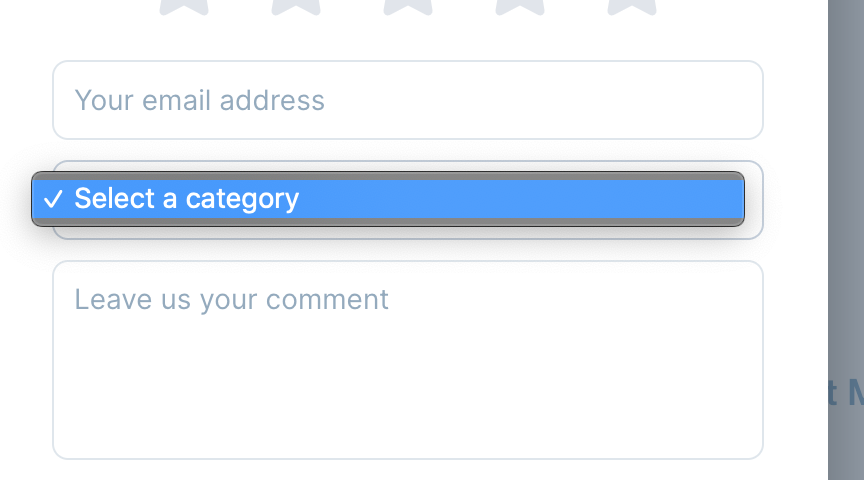
Is there any way to provide custom categories?

I am trying to customize the widget. I have used the below code to enable categories, but have no idea how I show my own values:

Userback.widget_settings = {
  style: "circle",
  position: "sw",
  form_settings: {
      general: {
        display_priority: false,
        display_assignee: false,
        display_category:true,
      }
    }
};

All I see is the below:

enter image description here

Struggling to implement “splitting” in a Blackjack game

I have a project due where I need to create a Blackjack game with the following functionality:

a) “Splitting” capability: What is splitting? If you hold two cards with the same value, like two eights or two sixes, you can split them into separate hands and play each hand individually. For this project, once the two cards are split, they should be treated as two separate hands, each with its own “hit,” “stay,” and “split” (if the two cards are the same) buttons. To achieve this, I need to add a button that appears only when the player holds two identical cards, and otherwise stays hidden. Once the button is clicked, the two cards should be split into two hands.

b) “Reset” capability: Currently, the game can only be reset by refreshing the page. I need to create a button that resets the game environment and starts a new game by clearing the scores and cards, without refreshing the page.

c) Disable “hit” button: When the player’s total exceeds 21, the “hit” button should be disabled and grayed out to prevent further action, until the game is reset or a new game begins.

I’ve managed to get b) and c) working, but no matter what I try, I haven’t been able to get splitting to work. Additionally, I need to add a backlog feature that tracks matches, pauses, and records the player’s progress, so users can return to their previous place in the game.

I’ve tried everything and I’m at my wit’s end.

Split Button Visibility: Showed the “Split” button when the player had two cards of the same rank (e.g., two 8s).
splitHand() Function: Created the splitHand() function to split the player’s two cards into two separate hands.
Rendering Cards: Used renderHand() to display the cards for both the player and the dealer.
Card Dealing: Implemented card dealing with dealCard() to distribute cards to both the player and the dealer.
Calculating Totals: Used calculateTotal() to compute the sum of the cards in the player’s and dealer’s hands, accounting for aces as 1 or 11.
Reset Game: Created a resetGame() function to reset the game environment (clearing hands and resetting the deck). The Split button should appear when the player has two matching cards (e.g., two 8s). When clicked, it splits the cards into two hands, dealing one additional card to each. Each hand becomes independent, allowing the player to “Hit” or “Stand” on each hand separately. The game continues with the player playing both hands, and the dealer plays their turn afterward to be more precise I am trying to find what is wrong with my code here:

<!DOCTYPE html>
<html lang="en">
<head>
    <meta charset="UTF-8">
    <meta name="viewport" content="width=device-width, initial-scale=1.0">
    <title>Blackjack Game</title>
    <link rel="stylesheet" href="blackjack.css">
</head>
<body>
    <h1>Blackjack Game</h1>

    <div id="game">
        <div id="player-hand">
            <h3>Player's Hand</h3>
            <div id="player-cards"></div>
            <p id="player-total">Total: 0</p>
            <button id="hit-button">Hit</button>
            <button id="stand-button">Stand</button>
            <button id="split-button" style="display:none;">Split</button>
        </div>

        <!-- Split Hand Section -->
        <div id="split-hand" style="display: none;">
            <h3>Split Hand</h3>
            <div id="split-cards"></div>
            <p id="split-total">Total: 0</p>
        </div>

        <div id="dealer-hand">
            <h3>Dealer's Hand</h3>
            <div id="dealer-cards"></div>
            <p id="dealer-total">Total: 0</p>
        </div>

        <button id="reset-button">Start New Game</button>
        <div id="result"></div>
    </div>

    <script src="blackjack.js"></script>
</body>
</html>

I’ve been getting this error anytime I try to press the split Button

blackjack.js:215 Uncaught TypeError: Cannot read properties of null (reading 'classList')
    at HTMLButtonElement.split (blackjack.js:215:43)

it’s saying it can’t find an element in html in particular split-section

the ther problem I am having is adding a Backlog feature that saves an unfinished Game pauses and lists some data and keeps track for how long other matches were and record like that but but the main issue is my the splitting not working here is the entire Javascript file for how it works

// Card deck setup
const cardImages = {
    "2-C": "https://upload.wikimedia.org/wikipedia/commons/3/30/English_pattern_2_of_clubs.svg",
    "2-D": "https://upload.wikimedia.org/wikipedia/commons/9/99/English_pattern_2_of_diamonds.svg",
    "2-H": "https://upload.wikimedia.org/wikipedia/commons/2/26/English_pattern_2_of_hearts.svg",
    "2-S": "https://upload.wikimedia.org/wikipedia/commons/0/0b/English_pattern_2_of_spades.svg",
    "3-C": "https://upload.wikimedia.org/wikipedia/commons/1/14/English_pattern_3_of_clubs.svg",
    "3-D": "https://upload.wikimedia.org/wikipedia/commons/2/2c/English_pattern_3_of_diamonds.svg",
    "3-H": "https://upload.wikimedia.org/wikipedia/commons/0/0f/English_pattern_3_of_hearts.svg",
    "3-S": "https://upload.wikimedia.org/wikipedia/commons/a/a5/English_pattern_3_of_spades.svg",
    "4-C": "https://upload.wikimedia.org/wikipedia/commons/c/c0/English_pattern_4_of_clubs.svg",
    "4-D": "https://upload.wikimedia.org/wikipedia/commons/4/4e/English_pattern_4_of_diamonds.svg",
    "4-H": "https://upload.wikimedia.org/wikipedia/commons/b/bb/English_pattern_4_of_hearts.svg",
    "4-S": "https://upload.wikimedia.org/wikipedia/commons/3/34/English_pattern_4_of_spades.svg",
    "5-C": "https://upload.wikimedia.org/wikipedia/commons/7/74/English_pattern_5_of_clubs.svg",
    "5-D": "https://upload.wikimedia.org/wikipedia/commons/6/6c/English_pattern_5_of_diamonds.svg",
    "5-H": "https://upload.wikimedia.org/wikipedia/commons/c/c6/English_pattern_5_of_hearts.svg",
    "5-S": "https://upload.wikimedia.org/wikipedia/commons/9/9c/English_pattern_5_of_spades.svg",
    "6-C": "https://upload.wikimedia.org/wikipedia/commons/0/02/English_pattern_6_of_clubs.svg",
    "6-D": "https://upload.wikimedia.org/wikipedia/commons/4/4e/English_pattern_6_of_diamonds.svg",
    "6-H": "https://upload.wikimedia.org/wikipedia/commons/d/da/English_pattern_6_of_hearts.svg",
    "6-S": "https://upload.wikimedia.org/wikipedia/commons/a/ac/English_pattern_6_of_spades.svg",
    "7-C": "https://upload.wikimedia.org/wikipedia/commons/6/60/English_pattern_7_of_clubs.svg",
    "7-D": "https://upload.wikimedia.org/wikipedia/commons/5/5d/English_pattern_7_of_diamonds.svg",
    "7-H": "https://upload.wikimedia.org/wikipedia/commons/c/cb/English_pattern_7_of_hearts.svg",
    "7-S": "https://upload.wikimedia.org/wikipedia/commons/d/d1/English_pattern_7_of_spades.svg",
    "8-C": "https://upload.wikimedia.org/wikipedia/commons/f/f0/English_pattern_8_of_clubs.svg",
    "8-D": "https://upload.wikimedia.org/wikipedia/commons/1/18/English_pattern_8_of_diamonds.svg",
    "8-H": "https://upload.wikimedia.org/wikipedia/commons/3/3c/English_pattern_8_of_hearts.svg",
    "8-S": "https://upload.wikimedia.org/wikipedia/commons/4/4d/English_pattern_8_of_spades.svg",
    "9-C": "https://upload.wikimedia.org/wikipedia/commons/1/14/English_pattern_9_of_clubs.svg",
    "9-D": "https://upload.wikimedia.org/wikipedia/commons/f/f5/English_pattern_9_of_diamonds.svg",
    "9-H": "https://upload.wikimedia.org/wikipedia/commons/2/22/English_pattern_9_of_hearts.svg",
    "9-S": "https://upload.wikimedia.org/wikipedia/commons/f/f0/English_pattern_9_of_spades.svg",
    "10-C": "https://upload.wikimedia.org/wikipedia/commons/4/48/English_pattern_10_of_clubs.svg",
    "10-D": "https://upload.wikimedia.org/wikipedia/commons/d/da/English_pattern_10_of_diamonds.svg",
    "10-H": "https://upload.wikimedia.org/wikipedia/commons/b/bb/English_pattern_10_of_hearts.svg",
    "10-S": "https://upload.wikimedia.org/wikipedia/commons/d/da/English_pattern_10_of_spades.svg",
    "J-C": "https://upload.wikimedia.org/wikipedia/commons/8/80/English_pattern_jack_of_clubs.svg",
    "J-D": "https://upload.wikimedia.org/wikipedia/commons/1/16/English_pattern_jack_of_diamonds.svg",
    "J-H": "https://upload.wikimedia.org/wikipedia/commons/5/56/English_pattern_jack_of_hearts.svg",
    "J-S": "https://upload.wikimedia.org/wikipedia/commons/4/4f/English_pattern_jack_of_spades.svg",
    "Q-C": "https://upload.wikimedia.org/wikipedia/commons/b/b3/English_pattern_queen_of_clubs.svg",
    "Q-D": "https://upload.wikimedia.org/wikipedia/commons/4/4f/English_pattern_queen_of_diamonds.svg",
    "Q-H": "https://upload.wikimedia.org/wikipedia/commons/9/9d/English_pattern_queen_of_hearts.svg",
    "Q-S": "https://upload.wikimedia.org/wikipedia/commons/c/ca/English_pattern_queen_of_spades.svg",
    "K-C": "https://upload.wikimedia.org/wikipedia/commons/3/3e/English_pattern_king_of_clubs.svg",
    "K-D": "https://upload.wikimedia.org/wikipedia/commons/1/1c/English_pattern_king_of_diamonds.svg",
    "K-H": "https://upload.wikimedia.org/wikipedia/commons/1/14/English_pattern_king_of_hearts.svg",
    "K-S": "https://upload.wikimedia.org/wikipedia/commons/f/f1/English_pattern_king_of_spades.svg",
    "A-C": "https://upload.wikimedia.org/wikipedia/commons/5/5f/English_pattern_ace_of_clubs.svg",
    "A-D": "https://upload.wikimedia.org/wikipedia/commons/0/00/English_pattern_ace_of_diamonds.svg",
    "A-H": "https://upload.wikimedia.org/wikipedia/commons/d/d4/English_pattern_ace_of_hearts.svg",
    "A-S": "https://upload.wikimedia.org/wikipedia/commons/1/19/English_pattern_ace_of_spades.svg",
    "hidden": "https://upload.wikimedia.org/wikipedia/commons/d/d4/Card_back_01.svg"
};

let deck, playerHand, dealerHand, playerTotal, dealerTotal, playerTurn, splitHand, splitTurn;

// Function to create a new shuffled deck
function createDeck() {
    const cardValues = [
        "2-C", "2-D", "2-H", "2-S",
        "3-C", "3-D", "3-H", "3-S",
        "4-C", "4-D", "4-H", "4-S",
        "5-C", "5-D", "5-H", "5-S",
        "6-C", "6-D", "6-H", "6-S",
        "7-C", "7-D", "7-H", "7-S",
        "8-C", "8-D", "8-H", "8-S",
        "9-C", "9-D", "9-H", "9-S",
        "10-C", "10-D", "10-H", "10-S",
        "J-C", "J-D", "J-H", "J-S",
        "Q-C", "Q-D", "Q-H", "Q-S",
        "K-C", "K-D", "K-H", "K-S",
        "A-C", "A-D", "A-H", "A-S", "hidden"
    ];  
    let deck = [...cardValues];
    console.log(deck.length);  // Should log 52
    console.log("Deck created:", deck);
    return deck.sort(() => Math.random() - 0.5);  // Shuffle the deck
}


// Function to get the value of a card
function getCardValue(card) {
    const value = card.slice(0, -2);
    if (value === "A") return 11;
    if (["J", "Q", "K"].includes(value)) return 10;
    return parseInt(value);
}

// Function to calculate the total value of a hand
function calculateTotal(hand) {
    let total = hand.reduce((sum, card) => sum + getCardValue(card), 0);
    // Adjust for Aces (if total > 21, treat Ace as 1)
    let aceCount = hand.filter(card => card.slice(0, -2) === "A").length;
    while (total > 21 && aceCount > 0) {
        total -= 10;
        aceCount--;
    }
    return total;
}

// Function to update the display of the cards
function displayHand(hand, handId) {
    const handDiv = document.getElementById(handId);
    handDiv.innerHTML = '';
    hand.forEach(card => {
        const img = document.createElement("img");
        img.src = cardImages[card];
        img.className = 'card';
        handDiv.appendChild(img);
    });
}

// Function to update the total display
function updateTotal(hand, totalId) {
    const total = calculateTotal(hand);
    document.getElementById(totalId).textContent = `Total: ${total}`;
    return total;
}

// Function to start a new game
function startGame() {
    deck = createDeck();
    playerHand = [deck.pop(), deck.pop()];
    dealerHand = [deck.pop(), deck.pop()];
    splitHand = [];
    playerTurn = true;
    splitTurn = false;

    displayHand(playerHand, "player-cards");
    displayHand(dealerHand, "dealer-cards");
    playerTotal = updateTotal(playerHand, "player-total");
    dealerTotal = updateTotal(dealerHand, "dealer-total");

    document.getElementById("hit-button").disabled = false;
    document.getElementById("split-button").style.display = (playerHand[0] === playerHand[1]) ? "inline-block" : "none";
    document.getElementById("result").textContent = '';
    document.getElementById("split-button").style.display = 
    (getCardValue(playerHand[0]) === getCardValue(playerHand[1])) ? "inline-block" : "none";

}

function hit() {
    if (playerTurn) {
        if (splitTurn) {
            splitHand.push(deck.pop());
            console.log("Updated Split Hand:", splitHand);
            updateTotal(splitHand, "split-total");
            displayHand(splitHand, "split-hand");

            if (calculateTotal(splitHand) > 21) {
                document.getElementById("result").textContent = "Split Hand Busts!";
                splitTurn = false;
                playerTurn = false;
            }
        } else {
            playerHand.push(deck.pop());
            console.log("Updated Player Hand:", playerHand);
            updateTotal(playerHand, "player-total");
            displayHand(playerHand, "player-cards");

            if (calculateTotal(playerHand) > 21) {
                document.getElementById("result").textContent = "Player Busts! Dealer Wins.";
                playerTurn = false;
            }
        }
        console.log("Player Hand:", playerHand, "Dealer Hand:", dealerHand);
    }
}


function stand() {
    if (playerTurn) {
        if (splitTurn) {
            // Finish the split hand
            playerTurn = false;
            while (dealerTotal < 17) {
                dealerHand.push(deck.pop());
                dealerTotal = updateTotal(dealerHand, "dealer-total");
                displayHand(dealerHand, "dealer-cards");
            }
            // Determine results for split hands
            const splitHandTotal = calculateTotal(splitHand);
            if (splitHandTotal > 21) {
                document.getElementById("result").textContent = "Dealer Wins. Split hand bust!";
            }
        } else {
            // Regular stand handling
            playerTurn = false;
            while (dealerTotal < 17) {
                dealerHand.push(deck.pop());
                dealerTotal = updateTotal(dealerHand, "dealer-total");
                displayHand(dealerHand, "dealer-cards");
            }
            const playerTotal = calculateTotal(playerHand);
            if (playerTotal > dealerTotal) {
                document.getElementById("result").textContent = "Player Wins!";
            } else if (playerTotal < dealerTotal) {
                document.getElementById("result").textContent = "Dealer Wins!";
            } else {
                document.getElementById("result").textContent = "It's a Tie!";
            }
        }
    }
}


// Function to handle splitting
function split() {
    if (getCardValue(playerHand[0]) === getCardValue(playerHand[1])) {
        splitHand = [playerHand.pop()]; // Move one card to the split hand
        playerHand.push(deck.pop());  // Add a new card to the original hand
        splitHand.push(deck.pop());   // Add a new card to the split hand
        

        splitTurn = true; // Mark that it's the split turn now

        // Update the card displays
        displayHand(playerHand, "player-cards");
        displayHand(splitHand, "split-cards");  // Make sure to use the correct element id

        // Disable the split button, enable the hit button for both hands
        document.getElementById("split-button").style.display = "none";
        document.getElementById("hit-button").disabled = false;

        // Update totals for both hands
        updateTotal(playerHand, "player-total");
        updateTotal(splitHand, "split-total");
    } else {
        console.log("Cannot split, cards do not match.");
    }
}


// Function to reset the game
function resetGame() {
    startGame();
}

// Event listeners
document.getElementById("hit-button").addEventListener("click", hit);
document.getElementById("stand-button").addEventListener("click", stand);
document.getElementById("split-button").addEventListener("click", split);
document.getElementById("reset-button").addEventListener("click", resetGame);


// Initialize the game on page load
window.onload = startGame;

along with that here is my html file

<!DOCTYPE html>
<html lang="en">
<head>
    <meta charset="UTF-8">
    <meta name="viewport" content="width=device-width, initial-scale=1.0">
    <title>Blackjack Game</title>
    <link rel="stylesheet" href="blackjack.css">
</head>
<body>
    <h1>Blackjack Game</h1>

    <div id="game">
        <div id="player-hand">
            <h3>Player's Hand</h3>
            <div id="player-cards"></div>
            <p id="player-total">Total: 0</p>
            <button id="hit-button">Hit</button>
            <button id="stand-button">Stand</button>
            <button id="split-button" style="display:none;">Split</button>
        </div>

        <!-- Split Section -->
        <div id="split-section" style="display: none;">
            <h3>Split Hand</h3>
            <div id="split-cards"></div>
            <p id="split-total">Total: 0</p>
        </div>

        <div id="dealer-hand">
            <h3>Dealer's Hand</h3>
            <div id="dealer-cards"></div>
            <p id="dealer-total">Total: 0</p>
        </div>

        <button id="reset-button">Start New Game</button>
        <div id="result"></div>
    </div>

    <script src="blackjack.js"></script>

</body>
</html>

and here is my CSS file

body {
    font-family: Arial, sans-serif;
    text-align: center;
}

#game {
    margin-top: 20px;
}

#player-hand, #dealer-hand, #split-hand {
    margin: 20px;
    padding: 10px;
    display: inline-block;
    border: 2px solid #000;
    border-radius: 10px;
}

button {
    margin: 10px;
    padding: 10px 20px;
    font-size: 16px;
}

button:disabled {
    background-color: gray;
}

#result {
    margin-top: 20px;
    font-size: 24px;
    font-weight: bold;
}

img.card {
    width: 60px;
    height: 90px;
    margin: 5px;
}

/* Styling for the split hand */
#split-hand {
    margin: 20px;
    padding: 10px;
    display: inline-block;
    border: 2px dashed #ff0000; /* Dashed red border to distinguish the split hand */
    border-radius: 10px;
    background-color: #fff5f5; /* Light red background for visibility */
}
#split-section {
    display: none; /* Initially hidden until a split occurs */
  }
  
  #split-section.active {
    display: block; /* Show when split logic is activated */
  }

and here is the specific error I am getting

blackjack.js:107 Uncaught TypeError: Cannot set properties of null (setting 'innerHTML')
    at displayHand (blackjack.js:107:23)
    at HTMLButtonElement.hit (blackjack.js:151:13) 
Enterprise Architect javascript – working with word RTF and linked elements

I have an Enterprise Architect project with some Diagram. I want to add them to an external Word document (which cannot be generated with EA). Moreover, other people may need to edit this word document without having the EA project. So here is what I did to do so :

I created an EA JavaScript file which generate rtf files (1 .rtf file for each diagram).
In my main word document, whenever I wanted to insert the diagram, I added a link to the specific rtf file previously generated.
Everything is working fine, except, after some times, I cannot generate the rtf file anymore (when
running docGenerator.SaveDocument), it tells me “Failed to save the output file”.

GenerateRTF :

function OnProjectBrowserScript()
{
    // Get the type of element selected in the Project Browser
    var treeSelectedType = Repository.GetTreeSelectedItemType();
    switch ( treeSelectedType )
    {
        case otPackage :
        {
            // Code for when a package is selected
            [...]
            packageDiagrams = thePackage.Diagrams; // Collection of all the Diagrams
            
            for ( var i = 0 ; i < packageDiagrams.Count ; i++ ) {
                var currentElement as EA.Diagram;
                currentDiagram = packageDiagrams.GetAt( i );
            
                // Document Generation using docGenerator
                var docGenerator as EA.DocumentGenerator;
                docGenerator = Repository.CreateDocumentGenerator();
                docGenerator.NewDocument("")
                docGenerator.DocumentDiagram(currentDiagram.DiagramID,1,"Diagram Report");
                var diagramName = currentDiagram.Name + ".rtf";

                //Save diagram into rtf document
                var saveSuccess = docGenerator.SaveDocument( diagramName, EA.DocumentType.dtRTF );
                if ( saveSuccess ) {
                    Session.Prompt( "Documentation complete!", promptOK );
                } else {

                    // -- > Error message saying file cannot be saved <--
                    Session.Prompt( "Error saving file " + diagramName + " : " + docGenerator.GetLastError(), promptOK );

                }
            
            }
            break;
        }
        [...]

This “problem” is that my RTF files are used/linked in another document (if I don’t use them in another file as a link, I can generate as many times as I want the rtf files).

Moreover, I never open the generated rtf files with Word (as I don’t want Word to lock them ….).
Also, when generating the rtf files, my main word document is also closed.
I think the problem comes from the EA rtf file generation as I already used this method with another tool generating rtf and I did not get any problem.

How could I pass by the protection when writing the rtf file ?
Is there another method to export the file from EA which could be used instead of using docGenerator ?

How to implement multiple pages into iframe using srcdoc

I’m working on a website editor, and one of the roadblocks I’m running into is how to implement multiple pages

I’m currently taking the user provided HTML, CSS, and JS, and then jamming it all into a single iframe using srcdoc (which already isn’t very practical), however this won’t work with implementing multiple pages, so I’m trying to find solutions or alternatives.

I want to make it work the same way an actual website would function, however I’m just not sure how to go about doing that.

How to run code before closing side-panel?

I’m building a browser extension using react, vite, typescript. The extension has side-panel and fullscreen tabs.
Only on fullscreeen tabs, I need to create a button/icon that appears only when side-panel is closed. So, when I open side-panel it hides the button and when I close side-panel it shows the button. I found a way to check if the side-panel is closed or open using this code.

const contexts: chrome.runtime.ExtensionContext[] = await chrome.runtime.getContexts({ contextTypes: ["SIDE_PANEL"] });

if contexts.length > 0 it means that side-panel is open, otherwise, it is closed. I added this logic in useEffect hook, and it works fine. The problem is that I need to run this code again every time side-panel opens or closes so it can check side-panel status and show/hide it if needed. I tried using focus and blur events but unfortunately it doesn’t work in Chrome browser although it works in Edge. I come up with an idea that I can use chrome.runtime.sendMessage to trigger the code and run function again. In my main component index.tsx in useEffect I can send the message and it will trigger the code and hide the button. But then, I need to send the same message when side-panel closes. I tried to do it in useEffect return function but it didn’t work for me.
Is there any way to sendMessage when side-panel closes? Or maybe, there is better options to implement the logic of showing and hiding the icon?
Full code of the button component is below

import { useEffect, useState } from "react";
import { logosHooks } from "@/hooks/logos-hooks";
import { cn } from "@/lib/utils";

const SidePanelTrigger = () => {
  const logo = logosHooks.useLogoIcon();
  const [show, setShow] = useState(false);

  useEffect(() => {
    const checkPanelState = async() => {
      const contexts: chrome.runtime.ExtensionContext[] = await chrome.runtime.getContexts({ contextTypes: ["SIDE_PANEL"] });
      setShow(contexts.length !== 0);
    }

    checkPanelState();
  }, []);

  const handleOpenSidepanel = () => {
    chrome.runtime.sendMessage({ action: "openSidePanel" });
  }
  
  return (
    <button 
      className={cn(
        "flex fixed top-[200px] z-10 -right-[10px] bg-primary rounded-l-sm justify-center items-center transition-all duration-300 hover:right-0 p-3 shadow-lg cursor-pointer",
        show && "hidden"
      )}
      onClick={handleOpenSidepanel}
    >
      Button
    </button>
  );
};

export default SidePanelTrigger;

vue “InternalError: too much recursion”

I try to embedd chart.js as a vue component into my app.
As soon as i try to add new data to the chart dataset i get the error:

Uncaught InternalError: too much recursion
    push reactivity.esm-bundler.js:798
    value helpers.collection.ts:138
    noTracking reactivity.esm-bundler.js:901
    push reactivity.esm-bundler.js:799
    value helpers.collection.ts:138
    noTracking reactivity.esm-bundler.js:901
    push reactivity.esm-bundler.js:799
    value helpers.collection.ts:138
    noTracking reactivity.esm-bundler.js:901
    push reactivity.esm-bundler.js:799
    value helpers.collection.ts:138
    noTracking reactivity.esm-bundler.js:901

Error Screenshot

App.vue

<script>
import Chart from "./Chart.vue";

export default {
    name: "Chart Demo",
    components: {
        Chart
    },
    data() {
        return {};
    }
};
</script>

<template>
    <div>
        <h1>Hello World</h1>
        <Chart></Chart>
    </div>
</template>

Chart.vue

<template>
    <canvas ref="canvas"></canvas>
</template>

<script>
import { defineComponent } from "vue";
import { Chart } from "chart.js/auto";

export default defineComponent({
    data() {
        return {
            chart: null,
            chartData: {
                labels: [
                    "Januar", 
                    "Februar", 
                    "März", 
                    "April", 
                    "Mai", 
                    "Juni", 
                    "Juli", 
                    "August"
                ],
                datasets: [{
                    label: "Verkäufe",
                    data: [60, 65, 67, 65, 66, 69, 72, 70]
                }]
            }
        };
    },
    mounted() {

        console.log("mounted create")

        this.chart = new Chart(this.$refs.canvas, {
            type: "line",
            data: this.chartData
        });

        setInterval(() => {

            console.log("Add chart data")

            let d = 90
            this.chartData.labels.push(d);
            this.chartData.datasets[0].data.push(d);

        }, 3000);

    }
});
</script>

Without this part:

setInterval(() => {

            console.log("Add chart data")

            let d = 90
            this.chartData.labels.push(d);
            this.chartData.datasets[0].data.push(d);

        }, 3000);

it just works fine.

But i would like to create a history of values, where i need to add new data to the chart and re-render it.

What is the correct way to manipulate the chart data and re render it?

How to Prevent Swiper Slides from Moving After Dropping an Item with Sortable.js?

I’m working on a React project where I am integrating two libraries: Swiper and Sortable.js. Swiper is being used to create a carousel, and Sortable.js is enabling drag-and-drop functionality within the slides.

The issue I’m facing is that after I drop an item using Sortable.js, the Swiper slide starts moving along with the mouse pointer, as if it’s being dragged. This behavior persists until I click somewhere else or interact with the Swiper in some way. This only happens when i drag and drop an item horizontally using sortable.

import { useEffect, useRef, useState } from "react";
import { Swiper, SwiperSlide } from 'swiper/react';
import { Mousewheel, A11y, Navigation, Pagination } from "swiper/modules";
import Sortable from 'sortablejs';
import DraggableItem from "./DraggableItem.tsx";
import 'swiper/css';
import 'swiper/css/mousewheel';
import './SweetSlider.css';

interface ISweetSlider {
  items: any[];
  rows: number;
  columns: number;
  showBullets?: boolean;
}

const SweetSlider: React.FC<ISweetSlider> = ({ items, rows, columns, showBullets }) => {
  const screenWidth = window.innerWidth;
  const [itemsPerPage, setItemsPerPage] = useState<number>(rows * columns);
  const [numberOfPages, setNumberOfPages] = useState<number>(Math.ceil(items.length / itemsPerPage));
  const [widthOfItem, setWidthOfItem] = useState<number>((screenWidth / columns) - (columns - 1) * 10);
  const [activeIndex, setActiveIndex] = useState<number>(0);
  const [sortedItems, setSortedItems] = useState(items);
  const [allowSwiping, setAllowSwiping] = useState(true)
  const sortableRefs = useRef<any[]>([]);
  const dragItem = useRef(null)

  useEffect(() => {
    setItemsPerPage(rows * columns);
    setNumberOfPages(Math.ceil(items.length / itemsPerPage));
    setWidthOfItem((screenWidth / columns) - (columns - 1) * 10);
  }, [items, rows, columns]);


  useEffect(() => {
    sortableRefs.current.forEach((sortableElement) => {
      Sortable.create(sortableElement, {
        group: 'sweetslider',
        animation: 90,
        delay: 500,
        ghostClass: 'custom-ghost',
        onChoose:(evt) => {
          setAllowSwiping(false)
          const draggedElement = evt.item;
          const rect = draggedElement.getBoundingClientRect();

          if (dragItem.current) {
            dragItem.current.textContent = draggedElement.textContent;
            dragItem.current.style.display = 'flex';
            dragItem.current.style.left = ${rect.left}px;
            dragItem.current.style.top = ${rect.top}px;
          }
        },
        onStart: (evt) => {
            evt.from.addEventListener('drag', (e) => {
              if (dragItem.current) {
                dragItem.current.style.left = ${e.pageX - widthOfItem / 2}px;
                dragItem.current.style.top = ${e.pageY - 50}px;
              }
            });
        },
        onEnd: (event: any) => {
          const newItemsOrder = [...sortedItems];
          const movedItem = newItemsOrder.splice(event.oldIndex, 1)[0];
          newItemsOrder.splice(event.newIndex, 0, movedItem);
          setSortedItems(newItemsOrder);
          if (dragItem.current) {
            dragItem.current.style.display = 'none';
          }
          setAllowSwiping(true)
        },
      });
    });
  }, [sortedItems]);


  useEffect(() => {
    console.log(is swiping allowed: ${allowSwiping})
  }, [allowSwiping]);


  const pageRender = (itemsToRender: any[]) => {
    const slides: any[] = [];

    for (let counter = 0; counter < numberOfPages; counter++) {
      const firstItemIndex: number = counter * itemsPerPage;
      const lastItemIndex: number = (counter + 1) * itemsPerPage;
      const pageItems: any[] = itemsToRender.slice(firstItemIndex, lastItemIndex);

      slides.push(
        <SwiperSlide key={counter}>
          <div ref={(el) => (sortableRefs.current[counter] = el)}>
            {pageItems.map((pageItem) => (
              <DraggableItem
                key={pageItem}
                style={{
                  width: widthOfItem
                }}
                text={pageItem}
              />
            ))}
          </div>
        </SwiperSlide>
      );
    }
    return slides;
  };


  const bulletRender = () => {
    const bullets = [];

    for (let counter = 0; counter < numberOfPages; counter++) {
      bullets.push(
        <div
          key={bullet-${counter}}
          className={bullet ${counter === activeIndex ? 'active' : ''}}
        ></div>
      );
    }

    return bullets;
  };

  return (
      <>
        <div className="sweetslider-wrapper">
          <Swiper
              modules={[Mousewheel, A11y, Navigation, Pagination]}
              mousewheel
              slidesPerView={1}
              threshold={20}
              onSlideChange={(swiper) => setActiveIndex(swiper.activeIndex)}
              touchStartPreventDefault={false}
              allowSlideNext={allowSwiping}
              allowSlidePrev={allowSwiping}
          >
            {pageRender(sortedItems)}
          </Swiper>

          {showBullets && (
              <div className="bullets-wrapper">
                {bulletRender()}
              </div>
          )}
        </div>
        <div ref={dragItem} id="dragItem" style={{position: "absolute", width: widthOfItem, display: "none"}}></div>

      </>
  );
};

export default SweetSlider;

I tried stopPropagation: true and also some other props of swiper
I tried evt.stopPropagation() in sortable hooks

SD-JWT. Verify Error: Invalid JWT Signature

I am new to SD-JWTs, so I just wanted to see how it works.

I am currently trying to implement a JS version of sd-jwt-js. Just a basic thing: issue-validate-present-verify

In local environment, everything works fine (at least it seems this way). Some logs:

Encoded SD-JWT: eyJhbGciOiJFUzI1NiJ9.eyJpZCI6IjEyMzQiLCJfc2QiOlsiSFJKZDVjVEo1TGlLbWRMTC1HWURDeUdsWkNqQT
hyZUVhOFRxR2w1WHBxVSIsImZUa1E1RmRieE83d2l4bWR2aVl0M1dwcVd0TXJjbWFEQTFNLWhfNTVEd2ciLCJnY
050TTd2eWNra29kODNxV2o4VERYVE9FOGF5aTFUVE1rR3VIemFCVXUwIl0sIl9zZF9hbGciOiJTSEEtMjU2In0.
HzJ9o6hP1iAC676EwKcsI7HieSxHKTPrNxe6k7YeUz3McejLuIToDgLjF79JBAUB7_y4C7i5SeaFO7un_7JDSQ~
WyI1ZmI1ZDJiYzg1YTFlMzc0IiwiZmlyc3RuYW1lIiwiSm9obiJd~WyI4MmVkYjUyZTUxNjYwNWU2IiwibGFzdG
5hbWUiLCJEb2UiXQ~WyI4ZTIxNzc3Y2MwMjhlZDE5Iiwic3NuIiwiMTIzLTQ1LTY3ODkiXQ~

Valid? SD-JWT: {
  payload: {
    id: '1234',
    ssn: '123-45-6789',
    firstname: 'John',
    lastname: 'Doe'
  },
  header: { alg: 'ES256' }
}
.
.
.
Verification Result: {
  payload: { id: '1234', ssn: '123-45-6789', firstname: 'John' },
  header: { alg: 'ES256' }
}

But when I tried to paste the same token to sdjwt.co, I receive "Verify Error: Invalid JWT Signature". Moreover, I’ve noticed, that even though I have a couple of fields disclosed, I am missing a "typ": "sd+jwt" in header.

I tried to understand the issue myself, but I really don’t get it.

Source code:

// test_sdjwt.js
import { SDJwtInstance } from '@sd-jwt/core';
import { ES256, digest, generateSalt } from '@sd-jwt/crypto-nodejs';
import fs from 'fs';

// Function to load JWK from file
const loadJwk = (filePath) => {
  const jwkData = fs.readFileSync(filePath, 'utf-8');
  return JSON.parse(jwkData);
};

(async () => {
    console.log('Debugging starts...');
    
    // Load the persisted key pair
    const privateJwk = loadJwk('privateKey.json');
    const publicJwk = loadJwk('publicKey.json');
    
    // Get signer and verifier using the persisted keys
    const signer = await ES256.getSigner(privateJwk);
    const verifier = await ES256.getVerifier(publicJwk);
    
    // Create SDJwt instance for signing and verifying
    const sdjwt = new SDJwtInstance({
        signer,
        verifier,
        signAlg: ES256.alg,
        hasher: digest,
        hashAlg: 'SHA-256',
        saltGenerator: generateSalt,
    });

    // Define the claims object with the user's information
    const claims = {
        firstname: 'John',
        lastname: 'Doe',
        ssn: '123-45-6789',
        id: '1234',
    };

    const disclosureFrame = {
        _sd: ['firstname', 'lastname', 'ssn'],
    };

    // Issue the SD-JWT
    const credential = await sdjwt.issue(claims, disclosureFrame);
    console.log('Encoded SD-JWT:', credential);

    // Validate the SD-JWT
    const isValid = await sdjwt.validate(credential);
    console.log('Valid? SD-JWT:', isValid);

    if (isValid) {
        // Decode the SD-JWT
        const sdJwtToken = await sdjwt.decode(credential);
        console.log('Decoded Token:', JSON.stringify(sdJwtToken, null, 2));

        const keys = await sdJwtToken.keys(digest);
        console.log({ keys });

        const payloads = await sdJwtToken.getClaims(digest);

        const presentableKeys = await sdJwtToken.presentableKeys(digest);

        console.log({
            payloads: JSON.stringify(payloads, null, 2),
            disclosures: JSON.stringify(sdJwtToken.disclosures, null, 2),
            claim: JSON.stringify(sdJwtToken.jwt?.payload, null, 2),
            presentableKeys,
        });

        // Present the SD-JWT
        const presentationFrame = { firstname: true, id: true, ssn: true };
        const presentation = await sdjwt.present(credential, presentationFrame);
        console.log('Presented SD-JWT:', presentation);

        // Verify the presented SD-JWT
        const requiredClaims = ['firstname', 'ssn', 'id'];
        const verified = await sdjwt.verify(presentation, requiredClaims);
        console.log('Verification Result:', verified);
    } else {
        console.error('Invalid SD-JWT. Cannot proceed with decoding.');
    }
})();

Thanx in advance for your help!

Dialog for the datepicker is not opening

i am using the datepicker plugin from the flatpicker.

I am using React and integrating it with plain html.

  const [displayDate, setDisplayDate] = useState(new Date()); // display date being used as the value


// function that is handling the change of the date
  const handleDateChange = (e) => {
    const thisDate = e.target.value;
    const dateObj = new Date(thisDate);
    const isoDateString = dateObj.toISOString();

    const startDateObj = new Date(dateObj);
    startDateObj.setDate(startDateObj.getDate() + 1);
    const start = startDateObj.toISOString();

    setStartDate(start);
    setSelectedDate(isoDateString);

    setDisplayDate(thisDate);
  };
 

          <!-- this is the input field for the datepicker-->
          <input
            type="text"
            class="form-control form-control-md"
            data-toggle="date"
            placeholder="Select date"
            value={displayDate}
            onChange={handleDateChange}
          />

Its just the simple thing that i am expecting out of this is for the datepicker dialog, where you choose a date and such to open, but in this code it does not

To clarify whether or not i have added the stylesheets and the script for the flatpicker, i have.

Date picker input field in my code

that is how it looks, the input field is visible but when clicked the date picker dialog dont open which should somewhat look like this

This is how it looks in the docs

been trying for hours now please help if you can

How does React Server Components (RSC) improve the performance and developer experience in modern web applications, especially with Next.js?

With React 18 onwards, we have entered a new era of hydration and rendering. Earlier we had per page static or server-side rendering. Now, the concept of rendering on server side has descended to components. How does this improve overall performance of the applications, as well as how does it improve the developer experience?

Using paged.js to print bootstrap html files [closed]

My aim is to create a HTML file (engineering design calculation) that has two “views”:

  1. A screen view. This would use bootstrap and take advantage of the screen size. This is for everyday work on the screen.
  2. A print version. This would be a portrait A4 pdf file created using the browser’s print function (e.g. save as pdf) that can be sent to customers.

The content would be the same for both. Formatting would be done with two css files: one with media=”screen” and one with media=”print”. For the print version pagination & co. are done using paged.js; however, this would not be done for the screen version.

Current state of the project: the screen version works and I can generate nice printed pdfs with paged.js from HTML, but it is not yet possible to have a single HTML file that can do both.

The way paged.js works is: a javascript takes the html content and reformats it. For my idea to work I needed some kind of a button that can toggle and control if the paged.js script runs when the file is rendered.

My question is: is my aim doable?