Wrong db name in mongo URI- created a new db

So in my MongoURI variable – i have mistakenly added a wrong db name for example it should be ‘trepdb’ but it was written as ‘tpredb’.

  1. First I tried running the following script to import some dummy data

Seeder script/import script

const importData =async() =>{   
 try{
   await Student.deleteMany()
     
     await Student.insertMany(students)
     console.log("Data imported".green.inverse)
     process.exit()
    
    }
    catch(error){
        console.error(`${error}`.red.inverse)
        process.exit(1)
    }
}

dummy data & SCHEMA
enter image description here

And I tried running it atleast 5 times but the students collection didnt have any data as I intended

  1. So i thought I may have made a mistake in adding the schema type. ‘classesEnrolled:Array’ So i deleted that from both studentSchema and dummy data and ran the seeder script (ie. import Students) and then i refreshed my cluster it showed me a new database with the mistaken name and the students collection in it with the data imported..

Is this the expected behavior-if so why so ? thanks for the help here – I would have expected an error saying that database doesnt exist or something but instead it created a database and added a brand new collection with the data in it,

Classes property removed from schema & dummy data - data import script at the right

How to make a map with predetermined strings as key?

I want to define a map with predetermined strings in JSDoc. Such as:

/**
  * @typedef {'string' | 'integer' | 'date'} ColumnTypes
  * @type {Map<ColumnTypes, string>}
 */
 typeMap = {
     'string': 'varchar(max)',
     'integer': 'decimal(18,4)',
     'date': 'smalldatetime',
 }

I tried to write it like that, but I didn’t see the options list for the keys like when I use @type {ColumnTypes}

How to define that the key should be inside those strings in ColumnTypes?

How can I obtain an image link that is in the body of my GET request using React.js?

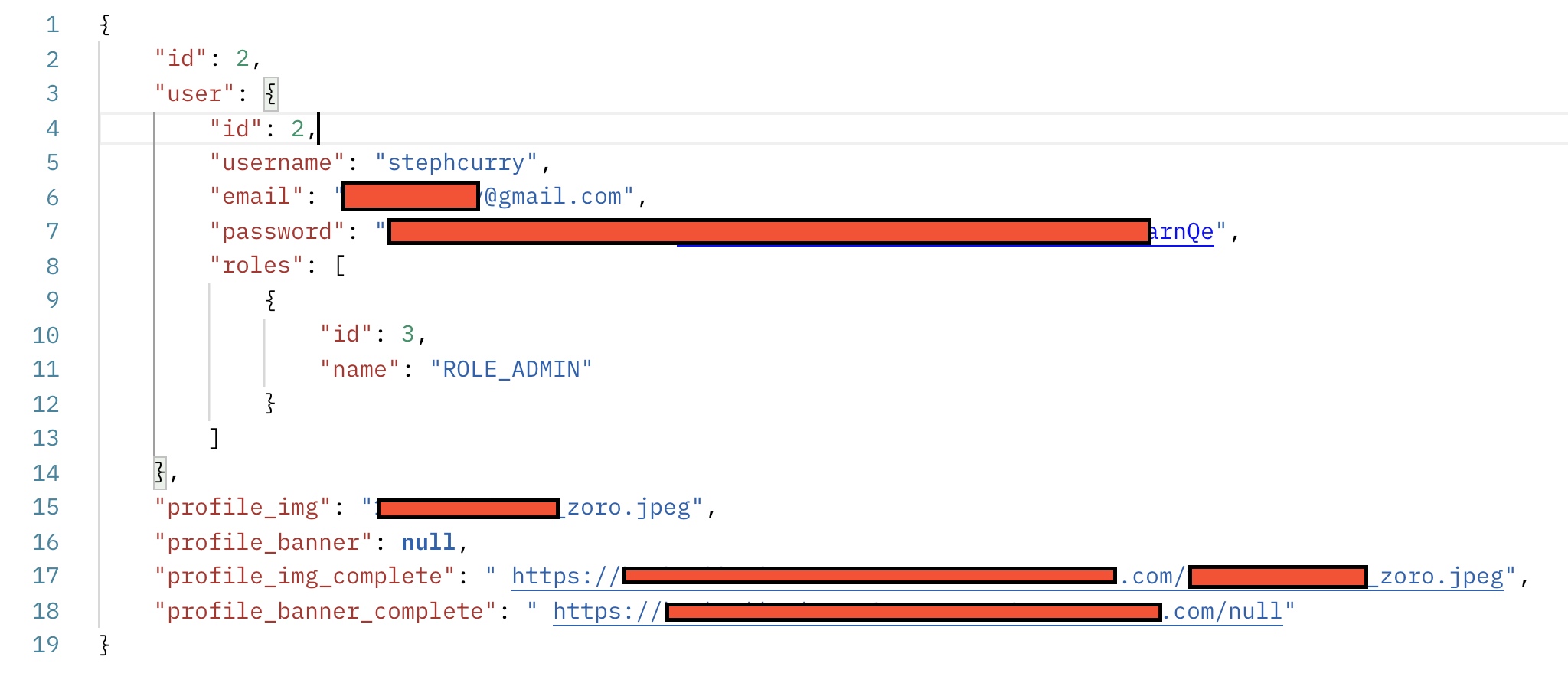
I am using a spring boot backend with a react.js frontend for a web application. Once a user is logged in, it directs the user to their Profile where they will have their username, profile picture, and a banner displayed on the screen. I have developed a backend service that returns the necessary information in the body of my GET request on Postman such as the link of the image (Profile or Banner). How can I use React to obtain the necessary link in profile_img_complete and insert it into my image that has a default image in it already if the value is null? My demo user has an image in the database ready to be used, so it should not be displaying the default image, but it is. Any help would be deeply appreciated, here is an image of the information on Postman.
enter image description here

Profile.jsx:

import React, {useState, useEffect} from 'react';
import {Link} from 'react-router-dom';
import {useSelector} from 'react-redux';
import UserProfileService from '../../services/user-profile.service';
import './styles/Profile.css';
const Profile = () => {
    const {user: currentUser} = useSelector((state) => state.auth);
    const {id: currentId} = useSelector((state) => state.auth);
    const [content, setContent] = useState('');
    const [photoURL, setPhotoURL] = useState('../../images/user-solid.svg');
 //user-solid is the default image I want if the profile image link is null
    useEffect(() => {
        UserProfileService.getProfile().then(
            (response) => {
                setContent(response.data);
            },
            (error) => {
                const _content =
                    (error.response &&
                        error.response.data &&
                        error.response.data.message) ||
                    error.message ||
                    error.toString();
                setContent(_content);
            }
        );
        if (currentId && currentId.profile_img_complete) {
            setPhotoURL(currentId.profile_img_complete);
        }
    }, [currentId]);

    if (!currentUser) {
        return <Link to='/login' />;
    }
    return (
        <div className='page'>
            <div className='profile-container'>
                <header className='jumbotron'>
                    <h3>
                        <strong id='profile-name'>{currentUser.username}</strong> Profile
                    </h3>
                </header>

                <p>
                    <img src={photoURL} alt='Avatar' className='avatar'></img>
                    <strong>Token:</strong> {currentUser.accessToken.substring(0, 20)} ...{' '}
                    {currentUser.accessToken.substr(currentUser.accessToken.length - 20)}
                </p>
                <p>
                    <strong>Id:</strong> {currentUser.id}
                </p>
                <p>
                    <strong>Email:</strong> {currentUser.email}
                </p>
                <strong>Authorities:</strong>
                <ul>
                    {currentUser.roles &&
                        currentUser.roles.map((role, index) => <li key={index}>{role}</li>)}
                </ul>
                <button>
                    <Link to={'/profile/edit'}>Edit Profile</Link>
                </button>
            </div>
        </div>
    );
};
export default Profile;

How to check if an input is undefined

So i have a function, lets say:

function a(string).....

and i want to check if the string is undefind. if it is do something
The code would look something like this:

function a(string){
 if(string == null){
 //do something
 }
 else{
 //do another thing
 }

The problem is it doesn’t seem to work, even if the string isn’t declared its still going to call the else. Maybe we could try doing

 if(string == "undefind"){
 //do something
 }
 else{
 //do something else
 }

but yet it doesn’t seem to change anything. null and undefind seem to work in the same way. Is there a specific function from a library that allows the checking if an input is declared? is there a way you could check it directly from the input with something like

if(string.isDeclared()==true){
//do something
}
else{
//do something else
}

Toggle onclick changes only in one class JavaScript [duplicate]

Script:

const toggle = document.getElementById('toggle');
const header = document.querySelector('header');
const a = document.querySelector('a');
const body = document.querySelector('body');

toggle.onclick = function() {
    toggle.classList.toggle('active');
    body.classList.toggle('active');
    header.classList.toggle('active');
    a.classList.toggle('active');
}

html:

<body>
    <header>
        <div class="header_section">
            <div class="header_item headerLogo">BLB</div>
            <div class="header_item headerButton"><a href="#">About</a></div>
            <div class="header_item headerButton"><a href="#">Posts</a></div>
            <div class="header_item headerButton"><a href="#">Source</a></div>
        </div>
        <div class="header_section">
            <div id="toggle">
                <i class="indicator"></i>
            </div>
        </div>
    </header>
    <script type="text/javascript" src="themes.js"></script>
</body>

When you click on the switch, it changes only the “About” button in “active”, but it should change all the buttons.

It works through “querySelector”, but I want it to work through “onclick”

npm update is not updating the version in package.json file

I am trying to update specific package in my project. I have checked it using npm outdated and then I run this command to update this package: npm update nameofpackage i.e., npm update slugify.

My package.json file is not got updated after that, although when i run npm outdated again it shows no outdated package. It means it got updated but my package.json file still shows the older version of the package.

Please let me know how can I update my package.json file also. I have tried npm update slugify --save also but it didn’t worked for me.

How to use default global variables defined in globals.js file for nightwatch e2e tests?

Inside generated globals.js file for the vue/cli-plugin-e2e-nightwatch package there is a part that looks like:

  'default': {
    /*
    The globals defined here are available everywhere in any test env
    */

    
    myGlobal: function() {
      return 'I'm a method';
    }
    
  },

if I comment out the given myGlobal function how is it used in actual e2e tests?

module.exports = {
  beforeEach: (browser) => browser.init(),

  'e2e tests using page objects': (browser) => {
      // browser.globals.myGlobal() doesn't work
      // myGlobal() also doesn't work
  }
}

There is documentation how to define global variables, but not how to use them.

How to make image fit on canvas without deforming

How to fit img to canvas, each time I put the //commented code the canvas disapears, I don’t know how to get around this one. So i gave it a few tries but the frame goes away and I would like the canvas to take the size of the image so no stretching or deforming. There must be a simple line to add just for the format. Currently the image goes beyonf the canvas format from the left top up.

window.requestAnimFrame =
    window.requestAnimationFrame ||
    window.webkitRequestAnimationFrame ||
    window.mozRequestAnimationFrame ||
    window.oRequestAnimationFrame ||
    window.msRequestAnimationFrame ||
    function (callback) {
        window.setTimeout(callback, 1e3 / 60)
    }

let curCanvas = document.getElementById('canvas0')
let curCtx = curCanvas.getContext('2d')

let imgCanvas = document.getElementById('canvas-ref')
let imgCtx = imgCanvas.getContext('2d')

curCanvas.width = parent.innerWidth
curCanvas.height = parent.innerHeight

//  imgCanvas.width = window.innerWidth
//  imgCanvas.height = window.innerHeight
// Create a variable for the canvas and it's context
// var canvas = document.getElementById("canvas-ref");
// var ctx = canvas.getContext("2d");

// // Initialise an image object
// var image = new Image();

// // When it loads an image
// image.onload = function() {
//   // Get the canvas' current style
//   var canvasStyle = getComputedStyle(canvas);
  
//   // Get it's current width, minus the px at the end
//   var canvasWidth = canvasStyle.width.replace("px", "");
  
//   // Work out the images ratio
//   var imageRatio = this.width/this.height;
  
//   // Work out the new height of the canvas, keeping in ratio with the image
//   var canvasHeight = canvasWidth/imageRatio;
  
//   // Set the canvas' height in the style tag to be correct
//   canvas.style.height = canvasHeight+"px";
  
//   // Set the width/height attributes to be correct (as this is what drawImage uses)
//   canvas.width = canvasWidth;
//   canvas.height = canvasHeight;
  
//   // Draw the image at the right width/height
//   ctx.drawImage(this, 0, 0, canvasWidth, canvasHeight);
// };


// Reference image
const img = new Image();

img.onload = () => {
    imgCanvas.width = img.naturalWidth
    imgCanvas.height = img.naturalHeight
    imgCtx.clearRect(0, 0, imgCanvas.width, imgCanvas.height);
    imgCtx.drawImage(img, 0, 0);
}

// const img = new Image();
// image.src = "imgURL";
// image.onload = function(){
//     scaleToFit(this);
// }
// function scaleToFit(img){
//     // get the scale
//     var scale = Math.min(canvas.width / img.width, canvas.height / img.height);
//     // get the top left position of the image
//     var x = (canvas.width / 2) - (img.width / 2) * scale;
//     var y = (canvas.height / 2) - (img.height / 2) * scale;
//     ctx.drawImage(img, x, y, img.width * scale, img.height * scale);
// }
// img.onload = () => {
//     imgCanvas.width = img.naturalWidth
//     imgCanvas.height = img.naturalHeight
//     imgCtx.clearRect(0, 0, imgCanvas.width, imgCanvas.height);
//     imgCtx.drawImage(img, 0, 0);
// }


curCtx.strokeStyle = '#555'

let mouse = {
    cut: 8,
    influence: 50,
    down: false,
    button: 1,
    x: 0,
    y: 0,
    px: 0,
    py: 0
}

class Point {
    constructor(x, y) {
        this.x = x
        this.y = y
        this.px = x
        this.py = y
        this.vx = 0
        this.vy = 0
        this.pinX = null
        this.pinY = null
        this.origx = x;
        this.origy = y;
        canvas1
        this.constraints = []
    }

    update(delta) {
        if (this.pinX && this.pinY) return this

        if (mouse.down) {
            let dx = this.x - mouse.x
            let dy = this.y - mouse.y
            let dist = Math.sqrt(dx * dx + dy * dy)

            if (mouse.button === 1 && dist < mouse.influence) {
                this.px = this.x - (mouse.x - mouse.px)
                this.py = this.y - (mouse.y - mouse.py)
            } else if (dist < mouse.cut) {
                this.constraints = []
            }
        }

        this.addForce(0, gravity)

        let nx = this.x + (this.x - this.px) * friction + this.vx * delta
        let ny = this.y + (this.y - this.py) * friction + this.vy * delta

        this.px = this.x
        this.py = this.y

        this.x = nx
        this.y = ny

        this.vy = this.vx = 0

        if (this.x >= curCanvas.width) {
            this.px = curCanvas.width + (curCanvas.width - this.px) * bounce
            this.x = curCanvas.width
        } else if (this.x <= 0) {
            this.px *= -1 * bounce
            this.x = 0
        }

        if (this.y >= curCanvas.height) {
            this.py = curCanvas.height + (curCanvas.height - this.py) * bounce
            this.y = curCanvas.height
        } else if (this.y <= 0) {
            this.py *= -1 * bounce
            this.y = 0
        }

        return this
    }

    draw() {
        let i = this.constraints.length
        while (i--) this.constraints[i].draw()
    }

    resolve() {
        if (this.pinX && this.pinY) {
            this.x = this.pinX
            this.y = this.pinY
            return
        }

        this.constraints.forEach((constraint) => constraint.resolve())
    }

    attach(point) {
        this.constraints.push(new Constraint(this, point))
    }

    free(constraint) {
        this.constraints.splice(this.constraints.indexOf(constraint), 1)
    }

    addForce(x, y) {
        this.vx += x
        this.vy += y
    }

    pin(pinx, piny) {
        this.pinX = pinx
        this.pinY = piny
    }
}

class Constraint {
    constructor(p1, p2) {
        this.p1 = p1
        this.p2 = p2
        this.length = spacing
    }

    resolve() {
        let dx = this.p1.x - this.p2.x
        let dy = this.p1.y - this.p2.y
        let dist = Math.sqrt(dx * dx + dy * dy)

        if (dist < this.length) return

        let diff = (this.length - dist) / dist

        if (dist > tearDist) this.p1.free(this)

        let mul = diff * 0.5 * (1 - this.length / dist)

        let px = dx * mul
        let py = dy * mul

        !this.p1.pinX && (this.p1.x += px)
        !this.p1.pinY && (this.p1.y += py)
        !this.p2.pinX && (this.p2.x -= px)
        !this.p2.pinY && (this.p2.y -= py)

        return this
    }

    draw() {
        curCtx.drawImage(imgCanvas, this.p1.origx, this.p1.origy, 
            spacing, spacing, this.p1.x, this.p1.y, spacing + 1, spacing + 1);
    }
}

class Cloth {
    constructor() {
        this.points = []

        let startX = curCanvas.width / 2 - (clothWidth * spacing / 2)
        
        console.log("Start x", startX);
        for (let y = 0; y <= clothHeight; y++) {
            for (let x = 0; x <= clothWidth; x++) {
                let point = new Point(startX + x * spacing, 5 + y * spacing)
                y === 0 && point.pin(point.x, point.y)
                x !== 0 && point.attach(this.points[this.points.length - 1])
                y !== 0 && point.attach(this.points[x + (y - 1) * (clothWidth + 1)])

                this.points.push(point)
            }
        }
    }

    update(delta) {
        let i = accuracy

        while (i--) {
            this.points.forEach((point) => {
                point.resolve()
            })
        }

        curCtx.beginPath()
        this.points.forEach((point) => {
            point.update(delta * delta).draw()
        })
        curCtx.stroke()
    }
}

function setMouse(e) {
    if (curCanvas === null) return;

    let rect = curCanvas.getBoundingClientRect()
    mouse.px = mouse.x
    mouse.py = mouse.y
    mouse.x = e.clientX - rect.left * 0.5
    mouse.y = e.clientY - rect.top
}

function bindEvents(c) {
    if (curCanvas === null) return;

    c.onmousedown = (e) => {
        mouse.button = e.which
        mouse.down = true
        setMouse(e)
    }
    c.onmousemove = setMouse
    c.onmouseup = () => (mouse.down = false)
    c.oncontextmenu = (e) => e.preventDefault()
}

function load_canvas(id) {
    console.log("Loading canvas ", id);
    switch (id) {
      case 0:
        canvas0();
        break;
      case 1:
        canvas1();
        break;
      case 2:
        canvas2();
        break;
      case 3:
        canvas3();
        break;
      case 4:
        canvas4();
        break;
      case 5:
        canvas5();
        break;
      case 6:
        canvas6();
        break;
      case 7:
        canvas7();
        break;
      case 8:
        canvas8();
        break;
      case 9:
        canvas9();
        break;
      case 10:
        canvas10();
        break;
    case 11:
        canvas11();
        break;

      default:
        break;
    }
    console.log("Binding mouse events");
    bindEvents(curCanvas)
}

window.onload = function () {
    load_canvas(0) // Ne pas modifier
}

Module pattern variable returning undefined in test?

I have the following code below which returns certain data depending on NODE_ENV:

config.js

export const Config = (() => {
    let data;

    switch (process.env.NODE_ENV) {
        case 'development':
            data = '123';
            break;
        case 'production':
            data = '456'
            break;
        default:
            break;
    }

    return {
        data
    };
})();

This works well in my component when I set NODE_ENV. However in my test, I keep getting undefined as a result.

config.test.js

describe('Config', () => {
    test('returns correct data if NODE_ENV is development', () => {
        process.env = { ...process.env, NODE_ENV: 'development' };

        expect(Config.data).toBe('123'); // returns undefined, expected '123'
    });

    test('returns correct data if NODE_ENV is production', () => {
        process.env = { ...process.env, NODE_ENV: 'production' };

        expect(Config.data).toBe('456'); // returns undefined, expected '456'
    });
});

Again, Config.data works fine in my React component when I start it up, but I guess I need to somehow initialize this for it to work in my tests? Any advice would be appreciated!

Save countup timestamp to local storage

I’m completely new to stack and code and just looking for some assistance on saving elapsed time for a game.
When a seperate endGame function runs on completing all remaining questions, I want to add in the capability to save the timecount to local storage (to be viewable on a leaderboard).

My understanding is that I should look to store the start timestamp and the time elapsed (I have a start onclick button, and relying on the seperate endGame() to execute clearInterval / stop timer and save the timecount to localStorage.

I found a similar thread How to save countup timer upon browser refresh? which I am working to incorporate a similar solve however, I’ve broken the 00:00 minute:second layout which doesn’t seem to increment upwards or downwards randomly both) and the start timestamp in console log shows a long string.

I think it may have something to do with how I’ve set up the selectors minutes and seconds, but any guidance or help would be much appreciated to get me on track! thank you

Link to codepen here ~

  <div class="timer">
    <span class="minutes">
      00
    </span>
    :
    <span class="seconds">
      00
    </span>
  </div>
</div>


    <button class="btn btn-lg btn-success" data-action="start">
      Start
    </button>

______________________________________


const btnStartElement = document.querySelector('[data-action="start"]');
const minutes = document.querySelector('.minutes');
const seconds = document.querySelector('.seconds');
let timerTime = 0;
// changes here
let intervalId = null;
let startTimestamp = 0;

const start = () => {
  isRunning = true;
  interval = setInterval(incrementTimer, 1000)
}

const pad = (number) => {
  return (number < 10) ? '0' + number : number;
}

const incrementTimer = () => {
  let totalSeconds = (Date.now() - startTimestamp) / 1000;
  timerTime++;
  const numberMinutes = Math.floor(timerTime / 60);
  const numberSeconds = totalSeconds - (timerTime % 60);
  console.log(localStorage)
  
  minutes.innerText = pad(numberMinutes);
  seconds.innerText = pad(numberSeconds);

}
{
    const _startTimestamp = localStorage.getItem("start-timestamp");
    if (_startTimestamp) {
        startTimestamp = Number(_startTimestamp);
        intervalId = setInterval(incrementTimer, 1000);
    }
}

btnStartElement.addEventListener('click', startTimer = () => {
  start();
   if (!intervalId) {
      startTimestamp = Date.now();
      localStorage.setItem("start-timestamp", startTimestamp);
      intervalId = setInterval(incrementTimer, 1000);

}
});

Unable to show loader on screen between ngOnInit and ngAfterViewInit lifecycle hooks in Angular

I have an angular component which has some components on its template which take some time to load, As a result the control to ngAfterViewinit() lifecycle hook reaches after some time (~20s) after the component is initialized in ngOnInit(). I want to show a loader on screen in the mean time, but I am unable to do so as the wait component only renders after ngAfterViewinit() and I need to show the loader before this hook.

I am having a component in template as given below to show the loader symbol.

  <wait [isLoading]="isLoading" ></wait>

The problem is that the variable isLoading is reflected to template only after ngAfterViewinit() though it is initialized in ngOnInit().

Javascript DOM capturing after using javascript to insert dom

I have a question regarding DOM manipulation, say I insert a grid using this function:

const grid__container = document.querySelector('.grid__container');

function createVertexes() {
    for (let i = 0; i < 9; i++) {
        const grid = document.createElement("div");
        grid.setAttribute('class', "vertex");
        grid.setAttribute('id', i+1);
        grid__container.appendChild(grid);

    }
}

afterwards, I try to grab all the vertexes with the class “vertex” using document.querySelectorAll(“vertex”) it doesnt work:

const vertexes = document.qeurySelectorAll('vertex');

but this works:

const vertexes = grid__container.childNodes;

I see that the difference is that grid__container is pre-defined in my HTML file, but I wrote the querySelectorALL method in a top down approach, so I dont understand why query selector doesnt work, because I created the elements then tried to grab it, anyone knows why?

I only know this is called DOM-manipulation and not know the exact name of this error and am quite new to javascript, please help.