How to enable website notifications for Safari

I have notifications switched on in System Preferences and Safari, but ‘website permissions’ appear in every Safari preferences category, but not in Notifications.

I have a website asking me to allow their notifications – but no way of allowing them, as they don’t show up in notifications box when the webpage is active.

Below is my screenshot, on the right they are asking permissions, and showing how to allow them, and on the left, my Notifications box with no websites in it…

Q1- Can anyone advise how to enable website notifications – or even get them to show up?

Q2- why safari is mot showing ask notification permission box by default if requested through service worker like chrome or Firefox ?

Strictly parsing ISO 8601 date time in JavaScript

Parsing ISO 8601 datetime in JS should be as simple as Date.parse. Yet the following are valid date time strings:

console.log(Date.parse("Us-east-2"));   // 980978400000
console.log(Date.parse("What-the-3"));  // 983397600000

Can someone shed some light on this matter? How can I make sure this will not be parsed as a valid ISO 8601 date?

Day.js seems to parse it, even though it mentions it would parse ISO 8601.

It seems that only Moment.js would return error on these strings, yet I do not wish to use Moment as it is deprecated. I guess that the proper way would be to use regex, but is there a widely-accepted solution to ensure the format is strictly ISO 8601 that does not resort to using regex?

Facing default value issue for resizing images

I have used react quill in my react project with react hook form. It is working fine when I store some data & show it in browser. But if I want to see the same value in react quill editor, then the image size has been changed to actual size. Every time, I need to resize it while updating.
I have default value like this

"<p>Test</p><p><img src="data:image/png;base64,/9j/...../9k=" style="cursor: nwse-resize;" width="97"></p>"

I am expecting that inside quill editor, default image width will be 97. I have added the sample code below

import ReactQuill, { Quill } from 'react-quill';
import ImageResize from 'quill-image-resize-module-react';
import { ImageDrop } from 'quill-image-drop-module';
import { useForm, useFieldArray, Controller } from "react-hook-form";

Quill.register('modules/imageResize', ImageResize);
Quill.register('modules/imageDrop', ImageDrop);

const modules = {
    toolbar: [
        [
            'bold',
            'italic',
            'underline',
            'strike'
        ],
        [
            'blockquote',
            'code-block'
        ],
        [
            {
                header: [
                    1,
                    2,
                    3,
                    4,
                    5,
                    6,
                    false
                ]
            }
        ],
        [
            {
                list: 'ordered'
            },
            {
                list: 'bullet'
            }
        ],
        [
            {
                script: 'sub'
            },
            {
                script: 'super'
            }
        ],
        [
            {
                indent: '-1'
            },
            {
                indent: '+1'
            }
        ],
        [
            {
                direction: 'rtl'
            }
        ],
        [
            {
                color: []
            },
            {
                background: []
            }
        ],
        [
            'link',
            'image',
            'video'
        ],
        [
            'clean'
        ]
    ],
    clipboard: {
        matchVisual: false
    },
    imageResize: {
        parchment: Quill.import('parchment'),
        modules: [
            'Resize',
            'DisplaySize',
            'Toolbar'
        ],
        displaySize: true
    },
    imageDrop: true
};

const formats = [
    'header',
    'font',
    'size',
    'bold',
    'italic',
    'underline',
    'strike',
    'blockquote',
    'list',
    'bullet',
    'indent',
    'link',
    'image',
    'video',
    'color',
    'align',
    'background',
    'direction',
    'code-block',
    'code'
];

<Controller
    id='description'
    name={`description`}
    control={control}
    render={({ field }) => (
        <ReactQuill
            theme="snow"
            value={field.value}
            modules={modules}
            formats={formats}
            onChange={field.onChange}
        />
    )}
    rules={{
        required: "Description is required"
    }}
/>

Thank you in advance for your help and guidance
How to show React popup in jsf application?

I have a requirement where I need to show a react popup dialog when clicked a button which existed in JSF application. So, when user clicked that button in JSF, it should somehow show React popup which has some react js components

I tried to create web component of React app(vite), but when integrated with JSF, Jquery of JSF and Build file of React js got some conflicts, Even I tried to build using npm run build , but no luck, same conflicts occurs.

Vite Proxy config leading to infinite loop

I’m building a simple chat app with Vite + React.
I have a form that accepts text input and when that input is submitted, it calls a fetch to hit my own API:

        const response = await fetch('/api/chat', {
            method: 'POST',
            headers: {
                'Content-Type': 'application/json',
            },
            body: JSON.stringify({ messages, model }),
        });

I have a server set up to accept these post requests (/src/api/chat.ts)

But the main issue here is my vite config, which is as follows:

export default defineConfig({
  plugins: [react()],
  server: {
    port: 3000,
    open: true,
    proxy: {
      '/api/chat': {
        target: 'http://localhost:3000',
        selfHandleResponse: true,
        configure: (proxy, options) => {
          proxy.on('proxyReq', (proxyReq, req: any, res) => {
            // This code runs infinitely
            console.log('Sending Request to the Target:', req.method, req.url);
            handleProxyRequest(req, res);
          });
          proxy.on('error', (err, req, res) => {
            console.error('Proxy error:', err, req, res);
          });
        }
      }
    }
  }
});

If I submit the form or otherwise make the post to https://localhost:3000/api/chat, I get an infinite loop of logs:

Sending Request to the Target: POST /api/chat
...

My expectation is that this config would just accept the single POST request and send it on to the handleProxyRequest function, but instead it just infinitely loops on that code block.

What am I missing here?

Automatic submit after type the last digit – C#/Blazor

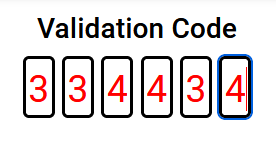
I have a field to input 6 numbers, here’s what it looks like:

Validation form

And I’d like to have the form submitted as soon as the 6th number has been added but I don’t know how to use JS and everything seems to be using JS to do this.

Of course, the goal would be to use C# to do this if possible or to be able for the JS code to communicate with the C# code.

So far, the code makes it so that when I click on the inputs, it starts at the first one, and after each number input, it moves onto the next.
But how could I not only submit the form upon entering the last number, but also get these numbers into a variable or a property that could be used in a submit function ?

Every answer I looked for was in JS and I don’t understand anything when it’s JS. I don’t even understand the JS I’m using but it works so far and as bad as I know it is not to fully be in control of your code unfortunately I couldn’t find any example in C#.

Here’s the code associated to it:

CodeValidation.cs:

<div class="card text-center ">
    <div class="card-body">
        <EditForm Model="Code" OnValidSubmit="@VerifyCode" FormName="one-time-code" class="otc">
            <fieldset>
                <!-- https://developer.apple.com/documentation/security/password_autofill/enabling_password_autofill_on_an_html_input_element -->
                <div>
                    <input type="number" pattern="[0-9]*" value="" inputtype="numeric" autocomplete="one-time-code" id="otc-1" required>
                    <!-- Autocomplete not to put on other input -->
                    <input type="number" pattern="[0-9]*" min="0" max="9" maxlength="1" value="" inputtype="numeric" id="otc-2" required>
                    <input type="number" pattern="[0-9]*" min="0" max="9" maxlength="1" value="" inputtype="numeric" id="otc-3" required>
                    <input type="number" pattern="[0-9]*" min="0" max="9" maxlength="1" value="" inputtype="numeric" id="otc-4" required>
                    <input type="number" pattern="[0-9]*" min="0" max="9" maxlength="1" value="" inputtype="numeric" id="otc-5" required>
                    <input type="number" pattern="[0-9]*" min="0" max="9" maxlength="1" value="" inputtype="numeric" id="otc-6" required>
                </div>
            </fieldset>
        </EditForm>
    </div>
</div>

<script>
    let in1 = document.getElementById('otc-1'),
        ins = document.querySelectorAll('input[type="number"]'),
        splitNumber = function(e) {
            let data = e.data || e.target.value; // Chrome doesn't get the e.data, it's always empty, fallback to value then.
            if ( ! data ) return; // Shouldn't happen, just in case.
            if ( data.length === 1 ) return; // Here is a normal behavior, not a paste action.

            popuNext(e.target, data);
            //for (i = 0; i < data.length; i++ ) { ins[i].value = data[i]; }
        },
        popuNext = function(el, data) {
            el.value = data[0]; // Apply first item to first input
            data = data.substring(1); // remove the first char.
            if ( el.nextElementSibling && data.length ) {
                // Do the same with the next element and next data
                popuNext(el.nextElementSibling, data);
            }
        };

    ins.forEach(function(input) {
        /**
         * Control on keyup to catch what the user intent to do.
         * I could have check for numeric key only here, but I didn't.
         */
        input.addEventListener('keyup', function(e){
            // Break if Shift, Tab, CMD, Option, Control.
            if (e.keyCode === 16 || e.keyCode == 9 || e.keyCode == 224 || e.keyCode == 18 || e.keyCode == 17) {
                return;
            }

            // On Backspace or left arrow, go to the previous field.
            if ( (e.keyCode === 8 || e.keyCode === 37) && this.previousElementSibling && this.previousElementSibling.tagName === "INPUT" ) {
                this.previousElementSibling.select();
            } else if (e.keyCode !== 8 && this.nextElementSibling) {
                this.nextElementSibling.select();
            }

            // If the target is populated to quickly, value length can be > 1
            if ( e.target.value.length > 1 ) {
                splitNumber(e);
            }
        });

        /**
         * Better control on Focus
         * - don't allow focus on other field if the first one is empty
         * - don't allow focus on field if the previous one if empty (debatable)
         * - get the focus on the first empty field
         */
        input.addEventListener('focus', function(e) {
            // If the focus element is the first one, do nothing
            if ( this === in1 ) return;

            // If value of input 1 is empty, focus it.
            if ( in1.value == '' ) {
                in1.focus();
            }

            // If value of a previous input is empty, focus it.
            // To remove if you don't wanna force user respecting the fields order.
            if ( this.previousElementSibling.value == '' ) {
                this.previousElementSibling.focus();
            }
        });
    });

    /**
     * Handle copy/paste of a big number.
     * It catches the value pasted on the first field and spread it into the inputs.
     */
    in1.addEventListener('input', splitNumber);
</script>

Image Slider Not Appearing

I’ve created an image slider for my website.

var count = 1;
setInterval(function() {
  document.getElementById('radio-button' + count).checked = true;
  count ++;
  if(count > 5){
    count = 1;
  }
}, 5000);
.slider {
  width: 85%;
  height: 100%;
  border-radius: 10px;
  overflow: hidden;
  text-align: center;
  position: relative;
  left: 50%;
  transform: translateX(-50%);
}

.slides {
  width: 500%;
  display: flex;
}

.slides input {
  display: none;
}

.slide {
  width: 20%;
  transition: 2s;
}

.slide img {
  width: 100%;
  height: 100%;
}

.slide-manual {
  position: relative;
  width: 100%;
  margin-top: -60px;
  display: flex;
  align-items: center;
  justify-content: center;
}

.manual-button {
  border: 2px solid #FFFFFF;
  padding: 5px;
  border-radius: 10px;
  cursor: pointer;
  transition: 1s;
  margin: 15px;
}

.manual-button:hover {
  background: #FFFFFF;
}

#radio-button1:checked~.one {
  margin-left: 0;
}

#radio-button2:checked~.one {
  margin-left: -20%;
}

#radio-button3:checked~.one {
  margin-left: -40%;
}

#radio-button4:checked~.one {
  margin-left: -60%;
}

#radio-button5:checked~.one {
  margin-left: -80%;
}

.slide-automatic {
  position: absolute;
  display: flex;
  width: 100%;
  justify-content: center;
  align-items: center;
  margin-left: 0%;
  margin-right: 0%;
  bottom:0;

}

.slide-automatic div {
  border: 2px solid #FFFFFF;
  padding: 5px;
  border-radius: 10px;
  transition: 1S;
  margin: 15px;
}

#radio-button1:checked~.slide-automatic .auto-button1 ,
#radio-button2:checked~.slide-automatic .auto-button2 ,
#radio-button3:checked~.slide-automatic .auto-button3 ,
#radio-button4:checked~.slide-automatic .auto-button4 ,
#radio-button5:checked~.slide-automatic .auto-button5 {
  background: #FFFFFF;
}
<div class="slider">
    <div class="slides">
      <input type="radio" name="radio-button" id="radio-button1">
      <input type="radio" name="radio-button" id="radio-button2">
      <input type="radio" name="radio-button" id="radio-button3">
      <input type="radio" name="radio-button" id="radio-button4">
      <input type="radio" name="radio-button" id="radio-button5">

      <div class="slide one">
       <a href="#"><img loading="lazy" src="https://picsum.photos/id/760/500" alt="#"></a>
      </div>

      <div class="slide">
       <a href="#"><img loading="lazy" src="https://picsum.photos/id/764/500" alt="#"></a>
      </div>

      <div class="slide">
       <a href="#"><img loading="lazy" src="https://picsum.photos/id/765/500" alt="#"></a>
      </div>

      <div class="slide">
       <a href="#"><img loading="lazy" src="https://picsum.photos/id/767/500" alt="#"></a>
      </div>

      <div class="slide">
       <a href="#"><img loading="lazy" src="https://picsum.photos/id/768/500" alt="#"></a>
      </div>

      <div class="slide-automatic">
        <div class="auto-button1"></div>
        <div class="auto-button2"></div>
        <div class="auto-button3"></div>
        <div class="auto-button4"></div>
        <div class="auto-button5"></div>
      </div>
    </div>

    <div class="slide-manual">
      <label for="radio-button1" class="manual-button"></label>
      <label for="radio-button2" class="manual-button"></label>
      <label for="radio-button3" class="manual-button"></label>
      <label for="radio-button4" class="manual-button"></label>
      <label for="radio-button5" class="manual-button"></label>
    </div>
  </div>

When I first tested the image slider it was working without any issues. However, when I uploaded it to my website, the image slider didn’t appear. On the PC version of the website, it seems to have been overlapped by other content and is almost unviewable. On the mobile version of the website, the images don’t appear but still seem to be functioning.

Could my photos cause this issue?
Is there a problem with the image slider itself?

Any help would be much appreciated.

Add Bullets points to New Line within a textarea

I have a textarea that I want users be able to input text in

<div class="col-12 col-sm-12 col-md-12 col-lg-12 col-xl-12 p-0">
    <div class="blu-heading">Clarification Remarks</div>
    <div class="table-responsive tabledesign">
        <table class="table table-bordered" id="mytable1">
            <thead>
                <tr>
                    <th>Sr.No.</th>
                    <th scope="col">Remarks</th>
                    <th scope="col">Date of Query</th>
                    <th scope="col">User Remarks</th>
                    <th scope="col">Date of Reply</th>
                </tr>
            </thead>
            <tbody>
                <c:forEach items="${lmApplicationRemarks}" var="doc" varStatus="status">
                    <tr>
                        <td>${status.index + 1}</td>
                        <td>${doc.remarks}</td>
                        <td><fmt:formatDate value="${doc.dateQuery}" pattern="dd/MM/yyyy" /></td>
                        <td>${doc.userRemarks}</td>
                        <td><fmt:formatDate value="${doc.dateReply}" pattern="dd/MM/yyyy" /></td>
                    </tr>
                </c:forEach>
            </tbody>
        </table>
    </div>
</div>

now my output is like this
1. Please update full detailed address of the factory location on the application. 2. You are requested to submit suggested/estimated turnover from the project for the next 3-5 years. 3. You are requested to provide a declaration stating that the company abides by the Press No.

but i want
1. Please update full detailed address of the factory location on the application.
2. You are requested to submit suggested/estimated turnover from the project for the next 3-5 years.
3. You are requested to provide a declaration stating that the company abides by the Press No.

How to add CSS(preferably) or JS style, to a div element only if a specific child element from another parent div exists?

I want to add a top-border to #childmenulist only if .title.lengthyText.subcontainer contains an element called #highLayer id attribute. If there is no #highLayer id attribute, then there is no top-border for #childmenulist.

I tried to do this using jQuery, but I am wondering if there is a CSS solution to this scenario? Also my jQuery code works, but I don’t think it’s the best solution performance wise.

if ($('.title.lengthyText #highLayer').length > 0) {
  $("#childmenuList").css("border-top", "3px solid red");
}
<script src="https://cdnjs.cloudflare.com/ajax/libs/jquery/3.7.1/jquery.min.js"></script>
<div class="title lengthyText">
  <div class="subcontainer">
    <nav id="highLayer" class="high-lay">Nav</nav>
  </div>
  <div id="childmenuList">child menu</div>
</div>

function is declared but never read

I am trying to make a vending machine

here is the js

//functions for stock management
function stockplus(stockid,spanid,name,price,imgurl){
    if(document.getElementById(stockid).textContent == 0){
        fun += 1;
        document.getElementById(stockid).style.color = 'red';
        alert('NO ITEM LEFT');
        if(fun >= 3)
        alert("seriously bro!?");//hehehe
        return;
    }
    //managing the stocks and quantitiy in cart
    document.getElementById(stockid).textContent -= 1;
    document.getElementById(spanid).textContent = Number(document.getElementById(spanid).textContent)+1;
    cart.addtocart(quantity,name,price,imgurl)
}
function stockminus(stockid,spanid,name,price,imgurl){
    if(document.getElementById(stockid).textContent == 0){
        return;
    }
    //manually setting the stock limits :(
    if((stockid == 'skittelstock' ||stockid == 'pepitostock'||stockid == 'pizzaoatstock')&&document.getElementById(stockid).textContent >= 30 
    ||(stockid == 'mnmstock' ||stockid == 'pringlestock'||stockid == 'maggistock')&&document.getElementById(stockid).textContent >= 20
    ||(stockid == 'chowmeinstock' ||stockid == 'topramenstock'||stockid == 'pepsistock')&&document.getElementById(stockid).textContent >= 15
    ||(stockid == 'cokestock' ||stockid == 'monsterstock')&&document.getElementById(stockid).textContent >= 10
    ){
    return;
    } 
    //managing the stocks and quantity in cart
    document.getElementById(stockid).textContent = Number(document.getElementById(stockid).textContent) +1;
    quantity = document.getElementById(spanid).textContent = Number(document.getElementById(spanid).textContent)-1;
    cart.addtocart(quantity,name,price,imgurl)
}

I called it from html using onclick.I have imported cart.js and cart.js has a function addtocart().I am also using tailwindcss as CDN

the error i get is
index.html:34 Uncaught ReferenceError: stockplus is not defined
at HTMLButtonElement.onclick (index.html:34:424)

No errors the function should be called and addtocart() should work

Javascript library to extract webpage forms in human readable format [closed]

I want to write a Chrome extension to extract user-filled information from forms on web pages. Are there any tools or javascript libraries that can help with this?

Note that I want to extract the information in a human-readable format, so I want the labels of the options and the title of the questions to be extracted, instead of having the HTML element name in the extracted result.

Thanks in advance!

Property ‘value” of object ‘Backend’ error when using QWebChannel in Python

Main module:

import f_main

if __name__ == "__main__":
    app = QApplication(sys.argv)
    f_main.WMain.show()
    sys.exit(app.exec_())

f_main module

class Backend(QtCore.QObject):
    valueChanged = QtCore.pyqtSignal(str)

    def __init__(self, parent=None):
        super().__init__(parent)
        self._value = ""

    @QtCore.pyqtProperty(str)
    def value(self):
        return self._value

    @value.setter
    def value(self, v):
        self._value = v
        self.valueChanged.emit(v)

class WB(QWebEngineView):
    def __init__(self):
        super(WB, self).__init__()
        self.settings = QSettings("MyCompany", "MyApp")
        geom = self.settings.value("geometry", "")
        s_ini._m['js'] = self.settings.value("js", {})
        if not s_ini._m['js']:
            s_ini._m['js'] = {}
        if geom != '':
            self.restoreGeometry(geom)
        
        self.backend = Backend()
        self.backend.valueChanged.connect(self.fromJS)
        self.webchannel = QtWebChannel.QWebChannel()
        self.webchannel.registerObject("backend", self.backend)
        self.setPage(WebEnginePage(self))
        self.page().setWebChannel(self.webchannel)

Javascript in web page:

new QWebChannel(qt.webChannelTransport, function (channel) {
    backend = channel.objects.backend;
});

But when I run get error:
Property ‘value” of object ‘Backend’ has no notify signal and is not constant, value updates in HTML will be broken!

Uncaught ReferenceError: process is not defined in React (Webpack), how to fix?

I’m working on a React project that uses JWT for authentication. Everything was working fine, but recently I encountered an error in the browser console saying:
“Uncaught ReferenceError: process is not defined”
This error appears in the file readable-stream/lib/_stream_writable.js when I try to run the app.

Project Context:

React version: 18.3.1

Webpack version: 4.42.0 (updated to version 5 recently)

Key dependencies:

  1. JWT: I’m using jsonwebtoken to generate and verify tokens.
  2. React-router-dom: For routing.
  3. Axios: For making HTTP requests.
  4. React-bootstrap: For UI components.
  5. Backend: I’m using Express and JWT for authentication

What I’ve Tried So Far:

  1. Checking for usage of process: I identified that the error is
    related to process usage inside readable-stream. I tried several
    approaches to fix it:

Using polyfills for process and other Node.js modules (such as crypto, stream):

    config.resolve.fallback = {
  ...config.resolve.fallback,
  process: require.resolve('process/browser'),
  crypto: require.resolve('crypto-browserify'),
  stream: require.resolve('stream-browserify'),
};

But the error still persists, and process is not defined keeps appearing.

  1. Reinstalling dependencies: I tried deleting node_modules and the
    package-lock.json file, then running npm install. I also tried
    updating several dependencies, including react-scripts and webpack.

  2. Checking Webpack configuration: I checked my config-overrides.js
    file to make sure it’s correctly configured to use polyfills and
    resolve Node.js dependencies. I followed the documentation for
    customize-cra and webpack.

  3. Using react-app-rewired: To avoid the limitations of
    create-react-app, I’m using react-app-rewired to modify Webpack
    configuration. I tried removing it and using react-scripts directly,
    but no luck.

  4. Updating Webpack: I updated Webpack from version 4.42.0 to 5.97.1, but
    the error persists.

Relevant Files:

  1. config-overrides.js:
const { override, addWebpackAlias } = require('customize-cra');
const webpack = require('webpack');
const path = require('path');

module.exports = override(
  addWebpackAlias({
    "http": require.resolve("stream-http"),
    "https": require.resolve("https-browserify"),
    "assert": require.resolve("assert/"),
    "util": require.resolve("util/"),
    "zlib": require.resolve("browserify-zlib"),
    "stream": require.resolve("stream-browserify"),
    "url": require.resolve("url/"),
    "crypto": require.resolve("crypto-browserify"),
    "process": require.resolve("process/browser"), // Polyfill for process
  }),
  (config) => {
    config.resolve = {
      ...config.resolve,
      fallback: {
        ...config.resolve.fallback,
        process: require.resolve("process/browser"), // Ensuring 'process' is available
        crypto: require.resolve("crypto-browserify"),
        stream: require.resolve("stream-browserify"),
        buffer: require.resolve("buffer/"),
      },
    };
    config.plugins = [
      ...(config.plugins || []),
      new webpack.ProvidePlugin({
        process: 'process/browser',
        Buffer: ['buffer', 'Buffer'],
      }),
    ];
    return config;
  }
);
  1. package.json:
{
  "dependencies": {
    "jsonwebtoken": "^9.0.2",
    "react-scripts": "^5.0.1",
    "webpack": "^5.0.0",
    "react-app-rewired": "^2.2.1",
    "axios": "^1.7.9",
    "react-router-dom": "^6.23.1",
    "react-bootstrap": "^2.10.2"
  }
}

Console Error:

Uncaught ReferenceError: process is not defined
    at ./node_modules/readable-stream/lib/_stream_writable.js (http://localhost:3000/static/js/bundle.js:105779:18)
    at options.factory (http://localhost:3000/static/js/bundle.js:141002:31)
    at __webpack_require__ (http://localhost:3000/static/js/bundle.js:140424:32)
    at fn (http://localhost:3000/static/js/bundle.js:140661:21)
    at ./node_modules/readable-stream/readable-browser.js (http://localhost:3000/static/js/bundle.js:106604:20)
    at options.factory (http://localhost:3000/static/js/bundle.js:141002:31)
    at __webpack_require__ (http://localhost:3000/static/js/bundle.js:140424:32)
    at fn (http://localhost:3000/static/js/bundle.js:140661:21)
    at ./node_modules/browserify-sign/browser/index.js (http://localhost:3000/static/js/bundle.js:28898:14)

Questions:

  • Why is process not defined even though I’ve correctly polyfilled it
    in my Webpack config?
  • Is there another approach to fix the process
    error with webpack?

Additional Details:

  • I have tried common solutions (adding polyfills and fallbacks), but I’m still encountering the same error.
  • I’m using jsonwebtoken for JWTand axios for API requests.
  • The error appears in the browser, not on the development server,
    which makes me think there’s an issue in the Webpack client
    configuration.

How to CSS constrain Object tag with SVG inside containing DIV [closed]

If you look at this example you will see that if you turn the phone into portrait mode an click one of the right most yellow boxes (to relocate the arrow) you will see scrollbars appear.

I can prevent this by setting overflow to hidden on the wholescreem DIV but why isn’t the OBJECT tag being contained inside its DIV?

The “arrow” object has object-fit set to contain and max-width 100%

Use Import and Require to import JSON impact on the construction time of Webpack, vue cli5

I have a repo that built by vue/cli5 for vue3. I also use vue-i18n here. The main.

import { createApp } from "vue";
import App from "./App.vue";
import router from "./router";
import store from "./store";
import i18n from "./locales";
const app = createApp(App);
app.use(store);
app.use(router);
app.use(i18n);
app.mount("#app");
export default app;

the locales/index.ts is:

import { createI18n } from "vue-i18n";
import en from "./en.json";
import id from "./id.json";

const i18n = createI18n({
    legacy: false,
    locale: process.env.VUE_APP_LANG, // set locale
    messages: {
        en,
        id,
    },
});

export default i18n;

There is hundreds of pages use i18n. Some of use it like

import i18n from "@/locales";
const { t } = i18n.global;

or

import { useI18n } from "vue-i18n";
const { t } = useI18n;

When i run npm run build. It takes 180s and its really slow. But I change the locales/index.ts to:

import { createI18n } from "vue-i18n";

type LangMessages = Record<string, string>;
const lang = process.env.VUE_APP_LANG;
const langJsonMap: Record<string, string> = {
    en: "en",
    id: "id",
};

const json = require(`./${langJsonMap[lang]}.json`) as LangMessages;
const i18n = createI18n({
    legacy: false,
    locale: process.env.VUE_APP_LANG, // set locale
    messages: {
        [process.env.VUE_APP_LANG]: json,
    },
});

export default i18n;

then i run npm run build again, it only takes 40s. What’s the difference between import and require? And how does it affect the construction time? How do I track the time it consumes or how to compare it intuitively?

I have tried to use a custom plugin and obtain the JSON parsing time through hooks, but it consumes little time. maybe my useage is wrong.

thank you!!!