VS code extension that uses OpenAI API doens’t work

I want to write a simple VS Code extension that calls OpenAI API and tells the user the day in Danish.

I cannot find the extension when searching for it in the Extension Development Host window (after pressing F5). What could I be doing wrong ?

Thanks in advance.

****** Here is the code in extension.js ******:

const vscode = require('vscode');
import { OpenAI } from 'openai';
require("dotenv").config(); // Load environment variables from .env file

// Initialize the OpenAI client
const client = new OpenAI({
    apiKey: process.env.OPENAI_API_KEY
});


// Activate the extension
function activate(context) {
    console.log('Your extension "gpt-danish-day" is now active!');

    // Register the command
    let disposable = vscode.commands.registerCommand('gpt-danish-day.getDay', async () => {
        // Call the OpenAI function to get the day in Danish
        const response = await getDayInDanish();

        // Show the result in a VS Code information message
        vscode.window.showInformationMessage(`Today in Danish: ${response}`);
    });

    context.subscriptions.push(disposable);
}


// Function to fetch the current day in Danish
async function getDayInDanish() {
    try {
        const chatCompletion = await client.chat.completions.create({
            model: "gpt-4o-mini",
            messages: [
                { role: "system", content: "You are a helpful assistant." },
                { role: "user", content: "Tell me what day is it today in Danish?" }
            ]
        });

        // Extract and return the content of the first choice
        return chatCompletion.choices[0].message.content.trim();
    } catch (error) {
        console.error("Error calling OpenAI API:", error.message);
        return "Error fetching the day in Danish.";
    }
}


// Deactivate the extension
function deactivate() {}

module.exports = {
    activate,
    deactivate
};

****** Here is the code in package.json ******:
{
“name”: “code-commenter”,
“displayName”: “Code Commenter”,
“description”: “A VS Code extension that uses ChatGPT to add comments to your code.”,
“version”: “0.0.1”,
“engines”: {
“vscode”: “^1.80.0”
},
“categories”: [
“Other”
],
“contributes”: {
“commands”: [
{
“command”: “gpt-danish-day.getDay”,
“title”: “Get Day in Danish”
}
]
}, “scripts”: {
“vscode:prepublish”: “vsce package”,
“test”: “node ./test/runTest.js”
},
“dependencies”: {
“axios”: “^1.5.0”,
“dotenv”: “^10.0.0”,
“vscode”: “^1.80.0”
},
“devDependencies”: {}
}
Javascript to find time between two dates

I’ve come up empth on searches. Looking for javascript to find the number of year, months, and days from a known date to whateve the current year, month, and day is. For examle, how many years, months, and days since, say December 1, 2019 to whatever the current year, month, and day it is when the page is viewed. Hope that makes sense.

I’ve found script to calculate the time from one known date to another known date but I want the second known date to be the current date when viewed.

How can I prevent custom macros in mathlife from losing their arguments?

I’m trying to use mathlife with “atomic” elements that are generated from the environment. One way to get atomic elements is by defining a macro. So, a defined a macro as

  prop: {
    args: 2,
    def: '\,\text{#1}^\text{#2}\,{}',
    captureSelection: true, // not editable
    expand: false       // keep as macro
  },

The macros are used in the initial system proposed equation and may be inserted from the customized menu. All that works great. I can also copy/paste these elements. It goes wrong at the moment that I edit the equation using the keyboard. Most works fine, but after I enter ‘*’ (multiplication), I get a cdot in the formula, but the LaTeX returned from getValue('latex') loses the arguments on prop. For example:

Before: prop{x}{obj} = t (renders fine, returns this as LaTeX value)

Now, after typing ‘*’, the display looks fine, but getValue('latex') returns

After: prop=tcdot, while the display still looks pretty.

I can ask for getValue('latex-expanded'). That works fine, but that means I need to convert the expanded text back to prop{x}{obj} myself.

Is there anything that can be done against this? All I want is to add elements as atomic in the initial equation, allow inserting through the menu and get it back as macro from getValue('latex').

About CSSStyleDeclaration objects

I’ve been exploring the behavior of the style property on DOM elements, specifically element.style, which is an instance of CSSStyleDeclaration. I understand that element.style allows access to inline styles and dynamically reflects changes to the element’s style attribute. However, I’m puzzled about the following behavior:

When I inspect element.style with Object.getOwnPropertyNames, I see a large number of own properties corresponding to all possible CSS properties:

const div = document.createElement('div');
console.log(Object.getOwnPropertyNames(div.style));

This outputs an array with numerous property names such as color, backgroundColor, etc.

I have a few questions about this behavior:

  1. Does this mean that div.style stores its state directly on the object unlike e.g. div.nodeType (a getter residing in Node.prototype) which routes itself to the native browser environment in order to fetch the value from the native DOM?
  2. If the properties are defined on the object, how does CSSStyleDeclaration manage changes to the inline style attribute in sync with these properties?

I’m trying to better understand how CSSStyleDeclaration works under the hood and am seeking for a reliable answer.

How to create a sankey highchart graph with a grouping node

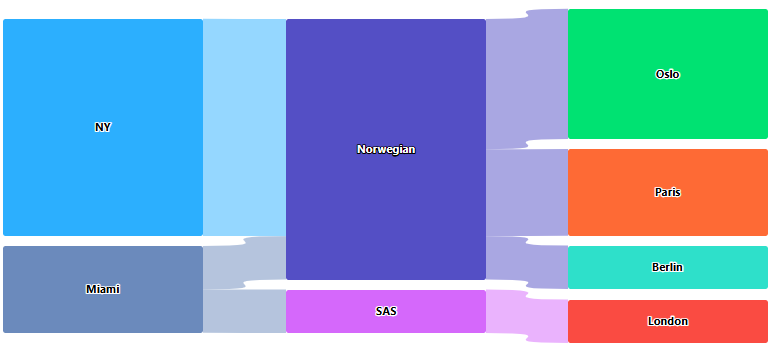
I have some flights data which looks like this:

[{"from":"NY", "to":"Oslo", "company": "Norwegian", "flights":3},
{"from":"NY", "to":"Paris", "company": "Norwegian", "flights":2},
{"from":"Miami", "to":"Berlin", "company": "Norwegian", "flights":1},
{"from":"Miami", "to":"London", "company": "SAS", "flights":1}]

I’m looking for a way to implement a highcharts sankey/alluvial or similar graph where “from” will be on the left side, the company involved will be in the middle and the destination will be on the right.

The problem is that there doesn’t seem to be a way of actually doing it.

I can sort of get the look of it by faking data and doing a: {From => company}, {company => to}-mapping, according to this fiddle: https://jsfiddle.net/1a9h8kz0/1/

Looks ok but doesn't quite work

But it doesn’t really work properly, for example, when hovering on NY, i want it to display all the targets of NY (Oslo and Paris) but it only goes to the “Norwegian”.

This is not really strange, because there’s no connection between the source and target destinations, only through the “middle”.

So, is there a way of making it recognize the flow of data between from => company => to and properly display the lines when doing tooltips etc?

Nice way to load data in-time with Svelte

In Svelte, we have a very nice and beautiful way to load some data in time and render it using @const:

<script>
    let a = false;
</script>

<button on:click={() => a = !a}></button>
{#if a}
    {@const table = axios.get(...)}
    {#await table}
        <Spinner />
    {:then table}
        ...
    {/await} 
{/if}

This way, we don’t really have to declare anything in the body. But sometimes we might need to have some logic inside:

{@const table = axios.get(...)}
{#await table}
    <Spinner />
{:then table}
    {#each table as x}
        <button on:click={() => x.open = true}>
            Open row!
        </button>
        {#if x.open === true}
            ...
        {/if}
    {/each}
{/await} 

And it will not work, since table is a @const. I want to find a clever and simple way to work this out. Is there any good practice I can use here instead of @const to not overload body of component with state variables?

Tldraw Collaboration: Eraser Changes Not Syncing Across Users Using Socketio

I’m building a collaborative drawing application using Tldraw and socket.io. The goal is to allow multiple users to draw and erase shapes, and their changes should sync in real time. While drawing shapes is working fine, erasing and syncing changes across users isn’t functioning as expected.

Here’s what I’m currently doing:

Emit Local Changes:
Whenever a user makes changes (drawing or erasing), I emit a DRAWING_UPDATE event with the snapshot data using getSnapshot(editor.store).

const handleChangeEvent = useCallback(() => {
    if (editor) {
      const snapshot = getSnapshot(editor.store);
      console.log("Snapshot being emitted:", snapshot);
      if (snapshot && typeof snapshot === "object") {
        setDrawingData(snapshot);
        socket.emit("DRAWING_UPDATE", { snapshot });
      } else {
        console.error("Invalid snapshot during change event:", snapshot);
      }
    }
  }, [editor, setDrawingData, socket]);

Handle Remote Changes:
When a user receives a DRAWING_UPDATE event, I process the added, updated, and removed records in the snapshot to update the local editor store.

const handleRemoteDrawing = useCallback(
  ({ snapshot }) => {
    if (!snapshot || typeof snapshot !== "object") {
      console.error("Invalid snapshot data:", snapshot);
      return;
    }

    const { added = {}, updated = {}, removed = {} } = snapshot;

    if (editor) {
      editor.store.mergeRemoteChanges(() => {
        // Adding/updating shapes
        Object.values({ ...added, ...updated }).forEach((record) => {
          if (record && record.typeName === "shape") {
            editor.store.put([record]);
          }
        });

        // Handling deletions
        Object.keys(removed).forEach((id) => {
          if (editor.store.has(id)) {
            editor.store.remove(id);
          }
        });
      });
    }
  },
  [editor]
);

Lifecycle Management:

I listen for changes in the local editor and emit them using Socket.IO.
I load initial data for the editor using loadSnapshot

useEffect(() => {
  if (editor && drawingData) {
    loadSnapshot(editor.store, drawingData);
  }
}, [editor, drawingData]);

Problem:
Erasing Shapes: Deleted shapes are not being removed on other users’ screens.

Expected Behavior:
When a user erases a shape, it should disappear from other users’ editors.

Actual Behavior:
erasers updates are not visible to other users.
Question:
How can I ensure that erasing actions are synced across all users in real time using Tldraw and Socket.IO?

For drawing everything is fine.

How to read JSON object in Angular v18 template file with unknown key

I am trying to read a JSON object containing list of unknown key in my template file (HTML) using Angular v18. But getting error stating Type ‘JSON’ is not assignable to Record<string, string | ((text: string, reviver?: …)

{
   "data": [
      {
         "col1": "val1",
         "col2": "val2",
         ..... // 100s of entries
      },
      {
         "col1": "val1",
         "col2": "val2",
         ..... // 100s of entries
      }
   ]
}

Below is my sample code to read the data in template file (HTML)

@if(resp && resp.data) {
  @for(row of resp.data; track $index) {
    <tr *ngFor="let obj if row | keyvalue ">
      <td>{{obj.value}}</td>
    </tr>
  }
}

This line where I mentioned “let obj if row” is giving error stating row is

row: Type ‘JSON’ is not assignable to Record<string, string | ((text: string, reviver?: …)

Tried few other approaches as well. But nothing seems working.

Error Connecting to Elasticsearch on Render Deployment: getaddrinfo ENOTFOUND elasticsearch

I have a Node.js application that works perfectly when running locally with docker-compose up --build. It connects to both MongoDB and Elasticsearch without any issues. However, when I deploy the application on Render, I encounter the following error when making a POST request to an endpoint that interacts with Elasticsearch:

Error indexing document: ConnectionError: getaddrinfo ENOTFOUND elasticsearch
    at SniffingTransport._request (/app/node_modules/@elastic/transport/lib/Transport.js:609:31)
    ...

My docker-compose.yml file looks like this:

version: "3.9"

services:
  app:
    build:
      context: .
    ports:
      - "4000:4000"
    env_file:
      - .env
    environment:
      MONGO_URI: ${MONGO_URI}
      ELASTICSEARCH_URI: ${ELASTICSEARCH_URI}
    depends_on:
      - mongo
      - elasticsearch
    networks:
      - app-network

  mongo:
    image: mongo:5.0
    ports:
      - "27017:27017"
    networks:
      - app-network

  elasticsearch:
    image: docker.elastic.co/elasticsearch/elasticsearch:7.17.10
    environment:
      - discovery.type=single-node
      - xpack.security.enabled=false
    ports:
      - "9200:9200"
    networks:
      - app-network

In my .env file, I set the following values:

MONGO_URI=mongodb+srv://<username>:<password>@cluster0.mongodb.net/mydb?retryWrites=true&w=majority
ELASTICSEARCH_URI=http://elasticsearch:9200

In my code, I connect to Elasticsearch like this:

const { Client } = require('@elastic/elasticsearch');
const client = new Client({ node: process.env.ELASTICSEARCH_URI });
  1. Locally, everything works fine when I run docker-compose up --build.
  2. On Render, MongoDB connects successfully, but Elasticsearch fails with getaddrinfo ENOTFOUND elasticsearch.
  3. I suspect this happens because the hostname elasticsearch cannot be resolved on Render.

Questions:

  1. How can I fix this issue, and how can I deploy Elasticsearch on Render using Docker?

Additional Context:

Here are my Render server logs:

Error indexing document: ConnectionError: getaddrinfo ENOTFOUND elasticsearch
...

Any guidance on how to resolve this issue would be greatly appreciated!

dynamic import of a module

I have a ES6-modules project, where different databases can be used dependig on the context.
For that I created a module (database-provider.js) that handles this import dynamically.

standalone this module does exactly what I expect but in the project it doesn’t work.
where I get the follwing Error – that I can’t explain:

TypeError: database.initialize is not a function
at initialize (file:///C:/Users/.../.../api-server.js:206:22)

Thats why I guess something else goes wrong before.
Here is the timeline of what is happening from start to where the database is imported dynamically.
starter.js -> eventManager.js -> api-server.js -> database-provider.js

Is there any mistake I am doing with the imports and the order they occur in?
I would be happy about any help I can get.

// starter.js
import { eventManager, logger, config, database } from './services/core/resourceManager.js';
...

const startup = async () => {
  emitter.emit(eventManager.events.global.POWER_UP);
};
startup();
...
//eventManager.js
emitter.addListener(events.global.POWER_UP, powerUpListener);

...
const powerUpListener = async () => {
emitter.emit(events.apiServer.POWER_UP);
}
//api-server.js
...
import { database } from '../core/database-provider.js';
emitter.addListener(eventManager.events.apiServer.POWER_UP, powerUpListener);

const powerUpListener = async () => {
...
await initialize();
...
}

export const initialize = async (reInit = false) => {
    try {
      await database.initialize();
    } catch (err) {
    ...
    }
}
//database-provider.js
import { env as config } from '../config.js';
const dbVendor = config.dbVendor;
const dbDriverRoot = '../api/database/';
const databaseImportString = `${dbDriverRoot}${dbVendor}.js`;

let databaseInstance;

const loadDatabaseModule = async () => {
  try {
    const module = await import(`${dbDriverRoot}${dbVendor}.js`);
    console.log('Database module imported successfully');
    return module;
  } catch (error) {
    console.error('Failed to import database module:', error);
    throw error; // Re-throw the error after logging
  }
};

export const database = new Proxy(
  {},
  {
    get: async (target, prop) => {
      if (!databaseInstance) {
        databaseInstance = await loadDatabaseModule();
      }

      if (databaseInstance[prop]) {
        return databaseInstance[prop];
      }
      throw new Error(`Property '${prop}' does not exist on the database module.`);
    },
  }
);

Cannot upload file with ajax and asp.net webservice in shared hosting

I have created an application to upload files to a folder using ajax request and asp.net webservice.asmx. It’s working fine in my local system with IIS. But when I hosted it in my Mochahost shared hosting uploading function not working.
My ajax function is:

function FileUpload(MasterID) {
var formData = new FormData();
var fileUpload = $('#fileupload2').get(0);
var files = fileUpload.files;
for (var i = 0; i < files.length; i++) {
    formData.append(files[i].name, files[i]);        
}
formData.append('MasterID', MasterID);
    $.ajax({
    type: "POST",
    url: "../../Webservices/Payment.asmx/UploadFile",
    data: formData,
    success: function (data) {

    },
    error: function (data) {
        alert('error' + data)
    },
    async: false,
    contentType:false,
    cache: false,
    contentType: false,
    processData: false,
    
});
function OnSuccess(data) {
    console.log(data);
}

}

my webservice function is:

[WebMethod]
public string UploadFile()
{
    try
    {
        var MasterID = HttpContext.Current.Request.Form["MasterID"];
        HttpFileCollection Files = HttpContext.Current.Request.Files;
        string path = HttpContext.Current.Server.MapPath("~/Upload/");
        for (int i = 0; i < Files.Count; i++)
        {
            HttpPostedFile File = Files[i];
            string fileName = Regex.Replace(Path.GetFileNameWithoutExtension(File.FileName) + Guid.NewGuid().ToString(), @"s+", "");
            string extension = Path.GetExtension(File.FileName);

            File.SaveAs(Path.Combine(path, String.Concat(fileName, extension)));
            object[,] ParamArray;
            ParamArray = new object[,] {    
                                        {"@AccMasterID", MasterID },
                                        {"@FileName", fileName+extension }
                                       };
            
            string res = Convert.ToString(DB.ExecuteScalar_SP("[UpdateFileNameAccTransactionMaster]", ParamArray));
            return res;
        }
        return "nofile";    
    }
    catch (Exception ex)
    {
        return "error";
    }
}

When I debugged the code in my online server, the problem is when I use contentType: false server is showing following error:

    [InvalidOperationException]: Request format is unrecognized for URL unexpectedly ending in &#39;/UploadFile&#39;.
   at System.Web.Services.Protocols.WebServiceHandlerFactory.CoreGetHandler(Type type, HttpContext context, HttpRequest request, HttpResponse response)
   at System.Web.Services.Protocols.WebServiceHandlerFactory.GetHandler(HttpContext context, String verb, String url, String filePath)
   at System.Web.Script.Services.ScriptHandlerFactory.GetHandler(HttpContext context, String requestType, String url, String pathTranslated)
   at System.Web.HttpApplication.MaterializeHandlerExecutionStep.System.Web.HttpApplication.IExecutionStep.Execute()
   at System.Web.HttpApplication.ExecuteStepImpl(IExecutionStep step)
   at System.Web.HttpApplication.ExecuteStep(IExecutionStep step, Boolean& completedSynchronously)

But without contentType:false, uploading does not work. The same code is working fine in my system with contentType:false.

How to make a date input match a certain day of the week?

I have an HTML script with date inputs for each day of the week (Sunday-Saturday). I’d like to validate the inputs so that the user can only select dates which match that day of the week. For example, December 1, 2024 was a Sunday, so the user can only input December 1, 8, 15, 22, etc into that box. They cannot input December 2 or 3.

<table>
 <tbody>
 <tr>
  <td><label for="date">Sunday:</label></td>
  <td><label for="date">Monday:</label></td>
  <td><label for="date">Tuesday:</label></td>
  <td><label for="date">Wednesday:</label></td>
  <td><label for="date">Thursday:</label></td>
  <td><label for="date">Friday:</label></td>
  <td><label for="date">Saturday:</label></td>
 </tr>
  <tr>
  <td><input name="date" type="text" style="width:130px" onfocus="(this.type='date')" onblur="if(!this.value){this.type='text';this.style.width='130px'}"></td>
  <td><input name="date" type="text" style="width:130px" onfocus="(this.type='date')" onblur="if(!this.value){this.type='text';this.style.width='130px'}"></td>
  <td><input name="date" type="text" style="width:130px" onfocus="(this.type='date')" onblur="if(!this.value){this.type='text';this.style.width='130px'}"></td>
  <td><input name="date" type="text" style="width:130px" onfocus="(this.type='date')" onblur="if(!this.value){this.type='text';this.style.width='130px'}"></td>
  <td><input name="date" type="text" style="width:130px" onfocus="(this.type='date')" onblur="if(!this.value){this.type='text';this.style.width='130px'}"></td>
  <td><input name="date" type="text" style="width:130px" onfocus="(this.type='date')" onblur="if(!this.value){this.type='text';this.style.width='130px'}"></td>
  <td><input name="date" type="text" style="width:130px" onfocus="(this.type='date')" onblur="if(!this.value){this.type='text';this.style.width='130px'}"></td>
 </tr>
 <tr>
<table>

This script where getDay() returns the day of the week (from 0 to 6) of a date.

<p id="date1"></p>

const weekday = new Date("December 01, 2024 01:15:00");
let day = weekday.getDay()

document.getElementById("date1").innerHTML = day;

The script below returns an alert every time a date selected (including Sundays). And if I add else it does not return an alert at all (including Mondays-Saturdays). However I may be inserting the else incorrectly.

function validateDate(date) {
    const selectedDate = new Date(date);
    const day = selectedDate.getDay();
    if (day !== 0) {
        alert("Please select a date that falls on a Sunday.");}
}

Thank you in advance

Getting error, Unknown option when compiling webpacks

Im trying to build my react code with webpacks and babel. I downloaded a project from Github that combined React with Scala and AKKA (this was my ultimate goal). After hours of updating packages and dealing with issues, I finally had something that built.

I then realised I was missing some balel plugins from my webpacks.config.js. So I added these, and now I get the error:

Error: [BABEL] /Users/_/IdeaProjects/Hydra/src/main/frontend/main.jsx: Unknown option: .name

I am new to babel and React so please bare this in mind.

After some Googling, I found this guide, but i’m not using the plugins mentioned in this post. Should I be? Unknown Option error from Babel in React-Native app

This is my webpack.config.js:

const webpack = require('webpack');
const path = require('path');
const paths = {
    MAIN: path.resolve('src', 'main'),
    NODE_MODULES: path.resolve('src', 'main', 'node', 'node_modules')
}

module.exports = {
    entry: path.join(paths.MAIN, 'frontend', 'main.jsx'),
    output: {
        path: path.join(paths.MAIN, 'webapp', 'js'),
        filename: 'bundle.js',
        library: ['com', 'nudemeth', 'example', 'web']
    },
    module: {
        rules: [{
            test: /.jsx$/,
            loader: 'babel-loader',
            exclude: /node_modules/,
            options: {
                presets: [
                    path.join(paths.NODE_MODULES, '@babel/preset-env'),
                    path.join(paths.NODE_MODULES, '@babel/preset-react'),
                    path.join(paths.NODE_MODULES, "@babel/plugin-proposal-class-properties"),
                    path.join(paths.NODE_MODULES, "@babel/plugin-proposal-decorators"),
                    path.join(paths.NODE_MODULES, "@babel/plugin-proposal-export-namespace-from"),
                    path.join(paths.NODE_MODULES, "@babel/plugin-proposal-function-sent"),
                    path.join(paths.NODE_MODULES, "@babel/plugin-proposal-json-strings"),
                    path.join(paths.NODE_MODULES, "@babel/plugin-proposal-numeric-separator"),
                    path.join(paths.NODE_MODULES, "@babel/plugin-proposal-throw-expressions"),
                    path.join(paths.NODE_MODULES, "@babel/plugin-syntax-dynamic-import")
                ]
            }
        }]
    },
    plugins: [
        new webpack.DefinePlugin({
            'process.env.NODE_ENV': JSON.stringify('production')
        })
    ],
    resolve: {
        modules: [paths.NODE_MODULES]
    },
    resolveLoader: {
        modules: [paths.NODE_MODULES]
    }
}

And my package.json:

  {
  "name": "node-tasks",
  "version": "1.0.0",
  "description": "to run node tasks",
  "main": "index.js",
  "scripts": {
    "test": "echo "Error: no test specified" && exit 1"
  },
  "author": "nudemeth",
  "license": "ISC",
  "private": true,
  "dependencies": {
    "@babel/core": "^7.26.0",
    "@babel/plugin-transform-runtime": "^7.25.9",
    "@babel/preset-env": "^7.26.0",
    "@babel/preset-react": "^7.26.3",
    "@types/react": "^18.3.16",
    "@babel/plugin-proposal-class-properties": "^7.0.0",
    "@babel/plugin-proposal-decorators": "^7.0.0",
    "@babel/plugin-proposal-export-namespace-from": "^7.0.0",
    "@babel/plugin-proposal-function-sent": "^7.0.0",
    "@babel/plugin-proposal-json-strings": "^7.0.0",
    "@babel/plugin-proposal-numeric-separator": "^7.0.0",
    "@babel/plugin-proposal-throw-expressions": "^7.0.0",
    "@babel/plugin-syntax-dynamic-import": "^7.0.0",
    "@babel/plugin-syntax-import-meta": "^7.0.0",
    "@types/react-dom": "^18.3.5",
    "babel-loader": "^9.2.1",
    "core-js": "^3.39.0",
    "history": "^5.3.0",
    "react": "^19.0.0",
    "react-dom": "^19.0.0",
    "react-router": "^7.0.2",
    "react-router-dom": "^7.0.2",
    "terser-webpack-plugin": "^5.3.10",
    "webpack": "^5.97.1",
    "webpack-cli": "^5.1.4"
  }
}

And finally, by babel.config.json:

{
  "presets": ["@babel/preset-env"],
  "targets": "defaults"
}

Thanks for your help!

UPDATE:

So I tried commenting out each plugin inside webpack.config.js one at a time. What I found is that by having any of the commented plugins uncommented, I get the error.

    presets: [
        path.join(paths.NODE_MODULES, '@babel/preset-env'),
        path.join(paths.NODE_MODULES, '@babel/preset-react'),
        // path.join(paths.NODE_MODULES, '@babel/plugin-proposal-decorators'),
        // path.join(paths.NODE_MODULES, '@babel/plugin-proposal-function-sent'),
        // path.join(paths.NODE_MODULES, '@babel/plugin-proposal-throw-expressions'),
        // path.join(paths.NODE_MODULES, '@babel/plugin-syntax-dynamic-import'),
        // path.join(paths.NODE_MODULES, '@babel/plugin-syntax-import-meta'),
        // path.join(paths.NODE_MODULES, '@babel/plugin-transform-class-properties'),
        // path.join(paths.NODE_MODULES, '@babel/plugin-transform-export-namespace-from'),
        // path.join(paths.NODE_MODULES, '@babel/plugin-transform-json-strings'),
        // path.join(paths.NODE_MODULES, '@babel/plugin-transform-numeric-separator'),
        // path.join(paths.NODE_MODULES, '@babel/plugin-transform-runtime')
    ]

Why am I seeing an error compiling webpacks: Unknown option: .name

Im trying to build my react code with webpacks and babel. I downloaded a project from Github that combined React with Scala and AKKA (this was my ultimate goal). After hours of updating packages and dealing with issues, I finally had something that built.

I then realised I was missing some balel plugins from my webpacks.config.js. So I added these, and now I get the error:

Error: [BABEL] /Users/_/IdeaProjects/Hydra/src/main/frontend/main.jsx: Unknown option: .name

I am new to babel and React so please bare this in mind.

After some Googling, I found this guide, but i’m not using the plugins mentioned in this post. Should I be? Unknown Option error from Babel in React-Native app

This is my webpack.config.js:

const webpack = require('webpack');
const path = require('path');
const paths = {
    MAIN: path.resolve('src', 'main'),
    NODE_MODULES: path.resolve('src', 'main', 'node', 'node_modules')
}

module.exports = {
    entry: path.join(paths.MAIN, 'frontend', 'main.jsx'),
    output: {
        path: path.join(paths.MAIN, 'webapp', 'js'),
        filename: 'bundle.js',
        library: ['com', 'nudemeth', 'example', 'web']
    },
    module: {
        rules: [{
            test: /.jsx$/,
            loader: 'babel-loader',
            exclude: /node_modules/,
            options: {
                presets: [
                    path.join(paths.NODE_MODULES, '@babel/preset-env'),
                    path.join(paths.NODE_MODULES, '@babel/preset-react'),
                    path.join(paths.NODE_MODULES, "@babel/plugin-proposal-class-properties"),
                    path.join(paths.NODE_MODULES, "@babel/plugin-proposal-decorators"),
                    path.join(paths.NODE_MODULES, "@babel/plugin-proposal-export-namespace-from"),
                    path.join(paths.NODE_MODULES, "@babel/plugin-proposal-function-sent"),
                    path.join(paths.NODE_MODULES, "@babel/plugin-proposal-json-strings"),
                    path.join(paths.NODE_MODULES, "@babel/plugin-proposal-numeric-separator"),
                    path.join(paths.NODE_MODULES, "@babel/plugin-proposal-throw-expressions"),
                    path.join(paths.NODE_MODULES, "@babel/plugin-syntax-dynamic-import")
                ]
            }
        }]
    },
    plugins: [
        new webpack.DefinePlugin({
            'process.env.NODE_ENV': JSON.stringify('production')
        })
    ],
    resolve: {
        modules: [paths.NODE_MODULES]
    },
    resolveLoader: {
        modules: [paths.NODE_MODULES]
    }
}

And my package.json:

  {
  "name": "node-tasks",
  "version": "1.0.0",
  "description": "to run node tasks",
  "main": "index.js",
  "scripts": {
    "test": "echo "Error: no test specified" && exit 1"
  },
  "author": "nudemeth",
  "license": "ISC",
  "private": true,
  "dependencies": {
    "@babel/core": "^7.26.0",
    "@babel/plugin-transform-runtime": "^7.25.9",
    "@babel/preset-env": "^7.26.0",
    "@babel/preset-react": "^7.26.3",
    "@types/react": "^18.3.16",
    "@babel/plugin-proposal-class-properties": "^7.0.0",
    "@babel/plugin-proposal-decorators": "^7.0.0",
    "@babel/plugin-proposal-export-namespace-from": "^7.0.0",
    "@babel/plugin-proposal-function-sent": "^7.0.0",
    "@babel/plugin-proposal-json-strings": "^7.0.0",
    "@babel/plugin-proposal-numeric-separator": "^7.0.0",
    "@babel/plugin-proposal-throw-expressions": "^7.0.0",
    "@babel/plugin-syntax-dynamic-import": "^7.0.0",
    "@babel/plugin-syntax-import-meta": "^7.0.0",
    "@types/react-dom": "^18.3.5",
    "babel-loader": "^9.2.1",
    "core-js": "^3.39.0",
    "history": "^5.3.0",
    "react": "^19.0.0",
    "react-dom": "^19.0.0",
    "react-router": "^7.0.2",
    "react-router-dom": "^7.0.2",
    "terser-webpack-plugin": "^5.3.10",
    "webpack": "^5.97.1",
    "webpack-cli": "^5.1.4"
  }
}

And finally, by babel.config.json:

{
  "presets": ["@babel/preset-env"],
  "targets": "defaults"
}

Thanks for your help!

How can I format Pino logger output in the browser console?

I am using pino with next.js.

I have the following config:

import pino from "pino"
import { Logger } from "pino"

const baseLogger: Logger = pino({
  level: process.env.PINO_LOG_LEVEL || "info",
  browser: {
    serialize: true,
  },
  transport: {
    target: "pino-pretty",
    options: {
      colorize: true,
      messageFormat: "[{group}] {msg}",
    },
  },
})

export default baseLogger.child({ group: "app" })

export const authLogger = baseLogger.child({ group: "auth" })

This works great on the server and gives me colourised / formatted output with a timestamp and log level.

enter image description here

However when I use the logger on the client, I don’t get any formatting in the browser console:

enter image description here

How can I add timestamp and log level to the messages logged to the client?