How to let Pix2Pix with p5.js run?

I would like to try the ml5.js Pix2Pix example for p5.js. If I just copy the code, update the paths, and try to let it run on my local server, it doesn’t work.

Same here:

// Copyright (c) 2019 ml5
//
// This software is released under the MIT License.
// https://opensource.org/licenses/MIT

/* ===
ml5 Example
Pix2pix Edges2Pikachu example with p5.js using callback functions
This uses a pre-trained model on Pikachu images
For more models see: https://github.com/ml5js/ml5-data-and-training/tree/master/models/pix2pix
=== */

// The pre-trained Edges2Pikachu model is trained on 256x256 images
// So the input images can only be 256x256 or 512x512, or multiple of 256
const SIZE = 256;
let inputImg, inputCanvas, outputContainer, statusMsg, pix2pix, clearBtn, transferBtn, modelReady = false,
  isTransfering = false;

function setup() {
  // Create a canvas
  inputCanvas = createCanvas(SIZE, SIZE);
  inputCanvas.class('border-box').parent('canvasContainer');

  // Display initial input image
  inputImg = loadImage('images/input.png', drawImage);

  // Selcect output div container
  outputContainer = select('#output');
  statusMsg = select('#status');

  // Select 'transfer' button html element
  transferBtn = select('#transferBtn');

  // Select 'clear' button html element
  clearBtn = select('#clearBtn');
  // Attach a mousePressed event to the 'clear' button
  clearBtn.mousePressed(function() {
    clearCanvas();
  });

  // Set stroke to black
  stroke(0);
  pixelDensity(1);

  // Create a pix2pix method with a pre-trained model
  pix2pix = ml5.pix2pix('https://github.com/ml5js/ml5-library/blob/main/examples/p5js/Pix2Pix/Pix2Pix_callback/models/edges2pikachu.pict', modelLoaded);
}

// Draw on the canvas when mouse is pressed
function draw() {
  if (mouseIsPressed) {
    line(mouseX, mouseY, pmouseX, pmouseY);
  }
}

// Whenever mouse is released, transfer the current image if the model is loaded and it's not in the process of another transformation
function mouseReleased() {
  if (modelReady && !isTransfering) {
    transfer()
  }
}

// A function to be called when the models have loaded
function modelLoaded() {
  // Show 'Model Loaded!' message
  statusMsg.html('Model Loaded!');

  // Set modelReady to true
  modelReady = true;

  // Call transfer function after the model is loaded
  transfer();

  // Attach a mousePressed event to the transfer button
  transferBtn.mousePressed(function() {
    transfer();
  });
}

// Draw the input image to the canvas
function drawImage() {
  image(inputImg, 0, 0);
}

// Clear the canvas
function clearCanvas() {
  background(255);
}

function transfer() {
  // Set isTransfering to true
  isTransfering = true;

  // Update status message
  statusMsg.html('Applying Style Transfer...!');

  // Select canvas DOM element
  const canvasElement = select('canvas').elt;

  // Apply pix2pix transformation
  pix2pix.transfer(canvasElement, function(err, result) {
    if (err) {
      console.log(err);
    }
    if (result && result.src) {
      // Set isTransfering back to false
      isTransfering = false;
      // Clear output container
      outputContainer.html('');
      // Create an image based result
      createImg(result.src).class('border-box').parent('output');
      // Show 'Done!' message
      statusMsg.html('Done!');
    }
  });
}
<script src="https://cdnjs.cloudflare.com/ajax/libs/p5.js/0.9.0/p5.min.js"></script>
<script src="https://cdnjs.cloudflare.com/ajax/libs/p5.js/0.9.0/addons/p5.dom.min.js"></script>
<script src="https://unpkg.com/ml5@latest/dist/ml5.min.js" type="text/javascript"></script>

<h1>Pix2Pix Edges2Pichaku Example</h1>
<p>1. Wait until the model is loaded</p>
<p>2. Press your mouse to draw a Pikachu on the left side of the canvas.</p>
<p>3. A colored Pikachu image will automatically appear on the right side of the canvas in ~2 seconds. You could also click the "Transfer" button to generate an new image.</p>
<p>4. You could click the "Clear" button to clear the canvas and draw again.</p>
<p id="status">Loading Model... Please wait...</p>
<div class="flex">
  <div>
    <div id="canvasContainer"></div>
    <div id="btnContainer" class="flex flex-space-between">
      <button id="clearBtn">Clear</button><br />
      <button id="transferBtn" class="btn">Transfer</button>
    </div>
  </div>
  <div id="transferContainer">
  </div>
  <div id="output"></div>
</div>

Here would be also a jsFiddle:
https://jsfiddle.net/43qso6pe/

Has anyone an idea how to let it run? Would be very thankful.

Align text next to link vertical center in MaterialUI Grid

I’m having trouble trying to get the count aligned center vertically with the link

<Grid container justify="flex-end">
  <Grid alignItems="center" className={styles} direction="row" item justify="center">
    <Link className={classes.allCompanies} to="/companies">view all companies</Link> 
    {companyCount && <span className={classes.companyCount}>({companyCount})</span>}
  </Grid>
</Grid>

the count span is showing bottom aligned with the link

Spreading for object as function input arguments

I want to pass in “he”, and “she” to function func and output “heshe”.

Is there any way to spread the value of object (like array) to make it work?

  const func=(a,b)=>(a+b);

  const arr=["he","she"];
  console.log(func(...arr));//working

  const obj1={a:"he", "b":"she"}
  console.log(func(...obj1));//not working

how to ignore tilde accent in search filter js?

When I look in the search engine for a word with an accent, for example: Débora, Lázaro, Ángela, Álvaro, Arquímedes, etc. does not find the result.

Without accents or with upper or lower case, the search engine works excellent.

Someone who can help me, I’m still a beginner in programming.

This is my complete code

<!DOCTYPE html>
<html lang="en">
<head>
    <meta charset="UTF-8">
    <meta http-equiv="X-UA-Compatible" content="IE=edge">
    <meta name="viewport" content="width=device-width, initial-scale=1.0">
    <title>Document</title>
</head>
<body>

<style>
    body {
    margin: 0;
    padding: 100px 150px;
    font-family: sans-serif;
}

/* *** */

.cselect {
  position: relative;
}
.cselect,
.cselect *,
.cselect *:before,
.cselect *:after {
  box-sizing: border-box;
}
.cselect__select {
  display: block;
  position: absolute;
  bottom: 0;
  left: 0;
  width: 100%;
  height: 100%;
  opacity: 0;
  z-index: -1;
  pointer-events: none;
}
.cselect__rendered {
  display: flex;
  align-items: center;
  justify-content: space-between;
  margin: 0;
  padding: 6px 12px;
  width: 100%;
  font: inherit;
  font-size: 16px;
  font-weight: normal;
  color: #fff;
  line-height: 1.5;
  text-align: left;
  text-decoration: none;
  background: #333;
  border: 0;
  border-radius: 6px;
  cursor: pointer;
}
.cselect__rendered:after {
  content: '▾';
  display: block;
  margin: 0 0 0 8px;
}
.cselect.is-open .cselect__rendered:after {
  content: '▴';
}
.cselect__rendered-text {
  display: inline-block;
  white-space: nowrap;
  text-overflow: ellipsis;
  overflow: hidden;
}
.cselect__options {
  position: absolute;
  top: 100%;
  left: 0;
  margin: 6px 0;
  padding: 6px;
  width: 100%;
  max-height: 264px;
  color: #fff;
  background: #333;
  border-radius: 6px;
  transform: translateY(-6px) scale(0.98);
  transform-origin: center top;
  opacity: 0;
  visibility: hidden;
  transition-property: transform, visibility, opacity;
  transition-duration: 0.3s;
  transition-timing-function: ease;
  overflow: auto;
  z-index: 999;
}
.cselect__options::-webkit-scrollbar {
  width: 4px;
}
.cselect__options::-webkit-scrollbar-track {
  background: transparent;
  border-radius: 4px;
}
.cselect__options::-webkit-scrollbar-thumb {
  background: #555;
  border-radius: 4px;
}
.cselect__options::-webkit-scrollbar-thumb:hover {
  background: #777;
}
.cselect__options.is-on-top {
  top: auto;
  bottom: 100%;
}
.cselect.is-open .cselect__options {
  transform: translateY(0) scale(1);
  opacity: 1;
  visibility: visible;
  transition-property: transform, opacity;
}
.cselect__search {
  display: block;
  margin: 0 0 6px;
  padding: 2px 6px;
  width: 100%;
  font: inherit;
  font-size: 16px;
  font-weight: normal;
  color: #333;
  line-height: 1.5;
  background: #fff;
  border: 0;
  border-radius: 6px;
}
.cselect__option {
  display: block;
  padding: 6px;
  width: 100%;
  font: inherit;
  font-size: 16px;
  font-weight: normal;
  color: #fff;
  line-height: 1.5;
  text-align: left;
  text-decoration: none;
  background: transparent;
  border: 0;
  border-radius: 6px;
  cursor: pointer;
}
.cselect__option:hover {
  background: #555;
}
.cselect__option.is-selected {
  color: #999;
  background: transparent;
  cursor: default;
}
.cselect__option.is-hidden {
  display: none;
}

</style>

    <form action="./" method="get">
        <button type="submit">GET</button>
        <br><br><br><br>
        <div style="max-width: 256px;">
            <select name="select1" id="select1" class="js-select" required>
                <option value="" selected disabled>Please select</option>
                <option value="bunny">Perú</option>
                <option value="kitten">Luís</option>
                <option value="hamster">Hamster</option>
            </select>
        </div>
    </form>

<script>
    'use strict'

const deepMerge = (...objects) => {
  const isObject = (obj) => obj && typeof obj === 'object'
  return objects.reduce((prev, obj) => {
    Object.keys(obj).forEach((key) => {
      const pVal = prev[key]
      const oVal = obj[key]
      if (Array.isArray(pVal) && Array.isArray(oVal)) {
        prev[key] = pVal.concat(...oVal)
      } else if (isObject(pVal) && isObject(oVal)) {
        prev[key] = deepMerge(pVal, oVal)
      } else {
        prev[key] = oVal
      }
    })
    return prev
  }, {})
}

const DEFAULT_OPTIONS = {
  classNames: {
    wrapperEl: 'cselect',
    selectEl: 'cselect__select',
    renderedEl: 'cselect__rendered',
    renderedTextEl: 'cselect__rendered-text',
    searchEl: 'cselect__search',
    optionsEl: 'cselect__options',
    optionEl: 'cselect__option',
    init: 'js-init-cselect',
    open: 'is-open',
    onTop: 'is-on-top',
    selected: 'is-selected',
    hidden: 'is-hidden',
  },
  minimumOptionsForSearch: 10,
  onOpen: null,
  onClose: null,
  onToggle: null,
}

class CSelect {
  // Elements
  #wrapperEl
  #renderedEl
  #renderedTextEl
  #searchEl
  #optionsEl
  #optionEls
  // Functions
  #handleSearch
  #optionElClick
  #clickOutside
  #escPress

  constructor(selectEl, options = {}) {
    // Handle arguments
    this.selectEl = selectEl
    this.options = deepMerge(DEFAULT_OPTIONS, options)
    // Bind 'this'
    this.open = this.open.bind(this)
    this.close = this.close.bind(this)
    this.toggle = this.toggle.bind(this)
    this.#handleSearch = this.#handleSearchFn.bind(this)
    this.#optionElClick = this.#optionElClickFn.bind(this)
    this.#clickOutside = this.#clickOutsideFn.bind(this)
    this.#escPress = this.#escPressFn.bind(this)
    // Functions
    this.init()
  }

  init() {
    // Check if already init
    if (this.selectEl.classList.contains(this.options.classNames.init)) {
      console.error(`CSelect already initialized. ID: ${this.selectEl.id}`)
      return
    }
    // Handle select element
    this.selectEl.setAttribute('tabindex', '-1')
    this.selectEl.classList.add(this.options.classNames.selectEl)
    // Functions
    this.#generateHTML()
    this.#addEvents()
    // Add initialization
    this.selectEl.classList.add(this.options.classNames.init)
  }

  #generateHTML() {
    // Generate wrapper
    const wrapperHTML = /* HTML */ `<div class="${this.options.classNames.wrapperEl}"></div>`
    this.selectEl.insertAdjacentHTML('beforebegin', wrapperHTML)
    this.#wrapperEl = this.selectEl.previousElementSibling
    this.#wrapperEl.appendChild(this.selectEl)
    // Generate rendered
    const selectedOption = this.selectEl.options[this.selectEl.selectedIndex]
    const selectedOptionText = selectedOption.textContent
    this.#renderedEl = document.createElement('button')
    this.#renderedEl.type = 'button'
    this.#renderedEl.className = this.options.classNames.renderedEl
    this.#wrapperEl.appendChild(this.#renderedEl)
    this.#renderedTextEl = document.createElement('span')
    this.#renderedTextEl.className = this.options.classNames.renderedTextEl
    this.#renderedTextEl.textContent = selectedOptionText
    this.#renderedEl.appendChild(this.#renderedTextEl)
    // Generate options wrapper
    this.#optionsEl = document.createElement('div')
    this.#optionsEl.className = this.options.classNames.optionsEl
    this.#wrapperEl.appendChild(this.#optionsEl)
    // Generate search
    if ([...this.selectEl.options].length >= this.options.minimumOptionsForSearch) {
      this.#searchEl = document.createElement('input')
      this.#searchEl.type = 'text'
      this.#searchEl.className = this.options.classNames.searchEl
      this.#optionsEl.appendChild(this.#searchEl)
    }
    // Generate each option
    const selectOptions = [...this.selectEl.options]
    this.#optionEls = []
    for (const option of selectOptions) {
      if (option.disabled) {
        continue
      }
      const newOption = document.createElement('button')
      newOption.type = 'button'
      newOption.className = this.options.classNames.optionEl
      newOption.textContent = option.textContent
      newOption.setAttribute('data-value', option.value)
      if (option.selected) {
        newOption.classList.add(this.options.classNames.selected)
      }
      this.#optionsEl.appendChild(newOption)
      this.#optionEls.push(newOption)
    }
  }

  open(callback) {
    this.#wrapperEl.classList.add(this.options.classNames.open)
    // Handle optionsEl position
    this.#handleOptionsElPosition()
    // Handle search
    if (this.#searchEl !== null) {
      this.#resetSearch()
      this.#searchEl.focus()
    }
    // Handle callback functions
    if (typeof this.options.onOpen === 'function') {
      this.options.onOpen(this)
    }
    if (typeof callback === 'function') {
      callback(this)
    }
  }

  close(callback) {
    this.#wrapperEl.classList.remove(this.options.classNames.open)
    // Handle callback functions
    if (typeof this.options.onClose === 'function') {
      this.options.onClose(this)
    }
    if (typeof callback === 'function') {
      callback(this)
    }
  }

  toggle(callback) {
    if (!this.#wrapperEl.classList.contains(this.options.classNames.open)) {
      this.open()
    } else {
      this.close()
    }
    // Handle callback functions
    if (typeof this.options.onToggle === 'function') {
      this.options.onToggle(this)
    }
    if (typeof callback === 'function') {
      callback(this)
    }
  }

  #handleOptionsElPosition() {
    this.#optionsEl.classList.remove(this.options.classNames.onTop)
    const boundingRect = this.#optionsEl.getBoundingClientRect()
    const isOutTop = boundingRect.top < 0
    const isOutBottom = boundingRect.bottom > (window.innerHeight || document.documentElement.clientHeight)
    if (isOutBottom) {
      this.#optionsEl.classList.add(this.options.classNames.onTop)
    }
    if (isOutTop) {
      this.#optionsEl.classList.remove(this.options.classNames.onTop)
    }
  }

  #resetSearch() {
    this.#searchEl.value = ''
    for (const optionEl of this.#optionEls) {
      optionEl.classList.remove(this.options.classNames.hidden)
    }
  }

  #handleSearchFn() {
    for (const optionEl of this.#optionEls) {
      if (optionEl.textContent.toLowerCase().indexOf(this.#searchEl.value.toLowerCase()) > -1) {
        optionEl.classList.remove(this.options.classNames.hidden)
      } else {
        optionEl.classList.add(this.options.classNames.hidden)
      }
    }
  }

  #optionElClickFn(event) {
    // Close the select
    this.close()
    // Cache the target
    const target = event.target
    // Check if click selected option
    if (this.selectEl.value === target.dataset.value) {
      return
    }
    // Handle rendered text
    this.#renderedTextEl.textContent = target.textContent
    // Handle select element change
    this.selectEl.value = target.dataset.value
    const triggerEvent = new Event('change')
    this.selectEl.dispatchEvent(triggerEvent)
    // Highlight selected
    for (const optionEl of this.#optionEls) {
      optionEl.classList.remove(this.options.classNames.selected)
    }
    target.classList.add(this.options.classNames.selected)
  }

  #clickOutsideFn(event) {
    const isOutside = event.target.closest(`.${this.options.classNames.wrapperEl}`) !== this.#wrapperEl
    const isOpen = this.#wrapperEl.classList.contains(this.options.classNames.open)
    if (isOutside && isOpen) {
      this.close()
    }
  }

  #escPressFn(event) {
    const isEsc = event.keyCode === 27
    const isOpen = this.#wrapperEl.classList.contains(this.options.classNames.open)
    if (isEsc && isOpen) {
      this.close()
    }
  }

  #addEvents() {
    this.#renderedEl.addEventListener('click', this.toggle)
    if (this.#searchEl !== null) {
      this.#searchEl.addEventListener('input', this.#handleSearch)
    }
    for (const optionEl of this.#optionEls) {
      optionEl.addEventListener('click', this.#optionElClick)
    }
    document.addEventListener('click', this.#clickOutside)
    document.addEventListener('keyup', this.#escPress)
  }

  destroy() {
    // Check if already init
    if (!this.selectEl.classList.contains(this.options.classNames.init)) {
      console.error(`CSelect not initialized. ID: ${this.selectEl.id}`)
      return
    }
    // Remove Events
    document.removeEventListener('click', this.#clickOutside)
    document.removeEventListener('keyup', this.#escPress)
    // Unwrap
    this.#wrapperEl.replaceWith(this.selectEl)
    // Clear select element
    this.selectEl.removeAttribute('tabindex')
    this.selectEl.classList.remove(this.options.classNames.selectEl)
    this.selectEl.classList.remove(this.options.classNames.init)
  }
}

// ***

window.addEventListener('DOMContentLoaded', () => {
  window['selectObj'] = {}
  const selectEls = [...document.querySelectorAll('.js-select')]
  for (const selectEl of selectEls) {
    window['selectObj'][selectEl.id] = new CSelect(selectEl, {
      minimumOptionsForSearch: 0,
      // onClose: (cselectObj) => {
      //   console.log(cselectObj)
      // },
    })
  }
  // window['selectObj']['select1'].open((cselectObj) => {
  //   console.log(cselectObj)
  // })
})

</script>

</body>
</html>
Certain number question being missed in regex

I have the following if statement that removes the first instances of a number followed by the period. However, I am noticing it is missing to catch some of them (ex. “16.”, “23.”, “24.”, etc.) and not sure why.

Here is the function:

function quesCleanUp(ques){
  //Checks the first instance of "." and removes it and the number
  if(ques.match(/[0-9]./g)?.length > 1){//(ques.match(/./g)?.length > 1){
    var quesClean = ques.replace(/^[^.]*./, '').trim();
  } else{
    var quesClean = ques.trim();
  }

  return quesClean;
}

The following for loop extracts the question from the google form:

for (var i = 0; i < items.length; i++) {
var item = items[i];
switch(item.getType()) {
  case FormApp.ItemType.MULTIPLE_CHOICE:
    var question = item.asMultipleChoiceItem();
    var ques = quesCleanUp(question.getTitle().trim());//replace(/s/g, "");
    var question_type = "Multiple Choice";
    var optns = [];
    var answr;
    var answers = question.getChoices();
    answer_val = false;
     for (var j = 0; j < answers.length; j++) {
      var clean = answers[j].getValue().trim();
      optns.push(clean);
      if(answers[j].isCorrectAnswer()){
        answr = answers[j].getValue().trim();
        for(var x = 0; x < optns.length; x++){
            if(answr == optns[x]){
              answer_val = true;
              break;
            }
        }
      }
    }
    var multiJSON = makeJSON(ques, question_type, optns, answr);
    console.log("JSON1: " + JSON.stringify(multiJSON));
    constructedJSON[i+1] = multiJSON;
    break;
  case FormApp.ItemType.CHECKBOX:
    var question = item.asCheckboxItem();
    //var ques = question.getTitle().trim();//.replace(/s/g, "");
    var ques = quesCleanUp(question.getTitle().trim());//replace(/s/g, "");
    var question_type = "CheckBox";
    var optns = [];
    var answr = [];
    var answers = question.getChoices();
    
     for (var j = 0; j < answers.length; j++) {
      var clean = answers[j].getValue().trim();//replace(/s/g, "");
      optns.push(clean);
      if(answers[j].isCorrectAnswer()){
        answr.push(answers[j].getValue().trim());
      }
    }
    var checkJSON = makeJSON(ques, question_type, optns, answr);
    console.log("JSON2: " + JSON.stringify(checkJSON));
    constructedJSON[i+1] = checkJSON;
    break;
  case FormApp.ItemType.PARAGRAPH_TEXT:
    var question = item.asParagraphTextItem();
    //var ques = question.getTitle().trim();//.replace(/s/g, "");
    var ques = quesCleanUp(question.getTitle().trim());//replace(/s/g, "");
    var question_type = "free response";
    var optns = [];
    var answr;
    var paraJSON = makeJSON(ques, question_type, optns, answr);
    console.log("JSON3: " + JSON.stringify(paraJSON));
    constructedJSON[i+1] = paraJSON;
    break;
  case FormApp.ItemType.TEXT:
    var question = item.asTextItem();
    //var ques = question.getTitle().trim();
    var question_type = "free response";
    var ques = quesCleanUp(question.getTitle().trim());//replace(/s/g, "");
    var optns = "";
    var answr = "";
    var textJSON = makeJSON(ques, question_type, optns, answr);
    console.log("JSON4: " + JSON.stringify(textJSON));
    constructedJSON[i+1] = textJSON;
    break;
}

The following example is the type of question 16. What is the meaning of life?

And the expected output: What is the meaning of life?

How to use Sweet Alert to send ajax DELETE request in Rails?

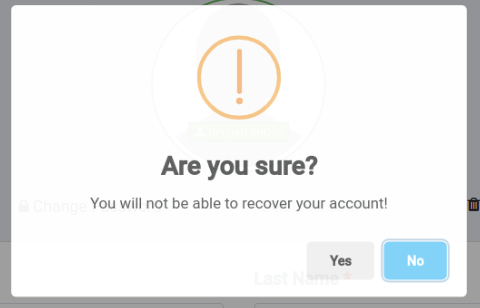
Problem 1: When I click the link, the sweet alert modal pops up for a split second, disappears, and redirects to route. Not sure why the modal is only flashing when it should stay until option chosen. I need user to confirm yes or no to delete account. If no then cancel, if yes than redirect to route.

enter image description here

Problem 2: I also understand from looking at this doc that in order to use the DELETE method in Sweet Alert I have to use an ajax request. Not sure what to put in url since I am using a rails route with a DELETE method, in order to get the ajax to redirect to that route to delete account.

Any help appreciated. Been working on this two days now.

Edit: Rails version 4.2.4, Sweet Alert version 1

<%= link_to 'Delete Account',registration_path(current_user), method: :delete, data: { behavior: 'delete' } %>


$("[data-behavior='delete']").on('click', function (e) {
      e.preventDefault();

  swal ({
      title: 'Are you sure?',
      text: 'You will not be able to recover your account!',
      icon: 'warning',
      buttons: [ 'Yes', 'No']
  }).then(isNo => {
  if(isNo) return;
      $.ajax({
        url: $(this).attr('href'),
        dataType: "JSON",
        method: "DELETE",
        success: ()=> {
            swal('Deleted!', 'Your account has been deleted.', 'success');
        }
      })
    });
  });

Run node.js script multiple times with multiple command line arguements on windows

I have a script named index.js which I need to run with multiple command line arguements, one at a time. Something like this:

node index.js ABC
node index.js DEF
.
.
node index.js XYZ

So I have written all these arguements in a params.txt file, one on each line. In this question, the solution for my problem is given, but it would not work on windows. Can anyone tell me what script I need to run on windows to achieve what is being done in the linked question?

Thank You.

Input value not updating, dynamic input box when user opens popup window react/next js

I have a problem where when a user opens a popup window to change their name, email, password, etc. the input box where they’d add their change won’t collect their input and display the change.

I’m using react/next.js and my popup window is from the npm package “reactjs-popup”

note -> I don’t think the fact that it’s a popup window is relevant, just adding that for context. I believe the problem lies in the dynamic creation of the input boxes or something along the lines of that

Example: user clicks on the edit email option -> popup window opens with an input box for them to change their email, when the user tries to type in that input box nothing shows, when I console log their change it only logs 1 letter at a time, with previous letters being replaced by the new one typed.

I’ve included the code below that I’m trying to use to make this work. If anyone has any questions for things I need to add please don’t hesitate to comment and I’ll get you the requested info ASAP.

Thanks.

Code

// element -> identifier so I know which field the user wants to update, ex: element = "full_name"
// title -> the title of the popup, ex: title = "Change Full Name"
// content -> the current value of the field, ex: content = "John Doe"
const EditSettingPopupWindow = ({ element, user_id, title, content }) => {
    const [edit, setEdit] = useState("");
    const [inputType, setInputType] = useState(<>Loading...</>);
    const [popupTitle, setPopupTitle] = useState("");
    const [toChange, setToChange] = useState("");

    const fullNameInput = {
        input: (
            <input
            id="new-name"
            name="new-name"
            type="name"
            placeholder="Full Name"
            value={edit}
            onChange={(e) => setEdit(e.target.value)}
            autoComplete="name"
            required
            />
        ),
        title: "Change Name",
        toChange: `Current name: ${`PLACEHOLDER`}`,
    };
    const dateOfBirth = {...};
    const emailInput = {...};
    const phoneInput = {...};
    const addressInput = {...};
    const usernameInput = {...};
    const passwordInput = {...};
    const billingPlan = {...}

    const updateUserPassword = async (password) => {
        ...change password code
    };

    useEffect(() => {
        switch (element) {
            case "full_name":
                setInputType(fullNameInput.input);
                setPopupTitle(fullNameInput.title);
                setToChange(fullNameInput.toChange);
                console.log(fullNameInput.title);
                break;
            case "userId":
                setInputType(usernameInput.input);
                setPopupTitle(usernameInput.title);
                setToChange(usernameInput.toChange);
                console.log(usernameInput.title);
                break;
            ...(rest of switch cases)
        }
    }, [element]);


    const handleSubmit = async (e) => {
        e.preventDefault();
        if (element === "password") {
            await updateUserPassword(edit);
            setEdit("");
            Router.reload();
            return;
        };
        console.log('handleSubmit-not password');
        await updateFirestore(user_id, element, edit);
        setEdit("");
        Router.reload();
    };

    return (
        <>
        <Popup
        trigger={
            <span className={styles.rowContainer}>
                <h3 className={styles.rowInfo}>{title}</h3>
                <h3 className={styles.rowInfo}>{content}</h3>
                <IoIosAddCircleOutline />
            </span>
        }
        modal
        nested
        >
        {/* @ts-ignore */ }
        {close => {
        return (
            <div className="modal">
                <button className="close" onClick={close}>
                    &times;
                </button>
                <div className="header"><h3>{popupTitle}</h3></div>
                <div className="content">
                    <h4>{toChange}</h4>
                    <form onSubmit={(e) => {
                        handleSubmit(e);
                        close();
                    }}>
                        {inputType}

                        <button
                        type="submit"
                        id="submit"
                        value="Submit"
                        >
                        Submit
                        </button>
                    </form>
                </div>
                <div className="actions">
                    <button
                    className="button"
                    onClick={() => {
                        console.log('modal closed ');
                        close();
                    }}
                    >
                    Close
                    </button>
                </div>
            </div>
            )
        }}
        </Popup>
        </>
    )
};

How does custom made asynchronous wrapper work?

I was following a code along video in Node.JS and creating the backend of a CRUD application.
I was able to understand the logic for all the controllers for the routes. However in order to make the code more clean and avoid writing try and catch for each controller, the author started using his own custom asynchronous wrapper for handling error. I am unable to understand the flow of control and how the wrapper and error handling is working. Any help would be really appreciated as I am new to Node.js and JavaScript.

This is the asynchronous wrapper.

const asyncWrapper = (fn) => {
  return async (req, res, next) => {
    try {
      await fn(req, res, next)
    } catch (error) {
      next(error)
    }
  }
}

module.exports = asyncWrapper

This is the controller file: –

const Task = require('../models/Task')
const asyncWrapper = require('../middleware/async')
const { createCustomError } = require('../errors/custom-error')

const getAllTasks = asyncWrapper(async (req, res) => {
  const tasks = await Task.find({})
  res.status(200).json({ tasks })
})

const createTask = asyncWrapper(async (req, res) => {
  const task = await Task.create(req.body)
  res.status(201).json({ task })
})

const getTask = asyncWrapper(async (req, res, next) => {
  const { id: taskID } = req.params
  const task = await Task.findOne({ _id: taskID })
  if (!task) {
    return next(createCustomError(`No task with id : ${taskID}`, 404))
  }
  res.status(200).json({ task })
})

const deleteTask = asyncWrapper(async (req, res, next) => {
  const { id: taskID } = req.params
  const task = await Task.findOneAndDelete({ _id: taskID })
  if (!task) {
    return next(createCustomError(`No task with id : ${taskID}`, 404))
  }
  res.status(200).json({ task })
})

const updateTask = asyncWrapper(async (req, res, next) => {
  const { id: taskID } = req.params

  const task = await Task.findOneAndUpdate({ _id: taskID }, req.body, {
    new: true,
    runValidators: true,
  })
if (!task) {
    return next(createCustomError(`No task with id : ${taskID}`, 404))
  }
res.status(200).json({ task })
})

module.exports = {
  getAllTasks,
  createTask,
  getTask,
  updateTask,
  deleteTask,
}

And this is the error handler :-

const { CustomAPIError } = require('../errors/custom-error')
const errorHandlerMiddleware = (err, req, res, next) => {
  if (err instanceof CustomAPIError) {
    return res.status(err.statusCode).json({ msg: err.message })
  }
  return res.status(500).json({ msg: 'Something went wrong, please try again' })
}

module.exports = errorHandlerMiddleware

php variables converted with json_decode must be printed to be accessible with ajax?

I am trying to get php values ​​with ajax, from a php template that also uses html.

first-template.php

<?php
$variable = array(
        'first_val' => 'Hello',
        'second_val' => 'bye',
     );
 echo json_encode($variable);

?>
/*
<div></div>
*/

output: {"first_val":"Hello","second_val":"bye"}

second-template.php

?>
 <script>
jQuery(document).ready(function($){
 $.ajax({
                beforeSend: function(){
                alert('Requesting...');
                },
                url : 'first-template.php',
                type : 'GET',
                dataType : 'json',
                success : function (result) {
                   console.log(result);
                   
                },
                error : function(xhr, status, error) {
        console.log(error);
        }
            });
  
      });    
  </script>
<?php

output: {ajax: 'Hello world!', advert: 'bye'}

The problem is that if I remove the echo from the first template I get an error: SyntaxError: Unexpected end of JSON input

And if I remove the /* ...*/ leaving the visible html printed I get an error: SyntaxError: Unexpected token < in JSON at position 40

What I need is to get the php variables with ajax, but without printing them to the screen

Next.js – Why I get hydration error in my header component

I am working on a job portal, I get user authentication using JWT and store it in local storage. I get hydration error in my header component when authenticated and if I reload my web page. I don’t know how to figure out the problem as I am new to next.js.

Header.js

import React from "react";
import { useState, useEffect } from "react";

import { useDispatch, useSelector } from "react-redux";

import Link from "next/link";
import Image from "next/image";
import { useRouter } from "next/router";

import Navbar from "react-bootstrap/Navbar";
import Container from "react-bootstrap/Container";
import Nav from "react-bootstrap/Nav";
import Dropdown from "react-bootstrap/Dropdown";
import Button from "react-bootstrap/Button";

import { logout } from "../actions/userActions";

const Header = ({ acclink, acc }) => {
  const userLogin = useSelector((state) => state.userLogin);
  const { userInfo } = userLogin;

  const dispatch = useDispatch();

  const logoutHandler = () => {
    dispatch(logout());
  };

  return (
    <>
      {/* Dark navbar: Light links against dark background */}
      <Navbar
        as="header"
        className="mb-5 navbar-stuck"
        bg="dark"
        variant="dark"
        fixed="top"
        expand="lg"
      >
        <Container>
          {/* Logo (Brand) */}
          <Link href="/" passHref>
            <Navbar.Brand className="me-2 me-xl-4">
              <Image
                src="/images/Apt-Job-logo.svg"
                width={116}
                height={32}
                quality={100}
                alt="Apt Job"
              />
            </Navbar.Brand>
          </Link>

          {/* Mobile menu toggle */}
          <Navbar.Toggle
            aria-controls="navbarNav"
            bsPrefix="ms-auto navbar-toggler"
          />

          {/* Action button */}

          {userInfo ? (
            <Nav.Item
              as={Dropdown}
              bsPrefix="d-none d-lg-block order-lg-3 my-n2 me-3"
            >
              <Dropdown.Toggle
                as={Nav.Link}
                className="dropdown-toggle-flush d-flex py-1 px-0"
              >
                <Image
                  alt="User"
                  src="/images/user.png"
                  width={40}
                  height={40}
                  quality={100}
                />
              </Dropdown.Toggle>
              <Dropdown.Menu align="end" renderOnMount variant="dark">
                <Dropdown.Item className="d-flex align-items-start border-bottom border-light px-3 py-1 mb-2">
                  <div className="ps-2">
                    <h6 className="fs-base mb-0 text-light">{userInfo.name}</h6>
                    <div className="fs-xs py-2">{userInfo.email}</div>
                  </div>
                </Dropdown.Item>
                {userInfo.isEmployer ? (
                  <Link href="#" passHref>
                    <Dropdown.Item>Action link</Dropdown.Item>
                  </Link>
                ) : (
                  <Link href="/user/profile" passHref>
                    <Dropdown.Item>Profile Settings</Dropdown.Item>
                  </Link>
                )}

                {userInfo.isEmployer ? (
                  <Link href="#" passHref>
                    <Dropdown.Item>Employer action</Dropdown.Item>
                  </Link>
                ) : (
                  <Link href="#" passHref>
                    <Dropdown.Item>Another action</Dropdown.Item>
                  </Link>
                )}
                <Dropdown.Divider as="div" />
                <Dropdown.Item onClick={logoutHandler}>Signout</Dropdown.Item>
              </Dropdown.Menu>
            </Nav.Item>
          ) : (
            (acc == "usr" || acc == "emp") && (
              <Link href={`${acclink}/login`} passHref>
                <Button
                  variant="link"
                  size="sm"
                  className="btn-light d-none d-lg-block order-lg-3"
                  // onClick={() => router.push("/login")}
                >
                  <i className="fi-user me-2"></i>
                  <span className="d-none d-sm-inline">Sign in</span>
                </Button>
              </Link>
            )
          )}

          {acc == "usr" && (
            <Link href="/postresume" passHref>
              <Button
                variant="primary"
                size="sm"
                className=" rounded-pill order-lg-3 ms-2"
              >
                <i className="fi-plus me-2"></i>
                Post<span className="d-none d-sm-inline"> Resume</span>
              </Button>
            </Link>
          )}

          {!userInfo && acc == "" && (
            <>
              <Link href="/user" passHref>
                <Button
                  variant="link"
                  size="sm"
                  className="btn-light d-none d-lg-block order-lg-3"
                >
                  <span className="d-none d-sm-inline">For Users </span>
                  <i className="fi-arrow-long-right ms-2"></i>
                </Button>
              </Link>
              <Link href="/employer" passHref>
                <Button
                  variant="link"
                  size="sm"
                  className="btn-light d-none d-lg-block order-lg-3"
                >
                  <span className="d-none d-sm-inline">For Employers </span>
                  <i className="fi-arrow-long-right ms-2"></i>
                </Button>
              </Link>
            </>
          )}

          {/* Responsive Navbar nav (Menu) */}
          <Navbar.Collapse id="navbarNav" className="order-md-2">
            <Nav className="navbar-nav-scroll" style={{ maxHeight: "35rem" }}>
              <Nav.Item>
                <Link href="/user" passHref>
                  <Nav.Link>Find Jobs</Nav.Link>
                </Link>
              </Nav.Item>
              {userInfo && userInfo.isEmployer ? (
                <Nav.Item>
                  <Link href="#" passHref>
                    <Nav.Link> Post Jobs</Nav.Link>
                  </Link>
                </Nav.Item>
              ) : (
                userInfo &&
                userInfo.isEmployer == false && (
                  <Nav.Item>
                    <Link href="#" passHref>
                      <Nav.Link>Applied Jobs</Nav.Link>
                    </Link>
                  </Nav.Item>
                )
              )}

              {(!userInfo && acc == "usr") ||
                (acc == "emp" && (
                  <Nav.Item className="d-lg-none">
                    <Link href={`${acclink}/login`} passHref>
                      <Nav.Link>
                        <i className="fi-user me-2"></i>
                        {"Sign in"}
                      </Nav.Link>
                    </Link>
                  </Nav.Item>
                ))}
             
            </Nav>
          </Navbar.Collapse>
        </Container>
      </Navbar>
    </>
  );
};


export default Header;

I am sure hydration error is because of header, I removed header component from a page and tested when authenticated, it shows no hydration error when I include header when authenticated and reload the page it shows hydration error.

How can I pass the value of a unchecked checkbox to the form?

I have a webiste where users can find a discord server with their option,such as if server is NSFW, premium,member count and tags. I tried to do a dinamic filter using the request query from the form where users filter the servers,but I can’t find a solution to send the value of the input checkbox to the form even if the input is unchecked.

                    <form method="get" action="/search/">   
 <div class="setting">
                          <input name="premium" type="checkbox" id="uppercase" value="true" onClick="if(this.value === 'false') {this.value = true}else {this.value =false}" checked />
                          <label for="uppercase">Premium</label>
                        </div>
                        </form>

when the input is checked the value is sent to the url, like /search?premium=true, but when the checkbox is unchecked,nothing is sent to the url and this causing me trouble,cause I need those parameters in order to make the filter to work.
Is there something that I can do to the send the value of the check input even if it’s unchecked?

How to alert north east south west? Javascript

I am new to coding and have had alot of help with this. I am making a game, you have to choose the right cell in the table. I am wondering how i would be able to alert them a direction when they choose the wrong cell. For example if they choose the wrong cell they would be alerted “north” if the correct cell was north. Here is my code if you would like to look.

<!DOCTYPE html>
<html lang="en">
 
<head>
    <meta charset="UTF-8">
    <meta http-equiv="X-UA-Compatible" content="IE=edge">
    <meta name="viewport" content="width=device-width, initial-scale=1.0">
    <title>Document</title>
 
    <style>
        body {
            text-align: center;
        }
 
        table,
        th,
        td {
            border: 0px solid white;
            border-collapse: collapse;
            width: 45%;
            height: 55px;
            text-align: center;
            vertical-align: center;
            table-layout: fixed;
        }
 
        table.center {
            margin-left: auto;
            margin-right: auto;
        }
 
        .Tableheader {
            border: 0px solid white
        }
 
        .TableCell {
            background-color: rgb(252, 142, 215);
            border: 2px solid black;
        }
 
        .button {
            padding: 5px;
            background-color: #dcdcdc;
            border: 1px solid #666;
            color: #000;
            margin-top: 10px;
        }
 
        button:hover {
            color: yellow;
        }
 
        .TableCell:hover {
            background-color: rgb(255, 230, 0);
        }
        body {
  background-image: url('https://storage.pixteller.com/designs/designs-images/2019-03-27/05/simple-background-backgrounds-passion-simple-1-5c9b95bd34713.png');
}
    </style>
</head>
 
</body>
<div id="MainMenu">
    <form name="form1" action="#" onsubmit="required(event)">
        <ul>
    <h2>Hurkles the Game</h2>
    <p>Type in your name and click start to begin</p>
    <li><input  type='text' name ='text1' id='text1'/></li>
    <li class="rq">*Required Field</li>
        <li><input type="submit" name="submit" id='submit' value="Submit" /></li>
</ul>
</form>
</div>
 <div id="Table">
<div id='playerName'></div>
<h2>Hurkles</h2>
<p> Click a Cell to Find Hurkles</p>
<table>
    <table id="tableID" class="center">
        <tr>
            <td id="R0C0" class="Tableheader"></td>
            <td id="R0C1" class="Tableheader">A</td>
            <td id="R0C2" class="Tableheader">B</td>
            <td id="R0C3" class="Tableheader">C</td>
            <td id="R0C4" class="Tableheader">D</td>
            <td id="R0C5" class="Tableheader">E</td>
            <td id="R0C6" class="Tableheader">F</td>
            <td id="R0C7" class="Tableheader">G</td>
            <td id="R0C8" class="Tableheader">H</td>
            <td id="R0C9" class="Tableheader">I</td>
            <td id="R0C10" class="Tableheader">J</td>
        </tr>
        <tr>
            <td id="R1C0" class="Tableheader">1</td>
            <td id="R1C1" class="TableCell" onclick="tableText('red')"></td>
            <td id="R1C2" class="TableCell" onclick="tableText('red')"></td>
            <td id="R1C3" class="TableCell" onclick="tableText('red')"></td>
            <td id="R1C4" class="TableCell" onclick="tableText('red')"></td>
            <td id="R1C5" class="TableCell" onclick="tableText('red')"></td>
            <td id="R1C6" class="TableCell" onclick="tableText('red')"></td>
            <td id="R1C7" class="TableCell" onclick="tableText('red')"></td>
            <td id="R1C8" class="TableCell" onclick="tableText('red')"></td>
            <td id="R1C9" class="TableCell" onclick="tableText('red')"></td>
            <td id="R1C10" class="TableCell" onclick="tableText('red')"></td>
        </tr>
        <tr>
            <td id="R2C0" class="Tableheader">2</td>
            <td id="R2C1" class="TableCell" onclick="tableText('red')"></td>
            <td id="R2C2" class="TableCell" onclick="tableText('red')"></td>
            <td id="R2C3" class="TableCell" onclick="tableText('red')"></td>
            <td id="R2C4" class="TableCell" onclick="tableText('red')"></td>
            <td id="R2C5" class="TableCell" onclick="tableText('red')"></td>
            <td id="R2C6" class="TableCell" onclick="tableText('red')"></td>
            <td id="R2C7" class="TableCell" onclick="tableText('red')"></td>
            <td id="R2C8" class="TableCell" onclick="tableText('red')"></td>
            <td id="R2C9" class="TableCell" onclick="tableText('red')"></td>
            <td id="R2C10" class="TableCell" onclick="tableText('red')"></td>
        </tr>
        <tr>
            <td id="R3C0" class="Tableheader">3</td>
            <td id="R3C1" class="TableCell" onclick="tableText('red')"></td>
            <td id="R3C2" class="TableCell" onclick="tableText('red')"></td>
            <td id="R3C3" class="TableCell" onclick="tableText('red')"></td>
            <td id="R3C4" class="TableCell" onclick="tableText('red')"></td>
            <td id="R3C5" class="TableCell" onclick="tableText('red')"></td>
            <td id="R3C6" class="TableCell" onclick="tableText('red')"></td>
            <td id="R3C7" class="TableCell" onclick="tableText('red')"></td>
            <td id="R3C8" class="TableCell" onclick="tableText('red')"></td>
            <td id="R3C9" class="TableCell" onclick="tableText('red')"></td>
            <td id="R3C10" class="TableCell" onclick="tableText('red')"></td>
        </tr>
        <tr>
            <td id="R4C0" class="Tableheader">4</td>
            <td id="R4C1" class="TableCell" onclick="tableText('red')"></td>
            <td id="R4C2" class="TableCell" onclick="tableText('red')"></td>
            <td id="R4C3" class="TableCell" onclick="tableText('red')"></td>
            <td id="R4C4" class="TableCell" onclick="tableText('red')"></td>
            <td id="R4C5" class="TableCell" onclick="tableText('red')"></td>
            <td id="R4C6" class="TableCell" onclick="tableText('red')"></td>
            <td id="R4C7" class="TableCell" onclick="tableText('red')"></td>
            <td id="R4C8" class="TableCell" onclick="tableText('red')"></td>
            <td id="R4C9" class="TableCell" onclick="tableText('red')"></td>
            <td id="R4C10" class="TableCell" onclick="tableText('red')"></td>
        </tr>
        <tr>
            <td id="R5C0" class="Tableheader">5</td>
            <td id="R5C1" class="TableCell" onclick="tableText('red')"></td>
            <td id="R5C2" class="TableCell" onclick="tableText('red')"></td>
            <td id="R5C3" class="TableCell" onclick="tableText('red')"></td>
            <td id="R5C4" class="TableCell" onclick="tableText('red')"></td>
            <td id="R5C5" class="TableCell" onclick="tableText('red')"></td>
            <td id="R5C6" class="TableCell" onclick="tableText('red')"></td>
            <td id="R5C7" class="TableCell" onclick="tableText('red')"></td>
            <td id="R5C8" class="TableCell" onclick="tableText('red')"></td>
            <td id="R5C9" class="TableCell" onclick="tableText('red')"></td>
            <td id="R5C10" class="TableCell" onclick="tableText('red')"></td>
        </tr>
        <tr>
            <td id="R6C0" class="Tableheader">6</td>
            <td id="R6C1" class="TableCell" onclick="tableText('red')"></td>
            <td id="R6C2" class="TableCell" onclick="tableText('red')"></td>
            <td id="R6C3" class="TableCell" onclick="tableText('red')"></td>
            <td id="R6C4" class="TableCell" onclick="tableText('red')"></td>
            <td id="R6C5" class="TableCell" onclick="tableText('red')"></td>
            <td id="R6C6" class="TableCell" onclick="tableText('red')"></td>
            <td id="R6C7" class="TableCell" onclick="tableText('red')"></td>
            <td id="R6C8" class="TableCell" onclick="tableText('red')"></td>
            <td id="R6C9" class="TableCell" onclick="tableText('red')"></td>
            <td id="R6C10" class="TableCell" onclick="tableText('red')"></td>
        </tr>
        <tr>
            <td id="R7C0" class="Tableheader">7</td>
            <td id="R7C1" class="TableCell" onclick="tableText('red')"></td>
            <td id="R7C2" class="TableCell" onclick="tableText('red')"></td>
            <td id="R7C3" class="TableCell" onclick="tableText('red')"></td>
            <td id="R7C4" class="TableCell" onclick="tableText('red')"></td>
            <td id="R7C5" class="TableCell" onclick="tableText('red')"></td>
            <td id="R7C6" class="TableCell" onclick="tableText('red')"></td>
            <td id="R7C7" class="TableCell" onclick="tableText('red')"></td>
            <td id="R7C8" class="TableCell" onclick="tableText('red')"></td>
            <td id="R7C9" class="TableCell" onclick="tableText('red')"></td>
            <td id="R7C10" class="TableCell" onclick="tableText('red')"></td>
        </tr>
        <tr>
            <td id="R8C0" class="Tableheader">8</td>
            <td id="R8C1" class="TableCell" onclick="tableText('red')"></td>
            <td id="R8C2" class="TableCell" onclick="tableText('red')"></td>
            <td id="R8C3" class="TableCell" onclick="tableText('red')"></td>
            <td id="R8C4" class="TableCell" onclick="tableText('red')"></td>
            <td id="R8C5" class="TableCell" onclick="tableText('red')"></td>
            <td id="R8C6" class="TableCell" onclick="tableText('red')"></td>
            <td id="R8C7" class="TableCell" onclick="tableText('red')"></td>
            <td id="R8C8" class="TableCell" onclick="tableText('red')"></td>
            <td id="R8C9" class="TableCell" onclick="tableText('red')"></td>
            <td id="R8C10" class="TableCell" onclick="tableText('red')"></td>
        </tr>
        <tr>
            <td id="R9C0" class="Tableheader">9</td>
            <td id="R9C1" class="TableCell" onclick="tableText('red')"></td>
            <td id="R9C2" class="TableCell" onclick="tableText('red')"></td>
            <td id="R9C3" class="TableCell" onclick="tableText('red')"></td>
            <td id="R9C4" class="TableCell" onclick="tableText('red')"></td>
            <td id="R9C5" class="TableCell" onclick="tableText('red')"></td>
            <td id="R9C6" class="TableCell" onclick="tableText('red')"></td>
            <td id="R9C7" class="TableCell" onclick="tableText('red')"></td>
            <td id="R9C8" class="TableCell" onclick="tableText('red')"></td>
            <td id="R9C9" class="TableCell" onclick="tableText('red')"></td>
            <td id="R9C10" class="TableCell" onclick="tableText('red')"></td>
        </tr>
        <tr>
            <td id="R10C0" class="Tableheader">10</td>
            <td id="R10C1" class="TableCell" onclick="tableText('red')"></td>
            <td id="R10C2" class="TableCell" onclick="tableText('red')"></td>
            <td id="R10C3" class="TableCell" onclick="tableText('red')"></td>
            <td id="R10C4" class="TableCell" onclick="tableText('red')"></td>
            <td id="R10C5" class="TableCell" onclick="tableText('red')"></td>
            <td id="R10C6" class="TableCell" onclick="tableText('red')"></td>
            <td id="R10C7" class="TableCell" onclick="tableText('red')"></td>
            <td id="R10C8" class="TableCell" onclick="tableText('red')"></td>
            <td id="R10C9" class="TableCell" onclick="tableText('red')"></td>
            <td id="R10C10" class="TableCell" onclick="tableText('red')"></td>
        </tr>
        
    </table>
    <br>
    <br>
    <button type="button" id="reset" onclick="hideAll()">Start</button>
</div>
 
<script>
Table.style.display = "none";
MainMenu.style.display = "block";
var name = '';
function Start(){
    Table.style.display = "block"
    MainMenu.style.display = "none"
    document.getElementById('playerName').innerHTML = 'Welcome ' + name;
    
}
var input = document.getElementById("text1");
input.addEventListener("keypress", function(event) {
  if (event.key === "Enter") {
    event.preventDefault();
    document.getElementById("submit").click();
  }
});
   
function tableText(col) {
  if (typeof event !== 'undefined')
    el = event.srcElement
  el.style.backgroundColor = col
}
    
    
    let colIndex = Math.floor(Math.random() * 8) + 1;
    let rowIndex = Math.floor(Math.random() * 8) + 1;
    console.log('col:' + ['A', 'B', 'C', 'D', 'E', 'F', 'G', 'H', 'I', 'J'][colIndex-1], 'row:' + rowIndex);
    document.querySelector('#R' + rowIndex + 'C' + colIndex).onclick = () => { 
        tableText('green');
        alert("correct");
    }
    
    function hideAll(){
    Table.style.display = "none"
    MainMenu.style.display = "block"
}
function gameReset(){
}
function required(e){
    e.preventDefault();
    var empt = document.forms["form1"]["text1"].value;
    if(empt == ""){
        alert("Please input your name");
    }
        else{
            name = document.getElementById('text1').value;
            Start()
        }
        
    
}
</script>
 
</html>
</script>

My JavaScript code is memory leaking, but I don’t know how to fix

I have a Discord bot written in Nodejs (JavaScript), but I run into a memory leak issue recently.

My code is using ~10GB memory, and it keep increasing. I run process.memUsage() and it returned something like this:

rss: ~10GB
heapTotal: ~300MB
heapUsed: ~250MB
external: ~500MB
arrayBuffer: ~500MB

I can’t figure out which piece of code is leaking, there is alot tool that will diagnose memory leak in Node.js, but almost all tools is watching heap instead rss.

Note: I did not use any var keyword, I hate it.

Code repository: https://github.com/blackcatbot/blackcat

Iterate Object and replace values

I have this Object:

{
  "data": {
    "success": true,
    "historical": true,
    "date": "2022-01-01",
    "base": "MXN",
    "rates": {
      "COFFEE": 0.02158734144632395,
      "CORN": 0.008232645172711363,
      "COTTON": 0.04320921676820366,
      "SOYBEAN": 0.0036714622235960175,
      "SUGAR": 0.25680398615582695,
      "WHEAT": 0.00017592643558262669
    },
    "unit": "per bushel"
  }
}  

And I want to iterate over “rates” to replace the values of each key with 1 / value
I tried with: (prueba is the Object name)

Object.values(this.prueba.data.rates).forEach((val) => {
      console.log(val)
      val = 1 / val;
      console.log(val)
    })

But how to replace those values or how can I saved them in another array or Object