Multiple Prototypes inside constructor functions

I have been researching this for hours. I wanted to find where the predefined method call() resides.
After creating a constructor function,

function computer() {
this.name = "my computer";
}

And after I console.log(computer.prototype) I find a constructor property and a prototype property.

enter image description here

The method call() is not defined inside this prototype, neither is it defined inside the prototype of its prototype.
But I see there is a constructor property and as the documentation says, it hold a reference to the function itself.
This allows me to look inside the computer constructor function (as this contructor property holds a reference to it). enter image description here

I can see that there are in fact two prototypes inside the computer constructor function, the first one has apparently the same properties as the prototype I am accessing this constructor from.

And the second one, (which is of type function by spec) has finally the method call() on it and it follows the proper prototypal chain as well. (inherting from function and function then inherting from object)

My first question is, how are there two prototypes inside the computer constructor function? We can have more than one prototype!? This first prototype seems to be only an object that has a constructor property that points to the function itself and its prototype pointing to Object. It doesn’t even have all the methods like call() and bind() etc. So what is even its purpose?

Secondly, why am I not getting the second prototype when I use computer.prototype which seems to be actually following the prototype chain and has all the necessary methods in it.

Pass Local storage data (videos) to popup video player in react JavaScript

Get data from Fastapi and display it in react console. After that I stored in into local storage.

enter image description here

After populating API data grid in this format
enter image description here

Now I expected to pass videos to button also when I click button popup should open and video should play.

How to resolve that use case with react JavaScript

Problems and use case:

  1. Pass localstorage to button and popup open when click play button

  2. When I click button popup open and video should play in popup video player which read from my computer storage.

Code reference: Click here

Action happening for all the items in v-for but I want to run the action on the item I clicked on (Nuxt.js/Vue.js)

I have an icon in the v-for loop and I want the action to be performed specific to the one icon but it is happening for all the icons that are repeating because of v-for. Any idea how to fix this!

// Inside the v-for

 <td data-label="Activity Alert">
              <el-popover
                v-model="remindMeVisibility"
                placement="left-start"
                width="500"
                trigger="manual"
                class="popover-form"
              >
                <RemindMe />
                <i
                  @click="remindMeVisibility = true"
                  slot="reference"
                  class="el-icon-message-solid reminder-icon"
                ></i>
              </el-popover>
            </td>

Jupyter Notebook / jupyternotify / Javascript Error: $ is not defined

This is a not a full on JavaScript project like the following question/answers:

This is a simple Jupyter notebook/lab expansion python package called “jupyter-notify” that should generate a pop up “browser notification” after a cell finish running

Previously it was installed via

pip install jupyternotify

CELL 1:

%load_ext jupyternotify

CELL 2:

%%notify
import time
time.sleep(5)

CELL 2 ERROR:

Javascript Error: $ is not defined

Goal

  • is to not to have this error and
  • just get a pop up message whenever a certain cell finishes running

React – A component is changing a controlled input to be uncontrolled. This is likely caused by the value changing from a defined to undefined

I am building my first own Mern-Stack. I have a dropdownmenue with three contents, menuepoints(lis), videos and themes. Currently I am writing an edit-component for this dropdown, and I am getting the error, which is the title of my post. It is clear, the users should get the current state displayed, but only menuepoints and themes are displayed, and when I try to update them, console say the same and the value is undefined. I tried something with defaultValue, I tried to define the value before setData, but nothing changes.
Can someone help me out?
Thanks for your help.

Here is my code:

const DropdownRessortEdit = () => {
    const dispatch = useDispatch();
    const { id } = useParams();
    const {dropdownRessort, isLoading, isError, message} = useSelector((state)=>state.dropdownRessort);
   console.log({...dropdownRessort});
    const [data, setData] = useState({
        lis: [],
        videos:[
                {
                    iframe:"",
                    ressort:"",
                    theme:"",
                    title:"",
                },
                {
                    iframe:"",
                    ressort:"",
                    theme:"",
                    title:"",
                },
                {
                    iframe:"",
                    ressort:"",
                    theme:"",
                    title:"",
                }, 
        ],
        themen:[],
    })
    
    const {lis, videos, themen} = data;

    useEffect(()=>{
        if(isError){
            window.alert(message);
        }
        if(id){
            dispatch(getDropdownRessort(id));
        }
            return ()=>{
                dispatch(reset());
            }
        
    }, [dispatch, isError, message, id]);
    useEffect(()=>{
        
            if(dropdownRessort){
                setData({...dropdownRessort})
            }
            return dispatch(reset());
    },[dropdownRessort, dispatch]);
    
  console.log(data);
    const updateData = (e)=>{
        const {value} = e.target //changes nothing
        setData((prevState)=>({
            ...prevState,
            [e.target.name]: value,
          }))
    }
    const onSubmit = (e)=>{
        e.preventDefault();
        const updateDropdownRessortData = {
            lis,
            videos,
            themen,
        }
        dispatch(updateDropdownRessort(updateDropdownRessortData));
    }
    if(isLoading){
        return <Spinner/>
    }
  return (
   
    <Container>
        <Navbar/>
        <TitleHolder>
            <Title>Update DropdownRessort</Title>
        </TitleHolder>
        <ContentHolder>
            {data ? 
            <UpdateForm onSubmit={onSubmit} encType="multipart/form-data">
            <section className="menupoints">
                  <Label htmlFor="lis_ressorts">Menüpunkte Ressorts</Label>
                  <Input type="text" name="lis_ressorts" id="lis_ressorts" value={data.lis} onChange={updateData}/>
                </section>
                <VideoWrapper>
                    <DataHolder>
                        {data.videos?.map((video, index)=>(
                            <div key={index}>
                                 <VideoSection>
                                    <FormGroup>
                                        <Label htmlFor={`ressortvideo_ + ${index} + _iframe`}>{`Video ${index}`}</Label>
                                        <Input type="url" name={`ressortvideo_ + ${index} + _iframe`} id={`ressortvideo_ + ${index} + _iframe`}
                                        defaultValue={""} value={video.iframe}  onChange={updateData}/>
                                    </FormGroup>
                                    <FormGroup>
                                        <Label htmlFor={`ressortvideo_ + ${index} + _ressort`}>{`Video ${index} Ressortzuordnung`}</Label>
                                        <Input type="text" name={`ressortvideo_ + ${index} + _ressort`} id={`ressortvideo_ + ${index} + _ressort`} value={video.ressort} onChange={updateData}/>
                                    </FormGroup>
                                    <FormGroup>
                                        <Label htmlFor={`ressortvideo_ + ${index} + _theme`}>{`Video ${index} Themenzuordnung`}</Label>
                                        <Input type="text" name={`ressortvideo_ + ${index} + _theme`} id={`ressortvideo_ + ${index} + _theme`}  value={video.theme} onChange={updateData}/>
                                    </FormGroup>
                                    <FormGroup>
                                        <Label htmlFor={`ressortvideo_ + ${index} + _title`}>{`Video ${index} Titelzuordnung`}</Label>
                                        <Input type="text" name={`ressortvideo_ + ${index} + _title`} id={`ressortvideo_ + ${index} + _title`}  value={video.title} onChange={updateData}/>
                                    </FormGroup>
                                </VideoSection>
                            </div>
                        ))}
                        </DataHolder>
                </VideoWrapper>
                <section className="themen">
                  <Label htmlFor="themen_ressorts">Themen</Label>
                  <Input type="text" name="themen_ressorts" id="themen_ressorts" value={data.themen} onChange={updateData}/>
                </section>
                        <ButtonHolder>
                            <UpdateButton type="submit">Update</UpdateButton>
                        </ButtonHolder> 
 
            </UpdateForm>
            : null}
        </ContentHolder>
        <Footer/>
    </Container>
  )
}

export default DropdownRessortEdit

MongoDB aggregate join two $group

I have a model that looks like this:

{
tokens: [
{
  value: {
    type: String,
    required: true,
    unique: true,
  },
  origin: {
    type: String,
    default: 'Unknown',
  },
  grabbedAt: {
    type: Date,
    default: Date.now,
  },
},
], ...
}

Now I want to format the data in the following way that all “tokens” with a date of the past 12 days are returned and grouped by their origin with a count per day.

So the result would look like this: [{ origin: 'Unknown', data: [0,1,2,...] }, { origin: 'origin2', data: [1,10,...] }]
The data array would hold the count of tokens acquired on past 12 days, beginning with the first day to the 12th day.

I already tried something like this:

Account.aggregate([
{ $unwind: '$tokens' },
{ $match: { 'tokens.grabbedAt': { $gte: beforeDate } } },
{
  $group: {
    _id: { origin: '$tokens.origin', date: '$tokens.grabbedAt' },
    count: { $sum: 1 },
  },
},
{ $project: { _id: 0, origin: '$_id.origin', date: '$_id.date', count: '$count' } },
{ $sort: { date: 1 } },
]);

But using this code each date and origin is included multiple times. So how can I “join” or merge these two $groups?

How do I re-render a component when an object is changed in React

I’m trying to build a simple expense log app in React and would like to display the latest data every time the expensesLog object is updated. On clicking the button, the clickHandler function is called and the object is updated but nothing seems to change on the UI inspite of me mapping the expenseLog object. Here’s my code :

import './App.css';
import { useState } from 'react';

function App() {

  var expenseLog = [
    {
      name: "Expense1",
      amount: 1000
    },
    {
      name: "Expense2",
      amount: 100
    }
  ];

  var [count, setCount] = useState(0);
  var [name, setName] = useState("");

  const inputChangeHandler = (e) => { 
    setName(e.target.value);
  }

  const inputChangeHandler2 = (e) => { 
    setCount(e.target.value);
  }
  
  const clickHandler = () => { 
    expenseLog = [...expenseLog, {name: name, amount: count}];
    document.querySelector('.inputField').value = "";
    document.querySelector('.inputField2').value = 0;
  }

  return (
    <div className="App">
      <input onChange={inputChangeHandler} className='inputField'/>
      <input type={"number"} onChange={inputChangeHandler2} className='inputField2'/>
      <button onClick={clickHandler}></button>
      {expenseLog.map(expense => <p>{expense.name} {expense.amount}</p>)}
    </div>
  );
}

export default App;

Unable to find draggable with id: b7zc6

Hi i am new to react and stuck with react-beautiful-dnd issue.
I Seem to have configured as per the documentation but still facing this weird issue related to draggable id.

  1. made draggableid as string
  2. provided index as number
  3. assigned innerref properly

But still the issue persist.
Need some expert help in this area.

CodeSandBox Link : Link to react beautiful dnd codesandbox issue code

Also adding the code for quick glance:

import "./styles.css";
import { DragDropContext, Draggable, Droppable } from "react-beautiful-dnd";
import { useState } from "react";

export default function App() {
  const [list, setList] = useState(generateData());

  const st = {
    width: "300px",
    cursor: "grab",
    display: "flex",
    gap: "10px",
    flexDirection: "column"
  };
  const onDragEnd = (result) => {
    if (result.destination) {
      alert("drag successfull");
    }
  };

  return (
    <div className="App">
      <h4>Test</h4>
      <div>
        <DragDropContext onDragEnd={onDragEnd}>
          <Droppable droppableId="droppable">
            {(provided) => (
              <div
                {...provided.droppableProps}
                ref={provided.innerRef}
                style={st}
                className="work-parent"
              >
                <WorkList list={list} />
              </div>
            )}
          </Droppable>
        </DragDropContext>
      </div>
    </div>
  );
}

function WorkList({ list }) {
  return list.map((l, index) => <Work key={l.id} work={l} index={index} />);
}

function Work({ work, index }) {
  const st = {
    padding: "10px",
    width: "100%",
    color: "white",
    backgroundColor: "purple",
    width: "200px",
    height: "50px"
  };
  return (
    <Draggable draggableId={work.id} key={work.id} index={index}>
      {(provided) => (
        <div
          ref={provided.innerRef}
          {...provided.draggableProps}
          {...provided.dragHandleProps}
          style={st}
        >
          {work.title}
        </div>
      )}
    </Draggable>
  );
}

function generateData() {
  const data = [];

  for (let i = 0; i < 10; i++) {
    data.push({
      title: "Work - " + i,
      id: makeid(5)
    });
  }

  return data;
}

function makeid(length) {
  var result = "";
  var characters =
    "ABCDEFGHIJKLMNOPQRSTUVWXYZabcdefghijklmnopqrstuvwxyz0123456789";
  var charactersLength = characters.length;
  for (var i = 0; i < length; i++) {
    result += characters.charAt(Math.floor(Math.random() * charactersLength));
  }
  return result;
}

Calling a function using onclick from a file in my public folder (Next.js)

so I’m new to Next.js and I was wondering how to use onclick to call a function from an external file in my public folder.

Here is my index.js

import Head from "next/head"
import Script from "next/script"

export default function Home() {
  return (
    <div>
      <Head>
        <Script src="/hello.js"></Script>
      </Head>
      <p id="hi">Hello World</p>
      <button onclick="hello()">Click me</button>
    </div>
  )
}

Here is my hello.js

function hello() {
  document.getElementById("hi").innerHTML = "Hi World";
}

Creating Object Using Array Elements without overwriting Existing Keys

I trying to creating an object from an array that contains many arrays.
The array element are to be nested keys of object for each other, only if the key has not be created initially. That is, it should not overwrite key and should also maintained key index.

Example is this –


const MainArray = [
                    {
                      key: ['name', 'dog', 'feature', 'hairy'],
                      value1:1 , 
                      value2:2
                     },
                    {
                      key: ['name', 'dog', 'eye', 'brown'],
                      value1:1 , 
                      value2:2
                     }, 
                    {
                      key: ['kind', 'human', 'class', 'man' 'height', 'tall'],
                      value1:'Mike' , 
                      value2:'John'
                     }, 
                     {
                      key: ['kind', 'human', 'class', 'woman', 'hobby'],
                      value1:'Cyling' , 
                      value2:'Tennis'
                     }, 

                ]


const requiredObject = 
                     {

                      name:{
                          dog :{
                            feature:{
                                   hairy :{value1:1, value2:2}
                            },
                            eye:{
                                brown:{value1:1, value2:2}
                             }
                           }
                        },
                        kind:{
                           human:{
                              class:{
                                   man:{
                                      height:{
                                        tall:{value1:'Mike', value2:'John'}
                                      }
                                   },
                                   woman:{
                                       hobby:{value1:'Cyling', value2: 'Tennis'}
                                   } 
                                }
                            }
                         }

                     }

How can I go from MainArray to requireObject

Cant access items in array object – JavaScript

I want to filter data by category and get the items.

When I check console it says

Objects are not valid as a React child (found: object with keys {category, items}). If you meant to render a collection of children, use an array instead.

const contentt = [
{
    category : 'gunes',
    items : [
        "Diyarbakır-2 GES",
        "Kilis-1 GES",
        "Mardin-1 GES",
        "Şırnak-1 GES",
        "Şırnak-2 GES",
    ]
},];
console.log(contentt.filter(x => x.category ===  'gunes'))

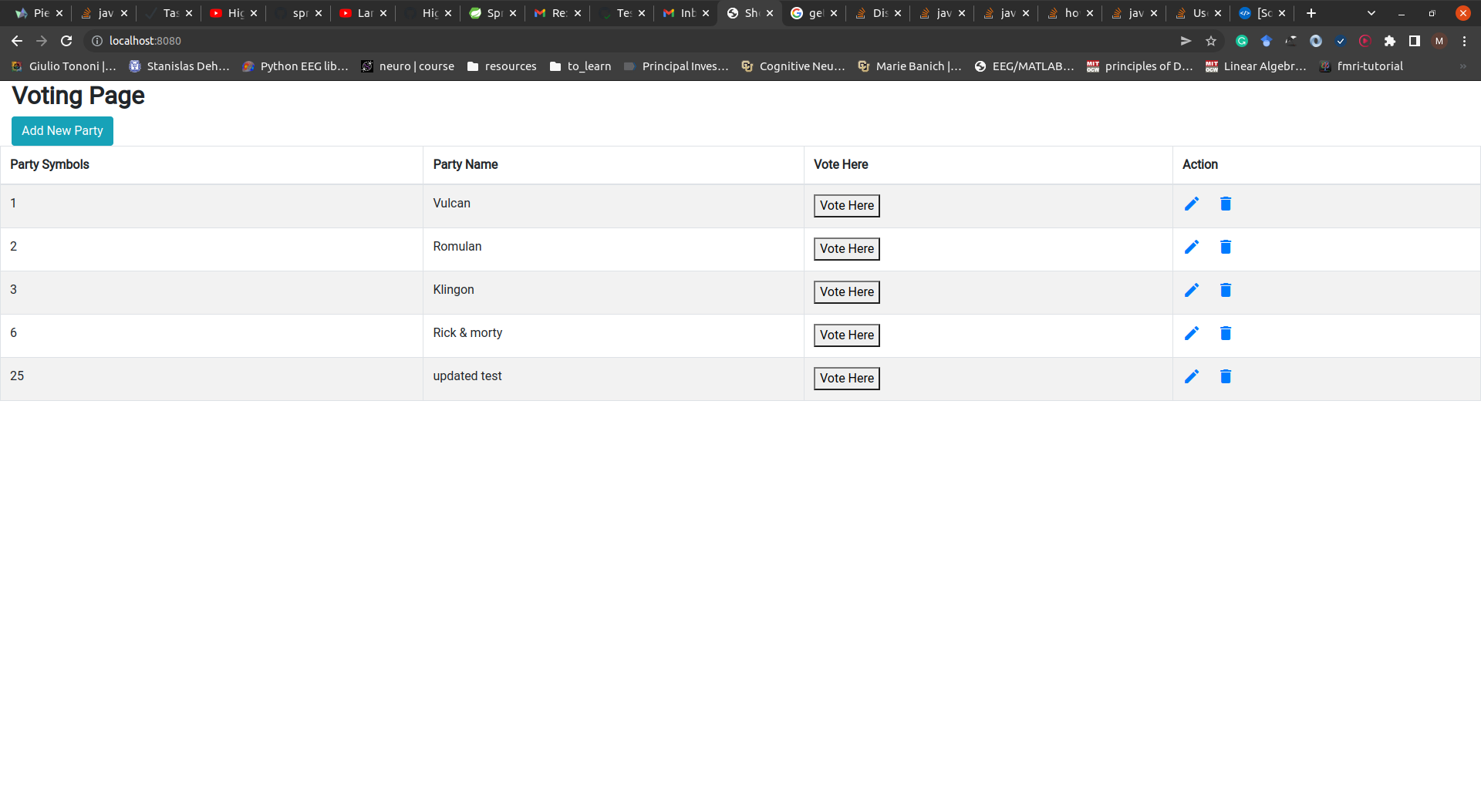
Disable multiple buttons even after refresh in javascript and thymeleaf

The problem:

I have multiple buttons that are connected to db to keep count of the clicks. They are in a column and each time you click on one, the value associated with that button increments by one.
enter image description here

the db looks like this:

id  party name  vote 
'1', 'Vulcan', '0'
'2', 'Romulan', '0'
'3', 'Klingon', '0'
'6', 'Rick & morty', '0'
'25', 'updated test', '0'

What I want is

when you click on any button it should disable all the buttons but still increment the one that has been clicked while also saving the cookies session so even after refershing the page you can not click any buttons. So all button should disappear/disabled after one click.

What I have tried?
I have tried so many things such as this, but non works. The buttons still work and the increament still happen.

Here is my html page for that shown the pic above

<!DOCTYPE html>
<html xmlns:th="http://www.thymeleaf.org" 
    >
<head>
<meta charset="UTF-8">
<title>Show all parties</title>
<link rel="stylesheet" href="https://fonts.googleapis.com/css?family=Roboto|Varela+Round|Open+Sans">

 -->
 <link rel="stylesheet" href="https://stackpath.bootstrapcdn.com/bootstrap/4.5.0/css/bootstrap.min.css">
<link rel="stylesheet" href="https://fonts.googleapis.com/icon?family=Material+Icons">

</head>
<body>
    <div class="col-sm-8"><h2><b>Voting Page</b></h2></div>
        <div class="col-sm-4">
        
         <a href="/newparty" class="btn btn-info add-new">Add New Party</a>
    </div>
    
    <table border="1" cellpadding="10" class="table table-bordered table-striped">
        <thead>
            <tr>
                <th>Party Symbols</th>
                <th>Party Name</th>
                <th>Vote Here</th>
                <th>Action</th>
            </tr>
        </thead>
        
        <tbody>
            <tr th:each=" party : ${parties}">
                <td th:text="${party.id}">Party Symbols</td>
                <td th:text="${party.name}">Party Name</td>
                <td>
                    
                    <form th:action="@{/vote/{id}(id=${party.id})}" method="get">
                             
                             <button id="voted" >Vote Here</button>
                             
                    </form>
                </td>
                <td>
                    
                    <a th:href="@{/edit/{id}(id=${party.id})}"
                    
                    class="edit" title="Edit" data-toggle="tooltip"><i class="material-icons">&#xE254;</i></a>
                     &nbsp;&nbsp;&nbsp;
                     <a th:href="@{/delete/{id}(id=${party.id})}"
                    
                    class="delete" title="Delete" data-toggle="tooltip"><i class="material-icons">&#xE872;</i></a>
                    
                </td>
                
            </tr>
        </tbody>
        
    </table >
    <script type="text/javascript" 
        
    >
    function setCookie(name, value, days) {
        if (days) {
            var date = new Date();
            date.setTime(date.getTime() + (days * 24 * 60 * 60 * 1000));
            var expires = "; expires=" + date.toGMTString();
        }
        else var expires = "";
        document.cookie = name + "=" + value + expires + "; path=/";
    }

    function getCookie(name) {
        var nameEQ = name + "=";
        var ca = document.cookie.split(';');
        for (var i = 0; i < ca.length; i++) {
            var c = ca[i];
            while (c.charAt(0) == ' ') c = c.substring(1, c.length);
            if (c.indexOf(nameEQ) == 0) return c.substring(nameEQ.length, c.length);
        }
        return null;
    }

    $('#voted').click(function(){
        $(this).attr('disabled',true);
        setCookie('DisableBtn', true, null);
    });
    if(getCookie('DisableBtn'))
        $('#clic').attr('disabled',true);

    </script>
</body>
</html>

And here is my controller get fetched when clicking on Vote Here

@GetMapping("/vote/{id}")
    public String getVote(@PathVariable Long id) {
        partyService.vote(id);
        
        return "redirect:/";
    }