Find all matching words in a given number of sentences (JavaScript)

I have for example 2 arrays with 3 strings in each.

INPUT

(first part)
3
["i love coffee",
"coffee with milk and sugar",
"free tea for everyone" ]

(second part)
3 
["i like black coffee without milk",
"everyone loves new year",
"mary likes black coffee without milk"]

I need to take each string from the second part separately, and compare it with every separate string from the first part (and repeat the same procedure with other two strings). If there is any matching word I need to count them. Goal is to output strings that have most matches, in descending order.
For example the output for this code should be

1 2
3
2 1

[1, 2] – result of comparing the first string (“i like black coffee without milk”)
[3] – result for the second string (“everyone loves new year”)
[2, 1] – result for the third string (“mary likes black coffee without milk”)

My character won’t move when using velocity

I made a game that makes it so that you can move the character. I tried changing it a bit by adding velocity instead of just moving the position by a little bit every frame when the key is held down, which would add acceleration/deceleration, but not my character won’t move at all. I’m not getting any errors in the console, but for some reason the character just sticks to the left and doesn’t move.

The code I’m experiencing difficulties with:

function draw() {
if (characterMoveable) {
    background(255);
    if (keyIsDown(LEFT_ARROW)) {
      if (characterPos[0] > characterBounds[0]) {
        characterVelocity[0]--;
        characterFlipped = true;
      }
    }
    if (keyIsDown(RIGHT_ARROW)) {
      if (characterPos[0] < characterBounds[1]) {
        characterVelocity[0]++;
        characterFlipped = true;
      } else {
        characterPos[0] = characterBounds[1];
      }
    }
  }
  
  if (characterVelocity[0] !== 0) {
    if (characterVelocity[0] < 0) {
      characterVelocity[0]++;
    } else {
      characterVelocity[0]--;
    }
  }
  if (characterVelocity[0] > 5) characterVelocity[0] = 5;
  characterPos[0] += characterVelocity[0];
  if (characterVelocity[0] < -5) characterVelocity[0] = -5;
  characterPos[0] += characterVelocity[0];
  
  rect(characterPos[0], characterPos[1], 50, 50);

  fill(0);
  text(characterPos[0] + ", " + characterVelocity[0], 200, 200);
};

(The text in the middle of the screen in the game is the X position and X velocity.)

map data in javascript

I have a card component, I have styled the same card thrice to change its size,
if I have an array of three names, how do I map one name to one card

for eg:

             <div
                className="row collection_page3_row"
                style={{ rowGap: "1vw", paddingRight: "0.5vw" }}
              >
                <div className="col-12">
                  <Card />
                </div>
                <div className="col-6" style={{ paddingRight: "0.5vw" }}>
                  <Card />
                </div>
                <div className="col-6" style={{ paddingLeft: "0.5vw" }}>
                  <Card />
                </div>
              </div>```

How can I display the incremented value correctly based on user click?

I’m trying to replicate the likes system that Instagram for learning purposes. With my code below, the very first click on any photo increments correctly which means the likes amount is correctly being displayed as well as the specified user ID’s DB column is correctly being incremented/decremented.

The problem I’m facing is: Whenever I try to like (click) any other photo after the first photo click (which correctly updates as mentioned above), I’ll need to click it a few times, instead of once, in order for the likes value to change (increment/decrement) and even then, it’s being displayed and updated incorrectly.

How can I make it so that the user can freely like/dislike (click once and click again on the same photo) any photo in any order so that the correct data is updated and displayed on the browser? Thanks in advance for any feedback.

Note: I’m using React Query to fetch DB data for each user.

Here’s Gallery.js

const [currentUserClicks, setCurrentUserClicks]               = useState(1);

async function fetchUploads() {
    const headers = {
        "Accept": 'application/json',
        "Authorization": `Bearer ${authToken}`
    };

    const {data} = await axios.get('http://localhost/api/get-user-uploads-data', {headers});
    return data;
}

const handleLikesBasedOnUserId = (likedPhotoUserId) => {
    if(currentUserClicks > 1) {
        setCurrentUserClicks(currentUserClicks - 1);
        handleDisLike(likedPhotoUserId); // sends data to server to decrement DB column
    } else {
        setCurrentUserClicks(currentUserClicks + 1);
        handleLike(likedPhotoUserId); // sends data to server to increment DB column
    }
};

const handleLike = (likedPhotoUserId) => {
    const url = 'http://localhost/api/like';

    const headers = {
        "Accept": 'application/json',
        "Authorization": `Bearer ${authToken}`
    };

    let data = {
        'UserID': likedPhotoUserId,
        'likeCount': currentUserClicks
    };

    axios.post(url, data, {headers})
        .then(resp => {
            console.log("handleLike",resp.data.userLikes[0].likes);
        }).catch(err => {
        console.log(err);
    });

};

const handleDisLike = (likedPhotoUserId) => {
    const url = 'http://localhost/api/dislike';

    const headers = {
        "Accept": 'application/json',
        "Authorization": `Bearer ${authToken}`
    };

    let data = {
        'UserID': likedPhotoUserId,
        'likeCount': currentUserClicks
    };

    axios.post(url, data, {headers})
        .then(resp => {
            console.log("handleDisLike", resp.data.userLikes[0].likes);
        }).catch(err => {
        console.log(err);
    });

};

const { data } = useQuery('uploads', fetchUploads); 

return(
      <div className="main">
            <ul className="cards">
                {
                    data.map((photos, index) => {
                        return <Grid
                            src={photos.url}
                            likes={photos.likes}
                            currentUserClicks={currentUserClicks}
                            key={index}
                            onClick={handleLikesBasedOnUserId}
                            userId={photos.UserID}
                        />
                    })
                }
            </ul>
       </div>
 );

Here’s Grid.js:

const Grid = (props) => {
     const [likes, setLikes] = useState(props.likes);

       return (
            <>
                <img src={props.src} alt="Photo" className="gallery-img" onClick={() => props.onClick(props.userId, props.currentUserClicks > 1 ? setLikes(props.likes) : setLikes(props.likes + 1))}/>
                <span style={{display: 'none'}}>{props.currentUserClicks}</span>
                <h5 className="likes">Likes: {likes}</h5>
          </>
    );
}

TypeError: Cannot read property “date_config” from undefined

I am trying to use the code below and while using apps script

it is giving me the error

“TypeError: Cannot read property “date_config” from undefined.”

  var config = cc.getConfig();
  config.setDateRangeRequired(true);
  config
    .newSelectSingle()
    .setId('date_config')
    .setName('Select date preset')
    .setHelpText('Select the date preset for which you would like to receive the ads data.')
    .setAllowOverride(true)
    .addOption(config.newOptionBuilder().setLabel('Today').setValue('today'))
    .addOption(config.newOptionBuilder().setLabel('Yesterday').setValue('yesterday'))
    .addOption(config.newOptionBuilder().setLabel('This week (Sunday to today)').setValue('this_week_sun_today'))
    .addOption(config.newOptionBuilder().setLabel('Last week (Sunday to Saturday)').setValue('last_week_sun_sat'))
    .addOption(config.newOptionBuilder().setLabel('Last week (Monday to Sunday)').setValue('last_week_mon_sun'))
    .addOption(config.newOptionBuilder().setLabel('This month').setValue('this_month'))
    .addOption(config.newOptionBuilder().setLabel('Last month').setValue('last_month'))
    .addOption(config.newOptionBuilder().setLabel('This quarter').setValue('this_quarter'))
    .addOption(config.newOptionBuilder().setLabel('Last three days').setValue('last_3d'))
    .addOption(config.newOptionBuilder().setLabel('Last seven days').setValue('last_7d'))
    .addOption(config.newOptionBuilder().setLabel('Last 28 days').setValue('last_28d'))
    .addOption(config.newOptionBuilder().setLabel('Last 30 days').setValue('last_30d'))
    .addOption(config.newOptionBuilder().setLabel('Last 90 days').setValue('last_90d'))
    .addOption(config.newOptionBuilder().setLabel('This year').setValue('this_year'))
    .addOption(config.newOptionBuilder().setLabel('Last year').setValue('last_year'))
    .addOption(config.newOptionBuilder().setLabel('Maximum').setValue('maximum'))


  return config.build();
}


Can someone help?

Pushing New value to Array of Objects while keeping old one intact React Js Next Js

I have a JSON file with image Names. I want to store data in an Key Value Object. I’m creating the key using regex to remove -img[image No]. I’m unable to store all image Names in array. When I add new element it overwrite it to the previous value. How can I push new data in array without wiping off previously stored data.
Data Document

[
    "apple-img1",
    "apple-img2",
    "apple-img3",
    "apple-img4",
    "apple-img5",
    "dell-img1",
    "dell-img2",
    "dell-img3",
    "hp-img1",
    "hp-img2"
]

My Code

content.map((contentInfo) => {
            let key = contentInfo.replace(/-imgd$/, "") //Return Company Name without -i{Digit} For Example apple-img1 whould be apple
            let imgName = contentInfo //Name of the Image
            
            data[key] = {
               Images: imgName //Append New Image 2 Array Instead of OverWriting Them
            }
            console.log(data);
})

Current Output

{
    "apple": {
        "Images": [
            "apple-img5"
        ]
    },
    "dell": {
        "Images": [
            "dell-img3"
        ]
    },
    "hp": {
        "Images": [ 
            "hp-img2"
        ]
    }
}

Expected Output

{
    "apple": {
        "Images": [
            "apple-img1",
            "apple-img2",
            "apple-img3",
            "apple-img4",
            "apple-img5"
        ]
    },
    "dell": {
        "Images": [
            "dell-img1",
            "dell-img2",
            "dell-img3"
        ]
    },
    "hp": {
        "Images": [ 
            "hp-img1",
            "hp-img2"
        ]
    }
}

How to splice an array and add random numbers to each array index in JavaScript

I am attempting to build a slot machine in JavaScript and Vue.js with the index of each array returning a random number. For this project, I am using a for loop to loop through a slot array initialized at [1, 1, 1], and indexOf method to target the index of each slot array item. Then, I am also looping through an array of random numbers, then using a splice method to target the index of each slot array item, remove 1 element from that index, and replace the item at that given index with the random number. However, my slots.value.splice(index, 1, randomNum[r]) setup appears to be removing 1 element at index and replacing that element with the last element of randomNum array. My intention is to instead replace the element at each index of slots.value with differing random numbers from the randomNum array. How can I go about doing this?

Here is my code:

<template>
  <div class="max-w-7xl mx-auto py-6 sm:px-6 lg:px-8">
    <div class="px-4 py-6 sm:px-0">
      <div  class="grid grid-cols-3 items-center py-16">
        <div v-for="slot in slots" :key="slot.id" class="w-96 h-96">
          <div class="w-full h-full rounded-md shadow-lg border-solid border-2 border-sky-500">
            <p class="text-9xl mt-28">{{ slot }}</p>
          </div>
        </div>
      </div>

      <div class="flex justify-center">
        <button @click="spin">
          Spin
        </button>
      </div>
    </div>
  </div>
</template>

<script setup>
import { ref } from "@vue/reactivity";

const slots = ref([1, 1, 1])

const spin = () => {
  const randomNumOne = Math.floor(Math.random() * (10 - 0) + 0)
  const randomNumTwo = Math.floor(Math.random() * (10 - 0) + 0)
  const randomNumThree = Math.floor(Math.random() * (10 - 0) + 0)

  const randomNum = [randomNumOne, randomNumTwo, randomNumThree]

  for (let i = 0; i < slots.value.length; i++) {
    for (let r = 0; r < randomNum.length; r++) {
      const index = slots.value.indexOf(slots.value[i])
      console.log(randomNum[r])
      if (index > -1) {
        // remove 1 element at each index and replace each with random numbers
        slots.value.splice(index, 1, randomNum[r])
      }
    }  
  }
}
</script>

How to pass an array to my state in Redux toolkit?

I want to pass an Array that contains information of different products that were added to the cart so when I reload the page I restore the array with that info to my state in redux, but action.payload is receiving the info as a string when it is an array, how can I fix this?

Notes: I am using Javascript not TypeScript

initialState: {
    productsInCart: [],
  },
setRestoreCartProducts: (state, action) => {
      state.productsInCart.push(action.payload);
    },

enter image description here

As you can see in the image, action receives the payload as string when it is an array

Axios Request returns 404 even though URL is valid and the API functions correctly

I’ve been working on making a simple website that handles information for a MySQL database of books.

Intro/Problem:

I’ve gotten the server (spring-boot), database (MySQL) and website (React) running as they’re expected to with the sole exception of one particular GET request even though there doesn’t seem to be anything wrong with it at all.

The issue occurs when I use Axios to make a GET request to the server from the website for GetFiveBooks. As soon as it’s called, a 404 error is returned.

Thoughts:

Now the obvious issue is that there’s something wrong with the URL but that doesn’t seem to be the case at all. I’ve called the exact same URL multiple times both from within the browser and with PostMan and both return the expected results every single time. The next thing is that maybe something is wrong with Axios but I don’t see that as an issue either because I can run another Axios request with a different URL and that one works perfectly.

So if the URL is good and Axios is running as intended then what could be wrong?

I’ve included all of the code that I believe to be relevant below.

Code:

The Axios Requests

The first method is the request I mentioned earlier that works as expected and the second one is the method that’s giving me trouble. The URLs are pulled from a sepreate file called “Commands.js” Note how the only differences are the names of the methods and the exact command that they’re calling.

 const getExactBook = async () => {
    try{
      const response = await axios.get(commands.getSpecificBook(10));
      console.log(response)
    } catch(error) {
  
    }
  }

  const getLastFive = async () => {
    try{
      const response = await axios.get(commands.getFiveBooks);
      console.log(response)
    } catch(error) {
  
    }
  }

The Commands.js class

Awkward name aside, this file does appear to be doing its job as it should and the URLs are constructed in much the same way minus some additional formatting needed for the “getSpecificBook” method. Ironically, this makes the problematic URL even simpler than the one that’s actually working.

const baseURL="http://localhost:8080/api";

class commands {

  getSpecificBook = (id) => {
    return baseURL+`/books/${id}`;
  }

  getFiveBooks = () => {
    return baseURL+`/books`;
  }
}

export default new commands();

The Spring-Boot REST Controller

These are the two most relevant mappings in the controller class. Both of them work when manually called via the web browser or Post Man but only “getSpecificBook” works when called by the website. Apologies if this code is sloppy, this is the part of the entire process that I understand the least.

@CrossOrigin(origins="http://localhost:8080")
    @GetMapping(path="/books")
    public @ResponseBody Iterable<Book> getFiveBooks() {
      // This returns a JSON or XML with the users
      return bookRepository.findLastFive();
    }
    
    @CrossOrigin(origins="http://localhost:8080")
    @GetMapping(path="/books/{id}")
    public @ResponseBody List<Book> getSpecificBook(@PathVariable int id) {
        return bookRepository.findBybookID(id);
    }

The Book Repository

This is the complete BookRepository interface minus the import code.
The custom SQL query at the bottom does work as expected. GenreID =8 simply refers to American History.

public interface BookRepository extends CrudRepository<Book, Integer>{
    List<Book> findAll();
    
    List<Book> findBybookID(int bookID);
    
    @Query(nativeQuery=true, value= "Select * from library.Book b where genreID = 8 order by b.bookID Desc Limit 0,5")
    List<Book> findLastFive();
    
}

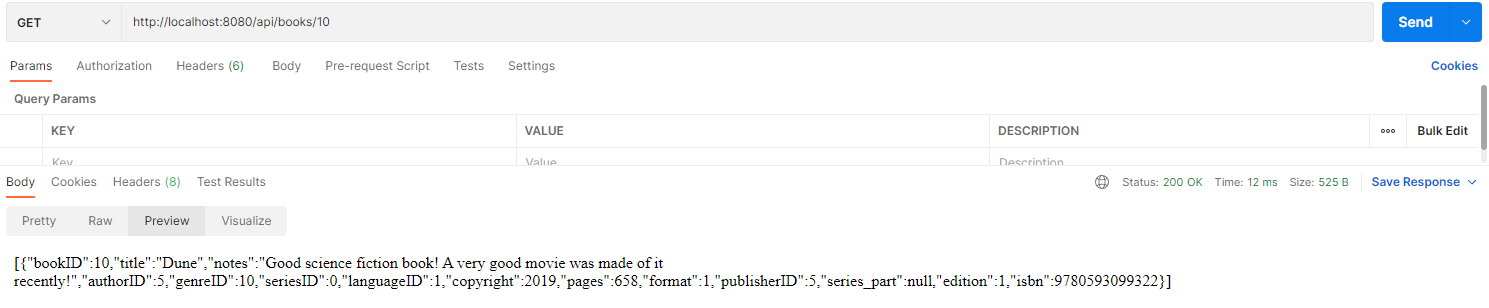
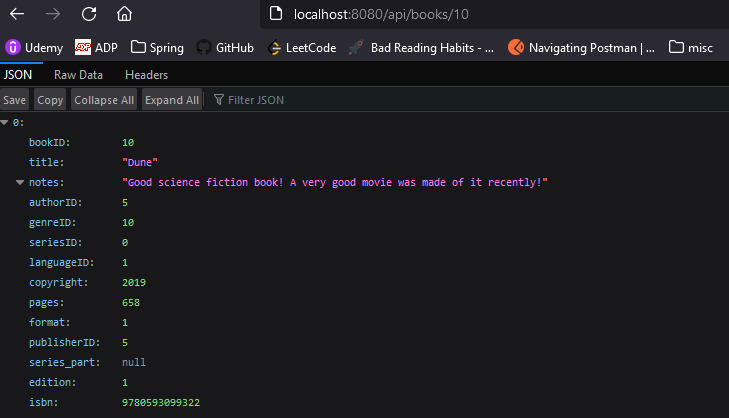
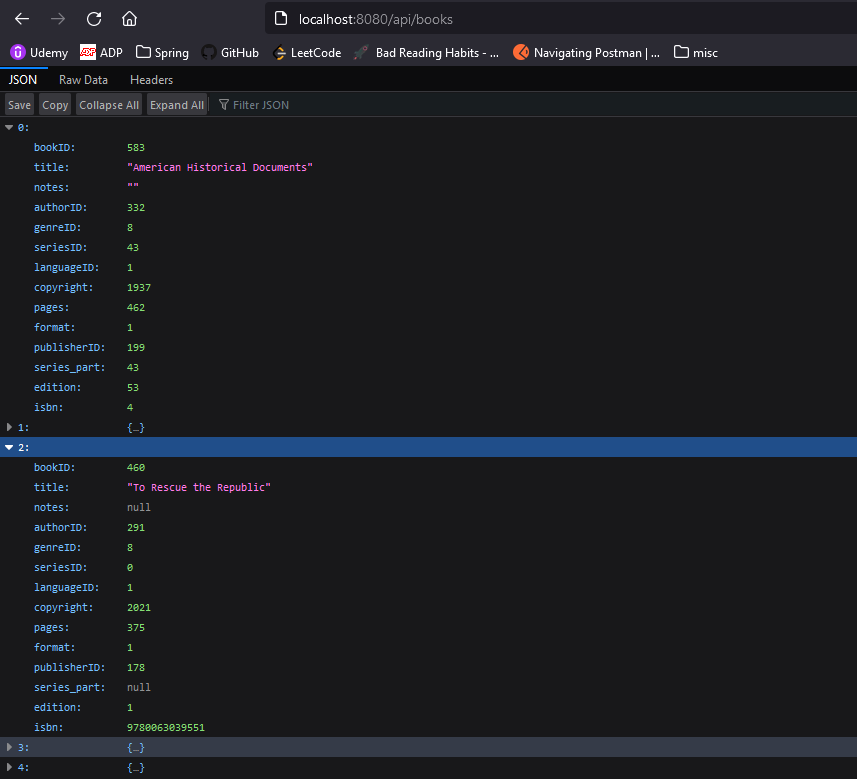
These Four pictures show the results for the two requests in both Post Man and Firefox.
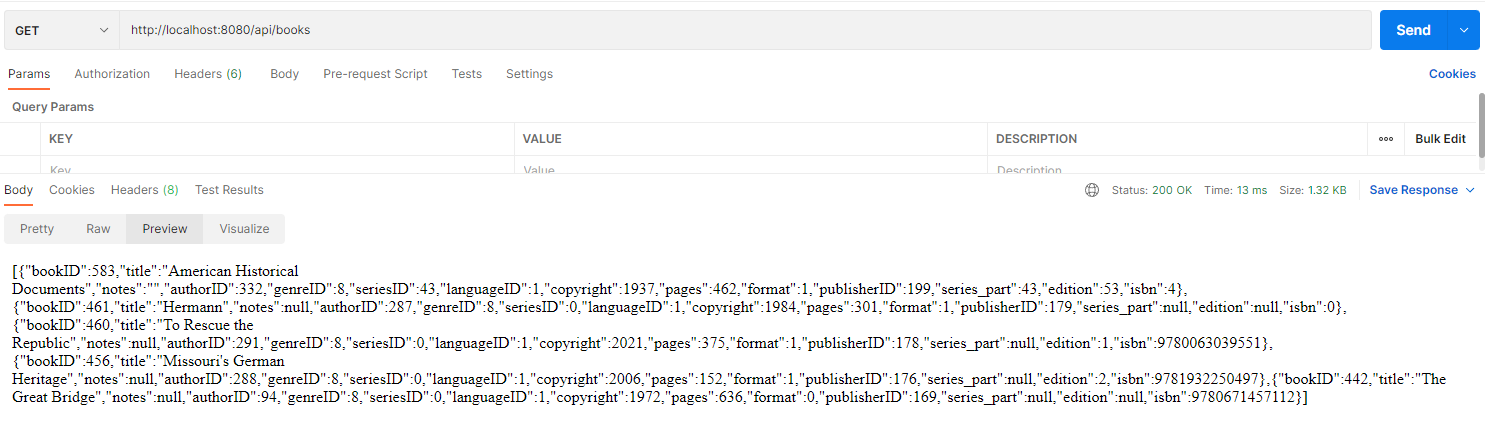
Post Man Five Books

Post Man Single Book

Firefox Single Book

Firefox Five Books

This last picture shows the console results of the requests as they’re made in the website. The first result is for the “getExactBook” method shown earlier and the last result is for “getLastFive”.

Please note that the 404 for “favicon.ico” is unimportant and I’ve simply not gotten around to setting a proper icon for the site. It never has any impact on the site at large.
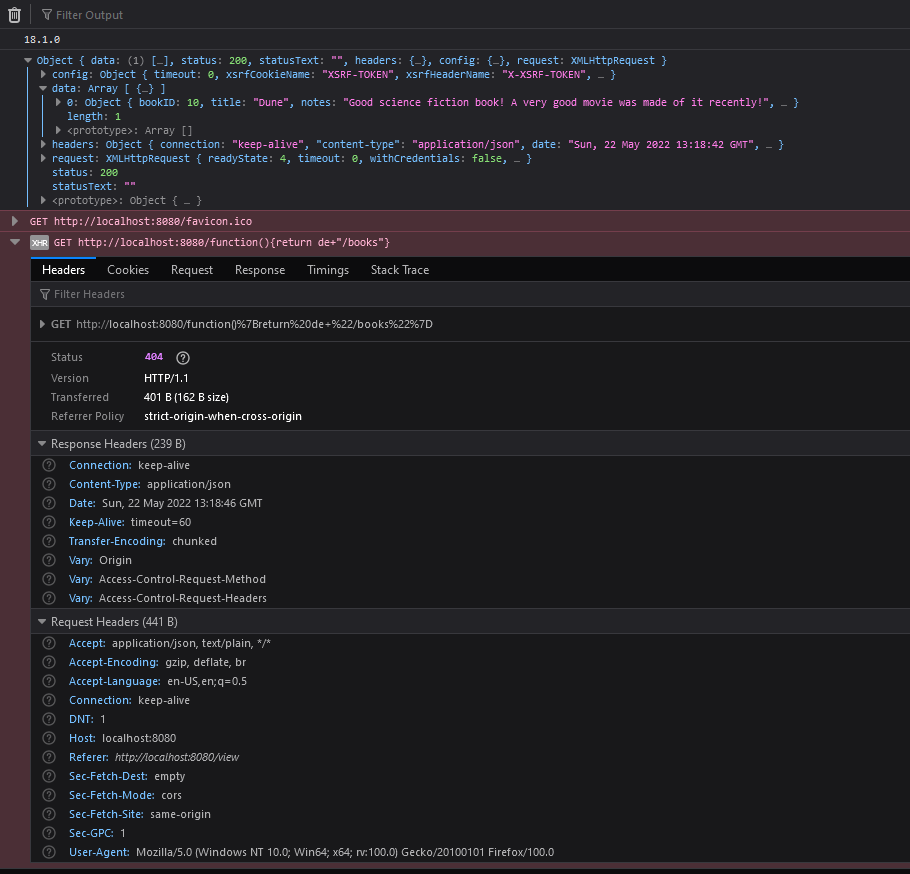
Firefox both Request Results

I apologize if there’s something I missed that’s obvious. I’m still very new to this and don’t know what all to look for.