setState is not working on 2nd time calling it inside componentDIdMount

im a beginner, im trying to make a memory game
this component fetches data for an api
then trims it down with only that has image link

then on level one it should display 3 random image from fetch data
it always
displayedChars: [undefined, undefined, undefined]

    constructor(props) {
       super()
       this.state = {
             level: 1,
             numImg: 1*3,
             displayedChars: [],
             chars: []
       }

    }


      async componentDidMount() {
        await this.loadData().then(data => {
          this.setState({
            chars: this.trimData(data)
          });
        });
    
        await this.displayChars().then(data => {
          console.log(data)
          this.setState({
            displayedChars: data
          });
        });
        
        console.log(this.state);
      }

     async loadData() {
       try {
         const res = await fetch(`http://hp-api.herokuapp.com/api/characters`)
         const characters = await res.json();
         return characters
       } catch(err) {
         console.error(err)
       }
     }

     trimData(characters) {
       const listChars = []
         characters.map(char => {
           if(char.image !== "") {
             listChars.push(char)
           }
         })
         return listChars
     }

     displayChars() {
         return (new Promise((resolve) => {
           const list = []
           for(let x=1; x<= this.state.numImg; x++) {
             let randomNum = Math.floor(Math.random() * 24);
             list.push(this.state.chars[randomNum]);
           }
           console.log(list)
           resolve(list)
         }))

    }

in the this.displayChars()
console.log(data) works fine
but

          this.setState({
            displayedChars: data
          });

then console.log(this.state)
OUTPUT: [undefined, undefined, undefined]
How to use setMute() in Discord.js

Tried searching about mute commands, but they were all role based and as I understand setMute is what i need. Which is to mute a specific member without having to mess with any roles, just can’t figure how to use the command as anything i try it’s either not a function or something is undefined. This is what i have now

let person = message.Client.users.fetch('id');
    let reason = ''
    person.then(function(personuser) {

            personuser.setMute(true, reason);
    }); 

why isn’t this slider and button redirect working?

      var slider = document.getElementById("myRange");
  if(document.getElementById("randomWord").innerHTML == "Please adjust the slider until you find the number 8" & slider.value == "8")
  {
    document.getElementById("button").onclick = document.getElementById('8').play() + setTimeout("location.href = 'https://example.com';",1500);
    
  }

it’s supposed to check if the slider is set to the number “8”, and the text says “Please adjust the slider until you find the number 8”, and then when the button is clicked it’ll play a sound and then redirect the page after the sound finishes. it doesn’t work, the button.onclick statement doesn’t change

How to change element of a child in .js? [duplicate]

I want my button to change it’s icon when user clicks on it. This is how far I went:

//html
<div class="button">
    <div class="search_dropdown">
        <span class="uil uil-search" onclick="changeIcon(this)"></span>
    </div>
</div>

//javascript
let changeIcon = function(icon) {
icon.classList.toggle('uil-times');
}

changeIcon = (icon) => icon.classList.toggle('uil-times');

Right now everything works fine, but not the way I want. I want it to be interactable whenever I click the button ( it’s grandparent). How should I do that?

because my Android 11 smarthphone detect the microhpone headsets through downloaded apps from the Play Store but dont cant it from Google o Firefox?

I have a Smartphone that can detect and play sounds from the microphone headsets and the internal microphone integrated in the Smarthphone, but when I use this web app it doesn’t detect the microphone headset, only detects the internal integrated smartphone microphone, only detect the microphone headset with apps downloads from PlayStore but cannot it from Google Chrome or Firefox Mobile,

¿How i can do for the microphone headsets will dettect by the mobile web browser?(Mozilla or Firefox)

I only can it in my MacBook 2017 with iRig

The context is the next, I made a fork by the this app and I was implemented 40 guitar ampliffiers and 10 bass amplifier and more than 100 pedal effects, in conclusión the original software is the 15% of my delevopent fork of this app, the problem is I cant execute it trought the interface sound, only execute trought the internal microphone of my Android 11 smarthphone, so only can procces my voice haha and I need input correctly my Guitar to the smartphone for usage the process effects web app.

¿How do can the Web Mobile Browser dettect my iRig or the microphone headsets?

Those were my 2 questions, I can’t connect my iRig to the mobile app, thank you very much

PD: My Android 11 smartphone only dettect the iRig interface trought the Amplitube o Deplike, but dont detect by the mobile web browser
PD2: ¿¿¿i can solve it if i put into a iframe in a builded APK android studio project for preccesing the sound trought the interface correctly???

trying to convert a custom validation function to addvalidation jquery validation plugin [closed]

I have this code from a different code where i am trying to gigure out how can i add make this code as working additional method for my jquery validator

$.addMethod('allowing',{
    validatorFunction: function (val, $el, conf) {
      if (val !== '') {
        var allowing = $el.valAttr('allowing') || '',
          decimalSeparator = $el.valAttr('decimal-separator') || conf.decimalSeparator,
          allowsRange = false,
          begin, end,
          steps = $el.valAttr('step') || '',
          allowsSteps = false,
          sanitize = $el.attr('data-sanitize') || '',
          isFormattedWithNumeral = sanitize.match(/(^|[s])numberFormat([s]|$)/i);

        if (isFormattedWithNumeral) {
          if (!window.numeral) {
            throw new ReferenceError('The data-sanitize value numberFormat cannot be used without the numeral' +
              ' library. Please see Data Validation in http://www.formvalidator.net for more information.');
          }
          //Unformat input first, then convert back to String
          if (val.length) {
            val = String(numeral().unformat(val));
          }
        }

        if (allowing.indexOf('number') === -1) {
          allowing += ',number';
        }

        if (allowing.indexOf('negative') === -1 && val.indexOf('-') === 0) {
          return false;
        }

        if (allowing.indexOf('range') > -1) {
          begin = parseFloat(allowing.substring(allowing.indexOf('[') + 1, allowing.indexOf(';')));
          end = parseFloat(allowing.substring(allowing.indexOf(';') + 1, allowing.indexOf(']')));
          allowsRange = true;
        }

        if (steps !== '') {
          allowsSteps = true;
        }

        if (decimalSeparator === ',') {
          if (val.indexOf('.') > -1) {
            return false;
          }
          // Fix for checking range with floats using ,
          val = val.replace(',', '.');
        }
        if (val.replace(/[0-9-]/g, '') === '' && (!allowsRange || (val >= begin && val <= end)) && (!allowsSteps || (val % steps === 0))) {
          return true;
        }

        if (allowing.indexOf('float') > -1 && val.match(new RegExp('^([0-9-]+)\.([0-9]+)$')) !== null && (!allowsRange || (val >= begin && val <= end)) && (!allowsSteps || (val % steps === 0))) {
          return true;
        }
      }
      return false;
    },
    errorMessage: '',
    errorMessageKey: 'badInt'
  });

but this function seems to be failing in all ends

please guide

do i need to follow somthing in this or i need to reformat this entire function to fix it

Rotation binary tree node is dropping half the tree

Im trying to build an AVL/Binary tree, but was not able to find a lot of code examples, only theory. My implementation for some reason has the AVL rotation function losing half the tree when the tree is 1 sided.

Here is my code:

function buildTree(dataSet){

    let root = null

    function rotateRight(node){
        return rotate(node,true)
    }
    function rotateLeft(node){
        return rotate(node,false)
    }
  
    function rotate(node,right){
    
    const  inputNodeSide = right ? "left"  : "right"
    const targetNodeSide = right ? "right" : "left"

    const targetNode      =       node[ inputNodeSide]
    const targetNodeChild = targetNode[targetNodeSide]
    
    targetNode[targetNodeSide] = node
          node[ inputNodeSide] = targetNodeChild
    
    return targetNode // as this is at the top
  }
  
function createNode(data){

    return {
    data,
    left : null, 
    right : null,
    get balance(){
        return workOutHeight(this.left) - 
             workOutHeight(this.right)
    },
    get height(){
        return workOutHeight(this)
    },
  }
} // END createNode

  function workOutHeight(node){
    if(null === node){
        return -1
    }
    return Math.max(workOutHeight(node.left),
                    workOutHeight(node.right))+1
  }
  
  function avl(node){
    const balanced = node.balance
    if(2 === balanced){
      if(0 > node.left.balance){
        node.left = rotateLeft(node.left);
      }
      return rotateRight(node); 
    } else if(-2 === balanced){
      if(0 < node.right.balance){
        node.right = rotateRight(node.right);
      }
      return rotateLeft(node); 
    }
    return node
  }
  
   this.add = function(data, perent){
    perent = perent || root;
    if(null === perent){
        return root = createNode(data);
    } else if(data < perent.data){
      if(null === perent.left){
        return perent.left = createNode(data);
      }
      this.add(data,perent.left)
      avl(perent)
    } else if(data > perent.data){
      if(null === perent.right){
       return perent.right = createNode(data);
      } 
      this.add(data,perent.right)
      avl(perent)
    }
  } // END addData
  
  this.tree = function(){
    return JSON.parse(JSON.stringify(root))
  }
  
  if(Array.isArray(dataSet)){
    dataSet.forEach(val=>this.add(val))
  }

} // END buildTree

console.log(new buildTree([2,6,9,4,7,0]).tree())

Thanks for any help on this.

How do you stop hide a tab bar on a specific screen in a nested stack navigator before the screen renders in React Navigation v6?

I need to make an app that has a structure as follows…

import HomeNavigator from './app/home-navigator';
import InboxNavigator from './app/inbox-navigator';
import ProfileNavigator from './app/profile-navigator';

import { createBottomTabNavigator } from '@react-navigation/bottom-tabs';

const App = createBottomTabNavigator();

<App.Navigator
     screenOptions={({ route }) => ({
                tabBarLabelStyle: {
                    color: 'black',
                },
            })}>
            <App.Screen
                name="HomeStack"
                options={{
                    headerShown: false,
                    title: 'Home',
                    tabBarStyle: { display: 'flex' },
                }}
                component={HomeNavigator}
            />
            <App.Screen
                name="InboxStack"
                options={{ headerShown: false, title: 'Tours' }}
                component={InboxNavigator}
            />
            <App.Screen
                name="ProfileStack"
                options={{ headerShown: false, title: 'Profile' }}
                component={ProfileNavigator}
            />
</App.Navigator>

Basically, it is a Tab Navigator with stack navigators nested inside. I want to be able to hide the tab bar on specific pages though. For example, the HomeNavigator had 2 pages, HomeScreen and ViewStudentScreen. I want to see the tab bar on the HomeScreen, but not on the viewstudent screen.

When I looked around for solutions I came across a couple, the first on reacts website which does not work for me because I still want the organizational structure and the navigational benefits (ie screen animations, stack poping, etc) of all of the similar pages being nested in the same navigator. If you follow their solution (and apply it to the scenario described above), then the ViewStudent screen, as well as all the other screens in the home stack, are now just in the root of the navigator with all other nested screens from the other tabs (Home, Inbox and Profile).

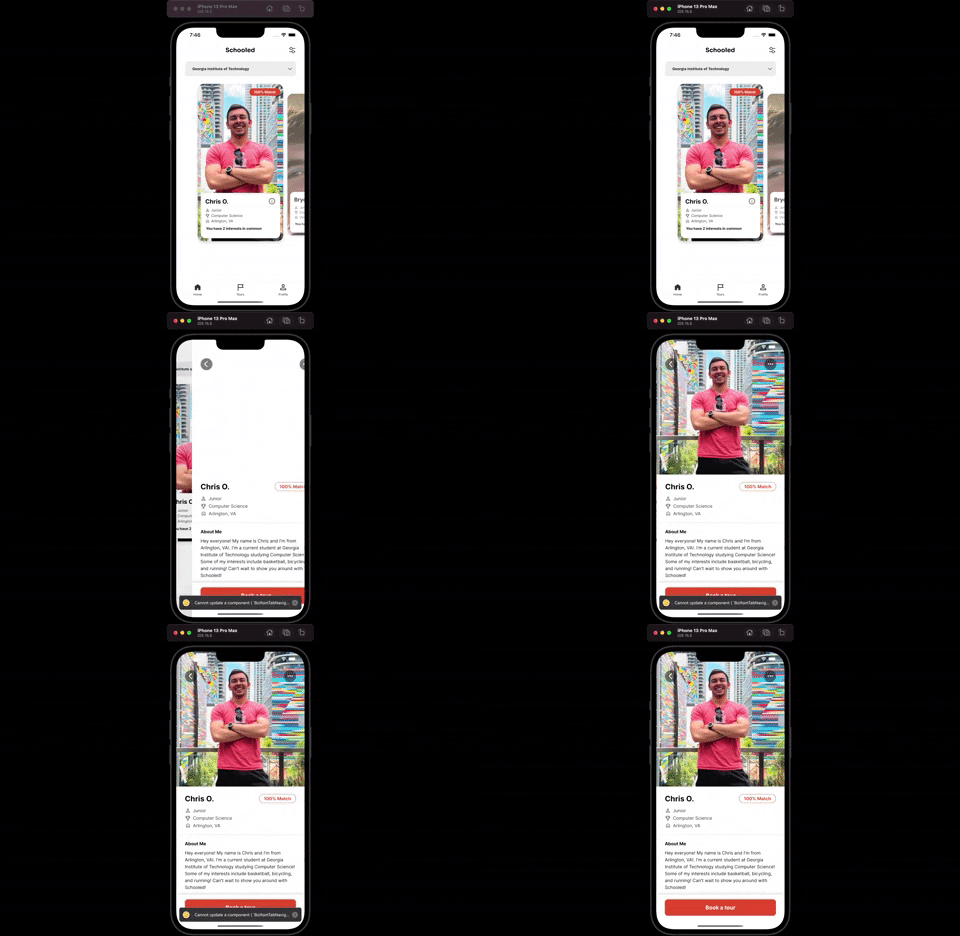
When I try using any options that work to hide the screen using the routeName, or checking the focused route name, I get behavior that looks like this. Gif of the incorrect behavior

console output from navigating from HomePage to view student page

As you can see, the tab bar is hidden, but the page renders as if the tab bar is there. If we look at the console, we see the screen is updated when we click (the second RouteName: Home), then the navigation and the ViewStudent Page renders, then the RouteName switches, and hides the tab bar (second RouteName: ViewStudent). However, the page has already rendered thinking the tab bar is there.

I found a jank solution that works, by putting the following code navigation.getParent()?.setOptions({ tabBarStyle: { display: 'none' } }); on any page you want to hide.

Basically, how do I hide the tab bar on pages that are in nested stack naviagtors? If this is confusing in any way, please let me know what else I can provide to help clarify! Thanks for the help!

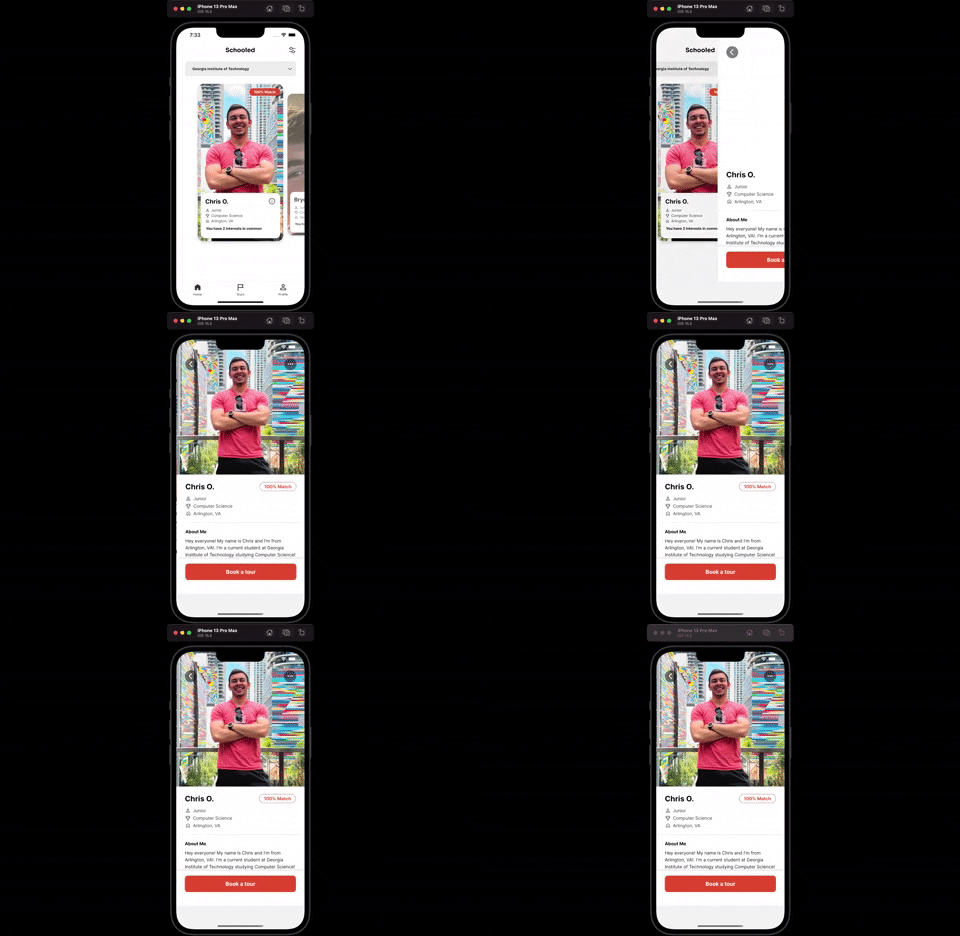
PS. Since I included the incorrect behavior, this is the correct behavior.

How can I check what the user’s tag is on Discord?

I have a HTML webpage hosted on Repl.it. I want to fetch the user who is on the website’s discord tag without needing an auth, so I can make a greeting, similar to this:

HTML:

<p id="greet"></p>

JS:

greet.innerHTML = `How's it going, ${User}?

Any help please? All help provided is very much appreciated!

Vue.js: Router is failing

So I was trying to implement routers so that, when the sidebar is active, you can click on buttons that take you to different pages, or routes.

However, the routes are not working at all, clicking on the button changes the weblink, but doesn’t do anything.

Here is my code for index.js in the folder router:

import { createRouter, createWebHistory } from "vue-router";
import HomeView from "../views/HomeView.vue";
import contact from "../views/Contact.vue";

const router = createRouter({
  history: createWebHistory(import.meta.env.BASE_URL),
  routes: [
    {
      path: "/",
      name: "home",
      component: HomeView,
    },
    {
      path: "/about",
      name: "about",
      // route level code-splitting
      // this generates a separate chunk (About.[hash].js) for this route
      // which is lazy-loaded when the route is visited.
      component: () => import("../views/AboutView.vue"),
    },
    {
      path: "/contact",
      name: "contact",
      component: contact,
    },
  ],
});

export default router;

my main.js is:

import { createApp } from "vue";
import App from "./App.vue";
import store from "./store";
// import Vue from "vue";
import router from "./router";


const app = createApp(App);
app.use(store);
app.use(router);
app.mount("#app");

and finally, my App.vue is:

<template>
  <div id="app">
    <nav class="main-nav">
      <div class="logo">my.company</div>
      <Burger></Burger>
    </nav>

    <Sidebar>
      <ul class="sidebar-panel-nav">
        <li><router-link to="/">Home</router-link></li>
        <li><router-link to="/about">About</router-link></li>
        <li><router-link to="/contact">Contact</router-link></li>
      </ul>
    </Sidebar>
  </div>
</template>

<script lang="ts">
import Burger from "./components/Burger.vue";
import Sidebar from "./components/topbar.vue";

export default {
  name: "app",
  components: {
    Burger,
    Sidebar,
  },
};
</script>
<style>
html {
  height: 100%;
  overflow: hidden;
}

body {
  border: 0;
  margin: 0;
  padding: 0;
  font-family: "Lato";
  height: 100%;
  background: rgb(101, 31, 87);
  background: linear-gradient(
    45deg,
    rgba(101, 31, 87, 1) 0%,
    rgba(225, 113, 87, 1) 48%,
    rgba(249, 248, 113, 1) 100%
  );
}

.logo {
  align-self: center;
  color: #fff;
  font-weight: bold;
  font-family: "Lato";
}

.main-nav {
  display: flex;
  justify-content: space-between;
  padding: 0.5rem 0.8rem;
}

ul.sidebar-panel-nav {
  list-style-type: none;
}

ul.sidebar-panel-nav > li > a {
  color: #fff;
  text-decoration: none;
  font-size: 1.5rem;
  display: block;
  padding-bottom: 0.5em;
}
</style>

(Most of the code in App.vue is either style tag or something that doesn’t have anything to do with routers, Burger represents the burger bars that toggle the Sidebar, and Sidebar is self-explanatory).

I’m not sure why the routers just isn’t working, and help would be appreciated.

Combine Javascript files without erasing inline js

I have finally managed to combine all my WordPress Javascript from my theme and plugins into a single bundle using the function below:

function merge_all_scripts() {
    global $wp_scripts;

    $wp_scripts -> all_deps($wp_scripts -> queue);
    
    $merged_file_location = get_stylesheet_directory() . DIRECTORY_SEPARATOR . 'merged-script.js';
    $merged_script  = '';
    
    foreach( $wp_scripts->to_do as $handle) {
        $src = strtok($wp_scripts->registered[$handle]->src, '?');

        if (strpos($src, 'http') !== false) {
            $site_url = site_url();

            if (strpos($src, $site_url) !== false) $js_file_path = str_replace($site_url, '', $src);
            else $js_file_path = $src;

            $js_file_path = ltrim($js_file_path, '/');
        } else {            
            $js_file_path = ltrim($src, '/');
        }

        if  (file_exists($js_file_path)) {
            $localize = '';

            if (@key_exists('data', $wp_scripts->registered[$handle]->extra)) {
                $localize = $obj->extra['data'] . ';';
            }

            $merged_script .=  $localize . file_get_contents($js_file_path) . ';';
        }
    }

    file_put_contents ( $merged_file_location , $merged_script);
    wp_enqueue_script('merged-script',  get_stylesheet_directory_uri() . '/merged-script.js', array(), '1.0', false );

    foreach( $wp_scripts->to_do as $handle ) {
        wp_deregister_script($handle);
    }
}

add_action( 'wp_enqueue_scripts', 'merge_all_scripts', 99 );

Problem is it erases all inline woocommerce js defined in the “get_script_data” woocommerce function. I want it to include that aswell.

Otherwise content such as this will not get injected into the DOM, and therefore prevent the site from working properly:

var wc_add_to_cart_params = {"ajax_url":"/wp-admin/admin-ajax.php","wc_ajax_url":"/?wc-ajax=%%endpoint%%","i18n_view_cart":"Se kurv","cart_url":"https://lawrence.dk/bag/","is_cart":"","cart_redirect_after_add":"no"};

Assigning an object’s array a new value on method call?

Good evening,

I am having trouble figuring out how to manipulate or even work around pass by refernce values, my understand in the below code, is that the function takes a copy of the obj.currentArray, but doesn’t ammend the actual array. However, when calling this as a function in the console, it DOES manipulate the original array. However, when calling it aspart of another function it simply returns a new array in the console, and the old array retains it’s values.

Where I think I am going wrong,

When call this as a method in a function such as the winnerCheck(), below it will call, but not manipulte the gameBoard()’s currentArray. However, if I initialise the gameboard such as

const game = gameBorad(); 

and change the syntax in the winnerCheck to

game.clearArray();

It will work as intended.

when it is trying to manipulate the array currentArray, it is not finding the gameBoard’s array, and including

this.clearArray()

Will mean that the method is called on the winnerCheck() object, not the const game; object.

I think I understand where I am going wrong, I just do not have the knowledge to fix it.

The entire code is below;

const gameboard = (() => {

    this.playersGo = "player1";
    let   currentArray = [0,1,2,3,4,5,6,7,8];
    const player1 = player("connor", "x");
    const player2 = player("Sona","o");

    
    // currently unused left in test version
    
    function clearArray () {return this.currentArray =[0,1,2,3,4,5,6,7,8]}
        

    const togglePlayer = (() => {if (this.playersGo ==="player1"){
            return playersGo = "player2"
                } else if(playersGo === "player2"){
                    return playersGo = "player1"
                }}
    );
    
    const Selection = (() => {gridcontainer.addEventListener("click", (e) => {
        if (playersGo === "player1"){
            currentArray[e.target.getAttribute("index")] = player1.marker;
                e.target.innerText = (player1.marker)
                    winnerCheck(currentArray);
                            return togglePlayer()

        } else if (playersGo ="player2"){
               e.target.innerText = (player2.marker)
                currentArray[e.target.getAttribute("index")] = player2.marker;
                    winnerCheck(currentArray);
                            return togglePlayer();
                        }
                    }
                )
            }
    )();

    // currently is comparing empty cells - 
    const winnerCheck = ((array) => {if (array.length > 3){
            if (array[0] === array[3] && array[3] === array[6]||
                array[0] === array[1] && array[1] === array[2]||
                array[0] === array[4] && array[4] === array[8]||
                array[1] === array[4] && array[4] === array[7]||
                array[2] === array[4] && array[4] === array[6]||
                array[3] === array[4] && array[4] === array[6]||
                array[6] === array[7] && array[7] === array[8]
                    ){console.log(`The winner is ${playersGo}`)
                    game.clearArray();
                        return 
                         
                    }
            }
        }
    );

    return {Selection,currentArray,clearArray};
});

//instantiate gameBoard Object 
const game = gameboard();

undefined and null value of javascript object

I have a newbie question about javascript object. If nodejs/express backend is expecting an object in req.query from front end with2 predefined keys: key1 and key2. On nodejs backend, the req.query is accessed by:

let _obj = {key1:req.query.key1, key2:req.query.key2};

If req.query.key1 is undefined and req.query.key2 is value2, then my understanding is that _obj becomes:

{key2:value2}

If key1 is null and key2 is value2, then _obj becomes:

{key1:null, key2:value2}

Is the understanding above correct? Any supporting doc is appreciated.

React Context is not passing 1/2 fields

So I’m learning how to use React context, I have found this example which is very helpful: https://codesandbox.io/s/login-flow-w-react-context-api-p9j96?file=/src/Login/index.js

Since useSetState can no longer be used, I tried to import useState from react, but it doesn’t work the same, useState only passing password to the login function, as can be seen here:

https://codesandbox.io/s/login-flow-w-react-context-api-forked-njs1kt?file=/src/Login/index.js

Console also threw this error:

A component is changing a controlled input to be uncontrolled. This is likely caused by the value changing from a defined to undefined, which should not happen. Decide between using a controlled or uncontrolled input element for the lifetime of the component.

Anyway I can fix this? Thank you guys so much, and happy holiday!!

truffle & soliditycant access to a function in test

after i run commande truffle test
i got this error

TypeError: _character.getName is not a function

my test file

let Game = artifacts.require("./Game.sol");
let Character = artifacts.require("./Character.sol");

const PROVIDED_NAME = "TEST";

contract("Game", (accounts) => {

    let creatorAccount = accounts[0];

    it("should create a character with the name provided", () => {
        let _game;
        let _character;

        return Game.deployed()
            .then(instance => {
                _game = instance;
                return _game.createCharacter(PROVIDED_NAME, { from: creatorAccount });
            })
            .then(result => {
                return _game.getCharacter();
            })
            .then(character => {
                _character = Character.at(character);
                return _character.getName();
            })
            .then(name => {
                assert.equal(name, PROVIDED_NAME, "Failed to create a character with the provided name");
            });
    });
});

and this my Character.sol file

// SPDX-License-Identifier: MIT
pragma solidity 0.8.15;

contract Character {
    string private _name;

    constructor(string memory name) public {
        _name = name;
    }

    function getName() public view returns (string memory) {
        return _name;
    }
}

im using

Truffle v5.5.20 (core: 5.5.20)
Ganache v7.2.0
Solidity – 0.8.15 (solc-js)
Node v16.15.1
Web3.js v1.7.4