Rerouting to new page with parameters and fetching from API results in API fetch loop

I made a search panel component, searchPanel.tsx. On it, a button grabs the details from the form (Flight From, Flight To, Flight Date, and some other data), then sends that to a new page.

Here’s the searchPanel.tsx:

'use client';    
import "./searchPanel.css";
import React, { useState } from "react";
import { useRouter } from "next/navigation";

export default function SearchPanel() {
  const router = useRouter();
  const [isUsingFlightNum, setIsUsingFlightNum] = useState(false);
  const [locFromValue, setLocFromValue] = useState('');
  const [locToValue, setLocToValue] = useState('');
  const [flightNumValue, setFlightNumValue] = useState('');
  const [flightDateValue, setFlightDateValue] = useState('');


  const locFromChange = (e: React.ChangeEvent<HTMLInputElement>) => {
    setLocFromValue(e.target.value);
  };

  const locToChange = (e: React.ChangeEvent<HTMLInputElement>) => {
    setLocToValue(e.target.value);
  };

  const flightNumChange = (e: React.ChangeEvent<HTMLInputElement>) => {
    setFlightNumValue(e.target.value);
  };

  const flightDateChange = (e: React.ChangeEvent<HTMLInputElement>) => {
    setFlightDateValue(e.target.value);
  };

  const handleSubmit = async (formData: FormData) => {
    const flightFrom = formData.get('flightFrom')?.toString() || "";
    const flightTo = formData.get('flightTo')?.toString() || "";
    const flightNumber = formData.get('flightNumber')?.toString() || "";
    const flightDate = formData.get('flightDate')?.toString() || "";

    if (flightDate !== "" && (flightFrom !== "" && flightTo !== "" || flightNumber !== "")) {
      const params = new URLSearchParams();

      params.set('is_using_flight_number', isUsingFlightNum.toString());
      params.set('flight_from', flightFrom);
      params.set('flight_to', flightTo);
      params.set('flight_num', flightNumber);
      params.set('flight_date', flightDate);

      router.push(`/flight/choose?${params.toString()}`)
    } else {
      alert("One or more required fields are missing.");
    }
  }

  return (
    <div>
      Front end code here
    </div>
  );
}

That routes to another page, flight/choose/page.tsx. This page now takes the parameters from the search panel, and uses those as parameters for an API call:

export default async function SelectFlight( {searchParams} : MyPageProps ) {
  // const [selectedFlightCardId, setSelectedFlightCardId] = useState(-1);
  // ^^ Code that I need
  const params = await searchParams;
  const isUsingFlightNum = params!.is_using_flight_number || "";
  const flightFrom = params!.flight_from || "";
  const flightTo = params!.flight_to || "";
  const flightNumber = params!.flight_num || "";
  const flightDate = params!.flight_date || "";

  const url = new URL(`${BASE_API_URL}/api/flights`);
  const options = {
    method: "GET",
  };

  url.searchParams.append('is_using_flight_number', isUsingFlightNum.toString());
  url.searchParams.append('flight_from', flightFrom);
  url.searchParams.append('flight_to', flightTo);
  url.searchParams.append('flight_num', flightNumber);
  url.searchParams.append('flight_date', flightDate);
  const response = await fetch(url, options);
  const result = await response.json();
  const flightData = result.data;

  const handleClick = (event) => {
    const clickedId = event.target.id;
    console.log(`clickedId`, clickedId);
  }

  return (
    <div>
      Front end code here
    </div>
  );
}

This works, until I add "use client" at the very top, which I need for a useState to update a clicked <div> styling and store the ID.

Then the page just repeatedly calls the fetch code, until I kill the project or navigate elsewhere.

I have no idea what to do. Removing my code and simply adding something like a console.log("help") would see help printed repeatedly in the console as well.

How to upload captions with the Youtube API?

No matter what I try, this keeps failing:

await youtube.captions.insert({
    part: ['snippet'],
    media: {
        body: fs.createReadStream('/Users/wannes/Desktop/tmp.srt')
    },
    requestBody: {
        snippet: {
            videoId: "2PRkCBZeihE",
            language: 'nl',
            name: '',
            isDraft: false,
        }
    }
});

Output:

{
    "kind": "youtube#caption",
    "etag": "horsekxpp-GkByDDIDPKuANDDCA",
    "id": "AUieDab4qxyEzvh1AyOlXzJG-2ZSK3TiqwUoRyxyUGfy",
    "snippet": {
        "videoId": "2PRkCBZeihE",
        "lastUpdated": "2025-09-05T08:17:00.002571Z",
        "trackKind": "standard",
        "language": "nl",
        "name": "",
        "audioTrackType": "unknown",
        "isCC": false,
        "isLarge": false,
        "isEasyReader": false,
        "isDraft": false,
        "isAutoSynced": false,
        "status": "failed",
        "failureReason": "processingFailed"
    }
}

Why does my Instagram hashtag copy & paste button not working?

I have one website which has few JavaScript code to copy the Instagram hashtags dynamically, initially it was working, but after sometime it suddenly stopped working. I don’t know the reason; but when I check the console I can see the following error:

parsing error: invalid sfntVersion

symbolCards.forEach(card => {
    card.addEventListener('click', function() {
        const symbol = this.getAttribute('data-symbol');
        
        // Copy to clipboard
        navigator.clipboard.writeText(symbol).then(() => {
            // Show notification
            notification.classList.add('show');
            
            // Hide notification after 2 seconds
            setTimeout(() => {
                notification.classList.remove('show');
            }, 2000);
        }).catch(err => {
            console.error('Failed to copy: ', err);
            alert('Failed to copy symbol. Please try again.');
        });
    });
});

How can I solve this?

Why my insatgram hashtag copy & paste button not working in javascript

i have one website which has few javascript code to copy the instagram hashtags dynamically , initialy it was working but after sometime it sudeely stop working i dont know the reason when i am checking in console it says “parsing error: invalid sfntVersion”, below is the copy code

` symbolCards.forEach(card => {
card.addEventListener(‘click’, function() {
const symbol = this.getAttribute(‘data-symbol’);

                // Copy to clipboard
                navigator.clipboard.writeText(symbol).then(() => {
                    // Show notification
                    notification.classList.add('show');
                    
                    // Hide notification after 2 seconds
                    setTimeout(() => {
                        notification.classList.remove('show');
                    }, 2000);
                }).catch(err => {
                    console.error('Failed to copy: ', err);
                    alert('Failed to copy symbol. Please try again.');
                });
            });`

Site url: https://rb.gy/nga2h1

Please give me a solution to fix it. i have researched all over internet tries muktiple things but could not fix it.

i am looking for a fix to make it work.

driverjs not keeping scroll position in Vuetify v-dialog

I have a Vue 2 project where I’m using both Vuetify and Driver.js. On one page, a v-dialog opens and I use the scrollable attribute. Since the dialog content is very long, it becomes scrollable. Inside the same dialog, I need to highlight certain areas with Driver.js. However, some of these areas are located far down in the content and are only visible after scrolling.

When defining the Driver steps, I use a for loop to dynamically generate them. I create an object like the one below, push it into an array, and then set the steps with setSteps:

let obj = {
  element: item.element ?? null,
  popover: {
    title: item.title ?? '',
    description: item.description ?? '',
    side: 'left',
    align: 'start',
  },
  onHighlightStarted: (element) => {
    element.scrollIntoView({
      behavior: 'smooth',
      block: 'center',
      container: 'nearest'
    });
  },
}

When I reach the elements inside the dialog that require highlighting and need scrolling, the dialog scrolls correctly but then immediately scrolls back to the top on its own. What is the reason for this?

Even when I set smoothScroll: true, I face the same issue.

If I wrap the scrollIntoView function in a setTimeout, the highlighted area appears in the wrong position.

Reminder: Before opening the dialog, the different elements are also shown on the page. After a certain action, the dialog opens and the
steps continue from there.

absolute position div cannot cross the parent’s height when any of the parent’s position is relative

Lets a div has position: relative; If any of the child div has position: absolute, and the height of that absolute positioned div is higher, that div gets clipped by the parent div. I mean, if you use a max-height on any of the parent divs, you need to scroll to go to the end of that position: absolute div. For example: lets see the screenshot.

enter image description here

You can see that a scrollbar has appeared in the accordion-body when opening the dropdown button. But I don’t want the scrollbar there at that event. .dropdown-menu has position: absolute; and .dropdown has position: relative; If we change the .dropdown to position: absolute;, then the issue will be solved, actually (no more scrollbar at the accordion-body). But, for some reason, in the future, if any parent div, for example, .extra-block (a parent) div may have some positioned div and for that we may need to make .extra-block to position: relative, then the issue will appear again. You can also turn the .dropdown-menu to position: fixed;. But then, when you open the dropdown button and scroll the outer body content, the placement of the dropdown breaks. So, is there any good solution?

enter image description here

Demo Fiddle

Fetch the encrypted data into the desired textarea

Fetch the encrypted data into the desired textarea

 <form>
    <textarea name="text" rows="12" cols="70"></textarea><br>
    <input type="text" name="password" size="56" /><br>
    <input type="submit" name="encrypt" value="Enc"><br>
    <textarea name="result" rows="12" cols="70"></textarea><br>
    <input type="submit" name="decrypt" value="Dec"><br>
    <input type="text" name="username">Username<br>
    <input type="text" name="email">Email<br>
    <input type="text" name="pass">Password<br>
  </form>

  <script type="text/javascript">
    $(function() {
      $('input[name=encrypt]').submit(function(event) {
        event.preventDefault();
      });

      $('input[name=encrypt]').click(function(event) {
        try {
          var key = $('input[name=password]').val();
          var text = $('textarea[name=text]').val();

          var bf = new Blowfish(key);

          var res = bf.encrypt(text);


          res = bf.base64Encode(res);
          $('textarea[name=result]').val(res);
        } catch(ex) {
          if (window.console && console.log) {
            console.log(ex)
          }
        }

        return false;
      });
      $('input[name=decrypt]').click(function() {
        try {
          var key = $('input[name=password]').val();
          var text = $('textarea[name=text]').val();

          var bf = new Blowfish(key);

          text = bf.base64Decode(text);

          var res = bf.decrypt(text);
          res = bf.trimZeros(res);

          $('input[name=username]').val(res);
        } catch(ex) {
          if (window.console && console.log) {
            console.log(ex)
          }
        }

        return false;
      });
    });
  </script>

 <form>
    <textarea name="text" rows="12" cols="70"></textarea><br>
    <input type="text" name="password" size="56" /><br>
    <input type="submit" name="encrypt" value="Enc"><br>
    <textarea name="result" rows="12" cols="70"></textarea><br>
    <input type="submit" name="decrypt" value="Dec"><br>
    <input type="text" name="username">Username<br>
    <input type="text" name="email">Email<br>
    <input type="text" name="pass">Password<br>
  </form>

  <script type="text/javascript">
    $(function() {
      $('input[name=encrypt]').submit(function(event) {
        event.preventDefault();
      });

      $('input[name=encrypt]').click(function(event) {
        try {
          var key = $('input[name=password]').val();
          var text = $('textarea[name=text]').val();

          var bf = new Blowfish(key);

          var res = bf.encrypt(text);


          res = bf.base64Encode(res);
          $('textarea[name=result]').val(res);
        } catch(ex) {
          if (window.console && console.log) {
            console.log(ex)
          }
        }

        return false;
      });
      $('input[name=decrypt]').click(function() {
        try {
          var key = $('input[name=password]').val();
          var text = $('textarea[name=text]').val();

          var bf = new Blowfish(key);

          text = bf.base64Decode(text);

          var res = bf.decrypt(text);
          res = bf.trimZeros(res);

          $('input[name=username]').val(res);
        } catch(ex) {
          if (window.console && console.log) {
            console.log(ex)
          }
        }

        return false;
      });
    });
  </script>

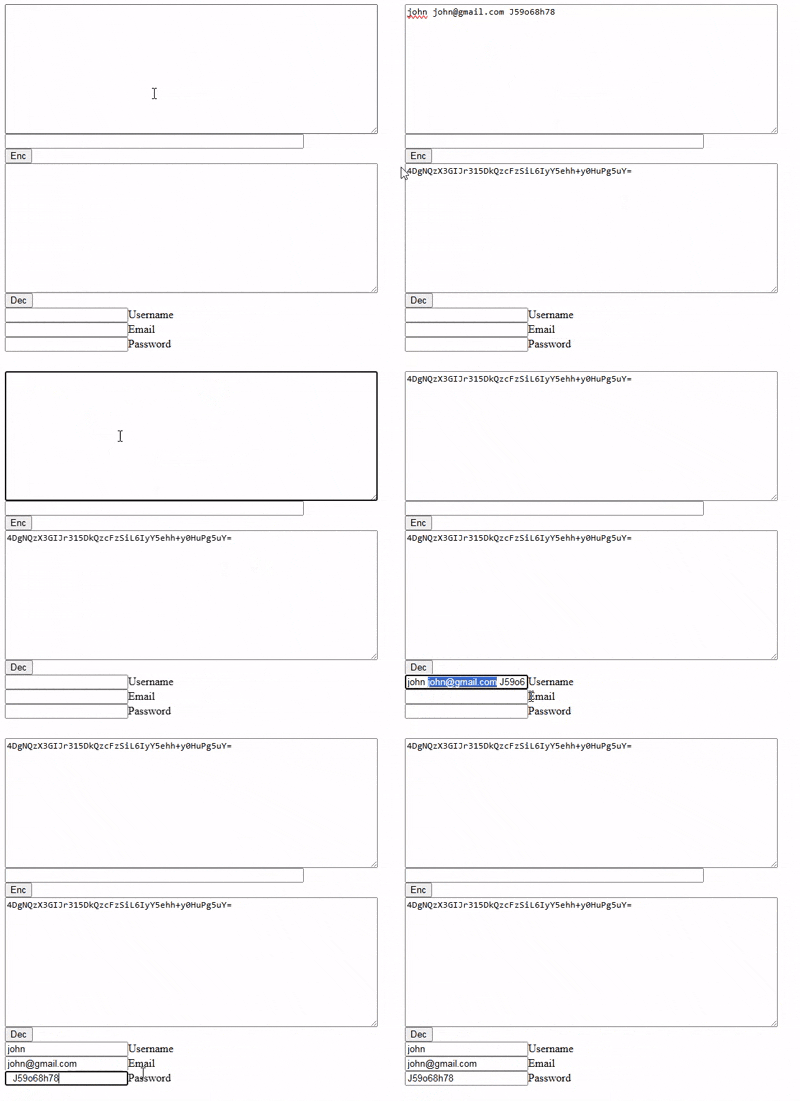
When I press the Decrypt button, I want it to write the username, email and password in the text fields.

https://media4.giphy.com/media/v1.Y2lkPTc5MGI3NjExMHhnbmsyeTY5bG0yM2V6aXgzZXhzOHUxOWVqaXBvY29pY2w1aXZmOSZlcD12MV9pbnRlcm5hbF9naWZfYnlfaWQmY3Q9Zw/3g3BUQoP36AOXwjQXQ/giphy.gif

There was an error uploading a gif to Stack Overflow. I uploaded it to giphy.com.

Using localStorage for persistent-across-pages dark mode and font selection

I’m trying to use JS (which I am pretty new to) for some display settings on my website. Originally I had checkbox labels and a CSS hack for dark mode and a font swap (the default font is a pixel typeface which I thought some users might have trouble reading), but of course these settings don’t follow the user to another page and have to be re-selected every time.

I’ve been poking around trying to make a script that will use localStorage to keep track of whether a user has changed the palette or font, but I can’t seem to get it to work consistently– it either works once and then reverts on the second page clicked, randomly applies the opposite of the previous state, or does nothing. This is the JS I have (patched together from other people’s code):

//change color scheme on click
function lightMode() {
    let element = document.body;
    element.classList.toggle("light");
    if (element.classList.contains("light")) {
        localStorage.setItem("mode", "light");
    } else {
        localStorage.setItem("mode", "dark");
    }
}

// Set color scheme on pageload
function loadMode() {
    let darkMode = localStorage.getItem("mode");
    if (darkMode === "light") {
        document.body.classList.add("light");
    }
}

window.onload = loadMode;

//change font on click
function textMode() {
    let element = document.body;
    element.classList.toggle("sans");
    if (element.classList.contains("sans")) {
        localStorage.setItem("font", "sans");
    } else {
        localStorage.setItem("font", "pixel");
    }
}

// Set font pref on pageload
function loadFont() {
    let darkMode = localStorage.getItem("font");
    if (darkMode === "sans") {
        document.body.classList.add("sans");
    }
}

window.onload = loadFont;

Here’s the relevant HTML: just links that fire the functions.

 <ul class="drop">
    <li>
       <a onclick="lightMode()" class="lightswitch"> Mode</a>
    </li>
    <li>
       <a onclick="textMode()">Change Font</a>
    </li>
 </ul>

In my CSS is a set of color variables for body, another set for body.light (dark mode is the default), a @font-family spec for body and another one for body.sans.

My guess is that the two onload events are colliding somehow, or I have a name I’m using twice? I have found a bunch of methods for applying a dark mode like this but I haven’t been able to find any that explain how to also manage a second setting. Thanks a bunch for any pointers.

I was expecting to be able to set the color palette and font family on one page, then refresh and/or navigate to another and see the same changes applied. Instead, it is erratically applying one or both styles or sometimes neither. JavaScript and coding in general is a mystery to me.

Why my code behave differently with transferControlToOffscreen or new OffscreenCanvas?

I’m trying to use a web-worker to render a scene with threejs. I want to render some dynamic font using a CanvasTexture. But I find that when I use canvas in web-worker from transferControlToOffscreen, if I change the text, the render loop will stop, but this doesn’t happen with new OffscreenCanvas().

//if use new OffscreenCanvas, render loop will work fine.
//if not, canvas2 is transferd from main thread, when change the text, render loop will stop sometimes
//canvas2=new OffscreenCanvas(200,200);  
canvas2.height = 200;
canvas2.width = 200;
let context = canvas2.getContext('2d');
context.font = "40px Helvetica";
context.fillStyle = 'red';
context.fillText("123", canvas2.width / 2, canvas2.height / 2);
this.sprite = new THREE.Sprite(new THREE.SpriteMaterial({map: new THREE.CanvasTexture(canvas2)}));
this.sprite.scale.set(50, 50, 50);
this.scene.add(this.sprite);

If I declare a canvas in the HTML and simply hide it, after transfered to worker, the problem doesn’t occur.

<canvas id="canvas3"style="display: none;" ></canvas>
// spriteCanvas2 = document.createElement('canvas').transferControlToOffscreen();
spriteCanvas2=document.getElementById('canvas3').transferControlToOffscreen();

The live sample is here.The top canvas run in main thread and the bottom run in worker. If click the bottom canvas, it will stop render sometimes.
Some additional information is in the forum.

If run in local not codepen, it will trigger consistently in three clicks. If not trigger, please refresh the browser.

Could anyone tell the difference between them? Thanks in advance.

How to get enough time from Android to save the local app state to disk?

In our app we listen to the AppState, but even responding immediately and as efficiently as possible in the JS thread, we fail to save the state to disk every time. How are we supposed to get our data saved to disk so a user swiping away from the app quickly won’t result in data loss?

We manage to get all the processing of the state done (which is not much but still work) but that state is never successfully written to the disk. If we just had 2ms that would be plenty, but of course, we apparently don’t have even that much time.

How we listen:

  AppState.addEventListener('change', nextAppState => emit(nextAppState));
  AppState.addEventListener('blur', nextAppState => emit(nextAppState));

Recursively adding properties to object

I need a function that I could call like this:

myFunction("a.b.c.d.e.f", value)

and that will return me an object like this:

{ a: { b: { c: { d: { e: { f: value } } } } } } 

I started doing this:

function myFunction(obj, o) {
    let results = []
      let sp =obj.split('.')
      const firstProperty = sp.shift()
      results[firstProperty] = {}

      if(sp.length > 0) {
        return myFunction(sp.join("."))
      }
      return results
}

but it isn’t working.

In `test.projects`, each subfolder is a project, but the parent folder is also treated as one, so tests run twice

I want to run Vitest tests in a monorepo. I’d like to distinguish between the tests of my different packages when running them, so I used the test.projects array in vitest.config.ts. To avoid listing every package manually, I used the following setup:

import { defineConfig } from 'vitest/config'

export default defineConfig({
  test: {
    projects: [
      './packages/*',
    ],
  },
})

However, I noticed that Vitest also treated the packages folder, which contains my packages, as a project, causing my tests to run and appear twice.

packages @my-first-package/src/utils/segment.test.ts (12 tests) 4ms
@my-first-package src/utils/segment.test.ts (12 tests) 4ms
packages @my-first-package/src/index.test.ts (2 tests) 46ms
@my-first-package src/index.test.ts (2 tests) 44ms

Note: The order of the tests is not significant.

When I listed my projects manually without the *, it worked correctly.

import { defineConfig } from 'vitest/config'

export default defineConfig({
  test: {
    projects: [
      './packages/@my-first-package',
      // ...
    ],
  },
})

@my-first-package src/utils/segment.test.ts (12 tests) 4ms
@my-first-package src/index.test.ts (2 tests) 44ms

Is there a way to make packages/* work properly?

Error: Rendered fewer hooks than expected

After adding following condition in ‘getrecyclableTypeName’ function

i18n?.language === 'ar' && product?.RecyclableTypeArbic

started getting error

enter image description here

Here is the functional component :

const RenderProductInfo = ({ product, handleCopyId, currentRoute, isEnvelope }) => {
  const { i18n } = useTranslation()
  const isArabic = i18n.language === 'ar'
  const unit = product.UnitOfMeasurement ? product.UnitOfMeasurement : 'T';
  const title = product.Title
    ? product.Title
    : product.TradeDetails && product.TradeDetails.title
      ? product.TradeDetails.title
      : '';
  const value = `${product?.Currency
    ? product?.Currency
    : product?.TradeDetails?.currency
      ? product?.TradeDetails?.currency
      : 'AED'
    } ${Utilities.formatNumberToCurrency(
      product.BidValue
        ? product.BidValue
        : product.TargetPrice
          ? product.TargetPrice
          : 0,
      true,
    )}`;

  const getrecyclableTypeName = () => i18n?.language === 'ar' && product?.RecyclableTypeArbic ? product?.RecyclableTypeArbic : product.TradeDetails
    ? product.TradeDetails.recyclableTypeName
    : Utilities.getKeywordFromId({
      firstKey: 'defaultRecyclableTypes',
      value: product.RecyclableType,
    });

  return (
    <View style={[styles.productInfoContainer]}>
      <Text numberOfLines={1} style={styles.productName}>
        {title}
      </Text>
      {!(
        currentRoute === 'Guest' || currentRoute === 'unVerified'
      ) &&
        (product?.TargetPrice || product?.BidValue) &&
        !isEnvelope ?
        (
          <View style={styles.productHeader}>
            <Text style={styles.productPrice}>
              {value}/{unit}
            </Text>
            {
              product?.TradeId ?
                <TouchableOpacity onPress={handleCopyId ?? undefined}>
                  <Text style={styles.productTrade}>{product?.TradeId}</Text>
                </TouchableOpacity>
                :
                null}
          </View>
        ) : null}

      <View style={styles.productSubInfoContainer}>
        <RecyclableIcon
          height={styles.subProductIcons.height}
          color={styles.subProductIcons.color}
        />
        <Text style={styles.subProductTitle}>{getrecyclableTypeName()}</Text>
        {currentRoute === 'Guest' ||
          currentRoute === 'unVerified' ? <>
          <RowView>
            <BalanceIcon
              height={styles.subProductIcons.height}
              color={styles.subProductIcons.color}
            />
            <Text style={[styles.subProductTitle]}>
              {product.Quantity ? product.Quantity : 0}
              {unit}
            </Text>
          </RowView>
          <RowView>
            <AddressIcon
              height={styles.subProductIcons.height - 3}
              color={styles.subProductIcons.color}
            />
            <Text numberOfLines={1} style={[styles.subProductTitle]}>
              {product.Emirate}
            </Text>
          </RowView>
        </> : null}
      </View>

    </View>
  );
};

I dont understand this behaviour , I have not used any hook conditionally.
Also I tried replacing the function with useState and useEffect like below

const [recyclableTypeName,setRecyclableTypeName]=useState('')

useEffect(()=>{
  if(i18n.language==="ar") setRecyclableTypeName(something)
},[i18n.language])

this resolved the issue but I still not understand where I was wrong.

Dynamic Language Switching with jQuery IME (Transliteration Example for Hindi, Gujarati, etc.)

If you need to provide multilingual typing (e.g., Hindi, Gujarati, Arabic, Chinese) on a webpage, the jQuery IME (Input Method Editor) library from Wikimedia is a great solution.

By default, jQuery IME attaches to an input/textarea and lets the user pick input methods. But if you want to build your own UI — for example, a custom dropdown to switch languages dynamically — you can manage the IME instance directly in JavaScript.

The following solution shows how to:
• Initialize jQuery IME on a hidden input.
• Capture keypress events and apply transliteration.
• Dynamically change languages with a dropdown ().
• Support multiple IMEs (e.g., Hindi Transliteration, Gujarati Transliteration, Arabic Buckwalter, Chinese Pinyin).

$(function() {
    var LANGS = [
        { code: 'system', label: 'Use system input (OS keyboard)', native: true },
        { code: 'en', label: 'English', native: true },
        { code: 'zh', label: '中文 (Chinese) — Pinyin', native: false, imHint: /pinyin|transliteration/i },
        { code: 'gu', label: 'ગુજરાતી (Gujarati) — Transliteration', native: false, imHint: /transliteration/i },
        { code: 'hi', label: 'हिन्दी (Hindi) — Transliteration', native: false, imHint: /transliteration|inscript/i },
        { code: 'ar', label: 'العربية (Arabic) — Buckwalter', native: false, imHint: /buckwalter|transliteration/i }
    ];

    var currentLangCode = 'en';
    var currentLangObj = LANGS.find(l => l.code === currentLangCode);

    var $selector = $('#language').empty();
    LANGS.forEach(function(L) {
        $selector.append($('<option>', { value: L.code, text: L.label }));
    });

    // Hidden element to initialize IME
    var $el = $('<input type="text" style="position:absolute;left:-9999px;">');
    if (!$el.data('ime')) {
        $el.ime({ showSelector: false, imePath: './' });
    }
    var imeInstance = $el.data('ime');

    // Default: Hindi IME
    imeInstance.setLanguage('hi');
    imeInstance.setIM('hi-transliteration');

    // Capture keypress
    $(document).on('keypress', function(e) {
        var altGr = false, c, input, replacement;
        var $target = $(e.target);

        if (!imeInstance.inputmethod) return true;

        if (e.which === 8) { // Backspace
            imeInstance.context = '';
            return true;
        }

        if (e.altKey || e.altGraphKey) altGr = true;

        if ((e.which < 32 && e.which !== 13 && !altGr) || e.ctrlKey || e.metaKey) {
            imeInstance.context = '';
            return true;
        }

        c = String.fromCharCode(e.which);
        var element = imeInstance.$element.get(0);

        input = $target.val().slice(
            Math.max(0, element.selectionStart - imeInstance.inputmethod.maxKeyLength),
            $target[0].selectionStart
        );

        replacement = imeInstance.transliterate(input + c, imeInstance.context, altGr);

        imeInstance.context = (imeInstance.context || '') + c;
        if (imeInstance.context.length > imeInstance.inputmethod.contextLength) {
            imeInstance.context = imeInstance.context.slice(
                imeInstance.context.length - imeInstance.inputmethod.contextLength
            );
        }

        if (replacement.noop) return true;

        if (document.activeElement === $target[0]) {
            var start = $target[0].selectionStart - input.length;
            var end = $target[0].selectionEnd;
            $target.val(
                $target.val().slice(0, start) +
                replacement.output +
                $target.val().slice(end)
            );
            $target[0].selectionStart = $target[0].selectionEnd = start + replacement.output.length;
        }

        e.stopPropagation();
        e.preventDefault();
        return false;
    });

    // Language change handler
    $selector.on('change', function() {
        currentLangCode = $(this).val();
        currentLangObj = LANGS.find(l => l.code === currentLangCode);

        // Update IME instance
        imeInstance.setLanguage(currentLangCode);
        imeInstance.setIM(currentLangCode + '-transliteration');

        $(':focus').trigger('focusin');
    });

    
    $selector.val('en').trigger('change');
});

How to insert tags on different pages using EJS?

I use EJS to connect repeating parts of page structure. Can you tell me if it is possible to add tags to pages using this or another method?

I understand that you can make a nested object with page keys and tag parameters. But this is not a universal method.

Now I have this code:

import {defineConfig} from "vite";
import {resolve} from "path";
import {ViteEjsPlugin} from "vite-plugin-ejs";

export default defineConfig({
    plugins: [
        ViteEjsPlugin(),
    ],
    build: {
        rollupOptions: {
            input: {
                main: resolve(__dirname, "index.html"),
                order: resolve(__dirname, "order.html"),
                notFound: resolve(__dirname, "404.html"),
                about: resolve(__dirname, "about.html"),
                deliveryPayment: resolve(__dirname, "delivery_payment.html"),
                faq: resolve(__dirname, "faq.html"),
                paymentError: resolve(__dirname, "payment_error.html"),
                successfulPayment: resolve(__dirname, "successful_payment.html"),
                contacts: resolve(__dirname, "contacts.html"),
                corporateInformation: resolve(__dirname, "corporate_information.html"),
                searchError: resolve(__dirname, "search_error.html"),
            },
        },
    },
});
<%- include("src/templates/menu.ejs") %>
<%- include("src/templates/order-call.ejs") %>
<%- include("src/templates/cart.ejs") %>
<%- include("src/templates/header.ejs") %>