How would I Bypass ECourts Captcha Code in vuejs

I want to bypass the captcha code of another website in Vuejs. The link is generated dynamically for every captcha code and user has to enter everytime, so I want to bypass the captcha code.

I have the API key for that and the page URL also but the website is a bit old and the captcha which the website is using is siwp_captcha maybe the name has the changed till date but earlier the name was siwp_captcha

React js CSS loading issue with webpack

I’m facing CSS loading issue in setting up my React application using Node.js and Express.js. Here is my code:

Webapck:

const path = require('path');
const nodeExternals = require('webpack-node-externals');

const MiniCssExtractPlugin = require("mini-css-extract-plugin");
const CssMinimizerPlugin = require("css-minimizer-webpack-plugin");
const HtmlWebpackPlugin = require("html-webpack-plugin");

module.exports = {
  target: 'node',
  mode: 'production',
  externals: [nodeExternals()],
  entry: './server/index.js',
  output: {
    filename: 'index.js',
    path: path.resolve(__dirname, 'build'),
  },
  plugins: [
    // new MiniCssExtractPlugin(),
  ],  
  module: {
    rules: [
      {
        test: /.css$/i,
        use: [
          {
            loader: 'style-loader',
            options: { 
                insert: 'head', // insert style tag inside of <head>
                injectType: 'singletonStyleTag' // this is for wrap all your style in just one style tag
            },
          },
          "css-loader",
        ],
        sideEffects: true, 
        include: __dirname
      },
      {
        test: /.(js|jsx)$/,
        exclude: /node_modules/,
        use: {
          loader: 'babel-loader',
          options: {
            presets: [
              '@babel/preset-env',
              '@babel/preset-react',
            ],
          },
        },
      },
    ],
  },
  resolve: {
    extensions: ['.js', '.jsx', '.css'],
    modules: [
      'node_modules'
    ]
  },
};

index.js (Server Code)

const express = require('express');
const app = express();
const port = 5005;
const path = require('path');
var ReactDomServer = require('react-dom/server');
import Hello from '../ui.src/hello';
var cors = require('cors');
const axios = require('axios');
// import '../ui.src/assets/css/style.css';

app.use(cors())

app.get("/", (req,res) => {
    const component = ReactDomServer.renderToString(<Hello />);
    res.send(`<html><body class='testclass'>${component}</body></html>`);
})

app.listen(port, () => {
    console.log(`Server now listening at http://localhost:${port}`)
})

React component

import React, { useEffect, useState } from 'react';
import './assets/css/style.css';

const Hello = () => {
    return (
      <h1>Hello World this is Test File....</h1>
    )
}

export default Hello;

All my components are working fine, and via expess js I”m able to render the React component as well but it’s not loading the CSS. Tried all the options but no luck. Please do suggest if anything missing.

Thank you in advance.

how to send array object from html form to follow mongoose schema

So I’ve got this HTML form, my idea is to create a new document on my mongo database, that represent the notes given to a teacher based on several criterias, I’m using an array in the note property that contain objects that contains the author of the note for example.

(in the browser I entered these in the form :
name : mathis ||
familyName : de sousa ||
author : mathis de sousa)

I’ve tried using notes[0].author and notes[0][author] without success

    <form action="/teachers" method="post">
        <input type="text" placeholder="name" name="name" required>
        <input type="text" placeholder="familyName" name="familyName" required>
        <input type="text" name="notes[0].author">
        <input type="number" name="notes[0].knowledge">
        <input type="number" name="notes[0].helpfulness">
        <input type="number" name="notes[0].attitude">
        <input type="number" name="notes[0].overallRating">
        <input type="text" name="notes[0].comment">
        <button>Submit</button>
    </form>

the form has to follow this mongoose schema :

const teacherSchema = new mongoose.Schema({

    name: {
        type: String,
        required: true
    },
    familyName: {
        type: String,
        required: true
    },
    notes: [
    {   
        author: {
            type: String,
            required: true
        },
        knowledge: {
            type: Number,
            required: true,
            min:0,
            max:10
        },
        helpfulness: {
            type: Number,
            required: true,
            min:0,
            max:10
        },
        attitude: {
            type: Number,
            required: true,
            min:0,
            max:10
        },
        overallRating: {
            type: Number,
            required: true,
            min:0,
            max:10
        },
        comment: {
            type: String,
            required: false
        }
    }]
});

however, either it output an empty array in notes, either it outputs this issue

C:UsershddesDesktopjs-udemyESUPcampnode_modulesmongooselibdocument.js:3197
    this.$__.validationError = new ValidationError(this);
                               ^

ValidationError: Teachers validation failed: notes: Cast to embedded failed for value "Mathis DE SOUSA" (type string) at path "notes" because of "ObjectParameterError"
    at Document.invalidate (C:UsershddesDesktopjs-udemyESUPcampnode_modulesmongooselibdocument.js:3197:32)
    at model.$set (C:UsershddesDesktopjs-udemyESUPcampnode_modulesmongooselibdocument.js:1456:12)
    at model.$set (C:UsershddesDesktopjs-udemyESUPcampnode_modulesmongooselibdocument.js:1111:16)
    at model.Document (C:UsershddesDesktopjs-udemyESUPcampnode_modulesmongooselibdocument.js:166:12)
    at model.Model (C:UsershddesDesktopjs-udemyESUPcampnode_modulesmongooselibmodel.js:130:12)
    at new model (C:UsershddesDesktopjs-udemyESUPcampnode_modulesmongooselibmodel.js:4770:15)
    at C:UsershddesDesktopjs-udemyESUPcampindex.js:55:24
    at Layer.handle [as handle_request] (C:Usershddesnode_modulesexpresslibrouterlayer.js:95:5)
    at next (C:Usershddesnode_modulesexpresslibrouterroute.js:144:13)
    at Route.dispatch (C:Usershddesnode_modulesexpresslibrouterroute.js:114:3) {
  errors: {
    notes: CastError: Cast to embedded failed for value "Mathis DE SOUSA" (type string) at path "notes" because of "ObjectParameterError"
        at SchemaDocumentArray.cast (C:UsershddesDesktopjs-udemyESUPcampnode_modulesmongooselibschemadocumentArray.js:508:19)
        at SchemaType.applySetters (C:UsershddesDesktopjs-udemyESUPcampnode_modulesmongooselibschemaType.js:1221:12)
        at model.$set (C:UsershddesDesktopjs-udemyESUPcampnode_modulesmongooselibdocument.js:1414:22)
        at model.$set (C:UsershddesDesktopjs-udemyESUPcampnode_modulesmongooselibdocument.js:1111:16)
        at model.Document (C:UsershddesDesktopjs-udemyESUPcampnode_modulesmongooselibdocument.js:166:12)
        at model.Model (C:UsershddesDesktopjs-udemyESUPcampnode_modulesmongooselibmodel.js:130:12)
        at new model (C:UsershddesDesktopjs-udemyESUPcampnode_modulesmongooselibmodel.js:4770:15)
        at C:UsershddesDesktopjs-udemyESUPcampindex.js:55:24
        at Layer.handle [as handle_request] (C:Usershddesnode_modulesexpresslibrouterlayer.js:95:5)
        at next (C:Usershddesnode_modulesexpresslibrouterroute.js:144:13) {
      stringValue: '"Mathis DE SOUSA"',
      messageFormat: undefined,
      kind: 'embedded',
      value: 'Mathis DE SOUSA',
      path: 'notes',
      reason: ObjectParameterError: Parameter "obj" to Document() must be an object, got "Mathis DE SOUSA" (type string)
          at EmbeddedDocument.Document (C:UsershddesDesktopjs-udemyESUPcampnode_modulesmongooselibdocument.js:113:11)
          at EmbeddedDocument.Subdocument (C:UsershddesDesktopjs-udemyESUPcampnode_modulesmongooselibtypessubdocument.js:34:12)
          at EmbeddedDocument.ArraySubdocument [as constructor] (C:UsershddesDesktopjs-udemyESUPcampnode_modulesmongooselibtypesarraySubdocument.js:44:15)
          at new EmbeddedDocument (C:UsershddesDesktopjs-udemyESUPcampnode_modulesmongooselibschemadocumentArray.js:127:17)
          at SchemaDocumentArray.cast (C:UsershddesDesktopjs-udemyESUPcampnode_modulesmongooselibschemadocumentArray.js:502:22)
          at SchemaType.applySetters (C:UsershddesDesktopjs-udemyESUPcampnode_modulesmongooselibschemaType.js:1221:12)
          at model.$set (C:UsershddesDesktopjs-udemyESUPcampnode_modulesmongooselibdocument.js:1414:22)
          at model.$set (C:UsershddesDesktopjs-udemyESUPcampnode_modulesmongooselibdocument.js:1111:16)
          at model.Document (C:UsershddesDesktopjs-udemyESUPcampnode_modulesmongooselibdocument.js:166:12)
          at model.Model (C:UsershddesDesktopjs-udemyESUPcampnode_modulesmongooselibmodel.js:130:12),
      valueType: 'string'
    }
  },
  _message: 'Teachers validation failed'
}

Sorry if it’s a dumb question or wrongly formulated, i’m a beginner

Thank you for your help πŸ™‚

React Native: Options avaible for bubble picker ui?

i need to implement a bubble picker ui for my react native app.

Example:
[React Native Bubble Select
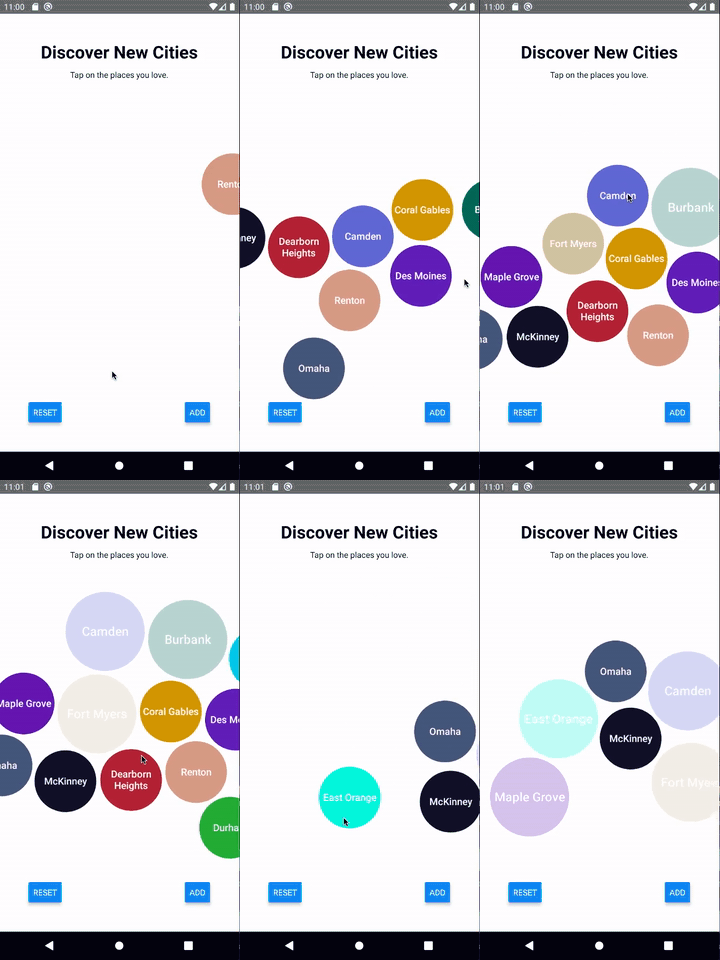
Maybe the only similar result i found is about the Apple Music Selector:
enter image description here

I found results on internet like this:

  1. React Native Bubble Select: Obsolete
  2. React Native Physics: Obsolete
  3. React Native Game Engine: Obsolete

I tried with emulate some animations but looks aweful. Theres some physic engine for React Native that i can implement?

I tried with Matter.js the next with something so basic but i cant see anything:

import React, { useEffect, useRef } from 'react';
import { View, StyleSheet } from 'react-native';
import Matter from 'matter-js';
import { GameEngine } from 'react-native-game-engine';

const CircularButtonAnimation_Screen = () => {
  const engine = useRef(null);

  useEffect(() => {
    console.log('Creating engine...');
    engine.current = Matter.Engine.create();
    console.log('Engine created:', engine.current);

    const { world } = engine.current;

    console.log('Creating world...');
    console.log('Dimension screen:', '400 x 400');

    // Crear cuerpo circular
    console.log('Creating circle...');
    const circle = Matter.Bodies.circle(200, 200, 25, {
      isStatic: true,
    });
    console.log('CΓ­rcle created:', circle);

    console.log('Adding circle in the world...');
    Matter.World.add(world, circle);

    return () => {
      console.log('Cleaning world...');
      // Matter.World.clear(world);
    };
  }, []);

  return (
    <View style={styles.container}>
      <GameEngine
        style={styles.gameEngine}
        systems={[]}
        entities={{
          physics: { engine: engine.current },
        }}
      />
    </View>
  );
};

const styles = StyleSheet.create({
  container: {
    flex: 1,
    backgroundColor: 'grey',
  },
  gameEngine: {
    flex: 1,
  },
});

export default CircularButtonAnimation_Screen;

This is the log:

 LOG  Creating world...                                                                                                                               
 LOG  Dimension screen: 400 x 400                                                                                                                     
 LOG  Creating circle...                                                                                                                              
 LOG  CΓ­rcle created: {"_original": {"density": 0.001, "friction": 0.1, "inertia": 2407.040215928269, "inverseInertia": 0.0004154479818752644, "invers
eMass": 0.5142834297505565, "mass": 1.9444530819999999, "restitution": 0}, "angle": 0, "anglePrev": 0, "angularSpeed": 0, "angularVelocity": 0, "area"
: 1944.4530819999998, "axes": [{"x": -0.9709182366411434, "y": -0.23941131501592125}, {"x": -0.8855293211163864, "y": -0.4645834924350539}, {"x": -0.7
48461108518164, "y": -0.6631786856012194}, {"x": -0.5679927261836174, "y": -0.8230335734358}, {"x": -0.35473926289412316, "y": -0.9349652696016757}, {
"x": -0.1204602009454297, "y": -0.9927181573781084}, {"x": 0.1204602009454297, "y": -0.9927181573781084}, {"x": 0.35473926289412316, "y": -0.934965269
6016757}, {"x": 0.5679927261836174, "y": -0.8230335734358}, {"x": 0.748461108518164, "y": -0.6631786856012194}, {"x": 0.8855293211163864, "y": -0.4645
834924350539}, {"x": 0.9709182366411434, "y": -0.23941131501592125}, {"x": 1, "y": 0}], "bounds": {"max": {"x": 224.818, "y": 225}, "min": {"x": 175.1
82, "y": 175}}, "chamfer": null, "circleRadius": 25, "collisionFilter": {"category": 1, "group": 0, "mask": 4294967295}, "constraintImpulse": {"angle"
: 0, "x": 0, "y": 0}, "deltaTime": 16.666666666666668, "density": Infinity, "events": null, "force": {"x": 0, "y": 0}, "friction": 1, "frictionAir": 0
.01, "frictionStatic": 0.5, "id": 1, "inertia": Infinity, "inverseInertia": 0, "inverseMass": 0, "isSensor": false, "isSleeping": false, "isStatic": t
rue, "label": "Circle Body", "mass": Infinity, "motion": 0, "parent": [Circular], "parts": [[Circular]], "plugin": {}, "position": {"x": 200, "y": 200
}, "positionImpulse": {"x": 0, "y": 0}, "positionPrev": {"x": 200, "y": 200}, "render": {"fillStyle": "#14151f", "lineWidth": 1, "opacity": 1, "sprite
": {"xOffset": 0.5, "xScale": 1, "yOffset": 0.5, "yScale": 1}, "strokeStyle": "#555", "visible": true}, "restitution": 0, "sleepCounter": 0, "sleepThr
eshold": 60, "slop": 0.05, "speed": 0, "timeScale": 1, "torque": 0, "totalContacts": 0, "type": "body", "velocity": {"x": 0, "y": 0}, "vertices": [{"b
ody": [Circular], "index": 0, "isInternal": false, "x": 224.818, "y": 203.013}, {"body": [Circular], "index": 1, "isInternal": false, "x": 223.375, "y
": 208.865}, {"body": [Circular], "index": 2, "isInternal": false, "x": 220.575, "y": 214.202}, {"body": [Circular], "index": 3, "isInternal": false, 
"x": 216.578, "y": 218.713}, {"body": [Circular], "index": 4, "isInternal": false, "x": 211.618, "y": 222.136}, {"body": [Circular], "index": 5, "isIn
ternal": false, "x": 205.983, "y": 224.274}, {"body": [Circular], "index": 6, "isInternal": false, "x": 200, "y": 225}, {"body": [Circular], "index": 
7, "isInternal": false, "x": 194.017, "y": 224.274}, {"body": [Circular], "index": 8, "isInternal": false, "x": 188.382, "y": 222.136}, {"body": [Circ
ular], "index": 9, "isInternal": false, "x": 183.422, "y": 218.713}, {"body": [Circular], "index": 10, "isInternal": false, "x": 179.425, "y": 214.202
}, {"body": [Circular], "index": 11, "isInternal": false, "x": 176.625, "y": 208.865}, {"body": [Circular], "index": 12, "isInternal": false, "x": 175
.182, "y": 203.013}, {"body": [Circular], "index": 13, "isInternal": false, "x": 175.182, "y": 196.987}, {"body": [Circular], "index": 14, "isInternal
": false, "x": 176.625, "y": 191.135}, {"body": [Circular], "index": 15, "isInternal": false, "x": 179.425, "y": 185.798}, {"body": [Circular], "index
": 16, "isInternal": false, "x": 183.422, "y": 181.287}, {"body": [Circular], "index": 17, "isInternal": false, "x": 188.382, "y": 177.864}, {"body": 
[Circular], "index": 18, "isInternal": false, "x": 194.017, "y": 175.726}, {"body": [Circular], "index": 19, "isInternal": false, "x": 200, "y": 175},
 {"body": [Circular], "index": 20, "isInternal": false, "x": 205.983, "y": 175.726}, {"body": [Circular], "index": 21, "isInternal": false, "x": 211.6
18, "y": 177.864}, {"body": [Circular], "index": 22, "isInternal": false, "x": 216.578, "y": 181.287}, {"body": [Circular], "index": 23, "isInternal":
 false, "x": 220.575, "y": 185.798}, {"body": [Circular], "index": 24, "isInternal": false, "x": 223.375, "y": 191.135}, {"body": [Circular], "index":
 25, "isInternal": false, "x": 224.818, "y": 196.987}]}                                                                                               
 LOG  Adding circle in the world...                                                                                                                   
                                                                                                                                                      

What iΒ΄m expecting?
Let me know how implement a bubble picker, or lead me what physic engine are available and updated for the most new of React native.

Working with:

  1. React Native: 0.73.5
  2. React-Native-Cli: 11.3.7
  3. matter-js: 0.19.0
  4. react-native-game-engine: 1.2.0

Thanks for any help

Updating Object Properties within an Array maintained in ReactJS State

I have a modal that use to add items to a list. In this modal it has a form, where it has many form controls. When user filled the items and click save button, it adds that item to a list that is maintained in a state.

Below is the form, that add the item to the list

enter image description here

Once the user click save, once filled/selected all the form fields, it is added to a list and show on the UI. Below is the image of how it looks like
enter image description here

And if the user wants to edit any of the items added, the user should be able to edit the item within. Below is the image of it.

enter image description here

I was successfully able to retrieve the values of each item into the form fields of the each item. And was able to successfully remove the item from the list once the user clicks on the remove button for each item.

Below is the code snippet of what I have achieved so far

function AddGroceryItemView () {

    const initialGroceryItemList                            = [];
    const initialGroceryBill                                = { id: -1, storeId: -1, storeName: '', dateOfPurchase: '', billName: ''};
    const initialGroceryItem                                = { id: -1
                                                                , name: ''
                                                                , measurementTypeId: ''
                                                                , quantity: 0
                                                                , cost: 0
                                                                , categoryId: -1
                                                                , categoryName: ''
                                                                , frequencyId: ''
                                                                , productBrand: ''
                                                                , costPerQuantity: 0 };

    const [activeStores, setActiveStores]                   = useState([]);
    const [activeCategories, setActiveCategories]           = useState({});
    const [showAddGroceryItem, setShowAddGroceryItem]       = useState(false);
    const [groceryForm, setGroceryForm]                     = useState(initialGroceryItem);
    const [groceryItemsList, setGroceryItemsList]           = useState(initialGroceryItemList);

    const { listStoresByStatus, listCategoriesByStatus }         = useExternalDataContext();

    useEffect(() => {

        Promise.all([getAllActiveStores(), getCategories()])
                    .then(response => {

                        setActiveStores(response[0].stores);

                        setActiveCategories(response[1].categories);

                    });
    },[]);


    const clickAddGroceryItemDialog       = (visibility) => {
        setShowAddGroceryItem(visibility);
    }


    const getAllActiveStores = () => {

        return new Promise(async (resolve) => {

            let results     = await listStoresByStatus(Constants.STATUS_VALUES.active.number);

            resolve( {'stores': results} );
        });

    }


    const getCategories = () => {

        return new Promise(async (resolve) => {

            let result      = await listCategoriesByStatus(Constants.STATUS_VALUES.active.number);

            resolve( {'categories': result} );
        });
    }


    const setFormInput = (fieldName, value, attrValue) => {

        switch (fieldName) {
            case 'name':
                setGroceryForm( (prevData) => ( {...prevData, name: value } ) );
                break;
            case 'measurementType':
                setGroceryForm( (prevData) => ( {...prevData, measurementTypeId: value } ) );
                break;
            case 'quantity':
                setGroceryForm( (prevData) => ( {...prevData, quantity: value } ) );
                break;
            case 'cost':
                setGroceryForm( (prevData) => ( {...prevData, cost: value } ) );
                break;
            case 'category':
                setGroceryForm( (prevData) => ( {...prevData, categoryId: value } ) );
                setGroceryForm( (prevData) => ( {...prevData, categoryName: attrValue } ) );
                break;
            case 'frequency':
                setGroceryForm( (prevData) => ( {...prevData, frequencyId: value } ) );
                break;
            case 'productBrand':
                setGroceryForm( (prevData) => ( {...prevData, productBrand: value } ) );
                break;
            default:
                break;
        }

    }


    const clickAddGroceryItem = () => {

        let costPerQuantity     = GroceryItem.getCostPerQuantity(groceryForm.cost, groceryForm.quantity);
        let groceryItem         = new GroceryItem ( groceryForm.id
                                                    , groceryForm.name
                                                    , groceryForm.measurementTypeId
                                                    , groceryForm.quantity
                                                    , groceryForm.cost
                                                    , groceryForm.categoryId
                                                    , groceryForm.categoryName
                                                    , groceryForm.frequencyId
                                                    , groceryForm.productBrand
                                                    , costPerQuantity );

        setGroceryItemsList([...groceryItemsList, groceryItem]);
    }

    // TODO: edit a particular item in the grocery item list
    const groceryItemEdit = () => {
        
        
    }

 
    const groceryItemRemove = (index) => {

        let itemToDelete        = groceryItemsList.splice(index, 1);
        setGroceryItemsList((state) => state.filter((item) => item.name !== itemToDelete.name));
    }

    return (
    
        <LocalizationProvider dateAdapter={AdapterDayjs}>

            <Box>

                <Typography variant="h4">Add Grocery Bill</Typography>

                <Typography variant="span" sx={{ marginTop:1 }}>After adding all the items in the grocery bill. Please click save button to save the bill into the system.</Typography>

                <Grid container spacing={2} sx={{ marginTop:2 }}>

                    <Grid item xs={12} sm={12} md={4} lg={4} xl={4}>                        
                        <FormControl fullWidth>
                            <InputLabel id="label-store">{Constants.MAIN_FORMS.addGroceryItem.store.name}</InputLabel>
                            <Select labelId="label-store" id="select-store" 
                                label={Constants.MAIN_FORMS.addGroceryItem.store.name}
                                defaultValue="-1">
                                    
                                    <MenuItem value="-1">Select</MenuItem>
                                
                                    { activeStores && activeStores.map((item) => (
                                        <MenuItem key={item.id} value={item.id}>{item.name} - {item.suburb}</MenuItem>
                                    ))}

                            </Select>
                        </FormControl>
                    </Grid>

                    <Grid item xs={12} sm={12} md={4} lg={4} xl={4}>
                        <FormControl fullWidth>
                            <DatePicker label={Constants.MAIN_FORMS.addGroceryItem.purchasedDate.name} />
                        </FormControl>
                    </Grid>

                </Grid>

                <Grid container spacing={1} sx={{ marginTop:2 }}>
                    <Grid item xs={12} md={6} lg={6} xl={6}>
                        <Typography variant="h5">Total items in the bill: {groceryItemsList.length}</Typography>
                    </Grid>
                    <Grid item xs={12} md={6} lg={6} xl={6}>
                        <Button variant="contained" sx={{ float:'right' }} onClick={ () => clickAddGroceryItemDialog(true) }>Add Grocery Item</Button>
                    </Grid>
                </Grid>

                <Dialog open={showAddGroceryItem} fullWidth={true} maxWidth="md">

                    <DialogTitle>Add Grocery Item to Bill</DialogTitle>

                    <DialogContent>

                        <DialogContentText>Please use the below form to add items to the current bill.</DialogContentText>
                        
                        <Grid container spacing={2} sx={{ marginTop:2 }}>

  
                            <Grid item xs={12} md={8} lg={8} xl={8}>
                                <FormControl fullWidth>
                                    <TextField label={Constants.MAIN_FORMS.addGroceryItem.groceryItemName.name} 
                                        placeholder={Constants.MAIN_FORMS.addGroceryItem.groceryItemName.placeholder}
                                        value={groceryForm.name}
                                        onChange={ (e) => { setFormInput('name', e.target.value, '') } } />
                                </FormControl>
                            </Grid>

                            <Grid item xs={12} md={4} lg={4} xl={4}>
                                <FormControl fullWidth>
                                    <InputLabel id="label-form-category">{Constants.MAIN_FORMS.addGroceryItem.category.name}</InputLabel>
                                    <Select labelId="label-form-category" id="select-form-category" 
                                        label={Constants.MAIN_FORMS.addGroceryItem.category.name}
                                        value={groceryForm.categoryId}
                                        onChange={ (e, child) => { setFormInput('category', e.target.value, child.props.children[1]) } }
                                        defaultValue={-1} >

                                            <MenuItem key="-1" value="-1">Select</MenuItem>

                                            { activeCategories && 

                                                Object.keys(activeCategories).map( (key, index) => [

                                                    <ListSubheader key={key} sx={{ fontWeight:'bold', backgroundColor:'yellow' }}>{key}</ListSubheader>,
                                                    ...activeCategories[key].map( (cat, i) =>  <MenuItem key={cat.id} value={cat.id}> {cat.name} </MenuItem>)
                                                        
                                                ])
                                            }

                                    </Select>
                                </FormControl>
                            </Grid>

                            <Grid item xs={12} md={4} lg={4} xl={4}>
                                <FormControl fullWidth>
                                    <TextField label={Constants.MAIN_FORMS.addGroceryItem.quantity.name} 
                                        placeholder={Constants.MAIN_FORMS.addGroceryItem.quantity.placeholder}
                                        value={groceryForm.quantity}
                                        onChange={ (e) => { setFormInput('quantity', e.target.value, '') } } />
                                </FormControl>
                            </Grid>

                       
                            <Grid item xs={12} md={4} lg={4} xl={4}>
                                <FormControl fullWidth>
                                    <TextField label={Constants.MAIN_FORMS.addGroceryItem.actualAmount.name}
                                        placeholder={Constants.MAIN_FORMS.addGroceryItem.actualAmount.placeholder}
                                        value={groceryForm.cost}
                                        onChange={ (e) => { setFormInput('cost', e.target.value, '') }} />
                                </FormControl>
                            </Grid>

                            
                            <Grid item xs={12} md={4} lg={4} xl={4}>
                                <FormControl fullWidth>                                
                                    <TextField label={Constants.MAIN_FORMS.addGroceryItem.groceryItemBrand.name}
                                        placeholder={Constants.MAIN_FORMS.addGroceryItem.groceryItemBrand.placeholder}
                                        value={groceryForm.productBrand}
                                        onChange={ (e) => { setFormInput('productBrand', e.target.value, '') } } />
                                </FormControl>
                            </Grid>

                            
                            <Grid item xs={12} md={4} lg={4} xl={4}>
                                <FormControl fullWidth>
                                    <FormLabel id="rbg-measurement-label">{Constants.MAIN_FORMS.addGroceryItem.measurementType.name}:</FormLabel>
                                    <RadioGroup aria-labelledby="rbg-measurement-label" name="rbg-measurement-type" 
                                        value={groceryForm.measurementTypeId}
                                        onChange={ (e) => { setFormInput('measurementType', e.target.value, '') } }>
                                            <FormControlLabel value={Constants.GROCERY_ITEM_MEASUREMENT_TYPES.inUnits.value} control={<Radio />} label={Constants.GROCERY_ITEM_MEASUREMENT_TYPES.inUnits.text} />
                                            <FormControlLabel value={Constants.GROCERY_ITEM_MEASUREMENT_TYPES.inKgLitres.value} control={<Radio />} label={Constants.GROCERY_ITEM_MEASUREMENT_TYPES.inKgLitres.text} />
                                    </RadioGroup>
                                </FormControl>
                            </Grid>

                            
                            <Grid item xs={12} md={4} lg={4} xl={4}>
                                <FormControl fullWidth>
                                    <FormLabel id="rbg-frequency-label">{Constants.MAIN_FORMS.addGroceryItem.frequency.name}:</FormLabel>
                                    <RadioGroup aria-labelledby="rbg-frequency-label" name="rbg-frequency" 
                                        value={groceryForm.frequencyId}
                                        onChange={ (e) => { setFormInput('frequency', e.target.value, '') } }>
                                            <FormControlLabel value={Constants.GROCERY_ITEM_FREQUENCY.frequentItem.value} control={<Radio />} label={Constants.GROCERY_ITEM_FREQUENCY.frequentItem.text} data-frequencyname={Constants.GROCERY_ITEM_FREQUENCY.frequentItem.text} />
                                            <FormControlLabel value={Constants.GROCERY_ITEM_FREQUENCY.notEverydayItem.value} control={<Radio />} label={Constants.GROCERY_ITEM_FREQUENCY.notEverydayItem.text} data-frequencyname={Constants.GROCERY_ITEM_FREQUENCY.notEverydayItem.text} />
                                            <FormControlLabel value={Constants.GROCERY_ITEM_FREQUENCY.rareItem.value} control={<Radio />} label={Constants.GROCERY_ITEM_FREQUENCY.rareItem.text} data-frequencyname={Constants.GROCERY_ITEM_FREQUENCY.rareItem.text} />
                                    </RadioGroup>
                                </FormControl>
                            </Grid>
                        </Grid>
                    </DialogContent>
                    <DialogActions>
                        <Button variant="outlined" onClick={ () => clickAddGroceryItemDialog(false) }>Cancel</Button>
                        <Button variant="contained" onClick={clickAddGroceryItem}>Save</Button>
                    </DialogActions>
                </Dialog>


                <Grid container spacing={1} sx={{ marginTop:2 }}>
                    
                    {groceryItemsList.length > 0 && groceryItemsList.map( (item, index) => {

                        return (

                            
                            <Grid item xs={12} md={6} lg={6} xl={6} key={index}>
                                <Paper elevation={3}>
                                    <Accordion>
                                        
                                        <AccordionSummary expandIcon={<ExpandMoreIcon />}>
                                            <Grid container>
                                                <Grid item xs={12} md={12} lg={12} xl={12} sx={{ backgroundColor:"yellow" }}>
                                                    {item.name}
                                                </Grid>
                                                <Grid item xs={12} md={12} lg={12} xl={12} sx={{ backgroundColor:"blue" }}>
                                                    <Grid container spacing={2}>
                                                        <Grid item xs={12} md={4} lg={4} xl={4}>
                                                            Quantity: {item.quantity} {item.measurementTypeText}
                                                        </Grid>
                                                        <Grid item xs={12} md={4} lg={4} xl={4}>
                                                            Amount Paid: ${item.cost}
                                                        </Grid>
                                                        <Grid item xs={12} md={4} lg={4} xl={4}>
                                                            Price per {item.measurementTypeText}: ${item.costPerQuantity}
                                                        </Grid>
                                                    </Grid>
                                                </Grid>
                                                <Grid item xs={12} md={12} lg={12} xl={12} sx={{ backgroundColor:"green" }}>
                                                    Category: {item.categoryName}
                                                </Grid>
                                            </Grid>
                                        </AccordionSummary>

                                        
                                        <AccordionDetails>
                                            <Grid container spacing={2}>
                                                <Grid item xs={12} md={12} lg={12} xl={12} sx={{ backgroundColor:"" }}>
                                                    <Grid container spacing={2}>
                                                        <Grid item xs={12} md={9} lg={9} xl={9}>
                                                            Details of the Item
                                                        </Grid>
                                                        <Grid item xs={12} md={3} lg={3} xl={3}>
                                                            <Grid container spacing={2} direction="row" justifyContent="flex-end">
                                                                <Grid item xs={12} md={6} lg={6} xl={6}>
                                                                    <Button variant="contained" color="success" fullWidth onClick={ (e) => groceryItemEdit(index, item) }>Save</Button>
                                                                </Grid>
                                                                <Grid item xs={12} md={6} lg={6} xl={6}>
                                                                    <Button variant="outlined" color="error" fullWidth onClick={ (e) => groceryItemRemove(index) }>Remove</Button>  
                                                                </Grid>
                                                            </Grid>
                                                        </Grid>
                                                    </Grid>
                                                </Grid>
                                                <Grid item xs={12} md={8} lg={8} xl={8}>
                                                    <FormControl fullWidth>
                                                        <TextField label={Constants.MAIN_FORMS.addGroceryItem.groceryItemName.name} 
                                                            placeholder={Constants.MAIN_FORMS.addGroceryItem.groceryItemName.placeholder}
                                                            value={item.name} />
                                                    </FormControl>
                                                </Grid>
                                                <Grid item xs={12} md={4} lg={4} xl={4}>
                                                    <FormControl fullWidth>
                                                        <InputLabel id="label-store">{Constants.MAIN_FORMS.addGroceryItem.category.name}</InputLabel>
                                                        <Select labelId="label-store" id="select-store" 
                                                            label={Constants.MAIN_FORMS.addGroceryItem.category.name}
                                                            value={item.categoryId}
                                                            defaultValue="-1" >
                                                                
                                                                <MenuItem key="-1" value="-1">Select</MenuItem>

                                                                { activeCategories && 

                                                                    Object.keys(activeCategories).map( (key, index) => [

                                                                        <ListSubheader key={key} sx={{ fontWeight:'bold', backgroundColor:'yellow' }}>{key}</ListSubheader>,
                                                                        ...activeCategories[key].map( (cat, i) =>  <MenuItem key={cat.id} value={cat.id}> {cat.name} </MenuItem>)
                                                                            
                                                                    ])
                                                                }

                                                        </Select>
                                                    </FormControl>
                                                </Grid>
                                                <Grid item xs={12} md={4} lg={4} xl={4}>
                                                    <FormControl fullWidth>
                                                        <TextField label={Constants.MAIN_FORMS.addGroceryItem.quantity.name} 
                                                            placeholder={Constants.MAIN_FORMS.addGroceryItem.quantity.placeholder}
                                                            value={item.quantity} />
                                                    </FormControl>
                                                </Grid>
                                                <Grid item xs={12} md={4} lg={4} xl={4}>
                                                    <FormControl fullWidth>
                                                        <TextField label={Constants.MAIN_FORMS.addGroceryItem.actualAmount.name}
                                                            placeholder={Constants.MAIN_FORMS.addGroceryItem.actualAmount.placeholder}
                                                            value={item.cost} />
                                                    </FormControl>
                                                </Grid>
                                                <Grid item xs={12} md={4} lg={4} xl={4}>
                                                    <FormControl fullWidth>
                                                        <TextField label={Constants.MAIN_FORMS.addGroceryItem.groceryItemBrand.name}
                                                            placeholder={Constants.MAIN_FORMS.addGroceryItem.groceryItemBrand.placeholder}
                                                            value={item.productBrand} />
                                                    </FormControl>
                                                </Grid>
                                                <Grid item xs={12} md={4} lg={4} xl={4}>
                                                    <FormControl fullWidth>
                                                        <FormLabel id="rbg-measurement-item-label">{Constants.MAIN_FORMS.addGroceryItem.measurementType.name}:</FormLabel>
                                                        <RadioGroup aria-labelledby="rbg-measurement-item-label" name="rbg-item-measurement" 
                                                            value={item.measurementType} >
                                                                <FormControlLabel value={Constants.GROCERY_ITEM_MEASUREMENT_TYPES.inUnits.value} control={<Radio />} label={Constants.GROCERY_ITEM_MEASUREMENT_TYPES.inUnits.text} />
                                                                <FormControlLabel value={Constants.GROCERY_ITEM_MEASUREMENT_TYPES.inKgLitres.value} control={<Radio />} label={Constants.GROCERY_ITEM_MEASUREMENT_TYPES.inKgLitres.text} />
                                                        </RadioGroup>
                                                    </FormControl>
                                                </Grid>
                                                <Grid item xs={12} md={4} lg={4} xl={4}>
                                                    <FormControl fullWidth>
                                                        <FormLabel id="rbg-item-frequency-label">{Constants.MAIN_FORMS.addGroceryItem.frequency.name}:</FormLabel>
                                                        <RadioGroup aria-labelledby="rbg-item-frequency-label" name="rbg-item-frequency"
                                                            value={item.frequency} >
                                                                <FormControlLabel value={Constants.GROCERY_ITEM_FREQUENCY.frequentItem.value} control={<Radio />} label={Constants.GROCERY_ITEM_FREQUENCY.frequentItem.text} />
                                                                <FormControlLabel value={Constants.GROCERY_ITEM_FREQUENCY.notEverydayItem.value} control={<Radio />} label={Constants.GROCERY_ITEM_FREQUENCY.notEverydayItem.text} />
                                                                <FormControlLabel value={Constants.GROCERY_ITEM_FREQUENCY.rareItem.value} control={<Radio />} label={Constants.GROCERY_ITEM_FREQUENCY.rareItem.text} />
                                                        </RadioGroup>
                                                    </FormControl>
                                                </Grid>
                                            </Grid>
                                        </AccordionDetails>
                                    </Accordion>
                                </Paper>
                            </Grid>
                        )

                    })
                        
                        
                    }


                </Grid>

      
                <Grid container spacing={2} sx={{ marginTop:2 }}>
                    <Grid item xs={12} md={4} lg={4} xl={4}>
                        <Typography variant="h4">Total Amount on the bill: $ 150.98</Typography>
                    </Grid>
                    <Grid item xs={12} md={4} lg={4} xl={4}></Grid>
                    <Grid item xs={12} md={4} lg={4} xl={4}>
                        <Grid container spacing={2} direction="row" justifyContent="flex-end">
                            <Grid item xs={12} md={4} lg={4} xl={4}>
                                <Button variant="text" fullWidth>Cancel</Button>
                            </Grid>
                            <Grid item xs={12} md={4} lg={4} xl={4}>
                                <Button variant="outlined" fullWidth>Draft</Button>
                            </Grid>
                            <Grid item xs={12} md={4} lg={4} xl={4}>
                                <Button variant="contained" fullWidth>Save</Button>
                            </Grid>                    
                        </Grid>
                    </Grid>
                </Grid>            

            </Box>

        </LocalizationProvider>
    )

}

export default AddGroceryItemView;

I want to be able to edit a particular item within it and then when the user click save button it saves back the item with its updated values back to the list (which is maintained in the state)

Validation Password and confirm passoword Ionic 7 and Angular

Good evening everyone, I’m trying to create a validation for 2 password fields, where one will only be accepted if the other is the same, all validations are coming out as expected, except the password validation in the 2 field created ‘confirmpassword’, which Could I be doing it wrong?

My ts file:

export class SignupPage implements OnInit {

  regForm: FormGroup;
  

  constructor(public formBuilder:FormBuilder,public loadingCtrl: LoadingController)   {}

  ngOnInit() {
    this.regForm = this.formBuilder.group({
      fullname:['',[Validators.required]],
      email:['',[
        Validators.required,
        Validators.email,
        Validators.pattern("[a-z0-9._%+-]+@[a-z0-9.-]+.[a-z]{2,}$")
      ]],
      password:['',[
      Validators.required,
      Validators.pattern("")]],
      confirmPassword: ['', Validators.required],
    } ,{ validator: this.passwordConfirming }  )
  }

  get errorControl(){
    return this.regForm?.controls;}
    
  async signUp(){
    const loading = await this.loadingCtrl.create();
    await loading.present();
    if(this.regForm?.valid){
      //const user = await this.authService.registerUser(email,password)
    }
  }
  passwordConfirming(group: FormGroup) {
    const password = group.get('password').value;
    const confirmPassword = group.get('confirmPassword').value;

    return password === confirmPassword ? null : { mismatch: true };
  }
}

and my HTML file:

      <ion-item>
        <ion-input formControlName="password" placeholder="Senha" class="input"></ion-input>
        <ion-icon name="lock-closed-outline"></ion-icon>
      </ion-item>
      <div *ngIf="this.regForm.controls?.['password'].touched && this.regForm.controls?.['password'].invalid">
        <ion-text *ngIf="this.errorControl.password.errors?.required">Insira uma Nova Senha!</ion-text>
        <ion-text *ngIf="this.errorControl.password.errors?.pattern">Insira uma Nova Senha Valida!</ion-text>
        
      </div>

      <ion-item>
        <ion-input  formControlName="confirmPassword" placeholder="Senha" class="input"></ion-input>
        <ion-icon name="lock-closed-outline"></ion-icon>
      </ion-item>
      <div *ngIf="this.regForm.controls?.['confirmPassword'].touched && this.regForm.controls?.['confirmPassword'].invalid" >
        <ion-text *ngIf="this.errorControl.confirmPassword.errors?.required">Confirme sua Senha!</ion-text>
        <ion-text *ngIf="this.errorControl.confirmPassword.errors?.invalid">Senhas nao coincidem</ion-text>
      </div>
      

I just want to validate that one password is the same as another

ERROR in ./node_modules/@react-pdf/pdfkit/lib/pdfkit.browser.es.js Module not found: Can’t resolve ‘stream’ in ‘node_modules@react-pdfpdfkitlib’

Compiled with problems:
Γ—
ERROR in ./node_modules/@react-pdf/pdfkit/lib/pdfkit.browser.es.js 2:0-28
Module not found: Error: Can’t resolve ‘stream’ in ‘F:Projectnode_modules@react-pdfpdfkitlib’

BREAKING CHANGE: webpack < 5 used to include polyfills for node.js core modules by default.
This is no longer the case. Verify if you need this module and configure a polyfill for it.

If you want to include a polyfill, you need to:
– add a fallback ‘resolve.fallback: { “stream”: require.resolve(“stream-browserify”) }’
– install ‘stream-browserify’
If you don’t want to include a polyfill, you can use an empty module like this:
resolve.fallback: { “stream”: false }
ERROR in ./node_modules/@react-pdf/pdfkit/lib/pdfkit.browser.es.js 4:0-24
Module not found: Error: Can’t resolve ‘zlib’ in ‘F:Projectnode_modules@react-pdfpdfkitlib’

BREAKING CHANGE: webpack < 5 used to include polyfills for node.js core modules by default.
This is no longer the case. Verify if you need this module and configure a polyfill for it.

If you want to include a polyfill, you need to:
– add a fallback ‘resolve.fallback: { “zlib”: require.resolve(“browserify-zlib”) }’
– install ‘browserify-zlib’
If you don’t want to include a polyfill, you can use an empty module like this:
resolve.fallback: { “zlib”: false }
ERROR in ./node_modules/blob-stream/index.js 1:21-47
Module not found: Error: Can’t resolve ‘stream’ in ‘F:Projectnode_modulesblob-stream’

BREAKING CHANGE: webpack < 5 used to include polyfills for node.js core modules by default.
This is no longer the case. Verify if you need this module and configure a polyfill for it.

If you want to include a polyfill, you need to:
– add a fallback ‘resolve.fallback: { “stream”: require.resolve(“stream-browserify”) }’
– install ‘stream-browserify’
If you don’t want to include a polyfill, you can use an empty module like this:
resolve.fallback: { “stream”: false }
ERROR in ./node_modules/esri-leaflet/src/EsriLeaflet.js 2:0-53
Should not import the named export ‘version’ (reexported as ‘VERSION’) from default-exporting module (only default export is available soon)
ERROR in ./node_modules/restructure/src/EncodeStream.js 20:11-28
Module not found: Error: Can’t resolve ‘stream’ in ‘F:Projectnode_modulesrestructuresrc’

BREAKING CHANGE: webpack < 5 used to include polyfills for node.js core modules by default.
This is no longer the case. Verify if you need this module and configure a polyfill for it.

If you want to include a polyfill, you need to:
– add a fallback ‘resolve.fallback: { “stream”: require.resolve(“stream-browserify”) }’
– install ‘stream-browserify’
If you don’t want to include a polyfill, you can use an empty module like this:
resolve.fallback: { “stream”: false }

I have tried with the following code written in webpack.config.js

module.exports = {
    resolve: {
        fallback: {
            "stream": require.resolve("stream-browserify"),
            "zlib": require.resolve("browserify-zlib")
        }
    }
}

Unexpected token error while using javascript snippet with WPCode in wordpress

I am trying to add custom javascript into my website for a widget on wordpress using the wpcode plugin but I keep getting an unexpected token error. There is a already created that isn’t accessible in the text box where you add the code. Here is the line of javascript:

<script src="https://apis.owenscorning.com/client/widget.js" async></script>

I’ve tried deleting the opening and leaving the “src=” in hopes of it accepting the script that is inaccessible but the unexpected token error doesn’t go away.

Amplify cli – “amplify push” does not update backend environment

Node Version: v20.11.1 | Npm Version: 10.5.0 | Git Version: 2.44.0.windows.1 |Amplify Version: 12.10.1 | Operating System: Windows 10 | Vscode IDE

I setup my storage using the amplify cli command amplify storage add , when I try to amplify push it does not push in the backend (terminal does not show any errors) resulting with the storage category not being created in the backend environment. I only have one backend environment right now called dev.

I have followed the amplify documentation and this one and have configured storage, when I use amplify status this is the result:

Current Environment: dev
β”Œβ”€β”€β”€β”€β”€β”€β”€β”€β”€β”€β”¬β”€β”€β”€β”€β”€β”€β”€β”€β”€β”€β”€β”€β”€β”€β”€β”€β”€β”€β”€β”€β”€β”€β”€β”¬β”€β”€β”€β”€β”€β”€β”€β”€β”€β”€β”€β”¬β”€β”€β”€β”€β”€β”€β”€β”€β”€β”€β”€β”€β”€β”€β”€β”€β”€β”€β”€β”
β”‚ Category β”‚ Resource name         β”‚ Operation β”‚ Provider plugin   β”‚
β”œβ”€β”€β”€β”€β”€β”€β”€β”€β”€β”€β”Όβ”€β”€β”€β”€β”€β”€β”€β”€β”€β”€β”€β”€β”€β”€β”€β”€β”€β”€β”€β”€β”€β”€β”€β”Όβ”€β”€β”€β”€β”€β”€β”€β”€β”€β”€β”€β”Όβ”€β”€β”€β”€β”€β”€β”€β”€β”€β”€β”€β”€β”€β”€β”€β”€β”€β”€β”€β”€
β”‚ Api      β”‚ myProject             β”‚ No Change β”‚ awscloudformation β”‚
β”œβ”€β”€β”€β”€β”€β”€β”€β”€β”€β”€β”Όβ”€β”€β”€β”€β”€β”€β”€β”€β”€β”€β”€β”€β”€β”€β”€β”€β”€β”€β”€β”€β”€β”€β”€β”Όβ”€β”€β”€β”€β”€β”€β”€β”€β”€β”€β”€β”Όβ”€β”€β”€β”€β”€β”€β”€β”€β”€β”€β”€β”€β”€β”€β”€β”€β”€β”€β”€β”€
β”‚ Auth     β”‚ myProjectfc38077a     β”‚ No Change β”‚ awscloudformation β”‚
β”œβ”€β”€β”€β”€β”€β”€β”€β”€β”€β”€β”Όβ”€β”€β”€β”€β”€β”€β”€β”€β”€β”€β”€β”€β”€β”€β”€β”€β”€β”€β”€β”€β”€β”€β”€β”Όβ”€β”€β”€β”€β”€β”€β”€β”€β”€β”€β”€β”Όβ”€β”€β”€β”€β”€β”€β”€β”€β”€β”€β”€β”€β”€β”€β”€β”€β”€β”€β”€β”€
β”‚ Storage  β”‚ myProjectStorage      β”‚ No Change β”‚ awscloudformation β”‚
β””β”€β”€β”€β”€β”€β”€β”€β”€β”€β”€β”΄β”€β”€β”€β”€β”€β”€β”€β”€β”€β”€β”€β”€β”€β”€β”€β”€β”€β”€β”€β”€β”€β”€β”€β”΄β”€β”€β”€β”€β”€β”€β”€β”€β”€β”€β”€β”΄β”€β”€β”€β”€β”€β”€β”€β”€β”€β”€β”€β”€β”€β”€β”€β”€β”€β”€β”€β”˜

The first time I amplify push I get no errors, everything is successful, but when I check the amplify console the Storage category was not published.

I have tried amplify storage remove and amplify storage add again and still same end result.

I have deleted my node_modules and amplify in my project, ran npm install and amplify pull and tried to start over again creating storage and still the same problem.

My project API and AUTH are still functioning as expected.

This is what my amplifyconfiguration.json file looks like:

{
  "aws_project_region": "ap-southeast-2",
  "aws_appsync_graphqlEndpoint": "https://xxx.appsync-api.ap-southeast-2.amazonaws.com/graphql",
  "aws_appsync_region": "ap-southeast-2",
  "aws_appsync_authenticationType": "AMAZON_COGNITO_USER_POOLS",
  "aws_appsync_apiKey": "xxx",
  "aws_cognito_identity_pool_id": "ap-southeast-2:xxx",
  "aws_cognito_region": "ap-southeast-2",
  "aws_user_pools_id": "ap-southeast-2_xxx",
  "aws_user_pools_web_client_id": "xxx",
  "oauth": {
    "domain": "xxx-dev.auth.ap-southeast-2.amazoncognito.com",
    "scope": [
      "phone",
      "email",
      "openid",
      "profile",
      "aws.cognito.signin.user.admin"
    ],
    "redirectSignIn": "http://localhost:9000/",
    "redirectSignOut": "http://localhost:9000/",
    "responseType": "code"
  },
  "federationTarget": "COGNITO_USER_POOLS",
  "aws_cognito_username_attributes": [
    "EMAIL"
  ],
  "aws_cognito_social_providers": [],
  "aws_cognito_signup_attributes": [
    "EMAIL"
  ],
  "aws_cognito_mfa_configuration": "OFF",
  "aws_cognito_mfa_types": [
    "SMS"
  ],
  "aws_cognito_password_protection_settings": {
    "passwordPolicyMinLength": 8,
    "passwordPolicyCharacters": []
  },
  "aws_cognito_verification_mechanisms": [
    "EMAIL"
  ],
  "aws_user_files_s3_bucket": "xxx132512-dev",
  "aws_user_files_s3_bucket_region": "ap-southeast-2",
  "API": {
    "GraphQL": {
      "endpoint": "xxx.appsync-api.ap-southeast-2.amazonaws.com/graphql",
      "region": "ap-southeast-2",
      "defaultAuthMode": "AMAZON_COGNITO_USER_POOLS"
    }
  }
}

I've been stuck for this for a while so I might have overlooked a simple step or something. Thank you

XSLT stylesheet provided is not producing the desired indentation in Firefox

The XSLT code provided below is not producing the desired indentation in the output of XML when I am using Firefox but it is working fine for chrome.

Here is the code:

var sourceXml = '<Environment name=β€œDEFAULT”>n<ADFConnections>n<Connection name="MapViewer”>n<Attribute name="url”>n</Connection>n</ADFConnections>n</Environment>'
      var xmlDoc = new DOMParser().parseFromString(sourceXml, 'application/xml');
      var xsltDoc = new DOMParser().parseFromString([
            '<xsl:stylesheet version="1.0" xmlns:xsl="http://www.w3.org/1999/XSL/Transform">',
            '  <xsl:output indent="yes"/>',
            '  <xsl:strip-space elements="*"/>',
            '  <xsl:template match="node()|@*">',
            '    <xsl:copy><xsl:apply-templates select="node()|@*"/></xsl:copy>',
            '  </xsl:template>',
            '</xsl:stylesheet>',
        ].join('n'), 'application/xml'); 

        var xsltProcessor = new XSLTProcessor();
        xsltProcessor.importStylesheet(xsltDoc);      
        var resultDoc = xsltProcessor.transformToDocument(xmlDoc);
        var resultXml = new XMLSerializer().serializeToString(resultDoc);

In FireFox, it was showing like in single line

<Environment name="DEFAULT"><ADFConnections><Connection name="MapViewer”> .....

without any indentation. What I was doing wrong here where as it is working as expected in chrome with indentation.

How come object syntax is same as function syntax in TS?

Code is taken from TS Generic section

Below are 2 TS generic function and an object with generic function,

function identity<Type>(arg: Type): Type {
  return arg;
}
 
let myIdentity: <Type>(arg: Type) => Type = identity;

and

interface GenericIdentityFn {
  <Type>(arg: Type): Type;
}

and

interface GenericFnInObj {
    fn: <T>(arg: T) => T
}

How first two types are same, According to my understanding first one is a generic function which takes any type of arg and will return same value so return same type.

But second is an object which has a property which is a generic function.

and Third a is an object which has a property named as fn which we can call it as: obj.fn()

Is this related to fact that functions in JS is an object.

How can I recursively search all global variables for a string?

On any modern website there are a lot of global variables of complex configuration. Some are simple strings or dates, some will be objects or arrays.

I want to search for the string hello to see if it is the value of any global variable, including nested properties/values.

For example, say this was a global variable:

nacho = {
    "a" : "one",
    "b" : [
        { "d" : "yes", "e" : "no" },
        { "d" : "alpha", "e" : "bravo" },
        { "d" : "hello", "e" : "bye" },
        { "d" : "charlie", "e" : "delta" },
    ],
    "c" : "two"
}

Then searching for hello should find nacho.b[2].d;

typescript Map get or default

kinda new to JS/TS, I am trying to implement something like Java Map getOrDefault() method which if an object is not found in a Map, return a default value. I have tried the following code which I think it should work but somehow the return type still contains undefined as Set<number>|undefined

Here is my sample code:

 const resultMap = new Map<number, Set<number>>();
 const index = 0;
 const a = resultMap.get(index) ?? resultMap.set(index, new Set<number>()).get(index);

TS complier is complaining the variable a is still Set<number>|undefined which I am expecting it should be Set<number> as if there was a Set previously put into the map for the index, it should return left hand expression and if it’s undefined, then the right hand expression will put a new Set, then returns it. I think I am missing some simple things here.

Any help will be highly appreciated!

Autocomplete with multiple inputs asp.net core

person!
I really need help, I’m trying to do an Autocomplete with multiple inputs in ASP.NET Core, but at the moment I’m only able to return one value. When I enter the person’s name I can bind the city, I would like to bind email, department

    [HttpPost]
    public JsonResult AutoCompletePeoples(string prefix)
    {
        var pessoas = (from pessoa in _context.Pessoas
                          where pessoa.NamePeople.StartsWith(prefix)
                          select new
                          {
                              label = pessoa.NamePeople,
                              val = pessoa.City

                          }).ToList();

        return Json(pessoas);
    }


 <script type="text/javascript">
    $(function () {
        $("#txtNomeVisitante").autocomplete({
            source: function (request, response) {
                $.ajax({
                    url: '/Visitas/AutoCompletePeoples/',
                    data: { "prefix": request.term },
                    type: "POST",
                    success: function (data) {
                        response($.map(data, function (item) {
                            return item;
                        }))
                    },
                    error: function (response) {
                        alert(response.responseText);
                    },
                    failure: function (response) {
                        alert(response.responseText);
                    }
                });
            },
            select: function (e, i) {
                $("#txtCity").val(i.item.val);


            },
            minLength: 1
        });
    });

</script>

How can I parse a string to a time without taking timezone into account at all?

I want to take an input string like '2024-08-24T20:00:00-04:00' (8pm in Boston MA), feed it to dayjs so that it will be formatted as the exact same time.

The time format I’m using is dayjs(startTimeStr).format('YYYY-MM-DD H:mm'), which is giving me '2024-08-25 1:00' but the actual format isn’t important. What’s important is that I want it to parse it without changing timezones.

I’m in Boston but I’ve set my computer’s time zone to London. This is to simulate the behavior of my deployed Remix server, which appears to be on GMT, since when I use my actual time zone I can’t reproduce the production bug locally.

I’ve tried using dayjs.tz but it simply results in 0:00 instead of 1:00. I’m guessing the difference of only one hour has to do with daylight savings time.

dayjs.extend(timezone)
// ...
const startTimeStr = '2024-08-24T20:00:00-04:00'
const id = dayjs.tz(startTimeStr, 'America/New_York').format('YYYY-MM-DD H:mm') // '2024-08-25 1:00'

What I want is simply for supply a date and time as a string, and get a dayjs object that is simply that time, with no Time Zone awareness, not even any Daylight Savings awareness!

In other words, parsing a string from format X to a date and back to format X should yield the exact original string, regardless of whether I’m parsing in June or January, regardless of whether I’m parsing in Boston or London.

Why is this so hard!?!?!?