Get selection offsets in JS/HTML with formatting information

I am building a web interface for annotating texts.
The user should select a portion of the text (using the mouse) and write some side notes about it. When I save the annotation, I need to keep the offsets of the selected text. Note that the text is taken from a TXT file that may include spaces, tabulations, newlines, etc.

Now I put the text into a <pre> tag and call the Selection object in JS to get the offsets. By using a <pre> container, I have perfect correspondence between the offsets of the selection and the offsets in the TXT file.

Now I need to add some formatting information on this text (for instance, highlight the portions of text already annotated by other users): if I add some <span>s with the background color, I mess the information about the selection and the offsets.

Any idea on how to deal with this problem?

Problems with finding fault in color mapping

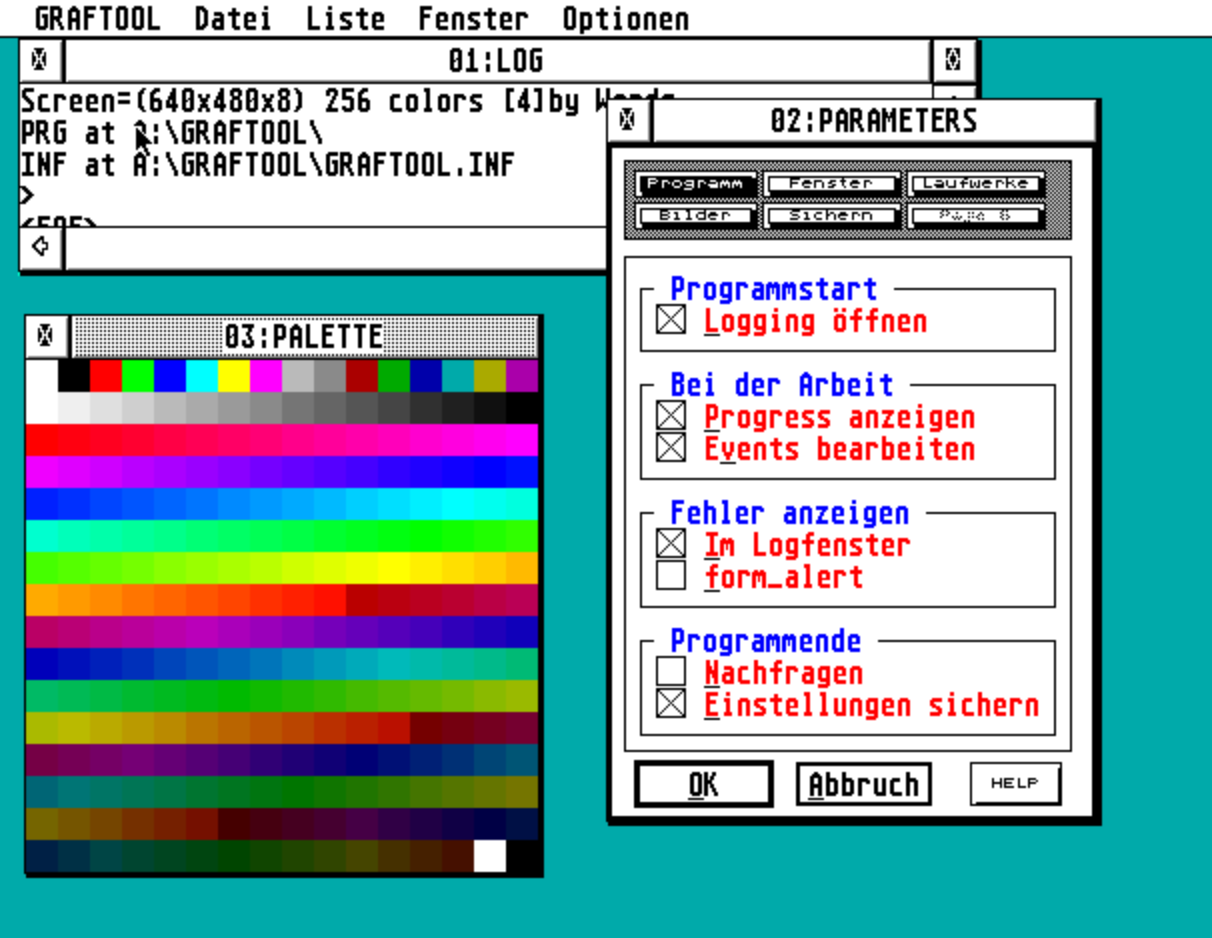
I have converted some old C code into JS and it works 99% as the original. The original code generates good looking space scenes where the perspective is from the surface of one planet looking up at another planet. The problem I am having is that the shading algorithm in some parts seem to get outside the set range, and I don’t know where to look. I’ve tried fiddling with the initial values to no avail.

The palette in Colors[] is derived from the Atari Falcon’s default palette.

On one picture (Seed: 100) you’ll notice the rocks have these light pixels in the dark, and on another picture (Seed: gen) the dark side of the planet (left) gets these light pixels. There are other moments where the light side of the rocks turn bright green, as does the dark side of the planet.
Little specks on the dark side of the rocks. Left side of the planet is speckled with light pixels

Now as said, I have no idea where to look in all this code. I just “copied” with little understanding of what is actually happening. So I cannot provide an MRE but instead both JS and C code gets attached here in a ZIP. I know it is a lot of code to go through, but I really don’t know where the fault actually lies.
https://edwardleuf.org/misc/imagery/PLANET.zip

How to port Buffer.from() to deno2

Rewriting a webapp so that it can run in both Node or Deno2, I get stuck on the following. The function has to read a base64 encoded gzip buffer containing a JSON string. This is the node implementation:

import zlib from 'node:zlib';

function from_base64_gzip(str){
  let buff = Buffer.from(str, 'base64');
  let json = zlib.unzipSync(buff).toString('utf-8');
  return JSON.parse(json);
}

However deno2 does not have the Buffer object, and atob() only seems to work for strings and not for binary data.

Is there an elegant way to rewrite this such that it will run both in node and deno (preferably without extra npm deps)?

Convert an array of object into 2-dimensional array to group the elements with same id in typescript

I have an array of object as

arr1 = [{catid: 1, name: 'mango', category: 'fruit'}, {catid: 2 name: 'potato', category: 'veg'}, {catid: 3, name: 'chiken', category: 'nonveg'},{catid: 1, name: 'apple', category: 'fruit'}, {catid: 1, name: 'banana', category: 'fruit'}];

I want to convert the above array to 2-d array based on catid of the element(basically want to group all elements on the basis of same catid):

arr2 = [[{catid: 1, name: 'mango', category: 'fruit'},{catid: 1, name: 'apple', category: 'fruit'}, {catid: 1, name: 'banana', category: 'fruit'} ],[{catid: 2 name: 'potato', category: 'veg'}],[{catid: 3, name: 'chiken', category: 'nonveg'}]]

How can I do this in typescript or javascript.

Voice Accent Changer For WebGL Application In Real Time

We have unity application with backend support of Nodejs and Socket Io for event handling.
We have voice chat functionality in this webgl application.
The connection between Nodejs and Unity is based on Server.js and the Client.js file attached with Unity Build where each client.js file work as a Client, in Server-Client communication. Using native javascript we have achieved the functionality of voice chat in real time.

Query
I want to add the real time voice accent changer in streamline voice without any delay? Is it possible? The server and the Unity code is deployed on the Ubuntu server VPS.

I want that user can change their native accent to American, Australian, Canadian etc..

Kindly help me to provide maximum possible solution for this scenario.
I am ready to apply solution in python and javascript both.

I have tried the API to change the accent on server.js side and emit the buffer array data of voice to client.js using socket.

How to make sliding animation in ReactJS

I have developed this login page which has sign-in and sign-up sections in the same page and can be displayed by sliding animation through button clicking process.

When doing that process by JS file this an error message: cannot read

properties of null (reading ‘addeventlistener’)

This is the result I am looking for: https://youtube.com/clip/Ugkx-j0vr45zTq9YzXk5u_5ehYQOUErJqIoX?si=wSkcpjI2u7ze-sPt

function Login() {
  return (
    <div className='login_container' id='container'>
      <div className='form-container sing-up'>
        <form>
          <h1>Create Account</h1>
          <div className='social-icons'>
            <i><Fas.FaGooglePlusG /></i>
            <i><Fas.FaFacebook /></i>
          </div>
          <span>O usa tu email para registrarte</span>
          <input type='text' placeholder='Nombre' />
          <input type='text' placeholder='Email' />
          <input type='text' placeholder='Password' />
          <button>Sign Up</button>
        </form>
      </div>
      <div className='form-container sing-in'>
        <form>
          <h1>Sign In </h1>
          <div className='social-icons'>
            <i><Fas.FaGooglePlusG /></i>
            <i><Fas.FaFacebook /></i>
          </div>
          <span>O usa tu email para registrarte</span>
          <input type='text' placeholder='Nombre' />
          <input type='text' placeholder='Email' />
          <input type='text' placeholder='Password' />
          <button>Sign In</button>
        </form>
      </div>
      <div className='toogle-container'>
        <div className='toogle'>
          <div className='toogle-panel toogle-left'>
            <h1>Welcome Back!</h1>
            <p>Enter your personal details to use all of site features</p>
            <button className='hidden' id='login'>Sign In</button>
          </div>
          <div className='toogle-panel toogle-right'>
            <h1>Hello!</h1>
            <p>Register with your personal email or social media </p>
            <button className='hidden' id='register'>Sign Up</button>
          </div>
        </div>
      </div>
      <script src='script.js'></script>
 </div>
  
  )
}

export default Login

const container = document.getElementById('container');
const registerBtn = document.getElementById('register');
const loginBtn = document.getElementById('login');


registerBtn.addEventListener('click', () =>{
    container.classList.add("active");
});

loginBtn.removeEventListener('click', ()=> {
    container.classList.remove("active");
});

MUIX dataGrid columns menu

I have issue in dataGrid of muix using "@mui/x-data-grid-pro": "^6.19.3".

In manage columns handling single column visibility and hideAll works fine. When I listen to onColumnVisibilityModelChange the event is correct. However the issue is in showAll. It should set all columns to visible but it doesn’t work and it sends only one column in the event

image of my manageColumns in column menu

Can sum total from checked and input value

Thanks to those who helped
that can be done, the item checked Total Price appears.,
If you don’t get it, the item is checked and the quantity is entered but the total price does not appear according to the order quantity entered.

Desired behaviour: the total price corresponds to the price per checked item multiplied by the quantity.

TotalPrice = PricePerItem * Numberoforders

The total also corresponds to the number of items checked.

JavaScript Code:

<script type="text/javascript">
function UpdateCost() {
  var sum = 0;
  var gn, elem;
  for (i=0; i<<?php echo $wapakpak ?>; i++) {
    gn = 'sum_m_'+i;
    elem = document.getElementById(gn);
    // tambah code
    jumlah = document.getElementById(jml);
    
    if (elem.checked == true) { 
        sum += Number(elem.value);
    }
  }
  document.getElementById('totalcost' ).value = sum.toFixed(0);
}
window.onload=UpdateCost
</script>

PHP / HTML Code

$sadsdsd = $db->prepare("SELECT count(*) FROM sw_datafasilitas");
$sadsdsd->execute();
$rowaas = $sadsdsd->fetch(PDO::FETCH_NUM);
$wapakpak=$rowaas[0];

<div class="card" style="width: 10rem; float: left; margin: 40px;">
<img src="/image_building/<?php echo $row['image']; ?>" class="card-img-top" alt="">
<div class="card-body">
<h5 class="card-title"><?php echo $row['fasilitas_name'];?></h5>
<p class="card-text"><?php echo rupiah($row['price_harga']);?> / <?php echo $row['satuan_harga'];?></p>
<input type="checkbox" name="total_fasilitastambahan[]" value="<?php echo $row['price_harga'] ?>" id="sum_m_<?php echo $i ?>" onclick="UpdateCost()" class="btn btn-warning">
<p><label>Jumlah Pesanan</label><input type="number" name="jml[]" id="jml" class="form-control" /></p>
</div>
</div>

Demo Apps Interface:

Uncaught TypeError: Cannot read properties of undefined (reading ‘fn’) at moment-duration-format

I am trying to use moment-duration-format for getting duration.

https://www.npmjs.com/package/moment-duration-format

I am getting error:-

moment-duration-format.js?t=1727769487718&v=a4aab22f:155 Uncaught TypeError: Cannot read properties of undefined (reading 'fn')
    at moment-duration-format.js?t=1727769487718&v=a4aab22f:155:23
    at node_modules/moment-duration-format/lib/moment-duration-format.js (moment-duration-format.js?t=1727769487718&v=a4aab22f:334:7)
    at __require2 (chunk-UP2VWCW5.js?v=a4aab22f:15:50)
    at moment-duration-format.js?t=1727769487718&v=a4aab22f:337:16


Uncaught TypeError: moment.duration(...).format is not a function

I have tried like this:-

app.jsx
===============

import moment from 'moment';
import 'moment-duration-format';


{moment.duration(456, 'seconds').format("h:mm", {
                                            trim: false,
                                        })}


package.json
===================

"dependencies": {
    "moment": "^2.18.1",
    "moment-duration-format": "^1.3.0"
  },

Dowsn’t swc-loader have class support?

I’m migrating an old React codebase from Webpack to rspack for better performance. In the migration, I’m changing the loader from Bable to swc-loader. But the swc-loader throws an error on handling class-based components saying super is in invalid keyword.

JavaScript parsing error: Invalid access to super

Doesn’t swc-loader has support for class-based component built-in?

If not what could I do to add it or is there any workaround for this issue?

Thanks in advance…

Animated Javascript canvas line with random amplitude representing internet traffic

How can I implement these animated lines in the screenshot? They should be endless

screenshot

I tried to do this, but it only turns out to be a sine wave that follows a predictable trajectory, but I need a random trajectory

<!DOCTYPE html>
<html lang="en">
<head>
    <meta charset="UTF-8">
    <meta name="viewport" content="width=device-width, initial-scale=1.0">
    <title>Wave Animation</title>
    <style>
        canvas {
            display: block;
            margin: 0 auto;
            background-color: #f0f0f0;
        }
    </style>
</head>
<body>

<canvas id="myCanvas" width="800" height="400"></canvas>

<script>
    const canvas = document.getElementById('myCanvas');
    const ctx = canvas.getContext('2d');

    let xOffset = 0;
    const frequency = 0.02;
    const speed = 2;

    function animate() {
        ctx.clearRect(0, 0, canvas.width, canvas.height);

        ctx.beginPath();
        ctx.moveTo(0, canvas.height / 2);

        for (let x = 0; x < canvas.width; x++) {
            let currentAmplitude = (x / canvas.width) * 100;
            let y = canvas.height / 2 + Math.sin((x + xOffset) * frequency) * currentAmplitude;
            ctx.lineTo(x, y);
        }

        ctx.strokeStyle = '#000';
        ctx.lineWidth = 2;
        ctx.stroke();

        xOffset += speed;

        requestAnimationFrame(animate);
    }

    animate();
</script>

</body>
</html>

Sms categoriesation like true caller [closed]

I am trying to figure out how Truecaller categories sms messages like transaction, OTP, bills etc.

I have similar requirement and also I want to track each transaction message either it is debit or credit. There may be two sms for the same debit/credit it should be counted as one based on transaction I’d.

Do you have any idea how to achieve it in javascript. Any third party library etc.